一 组网说明
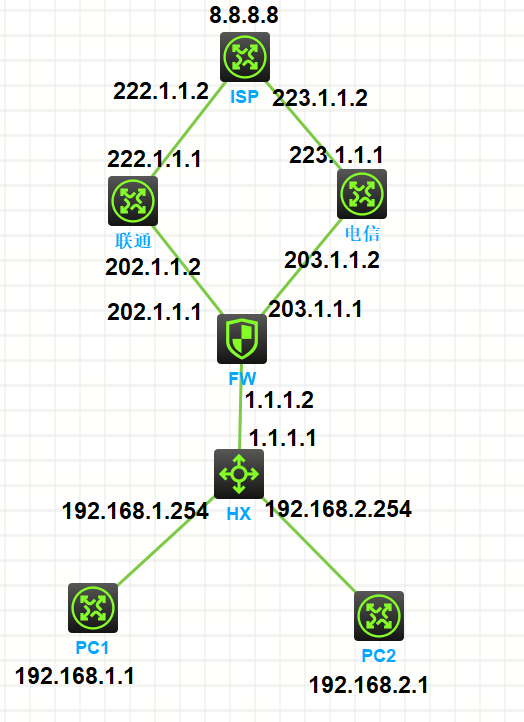
如上图:
公司互联网出口包括联通和电信2个出口,为了有效利用出口带宽,让PC1访问互联网走联通出口,PC2问互联网走电信出口
二 设备配置
2.1 ISP设备配置
sysname ISP
interface LoopBack0
ip address 8.8.8.8 255.255.255.255
interface GigabitEthernet0/0
port link-mode route
combo enable copper
ip address 222.1.1.2 255.255.255.252
interface GigabitEthernet0/1
port link-mode route
combo enable copper
ip address 223.1.1.2 255.255.255.252
ip route-static 202.1.1.1 32 222.1.1.1
ip route-static 203.1.1.1 32 223.1.1.1
2.2 联通-LT设备配置
sysname LT
interface GigabitEthernet0/0
port link-mode route
combo enable copper
ip address 202.1.1.2 255.255.255.252
interface GigabitEthernet0/1
port link-mode route
combo enable copper
ip address 222.1.1.1 255.255.255.252
ip route-static 8.8.8.8 32 222.1.1.2
2.3 电信-DX设备配置
sysname DX
interface GigabitEthernet0/0
port link-mode route
combo enable copper
ip address 203.1.1.2 255.255.255.252
interface GigabitEthernet0/1
port link-mode route
combo enable copper
ip address 223.1.1.1 255.255.255.252
ip route-static 8.8.8.8 32 223.1.1.2
2.4 FW-防火墙配置-PBR策略路由
sysname FW
acl advanced 3001 //PBR策略路由抓取数据流
description PBR
rule 0 permit ip source 192.168.2.0 0.0.0.255
policy-based-route 1 permit node 10 //抓取数据流后匹配数据扔向下一跳
if-match acl 3001
apply next-hop 203.1.1.2
interface GigabitEthernet1/0/0
port link-mode route
combo enable copper
ip address 1.1.1.2 255.255.255.252
ip policy-based-route 1 //内网接口应用PBR
acl advanced 3000 //出口NAT配置
description NAT
rule 0 permit ip
interface GigabitEthernet1/0/2 //出口NAT配置
port link-mode route
combo enable copper
ip address 203.1.1.1 255.255.255.252
nat outbound 3000
interface GigabitEthernet1/0/3 //出口NAT配置
port link-mode route
combo enable copper
ip address 202.1.1.1 255.255.255.252
nat outbound 3000
security-zone name Trust
import interface GigabitEthernet1/0/0
security-zone name Untrust
import interface GigabitEthernet1/0/2
import interface GigabitEthernet1/0/3
ip route-static 0.0.0.0 0 202.1.1.2
ip route-static 0.0.0.0 0 203.1.1.2 preference 100
ip route-static 192.168.0.0 16 1.1.1.1
security-policy ip
rule 0 name any
action pass
2.5 HX核心交换机配置
sysname HX
vlan 1
vlan 2
interface Vlan-interface1
ip address 192.168.1.254 255.255.255.0
interface Vlan-interface2
ip address 192.168.2.254 255.255.255.0
interface GigabitEthernet1/0/3
port link-mode route
combo enable fiber
ip address 1.1.1.1 255.255.255.252
interface GigabitEthernet1/0/1
port link-mode bridge
combo enable fiber
interface GigabitEthernet1/0/2
port link-mode bridge
port access vlan 2
combo enable fiber
ip route-static 0.0.0.0 0 1.1.1.2
2.6 PC1设备配置
sysname PC1
interface GigabitEthernet0/0
port link-mode route
combo enable copper
ip address 192.168.1.1 255.255.255.0
ip route-static 0.0.0.0 0 192.168.1.254
2.7 PC2设备配置
sysname PC2
interface GigabitEthernet0/0
port link-mode route
combo enable copper
ip address 192.168.2.1 255.255.255.0
ip route-static 0.0.0.0 0 192.168.2.254
三 业务测试
3.1 PC1业务测试走联通链路
<PC1>ping 8.8.8.8
Ping 8.8.8.8 (8.8.8.8): 56 data bytes, press CTRL+C to break
56 bytes from 8.8.8.8: icmp_seq=0 ttl=252 time=1.924 ms
56 bytes from 8.8.8.8: icmp_seq=1 ttl=252 time=1.188 ms
56 bytes from 8.8.8.8: icmp_seq=2 ttl=252 time=0.989 ms
56 bytes from 8.8.8.8: icmp_seq=3 ttl=252 time=1.399 ms
56 bytes from 8.8.8.8: icmp_seq=4 ttl=252 time=1.306 ms
--- Ping statistics for 8.8.8.8 ---
5 packet(s) transmitted, 5 packet(s) received, 0.0% packet loss
round-trip min/avg/max/std-dev = 0.989/1.361/1.924/0.313 ms
<PC1>tracert 8.8.8.8
traceroute to 8.8.8.8 (8.8.8.8), 30 hops at most, 40 bytes each packet, press CTRL+C to break
1 192.168.1.254 (192.168.1.254) 0.582 ms 0.288 ms 0.246 ms
2 1.1.1.2 (1.1.1.2) 0.570 ms 0.449 ms 0.593 ms
3 202.1.1.2 (202.1.1.2) 1.124 ms 0.793 ms 0.777 ms
4 222.1.1.2 (222.1.1.2) 1.056 ms 1.237 ms 3.927 ms
<PC1>
3.2 PC2业务测试-默认走联通链路-防火墙配置PBR策略路由后走电信链路
1.默认走联通链路
<PC2>ping 8.8.8.8
Ping 8.8.8.8 (8.8.8.8): 56 data bytes, press CTRL+C to break
56 bytes from 8.8.8.8: icmp_seq=0 ttl=252 time=3.000 ms
56 bytes from 8.8.8.8: icmp_seq=1 ttl=252 time=2.000 ms
56 bytes from 8.8.8.8: icmp_seq=2 ttl=252 time=1.000 ms
56 bytes from 8.8.8.8: icmp_seq=3 ttl=252 time=2.000 ms
--- Ping statistics for 8.8.8.8 ---
4 packet(s) transmitted, 4 packet(s) received, 0.0% packet loss
round-trip min/avg/max/std-dev = 1.000/2.000/3.000/0.707 ms
<PC2>%Jun 19 21:37:26:040 2026 PC2 PING/6/PING_STATISTICS: Ping statistics for 8.8.8.8: 4 packet(s) transmitted, 4 packet(s) received, 0.0% packet loss, round-trip min/avg/max/std-dev = 1.000/2.000/3.000/0.707 ms.
<PC2>
2.防火墙配置PBR策略路由后,走电信链路
<PC2>tracert 8.8.8.8
traceroute to 8.8.8.8 (8.8.8.8), 30 hops at most, 40 bytes each packet, press CTRL+C to break
1 192.168.2.254 (192.168.2.254) 1.000 ms 0.000 ms 1.000 ms
2 1.1.1.2 (1.1.1.2) 1.000 ms 1.000 ms 0.000 ms
3 202.1.1.2 (202.1.1.2) 1.000 ms 1.000 ms 1.000 ms
4 222.1.1.2 (222.1.1.2) 1.000 ms 1.000 ms 1.000 ms
<PC2>
<PC2>
<PC2>ping 8.8.8.8
Ping 8.8.8.8 (8.8.8.8): 56 data bytes, press CTRL+C to break
56 bytes from 8.8.8.8: icmp_seq=0 ttl=252 time=2.000 ms
56 bytes from 8.8.8.8: icmp_seq=1 ttl=252 time=2.000 ms
56 bytes from 8.8.8.8: icmp_seq=2 ttl=252 time=2.000 ms
56 bytes from 8.8.8.8: icmp_seq=3 ttl=252 time=1.000 ms
56 bytes from 8.8.8.8: icmp_seq=4 ttl=252 time=1.000 ms
--- Ping statistics for 8.8.8.8 ---
5 packet(s) transmitted, 5 packet(s) received, 0.0% packet loss
round-trip min/avg/max/std-dev = 1.000/1.600/2.000/0.490 ms
<PC2>tracert 8.8.8.8
traceroute to 8.8.8.8 (8.8.8.8), 30 hops at most, 40 bytes each packet, press CTRL+C to break
1 192.168.2.254 (192.168.2.254) 1.000 ms 0.000 ms 0.000 ms
2 1.1.1.2 (1.1.1.2) 1.000 ms 0.000 ms 1.000 ms
3 203.1.1.2 (203.1.1.2) 0.000 ms 1.000 ms 0.000 ms
4 223.1.1.2 (223.1.1.2) 2.000 ms 3.000 ms 2.000 ms
<PC2>