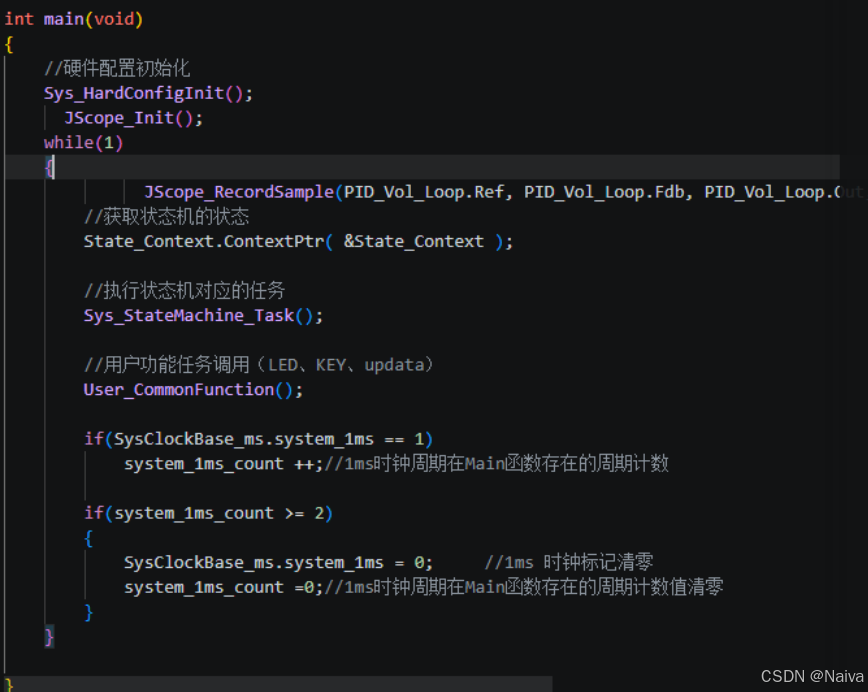
VScode 暗黑风格:
| 代码内容 | VS Code 识别类型 | 颜色表现 |
|---|---|---|
int、void、unsigned |
基础类型 / 关键字 | 橙红色、蓝色等 |
while、if |
控制流关键字 | 紫色、粉色等 |
uint16_t、uint32_t |
类型名 / typedef | 青绿色或浅蓝 |
JScope_Init() |
函数调用 | 紫色/蓝色 |
PID_Vol_Loop.Ref |
结构体变量 + 成员 | 可分别高亮 |
system_1ms_count |
普通变量 | 浅蓝或白色 |
// 注释 |
注释 | 绿色 |

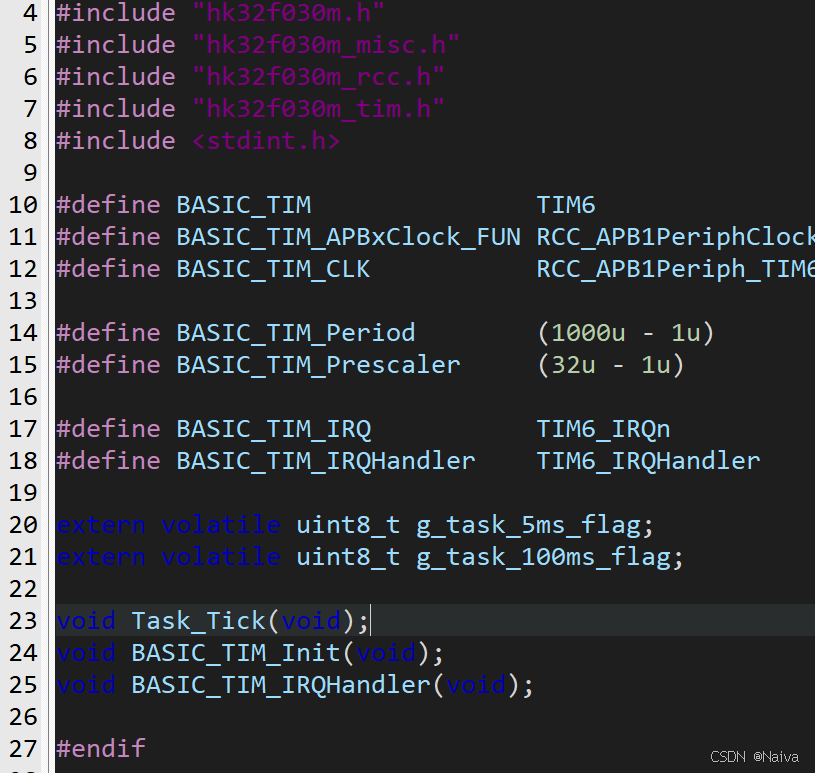
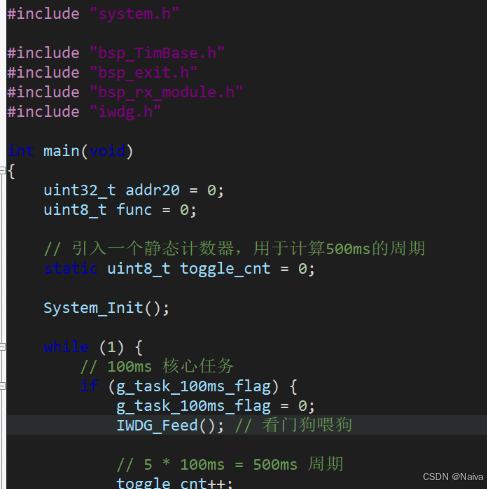
Keil5 中的自定义风格:
bash
Edit → Configuration → Colors & Fonts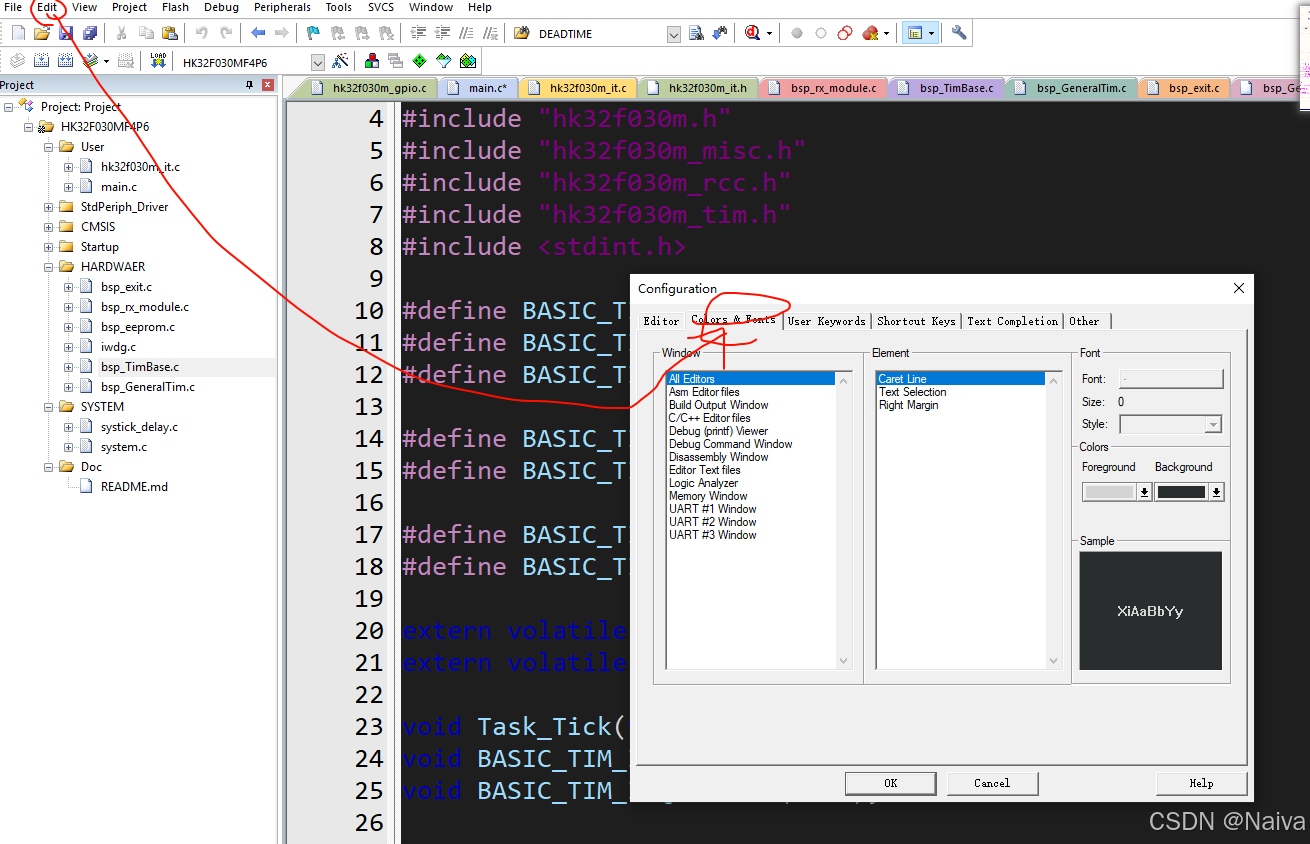
左侧 Window 每个选项是什么意思
| Window 项目 | 作用 | 建议 |
|---|---|---|
| All Editors | 所有编辑窗口的通用设置,比如当前行、选中颜色、右边距线 | 必须设置 |
| Asm Editor files | 汇编文件 .s、.asm 的颜色 |
写汇编才需要 |
| Build Output Window | 编译输出窗口 | 建议也改暗色 |
| C/C++ Editor files | .c、.h 文件代码高亮 |
最重要 |
| Debug Command Window | 调试命令窗口 | 可改暗色 |
| Disassembly Window | 反汇编窗口 | 调试时会用 |
| Editor Text files | 普通文本文件 .txt 等 |
可改暗色 |
| Logic Analyzer | Keil 逻辑分析器窗口 | 可不改 |
| Memory Window | 调试时查看内存的窗口 | 可改暗色 |
| UART #1/#2/#3 Window | Keil 仿真串口窗口 | 可改暗色 |
C/C++ Editor files右侧 Element 选项是什么意思
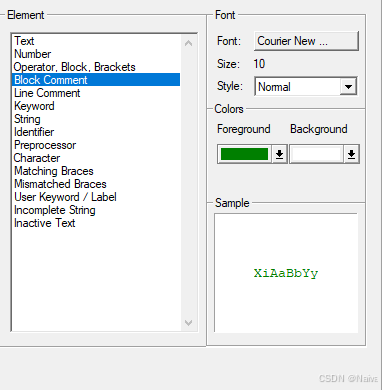
| 项目 | 含义 | 举例 |
|---|---|---|
| Text | 普通文本,默认代码颜色 | 普通变量、空白区域基础颜色 |
| Number | 数字常量 | 123、0x55、3.14 |
| Operator, Block, Brackets | 运算符、代码块符号、括号 | + - * / = { } ( ) [ ] |
| Block Comment | 块注释 | /* 这里是注释 */ |
| Line Comment | 行注释 | // 这里是注释 |
| Keyword | C 语言关键字 | if、else、while、return、static |
| String | 字符串 | "hello"、"UART Init" |
| Identifier | 标识符,一般是变量名、函数名 | main、PWM_Init、adc_value |
| Preprocessor | 预处理指令 | #include、#define、#if |
| Character | 字符常量 | 'A'、'\n' |
| Matching Braces | 匹配成功的括号 | 光标放在 { 时,对应的 } 高亮 |
| Mismatched Braces | 不匹配的括号 | 少了一个 } 或括号配对错误 |
| User Keyword / Label | 用户自定义关键字或标签 | 汇编标签、用户定义的高亮词 |
| Incomplete String | 未完成字符串 | "abc 少了右引号 |
| Inactive Text | 非激活代码 | 条件编译中被禁用的代码,例如 #if 0 ... #endif |
按 VS Code Dark+ 风格设置
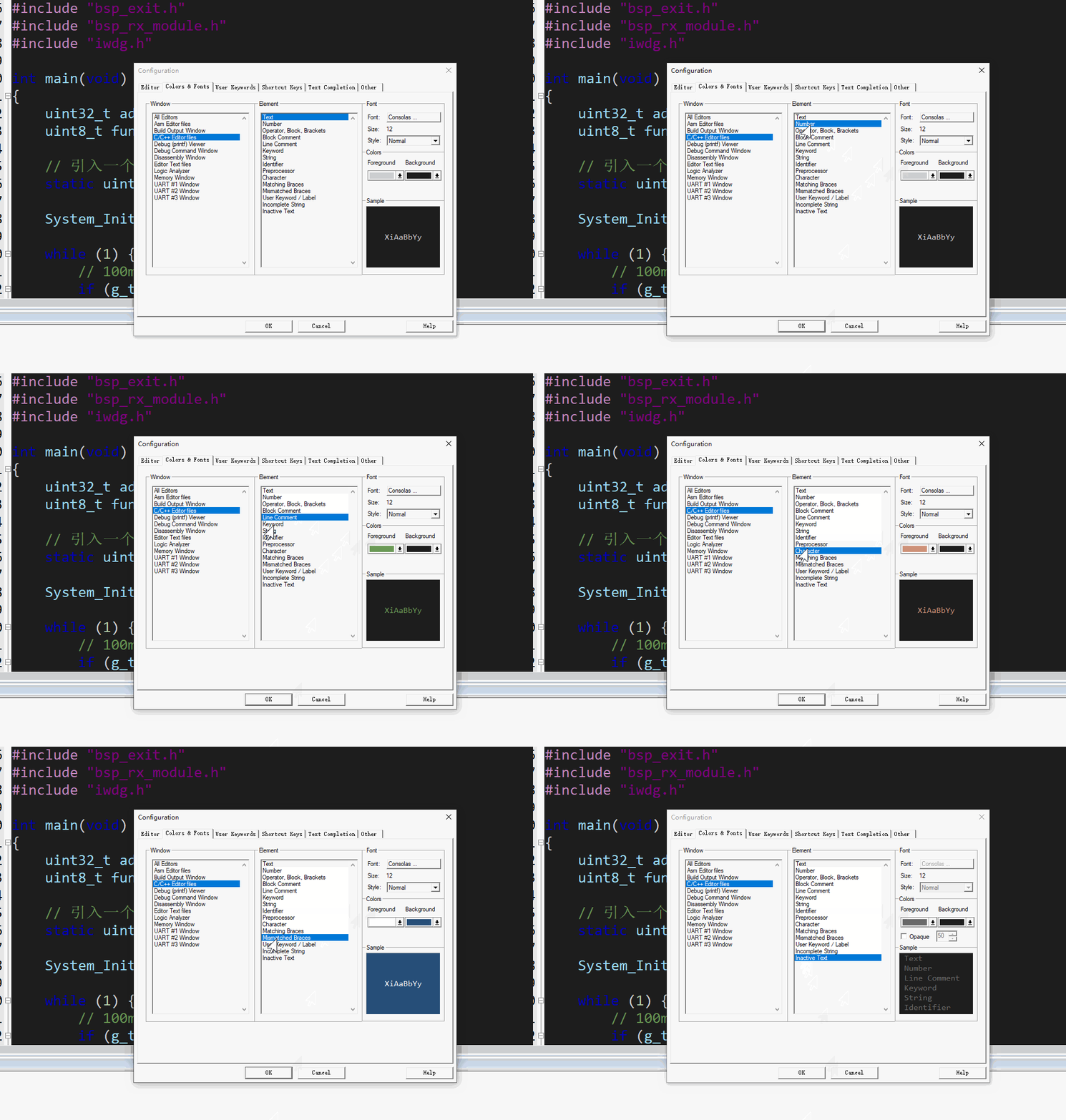
1. 普通代码和背景
| Element | Foreground 色号 | Foreground RGB | Background 色号 | Background RGB |
|---|---|---|---|---|
| Text | #D4D4D4 |
212, 212, 212 |
#1E1E1E |
30, 30, 30 |
| Identifier | #9CDCFE |
156, 220, 254 |
#1E1E1E |
30, 30, 30 |
| Operator, Block, Brackets | #D4D4D4 |
212, 212, 212 |
#1E1E1E |
30, 30, 30 |
2. 关键字、字符串、数字
| Element | Foreground 色号 | Foreground RGB | Background 色号 | Background RGB |
|---|---|---|---|---|
| Keyword | #569CD6 |
86, 156, 214 |
#1E1E1E |
30, 30, 30 |
| String | #CE9178 |
206, 145, 120 |
#1E1E1E |
30, 30, 30 |
| Character | #CE9178 |
206, 145, 120 |
#1E1E1E |
30, 30, 30 |
| Number | #B5CEA8 |
181, 206, 168 |
#1E1E1E |
30, 30, 30 |
3. 注释和宏定义
| Element | Foreground 色号 | Foreground RGB | Background 色号 | Background RGB |
|---|---|---|---|---|
| Line Comment | #6A9955 |
106, 153, 85 |
#1E1E1E |
30, 30, 30 |
| Block Comment | #6A9955 |
106, 153, 85 |
#1E1E1E |
30, 30, 30 |
| Preprocessor | #C586C0 |
197, 134, 192 |
#1E1E1E |
30, 30, 30 |
4. 括号匹配和错误提示
这几个可以不要完全黑色背景,因为它们本来就是提示用的。
| Element | Foreground 色号 | Foreground RGB | Background 色号 | Background RGB |
|---|---|---|---|---|
| Matching Braces | #FFFFFF |
255, 255, 255 |
#264F78 |
38, 79, 120 |
| Mismatched Braces | #FFFFFF |
255, 255, 255 |
#F44747 |
244, 71, 71 |
| Incomplete String | #F44747 |
244, 71, 71 |
#1E1E1E |
30, 30, 30 |
| Inactive Text | #6A6A6A |
106, 106, 106 |
#1E1E1E |
30, 30, 30 |
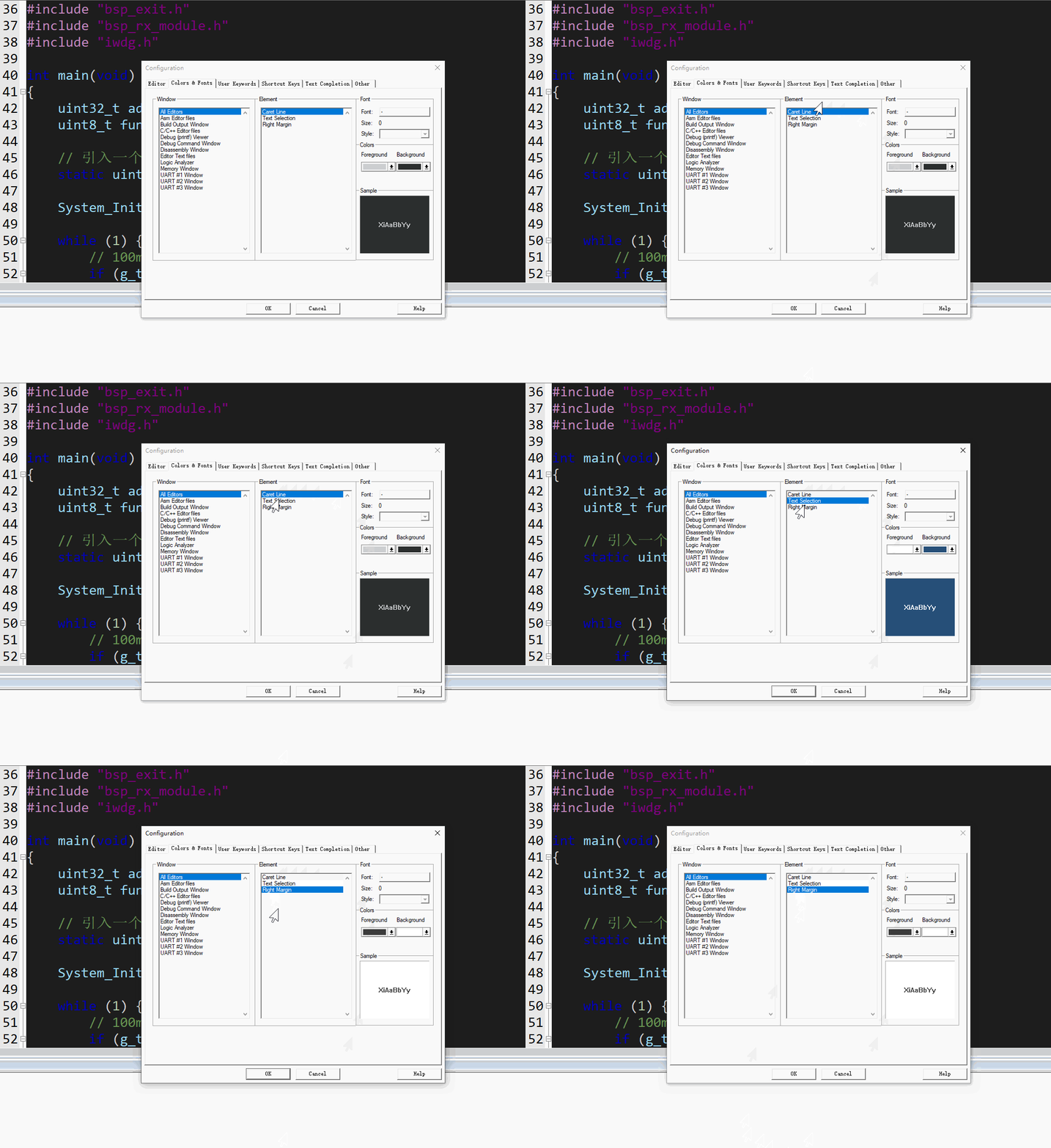
| Element | 作用 | Foreground 前景色 | RGB | Background 背景色 | RGB |
|---|---|---|---|---|---|
| Caret Line | 当前光标所在行 | #D4D4D4 |
212,212,212 |
#2A2D2E |
42,45,46 |
| Text Selection | 鼠标选中的文本 | #FFFFFF |
255,255,255 |
#264F78 |
38,79,120 |
| Right Margin | 右侧代码长度参考线 | #3C3C3C |
60,60,60 |
#1E1E1E |
30,30,30 |
字体建议
bash
Font:Consolas
Size:11 或 12
Style:Normal
总结
VS Code 可以把关键字、数据类型、函数名、变量名、结构体成员等分得很细;Keil5 的编辑器做不到这么细。
Keil5 的语法高亮比较老,它更多是"按大类染色",不是像 VS Code 那样做"语义级别高亮"。
配置迁移
Keil5 没有像 Altium Designer 那种完整的"设置导入/导出"按钮。它主要靠复制配置文件迁移。
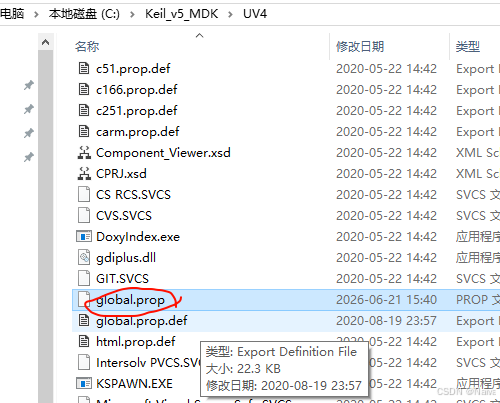
暗黑主题、字体、颜色、当前行颜色、选中颜色这类设置,核心在 Keil 安装目录下的 UV4 文件夹里,最关键的是:
bash
global.prop| 文件 | 建议是否备份 | 作用 |
|---|---|---|
global.prop |
必须 | 颜色、字体、编辑器外观、当前行、选中颜色等 |
global.prop.def |
可选 | 默认配置模板,通常不用改 |
arm.prop |
建议 | 可能和 ARM/C/C++ 编辑器相关用户关键字等有关 |
TOOLS.INI |
可选 | 工具链路径、编译器路径等 |
UV4.ini |
可选 | µVision 一些全局状态/工具设置,版本间可能有差异 |
global.prop
bash
# properties for all file types
indent.automatic=1
virtual.space=0
view.whitespace=0
view.endofline=0
code.page=936
caretline.visible=1
highlight.matchingbraces=1
print.syntax.coloring=1
use.tab.color=1
create.backup.files=0
auto.load.ext.modfiles=0
save.prj.before.dbg=0
save.files.before.dbg=0
function.scanner.project=1
function.scanner.files=1
function.scanner.modules=1

# properties for c/cpp files
syntax.colouring.cpp=1
use.tab.cpp=0
tabsize.cpp=2
line.margin.visible.cpp=1
fold.cpp=1
monospaced.font.cpp=1

# properties for asm files
syntax.colouring.asm=1
use.tab.asm=0
tabsize.asm=4
line.margin.visible.asm=1
monospaced.font.asm=1

# properties for other files
use.tabs=0
tabsize=4
line.margin.visible.txt=0
monospaced.font.txt=1

# setting for code completion and syntax check
cc.autolist=1
cc.highlightsyntax=1
cc.showparameters=1
cc.triggerlist=1
cc.triggernumchars=3
cc.enter.as.fillup=0
cc.usealpha4inactcode=0
cc.alphavalue=50

# autosave for editor files
autosave=0
autosave.interval=5

# vertical edge at right margin
edge.mode=0
edge.column=80


# Specification for text selection and caret line
selection.fore=#D4D4D4
selection.back=#264F78
caret.fore=#D4D4D4
caret.back=#2A2D2E

# Color for vertical edge
edge.colour=#3C3C3C

# C/C++ Editor files
template.cpp="#define","#define |";"#if","#if |\r\n\r\n#endif";\\
    "#include","#include ";"Header","// Header:\r\n// File Name: |\r\n// Author:\r\n// Date:\r\n";\\
    "continue","continue;";"do","do\r\n{\r\n\t// TODO: enter the block content here\r\n\t\r\n\t|\r\n} while ();\r\n";\\
    "enum","enum |\r\n{\r\n\t\r\n};\r\n";"for","for(|;;)\r\n{\r\n}";\\
    "fpointer_type","typedef int (* |F)();\r\n";"function","void function(|)\r\n{\r\n\r\n}\r\n";\\
    "if","if (|)";"ifelse","if (|)\r\n{\r\n}\r\nelse\r\n{\r\n}";\\
    "struct","struct | \r\n{\r\n\r\n};\r\n";"switch","switch (|)\r\n{\r\n\tcase:\r\n\t\tbreak;\r\n\tcase:\r\n\t\tbreak;\r\n\tdefault:\r\n\t\tbreak;\r\n}";\\
    "void","void | ();\r\n";"while","while (|)\r\n{\r\n}";\\

font.monospace.cpp=Consolas
font.acpmonofontname.cpp=Consolas
font.acppropfontname.cpp=Consolas
style.cpp.32=font:Consolas,size:12,fore:#D4D4D4,back:#1E1E1E
style.cpp.4=font:Consolas,size:12,fore:#B5CEA8,back:#1E1E1E
style.cpp.10=font:Consolas,size:12,fore:#D4D4D4,back:#1E1E1E
style.cpp.1=font:Consolas,size:12,fore:#6A9955,back:#1E1E1E
style.cpp.2=font:Consolas,size:12,fore:#6A9955,back:#1E1E1E
style.cpp.5=font:Consolas,size:12,fore:#FF8040,back:#1E1E1E
style.cpp.6=font:Consolas,size:12,fore:#7F007F,back:#1E1E1E
style.cpp.11=font:Consolas,size:12,fore:#9CDCFE,back:#1E1E1E
style.cpp.9=font:Consolas,size:12,fore:#C586C0,back:#1E1E1E
style.cpp.7=font:Consolas,size:12,fore:#CE9178,back:#1E1E1E
style.cpp.34=font:Consolas,size:12,fore:#FFFFFF,back:#264F78
style.cpp.35=font:Consolas,size:12,fore:#FFFFFF,back:#F44747
style.cpp.16=font:Consolas,size:12,fore:#4EC9B0,back:#1E1E1E
style.cpp.12=font:Consolas,size:12,fore:#F44747,back:#1E1E1E
style.cpp.86=font:Consolas,size:12,fore:#6A6A6A,back:#1E1E1E


# Asm Editor files
font.monospace.asm=Courier New
style.asm.32=font:Courier New,size:10,fore:#000000,back:#FFFFFF
style.asm.1=font:Courier New,size:10,fore:#616161,back:#FFFFFF
style.asm.2=font:Courier New,size:10,fore:#FF0000,back:#FFFFFF
style.asm.3=font:Courier New,size:10,fore:#7F007F,back:#FFFFFF
style.asm.4=font:Courier New,size:10,fore:#000000,back:#FFFFFF
style.asm.5=font:Courier New,size:10,fore:#000000,back:#FFFFFF
style.asm.6=font:Courier New,size:10,fore:#0000FF,back:#FFFFFF
style.asm.7=font:Courier New,size:10,fore:#0000FF,back:#FFFFFF
style.asm.9=font:Courier New,size:10,fore:#0000FF,back:#FFFFFF
style.asm.10=font:Courier New,size:10,fore:#0000FF,back:#FFFFFF
style.asm.11=font:Courier New,size:10,fore:#007F00,back:#FFFFFF
style.asm.12=font:Courier New,size:10,fore:#7F007F,back:#FFFFFF
style.asm.8=font:Courier New,size:10,fore:#46AA03,back:#FFFFFF


# Editor Text files
font.monospace.txt=Consolas
style.txt.32=font:Verdana,size:10,fore:#000000,back:#FFFFFF
arm.prop
bash
# C/C++ Editor files
# User keywords
keywords6.$(file.patterns.cpp)=


# Asm Editor files
# User keywords
keywords6.$(file.patterns.asm)=


# Editor Text files
# User keywords
keywords6.$(file.patterns.txt)=