目录
- 一、分析
- [二、Python 实现](#二、Python 实现)
-
- [2.1 纯 Python 复现版本](#2.1 纯 Python 复现版本)
- [2.2 Python 调用 JS 复现版本](#2.2 Python 调用 JS 复现版本)
- [2.3 运行结果摘要](#2.3 运行结果摘要)
- 三、总结
免责声明:本文内容仅用于合法授权范围内的技术学习、安全研究、逆向分析方法交流与风控防护理解,不针对任何网站、产品或服务提供绕过、攻击、滥用或破坏性使用建议。文中涉及的接口分析、参数加解密、调试定位、代码复现、数据请求等内容,仅用于说明相关技术原理和分析流程。读者应在遵守相关法律法规、平台规则、robots 协议、用户协议以及获得合法授权的前提下进行学习和实验。请勿将本文中的方法、脚本或思路用于未授权访问、批量采集、账号撞库、绕过风控、破坏验证码体系、规避平台限制、侵犯数据权益、商业化滥用或影响线上系统稳定性的行为。对于真实网站案例,读者不应直接复制代码对线上服务进行高频请求或非授权调用。若相关网站、产品方、权利方或平台认为本文内容存在不适宜公开展示之处,可通过评论区、私信或作者主页提供的联系方式联系我;核实后将及时删除、替换或调整相关内容。读者因不当使用本文内容造成的任何法律责任、业务风险或经济损失,均由使用者自行承担,与作者无关。
一、分析
目标地址:
text
https://ccprec.com/projectSecPage/#/cqzspl本案例需要抓取吉林长春产权交易中心(集团)有限公司官网首页项目公告下的产权正式披露列表,循环采集前 3 页,提取每条公告的标题、披露开始日期和披露结束日期。
F12 打开 DevTools,切到 Network 面板,清空请求记录。列表页数据通常会通过 Ajax 动态加载,因此先过滤 Fetch/XHR,再通过翻页触发请求,定位到目标数据包:
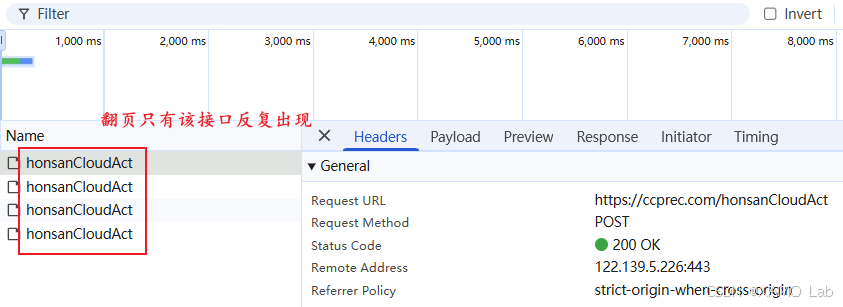
目标接口是一个 POST 请求:
text
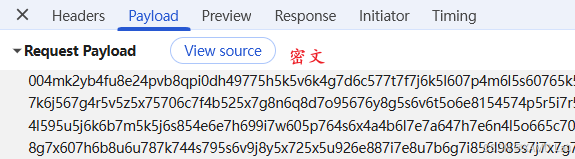
POST https://ccprec.com/honsanCloudAct因为是 POST 请求,我们先查看它的 Request Payload,发现是密文如下:
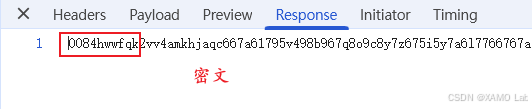
再看响应,发现返回的也是密文,如下:
再看请求头里有没有自定义字段或者需要额外留意的字段:
http
POST /honsanCloudAct HTTP/1.1
Accept: application/json, text/plain, */*
Accept-Encoding: gzip, deflate, br, zstd
Accept-Language: zh-CN,zh;q=0.9
Cache-Control: no-cache
Connection: keep-alive
Content-Length: 1307
Content-Type: text/xml;charset=UTF-8
Host: ccprec.com
Origin: https://ccprec.com
Pragma: no-cache
Referer: https://ccprec.com/projectSecPage/
Sec-Fetch-Dest: empty
Sec-Fetch-Mode: cors
Sec-Fetch-Site: same-origin
User-Agent: Mozilla/5.0 (Windows NT 10.0; Win64; x64) AppleWebKit/537.36 (KHTML, like Gecko) Chrome/149.0.0.0 Safari/537.36
sec-ch-ua: "Google Chrome";v="149", "Chromium";v="149", "Not)A;Brand";v="24"
sec-ch-ua-mobile: ?0
sec-ch-ua-platform: "Windows"
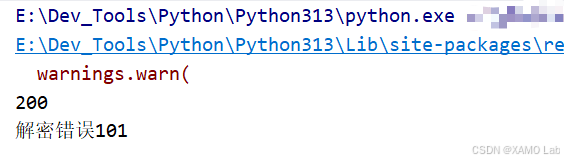
字段看起来都比较常规,接下来就可以做一次请求验证:右键请求 → Copy as cURL(bash) → 粘贴到 curlconverter.com 转成 Python 代码执行。在 Pycharm 中进行了简单测试,是能正常请求成功的,为了精简请求头,除了 User-Agent 保留,其他都注释掉,但是这样发现执行错误,如下:
经过多次测试发现请求头必须保留 'Content-Type': 'text/xml;charset=UTF-8' 才能请求成功。基本请求流程走通之后,接下来主要解决两个问题:一是解密响应,拿到页面实际使用的明文数据;二是还原请求体的构造和加密过程,方便后续动态修改页码抓取多页数据。这里先从响应解密入手,搜索关键字 decrypt,看看解密逻辑的位置在哪里,如下:
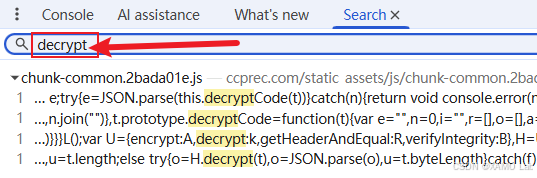
出现了四个结果,位置都在 static_assets/js/chunk-common.2bada01e.js 中。这里可以先把几个命中位置都打上断点,然后翻页触发请求,观察真正命中的位置。最开始断在了这里:e = JSON.parse(this.decryptCode(t))。从这行代码可以看出,真正负责解密的是 decryptCode,外层的 JSON.parse 只是把解密后的 JSON 字符串转成对象。接下来就围绕这行代码继续看:先确认 this 指向哪个对象,再看参数 t 具体是什么内容。调试时可以看到,t 就是服务端返回的响应密文,如下:
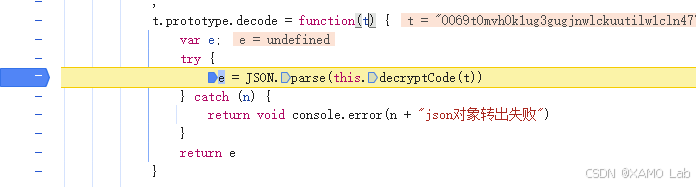
在 Console 控制台查看 this 是啥:
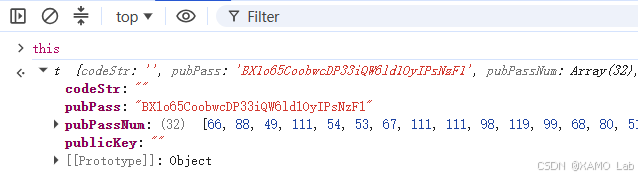
从控制台结果可以看到,当前 this 是一个由 t 构造出来的对象。再结合附近代码里的 t.prototype.decode 可以判断,这里的 t 应该是一个构造函数,decode、decryptCode 等方法都是挂在它的原型上的。这样一来,只要找到这个构造函数的定义,就可以在本地 new t() 创建实例,然后调用 decode 或 decryptCode 进行解密。需要注意的是,这里的构造函数 t 和前面 decryptCode(t) 里的参数 t 不是同一个东西。继续往上看,可以找到 t 的定义,如下:
javascript
function t() {
    this.codeStr = "",
        this.pubPass = "BX1o65CoobwcDP33iQW6ld1OyIPsNzF1",
        this.pubPassNum = [],
        this.publicKey = "",
        this.setPass(this.pubPass)
}
在本地新建 ccprec.js,先把构造函数 t 复制进去,然后继续沿着 t.prototype 把相关方法补齐。这里不需要一次性复制整个打包文件,只需要围绕 decode、decryptCode 以及它们依赖的方法逐个整理即可。整理时可以对照浏览器 Sources 面板,缺哪个方法就补哪个方法,避免漏掉依赖。最终整合后的核心 JS 代码如下:
javascript
function t() {
    this.codeStr = "",
        this.pubPass = "BX1o65CoobwcDP33iQW6ld1OyIPsNzF1",
        this.pubPassNum = [],
        this.publicKey = "",
        this.setPass(this.pubPass)
}

t.prototype.encode = function (t) {
    var e = "";
    try {
        e = JSON.stringify(t)
    } catch (n) {
        return console.error(n + "这不是一个正确的json对象"),
            ""
    }
    return this.encryptCode(e)
}


t.prototype.decode = function (t) {
    var e;
    try {
        e = JSON.parse(this.decryptCode(t))
    } catch (n) {
        return void console.error(n + "json对象转出失败")
    }
    return e
}
t.prototype.encryptCode = function (t) {
    for (var e = encodeURI(t), n = [], i = 0, r = "", o = this.random(16, 32), a = this.randomStr(o), c = this.stringChangeASCIINumberArrs(a), s = 0, u = 0, l = 0, h = 0; h < e.length; h++)
        i = e.charCodeAt(h),
        s == this.pubPassNum.length && (s = 0),
            i += this.pubPassNum[s],
            s++,
        u == c.length && (u = 0),
            i += c[u],
            u++,
            l += i,
        l > 65535 && (l -= 65535),
            r = i.toString(36),
            r = ("00" + r).substr(-2, 2),
        1 == r.length && (r = "0" + r),
            n.push(r);
    var f = "";
    return f = l.toString(36),
        f = ("0000" + r).substr(-4, 4),
        n.unshift(a),
        n.unshift(o.toString(36)),
        n.unshift(f),
        n.join("")
}

t.prototype.decryptCode = function (t) {
    var e = ""
        , n = 0
        , i = ""
        , r = []
        , o = []
        , a = 0
        , c = 0;
    e = t.substr(4, 1),
        n = parseInt(e, 36),
        i = t.substr(5, n),
        r = this.stringChangeASCIINumberArrs(i),
        e = t.substr(5 + n, t.length - 5 - n);
    for (var s = "", u = 0, l = 0, h = 0; h < e.length / 2; h++)
        s = e.substr(l, 2),
            l += 2,
            u = parseInt(s, 36),
        c == r.length && (c = 0),
            u -= r[c],
            c++,
        a == this.pubPass.length && (a = 0),
            u -= this.pubPassNum[a],
            a++,
            s = String.fromCharCode(u),
            o.push(s);
    return e = o.join(""),
        e = decodeURI(e),
        e
}

t.prototype.setPass = function (t) {
    this.pubPassNum = this.stringChangeASCIINumberArrs(t)
}

t.prototype.stringChangeASCIINumberArrs = function (t) {
    for (var e = [], n = 0; n < t.length; n++)
        e.push(t.charCodeAt(n));
    return e
}

t.prototype.random = function (t, e) {
    return void 0 === t && (t = 0),
    void 0 === e && (e = 1e4),
        Math.floor(Math.random() * (e - t) + t)
}

t.prototype.randomStr = function (t) {
    for (var e = [], n = 0; n < t; n++)
        e.push(this.random(0, 35).toString(36));
    return e.join("")
}
接下来在本地创建一个 t 的实例对象,调用 decode 方法测试是否能正常解密服务端返回的密文,示例:
javascript
t_object = new t()
// console.log(t_object) // 仔细观察发现结果和浏览器是一致的其实
let result = t_object.decode('0069t0mvh0k1u....8v8m857l7n7y6h5i7g6d636m7k7g7l646z6b6r47617o6n4s6069')
// 解密成功
console.log(JSON.stringify(result))
执行后可以看到,响应内容已经成功解密,如下:
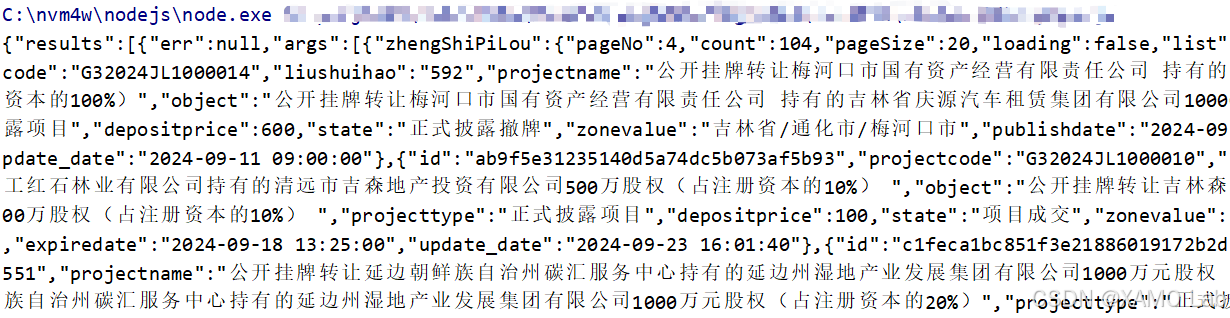
查看解密后的结果,可以看到其中的 pageNo 为 4。将这份结果与浏览器中第 4 页的数据进行对比,内容是一致的,说明响应解密逻辑已经还原成功。这里也可以直接调用 decryptCode 方法,只不过它返回的是 JSON 格式的字符串;而 decode 在内部多做了一步 JSON.parse,所以最终返回的是对象。
响应解密确认之后,接下来继续看请求体是如何加密的。前面整理原型方法时可以看到,除了 decode 之外还有一个 encode 方法,那么这个 encode 很可能就是请求加密入口。带着这个思路,在浏览器的 encode 函数中重新下断点,并清理掉前面不需要的断点,翻页后成功断住,如下:
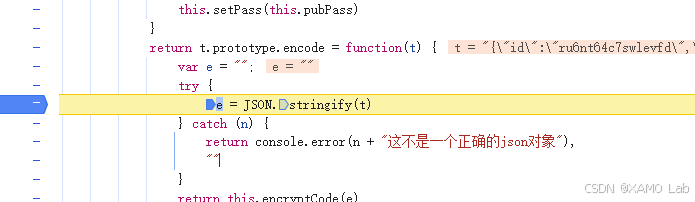
在 Console 控制台中查看当前传入 encode 的参数 t,如下:
javascript
{
    "id": "ru6nt64c7swlevfd",
    "projectKey": "honsan_cloud_ccprec",
    "clientKey": "ru6nhnvmon4slixh",
    "token": null,
    "clientDailyData": {},
    "acts": [
        {
            "id": "ru6nt64brlcn7xgv",
            "fullPath": "/cloud.sys.tomcatV11/api/v1/template/getPages",
            "args": [
                {
                    "zhengShiPiLou": {
                        "templateId": "ee9787141b6d4297817574e38208a726",
                        "pageNo": 2,
                        "pageSize": 20,
                        "where": {
                            "projecttype": "G3",
                            "state": "62"
                        }
                    }
                }
            ]
        }
    ]
}
从参数内容可以明显看到 pageNo、pageSize、templateId 等字段,基本可以确定这就是加密前的请求体明文。接下来继续单步调试到 return this.encryptCode(e),看它返回的结果是否和 Network 中看到的请求体密文一致。如果两者一致,就可以确认请求加密逻辑就在这里。先在 Console 中测试一下:

这里在 Console 中简单确认返回值是密文即可。接下来继续往外层单步调试,查看 encode 的返回值最终赋给了哪个变量。走完 encode 之后,会来到上层发送请求的位置:
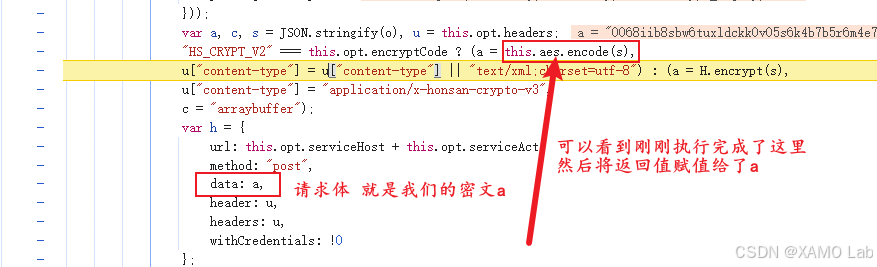
继续单步可以看到,encode 的返回值被赋给了变量 a。接下来在 Console 中输出 a,再和 Network 中新抓到的数据包请求体密文对比,看两者是否一致:

到这里,请求体的加密入口也确认了。接下来多翻几页,观察不同页码请求中的明文参数,重点看哪些字段是固定的,哪些字段会随翻页动态变化,如下:
javascript
// 第一页
{"id":"ru6ntw0nnrkd8plq","projectKey":"honsan_cloud_ccprec","clientKey":"ru6nhnvmon4slixh","token":null,"clientDailyData":{},"acts":[{"id":"ru6ntw0n7k0vlpz8","fullPath":"/cloud.sys.tomcatV11/api/v1/template/getPages","args":[{"zhengShiPiLou":{"templateId":"ee9787141b6d4297817574e38208a726","pageNo":1,"pageSize":20,"where":{"projecttype":"G3","state":"62"}}}]}]}

// 第二页
{"id":"ru6ntwhl87ktuu2i","projectKey":"honsan_cloud_ccprec","clientKey":"ru6nhnvmon4slixh","token":null,"clientDailyData":{},"acts":[{"id":"ru6ntwhks00rzq25","fullPath":"/cloud.sys.tomcatV11/api/v1/template/getPages","args":[{"zhengShiPiLou":{"templateId":"ee9787141b6d4297817574e38208a726","pageNo":2,"pageSize":20,"where":{"projecttype":"G3","state":"62"}}}]}]}

// 第三页
{"id":"ru6ntx8fd2oi93m6","projectKey":"honsan_cloud_ccprec","clientKey":"ru6nhnvmon4slixh","token":null,"clientDailyData":{},"acts":[{"id":"ru6ntx8ewv4ngpfs","fullPath":"/cloud.sys.tomcatV11/api/v1/template/getPages","args":[{"zhengShiPiLou":{"templateId":"ee9787141b6d4297817574e38208a726","pageNo":3,"pageSize":20,"where":{"projecttype":"G3","state":"62"}}}]}]}对比几次请求可以发现,pageNo 会随着翻页变化,外层 id 和 acts 里的 id 也会变化,其他业务参数基本保持不变。接下来需要继续看请求明文是怎么组装出来的,尤其是 acts 数组从哪里来。回到前面的加密调用位置:"HS_CRYPT_V2" === this.opt.encryptCode ? (a = this.aes.encode(s),这里传入 encode 的是变量 s,也就是待加密的明文字符串。继续往上追 s 的来源,可以看到代码如下:
javascript
// ① s 是由 o s = JSON.stringify(o) 这样来的
// ② 往上面再找 o o是定义的一个对象
o = {
    id: l.Utils.instantiation().uuid(),
    projectKey: this.opt.projectKey,
    clientKey: this.clientKey,
    token: this.dc.token,
    clientDailyData: this.dc.clientDailyData,
    acts: r
};

// id 是由 l.Utils.instantiation().uuid() 生成的,在这里下个断点看看这个函数是啥
// Utils 实际上是一个立即执行函数返回出来的构造函数 t
// instantiation() 是构造函数 t 上的静态方法,内部会 new t 并缓存实例
// uuid、randomStr、random 等方法都挂在这个 t.prototype 上
// 单步调试进入到 uuid() 函数的内部
为了方便在本地单独验证 uuid() 的生成逻辑,可以先定义一个 getUuid 方法,把浏览器里 uuid() 的核心代码复制进去,如下:
javascript
function getUuid(e, n) {
    void 0 === e && (e = 16),
    void 0 === n && (n = !1),
    !n && e < 16 && (console.error("uuid useCase=false 时 len 不能小于 16"),
        e = 16),
    n && e < 12 && (console.error("uuid useCase=true 时 len 不能小于 12"),
        e = 12);
    var i = ((new Date).getTime() + 1e14).toString();
    return i += ("000" + (++t.uuidCount).toString()).substr(-3, 3),
        i = n ? parseInt(i).to62() : parseInt(i).toString(36),
        i += this.randomStr(e),
        i = i.substr(0, e),
        i
}
执行报错:
javascript
TypeError: this.randomStr is not a function这个报错的原因是,浏览器中的 uuid() 并不是独立函数,而是通过 l.Utils.instantiation().uuid() 调用的。结合源码可以看到,Utils 实际上是一个立即执行函数返回出来的构造函数 t,uuid、randomStr、random 都挂在 t.prototype 上。instantiation() 是挂在构造函数 t 上的静态方法,内部会通过 new t 创建并缓存实例。因此浏览器中执行 uuid() 时,this 指向这个实例,可以正常访问 this.randomStr(e)。而本地只是把 uuid() 单独抽成了 getUuid,没有同时还原这个实例关系,所以执行到 this.randomStr(e) 时就会报错。继续回到源码里找到 randomStr 的实现,并在本地 ccprec.js 中补上,如下:
javascript
function randomStr(t) {
    for (var e = [], n = 0; n < t; n++)
        e.push(this.random(0, 35).toString(36));
    return e.join("")
}
由于本地没有还原 Utils 实例,而是把 randomStr 单独实现成了一个普通函数,所以 getUuid 里也不能继续使用 this.randomStr(e),需要改成直接调用本地的 randomStr(e),如下:
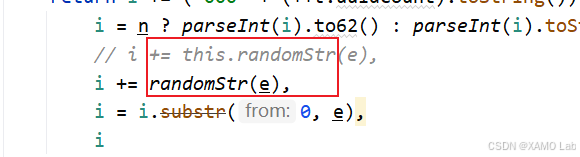
修改后再次执行,又出现了新的报错:
javascript
TypeError: this.random is not a function这个报错和前面的原因类似。浏览器里的 randomStr 是作为原型方法调用的,内部可以通过 this.random() 继续访问同一个实例上的 random 方法;而本地现在把 randomStr 抽成了普通函数,this.random 同样不存在。因此需要继续从源码里把 random 方法单独补出来,如下:
javascript
function random(t, e) {
    return void 0 === t && (t = 0),
    void 0 === e && (e = 1e4),
    Math.round(Math.random() * (e - t) + t)
}
补完 random 之后,randomStr 里原来的 this.random(0, 35) 也要改成直接调用本地的 random(0, 35),如下:
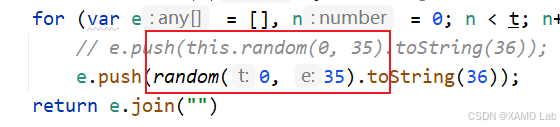
这样调整后再次执行:
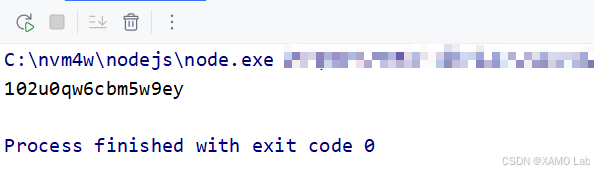
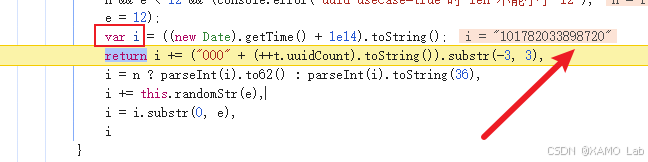
此时已经不再报错,并且可以生成长度为 16 的字符串。为了进一步确认本地逻辑和浏览器逻辑是否一致,可以先把变量 i 的初始值固定下来。这里的 i 并不是单纯的时间戳,而是由 ((new Date).getTime() + 1e14).toString() 得到的字符串,也就是当前毫秒时间戳加上 1e14 后的结果。先看浏览器中这一步生成的 i,如下:
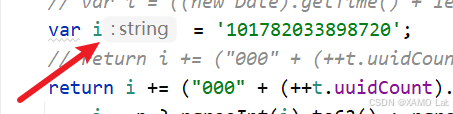
将本地代码中的 i 固定为与浏览器相同的值:
接下来继续往下看,会发现 i 后面还拼接了 ++t.uuidCount。这里的 uuidCount 是 Utils 构造函数 t 上的静态计数器,每调用一次 uuid() 就会自增一次。在浏览器中查看当前 t.uuidCount 的值,如下:
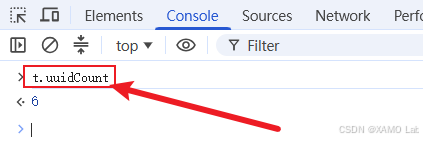
同理,将本地的 t.uuidCount 也固定为与浏览器一致的值,如下:
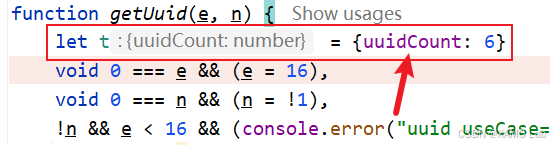
单步调试可以看到,在执行 i += randomStr(e) 之前,只要本地的 i 和 t.uuidCount 与浏览器保持一致,中间结果就是一致的。继续往后执行 randomStr(e) 时,内部会先调用 random() 生成随机数值,再通过 toString(36) 转成字符并拼接成随机串。如果这些随机数值不同,最终生成的 16 位字符串也会不同。经过测试,只要同时固定 i、t.uuidCount 和 randomStr(e) 生成的随机串,本地结果就可以和浏览器完全一致。
不过在实际请求里没有必要追求这个 ID 与浏览器逐字符一致。uuid() 生成的主要是请求标识,服务端并不会要求它必须等于浏览器某一次运行时的值。因此后续模拟请求时,只要保证生成的字符串格式相近、长度正确,并且每次请求基本唯一即可。
接下来继续看 acts: r 是怎么填充的。前面生成请求对象时,先定义了一个空数组 r = [],然后让 o.acts 指向这个数组。也就是说,o.acts 和 r 是同一个数组引用,后续对 o.acts.push(...) 的操作,本质上就是在往 r 里追加内容。
先看最终整理 acts 的位置:
javascript
// ConnService.prototype._post = function(t, e)
t.map.list.forEach((function(t) {
    o.acts.push({
        id: t.id,
        fullPath: t.fullPath,
        queueGroupId: t.queueGroupId,
        args: t.args
    })
}
这里不要被压缩后的变量名 t 绕进去。结合上层调用链可以看到,_post(t, e) 里的外层 t 实际上是一个 DataSet 请求集合对象,它不是单个接口参数,而是前面暂存下来的一批接口请求。大致链路如下:
javascript
DataCenter.call(fullPath, ...args)
    -> this.queueDataSet.add(fullPath, args)
    -> DataSet.add(fullPath, args)
    -> this.map.push(requestItem.id, requestItem)
    -> DataSet.end()
    -> this.connService.add(this)
    -> ConnService.post()
    -> ConnService._post(queueDataSet, callback)
其中单个请求项是在 DataSet.add() 中生成的:
javascript
e.prototype.add = function(t, e) {
    void 0 === e && (e = []);
    var n = {
        id: this.utils().uuid(),
        name: "",
        fullPath: t,
        args: e,
        cb: e.length && "function" == typeof e[e.length - 1] ? e.pop() : null
    };
    return this.map.push(n.id, n), this
}
所以 forEach(function(t){...}) 里的内层 t,就是 map.list 中的单个请求项,里面保存了 id、fullPath、args 等字段。_post 发送前会把这些请求项整理成最终请求体里的 acts 数组。
也就是说,爬虫复现时不需要完整还原前端的请求队列框架,只要按最终请求体结构构造 acts 即可:fullPath 使用业务接口路径,args 放入查询参数,id 使用前面分析的 uuid 逻辑生成一个请求标识。接下来把前面分析到的加密、解密和 uuid 相关逻辑整理到本地文件中,完整的 JS 代码如下:
javascript
function t() {
    this.codeStr = "",
        this.pubPass = "BX1o65CoobwcDP33iQW6ld1OyIPsNzF1",
        this.pubPassNum = [],
        this.publicKey = "",
        this.setPass(this.pubPass)
}

t.prototype.encode = function (t) {
    var e = "";
    try {
        e = JSON.stringify(t)
    } catch (n) {
        return console.error(n + "这不是一个正确的json对象"),
            ""
    }
    return this.encryptCode(e)
}


t.prototype.decode = function (t) {
    var e;
    try {
        e = JSON.parse(this.decryptCode(t))
    } catch (n) {
        return void console.error(n + "json对象转出失败")
    }
    return e
}
t.prototype.encryptCode = function (t) {
    for (var e = encodeURI(t), n = [], i = 0, r = "", o = this.random(16, 32), a = this.randomStr(o), c = this.stringChangeASCIINumberArrs(a), s = 0, u = 0, l = 0, h = 0; h < e.length; h++)
        i = e.charCodeAt(h),
        s == this.pubPassNum.length && (s = 0),
            i += this.pubPassNum[s],
            s++,
        u == c.length && (u = 0),
            i += c[u],
            u++,
            l += i,
        l > 65535 && (l -= 65535),
            r = i.toString(36),
            r = ("00" + r).substr(-2, 2),
        1 == r.length && (r = "0" + r),
            n.push(r);
    var f = "";
    return f = l.toString(36),
        f = ("0000" + r).substr(-4, 4),
        n.unshift(a),
        n.unshift(o.toString(36)),
        n.unshift(f),
        n.join("")
}

t.prototype.decryptCode = function (t) {
    var e = ""
        , n = 0
        , i = ""
        , r = []
        , o = []
        , a = 0
        , c = 0;
    e = t.substr(4, 1),
        n = parseInt(e, 36),
        i = t.substr(5, n),
        r = this.stringChangeASCIINumberArrs(i),
        e = t.substr(5 + n, t.length - 5 - n);
    for (var s = "", u = 0, l = 0, h = 0; h < e.length / 2; h++)
        s = e.substr(l, 2),
            l += 2,
            u = parseInt(s, 36),
        c == r.length && (c = 0),
            u -= r[c],
            c++,
        a == this.pubPass.length && (a = 0),
            u -= this.pubPassNum[a],
            a++,
            s = String.fromCharCode(u),
            o.push(s);
    return e = o.join(""),
        e = decodeURI(e),
        e
}

t.prototype.setPass = function (t) {
    this.pubPassNum = this.stringChangeASCIINumberArrs(t)
}

t.prototype.stringChangeASCIINumberArrs = function (t) {
    for (var e = [], n = 0; n < t.length; n++)
        e.push(t.charCodeAt(n));
    return e
}

t.prototype.random = function (t, e) {
    return void 0 === t && (t = 0),
    void 0 === e && (e = 1e4),
        Math.floor(Math.random() * (e - t) + t)
}

t.prototype.randomStr = function (t) {
    for (var e = [], n = 0; n < t; n++)
        e.push(this.random(0, 35).toString(36));
    return e.join("")
}


function encrypt(string){
    t_ = new t()
    return t_.encode(string)
}

function decrypt(string){
    t_object = new t()
    return t_object.decode(string)
}

function random(t, e) {
    return void 0 === t && (t = 0),
    void 0 === e && (e = 1e4),
    Math.round(Math.random() * (e - t) + t)
}

function randomStr(t) {
    for (var e = [], n = 0; n < t; n++)
        // e.push(this.random(0, 35).toString(36));
        e.push(random(0, 35).toString(36));
    return e.join("")
}

function getUuid(e, n) {
    let t = {uuidCount: 14}
    void 0 === e && (e = 16),
    void 0 === n && (n = !1),
    !n && e < 16 && (console.error("uuid useCase=false 时 len 不能小于 16"),
        e = 16),
    n && e < 12 && (console.error("uuid useCase=true 时 len 不能小于 12"),
        e = 12);
    var i = ((new Date).getTime() + 1e14).toString();
    // var i = '101782035272441';
    // return i += ("000" + (++t.uuidCount).toString()).substr(-3, 3),
    return i += ("000" + (++t.uuidCount).toString()).substr(-3, 3),
        i = n ? parseInt(i).to62() : parseInt(i).toString(36),
        // i += this.randomStr(e),
        i += randomStr(e),
        // i += '6v68leuugkdq4g98',
        i = i.substr(0, e),
        i
}

// console.log(getUuid());
接下来使用本地还原的加密、解密方法发起请求,验证是否能正常获取不同页码的数据:
javascript
import requests
import subprocess

from functools import partial

subprocess.Popen = partial(subprocess.Popen, encoding='utf-8')
import execjs

headers = {
    'Content-Type': 'text/xml;charset=UTF-8',
    'User-Agent': 'Mozilla/5.0 (Windows NT 10.0; Win64; x64) AppleWebKit/537.36 '
                  '(KHTML, like Gecko) Chrome/149.0.0.0 Safari/537.36',
}
for page in range(1, 3):
    test_str = '{"id":"ru6py128ktcw9zt6","projectKey":"honsan_cloud_ccprec","clientKey":"ru6pwkxcszk8ixtv","token":null,"clientDailyData":{},"acts":[{"id":"ru6py10jenk1ev2s","fullPath":"/cloud.sys.tomcatV11/api/v1/template/getPages","args":[{"zhengShiPiLou":{"templateId":"ee9787141b6d4297817574e38208a726","pageNo":'+str(page)+',"pageSize":20,"where":{"projecttype":"G3","state":"62"}}}]}]}'
    # data = ''
    ctx = execjs.compile(open('ccprec.js', encoding='utf-8').read())
    data = ctx.call('encrypt', test_str)

    response = requests.post('https://ccprec.com/honsanCloudAct', headers=headers, data=data)
    print(response.status_code)
    print(response.text)
    # 调用函数解密
    result = ctx.call('decrypt', response.text)
    print(result)
    print('-----' * 30)
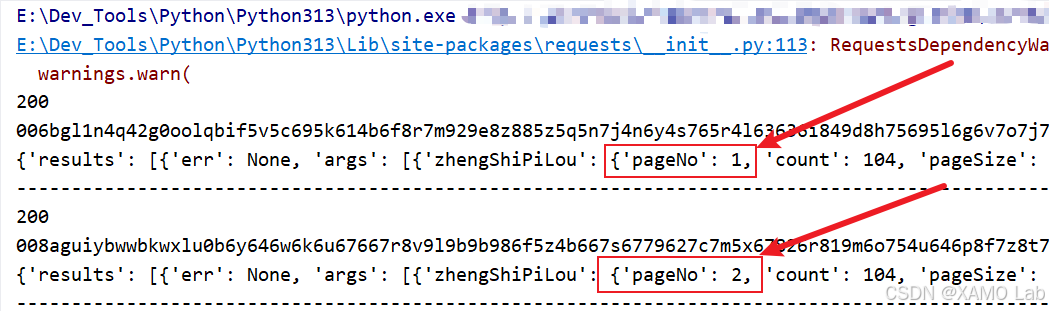
经过测试,请求可以正常返回不同页码的数据。从结果来看,分页抓取时核心变化点就是 pageNo;外层 id、clientKey、acts.id 这类字段只需要按前面的 uuid 逻辑生成请求标识即可,不需要和浏览器某一次运行时的值完全一致。
二、Python 实现
前面已经把请求明文结构、HS_CRYPT_V2 加密逻辑、响应解密逻辑都分析清楚了。这里把最终可运行代码整理成两个版本:
- 纯 Python 复现:直接用 Python 改写前端
encryptCode、decryptCode逻辑。 - Python 调用 JS:把浏览器中扣下来的构造函数和原型方法保留下来,只补 Node.js 导出与命令行桥接,再由 Python 调用。
目录结构:
text
ccprec-cqzspl-hs-crypt-v2
├─ README.md
├─ ccprec_cqzspl_python_spider.py
├─ ccprec_cqzspl_js_spider.py
└─ js/
   ├─ ccprec_crypto.js
   └─ ccprec_node_bridge.js
字段提取说明:
| 字段 | 说明 | 来源 |
|---|---|---|
page |
页码 | 请求参数 pageNo |
title |
公告标题 | 优先取 object,为空时取 projectname |
publishdate |
披露开始日期 | 响应字段 publishdate |
expiredate |
披露结束日期 | 响应字段 expiredate |
2.1 纯 Python 复现版本
运行方式:
bash
python ccprec_cqzspl_python_spider.py完整代码如下:
python
# -*- coding: utf-8 -*-
"""
@File    : ccprec_cqzspl_python_spider.py
@Author  : XAMO Lab
@Date    : 2026/6/22
@Blog    : https://blog.csdn.net/xw1680
@Tool    : PyCharm
@Desc    : 吉林长春产权交易中心产权正式披露采集(纯 Python 复现 HS_CRYPT_V2)
"""

from __future__ import annotations

import json
import random
import string
import sys
import time
import warnings
from concurrent.futures import ThreadPoolExecutor, as_completed
from dataclasses import dataclass
from typing import Any
from urllib.parse import quote, unquote

warnings.filterwarnings("ignore", message=r".*urllib3 .* doesn't match a supported version.*")

import requests
from loguru import logger


logger.remove()
logger.add(sys.stdout, level="INFO")

API_URL = "https://ccprec.com/honsanCloudAct"
REFERER = "https://ccprec.com/projectSecPage/"
PUB_PASS = "BX1o65CoobwcDP33iQW6ld1OyIPsNzF1"
TEMPLATE_ID = "ee9787141b6d4297817574e38208a726"
BUSINESS_PATH = "/cloud.sys.tomcatV11/api/v1/template/getPages"


@dataclass(frozen=True)
class NoticeItem:
    page: int
    title: str
    publishdate: str
    expiredate: str


class HsCryptV2:
    """Python port of the front-end HS_CRYPT_V2 encoder/decoder."""

    def __init__(self, pub_pass: str = PUB_PASS) -> None:
        self.pub_pass = pub_pass
        self.pub_pass_nums = [ord(char) for char in pub_pass]

    @staticmethod
    def base36_encode(number: int) -> str:
        chars = "0123456789abcdefghijklmnopqrstuvwxyz"
        if number == 0:
            return "0"
        result = []
        while number:
            number, remainder = divmod(number, 36)
            result.append(chars[remainder])
        return "".join(reversed(result))

    @staticmethod
    def encode_uri(value: str) -> str:
        return quote(value, safe=";/?:@&=+$,#-_.!~*'()")

    @staticmethod
    def random_int(start: int = 0, end: int = 10000) -> int:
        return random.randrange(start, end)

    def random_str(self, length: int) -> str:
        return "".join(self.base36_encode(self.random_int(0, 35)) for _ in range(length))

    def encrypt_code(self, plain_text: str) -> str:
        encoded = self.encode_uri(plain_text)
        salt_len = self.random_int(16, 32)
        salt = self.random_str(salt_len)
        salt_nums = [ord(char) for char in salt]

        chunks: list[str] = []
        pass_index = 0
        salt_index = 0
        checksum = 0
        last_chunk = ""

        for char in encoded:
            value = ord(char)
            if pass_index == len(self.pub_pass_nums):
                pass_index = 0
            value += self.pub_pass_nums[pass_index]
            pass_index += 1

            if salt_index == len(salt_nums):
                salt_index = 0
            value += salt_nums[salt_index]
            salt_index += 1

            checksum += value
            if checksum > 65535:
                checksum -= 65535

            last_chunk = self.base36_encode(value)[-2:].rjust(2, "0")
            chunks.append(last_chunk)

        # 前端源码计算了 checksum,但最终 prefix 实际使用的是最后一个编码片段补 4 位。
        prefix = last_chunk.rjust(4, "0")
        return prefix + self.base36_encode(salt_len) + salt + "".join(chunks)

    def decrypt_code(self, cipher_text: str) -> str:
        cipher_text = cipher_text.strip()
        salt_len = int(cipher_text[4:5], 36)
        salt = cipher_text[5 : 5 + salt_len]
        salt_nums = [ord(char) for char in salt]
        body = cipher_text[5 + salt_len :]

        chars: list[str] = []
        pass_index = 0
        salt_index = 0

        for index in range(0, len(body), 2):
            value = int(body[index : index + 2], 36)

            if salt_index == len(salt_nums):
                salt_index = 0
            value -= salt_nums[salt_index]
            salt_index += 1

            if pass_index == len(self.pub_pass_nums):
                pass_index = 0
            value -= self.pub_pass_nums[pass_index]
            pass_index += 1

            chars.append(chr(value))

        return unquote("".join(chars))

    def encode_request(self, payload: dict[str, Any]) -> str:
        request_json = json.dumps(payload, ensure_ascii=False, separators=(",", ":"))
        wrapped_json = json.dumps(request_json, ensure_ascii=False, separators=(",", ":"))
        return self.encrypt_code(wrapped_json)

    def decode_response(self, cipher_text: str) -> dict[str, Any]:
        return json.loads(self.decrypt_code(cipher_text))


class CcprecCqzsplPythonSpider:
    def __init__(
        self,
        pages: int = 3,
        page_size: int = 20,
        max_workers: int = 3,
        retries: int = 3,
        timeout: int = 20,
    ) -> None:
        self.pages = pages
        self.page_size = page_size
        self.max_workers = max_workers
        self.retries = retries
        self.timeout = timeout
        self.crypt = HsCryptV2()

    @staticmethod
    def make_uuid(length: int = 16) -> str:
        alphabet = string.ascii_lowercase + string.digits
        return "".join(random.choice(alphabet) for _ in range(length))

    @staticmethod
    def headers() -> dict[str, str]:
        return {
            "Accept": "application/json, text/plain, */*",
            "Accept-Language": "zh-CN,zh;q=0.9",
            "Content-Type": "text/xml;charset=UTF-8",
            "Origin": "https://ccprec.com",
            "Referer": REFERER,
            "User-Agent": (
                "Mozilla/5.0 (Windows NT 10.0; Win64; x64) "
                "AppleWebKit/537.36 (KHTML, like Gecko) "
                "Chrome/149.0.0.0 Safari/537.36"
            ),
            "X-Requested-With": "XMLHttpRequest",
        }

    def build_payload(self, page: int) -> dict[str, Any]:
        return {
            "id": self.make_uuid(),
            "projectKey": "honsan_cloud_ccprec",
            "clientKey": self.make_uuid(),
            "token": None,
            "clientDailyData": {},
            "acts": [
                {
                    "id": self.make_uuid(),
                    "fullPath": BUSINESS_PATH,
                    "args": [
                        {
                            "zhengShiPiLou": {
                                "templateId": TEMPLATE_ID,
                                "pageNo": page,
                                "pageSize": self.page_size,
                                "where": {"projecttype": "G3", "state": "62"},
                            }
                        }
                    ],
                }
            ],
        }

    def request_page(self, page: int) -> dict[str, Any]:
        encrypted_body = self.crypt.encode_request(self.build_payload(page))
        with requests.Session() as session:
            response = session.post(
                API_URL,
                headers=self.headers(),
                data=encrypted_body.encode("utf-8"),
                timeout=self.timeout,
            )
            response.raise_for_status()
            return self.crypt.decode_response(response.text)

    def request_page_with_retry(self, page: int) -> dict[str, Any]:
        last_error: Exception | None = None
        for attempt in range(1, self.retries + 1):
            try:
                logger.info("fetch page={} attempt={}", page, attempt)
                return self.request_page(page)
            except Exception as exc:  # noqa: BLE001
                last_error = exc
                logger.warning("fetch page={} attempt={} failed: {}", page, attempt, exc)
                if attempt < self.retries:
                    time.sleep(0.5 * attempt)
        raise RuntimeError(f"page {page} failed after {self.retries} attempts") from last_error

    @staticmethod
    def extract_business_result(decoded: dict[str, Any]) -> dict[str, Any]:
        for result in decoded.get("results", []):
            args = result.get("args") or []
            if args and isinstance(args[0], dict) and "zhengShiPiLou" in args[0]:
                return args[0]["zhengShiPiLou"]
        raise ValueError("zhengShiPiLou result not found in decoded response")

    def parse_items(self, page: int, decoded: dict[str, Any]) -> list[NoticeItem]:
        business = self.extract_business_result(decoded)
        rows = business.get("list") or []
        return [
            NoticeItem(
                page=page,
                title=item.get("object") or item.get("projectname") or "",
                publishdate=item.get("publishdate") or "",
                expiredate=item.get("expiredate") or "",
            )
            for item in rows
        ]

    def fetch_page(self, page: int) -> list[NoticeItem]:
        decoded = self.request_page_with_retry(page)
        rows = self.parse_items(page, decoded)
        logger.success("page={} parsed rows={}", page, len(rows))
        return rows

    def run(self) -> list[NoticeItem]:
        rows: list[NoticeItem] = []
        with ThreadPoolExecutor(max_workers=self.max_workers) as executor:
            futures = {executor.submit(self.fetch_page, page): page for page in range(1, self.pages + 1)}
            for future in as_completed(futures):
                page = futures[future]
                try:
                    rows.extend(future.result())
                except Exception as exc:  # noqa: BLE001
                    logger.error("page={} failed finally: {}", page, exc)
        return sorted(rows, key=lambda item: (item.page, item.publishdate, item.title))


def log_rows(rows: list[NoticeItem]) -> None:
    logger.info("page\tpublishdate\texpiredate\ttitle")
    for row in rows:
        logger.info("{}\t{}\t{}\t{}", row.page, row.publishdate, row.expiredate, row.title)


def main() -> None:
    spider = CcprecCqzsplPythonSpider(pages=3, page_size=20, max_workers=3, retries=3)
    rows = spider.run()
    logger.info("total rows={}", len(rows))
    log_rows(rows)


if __name__ == "__main__":
    main()
2.2 Python 调用 JS 复现版本
这个版本的重点不是再用 JS 重写一遍算法,而是尽量保留浏览器里扣下来的代码结构:js/ccprec_crypto.js 中仍然保留原来的构造函数 t 以及 t.prototype.encode、t.prototype.decode、t.prototype.encryptCode、t.prototype.decryptCode 等方法,只在末尾补充 Node.js 环境需要导出的桥接函数。Python 再通过 js/ccprec_node_bridge.js 调用这些 JS 方法。
运行方式:
bash
python ccprec_cqzspl_js_spider.pyPython 代码如下:
python
# -*- coding: utf-8 -*-
"""
@File    : ccprec_cqzspl_js_spider.py
@Author  : XAMO Lab
@Date    : 2026/6/22
@Blog    : https://blog.csdn.net/xw1680
@Tool    : PyCharm
@Desc    : 吉林长春产权交易中心产权正式披露采集(Python 调用 JS 复现 HS_CRYPT_V2)
"""

from __future__ import annotations

import json
import random
import string
import subprocess
import sys
import time
import warnings
from concurrent.futures import ThreadPoolExecutor, as_completed
from dataclasses import dataclass
from pathlib import Path
from typing import Any

warnings.filterwarnings("ignore", message=r".*urllib3 .* doesn't match a supported version.*")

import requests
from loguru import logger


logger.remove()
logger.add(sys.stdout, level="INFO")

API_URL = "https://ccprec.com/honsanCloudAct"
REFERER = "https://ccprec.com/projectSecPage/"
TEMPLATE_ID = "ee9787141b6d4297817574e38208a726"
BUSINESS_PATH = "/cloud.sys.tomcatV11/api/v1/template/getPages"
BASE_DIR = Path(__file__).resolve().parent
JS_BRIDGE = BASE_DIR / "js" / "ccprec_node_bridge.js"


@dataclass(frozen=True)
class NoticeItem:
    page: int
    title: str
    publishdate: str
    expiredate: str


class CcprecJsBridge:
    def __init__(self, bridge_path: Path = JS_BRIDGE) -> None:
        self.bridge_path = bridge_path

    def call(self, action: str, payload: dict[str, Any]) -> Any:
        command = ["node", str(self.bridge_path), action]
        proc = subprocess.run(
            command,
            input=json.dumps(payload, ensure_ascii=False),
            text=True,
            encoding="utf-8",
            capture_output=True,
        )
        if proc.returncode != 0:
            raise RuntimeError(proc.stderr.strip() or proc.stdout.strip() or f"node bridge failed: {action}")
        data = json.loads(proc.stdout)
        return data["result"]

    def encode_request(self, payload: dict[str, Any]) -> str:
        return self.call("encodeRequest", {"payload": payload})

    def decode_response(self, cipher_text: str) -> dict[str, Any]:
        return self.call("decodeResponse", {"text": cipher_text})


class CcprecCqzsplJsSpider:
    def __init__(
        self,
        pages: int = 3,
        page_size: int = 20,
        max_workers: int = 3,
        retries: int = 3,
        timeout: int = 20,
    ) -> None:
        self.pages = pages
        self.page_size = page_size
        self.max_workers = max_workers
        self.retries = retries
        self.timeout = timeout
        self.bridge = CcprecJsBridge()

    @staticmethod
    def make_uuid(length: int = 16) -> str:
        alphabet = string.ascii_lowercase + string.digits
        return "".join(random.choice(alphabet) for _ in range(length))

    @staticmethod
    def headers() -> dict[str, str]:
        return {
            "Accept": "application/json, text/plain, */*",
            "Accept-Language": "zh-CN,zh;q=0.9",
            "Content-Type": "text/xml;charset=UTF-8",
            "Origin": "https://ccprec.com",
            "Referer": REFERER,
            "User-Agent": (
                "Mozilla/5.0 (Windows NT 10.0; Win64; x64) "
                "AppleWebKit/537.36 (KHTML, like Gecko) "
                "Chrome/149.0.0.0 Safari/537.36"
            ),
            "X-Requested-With": "XMLHttpRequest",
        }

    def build_payload(self, page: int) -> dict[str, Any]:
        return {
            "id": self.make_uuid(),
            "projectKey": "honsan_cloud_ccprec",
            "clientKey": self.make_uuid(),
            "token": None,
            "clientDailyData": {},
            "acts": [
                {
                    "id": self.make_uuid(),
                    "fullPath": BUSINESS_PATH,
                    "args": [
                        {
                            "zhengShiPiLou": {
                                "templateId": TEMPLATE_ID,
                                "pageNo": page,
                                "pageSize": self.page_size,
                                "where": {"projecttype": "G3", "state": "62"},
                            }
                        }
                    ],
                }
            ],
        }

    def request_page(self, page: int) -> dict[str, Any]:
        encrypted_body = self.bridge.encode_request(self.build_payload(page))
        with requests.Session() as session:
            response = session.post(
                API_URL,
                headers=self.headers(),
                data=encrypted_body.encode("utf-8"),
                timeout=self.timeout,
            )
            response.raise_for_status()
            return self.bridge.decode_response(response.text)

    def request_page_with_retry(self, page: int) -> dict[str, Any]:
        last_error: Exception | None = None
        for attempt in range(1, self.retries + 1):
            try:
                logger.info("fetch page={} attempt={}", page, attempt)
                return self.request_page(page)
            except Exception as exc:  # noqa: BLE001
                last_error = exc
                logger.warning("fetch page={} attempt={} failed: {}", page, attempt, exc)
                if attempt < self.retries:
                    time.sleep(0.5 * attempt)
        raise RuntimeError(f"page {page} failed after {self.retries} attempts") from last_error

    @staticmethod
    def extract_business_result(decoded: dict[str, Any]) -> dict[str, Any]:
        for result in decoded.get("results", []):
            args = result.get("args") or []
            if args and isinstance(args[0], dict) and "zhengShiPiLou" in args[0]:
                return args[0]["zhengShiPiLou"]
        raise ValueError("zhengShiPiLou result not found in decoded response")

    def parse_items(self, page: int, decoded: dict[str, Any]) -> list[NoticeItem]:
        business = self.extract_business_result(decoded)
        rows = business.get("list") or []
        return [
            NoticeItem(
                page=page,
                title=item.get("object") or item.get("projectname") or "",
                publishdate=item.get("publishdate") or "",
                expiredate=item.get("expiredate") or "",
            )
            for item in rows
        ]

    def fetch_page(self, page: int) -> list[NoticeItem]:
        decoded = self.request_page_with_retry(page)
        rows = self.parse_items(page, decoded)
        logger.success("page={} parsed rows={}", page, len(rows))
        return rows

    def run(self) -> list[NoticeItem]:
        rows: list[NoticeItem] = []
        with ThreadPoolExecutor(max_workers=self.max_workers) as executor:
            futures = {executor.submit(self.fetch_page, page): page for page in range(1, self.pages + 1)}
            for future in as_completed(futures):
                page = futures[future]
                try:
                    rows.extend(future.result())
                except Exception as exc:  # noqa: BLE001
                    logger.error("page={} failed finally: {}", page, exc)
        return sorted(rows, key=lambda item: (item.page, item.publishdate, item.title))


def log_rows(rows: list[NoticeItem]) -> None:
    logger.info("page\tpublishdate\texpiredate\ttitle")
    for row in rows:
        logger.info("{}\t{}\t{}\t{}", row.page, row.publishdate, row.expiredate, row.title)


def main() -> None:
    spider = CcprecCqzsplJsSpider(pages=3, page_size=20, max_workers=3, retries=3)
    rows = spider.run()
    logger.info("total rows={}", len(rows))
    log_rows(rows)


if __name__ == "__main__":
    main()
JS 加密、解密代码如下:
javascript
/* 吉林长春产权交易中心产权正式披露
 * HS_CRYPT_V2 自定义请求加密与响应解密桥接脚本
 *
 * 这一版尽量保留浏览器中扣下来的构造函数与原型方法结构,
 * 只补 Node.js 环境下需要导出的桥接函数。
 */

function t() {
    this.codeStr = "";
    this.pubPass = "BX1o65CoobwcDP33iQW6ld1OyIPsNzF1";
    this.pubPassNum = [];
    this.publicKey = "";
    this.setPass(this.pubPass);
}

t.prototype.encode = function (t) {
    var e = "";
    try {
        e = JSON.stringify(t);
    } catch (n) {
        console.error(n + "这不是一个正确的json对象");
        return "";
    }
    return this.encryptCode(e);
};

t.prototype.decode = function (t) {
    var e;
    try {
        e = JSON.parse(this.decryptCode(t));
    } catch (n) {
        console.error(n + "json对象转出失败");
        return undefined;
    }
    return e;
};

t.prototype.encryptCode = function (t) {
    for (
        var e = encodeURI(t),
            n = [],
            i = 0,
            r = "",
            o = this.random(16, 32),
            a = this.randomStr(o),
            c = this.stringChangeASCIINumberArrs(a),
            s = 0,
            u = 0,
            l = 0,
            h = 0;
        h < e.length;
        h++
    ) {
        i = e.charCodeAt(h);
        s == this.pubPassNum.length && (s = 0);
        i += this.pubPassNum[s];
        s++;
        u == c.length && (u = 0);
        i += c[u];
        u++;
        l += i;
        l > 65535 && (l -= 65535);
        r = i.toString(36);
        r = ("00" + r).substr(-2, 2);
        1 == r.length && (r = "0" + r);
        n.push(r);
    }
    var f = "";
    return (f = l.toString(36)),
        (f = ("0000" + r).substr(-4, 4)),
        n.unshift(a),
        n.unshift(o.toString(36)),
        n.unshift(f),
        n.join("");
};

t.prototype.decryptCode = function (t) {
    var e = "",
        n = 0,
        i = "",
        r = [],
        o = [],
        a = 0,
        c = 0;
    e = t.substr(4, 1);
    n = parseInt(e, 36);
    i = t.substr(5, n);
    r = this.stringChangeASCIINumberArrs(i);
    e = t.substr(5 + n, t.length - 5 - n);
    for (var s = "", u = 0, l = 0, h = 0; h < e.length / 2; h++) {
        s = e.substr(l, 2);
        l += 2;
        u = parseInt(s, 36);
        c == r.length && (c = 0);
        u -= r[c];
        c++;
        a == this.pubPass.length && (a = 0);
        u -= this.pubPassNum[a];
        a++;
        s = String.fromCharCode(u);
        o.push(s);
    }
    return (e = o.join("")), (e = decodeURI(e)), e;
};

t.prototype.setPass = function (t) {
    this.pubPassNum = this.stringChangeASCIINumberArrs(t);
};

t.prototype.stringChangeASCIINumberArrs = function (t) {
    for (var e = [], n = 0; n < t.length; n++) {
        e.push(t.charCodeAt(n));
    }
    return e;
};

t.prototype.random = function (t, e) {
    return void 0 === t && (t = 0),
        void 0 === e && (e = 1e4),
        Math.floor(Math.random() * (e - t) + t);
};

t.prototype.randomStr = function (t) {
    for (var e = [], n = 0; n < t; n++) {
        e.push(this.random(0, 35).toString(36));
    }
    return e.join("");
};

function encodeRequest(payload) {
    var s = JSON.stringify(payload);
    var crypt = new t();
    return crypt.encode(s);
}

function decodeResponse(cipherText) {
    var crypt = new t();
    return crypt.decode(String(cipherText).trim());
}

function encryptCode(text) {
    return new t().encryptCode(text);
}

function decryptCode(text) {
    return new t().decryptCode(text);
}

module.exports = {
    HsCryptV2: t,
    encodeRequest: encodeRequest,
    decodeResponse: decodeResponse,
    encryptCode: encryptCode,
    decryptCode: decryptCode,
};
Node 桥接代码如下:
javascript
const crypto = require("./ccprec_crypto.js");

function readStdin() {
    return new Promise((resolve) => {
        let data = "";
        process.stdin.setEncoding("utf8");
        process.stdin.on("data", (chunk) => {
            data += chunk;
        });
        process.stdin.on("end", () => {
            resolve(data);
        });
    });
}

async function main() {
    const action = process.argv[2];
    const raw = await readStdin();
    const payload = raw ? JSON.parse(raw) : {};
    let result;

    if (action === "encodeRequest") {
        result = crypto.encodeRequest(payload.payload);
    } else if (action === "decodeResponse") {
        result = crypto.decodeResponse(payload.text);
    } else if (action === "encryptCode") {
        result = crypto.encryptCode(payload.text);
    } else if (action === "decryptCode") {
        result = crypto.decryptCode(payload.text);
    } else {
        throw new Error(`unknown action: ${action}`);
    }

    process.stdout.write(JSON.stringify({ result: result }));
}

main().catch((error) => {
    process.stderr.write(error && error.stack ? error.stack : String(error));
    process.exit(1);
});
2.3 运行结果摘要
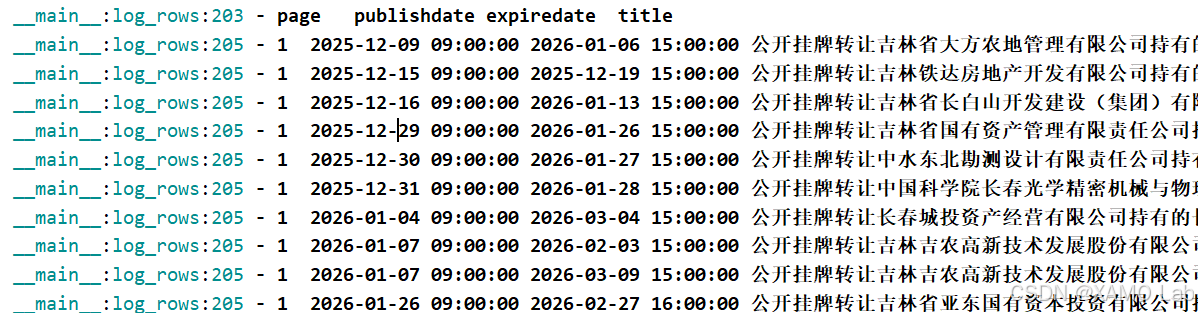
两种方案都已经实际请求验证,均能正常采集前 3 页数据。每页返回 20 条,前 3 页共 60 条。日志摘要如下:
text
纯 Python 版本:
2026-06-22 04:11:09.956 | INFO     | __main__:request_page_with_retry:227 - fetch page=1 attempt=1
2026-06-22 04:11:09.957 | INFO     | __main__:request_page_with_retry:227 - fetch page=2 attempt=1
2026-06-22 04:11:09.958 | INFO     | __main__:request_page_with_retry:227 - fetch page=3 attempt=1
2026-06-22 04:11:10.734 | SUCCESS  | __main__:fetch_page:260 - page=2 parsed rows=20
2026-06-22 04:11:10.746 | SUCCESS  | __main__:fetch_page:260 - page=1 parsed rows=20
2026-06-22 04:11:10.747 | SUCCESS  | __main__:fetch_page:260 - page=3 parsed rows=20
2026-06-22 04:11:10.748 | INFO     | __main__:main:285 - total rows=60

Python 调用 JS 版本:
2026-06-22 04:11:27.288 | INFO     | __main__:request_page_with_retry:153 - fetch page=1 attempt=1
2026-06-22 04:11:27.288 | INFO     | __main__:request_page_with_retry:153 - fetch page=2 attempt=1
2026-06-22 04:11:27.289 | INFO     | __main__:request_page_with_retry:153 - fetch page=3 attempt=1
2026-06-22 04:11:28.207 | SUCCESS  | __main__:fetch_page:186 - page=3 parsed rows=20
2026-06-22 04:11:28.208 | SUCCESS  | __main__:fetch_page:186 - page=1 parsed rows=20
2026-06-22 04:11:28.209 | SUCCESS  | __main__:fetch_page:186 - page=2 parsed rows=20
2026-06-22 04:11:28.210 | INFO     | __main__:main:211 - total rows=60
部分输出字段示例:
三、总结
这个案例的主线是先定位统一接口 honsanCloudAct,再分别确认请求体加密和响应体解密。请求明文最终会被整理成带 acts 数组的结构,业务接口路径放在 fullPath,分页参数放在 args 中;响应解密后再从业务结果里提取产权正式披露列表。
这里需要注意几点:
- 请求头中需要保留
Content-Type: text/xml;charset=UTF-8。 - 请求参数中真正控制分页的是
pageNo。 id、clientKey、acts.id属于请求标识,不需要和浏览器某一次运行时逐字符一致。- 响应数据从
results[*].args[0].zhengShiPiLou.list中提取,兼容浏览器原始请求中可能夹带访问统计 act 的情况。 - 本案例使用的是
HS_CRYPT_V2自定义编码,不是 AES/CBC、AES/ECB 或 RSA。