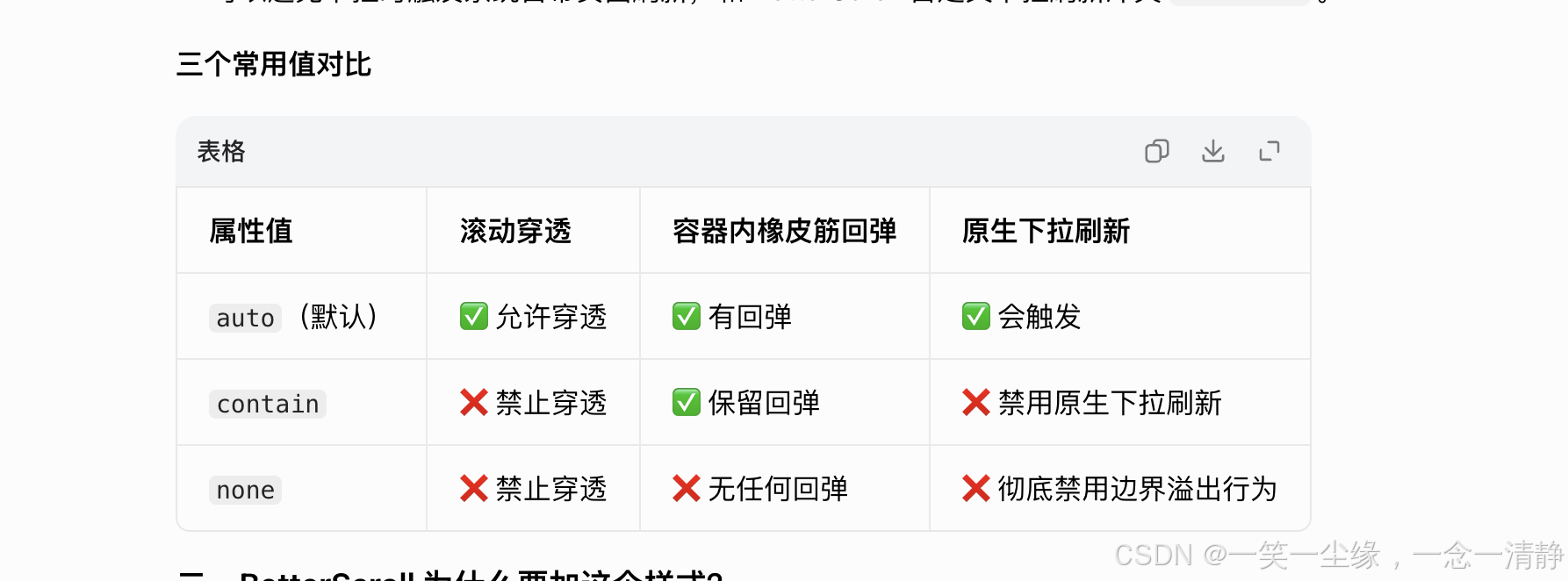
是否还有固定弹窗内部滚动,滚到边界会导致body滚动的苦扰,现在可以没了,直接一行css解决
给一下demo 复制,直接跑一下试试
<!DOCTYPE html>
<html lang="zh-CN">
<head>
<meta charset="UTF-8">
<meta name="viewport" content="width=device-width, initial-scale=1.0">
<title>overscroll-behavior-y 演示</title>
<style>
* {
margin: 0;
padding: 0;
box-sizing: border-box;
}
body {
font-family: -apple-system, BlinkMacSystemFont, 'Segoe UI', Roboto, sans-serif;
line-height: 1.6;
}
/* 底部背景内容 */
.background-content {
padding: 20px;
background: linear-gradient(180deg, #f0f0f0 0%, #e0e0e0 100%);
min-height: 300vh;
}
.background-content h1 {
text-align: center;
margin-bottom: 20px;
color: #333;
}
.background-content p {
margin-bottom: 15px;
color: #666;
}
/* 弹窗遮罩层 */
.modal-overlay {
position: fixed;
top: 0;
left: 0;
right: 0;
bottom: 0;
background: rgba(0, 0, 0, 0.5);
display: flex;
align-items: center;
justify-content: center;
z-index: 1000;
}
.modal-overlay.hidden {
display: none;
}
/* 弹窗容器 */
.modal {
background: white;
border-radius: 12px;
width: 90%;
max-width: 400px;
max-height: 70vh;
display: flex;
flex-direction: column;
overflow: hidden;
}
.modal-header {
padding: 16px 20px;
border-bottom: 1px solid #eee;
display: flex;
justify-content: space-between;
align-items: center;
}
.modal-header h2 {
font-size: 18px;
color: #333;
}
.modal-close {
background: none;
border: none;
font-size: 24px;
cursor: pointer;
color: #999;
padding: 0;
width: 32px;
height: 32px;
display: flex;
align-items: center;
justify-content: center;
}
/* 弹窗内容区域 - 关键对比 */
.modal-body {
flex: 1;
overflow-y: auto;
padding: 16px 20px;
}
/* 没有 overscroll-behavior 的弹窗 */
.modal-body.no-overscroll {
/* 默认行为:滚动到边界时会触发父元素滚动 */
}
/* 有 overscroll-behavior 的弹窗 */
.modal-body.with-overscroll {
overscroll-behavior-y: contain;
/* 滚动到边界时不会触发父元素滚动 */
}
.modal-body .item {
padding: 12px 0;
border-bottom: 1px solid #f0f0f0;
color: #444;
}
.modal-body .item:last-child {
border-bottom: none;
}
/* 控制按钮 */
.controls {
position: fixed;
bottom: 20px;
left: 50%;
transform: translateX(-50%);
display: flex;
gap: 12px;
z-index: 2000;
}
.controls button {
padding: 12px 24px;
border: none;
border-radius: 8px;
font-size: 14px;
cursor: pointer;
transition: all 0.2s;
}
.btn-primary {
background: #007aff;
color: white;
}
.btn-primary:hover {
background: #0051d5;
}
.btn-secondary {
background: #34c759;
color: white;
}
.btn-secondary:hover {
background: #248a3d;
}
/* 提示标签 */
.badge {
display: inline-block;
padding: 4px 8px;
border-radius: 4px;
font-size: 12px;
font-weight: 500;
}
.badge-warning {
background: #fff3cd;
color: #856404;
}
.badge-success {
background: #d4edda;
color: #155724;
}
/* 说明区域 */
.info {
position: fixed;
top: 10px;
left: 10px;
right: 10px;
background: rgba(255, 255, 255, 0.95);
padding: 12px 16px;
border-radius: 8px;
box-shadow: 0 2px 8px rgba(0, 0, 0, 0.1);
z-index: 3000;
font-size: 13px;
}
.info h3 {
margin-bottom: 8px;
color: #333;
}
.info p {
margin-bottom: 4px;
color: #666;
}
</style>
</head>
<body>
<!-- 说明 -->
<div class="info">
<h3>overscroll-behavior-y 演示</h3>
<p><strong>测试方法:</strong>在弹窗内滚动到顶部或底部后继续滚动</p>
<p><strong>无 overscroll:</strong>会继续触发底部 body 滚动</p>
<p><strong>有 overscroll:</strong>不会触发底部 body 滚动</p>
</div>
<!-- 底部背景内容 -->
<div class="background-content">
<h1>底部页面内容</h1>
<p>这是底部的背景内容,可以滚动查看。</p>
<p>当弹窗滚动到边界时,如果没有设置 overscroll-behavior,继续滚动会触发这里的滚动。</p>
<p>Lorem ipsum dolor sit amet, consectetur adipiscing elit.</p>
<p>Sed do eiusmod tempor incididunt ut labore et dolore magna aliqua.</p>
<p>Ut enim ad minim veniam, quis nostrud exercitation ullamco laboris.</p>
<p>Duis aute irure dolor in reprehenderit in voluptate velit esse cillum dolore.</p>
<p>Excepteur sint occaecat cupidatat non proident, sunt in culpa qui officia.</p>
<p>这是底部的背景内容,可以滚动查看。</p>
<p>当弹窗滚动到边界时,如果没有设置 overscroll-behavior,继续滚动会触发这里的滚动。</p>
<p>Lorem ipsum dolor sit amet, consectetur adipiscing elit.</p>
<p>Sed do eiusmod tempor incididunt ut labore et dolore magna aliqua.</p>
<p>Ut enim ad minim veniam, quis nostrud exercitation ullamco laboris.</p>
<p>Duis aute irure dolor in reprehenderit in voluptate velit esse cillum dolore.</p>
<p>Excepteur sint occaecat cupidatat non proident, sunt in culpa qui officia.</p>
<p>这是底部的背景内容,可以滚动查看。</p>
<p>当弹窗滚动到边界时,如果没有设置 overscroll-behavior,继续滚动会触发这里的滚动。</p>
<p>Lorem ipsum dolor sit amet, consectetur adipiscing elit.</p>
<p>Sed do eiusmod tempor incididunt ut labore et dolore magna aliqua.</p>
<p>Ut enim ad minim veniam, quis nostrud exercitation ullamco laboris.</p>
<p>Duis aute irure dolor in reprehenderit in voluptate velit esse cillum dolore.</p>
<p>Excepteur sint occaecat cupidatat non proident, sunt in culpa qui officia.</p>
</div>
<!-- 弹窗1:没有 overscroll-behavior -->
<div class="modal-overlay" id="modal1">
<div class="modal">
<div class="modal-header">
<h2>无 overscroll-behavior <span class="badge badge-warning">会穿透</span></h2>
<button class="modal-close" onclick="closeModal(1)">×</button>
</div>
<div class="modal-body no-overscroll">
<div class="item">列表项 1</div>
<div class="item">列表项 2</div>
<div class="item">列表项 3</div>
<div class="item">列表项 4</div>
<div class="item">列表项 5</div>
<div class="item">列表项 6</div>
<div class="item">列表项 7</div>
<div class="item">列表项 8</div>
<div class="item">列表项 9</div>
<div class="item">列表项 10</div>
<div class="item">列表项 11</div>
<div class="item">列表项 12</div>
<div class="item">列表项 13</div>
<div class="item">列表项 14</div>
<div class="item">列表项 15</div>
</div>
</div>
</div>
<!-- 弹窗2:有 overscroll-behavior -->
<div class="modal-overlay hidden" id="modal2">
<div class="modal">
<div class="modal-header">
<h2>有 overscroll-behavior <span class="badge badge-success">不会穿透</span></h2>
<button class="modal-close" onclick="closeModal(2)">×</button>
</div>
<div class="modal-body with-overscroll">
<div class="item">列表项 1</div>
<div class="item">列表项 2</div>
<div class="item">列表项 3</div>
<div class="item">列表项 4</div>
<div class="item">列表项 5</div>
<div class="item">列表项 6</div>
<div class="item">列表项 7</div>
<div class="item">列表项 8</div>
<div class="item">列表项 9</div>
<div class="item">列表项 10</div>
<div class="item">列表项 11</div>
<div class="item">列表项 12</div>
<div class="item">列表项 13</div>
<div class="item">列表项 14</div>
<div class="item">列表项 15</div>
</div>
</div>
</div>
<!-- 控制按钮 -->
<div class="controls">
<button class="btn-primary" onclick="showModal(1)">弹窗1:无 overscroll</button>
<button class="btn-secondary" onclick="showModal(2)">弹窗2:有 overscroll</button>
</div>
<script>
function showModal(num) {
document.getElementById('modal1').classList.add('hidden');
document.getElementById('modal2').classList.add('hidden');
document.getElementById('modal' + num).classList.remove('hidden');
}
function closeModal(num) {
document.getElementById('modal' + num).classList.add('hidden');
}
// 点击遮罩层关闭弹窗
document.querySelectorAll('.modal-overlay').forEach(overlay => {
overlay.addEventListener('click', (e) => {
if (e.target === overlay) {
overlay.classList.add('hidden');
}
});
});
</script>
</body>
</html>