Spring AI - 拦截器的创建
官方文档:
https://docs.spring.io/spring-ai/reference/api/chat-memory.html
Advisor拦截器,请求进来,判断是否存在敏感词且用户请求中匹配到了敏感词,则返回响应失败;若通过敏感词校验,则再继续调用下一个拦截器,拦截器会有多个,依次调用。
java
// class SafeGuardAdvisor
public ChatClientResponse adviseCall(ChatClientRequest chatClientRequest, CallAdvisorChain callAdvisorChain) {
        return !CollectionUtils.isEmpty(this.sensitiveWords) && this.sensitiveWords.stream().anyMatch((w) -> chatClientRequest.prompt().getContents().contains(w)) ? this.createFailureResponse(chatClientRequest) : callAdvisorChain.nextCall(chatClientRequest);
    }
实际开发中,我们往往会用到多个拦截器,组合在一起相当于一条拦截器链条(责任链模式的设计思想)。每个拦截器是有顺序的,通过getOrder()方法获取顺序,数字越小,优先级越高。
比如下面的代码中,我们可能认为,将首先执行MessageChatMemoryAdvisor,将对话历史记录添加到提示词中。然后,QuestionAnswerAdvisor将根据用户的问题和添加的对话历史记录执行知识库检索,从而提供更相关的结果。
java
var chatClient = ChatClient.builder(chatModel)
	.defaultAdvisors(
	new MessageChatMemoryAdvisor(chatMemory), // 对话记忆 advisor
	new QuestionAnswerAdvisor(vectorStore) // RAG检索增强advisor
	)
但实际上,拦截器的执行顺序是由getOrder方法决定的,而和编写顺序无关。
多个拦截器,多个advisor是有顺序的。
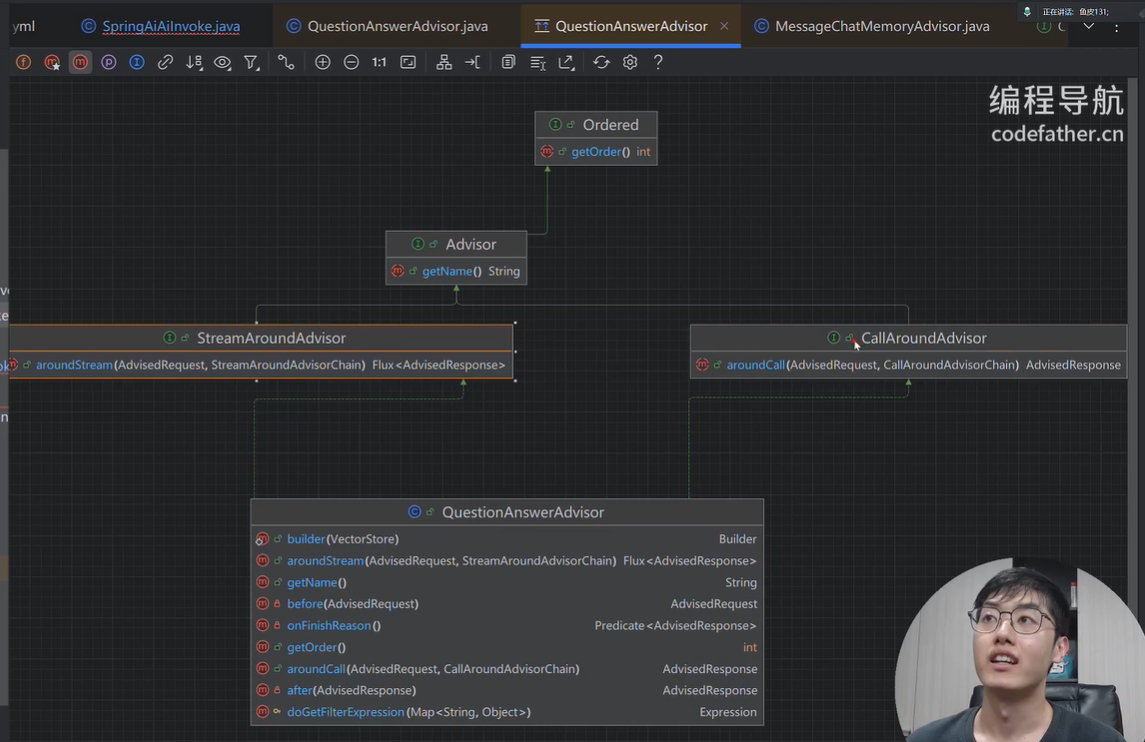
Advisor分为两种模式,流式streaming和非流式non-streaming响应,用法上没有区别,返回值不同而已,自己写Advisor时,为保证通用性,两种方式都要实现。
链式调用: .nextAroundCall()
Spring AI provides a few built-in Advisors that you can use to configure the memory behavior of the ChatClient, based on your needs.
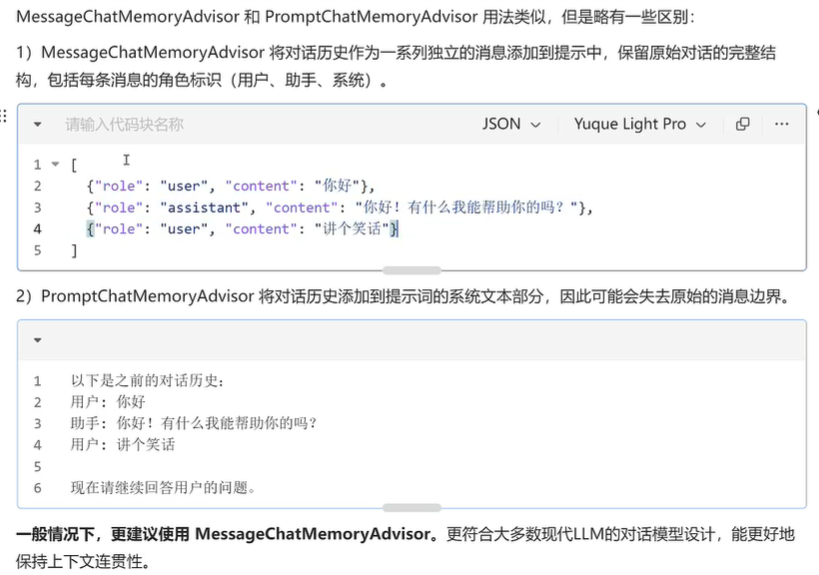
- MessageChatMemoryAdvisor. This advisor manages the conversation memory using the provided ChatMemory implementation. On each interaction, it retrieves the conversation history from the memory and includes it in the prompt as a collection of messages.
- PromptChatMemoryAdvisor. This advisor manages the conversation memory using the provided ChatMemory implementation. On each interaction, it retrieves the conversation history from the memory and appends it to the system prompt as plain text.
- VectorStoreChatMemoryAdvisor. This advisor manages the conversation memory using the provided VectorStore implementation. On each interaction, it retrieves the conversation history from the vector store and appends it to the system message as plain text.
ChatClient:SpringAI调用模型的一个客户端,ChatClient 支持更复杂更灵活的链式调用;
Advisors:SpringAI用于增强AI调用能力的拦截器;前置增强:改写prompt提示词,敏感词过滤;后置增强:调用AI后记录日志,处理返回结果;
ChatMemory: 对话记忆存储,
java
@Component
@Slf4j
public class LoveApp {

    private static final String SYSTEM_PROMPT = "你是资深恋爱专家,擅长倾听、共情,解决用户暗恋、表白、恋爱相处等各类情感困扰。核心任务:模拟真实咨询场景," +
            "以引导式提问为主,深入了解用户情况、真实需求与内心感受,再提供实用、有温度的专属建议,不急于给出笼统答案。\n" +
            "全程保持专业、温和、共情语气,避免生硬。";

    // 初始化客户端
    private final ChatClient chatClient;

    // 使用构造函数来注入

    /**
     * 初始化AI客户端ChatClient
     * @param dashscopeChatModel
     */
    public LoveApp(ChatModel dashscopeChatModel) {
        // 初始化基于内存的对话记忆
        // ChatMemoryRepository chatMemory = new InMemoryChatMemoryRepository();
        ChatMemory chatMemory = MessageWindowChatMemory.builder().build();
        chatClient = ChatClient.builder(dashscopeChatModel)
                .defaultSystem(SYSTEM_PROMPT)
                .defaultAdvisors(
                        MessageChatMemoryAdvisor.builder(chatMemory).build()// 记忆拦截器,记录每次对话
                ) // 默认拦截器,之后所有使用chatClient的对话都会经过这个拦截器
                .build();

        // 如果不想使用默认拦截器,每次对话时,创建新的客户端;
        // 或者,在调用chatClient时直接指定拦截器。
        // chatClient.prompt().advisors();
    }

    /**
     * AI基础对话,支持多轮记忆
     * @param message
     * @param chatId
     * @return
     */
    public String doChat(String message,String chatId){
        ChatResponse chatResponse = chatClient.prompt().user(message).advisors(
                spec -> spec.param("CHAT_MEMORY_CONVERSATION_ID_KEY", chatId).param("conversationSize",10))
                .call().chatResponse();
        String res = chatResponse.getResult().getOutput().getText();
        log.info("content:{}", res);
        return res;
    }
}
写了单元测试,发现ChatModel dashscopeChatModel 竟然有实例存在,明明没有声明也没有注入,原来是因为
LoveApp有注解@Component,Spring框架把它作为bean注入,创建bean时调用其构造函数发现需要入参ChatModel于是从容器中寻找ChatModel类型的bean,刚好yml文件中有Spring.ai.dashscope.api-key的配置,于是将该bean注入进去,完成LoveApp的构造。
另外还调用了SpringAiAiInvoke类的run方法,是因为其实现了CommandLineRunner接口,当项目启动完成后,就会去执行实现了CommandLineRunner / ApplicationRunner 接口的类的 run()方法。用来检查或者做其他用。
日志打印
由于springboot 默认打印的是info级别的日志,不能打出debug级别的日志,而spring.ai的SimpleLoggerAdvisor日志是Debug级别。如果想打印出debug级别日志需要指定配置。
添加如下配置,可指定某一个类的日志打印级别,注:debug > info > error ;debug级别最详细。
yml
logging:
  level:
    org.springframework.ai.chat.client.advisor.SimpleLoggerAdvisor: debug
在代码中,创建chatClient时新增SimpleLoggerAdvisor:
java
chatClient = ChatClient.builder(dashscopeChatModel)
                .defaultSystem(SYSTEM_PROMPT)
                .defaultAdvisors(
                        MessageChatMemoryAdvisor.builder(chatMemory).build(),// 记忆拦截器,记录每次对话
                        new SimpleLoggerAdvisor()
                ) // 默认拦截器,之后所有使用chatClient的对话都会经过这个拦截器
                .build();
自定义拦截器MyLoggerAdvisor
主要实现adviseCall adviseStream 方法。在调用LLM前后做一些事情。
** 在多个Advisor中传递内容**
可使用context中put 和 get 的方法来传递。
java
/// 在clientRequest中放处理后的结果信息
        chatClientRequest.context().put("userMsg","Value...");
///  获取到其他Advisor拦截器中所赋值的内容
        chatClientResponse.context().get("key");
结构化输出内容
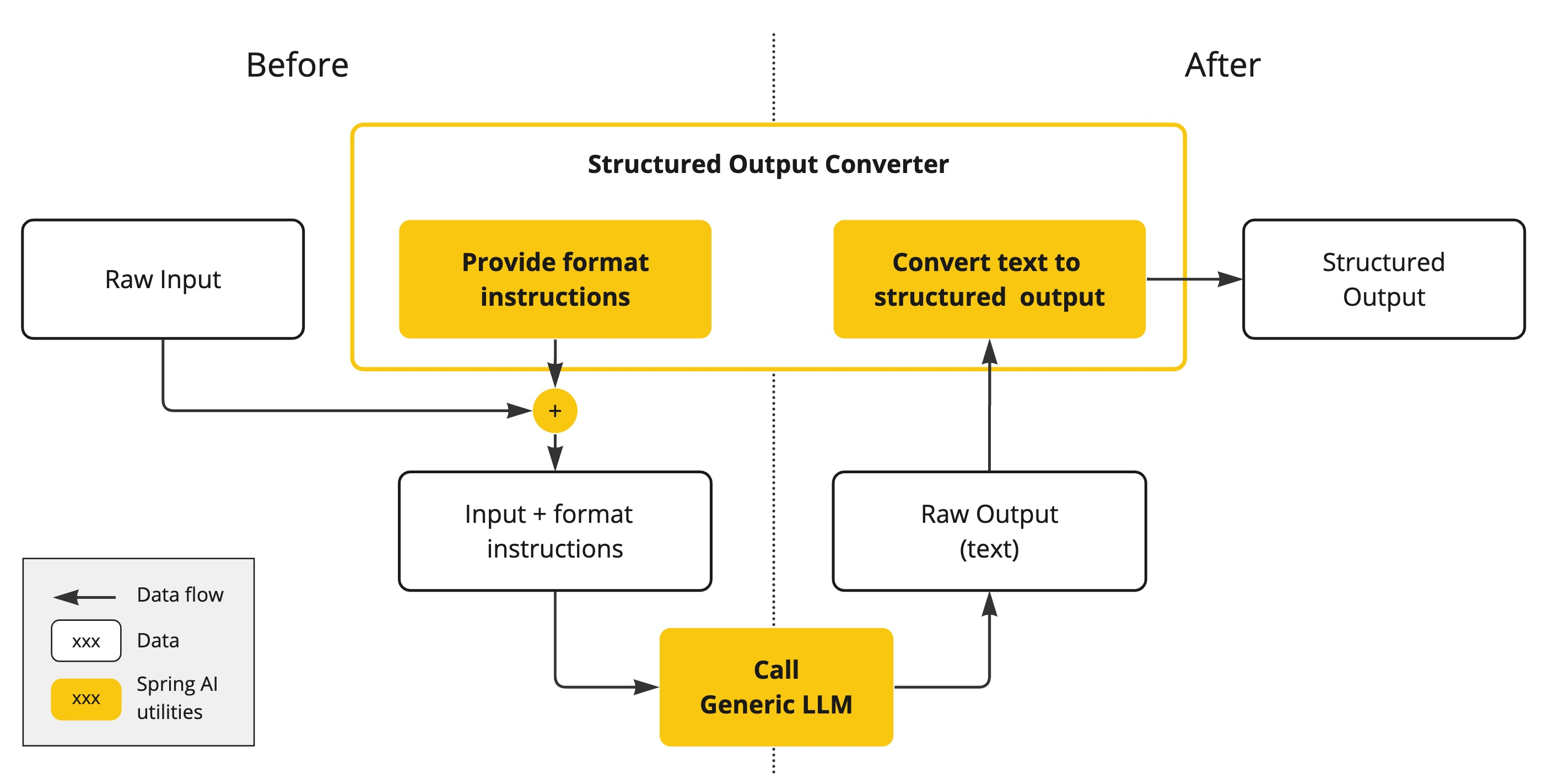
三种转换器: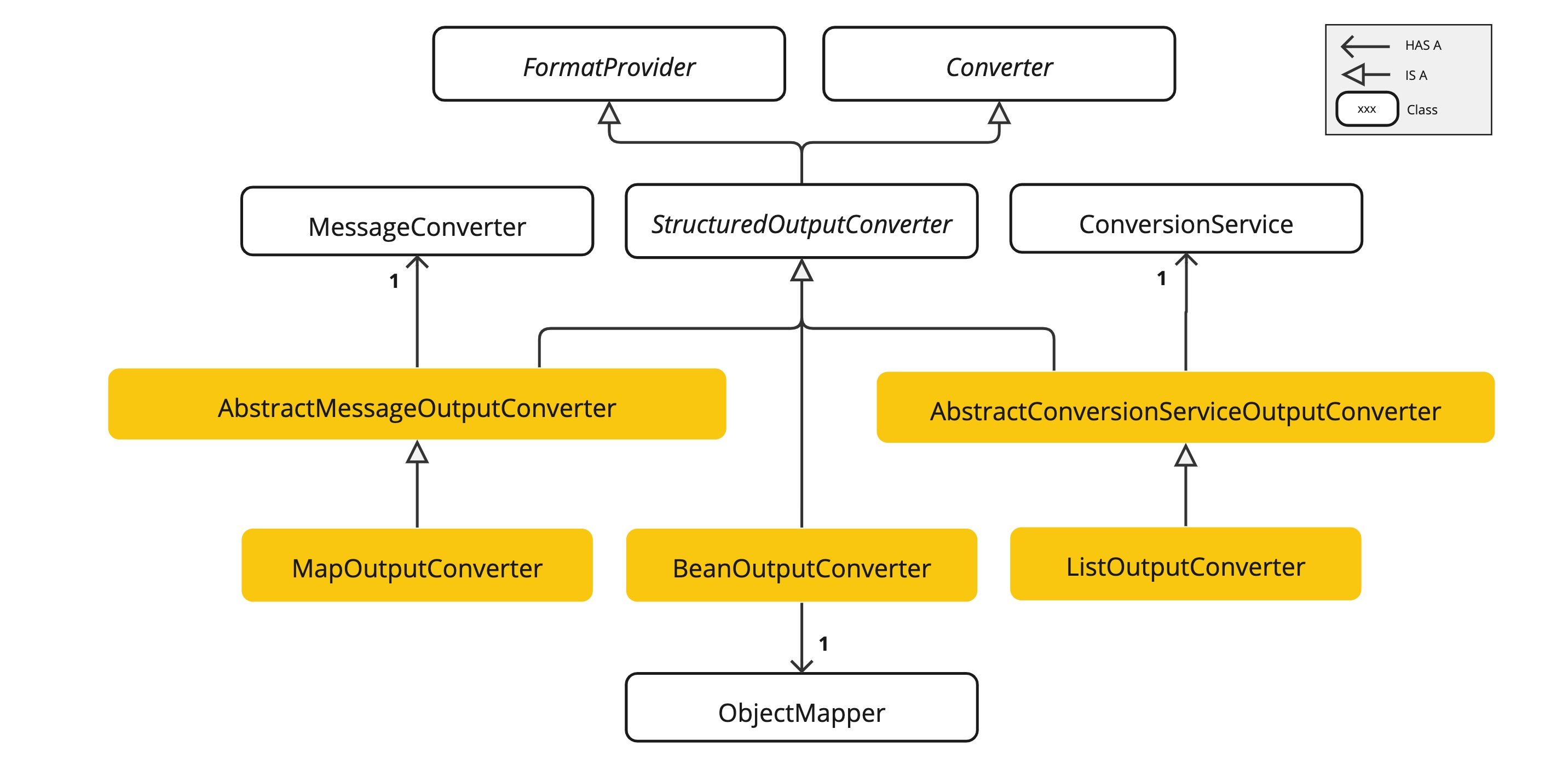
直接在大模型输出的后面.entity()中写自定义的类即可。
java
record ActorsFilms(String actor, List<String> movies) {
}
ActorsFilms actorsFilms = ChatClient.create(chatModel).prompt()
        .user(u -> u.text("Generate the filmography of 5 movies for {actor}.")
                    .param("actor", "Tom Hanks"))
        .call()
        .entity(ActorsFilms.class);

Map<String, Object> result = ChatClient.create(chatModel).prompt()
        .user(u -> u.text("Provide me a List of {subject}")
                    .param("subject", "an array of numbers from 1 to 9 under they key name 'numbers'"))
        .call()
        .entity(new ParameterizedTypeReference<Map<String, Object>>() {});

List<ActorsFilms> actorsFilms = ChatClient.create(chatModel).prompt()
        .user("Generate the filmography of 5 movies for Tom Hanks and Bill Murray.")
        .call()
        .entity(new ParameterizedTypeReference<List<ActorsFilms>>() {});
问:Spring AI 如何实现结构化输出转换?
通过FormationProvider 拼接prompt,调用LLM后,用转换器converter来转换为指定类型。
底层是通过ObjectMapper转换的。
恋爱报告输出
SpringAI 中的提示词:
json
spring.ai.chat.client.output.format -> Your response should be in JSON format.
Do not include any explanations, only provide a RFC8259 compliant JSON response following this format without deviation.
Do not include markdown code blocks in your response.
Remove the ```json markdown from the output.
Here is the JSON Schema instance your output must adhere to:
```{
  "$schema" : "https://json-schema.org/draft/2020-12/schema",
  "type" : "object",
  "properties" : {
    "suggestions" : {
      "type" : "array",
      "items" : {
        "type" : "string"
      }
    },
    "title" : {
      "type" : "string"
    }
  },
  "required" : [ "suggestions", "title" ],
  "additionalProperties" : false
}```
最佳实践
- 尽量为模型提供清晰的格式知道
- 时间输出验证机制,异常处理逻辑,确保结构化数据符合预期
- 选择支持结构化输出的合适模型
- 对于复杂数据结构,考试使用ParameterizedTypeReference
对话记忆持久化
SpringAI的对话记忆实现非常巧妙,解耦了"存储"和"记忆算法",使得我们可以单独修改ChatMemory存储来改变对话记忆的保存为止,而午休修改保存对话记忆的流程。
比如,MessageChatMemoryAdvisor 定义了在何种情况下要存储消息以及拿到历史消息,而具体的消息内容是保存在chatMemory中,这样就实现了存储和算法的解耦隔离。
java
// 初始化基于内存的对话记忆
        ChatMemory chatMemory = MessageWindowChatMemory.builder().build();
        chatClient = ChatClient.builder(dashscopeChatModel)
                .defaultSystem(SYSTEM_PROMPT)
                .defaultAdvisors(
                        MessageChatMemoryAdvisor.builder(chatMemory).build(),// 记忆拦截器,记录每次对话
                        new MyLoggerAdvisor()
                        // 自定义拦截器,按需开启
                        // , new ReReadingAdvisor()
                ) // 默认拦截器,之后所有使用chatClient的对话都会经过这个拦截器
                .build();
如果我们希望改变存储方式和存储位置,则只需要修改ChatMemory即可。
将对话内容存储到数据库中。
自己去实现一个chatMemory. 可以参考 InMemoryChatMemory 类的实现。
这里举例,实现基于文件读写的ChatMemory。
主要存在的问题:消息和文本的装换。
我们在保存消息时,要将消息从Message对象转换为文件内的文本;读取消息时,要将文件内的文本转换为Message对象。也就是对象的序列化和反序列化。
我们本能地会想到通过JSON进行序列化,但在实际操作中,我们发现这并不容易,因为:
- 要持久化的Message是一个接口,又很多种不同的子类实现(比如UserMessage SystemMessage等)
- 每种子类所拥有的字段都不一样,结构不统一
- 子类没有无参构造函数,而且没有实现Serializable序列化接口(无法用JDK的默认序列化实现)。
所以需要引入一个新的序列化的库,引入新的依赖。
这里选择高性能的Kryo序列化库。
新建一个FileBasedChatMemory类,来替代原有的MessageChatMemory类,在其中的add 方法中自己写存储到文件的方法,基于kryo的序列化和反序列化,来读取文件和写入文件。
java
/**
 * FileBasedChatMemory 类实现基于文件的聊天记忆存储功能。
 * 使用 Kryo 序列化库将消息存储到文件系统中。
 */
public class FileBasedChatMemory implements ChatMemory {

    private final String BASE_DIR; // 定义存储路径。文件保存目录

    /**
     * Kryo 序列化实例,用于对象的序列化和反序列化操作。
     * 使用 static 修饰确保全局唯一实例。
     */
    private static final Kryo kryo = new Kryo();

    // 类的初始化时,指定kryo的生成策略。 动态地去注册需要序列化的类。
    static{
        kryo.setRegistrationRequired(false); // 无需手动注册
        // 设置实例化策略 设置标准的实例化策略
        kryo.setInstantiatorStrategy(new StdInstantiatorStrategy());
    }

    public FileBasedChatMemory(String dir) {
        this.BASE_DIR = dir;
        File baseDir = new File(dir);
        // 判断该路径下的文件对象是否存在
        if (!baseDir.exists()) {
            baseDir.mkdirs();
        }
    }

    @Override

    public void add(String conversationId, Message message) {;
        List<Message> savedMessages = getOrCreateConversation(conversationId);
        savedMessages.add(message);
        saveConversation(conversationId,savedMessages);
    }

    @Override
    public void add(String conversationId, List<Message> messages) {
        List<Message> savedMessages = getOrCreateConversation(conversationId);
        savedMessages.addAll(messages);
        saveConversation(conversationId,savedMessages);
    }

    @Override
    public List<Message> get(String conversationId) {
        return getOrCreateConversation(conversationId);
    }

    public List<Message> getLastN(String conversationId, int lastN) {
        List<Message> messages = getOrCreateConversation(conversationId);
        // return messages.subList(Math.max(messages.size() - lastN, 0), messages.size());
        return messages.stream()
                .skip(Math.max(messages.size() - lastN, 0))
                .toList();
    }

    @Override
    public void clear(String conversationId) {
        // saveConversation(conversationId,new ArrayList<Message>());
        File file = getConversationFile(conversationId);
        if (file.exists()) {
            file.delete();
        }
    }

    /**
     * 保存会话消息到文件的方法
     * @param conversationId 对话ID,用于标识和区分不同的对话
     * @param messages 消息列表,包含要保存的对话内容
     */
    private void saveConversation(String conversationId, List<Message> messages) {
    // 根据对话ID获取对应的文件对象
        File file = getConversationFile(conversationId);
        List<Message> toSave = new ArrayList<>(messages);
        try(Output output = new Output(new FileOutputStream(file))) {
            kryo.writeObject(output, toSave);
        } catch (IOException e) {
            e.printStackTrace();
        }

    }

    /**
     * 根据对话ID获取或创建一个新的对话列表
     * 如果对话文件已存在,则从文件中读取消息列表;否则创建一个新的空列表
     * @param conversationId 对话的唯一标识符
     * @return 包含消息的列表,如果文件存在则返回读取的消息列表,否则返回新的空列表
     */
    private List<Message> getOrCreateConversation(String conversationId) {
    // 根据对话ID获取对应的文件
        File file = getConversationFile(conversationId);
    // 创建一个新的消息列表
        List<Message> messages = new ArrayList<>();
    // 检查文件是否存在
        if (file.exists()) {
            try (Input input = new Input(new FileInputStream(file))) {
            // 使用Kryo从文件中读取消息列表
                messages = kryo.readObject(input, ArrayList.class);
            } catch (IOException e) {
            // 如果发生IO异常,转换为运行时异常抛出
                throw new RuntimeException(e);
            }
        }
    // 返回消息列表(可能是从文件读取的,也可能是新创建的)
        return messages;
    }

    /**
     * 根据会话ID获取对应的会话文件
     * @param conversationId 会话的唯一标识符
     * @return 返回一个File对象,表示存储会话数据的文件
     */
    private File getConversationFile(String conversationId) {
    // 使用基础目录和会话ID组合创建文件对象,文件扩展名为.kryo
        return new File(BASE_DIR, conversationId + ".kryo");
    }
}
PromptTemplate特性
PromptTemplate是SpringAI框架中用于构建和管理提示词的核心组件。允许开发者创建带有占位符的文本模板,然后在运行时动态替换这些占位符。
它相当于AI交互中的"视图层",类似于SpringMVC中的视图模板。通过使用PromptTemplate,你可以更加结构化、可维护地管理AI应用中的提示词,使其更易于优化和扩展,同事降低硬编码带来的维护成本。
PromptTemplate最基本的功能是支持变量替换。你可以在模板中定义占位符,然后再运行时,提供这些变量的值:
java
String template = "你好,{name}, 今天是{date},天气{weather}。";
        PromptTemplate promptTemplate = new PromptTemplate(template);

        Map<String, Object> variables = new HashMap<>();
        variables.put("name", "张三");
        variables.put("date", "2022-01-01");
        variables.put("weather", "晴朗");

        String prompt = promptTemplate.render(variables);
PromptTemplate在以下场景特别有用:
1、动态个性化交互:根据用户信息、上下文或业务规则定制提示词
2、多语言支持:使用相同的变量,但不同的模板文件支持多种语言。
3、AB测试:轻松切换不同版本的提示词进行效果对比
4、提示词版本管理:将提示词外部化,便于版本控制和迭代优化。
实现原理
PromptTemplate底层使用了OSS StringTemplate引擎,这是一个强大的模板引擎,专注于文本生成。在SpringAI中,PromptTemplate实现了接口
java
public class PromptTemplate implements PromptTemplateActions, PromptTemplateMessageActions {通过模板来生成字符串、Prompt对象、Message对象。
从文件加载模板
PromptTemplate支持从外部文件加载模板内容,很适合管理复杂的提示词。SpringAI利用Spring的Resource对象来从指定路径加载模板文件。
java
// 从类路径资源加载系统提示模板
@Value("classpath:/prompts/system-message.st")
private Resource systemResource;

//直接使用资源创建模板
SystemPromptTemplate template = new SystemPrompteTemplate(systemResource);
这种方式可以让你:
- 将复杂的提示词放在单独的文件中管理
- 在不修改代码的情况下调整提示词
- 为不同场景准备多套提示词模板
拓展思路:
1 自定义Advisor,比如权限校验、违禁词校验
2 自定义对话记忆,比如持久化对话到MySQL或者Redis存储中
3 编写一套包含变量的Prompt模板,并保存为资源文件,从文件加载模板。
4 开发一个多模态对话助手,能让AI解释图片。