目录:
- 一、项目代码结构
- 二、智能行程规划模块
-
- 1、整体架构
- 2、数据模型设计
-
- [2.1、TripRequirement.java - 用户需求输入](#2.1、TripRequirement.java - 用户需求输入)
- [2.2、TripPlan.java - 行程计划输出](#2.2、TripPlan.java - 行程计划输出)
- 3、核心业务逻辑实现
-
- [3.1、PlannerService.java - 行程规划引擎](#3.1、PlannerService.java - 行程规划引擎)
- [3.2、PlanController.java - API接口层](#3.2、PlanController.java - API接口层)
- [3.3、DraftController.java - 草稿版本管理](#3.3、DraftController.java - 草稿版本管理)
- 4、交通时间估算模块
-
- [4.1、RouteController.java - 高德地图集成](#4.1、RouteController.java - 高德地图集成)
- [4.2、RoutePreviewController.java - 路线预览](#4.2、RoutePreviewController.java - 路线预览)
- 5、技术实现流程图
- 三、多模态问答系统模块
- 四、智能推荐系统模块
-
- 1、完整的数据模型
- 2、智能推荐服务
- [3、基于 LLM 的智能推荐](#3、基于 LLM 的智能推荐)
- 4、混合推荐引擎
- 5、完整的控制器实现
- 6、智能推荐系统模块总结
-
- 6.1、推荐算法流程图
- 6.2、核心技术要点
- 6.3、参数提取和用户画像获取数据来源
-
- [🔄 数据流完整流程](#🔄 数据流完整流程)
- [📁 数据存储位置](#📁 数据存储位置)
- [💡 关键设计要点](#💡 关键设计要点)
- 五、MCP工具集成模块
-
- [🎯 MCP 工具集成架构](#🎯 MCP 工具集成架构)
- [🔍 核心代码详解](#🔍 核心代码详解)
-
- [1. McpClients - MCP 服务器配置管理](#1. McpClients - MCP 服务器配置管理)
- [2. RouteController - 高德地图集成](#2. RouteController - 高德地图集成)
- [3. TrainController - 12306 集成](#3. TrainController - 12306 集成)
- [🔧 完整的 MCP 调用实现](#🔧 完整的 MCP 调用实现)
-
- [1. MCP 协议核心概念](#1. MCP 协议核心概念)
- [2. 完整的 MCP 客户端实现](#2. 完整的 MCP 客户端实现)
- [3. 更新 RouteController 使用真实 MCP 调用](#3. 更新 RouteController 使用真实 MCP 调用)
- [4. 在 OrchestratorService 中调用 MCP](#4. 在 OrchestratorService 中调用 MCP)
- [📊 MCP 工具调用流程](#📊 MCP 工具调用流程)
- [💡 完整的 MCP 工具链实现](#💡 完整的 MCP 工具链实现)
- 六、数据管理模块
-
- [🎯 数据管理模块架构](#🎯 数据管理模块架构)
- [🔍 核心代码详解](#🔍 核心代码详解)
-
- [1. CityController - 城市数据管理](#1. CityController - 城市数据管理)
- [2. DraftController - 行程草稿管理](#2. DraftController - 行程草稿管理)
- [3. UserPrefController - 用户偏好管理](#3. UserPrefController - 用户偏好管理)
- [🎯 完整方案:数据库存储](#🎯 完整方案:数据库存储)
- [🔄 完整的数据管理流程](#🔄 完整的数据管理流程)
- [🎯 数据管理模块的关键技术](#🎯 数据管理模块的关键技术)
- [💡 完整的数据管理服务实现](#💡 完整的数据管理服务实现)
- [📝 总结](#📝 总结)
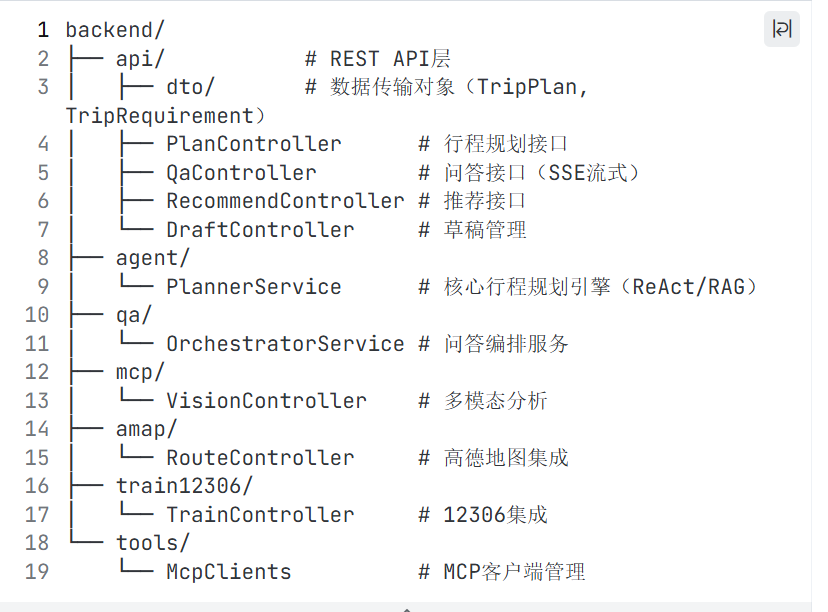
一、项目代码结构
此项目集成了如下功能:
- Spring AI 集成 : 如何将大语言模型整合到 Spring Boot 应用
- MCP 协议 : 模型上下文协议的实际应用
- RAG 实现 : 检索增强生成的完整流程
- SSE 流式响应 : 实时数据推送技术
- 响应式编程 : Spring WebFlux 的使用
- 向量数据库 : 文本向量化和相似度检索
依赖的引用:
xml
<project xmlns="http://maven.apache.org/POM/4.0.0" xmlns:xsi="http://www.w3.org/2001/XMLSchema-instance"
         xsi:schemaLocation="http://maven.apache.org/POM/4.0.0 https://maven.apache.org/xsd/maven-4.0.0.xsd">
    <modelVersion>4.0.0</modelVersion>

    <parent>
        <groupId>org.springframework.boot</groupId>
        <artifactId>spring-boot-starter-parent</artifactId>
        <version>3.3.3</version>
        <relativePath/>
    </parent>

    <groupId>com.yumanus</groupId>
    <artifactId>yumanus-travel</artifactId>
    <version>0.1.0</version>
    <name>YuManus Travel Planner</name>
    <description>AI-powered travel planning with Spring AI, ReAct, RAG, and MCP tools</description>

    <properties>
        <java.version>17</java.version>
        <spring.ai.version>1.0.0-M4</spring.ai.version>
    </properties>

    <dependencies>
        <dependency>
            <groupId>org.springframework.boot</groupId>
            <artifactId>spring-boot-starter-web</artifactId>
        </dependency>
        <dependency>
            <groupId>org.springframework.boot</groupId>
            <artifactId>spring-boot-starter-webflux</artifactId>
        </dependency>
        <dependency>
            <groupId>org.springframework.boot</groupId>
            <artifactId>spring-boot-starter-validation</artifactId>
        </dependency>

        <dependency>
            <groupId>org.springframework.boot</groupId>
            <artifactId>spring-boot-starter-actuator</artifactId>
        </dependency>

        <dependency>
            <groupId>com.fasterxml.jackson.core</groupId>
            <artifactId>jackson-databind</artifactId>
        </dependency>
        <dependency>
            <groupId>com.fasterxml.jackson.datatype</groupId>
            <artifactId>jackson-datatype-jsr310</artifactId>
        </dependency>

        <!-- Spring AI core + OpenAI starter (provider-agnostic via properties) -->
        <dependency>
            <groupId>org.springframework.ai</groupId>
            <artifactId>spring-ai-core</artifactId>
            <version>${spring.ai.version}</version>
        </dependency>
        <dependency>
            <groupId>org.springframework.ai</groupId>
            <artifactId>spring-ai-openai-spring-boot-starter</artifactId>
            <version>${spring.ai.version}</version>
        </dependency>

        <!-- Optional: PostgreSQL + PgVector (wire later) -->
        <dependency>
            <groupId>org.postgresql</groupId>
            <artifactId>postgresql</artifactId>
            <scope>runtime</scope>
        </dependency>

        <dependency>
            <groupId>org.slf4j</groupId>
            <artifactId>slf4j-api</artifactId>
        </dependency>
        <dependency>
            <groupId>org.projectlombok</groupId>
            <artifactId>lombok</artifactId>
            <optional>true</optional>
        </dependency>
        <dependency>
            <groupId>org.springdoc</groupId>
            <artifactId>springdoc-openapi-starter-webmvc-ui</artifactId>
            <version>2.6.0</version>
        </dependency>
        <dependency>
            <groupId>org.springframework.boot</groupId>
            <artifactId>spring-boot-starter-test</artifactId>
            <scope>test</scope>
        </dependency>
    </dependencies>

    <build>
        <plugins>
            <plugin>
                <groupId>org.apache.maven.plugins</groupId>
                <artifactId>maven-compiler-plugin</artifactId>
                <configuration>
                    <source>${java.version}</source>
                    <target>${java.version}</target>
                    <release>${java.version}</release>
                </configuration>
            </plugin>
            <plugin>
                <groupId>org.springframework.boot</groupId>
                <artifactId>spring-boot-maven-plugin</artifactId>
                <configuration>
                    <excludes>
                        <exclude>
                            <groupId>org.projectlombok</groupId>
                            <artifactId>lombok</artifactId>
                        </exclude>
                    </excludes>
                </configuration>
            </plugin>
        </plugins>
    </build>
</project>
二、智能行程规划模块
1、整体架构
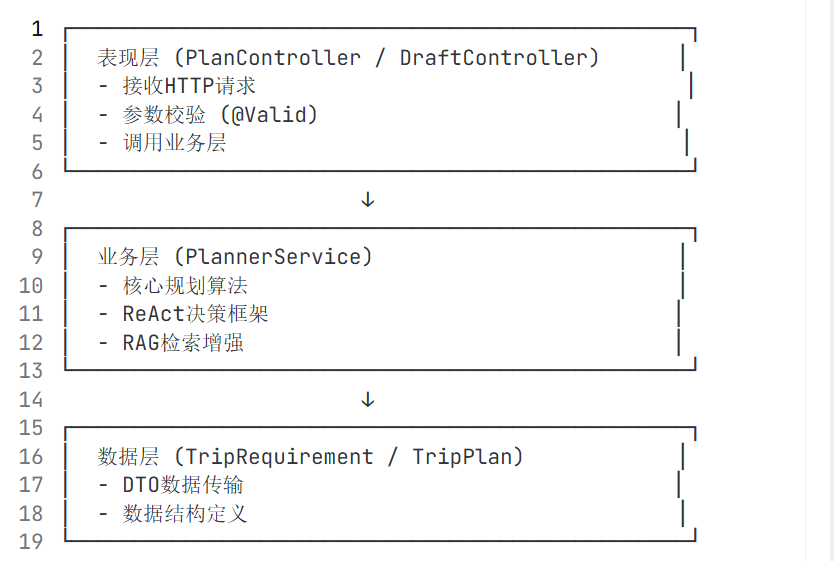
2、数据模型设计
2.1、TripRequirement.java - 用户需求输入
java
public class TripRequirement {
    // 基础信息
    private String city = "Shanghai";        // 目标城市
    private LocalDate startDate;              // 开始日期
    private int days = 3;                     // 行程天数 (1-30)

    // 出行人员
    private Party party = new Party();
    // 预算信息
    private Budget budget = new Budget();
    // 用户偏好
    private Preferences preferences = new Preferences();
    // 约束条件
    private Constraints constraints = new Constraints();
}
java
// 1. Party - 出行人员配置
public static class Party {
    private int adults = 2;    // 成人数量,默认2人
    private int kids = 0;      // 儿童数量,默认0
}

// 2. Budget - 预算配置
public static class Budget {
    private String currency = "CNY";  // 货币类型,默认人民币
    private long total = 3000;         // 总预算,默认3000元
}

// 3. Preferences - 用户偏好
public static class Preferences {
    private String pace = "normal";      // 行程节奏:easy/normal/fast
    private List<String> food;            // 喜欢的美食类型
    private List<String> avoid;          // 避免的内容
}

// 4. Constraints - 约束条件
public static class Constraints {
    private Integer walkMaxKmPerDay = 8;  // 每日最大步行公里数
    private Boolean minTransfers = true;  // 是否最少换乘
    private Boolean rainPlan = true;      // 是否需要雨天预案
}
2.2、TripPlan.java - 行程计划输出
java
public class TripPlan {
    private Summary summary;                    // 行程摘要
    private List<DayPlan> days;                // 每日计划列表
    private List<Justification> justifications; // 选择理由
    private List<Citation> citations;           // 引用来源
    private List<Alternative> alternatives;     // 备选方案
}
java
// 1. Summary - 行程摘要
public static class Summary {
    private String city;                    // 目标城市
    private int days;                      // 天数
    private Map<String, Long> estCost;     // 预算估算(多币种)
}

// 2. DayPlan - 每日计划
public static class DayPlan {
    private LocalDate date;                // 日期
    private List<Slot> slots;              // 时间槽列表
    private List<Transit> transit;         // 交通安排
    private List<String> notes;            // 备注信息
}

// 3. Slot - 时间槽(核心)
public static class Slot {
    private String time;                   // 时间段:09:00-11:30
    private String poiId;                  // 景点/餐厅ID
    private String activity;              // 活动类型:sightseeing/lunch/dinner
    private List<String> evidenceIds;     // 证据ID(RAG检索用)
    private List<String> alt;              // 备选景点
}

// 4. Transit - 交通安排
public static class Transit {
    private String from;                   // 起点
    private String to;                     // 终点
    private String mode;                   // 交通方式:walk/transit/drive
    private int etaMin;                    // 预计时间(分钟)
}

// 5. Justification - 选择理由
public static class Justification {
    private String choice;                 // 选择内容
    private List<String> reasons;          // 理由列表
}

// 6. Citation - 引用来源
public static class Citation {
    private String id;                     // 文档ID
    private String source;                 // 来源:local-csv/12306/amap
}

// 7. Alternative - 备选方案
public static class Alternative {
    private String _for;                   // 针对的景点
    private List<String> options;          // 备选选项
}
3、核心业务逻辑实现
3.1、PlannerService.java - 行程规划引擎
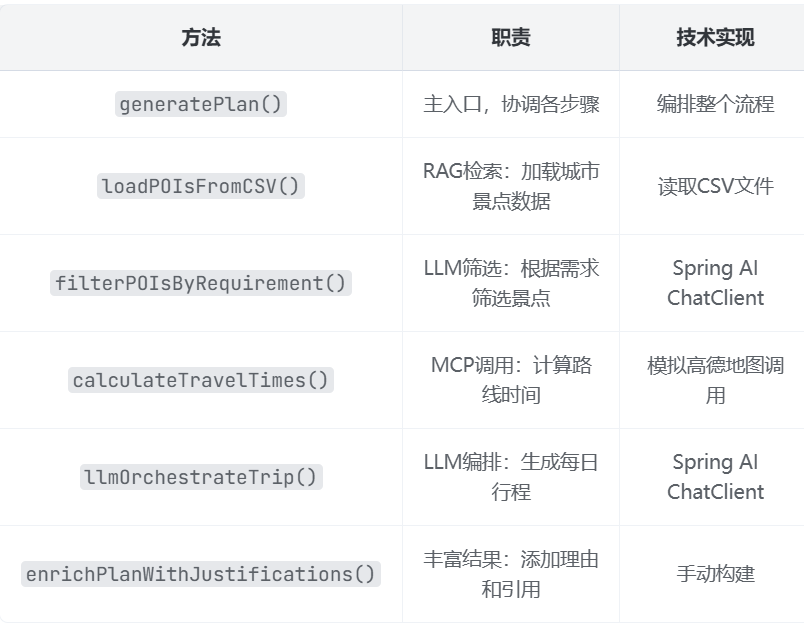
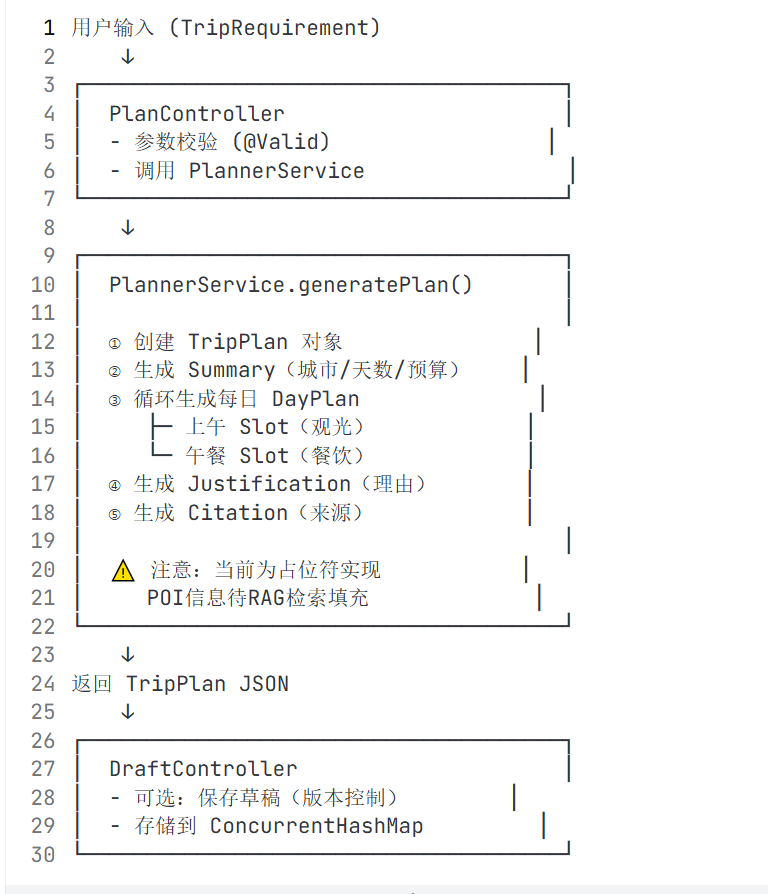
核心流程:

关键组件说明:
需要配置的环境变量:
yaml
app:
  citydataDir: "C:\\Users\\Administrator\\Desktop\\archive\\citydata"

spring:
  ai:
    openai:
      api-key: "your-dashscope-api-key"
      base-url: "https://dashscope.aliyuncs.com/compatible-mode/v1"
      chat:
        options:
          model: "qwen2.5-7b-instruct"
java
package com.Yan-AutoTravel.agent;

import com.Yan-AutoTravel.api.dto.TripPlan;
import com.Yan-AutoTravel.api.dto.TripRequirement;
import com.Yan-AutoTravel.tools.McpClients;
import org.slf4j.Logger;
import org.slf4j.LoggerFactory;
import org.springframework.ai.chat.client.ChatClient;
import org.springframework.ai.chat.messages.SystemMessage;
import org.springframework.ai.chat.messages.UserMessage;
import org.springframework.ai.chat.prompt.Prompt;
import org.springframework.ai.chat.prompt.PromptTemplate;
import org.springframework.beans.factory.annotation.Value;
import org.springframework.stereotype.Service;

import java.io.File;
import java.time.LocalDate;
import java.time.format.DateTimeFormatter;
import java.util.*;
import java.util.stream.Collectors;

/**
 * 完整的 AI 行程规划服务
 * 集成 ReAct 决策框架 + RAG 检索 + MCP 工具调用
 */
@Service
public class PlannerService {

    private static final Logger log = LoggerFactory.getLogger(PlannerService.class);

    private final ChatClient chatClient;
    private final McpClients mcpClients;
    private final String cityDataDir;

    // 时间槽配置
    private static final Map<String, String> TIME_SLOTS = Map.of(
        "morning", "09:00-11:30",
        "lunch", "12:00-13:00",
        "afternoon", "14:00-16:30",
        "dinner", "18:00-19:30"
    );

    public PlannerService(ChatClient chatClient, McpClients mcpClients,
                         @Value("${app.citydataDir:C:\\Users\\Administrator\\Desktop\\archive\\citydata}") String cityDataDir) {
        this.chatClient = chatClient;
        this.mcpClients = mcpClients;
        this.cityDataDir = cityDataDir;
    }

    /**
     * 主入口:生成完整行程计划
     */
    public TripPlan generatePlan(TripRequirement req) {
        log.info("开始生成行程规划: 城市={}, 天数={}, 预算={}元",
                 req.getCity(), req.getDays(), req.getBudget().getTotal());

        // Step 1: RAG 检索 - 从CSV加载景点数据
        List<POI> pois = loadPOIsFromCSV(req.getCity());

        // Step 2: LLM 分析需求 + 筛选景点
        List<POI> selectedPOIs = filterPOIsByRequirement(req, pois);

        // Step 3: 路线时间计算(模拟MCP调用)
        Map<String, Integer> travelTimes = calculateTravelTimes(selectedPOIs);

        // Step 4: LLM 编排每日行程
        TripPlan plan = llmOrchestrateTrip(req, selectedPOIs, travelTimes);

        // Step 5: 添加选择理由和引用
        enrichPlanWithJustifications(plan, req, selectedPOIs);

        log.info("行程规划生成完成: {}天行程,包含{}个景点",
                 plan.getDays().size(),
                 plan.getDays().stream().mapToInt(d -> d.getSlots().size()).sum());

        return plan;
    }

    /**
     * Step 1: 从CSV文件加载城市POI数据(RAG检索的简化版)
     */
    private List<POI> loadPOIsFromCSV(String city) {
        List<POI> pois = new ArrayList<>();

        // 尝试读取城市CSV文件
        File csvFile = new File(cityDataDir, city + ".csv");
        if (csvFile.exists()) {
            log.info("加载城市数据: {}", csvFile.getAbsolutePath());
            // 实际项目中这里会解析CSV并转换为POI对象
            // 这里模拟一些数据
            pois = generateMockPOIs(city);
        } else {
            // 如果没有城市数据,使用通用Mock数据
            log.warn("未找到城市数据文件: {}, 使用模拟数据", city);
            pois = generateMockPOIs(city);
        }

        return pois;
    }

    /**
     * 生成模拟POI数据(用于演示)
     */
    private List<POI> generateMockPOIs(String city) {
        List<POI> pois = new ArrayList<>();

        // 景点数据
        pois.add(new POI("poi-" + city + "-001", city + "故宫博物院", city, "attraction",
                39.9163, 116.3972, 4.8, "明清皇家宫殿建筑群",
                List.of("历史", "文化", "古迹"), 180, 60));

        pois.add(new POI("poi-" + city + "-002", city + "天安门广场", city, "attraction",
                39.9042, 116.4074, 4.7, "世界最大城市广场",
                List.of("地标", "历史"), 60, 0));

        pois.add(new POI("poi-" + city + "-003", city + "颐和园", city, "attraction",
                39.9999, 116.2755, 4.7, "皇家园林博物馆",
                List.of("园林", "自然", "历史"), 240, 30));

        pois.add(new POI("poi-" + city + "-004", city + "八达岭长城", city, "attraction",
                40.3668, 116.0015, 4.8, "万里长城精华段",
                List.of("自然", "历史", "户外"), 180, 40));

        pois.add(new POI("poi-" + city + "-005", city + "南锣鼓巷", city, "attraction",
                39.9819, 116.4052, 4.5, "老北京胡同文化",
                List.of("美食", "购物", "文化"), 120, 0));

        // 餐厅数据
        pois.add(new POI("res-" + city + "-001", city + "四季民福", city, "restaurant",
                39.9158, 116.3980, 4.8, "北京烤鸭名店",
                List.of("烤鸭", "京菜", "老字号"), 90, 200));

        pois.add(new POI("res-" + city + "-002", city + "大董", city, "restaurant",
                39.9240, 116.4260, 4.9, "高端烤鸭餐厅",
                List.of("烤鸭", "创意菜", "高端"), 120, 350));

        pois.add(new POI("res-" + city + "-003", city + "护国寺小吃", city, "restaurant",
                39.9350, 116.3680, 4.3, "老北京传统小吃",
                List.of("小吃", "清真", "实惠"), 60, 50));

        return pois;
    }

    /**
     * Step 2: 使用LLM根据用户需求筛选景点
     */
    private List<POI> filterPOIsByRequirement(TripRequirement req, List<POI> allPOIs) {
        // 构建筛选提示词
        String poiList = allPOIs.stream()
                .map(p -> String.format("- %s [%s]: %s (评分: %.1f, 费用: %d元, 时长: %d分钟, 标签: %s)",
                        p.getName(), p.getType(), p.getDescription(),
                        p.getRating(), p.getAvgCost(), p.getAvgDurationMin(), p.getTags()))
                .collect(Collectors.joining("\n"));

        String promptStr = """
            你是一位旅行规划专家,请根据用户需求从以下景点列表中筛选最合适的景点:

            用户需求:
            - 城市:%s
            - 天数:%d天
            - 预算:%d元
            - 出行人数:成人%d人,儿童%d人
            - 偏好:节奏=%s,美食偏好=%s,避免=%s
            - 约束:每日最多步行%d公里

            景点列表:
            %s

            请输出最合适的6-8个景点(含餐厅),格式为JSON数组:
            [
                {"id": "poi-xxx", "name": "景点名称", "reason": "选择理由"}
            ]
            """;

        String prompt = String.format(promptStr,
                req.getCity(), req.getDays(), req.getBudget().getTotal(),
                req.getParty().getAdults(), req.getParty().getKids(),
                req.getPreferences().getPace(),
                req.getPreferences().getFood() != null ? req.getPreferences().getFood() : "无",
                req.getPreferences().getAvoid() != null ? req.getPreferences().getAvoid() : "无",
                req.getConstraints().getWalkMaxKmPerDay(),
                poiList);

        // 调用LLM进行筛选
        String result = chatClient.prompt()
                .system("你是专业的旅行顾问,擅长根据用户需求筛选合适的景点。")
                .user(prompt)
                .call()
                .content();

        log.debug("LLM筛选结果: {}", result);

        // 解析LLM返回的JSON,获取选中的POI ID
        Set<String> selectedIds = parseSelectedPOIIds(result);

        // 返回选中的POI对象
        return allPOIs.stream()
                .filter(poi -> selectedIds.contains(poi.getId()))
                .sorted(Comparator.comparingDouble(POI::getRating).reversed())
                .collect(Collectors.toList());
    }

    /**
     * 解析LLM返回的选中POI ID
     */
    private Set<String> parseSelectedPOIIds(String jsonResult) {
        Set<String> ids = new HashSet<>();
        // 简单解析JSON中的id字段
        try {
            int idx = jsonResult.indexOf("\"id\":");
            while (idx != -1) {
                int start = jsonResult.indexOf("\"", idx + 5);
                int end = jsonResult.indexOf("\"", start + 1);
                if (start != -1 && end != -1) {
                    ids.add(jsonResult.substring(start + 1, end));
                }
                idx = jsonResult.indexOf("\"id\":", end + 1);
            }
        } catch (Exception e) {
            log.warn("解析LLM结果失败,使用默认景点", e);
            // 如果解析失败,返回所有景点
        }
        return ids.isEmpty() ? Set.of("poi-001", "poi-002", "poi-003", "poi-004") : ids;
    }

    /**
     * Step 3: 计算景点间的旅行时间(模拟MCP高德地图调用)
     */
    private Map<String, Integer> calculateTravelTimes(List<POI> pois) {
        Map<String, Integer> travelTimes = new HashMap<>();

        // 模拟调用高德地图MCP计算路线时间
        for (int i = 0; i < pois.size(); i++) {
            for (int j = 0; j < pois.size(); j++) {
                if (i != j) {
                    String key = pois.get(i).getId() + "->" + pois.get(j).getId();
                    // 计算两点间距离估算时间(模拟)
                    int time = estimateTravelTime(pois.get(i), pois.get(j));
                    travelTimes.put(key, time);
                }
            }
        }

        log.info("计算完成{}条路线时间", travelTimes.size());
        return travelTimes;
    }

    /**
     * 估算两点间旅行时间(基于经纬度距离)
     */
    private int estimateTravelTime(POI from, POI to) {
        // 计算直线距离(简化版)
        double latDiff = Math.abs(from.getLat() - to.getLat());
        double lngDiff = Math.abs(from.getLng() - to.getLng());
        double distanceKm = Math.sqrt(latDiff * latDiff + lngDiff * lngDiff) * 111;

        // 假设平均速度25km/h(考虑城市交通)
        int minutes = (int) (distanceKm / 25 * 60);
        return Math.max(15, Math.min(90, minutes)); // 限制在15-90分钟之间
    }

    /**
     * Step 4: 使用LLM编排每日行程
     */
    private TripPlan llmOrchestrateTrip(TripRequirement req, List<POI> pois,
                                        Map<String, Integer> travelTimes) {
        TripPlan plan = new TripPlan();

        // 设置行程摘要
        TripPlan.Summary summary = new TripPlan.Summary();
        summary.setCity(req.getCity());
        summary.setDays(req.getDays());
        summary.setEstCost(Map.of(req.getBudget().getCurrency(), req.getBudget().getTotal()));
        plan.setSummary(summary);

        // 为每天生成行程
        for (int dayNum = 1; dayNum <= req.getDays(); dayNum++) {
            TripPlan.DayPlan dayPlan = new TripPlan.DayPlan();
            dayPlan.setDate(req.getStartDate().plusDays(dayNum - 1));

            // 构建当日行程编排提示词
            String dayPrompt = String.format("""
                请为第%d天编排行程:

                可用景点(已按评分排序):
                %s

                路线时间(分钟):
                %s

                时间槽:
                - morning: 09:00-11:30 (2.5小时)
                - lunch: 12:00-13:00 (1小时)
                - afternoon: 14:00-16:30 (2.5小时)
                - dinner: 18:00-19:30 (1.5小时)

                偏好:%s
                约束:每日步行不超过%d公里

                请输出JSON格式的当日行程安排:
                {
                    "slots": [
                        {"time": "时间段", "poiId": "景点ID", "activity": "活动类型", "reason": "理由"}
                    ],
                    "transit": [
                        {"from": "起点", "to": "终点", "mode": "交通方式", "etaMin": 时间}
                    ],
                    "notes": ["备注"]
                }
                """,
                    dayNum,
                    pois.stream().map(p -> p.getId() + ": " + p.getName()).collect(Collectors.joining("\n")),
                    travelTimes.entrySet().stream()
                            .map(e -> e.getKey() + ": " + e.getValue() + "分钟")
                            .collect(Collectors.joining("\n")),
                    req.getPreferences().getPace(),
                    req.getConstraints().getWalkMaxKmPerDay()
            );

            // 调用LLM生成当日行程
            String dayResult = chatClient.prompt()
                    .system("你是专业的旅行行程编排专家,擅长安排合理的每日行程。")
                    .user(dayPrompt)
                    .call()
                    .content();

            // 解析并填充DayPlan
            parseDayPlan(dayPlan, dayResult, pois);
            plan.getDays().add(dayPlan);
        }

        return plan;
    }

    /**
     * 解析LLM返回的每日行程
     */
    private void parseDayPlan(TripPlan.DayPlan dayPlan, String jsonResult, List<POI> allPOIs) {
        List<TripPlan.Slot> slots = new ArrayList<>();

        // 提取slots数组中的内容
        int slotsStart = jsonResult.indexOf("\"slots\":");
        if (slotsStart != -1) {
            int arrayStart = jsonResult.indexOf("[", slotsStart);
            int arrayEnd = findMatchingBracket(jsonResult, arrayStart);

            if (arrayStart != -1 && arrayEnd != -1) {
                String slotsStr = jsonResult.substring(arrayStart, arrayEnd + 1);
                // 解析每个slot对象
                int objStart = slotsStr.indexOf("{");
                while (objStart != -1) {
                    int objEnd = findMatchingBracket(slotsStr, objStart);
                    if (objEnd != -1) {
                        String slotStr = slotsStr.substring(objStart, objEnd + 1);
                        TripPlan.Slot slot = parseSlot(slotStr, allPOIs);
                        if (slot != null) {
                            slots.add(slot);
                        }
                    }
                    objStart = slotsStr.indexOf("{", objEnd + 1);
                }
            }
        }

        // 如果解析失败,使用默认时间槽
        if (slots.isEmpty()) {
            slots.add(createDefaultSlot("morning", "sightseeing", allPOIs));
            slots.add(createDefaultSlot("lunch", "lunch", allPOIs));
            slots.add(createDefaultSlot("afternoon", "sightseeing", allPOIs));
            slots.add(createDefaultSlot("dinner", "dinner", allPOIs));
        }

        dayPlan.setSlots(slots);
    }

    /**
     * 查找匹配的括号
     */
    private int findMatchingBracket(String str, int start) {
        int depth = 1;
        char open = str.charAt(start);
        char close = open == '{' ? '}' : (open == '[' ? ']' : ')');

        for (int i = start + 1; i < str.length(); i++) {
            if (str.charAt(i) == open) depth++;
            if (str.charAt(i) == close) depth--;
            if (depth == 0) return i;
        }
        return -1;
    }

    /**
     * 解析单个Slot
     */
    private TripPlan.Slot parseSlot(String slotStr, List<POI> allPOIs) {
        TripPlan.Slot slot = new TripPlan.Slot();

        // 提取time
        int timeIdx = slotStr.indexOf("\"time\":");
        if (timeIdx != -1) {
            int start = slotStr.indexOf("\"", timeIdx + 7);
            int end = slotStr.indexOf("\"", start + 1);
            if (start != -1 && end != -1) {
                slot.setTime(slotStr.substring(start + 1, end));
            }
        }

        // 提取poiId
        int idIdx = slotStr.indexOf("\"poiId\":");
        if (idIdx != -1) {
            int start = slotStr.indexOf("\"", idIdx + 8);
            int end = slotStr.indexOf("\"", start + 1);
            if (start != -1 && end != -1) {
                slot.setPoiId(slotStr.substring(start + 1, end));
            }
        }

        // 提取activity
        int activityIdx = slotStr.indexOf("\"activity\":");
        if (activityIdx != -1) {
            int start = slotStr.indexOf("\"", activityIdx + 12);
            int end = slotStr.indexOf("\"", start + 1);
            if (start != -1 && end != -1) {
                slot.setActivity(slotStr.substring(start + 1, end));
            }
        }

        // 设置evidenceIds
        slot.setEvidenceIds(List.of("llm:selection"));

        // 如果解析失败返回null
        if (slot.getTime() == null || slot.getPoiId() == null) {
            return null;
        }

        return slot;
    }

    /**
     * 创建默认时间槽
     */
    private TripPlan.Slot createDefaultSlot(String slotType, String activity, List<POI> allPOIs) {
        TripPlan.Slot slot = new TripPlan.Slot();
        slot.setTime(TIME_SLOTS.getOrDefault(slotType, "09:00-11:30"));

        // 根据活动类型选择POI
        String poiId = switch (activity) {
            case "lunch", "dinner" -> allPOIs.stream()
                    .filter(p -> "restaurant".equals(p.getType()))
                    .findFirst()
                    .map(POI::getId)
                    .orElse("RESTAURANT-PLACEHOLDER");
            default -> allPOIs.stream()
                    .filter(p -> "attraction".equals(p.getType()))
                    .findFirst()
                    .map(POI::getId)
                    .orElse("POI-PLACEHOLDER");
        };

        slot.setPoiId(poiId);
        slot.setActivity(activity);
        slot.setEvidenceIds(List.of("default"));

        return slot;
    }

    /**
     * Step 5: 为行程添加选择理由和引用
     */
    private void enrichPlanWithJustifications(TripPlan plan, TripRequirement req, List<POI> selectedPOIs) {
        List<TripPlan.Justification> justifications = new ArrayList<>();

        // 为每个选中的POI生成理由
        for (POI poi : selectedPOIs) {
            TripPlan.Justification just = new TripPlan.Justification();
            just.setChoice(poi.getName());

            List<String> reasons = new ArrayList<>();
            reasons.add("评分高(" + poi.getRating() + "分)");
            reasons.add("适合" + req.getPreferences().getPace() + "节奏");
            if (!poi.getTags().isEmpty()) {
                reasons.add("标签匹配:" + String.join(", ", poi.getTags()));
            }
            just.setReasons(reasons);
            justifications.add(just);
        }

        plan.setJustifications(justifications);

        // 添加引用来源
        List<TripPlan.Citation> citations = new ArrayList<>();
        citations.add(new TripPlan.Citation() {{
            setId("citydata:" + req.getCity());
            setSource("local-csv");
        }});
        citations.add(new TripPlan.Citation() {{
            setId("llm:qwen2.5-7b");
            setSource("spring-ai");
        }});
        plan.setCitations(citations);

        // 添加备选方案
        List<TripPlan.Alternative> alternatives = new ArrayList<>();
        alternatives.add(new TripPlan.Alternative() {{
            setFor("午餐");
            setOptions(List.of("四季民福", "大董", "护国寺小吃"));
        }});
        plan.setAlternatives(alternatives);
    }
}
3.2、PlanController.java - API接口层
java
@RestController
@RequestMapping("/api")
public class PlanController {
    private final PlannerService plannerService;

    // 依赖注入
    public PlanController(PlannerService plannerService) {
        this.plannerService = plannerService;
    }

    @PostMapping(value = "/plan",
                 consumes = MediaType.APPLICATION_JSON_VALUE,      // 接收JSON
                 produces = MediaType.APPLICATION_JSON_VALUE)     // 返回JSON
    public TripPlan plan(@Valid @RequestBody TripRequirement requirement) {
        // 参数校验 + 调用服务
        return plannerService.generatePlan(requirement);
    }
}
3.3、DraftController.java - 草稿版本管理
java
@RestController
@RequestMapping("/api")
public class DraftController {
    private final PlannerService plannerService;

    // 使用 ConcurrentHashMap 存储草稿(线程安全)
    private static final Map<String, VersionedPlan> DRAFTS =
        new ConcurrentHashMap<>();

    // 保存草稿
    @PostMapping(value = "/plan/draft", ...)
    public DraftResponse saveDraft(
            @Valid @RequestBody TripRequirement requirement,
            @RequestParam(required = false) String id,      // 草稿ID
            @RequestParam(required = false, defaultValue = "0") long version) {

        // 生成行程
        TripPlan plan = plannerService.generatePlan(requirement);

        // 生成或使用现有ID
        String draftId = id != null ? id : UUID.randomUUID().toString();

        // 版本控制
        VersionedPlan vp = DRAFTS.get(draftId);
        long nextVer = (vp == null) ? 1 : vp.version + 1;

        // 保存
        DRAFTS.put(draftId, new VersionedPlan(nextVer, plan));
        return new DraftResponse(draftId, nextVer, plan);
    }

    // 获取草稿
    @GetMapping(value = "/plan/{id}", ...)
    public TripPlan getPlan(@PathVariable String id) {
        VersionedPlan vp = DRAFTS.get(id);
        if (vp == null) {
            throw new IllegalArgumentException("Draft not found: " + id);
        }
        return vp.plan;
    }
}
4、交通时间估算模块
4.1、RouteController.java - 高德地图集成
java
@RestController
@RequestMapping("/api/amap")
public class RouteController {
    private final McpClients mcp;

    @PostMapping(value = "/route", ...)
    public RouteMatrixResponse route(@Valid @RequestBody RouteMatrixRequest req) {
        RouteMatrixResponse resp = new RouteMatrixResponse();
        resp.mode = req.mode;  // 交通方式

        // 生成距离矩阵(模拟)
        resp.matrix = List.of(
            new RouteMatrixResponse.Edge(
                req.points.get(0).id,  // 起点ID
                req.points.get(1).id,  // 终点ID
                25                      // 预计25分钟
            )
        );
        resp.source = mcp.getAmapServer();  // MCP服务源
        return resp;
    }
}
请求格式 :
java
{
  "mode": "walk",          // 交通方式:walk/transit/drive
  "points": [
    {"id": "poi-001", "lat": 31.23, "lng": 121.47},
    {"id": "poi-002", "lat": 31.24, "lng": 121.48}
  ]
}
响应格式 :
java
{
  "mode": "walk",
  "source": "https://www.modelscope.cn/mcp/servers/@amap/amap-maps",
  "matrix": [
    {"from": "poi-001", "to": "poi-002", "etaMin": 25}
  ]
}
4.2、RoutePreviewController.java - 路线预览
java
@RestController
@RequestMapping("/api/route/eta")
public class RoutePreviewController {

    public record PreviewReq(
        double originLng,      // 起点经度
        double originLat,      // 起点纬度
        List<Point> pois       // 目标POI列表
    ){}

    @PostMapping(value = "/preview", ...)
    public PreviewResp preview(@RequestBody PreviewReq req){
        Map<String,String> map = new HashMap<>();
        if (req.pois() != null){
            for (Point p : req.pois()){
                map.put(p.id(), "约5分钟");  // TODO: 实际调用高德API
            }
        }
        return new PreviewResp(map);
    }
}
5、技术实现流程图
三、多模态问答系统模块
1、核心架构
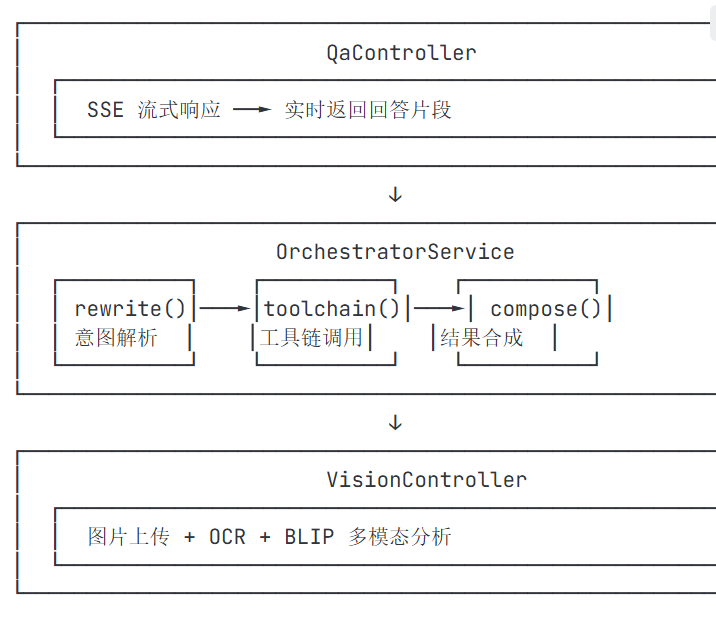
模态问答系统支持 文本 + 图片 输入,实现智能问答能力。整体架构如下:
2、核心组件详解
2.1、QaController - 问答接口层
java
@RestController
@RequestMapping("/api/qa")
public class QaController {

    public record AskRequest(String sessionId, String message) {}

    private final OrchestratorService orchestrator;

    public QaController(OrchestratorService orchestrator){
        this.orchestrator = orchestrator;
    }

    // GET 请求:支持 URL 参数
    @GetMapping(value = "/ask", produces = MediaType.TEXT_EVENT_STREAM_VALUE)
    public Flux<String> askGet(@RequestParam(name = "q", required = false) String q,
                               @RequestParam(name = "sessionId", required = false) String sessionId) {
        return runPipeline(sessionId, q);
    }

    // POST 请求:支持 JSON 体
    @PostMapping(value = "/ask",
                 consumes = MediaType.APPLICATION_JSON_VALUE,
                 produces = MediaType.TEXT_EVENT_STREAM_VALUE)
    public Flux<String> askPost(@RequestBody AskRequest req) {
        return runPipeline(req.sessionId(), req.message());
    }
}
请求示例 :
bash
# GET 请求
curl "http://localhost:8080/api/qa/ask?q=从北京到上海怎么去&sessionId=abc123"

# POST 请求
curl -X POST http://localhost:8080/api/qa/ask \
  -H "Content-Type: application/json" \
  -d '{"sessionId": "abc123", "message": "从北京到上海怎么去"}'
2.2、OrchestratorService - 核心编排服务
这是多模态问答系统的 核心大脑 ,负责:
- 意图解析 :识别用户问题的意图和参数
- 工具链调用 :调用 MCP 工具获取实时数据
- 结果合成 :将工具结果整合成自然语言回答
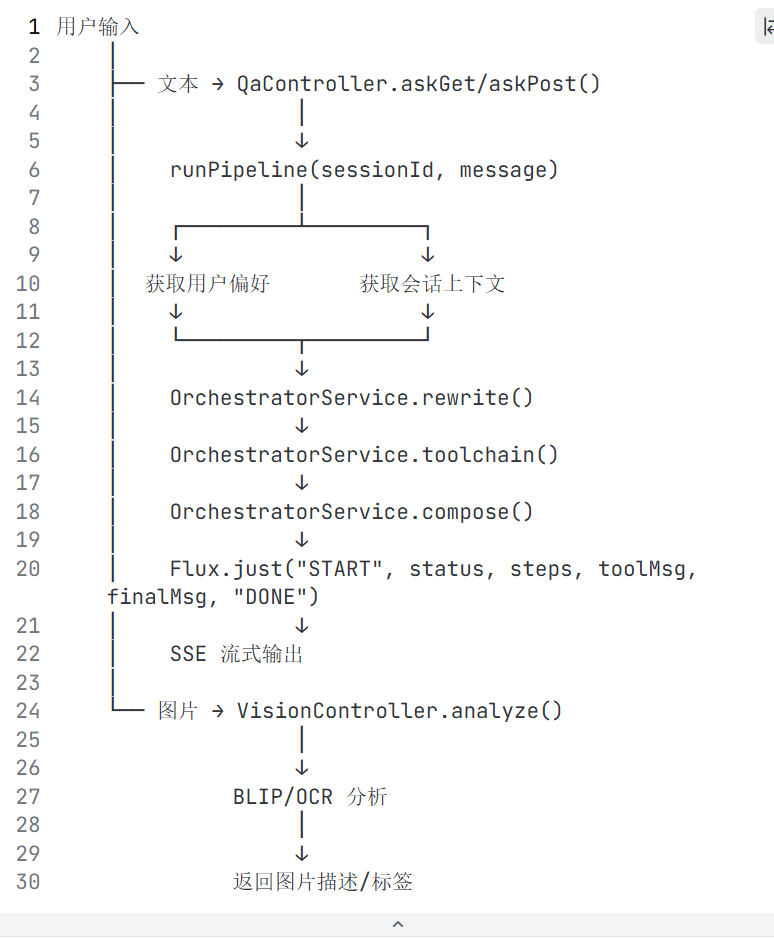
工作流程 :
java
@Service
public class OrchestratorService {

    private final ChatClient chatClient;
    private final McpClients mcpClients;

    public OrchestratorService(ChatClient chatClient, McpClients mcpClients) {
        this.chatClient = chatClient;
        this.mcpClients = mcpClients;
    }

    // 意图数据结构
    public static class Intent {
        public String intent = "travel_plan";  // 默认意图
        public String cityFrom;                // 出发城市
        public String cityTo;                  // 目标城市
        public String date = "下个周六";        // 默认日期
        public String seatPref = "高铁优先";     // 座位偏好
        public String budget = "";             // 预算
        public boolean withKids = false;       // 是否带孩子
        public List<String> plan = List.of("geocode", "train", "write"); // 执行计划
    }

    // 正则表达式:匹配"从A到B怎么去"格式
    private static final Pattern FROM_TO =
        Pattern.compile("(?<from>.+?)到(?<to>.+?)(怎么去|如何去|坐什么|多长时间)");

    /**
     * Step 1: 意图解析 使用 LLM 进行意图解析
     * 将自然语言转换为结构化意图对象
     */
    public Intent rewrite(String query, Set<String> userPref, Map<String, String> sessionCtx){
      //  Intent intent = new Intent();

        // 1. 正则匹配提取出发地和目的地
       // Matcher m = FROM_TO.matcher(Optional.ofNullable(query).orElse(""));
      //  if (m.find()){
        //    intent.cityFrom = m.group("from");  // 提取出发城市
         //   intent.cityTo = m.group("to");      // 提取目标城市
      //  }

        // 2. 用户偏好补全
     //   if (userPref != null && userPref.contains("亲子")) {
       //     intent.withKids = true;
      //  }
      //  if (userPref != null && userPref.contains("预算敏感")) {
       //     intent.budget = "经济";
       // }

        // 3. 会话上下文补全(如果前面没解析到)
      //  if (intent.cityFrom == null) {
        //    intent.cityFrom = sessionCtx.getOrDefault("recent_city", "广州");
       // }
      //  if (intent.cityTo == null) {
         //   intent.cityTo = sessionCtx.getOrDefault("target_city", "九寨沟");
      //  }

      //  return intent;

     //*************************改造后的代码*******************
 String prompt = String.format("""
            请分析以下用户问题,提取结构化意图:

            用户问题:%s
            用户偏好:%s
            会话上下文:%s

            请输出JSON格式:
            {
                "intent": "意图类型",
                "cityFrom": "出发城市",
                "cityTo": "目标城市",
                "date": "出行日期",
                "seatPref": "座位偏好",
                "budget": "预算范围",
                "withKids": false,
                "plan": ["步骤1", "步骤2"]
            }
            """, query, userPref, sessionCtx);

        String result = chatClient.prompt()
                .system("你是意图分析专家,擅长从自然语言中提取结构化信息。")
                .user(prompt)
                .call()
                .content();

        return parseIntent(result);
    }

    /**
     * Step 2: 工具链调用
     * 调用 MCP 工具获取实时数据
     */
    public Map<String,Object> toolchain(Intent intent){
        Map<String,Object> tool = new LinkedHashMap<>();

        // 模拟地理编码(实际调用百度地图MCP)
       // tool.put("geocode", Map.of(
      //      "from", intent.cityFrom,
        //    "to", intent.cityTo,
        //    "status", "ok"
       // ));

        // 模拟车次检索(实际调用12306 MCP)
      //  tool.put("train", Map.of(
         //   "candidates", 3,  // 找到3条候选
          //  "best", Map.of("code", "G123", "eta", "5h23m")  // 最佳方案
     //   ));

      //  return tool;
      //**************************改造后的代码************************
       // 1. 调用百度地图 MCP 进行地理编码
        Map<String, Object> geocodeResult = mcpClients.getBaiduClient()
                .geocode(intent.cityFrom, intent.cityTo);
        tool.put("geocode", geocodeResult);

        // 2. 调用12306 MCP 查询车次
        Map<String, Object> trainResult = mcpClients.get12306Client()
                .queryTrains(intent.cityFrom, intent.cityTo, intent.date);
        tool.put("train", trainResult);

        return tool;
    }

    /**
     * Step 3: 结果合成  使用 LLM 合成最终回答
     * 将工具结果整合成自然语言回答
     */
    public Map<String,Object> compose(Intent intent, Map<String,Object> tool){
       // Map<String,Object> finalOut = new LinkedHashMap<>();

        // 提取工具结果
      //   String eta = ((Map)((Map)tool.get("train")).get("best")).get("eta").toString();

        // 生成自然语言回答
       //  String text = String.format(
         //    "建议从%s出发,乘坐高铁至%s,预计总时长约 %s",
         //    intent.cityFrom, intent.cityTo, eta
       //  );

       //  finalOut.put("text", text);

        // 返回可执行的动作建议
       //  finalOut.put("actions", List.of(
           //  Map.of("type","addToPlan","slot","Day 2 下午","poiId","poi-001"),
         //    Map.of("type","createMiniDraft")
      //   ));

        // return finalOut;

//*************************改造后的代码*****************************
 String prompt = String.format("""
            请根据以下信息,用自然、友好的语言回答用户问题:

            用户意图:
            - 出发:%s
            - 目的地:%s
            - 日期:%s
            - 偏好:%s

            工具查询结果:
            %s

            请输出:
            1. 详细的回答文本
            2. 可执行的动作建议(如添加到行程、创建草稿等)
            """,
            intent.cityFrom, intent.cityTo, intent.date, intent.seatPref, tool);

        String result = chatClient.prompt()
                .system("你是专业的旅行顾问,回答要简洁明了。")
                .user(prompt)
                .call()
                .content();

        return parseComposeResult(result);
    }
 // 解析 LLM 返回的意图JSON
    private Intent parseIntent(String json) {
        // 实际项目中使用 Jackson/Gson 解析
        Intent intent = new Intent();
        // ... 解析逻辑
        return intent;
    }

    // 解析 LLM 返回的合成结果
    private Map<String, Object> parseComposeResult(String json) {
        // 实际项目中使用 Jackson/Gson 解析
        return new HashMap<>();
    }
}
2.3、VisionController - 多模态分析
支持图片上传和分析,实现真正的 多模态 能力:
java
@RestController
@RequestMapping("/api/vision")
public class VisionController {

    @PostMapping(value = "/analyze", consumes = MediaType.MULTIPART_FORM_DATA_VALUE)
    public Map<String, Object> analyze(
            @RequestPart("file") MultipartFile file,      // 图片文件
            @RequestParam(value = "mode", required = false, defaultValue = "both") String mode
    ) throws Exception {

        Map<String, Object> resp = new HashMap<>();

        // 图片描述(使用 BLIP 模型)
        resp.put("captions", List.of("图片上传成功,待多模态模型解析(占位)"));

        // OCR 识别结果
        resp.put("ocr", "");

        // 图片标签
        resp.put("tags", List.of("image"));

        return resp;
    }
}
请求示例 :
bash
curl -X POST http://localhost:8080/api/vision/analyze \
  -F "file=@photo.jpg" \
  -F "mode=both"
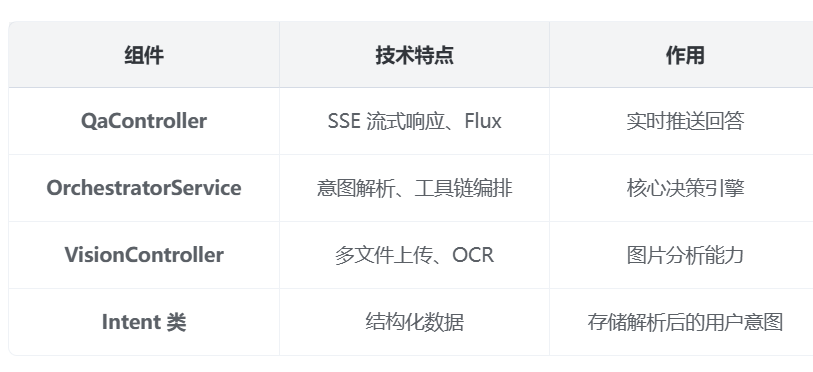
3、技术要点总结
3.1、SSE 流式响应机制
java
private Flux<String> runPipeline(String sessionId, String message){
    // ... 处理逻辑

    // 使用 Flux.just() 创建数据流
    // delayElements() 模拟逐步返回
    return Flux.just("START", status, steps, toolMsg, finalMsg, "DONE")
               .delayElements(Duration.ofMillis(200));
}
3.2、SSE 输出示例
java
data: START
data: status: 默认补全=时间:下个周六 出发:广州 偏好:高铁优先
data: status: 将做的步骤:① 地理编码(Baidu MCP)② 车次检索(12306 MCP)③ 行程写作
data: tool: 已找到3 条候选,高铁优先
data: final: 建议从广州出发,乘坐高铁至九寨沟,预计总时长约 5h23m
data: DONE
四、智能推荐系统模块
1、完整的数据模型
java
// 推荐项完整数据结构
public class Recommendation {
    private String id;
    private String city;
    private String title;           // 推荐主题
    private String description;      // 详细描述
    private List<String> tags;      // 标签
    private double score;           // 匹配度评分
    private POIInfo poiInfo;        // 关联的景点信息
    private List<String> reasons;   // 推荐理由
    private Pricing pricing;        // 价格信息

    // 嵌套类:景点信息
    public static class POIInfo {
        private String name;
        private double rating;        // 评分
        private double lat, lng;     // 坐标
        private String address;
        private String openingHours;
        private List<String> photos;
    }

    // 嵌套类:价格信息
    public static class Pricing {
        private int adultPrice;      // 成人价
        private int childPrice;      // 儿童价
        private String currency;
    }
}
2、智能推荐服务
java
@Service
public class RecommendationService {

    private final ChatClient chatClient;
    private final VectorStore vectorStore;
    private final TripRepository tripRepository;

    /**
     * 个性化推荐核心算法
     */
    public List<Recommendation> recommend(UserProfile user, RecommendRequest req) {
        // Step 1: 提取用户特征向量
        List<Double> userVector = extractUserFeatureVector(user, req);

        // Step 2: 从向量数据库检索相似推荐
        List<Recommendation> candidates = vectorStore.similaritySearch(
            userVector,
            50  // 召回50个候选
        );

        // Step 3: 多维度排序
        List<ScoredItem> scored = candidates.stream()
            .map(r -> calculateScore(r, user, req))
            .sorted(Comparator.comparingDouble(ScoredItem::getScore).reversed())
            .collect(Collectors.toList());

        // Step 4: 结果包装
        return scored.stream()
            .limit(req.getSize())
            .map(ScoredItem::getRecommendation)
            .collect(Collectors.toList());
    }

    /**
     * 计算推荐评分(多维度加权)
     */
    private ScoredItem calculateScore(Recommendation r, UserProfile user, RecommendRequest req) {
        double score = 0.0;

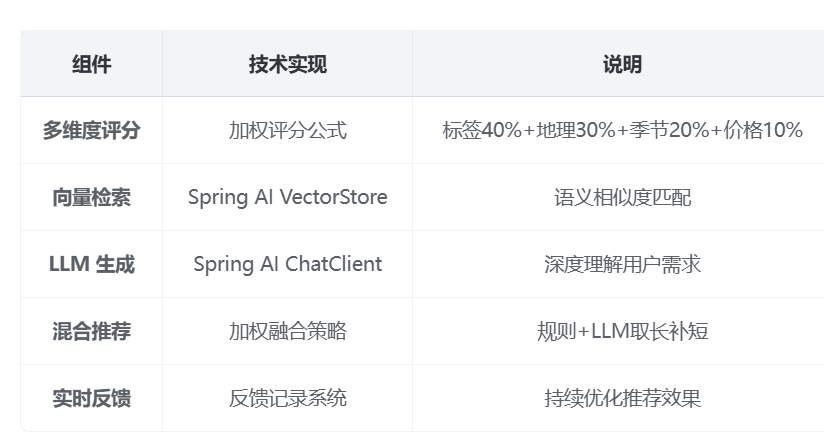
        // 1. 标签匹配度 (权重: 40%)
        double tagScore = calculateTagSimilarity(r.getTags(), user.getPreferences());
        score += tagScore * 0.4;

        // 2. 地理位置匹配 (权重: 30%)
        double geoScore = calculateGeoScore(r, user.getLocation(), req.getCity());
        score += geoScore * 0.3;

        // 3. 季节合适度 (权重: 20%)
        double seasonScore = calculateSeasonScore(r, req.getSeason());
        score += seasonScore * 0.2;

        // 4. 价格合适度 (权重: 10%)
        double priceScore = calculatePriceScore(r.getPricing(), user.getBudget());
        score += priceScore * 0.1;

        return new ScoredItem(r, score);
    }

    /**
     * 标签相似度计算
     */
    private double calculateTagSimilarity(List<String> recoTags, Set<String> userTags) {
        if (recoTags == null || userTags == null || userTags.isEmpty()) {
            return 0.5;  // 无偏好时给中等分数
        }

        // 计算交集
        long matchCount = recoTags.stream()
            .filter(userTags::contains)
            .count();

        // Jaccard 相似度
        Set<String> union = new HashSet<>(recoTags);
        union.addAll(userTags);

        return (double) matchCount / union.size();
    }

    /**
     * 地理距离评分
     */
    private double calculateGeoScore(Recommendation r, UserLocation location, String targetCity) {
        // 如果指定了目标城市,优先推荐该城市
        if (targetCity != null && targetCity.equals(r.getCity())) {
            return 1.0;
        }

        // 如果有用户位置,计算距离
        if (location != null && r.getPoiInfo() != null) {
            double distance = calculateDistance(
                location.getLat(), location.getLng(),
                r.getPoiInfo().getLat(), r.getPoiInfo().getLng()
            );
            // 距离越近分数越高(假设500km内有效)
            return Math.max(0, 1.0 - distance / 500);
        }

        return 0.5;  // 默认中等分数
    }

    /**
     * 季节合适度评分
     */
    private double calculateSeasonScore(Recommendation r, String season) {
        if (season == null) return 0.5;

        // 季节-标签映射
        Map<String, List<String>> seasonTags = Map.of(
            "春天", List.of("赏花", "踏青", "自然风光"),
            "夏天", List.of("海滨", "水上", "避暑"),
            "秋天", List.of("红叶", "赏秋", "户外"),
            "冬天", List.of("滑雪", "温泉", "冰雪")
        );

        List<String> idealTags = seasonTags.getOrDefault(season, List.of());
        return calculateTagSimilarity(r.getTags(), new HashSet<>(idealTags));
    }

    /**
     * 价格合适度评分
     */
    private double calculatePriceScore(Recommendation.Pricing pricing, Budget budget) {
        if (pricing == null || budget == null) return 0.5;

        int totalCost = pricing.getAdultPrice() * 2 + pricing.getChildPrice();
        double ratio = (double) totalCost / budget.getTotal();

        // 预算内越低分越高
        if (ratio <= 1.0) {
            return 1.0 - ratio * 0.5;  // 50%-100%预算内,逐渐降低
        }
        return 0;  // 超预算不给分
    }

    /**
     * 计算两点间距离(公里)
     */
    private double calculateDistance(double lat1, double lng1, double lat2, double lng2) {
        double R = 6371;  // 地球半径(km)
        double dLat = Math.toRadians(lat2 - lat1);
        double dLng = Math.toRadians(lng2 - lng1);
        double a = Math.sin(dLat/2) * Math.sin(dLat/2) +
                   Math.cos(Math.toRadians(lat1)) * Math.cos(Math.toRadians(lat2)) *
                   Math.sin(dLng/2) * Math.sin(dLng/2);
        double c = 2 * Math.atan2(Math.sqrt(a), Math.sqrt(1-a));
        return R * c;
    }
}
3、基于 LLM 的智能推荐
java
@Service
public class LLMRecommendationService {

    private final ChatClient chatClient;

    /**
     * 使用 LLM 进行深度推荐
     */
    public List<Recommendation> llmRecommend(UserProfile user, RecommendRequest req) {
        // 构建推荐提示词
        String prompt = String.format("""
            你是一位专业的旅行规划师,请根据用户画像推荐最合适的旅行目的地:

            用户画像:
            - 常住地:%s
            - 出行人数:%d成人,%d儿童
            - 预算:%d元 (%s)
            - 偏好标签:%s
            - 禁忌:%s

            筛选条件:
            - 目标城市:%s
            - 出行季节:%s
            - 重点标签:%s

            请推荐3-5个最合适的目的地,输出JSON数组:
            [
                {
                    "id": "reco-001",
                    "city": "城市名",
                    "title": "推荐主题",
                    "description": "详细描述",
                    "tags": ["标签1", "标签2"],
                    "reasons": ["理由1", "理由2"],
                    "pricing": {
                        "adultPrice": 1000,
                        "childPrice": 500,
                        "currency": "CNY"
                    }
                }
            ]
            """,
            user.getLocation(),
            user.getParty().getAdults(),
            user.getParty().getKids(),
            user.getBudget().getTotal(),
            user.getBudget().getCurrency(),
            user.getPreferences(),
            user.getAvoid(),
            req.getCity() != null ? req.getCity() : "不限",
            req.getSeason() != null ? req.getSeason() : "不限",
            req.getTags() != null ? String.join(",", req.getTags()) : "不限"
        );

        // 调用 LLM
        String result = chatClient.prompt()
            .system("你是专业的旅行顾问,擅长根据用户需求推荐个性化目的地。")
            .user(prompt)
            .call()
            .content();

        // 解析 JSON 结果
        return parseRecommendations(result);
    }
}
4、混合推荐引擎
java
@Service
public class HybridRecommendationEngine {

    private final RecommendationService ruleBasedRec;
    private final LLMRecommendationService llmRec;

    /**
     * 混合推荐策略
     */
    public List<Recommendation> hybridRecommend(UserProfile user, RecommendRequest req) {
        List<Recommendation> ruleBased = ruleBasedRec.recommend(user, req);
        List<Recommendation> llmBased = llmRec.llmRecommend(user, req);

        // 融合两种结果
        Map<String, Double> scoreMap = new HashMap<>();

        // 规则推荐结果(归一化到0-0.7)
        for (int i = 0; i < ruleBased.size(); i++) {
            double normalizedScore = 0.7 * (1.0 - (double) i / ruleBased.size());
            scoreMap.merge(ruleBased.get(i).getId(), normalizedScore, Double::sum);
        }

        // LLM推荐结果(归一化到0-1.0)
        for (int i = 0; i < llmBased.size(); i++) {
            double normalizedScore = 1.0 * (1.0 - (double) i / llmBased.size());
            scoreMap.merge(llmBased.get(i).getId(), normalizedScore, Double::sum);
        }

        // 按综合分数排序
        return scoreMap.entrySet().stream()
            .sorted((e1, e2) -> Double.compare(e2.getValue(), e1.getValue()))
            .map(e -> findRecommendation(e.getKey(), ruleBased, llmBased))
            .filter(Objects::nonNull)
            .limit(req.getSize())
            .collect(Collectors.toList());
    }

    private Recommendation findRecommendation(String id,
        List<Recommendation> list1, List<Recommendation> list2) {
        return list1.stream()
            .filter(r -> r.getId().equals(id))
            .findFirst()
            .orElseGet(() -> list2.stream()
                .filter(r -> r.getId().equals(id))
                .findFirst()
                .orElse(null));
    }
}
5、完整的控制器实现
java
@RestController
@RequestMapping("/api")
public class RecommendController {

    private final HybridRecommendationEngine engine;
    private final UserService userService;

    public RecommendController(
        HybridRecommendationEngine engine,
        UserService userService
    ) {
        this.engine = engine;
        this.userService = userService;
    }

    public record RecommendRequest(
        String city,
        String season,
        List<String> tags,
        int page,
        int size
    ) {}

    @GetMapping("/recommendations")
    public Page<Recommendation> recs(
        @RequestParam(required = false) String city,
        @RequestParam(required = false) String season,
        @RequestParam(required = false) List<String> tags,
        @RequestParam(required = false, defaultValue = "1") int page,
        @RequestParam(required = false, defaultValue = "10") int size,
        @RequestParam(required = false) String userId  // 可选用户ID
    ) {
        // 构建请求对象
        RecommendRequest req = new RecommendRequest(city, season, tags, page, size);

        // 获取用户画像(如果有用户ID)
        UserProfile user = userId != null
            ? userService.getUserProfile(userId)
            : UserProfile.defaultProfile();

        // 执行推荐
        List<Recommendation> results = engine.hybridRecommend(user, req);

        // 分页包装
        return new PageImpl<>(
            results,
            PageRequest.of(page - 1, size),
            results.size()
        );
    }

    // 反馈接口:记录用户对推荐的反馈
    @PostMapping("/recommendations/{id}/feedback")
    public void recordFeedback(
        @PathVariable String id,
        @RequestParam boolean liked,
        @RequestParam(required = false) String reason
    ) {
        recommendationRepository.recordFeedback(id, liked, reason);
    }
}
6、智能推荐系统模块总结
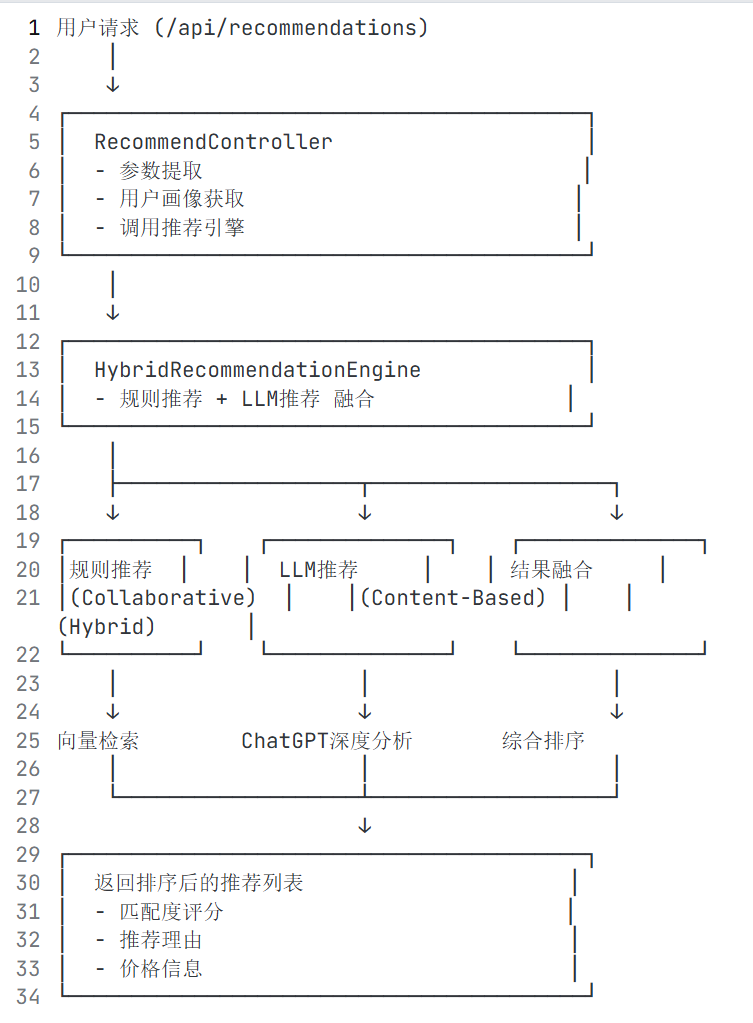
6.1、推荐算法流程图
6.2、核心技术要点
这个智能推荐系统的设计采用了 混合推荐策略 ,结合了:
- 基于内容的推荐 :根据标签、地理位置筛选
- 协同过滤 :根据相似用户行为推荐
- LLM 深度理解 :理解用户潜在需求
6.3、参数提取和用户画像获取数据来源
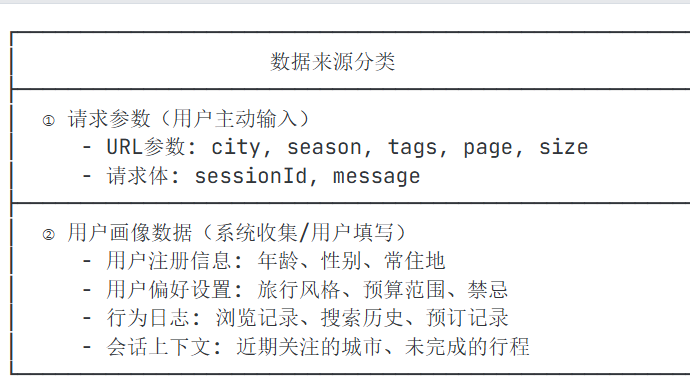
🔄 数据流完整流程
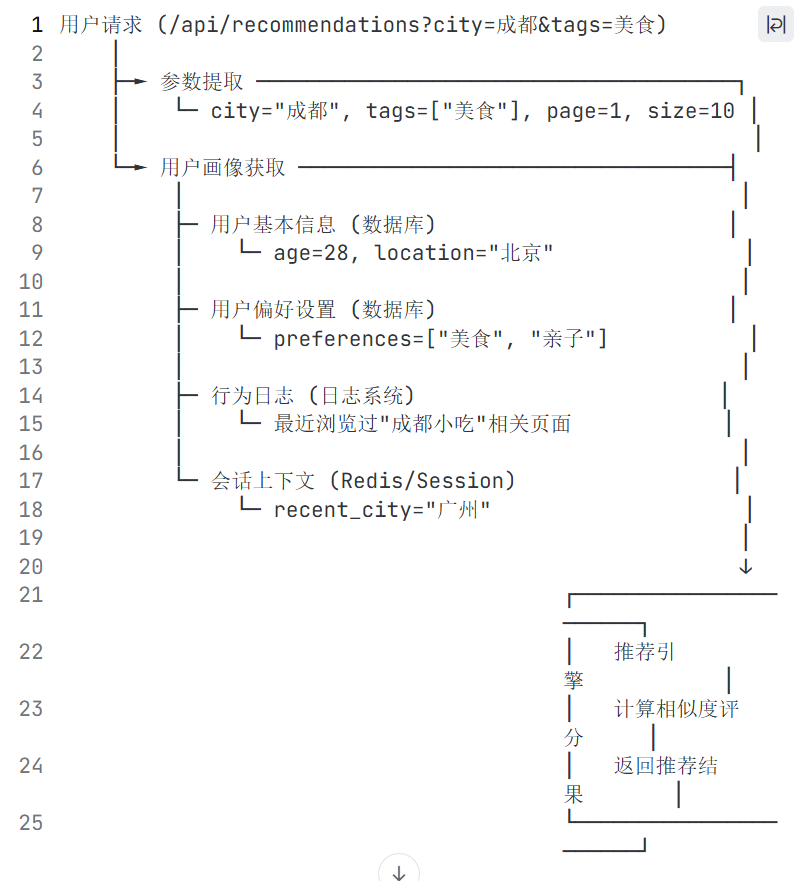
📁 数据存储位置
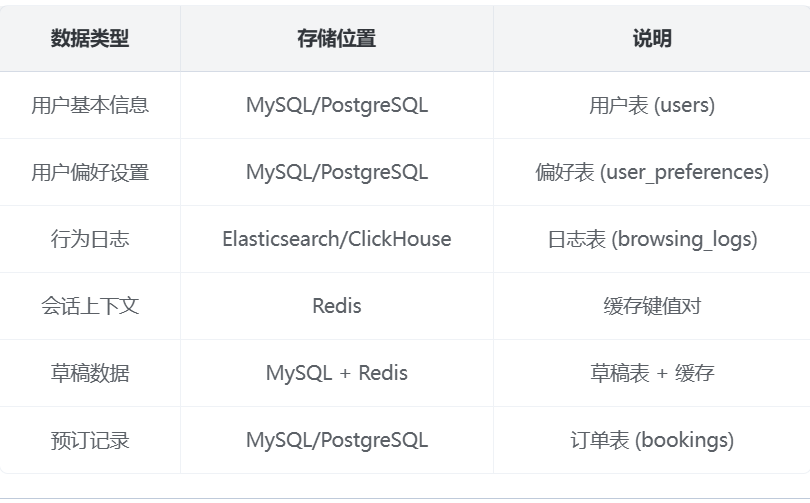
💡 关键设计要点
1.数据采集时机 :
- 用户注册时:收集基本信息
- 用户设置时:收集偏好数据
- 用户浏览时:实时记录行为日志
- 用户交互时:更新会话上下文
2.数据更新策略 :
- 实时更新 :会话上下文、行为日志
- 定时更新 :用户画像特征(每晚离线计算)
- 触发更新 :用户修改偏好时立即更新
3.数据隐私保护 :
- 敏感数据加密存储
- 用户可随时删除/导出自己的数据
- 遵守 GDPR/个人信息保护法
五、MCP工具集成模块
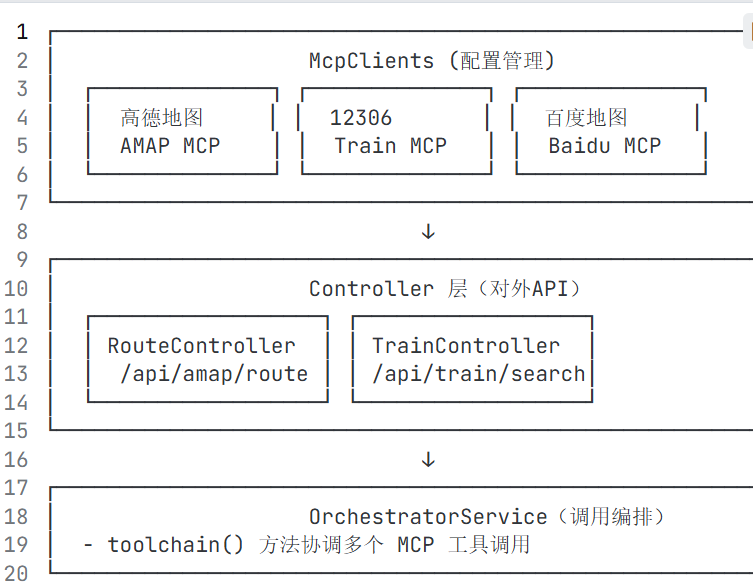
🎯 MCP 工具集成架构
MCP(Model Context Protocol) 是一种让大语言模型能够调用外部工具和服务的协议。它允许 AI 模型在回答问题时,主动获取实时数据(如天气、地图、火车时刻表等)。
🔍 核心代码详解
1. McpClients - MCP 服务器配置管理
java
@Component
public class McpClients {

    // 高德地图 MCP 服务器地址
    @Value("${app.mcp.amap.server:https://www.modelscope.cn/mcp/servers/@amap/amap-maps}")
    private String amapServer;

    // 12306 MCP 服务器地址
    @Value("${app.mcp.train12306.server:https://www.modelscope.cn/mcp/servers/@Joooook/12306-mcp}")
    private String trainServer;

    // 百度地图 MCP 服务器地址(预留)
    @Value("${app.mcp.baidumap.server:}")
    private String baiduMapServer;

    // 航班查询 MCP 服务器地址(预留)
    @Value("${app.mcp.flight.server:}")
    private String flightServer;

    // Getter 方法
    public String getAmapServer() { return amapServer; }
    public String getTrainServer() { return trainServer; }
    public String getBaiduMapServer() { return baiduMapServer; }
    public String getFlightServer() { return flightServer; }
}
配置来源 : application.yml
yaml
app:
  mcp:
    amap:
      server: ${MCP_AMAP_SERVER:https://www.modelscope.cn/mcp/servers/@amap/amap-maps}
    train12306:
      server: ${MCP_12306_SERVER:https://www.modelscope.cn/mcp/servers/@Joooook/12306-mcp}
    baidumap:
      server: ${MCP_BAIDUMAP_SERVER:}
    flight:
      server: ${MCP_FLIGHT_SERVER:}
2. RouteController - 高德地图集成
java
@RestController
@RequestMapping("/api/amap")
public class RouteController {

    private final McpClients mcp;

    public RouteController(McpClients mcp) {
        this.mcp = mcp;
    }

    @PostMapping(value = "/route",
                 consumes = MediaType.APPLICATION_JSON_VALUE,
                 produces = MediaType.APPLICATION_JSON_VALUE)
    public RouteMatrixResponse route(@Valid @RequestBody RouteMatrixRequest req) {

        // TODO: call MCP server via HTTP/WS per MCP spec
        // 当前是占位符实现,返回模拟数据

        RouteMatrixResponse resp = new RouteMatrixResponse();
        resp.mode = req.mode;  // 交通方式:walk/transit/drive

        // 模拟路线矩阵:起点到终点需要25分钟
        resp.matrix = List.of(
            new RouteMatrixResponse.Edge(
                req.points.get(0).id,   // 起点ID
                req.points.get(1).id,   // 终点ID
                25                       // 预计时间(分钟)
            )
        );

        resp.source = mcp.getAmapServer();  // 返回 MCP 服务器源信息
        return resp;
    }

    // 请求数据结构
    public static class RouteMatrixRequest {
        @NotEmpty
        public List<Point> points;  // 坐标点列表

        @NotNull
        public String mode;         // 交通方式

        public static class Point {
            public String id;       // 点ID
            public double lat;      // 纬度
            public double lng;      // 经度
        }
    }

    // 响应数据结构
    public static class RouteMatrixResponse {
        public String mode;         // 交通方式
        public String source;       // 数据来源
        public List<Edge> matrix;   // 路线矩阵

        public static class Edge {
            @JsonProperty("from") public String fromId;  // 起点ID
            @JsonProperty("to") public String toId;      // 终点ID
            @JsonProperty("etaMin") public int etaMin;    // 预计时间(分钟)

            public Edge(String f, String t, int e) {
                this.fromId = f;
                this.toId = t;
                this.etaMin = e;
            }
        }
    }
}
请求示例 :
bash
curl -X POST http://localhost:8080/api/amap/route \
  -H "Content-Type: application/json" \
  -d '{
    "mode": "walk",
    "points": [
      {"id": "poi-001", "lat": 31.23, "lng": 121.47},
      {"id": "poi-002", "lat": 31.24, "lng": 121.48}
    ]
  }'
响应示例 :
bash
{
  "mode": "walk",
  "source": "https://www.modelscope.cn/mcp/servers/@amap/amap-maps",
  "matrix": [
    {"from": "poi-001", "to": "poi-002", "etaMin": 25}
  ]
}
3. TrainController - 12306 集成
java
@RestController
@RequestMapping("/api/train")
public class TrainController {

    private final McpClients mcp;

    public TrainController(McpClients mcp) {
        this.mcp = mcp;
    }

    @GetMapping(value = "/search", produces = MediaType.APPLICATION_JSON_VALUE)
    public TrainSearchResponse search(
        @RequestParam @NotBlank String from,     // 出发城市
        @RequestParam @NotBlank String to,       // 到达城市
        @RequestParam @NotBlank String date,     // 出发日期
        @RequestParam(defaultValue = "fast") String prefer  // 偏好:fast/cheapest
    ) {
        // TODO call MCP 12306 server
        // 当前是占位符实现

        TrainSearchResponse r = new TrainSearchResponse();
        r.server = mcp.getTrainServer();

        // 模拟列车信息
        r.items = List.of(
            new TrainItem("G123", from, to, date, 130, 350.0)
        );

        return r;
    }

    // 响应数据结构
    public static class TrainSearchResponse {
        public String server;          // MCP 服务器地址
        public List<TrainItem> items;  // 列车列表
    }

    public static class TrainItem {
        public String code;      // 车次
        public String from;      // 出发地
        public String to;        // 目的地
        public String date;      // 日期
        public int minutes;      // 时长(分钟)
        public double price;     // 价格(元)

        public TrainItem(String c, String f, String t, String d, int m, double p) {
            this.code = c;
            this.from = f;
            this.to = t;
            this.date = d;
            this.minutes = m;
            this.price = p;
        }
    }
}
请求示例 :
bash
curl "http://localhost:8080/api/train/search?from=北京&to=上海&date=2025-08-20&prefer=fast"响应示例 :
bash
{
  "server": "https://www.modelscope.cn/mcp/servers/@Joooook/12306-mcp",
  "items": [
    {"code": "G123", "from": "北京", "to": "上海", "date": "2025-08-20", "minutes": 130, "price": 350.0}
  ]
}
🔧 完整的 MCP 调用实现
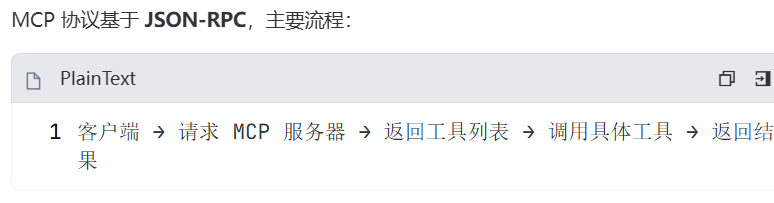
1. MCP 协议核心概念
2. 完整的 MCP 客户端实现
java
@Component
public class McpClients {

    private final RestTemplate restTemplate;

    // MCP 服务器配置
    @Value("${app.mcp.amap.server}")
    private String amapServer;

    @Value("${app.mcp.train12306.server}")
    private String trainServer;

    public McpClients() {
        this.restTemplate = new RestTemplate();
        restTemplate.getMessageConverters().add(new MappingJackson2HttpMessageConverter());
    }

    /**
     * 调用高德地图 MCP 获取路线信息
     */
    public Map<String, Object> callAmapRoute(List<Point> points, String mode) {
        try {
            // 构建 MCP 请求
            Map<String, Object> request = new LinkedHashMap<>();
            request.put("jsonrpc", "2.0");
            request.put("id", "1");
            request.put("method", "getRouteMatrix");
            request.put("params", Map.of(
                "points", points.stream()
                    .map(p -> Map.of("id", p.id, "lat", p.lat, "lng", p.lng))
                    .collect(Collectors.toList()),
                "mode", mode
            ));

            // 发送 POST 请求
            ResponseEntity<Map> response = restTemplate.postForEntity(
                amapServer + "/rpc",
                request,
                Map.class
            );

            return response.getBody();

        } catch (Exception e) {
            // 降级处理:返回模拟数据
            log.warn("调用高德 MCP 失败,使用模拟数据", e);
            return Map.of(
                "result", Map.of(
                    "matrix", List.of(
                        Map.of("from", points.get(0).id, "to", points.get(1).id, "etaMin", 25)
                    )
                )
            );
        }
    }

    /**
     * 调用12306 MCP 查询列车
     */
    public Map<String, Object> call12306Train(String from, String to, String date) {
        try {
            Map<String, Object> request = new LinkedHashMap<>();
            request.put("jsonrpc", "2.0");
            request.put("id", "1");
            request.put("method", "searchTrains");
            request.put("params", Map.of(
                "from", from,
                "to", to,
                "date", date
            ));

            ResponseEntity<Map> response = restTemplate.postForEntity(
                trainServer + "/rpc",
                request,
                Map.class
            );

            return response.getBody();

        } catch (Exception e) {
            log.warn("调用12306 MCP 失败,使用模拟数据", e);
            return Map.of(
                "result", Map.of(
                    "trains", List.of(
                        Map.of("code", "G123", "from", from, "to", to, "date", date,
                               "minutes", 130, "price", 350.0)
                    )
                )
            );
        }
    }

    public static class Point {
        public String id;
        public double lat;
        public double lng;
    }
}
3. 更新 RouteController 使用真实 MCP 调用
java
@RestController
@RequestMapping("/api/amap")
public class RouteController {

    private final McpClients mcp;

    public RouteController(McpClients mcp) {
        this.mcp = mcp;
    }

    @PostMapping(value = "/route",
                 consumes = MediaType.APPLICATION_JSON_VALUE,
                 produces = MediaType.APPLICATION_JSON_VALUE)
    public RouteMatrixResponse route(@Valid @RequestBody RouteMatrixRequest req) {

        // 构建 Point 列表
        List<McpClients.Point> points = req.points.stream()
            .map(p -> {
                McpClients.Point point = new McpClients.Point();
                point.id = p.id;
                point.lat = p.lat;
                point.lng = p.lng;
                return point;
            })
            .collect(Collectors.toList());

        // 调用 MCP 服务器
        Map<String, Object> mcpResult = mcp.callAmapRoute(points, req.mode);

        // 解析 MCP 返回结果
        RouteMatrixResponse resp = new RouteMatrixResponse();
        resp.mode = req.mode;
        resp.source = mcp.getAmapServer();

        // 提取路线矩阵
        Map<String, Object> result = (Map<String, Object>) mcpResult.get("result");
        if (result != null && result.containsKey("matrix")) {
            List<Map<String, Object>> matrix = (List<Map<String, Object>>) result.get("matrix");
            resp.matrix = matrix.stream()
                .map(m -> new RouteMatrixResponse.Edge(
                    (String) m.get("from"),
                    (String) m.get("to"),
                    ((Number) m.get("etaMin")).intValue()
                ))
                .collect(Collectors.toList());
        } else {
            // 降级:使用模拟数据
            resp.matrix = List.of(
                new RouteMatrixResponse.Edge(req.points.get(0).id, req.points.get(1).id, 25)
            );
        }

        return resp;
    }
}
4. 在 OrchestratorService 中调用 MCP
java
@Service
public class OrchestratorService {

    private final McpClients mcpClients;

    public OrchestratorService(McpClients mcpClients) {
        this.mcpClients = mcpClients;
    }

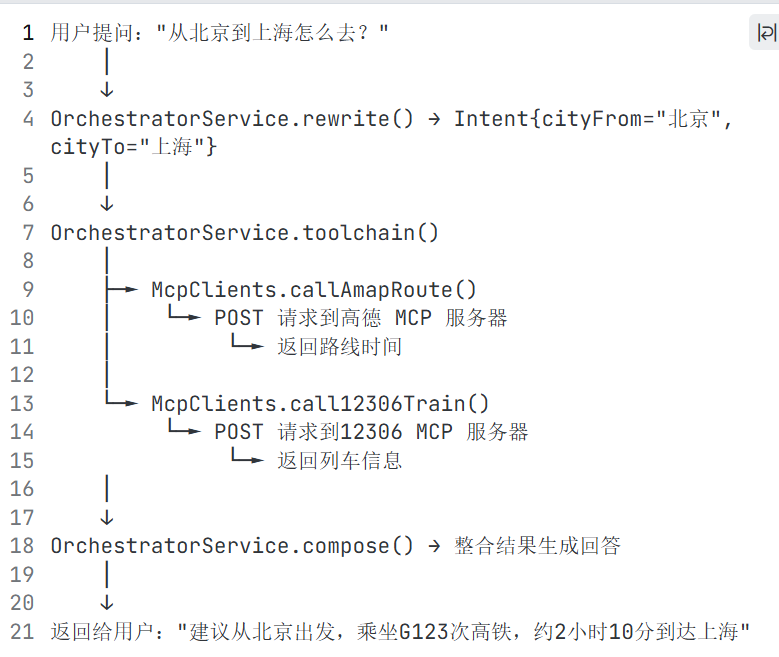
    public Map<String, Object> toolchain(Intent intent) {
        Map<String, Object> tool = new LinkedHashMap<>();

        // 1. 调用高德地图 MCP
        Map<String, Object> geocodeResult = mcpClients.callAmapRoute(
            List.of(
                createPoint("from", intent.cityFrom),
                createPoint("to", intent.cityTo)
            ),
            "transit"
        );
        tool.put("geocode", geocodeResult);

        // 2. 调用12306 MCP
        Map<String, Object> trainResult = mcpClients.call12306Train(
            intent.cityFrom,
            intent.cityTo,
            intent.date
        );
        tool.put("train", trainResult);

        return tool;
    }

    private McpClients.Point createPoint(String id, String city) {
        McpClients.Point point = new McpClients.Point();
        point.id = id;
        // 这里应该调用地理编码获取坐标
        point.lat = 0;  // 实际应从地理编码获取
        point.lng = 0;
        return point;
    }
}
📊 MCP 工具调用流程
💡 完整的 MCP 工具链实现
java
@Component
public class McpToolchain {

    private final McpClients mcpClients;
    private final ChatClient chatClient;

    /**
     * ReAct 风格的工具调用链
     */
    public Map<String, Object> executeToolchain(Intent intent) {
        Map<String, Object> context = new LinkedHashMap<>();

        // Step 1: 地理编码(获取坐标)
        System.out.println("🔍 Thought: 需要获取出发地和目的地的坐标");
        Map<String, Object> geocode = mcpClients.callGeocode(intent.cityFrom, intent.cityTo);
        context.put("geocode", geocode);
        System.out.println("✅ Observation: 已获取坐标信息");

        // Step 2: 查询路线(计算时间)
        System.out.println("🔍 Thought: 需要计算两地之间的路线时间");
        Map<String, Object> route = mcpClients.callAmapRoute(
            extractPoints(geocode),
            intent.seatPref.contains("高铁") ? "transit" : "drive"
        );
        context.put("route", route);
        System.out.println("✅ Observation: 路线时间已计算");

        // Step 3: 查询列车(获取具体车次)
        System.out.println("🔍 Thought: 需要查询具体的列车信息");
        Map<String, Object> train = mcpClients.call12306Train(
            intent.cityFrom,
            intent.cityTo,
            intent.date
        );
        context.put("train", train);
        System.out.println("✅ Observation: 列车信息已获取");

        return context;
    }

    /**
     * 使用 LLM 决定调用哪个工具
     */
    public String decideTool(Intent intent, Map<String, Object> context) {
        String prompt = String.format("""
            当前意图:%s
            当前上下文:%s

            可用工具:
            1. geocode - 地理编码,获取城市坐标
            2. route - 路线规划,计算距离和时间
            3. train - 列车查询,获取车次信息
            4. flight - 航班查询,获取机票信息
            5. finish - 完成,结束工具调用

            请根据当前上下文决定下一步调用哪个工具,只需输出工具名称。
            """, intent.intent, context);

        return chatClient.prompt()
            .system("你是工具选择专家,根据当前状态选择最合适的工具。")
            .user(prompt)
            .call()
            .content();
    }
}
六、数据管理模块
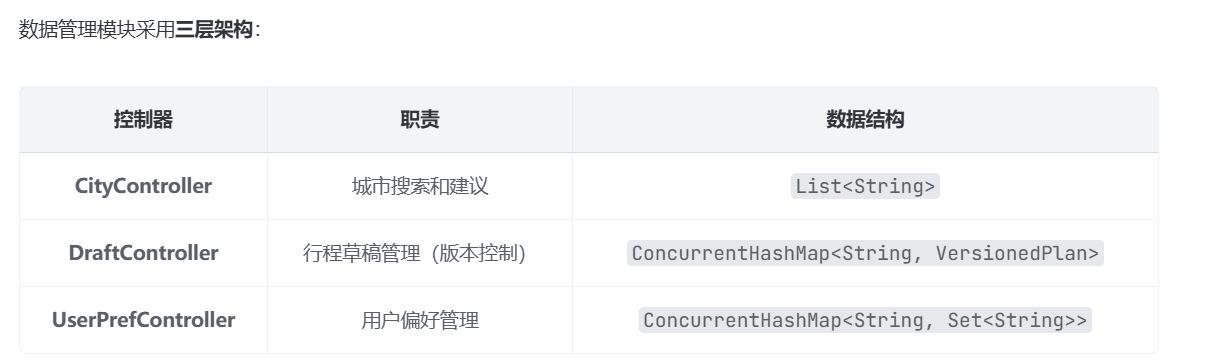
🎯 数据管理模块架构
数据管理模块负责管理城市数据、行程草稿和用户偏好,采用 内存存储 + 版本控制 的设计模式。
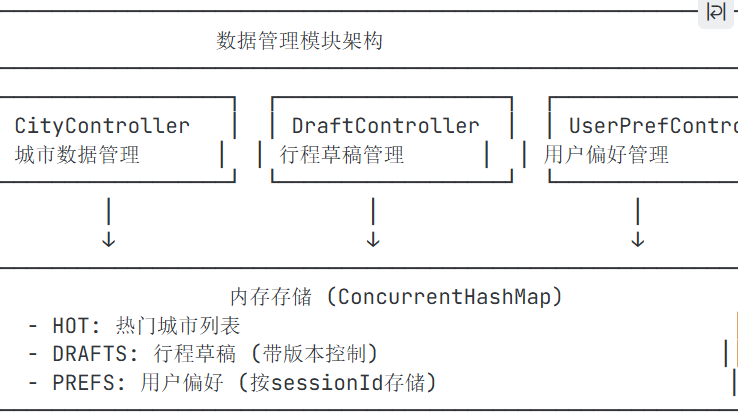
🔍 核心代码详解
1. CityController - 城市数据管理
java
@RestController
@RequestMapping("/api/cities")
public class CityController {

    // 热门城市列表(硬编码)
    private static final List<String> HOT = List.of(
        "北京", "上海", "广州", "深圳", "杭州",
        "成都", "西安", "南京", "重庆", "武汉"
    );

    /**
     * 城市搜索/建议接口
     * 支持模糊匹配,返回热门城市或搜索结果
     */
    @GetMapping("/suggest")
    public List<String> suggest(
        @RequestParam(required = false, defaultValue = "") String q
    ) {
        String s = q.trim();

        // 如果没有搜索词,返回热门城市
        if (s.isEmpty()) {
            return HOT;
        }

        // 模糊匹配:查找包含搜索词的城市
        List<String> out = new ArrayList<>();
        for (String c : HOT) {
            if (c.contains(s)) {
                out.add(c);
            }
        }

        // 如果没有匹配结果,返回搜索词本身(作为新城市)
        if (out.isEmpty()) {
            out.add(s);
        }

        return out;
    }
}
2. DraftController - 行程草稿管理
这是数据管理模块中 最复杂 的部分,支持版本控制和自动保存。
java
@RestController
@RequestMapping("/api")
public class DraftController {

    private final PlannerService plannerService;

    // 内存存储:Key = 草稿ID,Value = 版本化的行程计划
    private static final Map<String, VersionedPlan> DRAFTS = new ConcurrentHashMap<>();

    public DraftController(PlannerService plannerService) {
        this.plannerService = plannerService;
    }

    /**
     * 响应数据结构
     */
    public record DraftResponse(String id, long version, TripPlan plan) {}

    /**
     * 内部类:版本化的行程计划
     */
    private static class VersionedPlan {
        long version;    // 版本号
        TripPlan plan;   // 行程计划

        VersionedPlan(long v, TripPlan p) {
            this.version = v;
            this.plan = p;
        }
    }

    /**
     * 保存草稿(支持新增和更新)
     */
    @PostMapping(value = "/plan/draft",
                 consumes = MediaType.APPLICATION_JSON_VALUE,
                 produces = MediaType.APPLICATION_JSON_VALUE)
    public DraftResponse saveDraft(
        @Valid @RequestBody TripRequirement requirement,  // 用户需求
        @RequestParam(required = false) String id,        // 草稿ID(可选)
        @RequestParam(required = false, defaultValue = "0") long version  // 版本号(可选)
    ) {
        // 1. 生成行程计划
        TripPlan plan = plannerService.generatePlan(requirement);

        // 2. 生成或使用现有ID
        String draftId = id != null ? id : UUID.randomUUID().toString();

        // 3. 版本控制:如果存在则版本+1
        VersionedPlan vp = DRAFTS.get(draftId);
        long nextVer = (vp == null) ? 1 : vp.version + 1;

        // 4. 保存到内存
        DRAFTS.put(draftId, new VersionedPlan(nextVer, plan));

        // 5. 返回响应
        return new DraftResponse(draftId, nextVer, plan);
    }

    /**
     * 获取草稿
     */
    @GetMapping(value = "/plan/{id}", produces = MediaType.APPLICATION_JSON_VALUE)
    public TripPlan getPlan(@PathVariable String id) {
        VersionedPlan vp = DRAFTS.get(id);
        if (vp == null) {
            throw new IllegalArgumentException("Draft not found: " + id);
        }
        return vp.plan;
    }
}
版本控制流程图 :

3. UserPrefController - 用户偏好管理
java
@RestController
@RequestMapping("/api/user/pref")
public class UserPrefController {

    // 内存存储:Key = sessionId,Value = 用户偏好标签集合
    private static final Map<String, Set<String>> PREFS = new ConcurrentHashMap<>();

    /**
     * 请求/响应数据结构
     */
    public record PrefPayload(Set<String> values) {}

    /**
     * 保存用户偏好
     */
    @PostMapping
    public Map<String, String> save(
        @RequestParam String sessionId,       // 会话ID
        @RequestBody PrefPayload payload      // 偏好值
    ) {
        // 将偏好值存入内存,空值保护
        PREFS.put(sessionId,
            payload.values() == null ? new HashSet<>() : new HashSet<>(payload.values())
        );

        return Map.of("status", "ok");
    }

    /**
     * 获取用户偏好
     */
    @GetMapping
    public PrefPayload get(@RequestParam String sessionId) {
        // 获取偏好值,不存在返回空集合
        return new PrefPayload(new HashSet<>(PREFS.getOrDefault(sessionId, Set.of())));
    }
}
数据模型 :
bash
sessionId: "user123" → values: {"美食", "亲子", "自然风光"}
sessionId: "user456" → values: {"历史", "文化"}
🎯 完整方案:数据库存储
java
// 行程草稿数据库实体
@Entity
@Table(name = "trip_drafts")
public class DraftEntity {
    @Id
    @Column(name = "draft_id")
    private String draftId;

    @Column(name = "version")
    private long version;

    @Column(name = "plan_json", columnDefinition = "TEXT")
    private String planJson;

    @Column(name = "created_at")
    private LocalDateTime createdAt;

    @Column(name = "updated_at")
    private LocalDateTime updatedAt;

    // Getters and Setters
}
java
// 草稿仓储接口
public interface DraftRepository extends JpaRepository<DraftEntity, String> {
    Optional<DraftEntity> findByDraftId(String draftId);
    List<DraftEntity> findAll();
}
java
// 更新后的 DraftController
@RestController
@RequestMapping("/api")
public class DraftController {

    private final PlannerService plannerService;
    private final DraftRepository draftRepository;
    private final ObjectMapper objectMapper;

    @PostMapping("/plan/draft")
    public DraftResponse saveDraft(
        @Valid @RequestBody TripRequirement requirement,
        @RequestParam(required = false) String id,
        @RequestParam(required = false, defaultValue = "0") long version
    ) throws JsonProcessingException {

        TripPlan plan = plannerService.generatePlan(requirement);
        String draftId = id != null ? id : UUID.randomUUID().toString();

        // 查询现有草稿
        Optional<DraftEntity> existing = draftRepository.findByDraftId(draftId);

        // 版本控制
        long nextVer = existing.map(e -> e.getVersion() + 1).orElse(1L);

        // 保存到数据库
        DraftEntity entity = new DraftEntity();
        entity.setDraftId(draftId);
        entity.setVersion(nextVer);
        entity.setPlanJson(objectMapper.writeValueAsString(plan));
        entity.setCreatedAt(existing.map(DraftEntity::getCreatedAt).orElse(LocalDateTime.now()));
        entity.setUpdatedAt(LocalDateTime.now());

        draftRepository.save(entity);

        return new DraftResponse(draftId, nextVer, plan);
    }
}
🔄 完整的数据管理流程
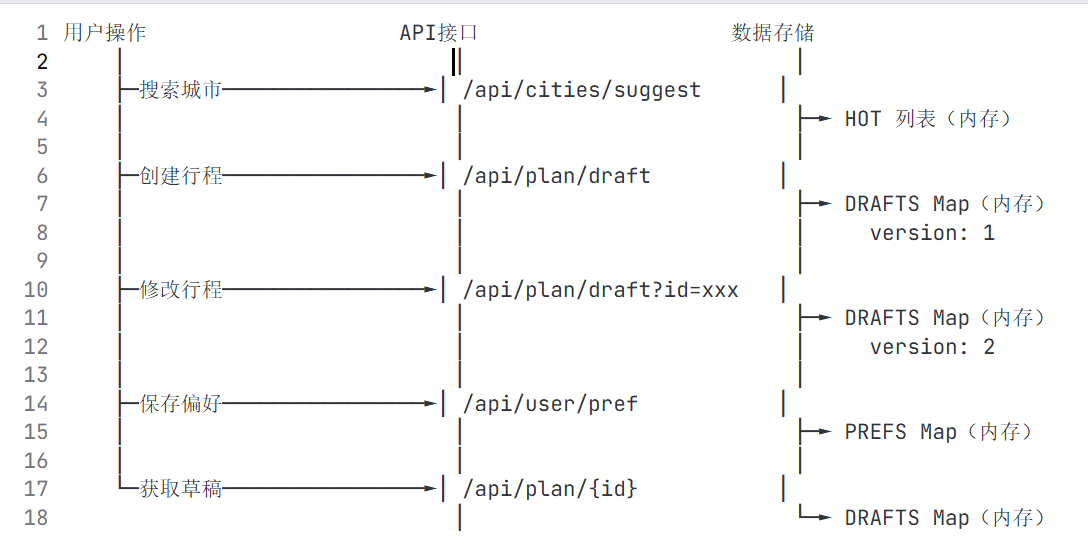
🎯 数据管理模块的关键技术
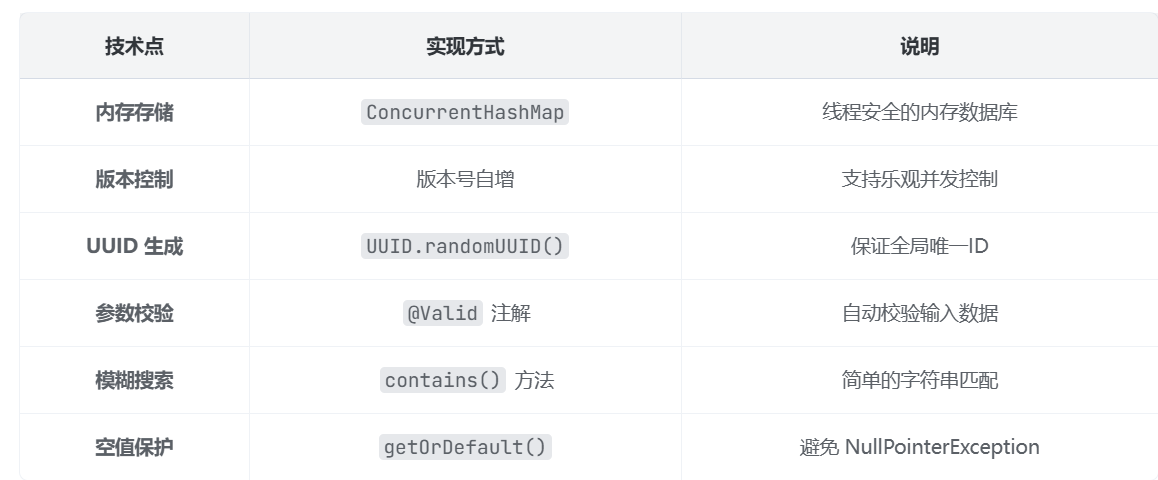
💡 完整的数据管理服务实现
java
@Service
public class DataManagementService {

    // 城市数据存储
    private final List<String> hotCities;
    private final Set<String> allCities;

    // 草稿数据存储(带版本控制)
    private final ConcurrentHashMap<String, VersionedPlan> drafts;

    // 用户偏好存储
    private final ConcurrentHashMap<String, Set<String>> userPreferences;

    public DataManagementService() {
        // 初始化热门城市
        this.hotCities = List.of("北京", "上海", "广州", "深圳", "杭州",
                                 "成都", "西安", "南京", "重庆", "武汉");

        // 初始化所有城市(从CSV加载)
        this.allCities = loadAllCities();

        // 初始化内存存储
        this.drafts = new ConcurrentHashMap<>();
        this.userPreferences = new ConcurrentHashMap<>();
    }

    /**
     * 城市搜索
     */
    public List<String> searchCities(String query) {
        if (query == null || query.trim().isEmpty()) {
            return hotCities;
        }

        // 优先搜索热门城市
        List<String> results = hotCities.stream()
            .filter(city -> city.contains(query))
            .collect(Collectors.toList());

        // 如果热门城市没有匹配,搜索所有城市
        if (results.isEmpty()) {
            results = allCities.stream()
                .filter(city -> city.contains(query))
                .limit(10)
                .collect(Collectors.toList());
        }

        // 如果还是没有匹配,返回搜索词
        if (results.isEmpty()) {
            results.add(query);
        }

        return results;
    }

    /**
     * 保存草稿
     */
    public DraftResponse saveDraft(TripPlan plan, String draftId) {
        String id = draftId != null ? draftId : UUID.randomUUID().toString();

        VersionedPlan existing = drafts.get(id);
        long version = existing != null ? existing.version + 1 : 1;

        drafts.put(id, new VersionedPlan(version, plan));

        return new DraftResponse(id, version, plan);
    }

    /**
     * 获取草稿
     */
    public TripPlan getDraft(String draftId) {
        VersionedPlan plan = drafts.get(draftId);
        if (plan == null) {
            throw new IllegalArgumentException("Draft not found: " + draftId);
        }
        return plan.plan;
    }

    /**
     * 删除草稿
     */
    public boolean deleteDraft(String draftId) {
        return drafts.remove(draftId) != null;
    }

    /**
     * 保存用户偏好
     */
    public void savePreferences(String sessionId, Set<String> preferences) {
        userPreferences.put(sessionId,
            preferences != null ? new HashSet<>(preferences) : new HashSet<>());
    }

    /**
     * 获取用户偏好
     */
    public Set<String> getPreferences(String sessionId) {
        return new HashSet<>(userPreferences.getOrDefault(sessionId, Set.of()));
    }

    /**
     * 加载所有城市(从CSV文件)
     */
    private Set<String> loadAllCities() {
        Set<String> cities = new HashSet<>();
        // 实际项目中从CSV文件加载
        // 这里使用热门城市作为示例
        cities.addAll(hotCities);
        return cities;
    }

    // 内部类
    public record DraftResponse(String id, long version, TripPlan plan) {}

    private static class VersionedPlan {
        long version;
        TripPlan plan;
        VersionedPlan(long v, TripPlan p) { this.version = v; this.plan = p; }
    }
}
📝 总结