📌 学习目标
- 掌握点击显示弹窗的实现方法
- 理解相关API的使用
- 能够独立完成类似功能开发
🎯 核心概念
点击地图时显示弹窗。
💻 完 整 代 码
html
<!DOCTYPE html>
<html lang="en">
<head>
    <title>Display a popup on click</title>
    <meta property="og:description" content="当用户点击符号时,显示包含更多信息的弹出框。" />
    <meta property="og:created" content="2006-06-25" />
    <meta charset='utf-8'>
    <meta name="viewport" content="width=device-width, initial-scale=1">
    <link rel='stylesheet' href='https://unpkg.com/maplibre-gl@5.24.0/dist/maplibre-gl.css' />
    <script src='https://unpkg.com/maplibre-gl@5.24.0/dist/maplibre-gl.js'></script>
    <style>
        body { margin: 0; padding: 0; }
        html, body, #map { height: 100%; }
    </style>
</head>
<body>
<style>
    .maplibregl-popup {
        max-width: 400px;
        font: 12px/20px 'Helvetica Neue', Arial, Helvetica, sans-serif;
    }
</style>
<div id="map"></div>
<script>
    const map = new maplibregl.Map({
        container: 'map',
        style: 'https://tiles.openfreemap.org/styles/bright',
        center: [-77.04, 38.907],
        zoom: 11.15
    });

    map.on('load', () => {
        map.addSource('places', {
            'type': 'geojson',
            'data': {
                'type': 'FeatureCollection',
                'features': [
                    {
                        'type': 'Feature',
                        'properties': {
                            'description':
                                '<strong>Make it Mount Pleasant</strong><p><a href="http://www.mtpleasantdc.com/makeitmtpleasant" target="_blank" title="Opens in a new window">Make it Mount Pleasant</a> is a handmade and vintage market and afternoon of live entertainment and kids activities. 12:00-6:00 p.m.</p>',
                            'icon': 'theatre'
                        },
                        'geometry': {
                            'type': 'Point',
                            'coordinates': [-77.038659, 38.931567]
                        }
                    },
                    {
                        'type': 'Feature',
                        'properties': {
                            'description':
                                '<strong>Mad Men Season Five Finale Watch Party</strong><p>Head to Lounge 201 (201 Massachusetts Avenue NE) Sunday for a <a href="http://madmens5finale.eventbrite.com/" target="_blank" title="Opens in a new window">Mad Men Season Five Finale Watch Party</a>, complete with 60s costume contest, Mad Men trivia, and retro food and drink. 8:00-11:00 p.m. $10 general admission, $20 admission and two hour open bar.</p>',
                            'icon': 'theatre'
                        },
                        'geometry': {
                            'type': 'Point',
                            'coordinates': [-77.003168, 38.894651]
                        }
                    },
                    {
                        'type': 'Feature',
                        'properties': {
                            'description':
                                '<strong>Big Backyard Beach Bash and Wine Fest</strong><p>EatBar (2761 Washington Boulevard Arlington VA) is throwing a <a href="http://tallulaeatbar.ticketleap.com/2012beachblanket/" target="_blank" title="Opens in a new window">Big Backyard Beach Bash and Wine Fest</a> on Saturday, serving up conch fritters, fish tacos and crab sliders, and Red Apron hot dogs. 12:00-3:00 p.m. $25.grill hot dogs.</p>',
                            'icon': 'bar'
                        },
                        'geometry': {
                            'type': 'Point',
                            'coordinates': [-77.090372, 38.881189]
                        }
                    },
                    {
                        'type': 'Feature',
                        'properties': {
                            'description':
                                '<strong>Ballston Arts & Crafts Market</strong><p>The <a href="https://ballstonarts-craftsmarket.blogspot.com/" target="_blank" title="Opens in a new window">Ballston Arts & Crafts Market</a> sets up shop next to the Ballston metro this Saturday for the first of five dates this summer. Nearly 35 artists and crafters will be on hand selling their wares. 10:00-4:00 p.m.</p>',
                            'icon': 'art-gallery'
                        },
                        'geometry': {
                            'type': 'Point',
                            'coordinates': [-77.111561, 38.882342]
                        }
                    },
                    {
                        'type': 'Feature',
                        'properties': {
                            'description':
                                '<strong>Seersucker Bike Ride and Social</strong><p>Feeling dandy? Get fancy, grab your bike, and take part in this year\'s <a href="http://dandiesandquaintrelles.com/2012/04/the-seersucker-social-is-set-for-june-9th-save-the-date-and-start-planning-your-look/" target="_blank" title="Opens in a new window">Seersucker Social</a> bike ride from Dandies and Quaintrelles. After the ride enjoy a lawn party at Hillwood with jazz, cocktails, paper hat-making, and more. 11:00-7:00 p.m.</p>',
                            'icon': 'bicycle'
                        },
                        'geometry': {
                            'type': 'Point',
                            'coordinates': [-77.052477, 38.943951]
                        }
                    },
                    {
                        'type': 'Feature',
                        'properties': {
                            'description':
                                '<strong>Capital Pride Parade</strong><p>The annual <a href="https://www.capitalpride.org/parade" target="_blank" title="Opens in a new window">Capital Pride Parade</a> makes its way through Dupont this Saturday. 4:30 p.m. Free.</p>',
                            'icon': 'rocket'
                        },
                        'geometry': {
                            'type': 'Point',
                            'coordinates': [-77.043444, 38.909664]
                        }
                    },
                    {
                        'type': 'Feature',
                        'properties': {
                            'description':
                                '<strong>Muhsinah</strong><p>Jazz-influenced hip hop artist <a href="https://www.muhsinah.com" target="_blank" title="Opens in a new window">Muhsinah</a> plays the <a href="https://www.blackcatdc.com">Black Cat</a> (1811 14th Street NW) tonight with <a href="https://www.exitclov.com" target="_blank" title="Opens in a new window">Exit Clov</a> and <a href="https://godsilla.bandcamp.com" target="_blank" title="Opens in a new window">Gods'illa</a>. 9:00 p.m. $12.</p>',
                            'icon': 'music'
                        },
                        'geometry': {
                            'type': 'Point',
                            'coordinates': [-77.031706, 38.914581]
                        }
                    },
                    {
                        'type': 'Feature',
                        'properties': {
                            'description':
                                '<strong>A Little Night Music</strong><p>The Arlington Players\' production of Stephen Sondheim\'s  <a href="http://www.thearlingtonplayers.org/drupal-6.20/node/4661/show" target="_blank" title="Opens in a new window"><em>A Little Night Music</em></a> comes to the Kogod Cradle at The Mead Center for American Theater (1101 6th Street SW) this weekend and next. 8:00 p.m.</p>',
                            'icon': 'music'
                        },
                        'geometry': {
                            'type': 'Point',
                            'coordinates': [-77.020945, 38.878241]
                        }
                    },
                    {
                        'type': 'Feature',
                        'properties': {
                            'description':
                                '<strong>Truckeroo</strong><p><a href="http://www.truckeroodc.com/www/" target="_blank">Truckeroo</a> brings dozens of food trucks, live music, and games to half and M Street SE (across from Navy Yard Metro Station) today from 11:00 a.m. to 11:00 p.m.</p>',
                            'icon': 'music'
                        },
                        'geometry': {
                            'type': 'Point',
                            'coordinates': [-77.007481, 38.876516]
                        }
                    }
                ]
            }
        });
        // 添加一个显示地点的图层。
        map.addLayer({
            'id': 'places',
            'type': 'symbol',
            'source': 'places',
            'layout': {
                'icon-image': '{icon}',
                'icon-overlap': 'always'
            }
        });

        // 当点击places图层上的要素时,在该要素的位置打开一个弹窗,
        // 该位置使用其属性的description HTML。
        map.on('click', 'places', (e) => {
            const coordinates = e.features[0].geometry.coordinates.slice();
            const description = e.features[0].properties.description;

            // 确保如果地图缩小到使要素的多个
            // 副本可见,弹窗会出现在
            // 被指向的副本上方。
            while (Math.abs(e.lngLat.lng - coordinates[0]) > 180) {
                coordinates[0] += e.lngLat.lng > coordinates[0] ? 360 : -360;
            }

            new maplibregl.Popup()
                .setLngLat(coordinates)
                .setHTML(description)
                .addTo(map);
        });

        // 当鼠标悬停在places图层上时,将光标更改为指针。
        map.on('mouseenter', 'places', () => {
            map.getCanvas().style.cursor = 'pointer';
        });

        // 当鼠标离开时,将光标改回指针。
        map.on('mouseleave', 'places', () => {
            map.getCanvas().style.cursor = '';
        });
    });
</script>
</body>
</html>
🔍 代码解析
1. 创建GeoJSON数据源
定义一个包含多个地点要素的GeoJSON数据源,每个要素都有 description(HTML格式的描述)和 icon(图标名称)属性。数据中包含剧院、酒吧、画廊、自行车活动、骄傲节等各种地点。
2. 添加符号图层
添加一个符号图层显示地点图标,使用 {icon} 表达式从每个要素的属性中获取图标名称,这样可以灵活显示不同类型的图标。
3. 点击事件处理
通过 map.on('click', 'places', ...) 监听符号图层的点击事件:
- 获取被点击要素的坐标和描述信息
- 处理经度超过180度的情况,确保弹窗显示在正确的位置
- 创建弹窗并设置内容和坐标
4. 鼠标样式交互
使用 mouseenter 和 mouseleave 事件监听鼠标悬停,当鼠标悬停在图标上时显示指针样式,提示用户可以点击。
5. 弹窗创建
new maplibregl.Popup() 创建一个弹窗实例,链式调用 setLngLat() 设置位置、setHTML() 设置内容、addTo(map) 将弹窗添加到地图。
⚙️ 参数说明
Popup 构造函数参数
| 参数 | 类型 | 必填 | 说明 |
|---|---|---|---|
| closeButton | boolean | 否 | 是否显示关闭按钮,默认true |
| closeOnClick | boolean | 否 | 点击地图时是否关闭,默认false |
| anchor | string | 否 | 弹窗锚点位置 |
| offset | number/object | 否 | 弹窗偏移量 |
map.on('click') 事件参数
| 参数 | 类型 | 说明 |
|---|---|---|
| layerId | string | 图层ID,限定只有该图层触发 |
| callback | function | 回调函数,接收 MapMouseEvent |
🎨 效果说明
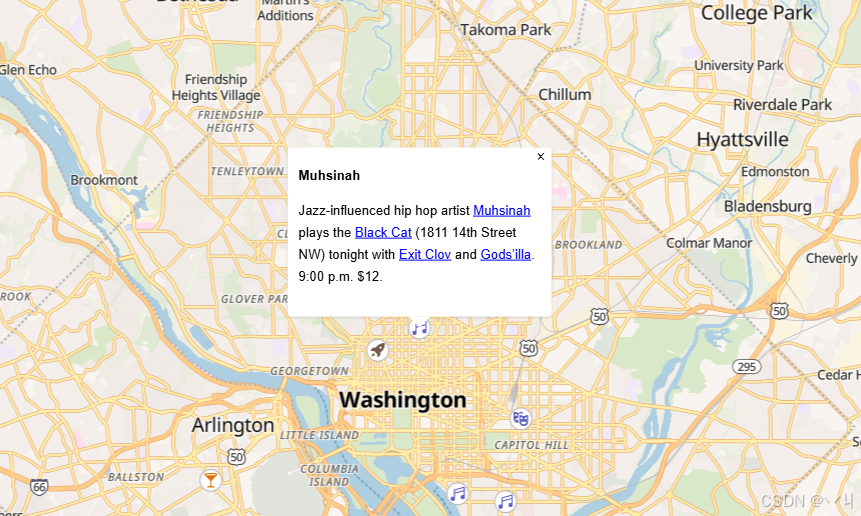
运行代码后,地图上会显示多个不同类型的地点图标。点击任意一个图标,地图上该位置会弹出一个信息窗口,显示对应的活动描述、链接等信息。弹窗会智能处理地图边缘和180度经线附近的情况。鼠标悬停在图标上时,光标会变为指针样式,提示用户可以交互。
💡 常 见 问 题
Q1: 点击图标没有反应怎么办?
A: 确保点击事件监听的是图层ID而不是地图本身。另外检查GeoJSON数据是否正确加载,图层是否成功添加。
Q2: 弹窗显示位置不对怎么办?
A: 这通常是因为地图缩放后坐标超出范围。代码中的 while 循环用于处理经度偏移问题,确保弹窗显示在正确的位置。
Q3: 如何自定义弹窗样式?
A: 可以通过CSS覆盖默认样式,例如:
css
.maplibregl-popup { max-width: 300px; }
.maplibregl-popup-content { border-radius: 10px; }
📝 练习任务
- 基础练习:修改GeoJSON数据,添加自己定义的地点
- 进阶挑战:为弹窗添加自定义样式,如改变背景色、添加阴影
- 拓展思考:如何实现点击一个图标关闭已打开的弹窗?提示:使用全局变量记录当前弹窗
- 综合实践:创建一个地点信息展示系统,支持点击查看详情
🌟 最佳实践
- 数据管理: 使用GeoJSON统一管理地点数据,便于维护和扩展
- 性能优化: 避免在弹窗中加载大量图片或复杂DOM结构
- 状态管理: 使用全局变量或类管理当前打开的弹窗
- 交互反馈: 鼠标悬停时改变光标样式,提示用户可点击
- 边界处理: 处理180度经线等边缘情况
- 检查浏览器控制台是否有错误信息
Q2: 如何更换地图样式?
A: 修改 style 参数为其他样式URL,例如:
javascript
style: 'https://demotiles.maplibre.org/style.json'📝 练习任务
- 基础练习:尝试修改地图的中心点和缩放级别,观察效果
- 进阶挑战:添加地图控件(缩放控件、罗盘等)
- 拓展思考:如何实现地图的自动旋转效果?
🌟 最佳实践
- 动画流畅性: 使用requestAnimationFrame优化动画
- 用户反馈: 为用户提供清晰的交互反馈
- 性能监控: 监控帧率,避免卡顿
- 无障碍: 考虑键盘导航和屏幕阅读器
🔗 延伸阅读
-
下一课预告:将继续学习地图图层的基础知识
本文是MapLibre GL JS实践课程系列的一部分,欢迎关注收藏