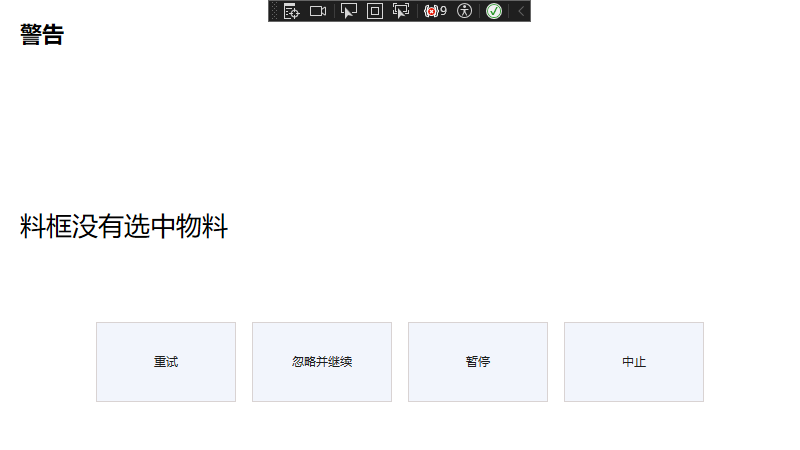
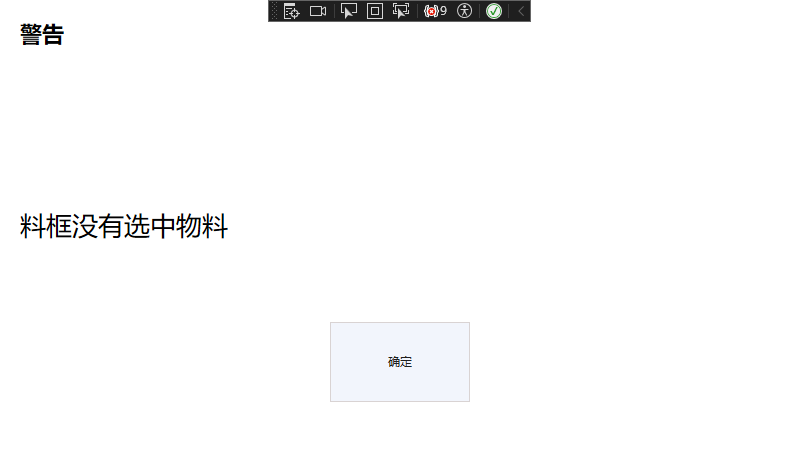
在使用WPF的MessageBox时,框架会根据我们传入的MessageBoxButton枚举生成不同的按钮供我们选择;
这篇文章主要是讲了如何实现这个功能,WPF的MessageBox底层目前我还没找到怎么实现的,我是用的MVVM模式实现:
首先要有一个按钮载体,在View中:
XML
<ItemsControl HorizontalAlignment="Center" ItemsSource="{Binding Buttons}">
    <ItemsControl.ItemsPanel>
        <ItemsPanelTemplate>
            <StackPanel Orientation="Horizontal" />
        </ItemsPanelTemplate>
    </ItemsControl.ItemsPanel>
    <ItemsControl.ItemTemplate>
        <DataTemplate>
            <Button
                x:Name="btnItem"
                Width="140"
                Height="80"
                Margin="8"
                Command="{Binding DataContext.ButtonCommand, RelativeSource={RelativeSource AncestorType=Window}}"
                CommandParameter="{Binding Result}"
                Content="{Binding Text}"
                IsDefault="{Binding IsDefault}" />
        </DataTemplate>
    </ItemsControl.ItemTemplate>
</ItemsControl>
其次是按钮信息链表,在ViewModel中:
cs
  private ObservableCollection<ButtonInfo> _buttons;

  public ObservableCollection<ButtonInfo> Buttons
  {
      get => _buttons;
      set => this.RaiseAndSetIfChanged(ref _buttons, value);
  }


//实体定义
public class ButtonInfo
{
    //按钮文本
    public string Text { get; set; }
    //按钮点击传递的参数
    public FlowMessageWarnWindowResult Result { get; set; }
    public bool IsDefault { get; set; }
}
然后根据不同枚举给按钮信息链表赋值:
cs
 private ObservableCollection<ButtonInfo> CreateButtons(FlowMessageWarnWindowButton buttonType)
 {
     var buttonMap = new Dictionary<FlowMessageWarnWindowButton, (string Text, FlowMessageWarnWindowResult Result)[]>
     {
         [FlowMessageWarnWindowButton.Reminder] = new[]
         {
             ("确定", FlowMessageWarnWindowResult.Ok)
         },

         [FlowMessageWarnWindowButton.FlowOperationSelection] = new[]
         {
             ("重试", FlowMessageWarnWindowResult.Retry),
             ("忽略并继续", FlowMessageWarnWindowResult.IgnoreAndContinue),
             ("暂停", FlowMessageWarnWindowResult.Pause),
             ("中止", FlowMessageWarnWindowResult.Abort)
         }
     };

     var buttons = new ObservableCollection<ButtonInfo>();
     foreach (var (text, result) in buttonMap[buttonType])
     {
         buttons.Add(new ButtonInfo
         {
             Text = text,
             Result = result,
             IsDefault = result == FlowMessageWarnWindowResult.Ok
         });
     }

     return buttons;
 }
其实很多时候想要ViewModel中控制View中控件数量,都是这种形式:后端保存实体信息,前端根据后端链表生成对应的控件集合;
效果:
另一种样式:
完整代码:
cs
public class FlowMessageWarnWindowViewModel : ReactiveObject
{

    private string _title;
    private string _message;
    private FlowMessageWarnWindowResult _result = FlowMessageWarnWindowResult.None;
    // 结果事件
    public event EventHandler<FlowMessageWarnWindowResult> ResultSelected;

    // 用于等待结果的 TaskCompletionSource
    private TaskCompletionSource<FlowMessageWarnWindowResult> _tcs;
    private FlowMessageWarnWindow _window;


    // 报警标题
    public string Title
    {
        get => _title;
        set => this.RaiseAndSetIfChanged(ref _title, value);
    }

    // 报警内容
    public string Message
    {
        get => _message;
        set => this.RaiseAndSetIfChanged(ref _message, value);
    }
    private ObservableCollection<ButtonInfo> _buttons;

    public ObservableCollection<ButtonInfo> Buttons
    {
        get => _buttons;
        set => this.RaiseAndSetIfChanged(ref _buttons, value);
    }


    // 关闭窗体的命令
    public ReactiveCommand<FlowMessageWarnWindowResult, Unit> ButtonCommand { get; }

    public FlowMessageWarnWindowViewModel()
    {
        ButtonCommand = ReactiveCommand.Create<FlowMessageWarnWindowResult>(ButtonClick);

    }
    public FlowMessageWarnWindowViewModel(string title, string message)
    {
        Title = title;
        Message = message;


    }

    private void ButtonClick(FlowMessageWarnWindowResult result)
    {
        _result = result;
        ResultSelected?.Invoke(this, result);

        // 如果有等待的任务,设置结果
        if (_tcs != null && !_tcs.Task.IsCompleted)
        {
            _tcs.TrySetResult(result);
        }

        // 关闭窗口
        _window?.Close();


    }
    /// <summary>
    /// 显示消息对话框并等待用户点击(同步)
    /// </summary>
    public FlowMessageWarnWindowResult ShowMessage(string message, string title = null, FlowMessageWarnWindowButton buttonType = FlowMessageWarnWindowButton.Reminder ,Window owner = null)
    {
        // 更新消息和标题
        Message = message;
        if (!string.IsNullOrEmpty(title))
        {
            Title = title;
        }
        Buttons = CreateButtons(buttonType);

        _result = FlowMessageWarnWindowResult.None;
        _tcs = new TaskCompletionSource<FlowMessageWarnWindowResult>();

        // 创建并显示窗口
        _window = new FlowMessageWarnWindow(this)
        {
            Owner = owner ?? Application.Current.MainWindow
        };
        _window.ShowDialog();

        // 等待结果
        return _tcs.Task.GetAwaiter().GetResult();
    }

    /// <summary>
    /// 显示消息对话框并等待用户点击(异步)
    /// </summary>
    public async Task<FlowMessageWarnWindowResult> ShowMessageAsync(string message, string title = null, Window owner = null)
    {
        // 更新消息和标题
        Message = message;
        if (!string.IsNullOrEmpty(title))
        {
            Title = title;
        }

        _result = FlowMessageWarnWindowResult.None;
        _tcs = new TaskCompletionSource<FlowMessageWarnWindowResult>();

        // 创建并显示窗口
        _window = new FlowMessageWarnWindow(this)
        {
            Owner = owner ?? Application.Current.MainWindow
        };

        // 在UI线程上显示窗口
        await Application.Current.Dispatcher.InvokeAsync(() =>
        {
            _window.ShowDialog();
        });

        // 等待结果
        return await _tcs.Task;
    }
    public FlowMessageWarnWindowResult GetResult()
    {
        return _result;
    }

    private ObservableCollection<ButtonInfo> CreateButtons(FlowMessageWarnWindowButton buttonType)
    {
        var buttonMap = new Dictionary<FlowMessageWarnWindowButton, (string Text, FlowMessageWarnWindowResult Result)[]>
        {
            [FlowMessageWarnWindowButton.Reminder] = new[]
            {
                ("确定", FlowMessageWarnWindowResult.Ok)
            },

            [FlowMessageWarnWindowButton.FlowOperationSelection] = new[]
            {
                ("重试", FlowMessageWarnWindowResult.Retry),
                ("忽略并继续", FlowMessageWarnWindowResult.IgnoreAndContinue),
                ("暂停", FlowMessageWarnWindowResult.Pause),
                ("中止", FlowMessageWarnWindowResult.Abort)
            }
        };

        var buttons = new ObservableCollection<ButtonInfo>();
        foreach (var (text, result) in buttonMap[buttonType])
        {
            buttons.Add(new ButtonInfo
            {
                Text = text,
                Result = result,
                IsDefault = result == FlowMessageWarnWindowResult.Ok
            });
        }

        return buttons;
    }
}

public class ButtonInfo
{
    //按钮文本
    public string Text { get; set; }
    //按钮点击传递的参数
    public FlowMessageWarnWindowResult Result { get; set; }
    public bool IsDefault { get; set; }
}
view:
XML
<reactiveUi:ReactiveWindow
    x:Class="Lithography.View.FlowMessageWarnWindow"
    xmlns="http://schemas.microsoft.com/winfx/2006/xaml/presentation"
    xmlns:x="http://schemas.microsoft.com/winfx/2006/xaml"
    xmlns:d="http://schemas.microsoft.com/expression/blend/2008"
    xmlns:lithography="clr-namespace:Lithography"
    xmlns:mc="http://schemas.openxmlformats.org/markup-compatibility/2006"
    xmlns:reactiveUi="http://reactiveui.net"
    Title="MessageWindow"
    Width="800"
    Height="450"
    d:DataContext="{d:DesignInstance lithography:FlowMessageWarnWindowViewModel}"
    x:TypeArguments="lithography:FlowMessageWarnWindowViewModel"
    ResizeMode="NoResize"
    ShowInTaskbar="False"
    Topmost="True"
    WindowStartupLocation="CenterScreen"
    WindowStyle="None"
    mc:Ignorable="d">
    <Grid Margin="20">
        <Grid.RowDefinitions>
            <RowDefinition Height="*" />
            <RowDefinition Height="*" />
            <RowDefinition Height="*" />
        </Grid.RowDefinitions>

        <!--  报警标题  -->
        <TextBlock
            Grid.Row="0"
            Margin="0,0,0,10"
            FontSize="22"
            FontWeight="Bold"
            Text="{Binding Title}" />

        <!--  报警内容  -->
        <TextBlock
            Grid.Row="1"
            VerticalAlignment="Center"
            FontSize="26"
            Text="{Binding Message}"
            TextWrapping="Wrap" />

        <Grid x:Name="Grid" Grid.Row="2">
            <!--  按钮区域  -->
            <ItemsControl HorizontalAlignment="Center" ItemsSource="{Binding Buttons}">
                <ItemsControl.ItemsPanel>
                    <ItemsPanelTemplate>
                        <StackPanel Orientation="Horizontal" />
                    </ItemsPanelTemplate>
                </ItemsControl.ItemsPanel>
                <ItemsControl.ItemTemplate>
                    <DataTemplate>
                        <Button
                            x:Name="btnItem"
                            Width="140"
                            Height="80"
                            Margin="8"
                            Command="{Binding DataContext.ButtonCommand, RelativeSource={RelativeSource AncestorType=Window}}"
                            CommandParameter="{Binding Result}"
                            Content="{Binding Text}"
                            IsDefault="{Binding IsDefault}" />
                    </DataTemplate>
                </ItemsControl.ItemTemplate>
            </ItemsControl>
        </Grid>

    </Grid>
</reactiveUi:ReactiveWindow>