安装 ubuntu 2404
创建虚拟机
创建过程省略。
安装过程
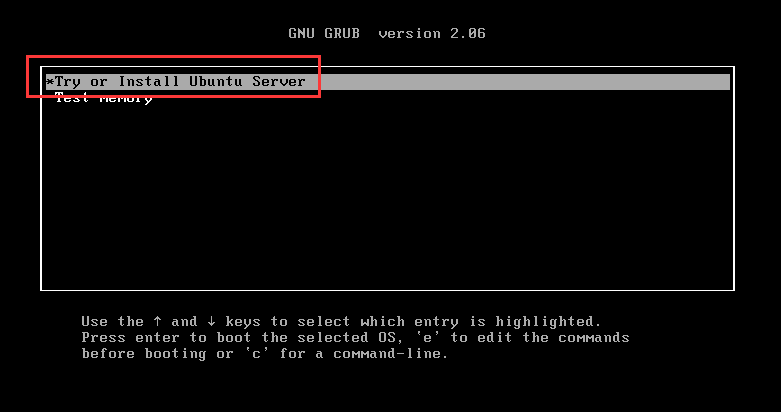
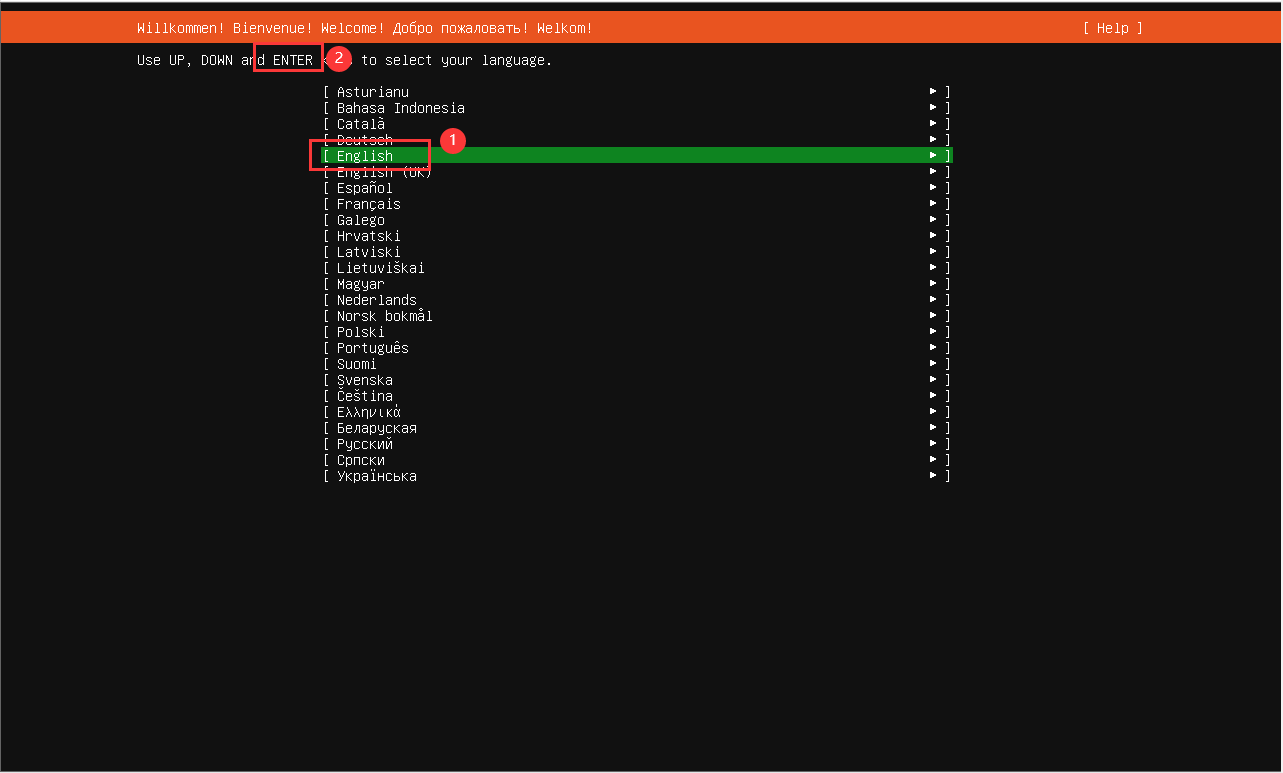
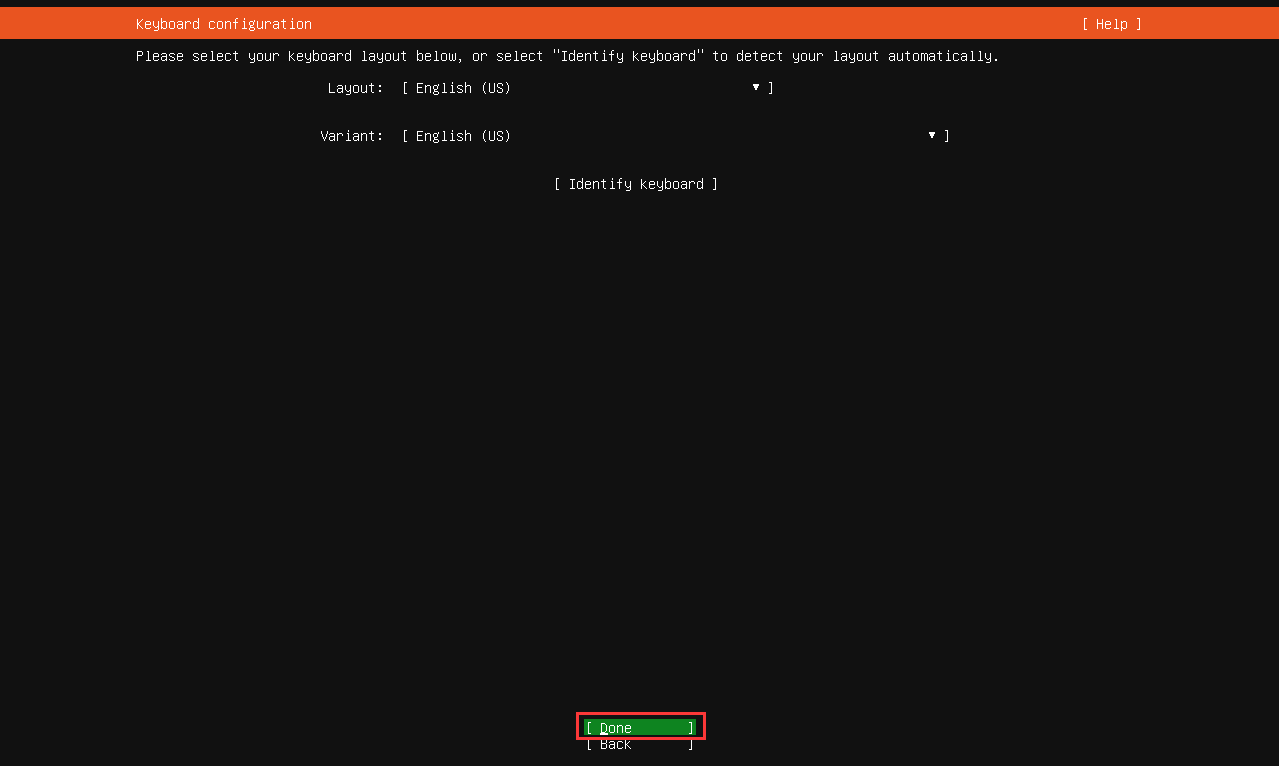
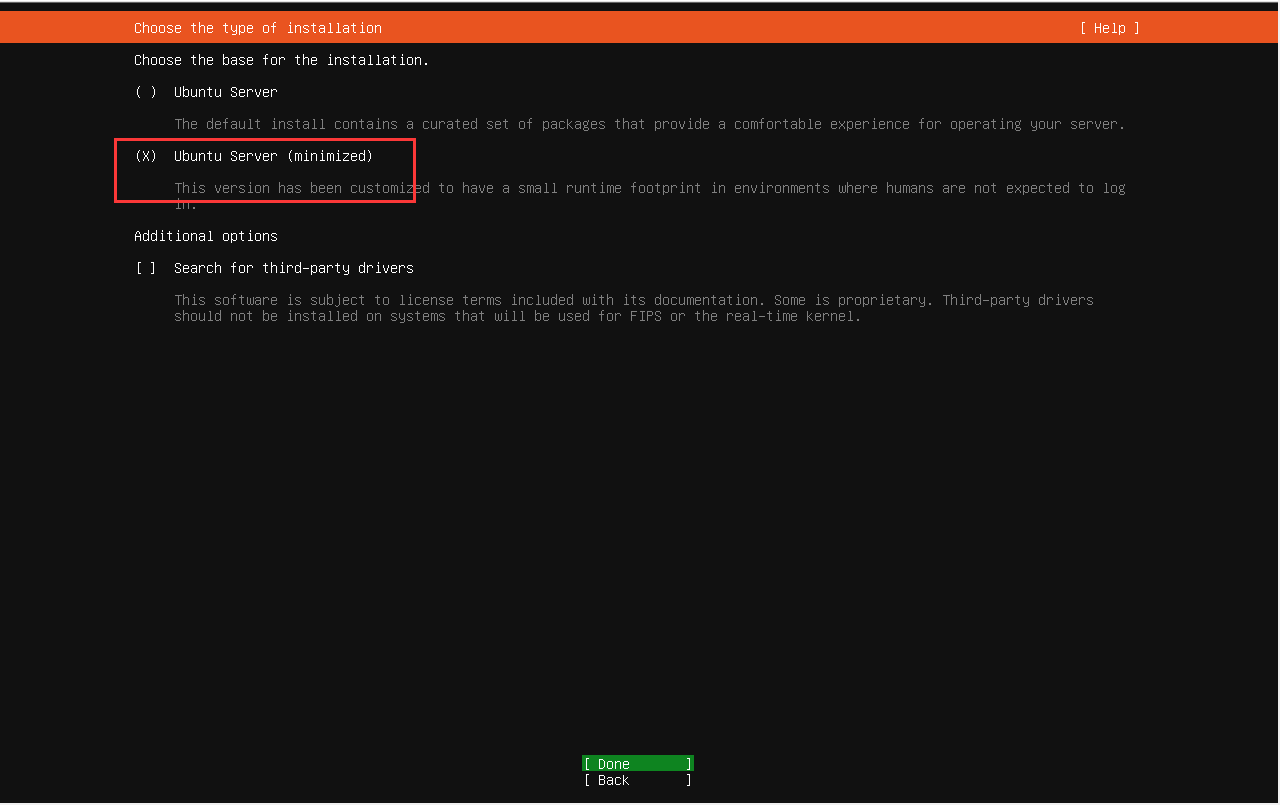
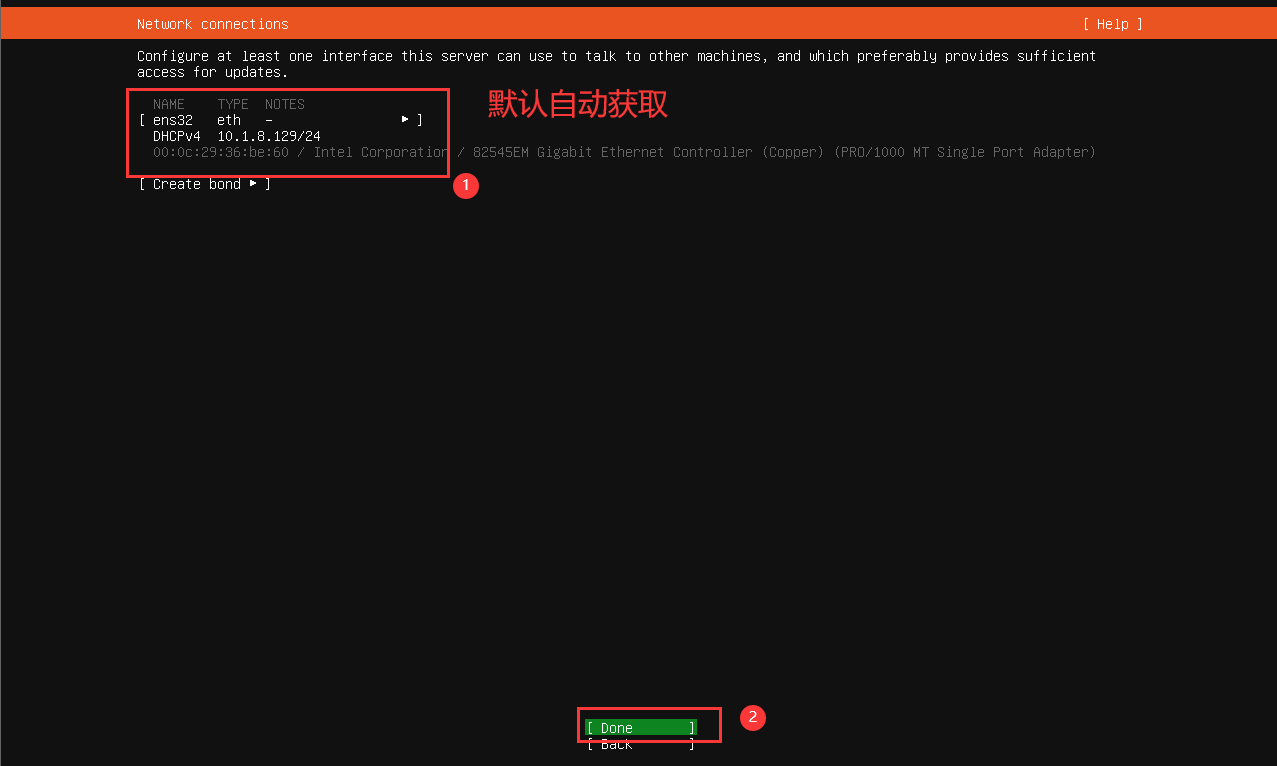
提示:为了防止连网更新软件包,该地方需断开网卡安装系统。系统安装完成后,再配置网络。
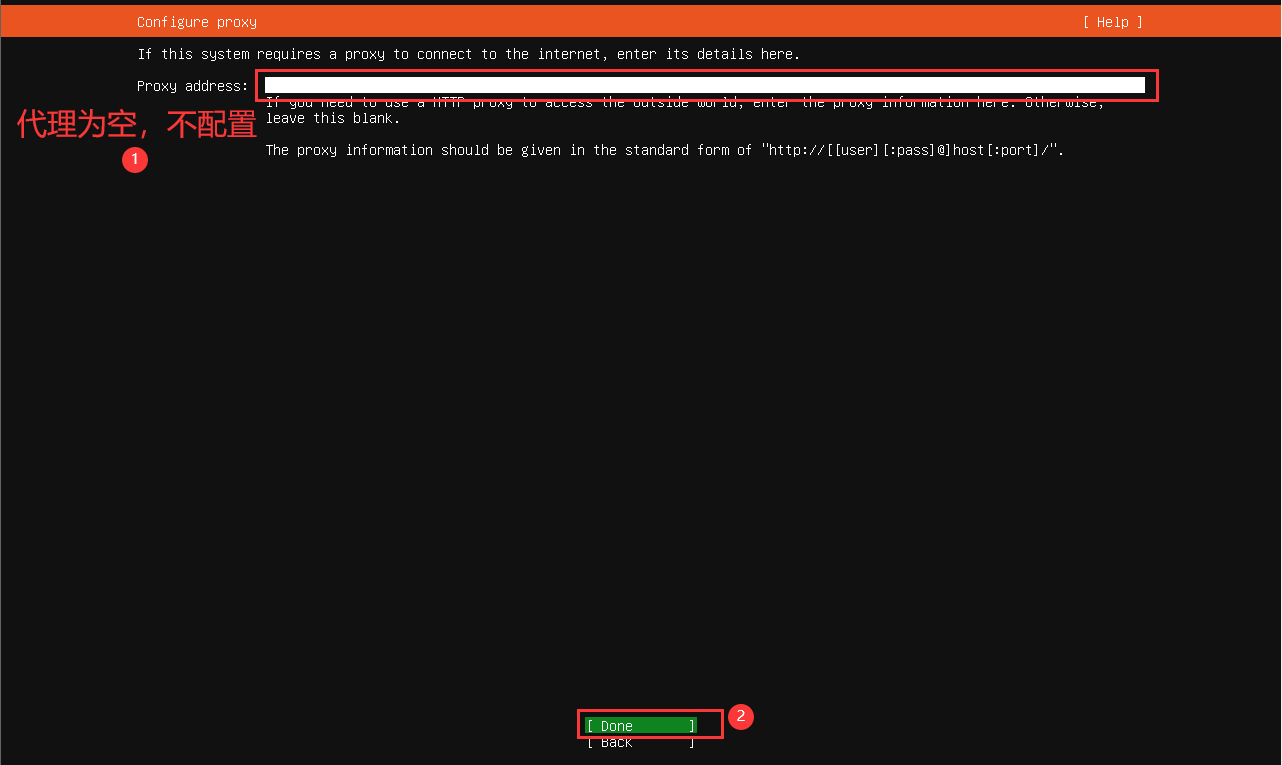
更改地址为 http://mirrors.aliyun.com/ubuntu
使用华为的mirror速度更快:http://mirrors.huaweicloud.com/ubuntu
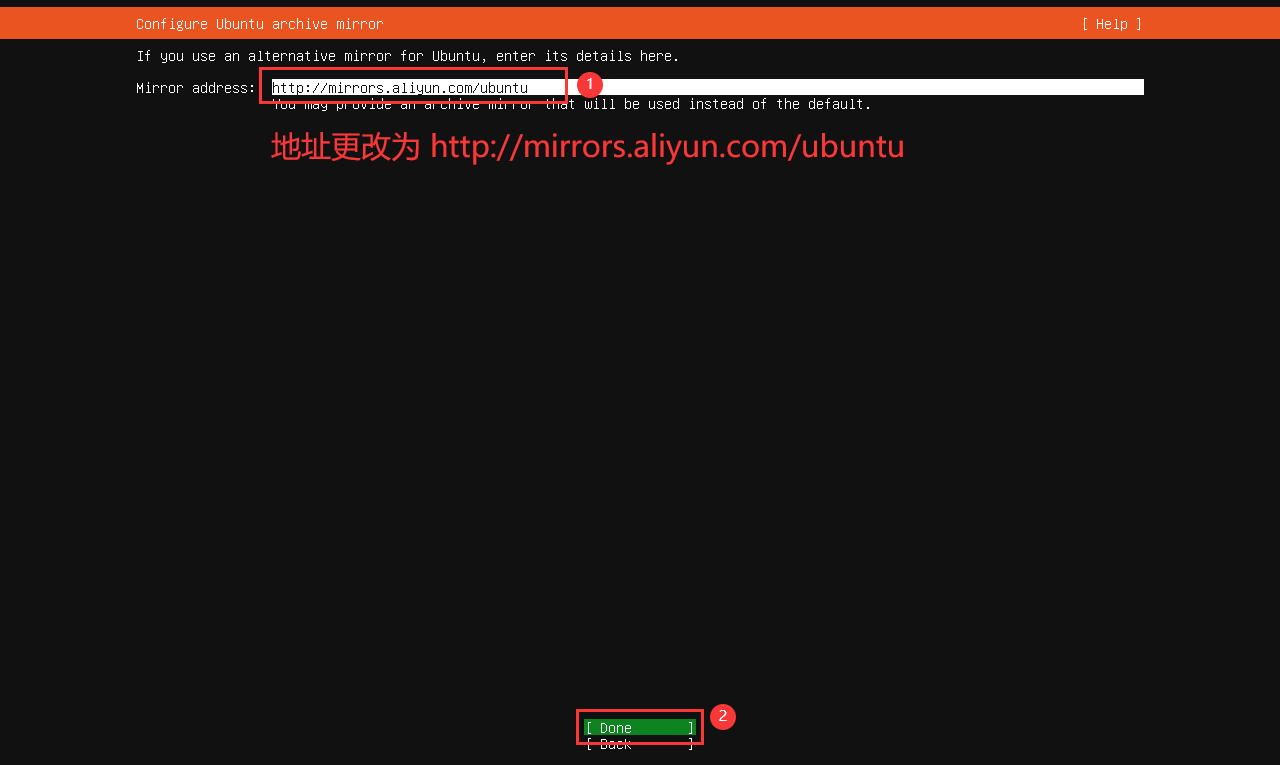
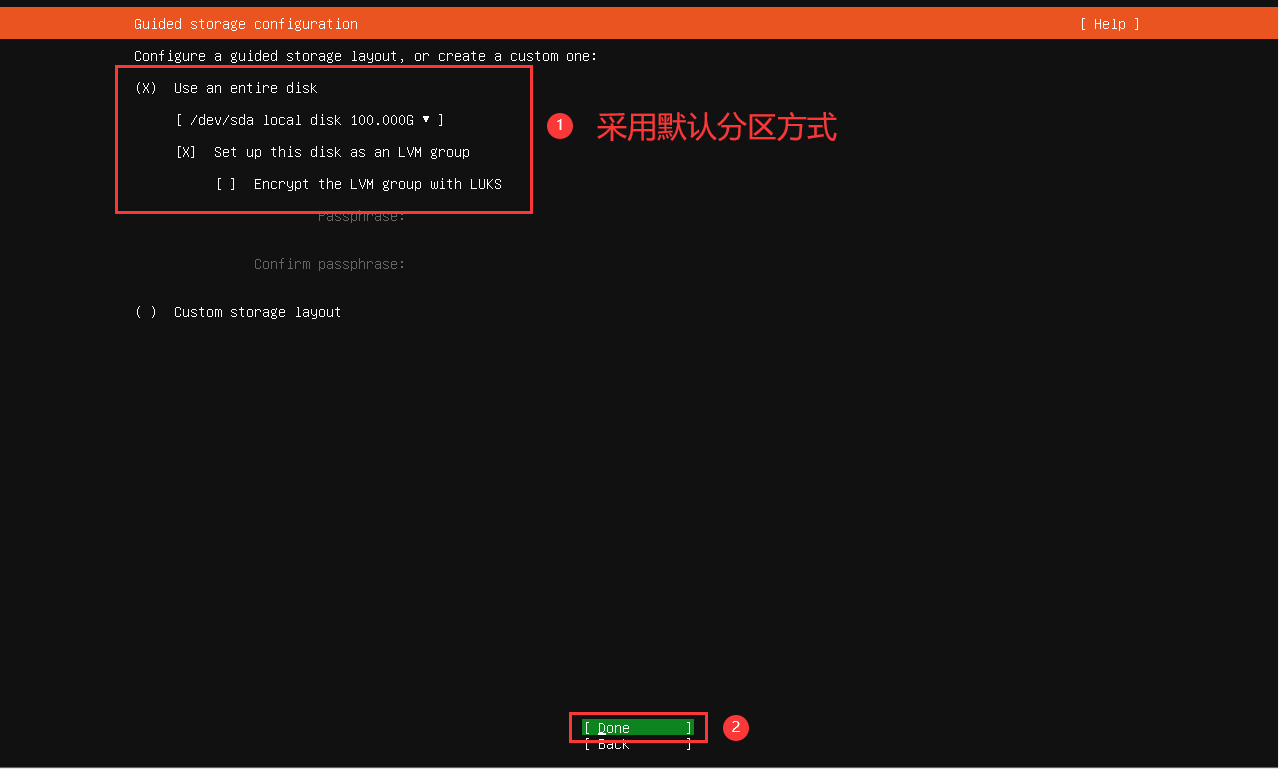
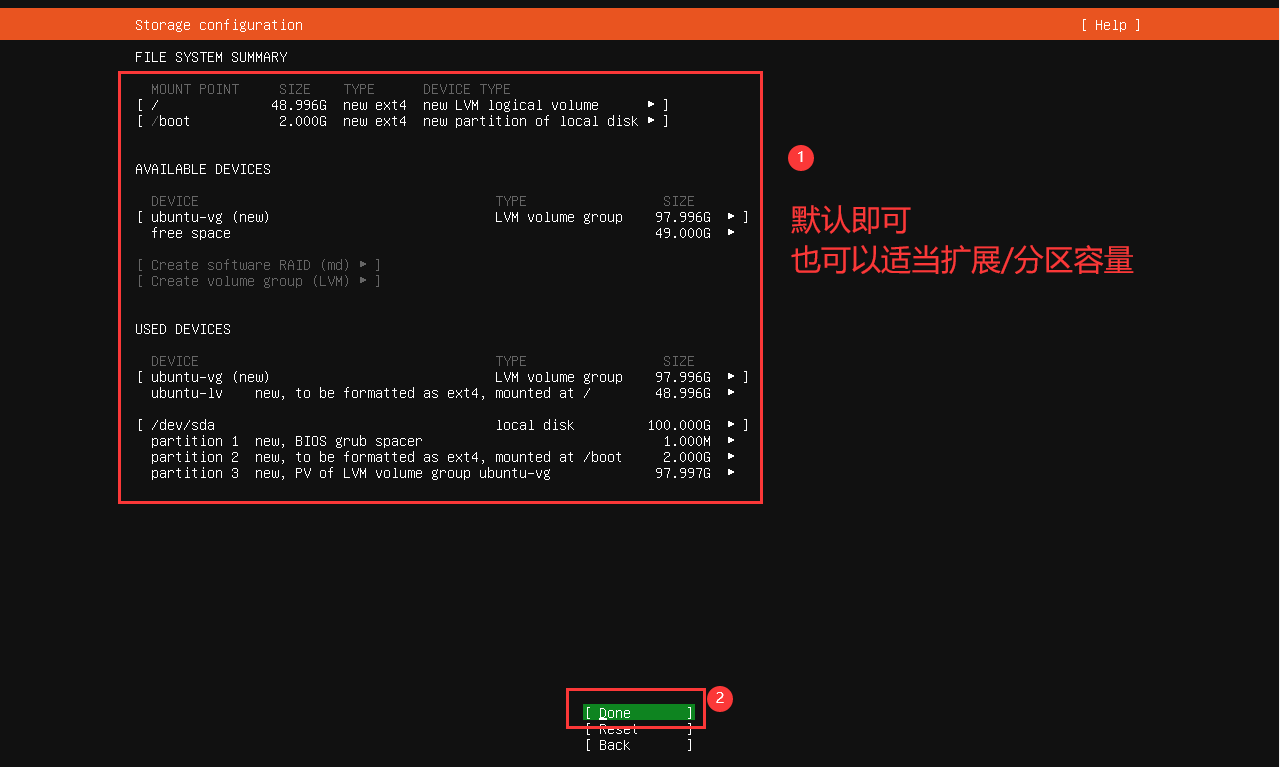
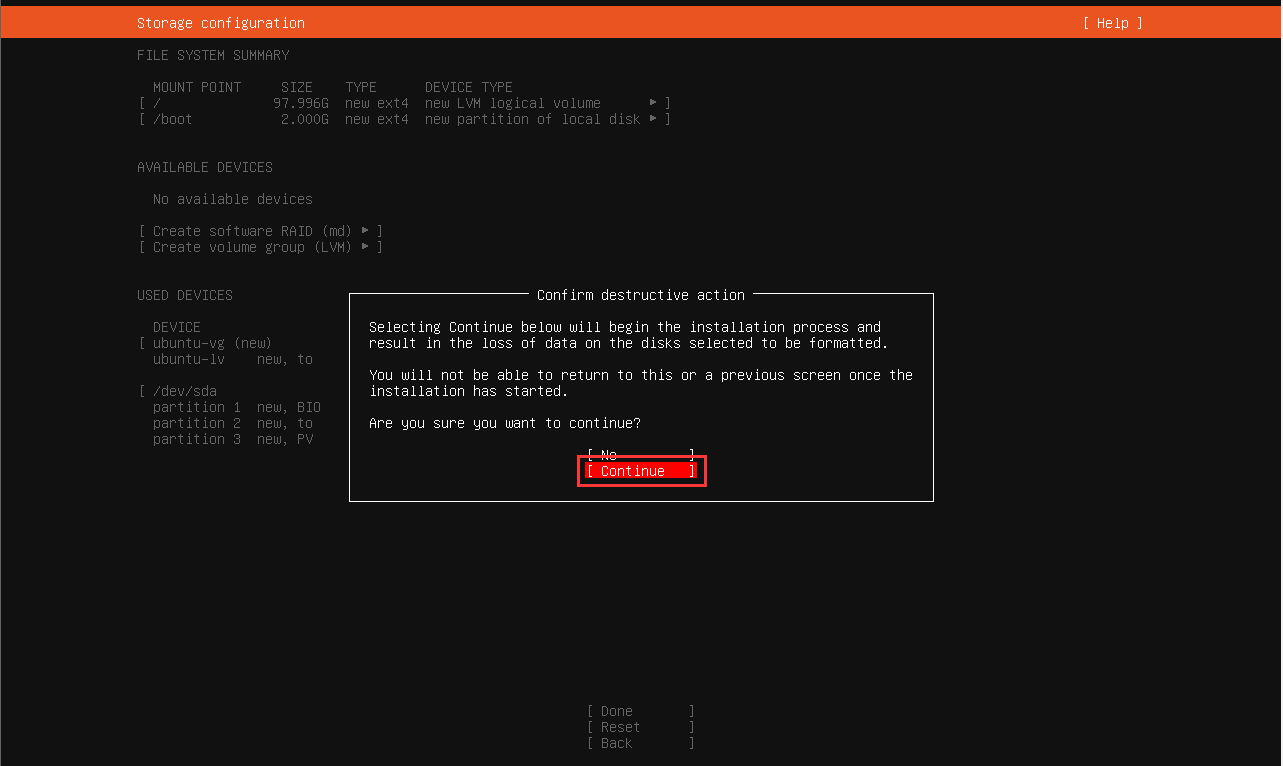
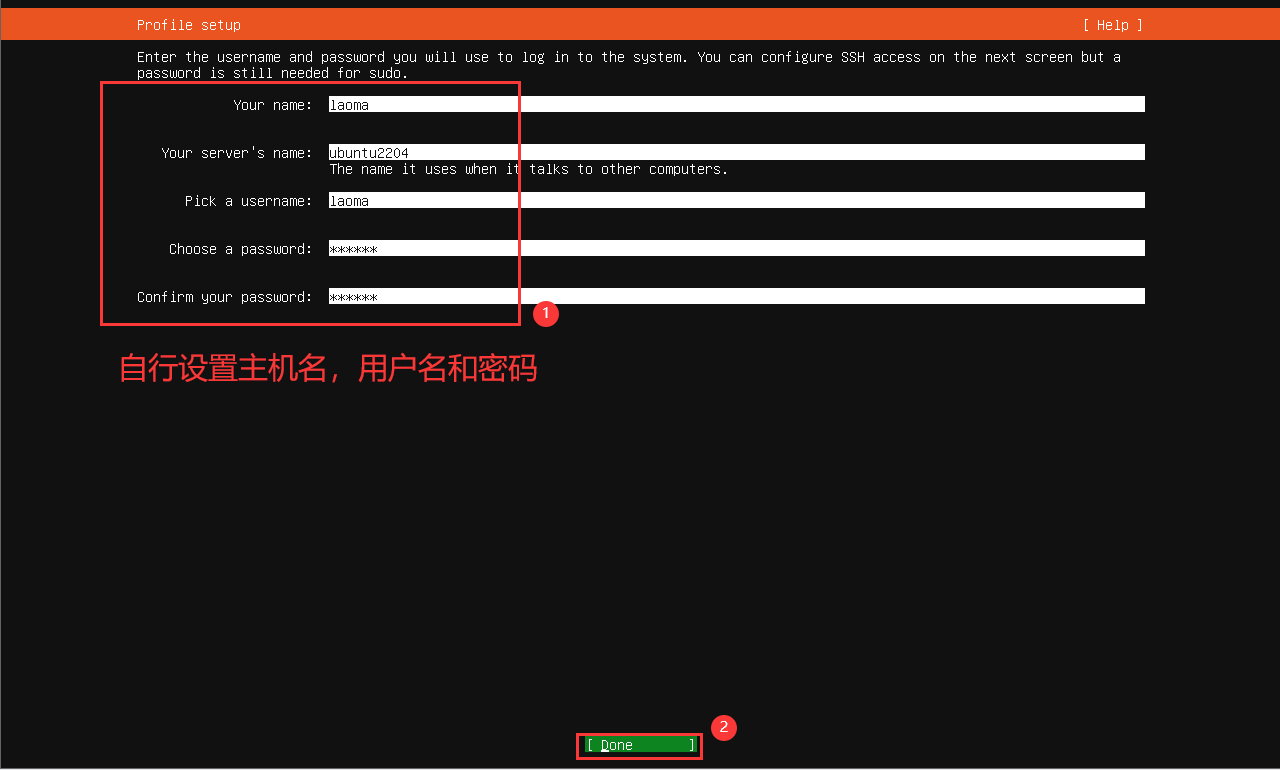
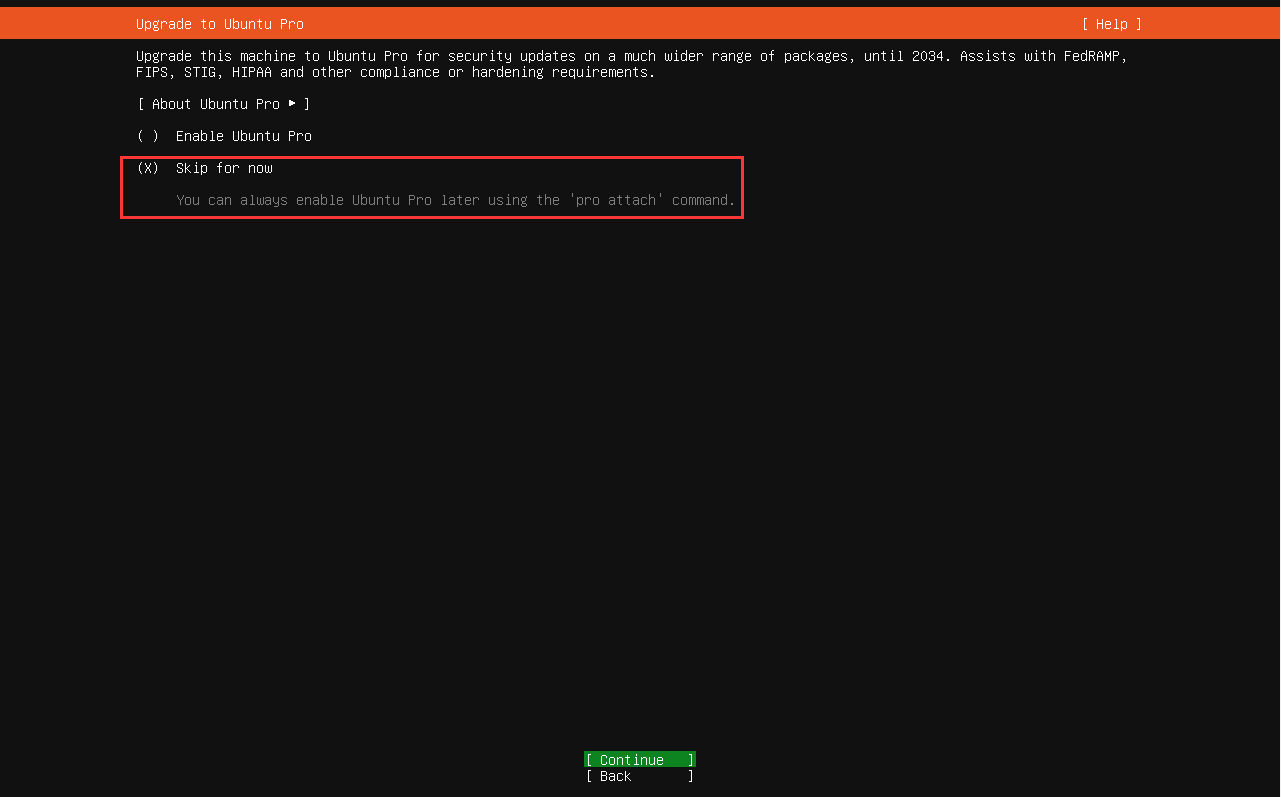
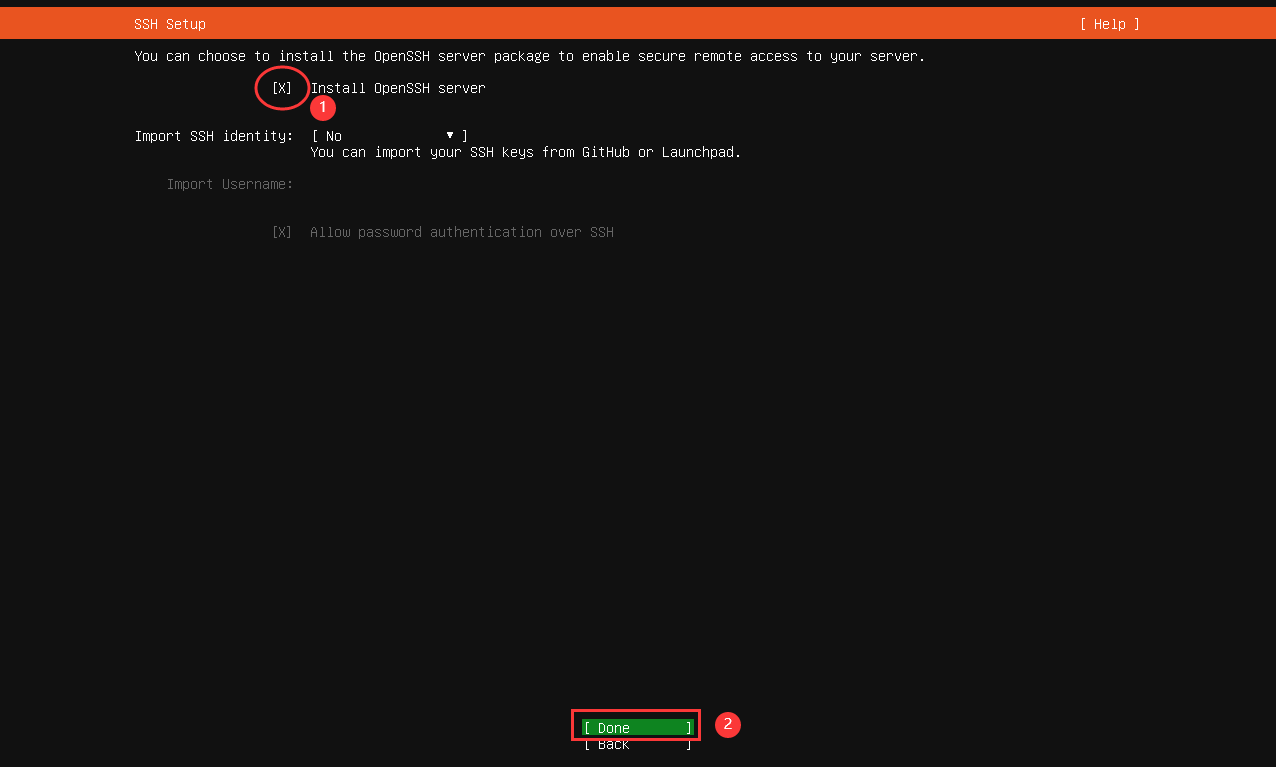
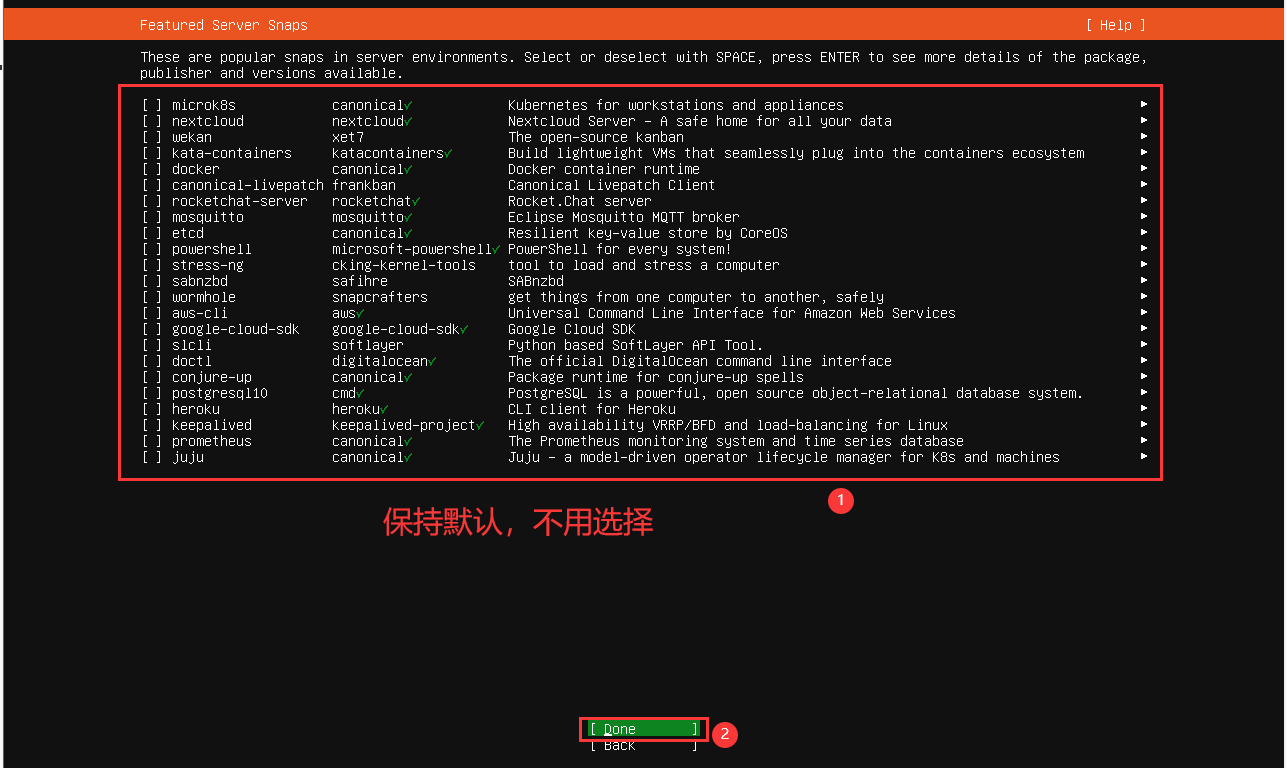
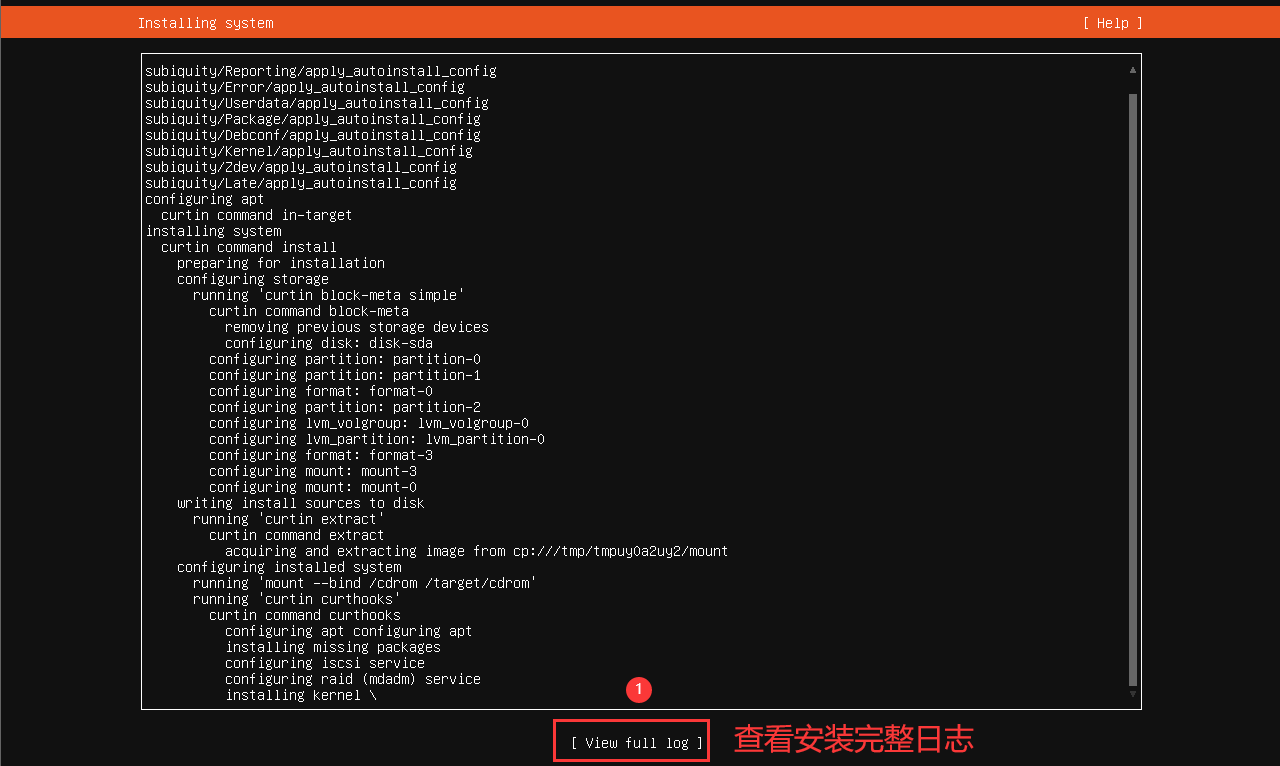
等待安装完成,该过程需要从Internet上下载软件包,还可以查看安装日志。
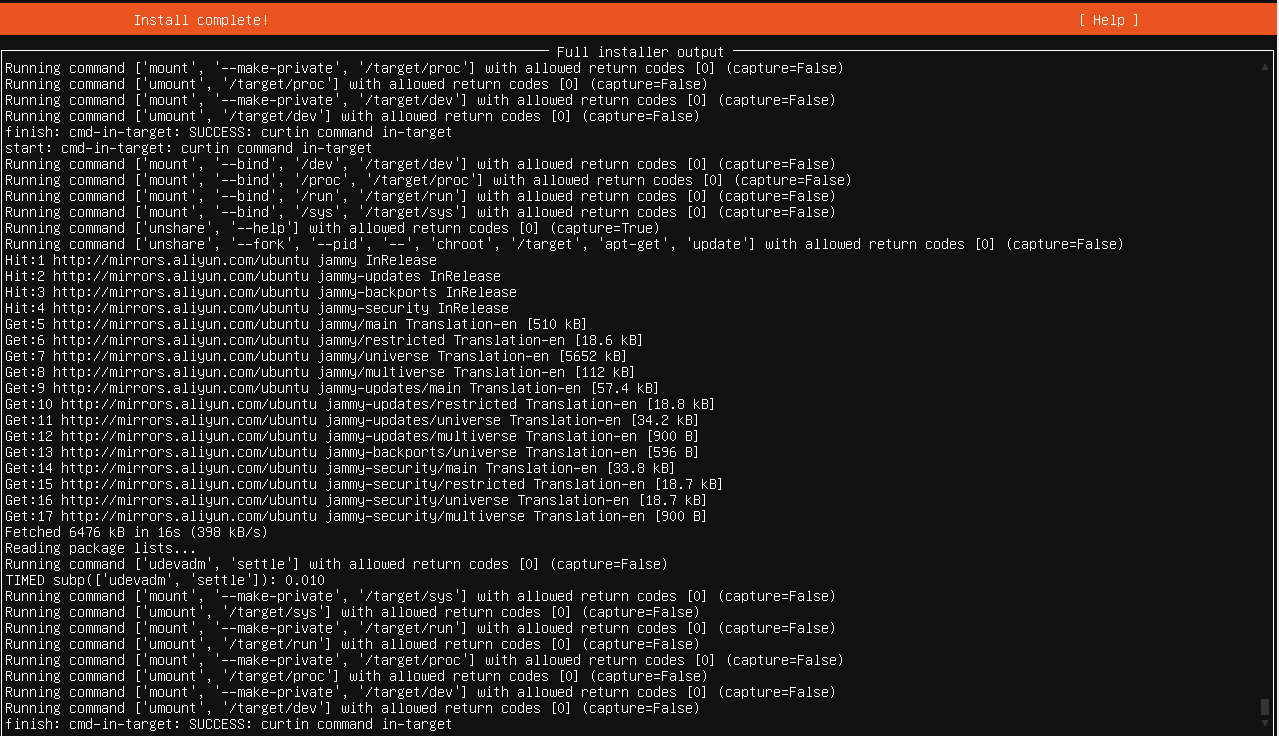
安装完成
重启系统
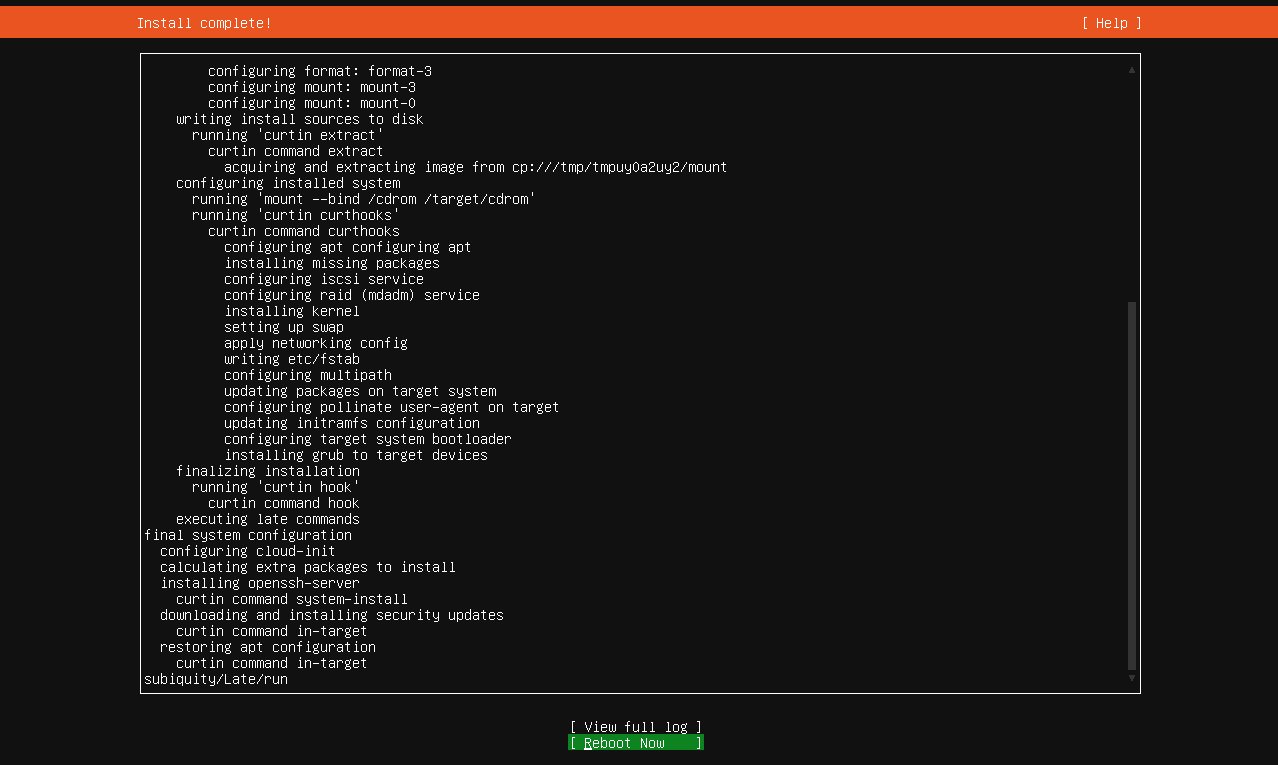
出现以下提示,不用理会,直接 回车 继续重启。
[FAIED] Failed unmounting /dev/cdrom安装后配置
安装常规软件包
vim和命令补全软件包。
bash
laoma@ubuntu2404:~$ sudo apt-get install -y vim bash-completion配置 IP
bash
song@ubuntu2404:~$ cd /etc/netplan/
song@ubuntu2404:/etc/netplan$ sudo vim
cat > 00-installer-config.yaml << 'EOF'
# This is the network config written by 'subiquity'
network:
  ethernets:
    ens32:
      dhcp4: no
      addresses:
        - 10.1.8.10/24
      routes:
        - to: default
          via: 10.1.8.2
      nameservers:
        addresses:
          - 223.5.5.5
  version: 2
EOF
# 应用配置
song@ubuntu2404:/etc/netplan$ sudo chmod 600 00-installer-config.yaml
song@ubuntu2404:/etc/netplan$ sudo netplan apply
配置 root 密码
bash
laoma@ubuntu2404:~$ sudo passwd
[sudo] password for laoma: `redhat`
New password: `redhat`
Retype new password: `redhat`
passwd: password updated successfully
配置 root 远程登录
bash
laoma@ubuntu2404:~$ sudo vim /etc/ssh/sshd_config
#PermitRootLogin prohibit-password
PermitRootLogin yes

# 重新sshd服务配置
laoma@ubuntu2404:~$ sudo systemctl reload ssh
laoma@ubuntu2404:~$ sudo systemctl enable ssh
配置命令提示符
文件~/.bashrc最后添加
bash
[root@ubuntu2404 ~]# tail -2 ~/.bashrc
# 带时间
PS1='[\[\e[91m\]\u\[\e[93m\]@\[\e[92;1m\]\h\[\e[0m\] \[\e[94m\]\W\[\e[0m\] \[\e[35m\]\t\[\e[0m\]]\[\e[93m\]\$\[\e[0m\] '

# 不带时间
# PS1='[\[\e[91m\]\u\[\e[93m\]@\[\e[92;1m\]\h\[\e[0m\] \[\e[35m\]\W\[\e[0m\]]\[\e[93m\]\$\[\e[0m\] '
HISTTIMEFORMAT="%F %T "
配置时间
bash
# 使用chrony自动对时
[root@ubuntu2404 ~]# apt install -y chrony
# 默认自动启动
[root@ubuntu2404 ~]# systemctl is-enabled chrony
enabled

# 设置时区
[root@ubuntu2404 ~]# timedatectl set-timezone Asia/Shanghai
管理系统网络
netplan
介绍
Netplan是Canonical(Ubuntu系统的开发和维护组织)开发的实用程序,能在Linux系统上轻松配置网络。要配置网络接口,只需创建所需网络接口的YAML描述,然后Netplan将为所选的渲染器工具生成所有必需的配置。
您可以在 /usr/share/doc/netplan/examples 中找到Netplan网络配置文件。Netplan当前支持以下后端渲染器,例如NetworkManager 和Systemd-networkd。
netplan只是NetworkManager 和Systemd-networkd前端工具。
bash
[root@ubuntu2404 ~]# ls /usr/share/doc/netplan/examples
bonding_router.yaml               openvswitch.yaml
bonding.yaml                      route_metric.yaml
bridge_vlan.yaml                  source_routing.yaml
bridge.yaml                       sriov_vlan.yaml
dhcp_wired8021x.yaml              sriov.yaml
dhcp.yaml                         static_multiaddress.yaml
direct_connect_gateway_ipv6.yaml  static_singlenic_multiip_multigateway.yaml
direct_connect_gateway.yaml       static.yaml
ipv6_tunnel.yaml                  vlan.yaml
loopback_interface.yaml           windows_dhcp_server.yaml
modem.yaml                        wireguard.yaml
network_manager.yaml              wireless.yaml
offload.yaml wpa_enterprise.yamlNetplan定义文件位于/etc/netplan目录,例如/etc/netplan/00-ens32.yaml。
示例
示例1:定义一个静态配置ip
bash
root@ubuntu2404:/usr/share/doc/netplan/examples# cat static.yaml
yaml
network:
  ethernets:
    ens32:
      dhcp4: no
      addresses:
        - 10.1.8.88/24
      routes:
        - to: default
          via: 10.1.8.2
      nameservers:
        addresses:
          - 10.1.8.2
          - 223.5.5.5
  version: 2
示例2:定义一个动态获取ip
bash
root@ubuntu2404:/usr/share/doc/netplan/examples# cat dhcp.yaml
yaml
network:
  version: 2
  renderer: networkd
  ethernets:
    enp3s0:
      dhcp4: true
命令
应用上面定义的配置文件:
bash
[root@ubuntu2404 ~]# netplan apply

# 获取当前配置信息
[root@ubuntu2404 ~]# netplan get
network:
  version: 2
  ethernets:
    ens32:
      addresses:
      - "10.1.8.88/24"
      nameservers:
        addresses:
        - 10.1.8.2
        - 223.5.5.5
      dhcp4: false
      routes:
      - to: "default"
        via: "10.1.8.2"
配置主机名
bash
[root@ubuntu2404 ~]# hostnamectl -h
hostnamectl [OPTIONS...] COMMAND ...

Query or change system hostname.

Commands:
  status                 Show current hostname settings
  hostname [NAME]        Get/set system hostname
  icon-name [NAME]       Get/set icon name for host
  chassis [NAME]         Get/set chassis type for host
  deployment [NAME]      Get/set deployment environment for host
  location [NAME]        Get/set location for host

Options:
  -h --help              Show this help
     --version           Show package version
     --no-ask-password   Do not prompt for password
  -H --host=[USER@]HOST  Operate on remote host
  -M --machine=CONTAINER Operate on local container
     --transient         Only set transient hostname
     --static            Only set static hostname
     --pretty            Only set pretty hostname
     --json=pretty|short|off
                         Generate JSON output

See the hostnamectl(1) man page for details.
名称解析
配置文件 /etc/nsswitch.conf 中 hosts 开头行 控制系统名称服务的查询顺序。
bash
root@ubuntu:~# grep host /etc/nsswitch.conf
hosts:          files dns
files 和 dns 是 名称服务开关(NSS) 的核心模块,分别对应两种完全不同的域名解析方式,遵循先 files 后 dns的查询优先级。
files 模块
files 是 NSS 中用于读取本地静态配置文件 的模块,核心对应 /etc/hosts 文件。
核心特点
-
优先级最高 :只要
files模块能在/etc/hosts中找到匹配的域名→IP映射,就会直接返回结果,不会再执行后续的dns模块查询。 -
无网络依赖:解析过程完全在本地完成,不需要联网、不需要DNS服务器,速度极快。
-
手动配置 :内容需要人工编辑
/etc/hosts,格式为IP地址 域名 [别名],例如:bash127.0.0.1 localhost 192.168.1.10 myserver.local # 自定义映射 -
适用场景:
- 本地测试(比如把
test.com映射到本机127.0.0.1); - 局域网内固定IP的设备(避免依赖DNS,提升访问速度);
- 屏蔽恶意域名(把广告/恶意域名映射到
0.0.0.0)。
- 本地测试(比如把
验证
假设 /etc/hosts 中添加了 1.2.3.4 example.com,执行 ping example.com 时,会直接访问 1.2.3.4,而非 example.com 的真实IP------这就是 files 模块优先生效的结果。
dns 模块
dns 是 NSS 中用于通过网络DNS服务器 解析域名的模块,核心对接系统的 DNS 服务(systemd-resolved)。
核心特点
-
仅在
files未匹配时执行 :只有/etc/hosts中找不到目标域名,才会触发dns模块的查询。 -
依赖网络和DNS服务器:需要联网,并向配置好的DNS服务器(链路级/全局/Fallback DNS)发送解析请求,等待返回结果。
-
动态获取:解析结果来自公共/私有DNS服务器,无需手动配置(除非自定义DNS),适配互联网域名解析。
-
对接系统DNS服务 :
dns模块不会直接访问DNS服务器,而是调用系统的systemd-resolved服务(底层通过/run/systemd/resolve/stub-resolv.conf指向本地DNS缓存服务),流程是:应用请求解析 → NSS的dns模块 → systemd-resolved → 配置的DNS服务器 → 返回结果
验证
如果 /etc/hosts 中没有 baidu.com 的映射,执行 resolvectl query baidu.com 时,系统会通过配置的DNS服务器(如8.8.8.8)查询 baidu.com 的真实IP,这就是 dns 模块的作用。
files vs dns 对比
| 特性 | files 模块 | dns 模块 |
|---|---|---|
| 对应文件 | /etc/hosts(静态) |
依赖 systemd-resolved(动态) |
| 网络依赖 | 无 | 必须联网 |
| 解析速度 | 极快(本地读取) | 较慢(网络请求) |
| 适用域名 | 本地/局域网自定义域名 | 互联网公共域名 |
| 优先级 | 更高(先执行) | 更低(后执行) |
| 可维护性 | 手动编辑,适合少量映射 | 自动解析,适合大量域名systemd-resolved 解析dns顺序 |
systemd-resolved 服务
systemd-resolved 是 DNS 解析的核心服务,其内部的 DNS 查询顺序是分层级、有明确优先级 。当 nsswitch.conf 触发 dns 模块后会执行这套逻辑。
systemd-resolved 的 DNS 核心顺序:本地缓存 → 链路级 DNS → 全局 DNS → Fallback DNS,层级越高优先级越高。
DNS 解析顺序
systemd-resolved 会严格按照以下优先级尝试解析域名,只要某一级返回有效结果,就立即终止查询:
1. 本地 DNS 缓存
- 作用 :
systemd-resolved会缓存已解析过的域名结果(默认缓存时间遵循 DNS 服务器返回的 TTL),避免重复网络请求。 - 特点:查询速度最快,完全本地操作;
常用缓存操作命令:
- 清空缓存:
resolvectl flush-caches - 查看缓存内容:
resolvectl show-cache - 查看缓存统计信息:
resolvectl statistics
2. 链路级 DNS 服务器
-
来源:当前网卡通过 DHCP 自动获取、或通过 Netplan 手动配置的 DNS 服务器(网卡专属)。
-
优先级 :高于全局 DNS,是
systemd-resolved最核心的 DNS 配置来源。 -
示例 :若你的网卡
ens32通过 Netplan 配置了nameservers.addresses: [223.5.5.5, 223.6.6.6],则优先使用这两个 DNS。 -
查看方式:
bashroot@ubuntu:~# resolvectl status ens32 # 替换为你的网卡名,查看该网卡的DNS配置 Link 2 (ens32) Current Scopes: DNS Protocols: +DefaultRoute -LLMNR -mDNS -DNSOverTLS DNSSEC=no/unsupported Current DNS Server: 10.1.8.2 DNS Servers: 10.1.8.2 223.5.5.5
3. 全局 DNS 服务器
-
来源 :
/etc/systemd/resolved.conf中DNS=字段配置的全局 DNS(对所有网卡生效)。 -
触发条件:仅当链路级 DNS 无配置、或链路级 DNS 解析失败时,才会使用全局 DNS。
-
示例配置 (
/etc/systemd/resolved.conf):ini[Resolve] DNS=223.5.5.5 223.6.6.6 # 阿里 DNS # FallbackDNS=1.1.1.1 # 备用DNS(下一级)
4. Fallback DNS 服务器
- 来源 :
systemd-resolved内置的公共 DNS(若未手动配置FallbackDNS=,默认包含:208.67.222.222、208.67.220.220、8.8.8.8、8.8.4.4 等)。 - 触发条件:链路级和全局 DNS 均失效时,作为最后兜底方案。
5. DNSSEC 降级/失败处理(可选)
- 若启用了
DNSSEC(resolved.conf中DNSSEC=非no),解析失败时会根据配置尝试降级(如allow-downgrade),但不会改变上述核心顺序。
补充规则
同一层级(如链路级)配置多个 DNS 服务器时,systemd-resolved 会采用 轮询+故障重试 策略:
- 优先尝试第一个 DNS 服务器;
- 超时/失败则尝试第二个,以此类推;
- 标记故障 DNS 服务器,短时间内不再优先使用。
验证解析实操命令
1. 查看当前 DNS 配置层级
bash
root@ubuntu:~# resolvectl status
# 输出中会区分「Link」(链路级)、「Global」(全局)DNS
示例:
bash
Global
         Protocols: -LLMNR -mDNS -DNSOverTLS DNSSEC=no/unsupported
  resolv.conf mode: stub

Link 2 (ens32)
    Current Scopes: DNS
         Protocols: +DefaultRoute -LLMNR -mDNS -DNSOverTLS DNSSEC=no/unsupported
Current DNS Server: 10.1.8.2
       DNS Servers: 10.1.8.2 223.5.5.5
2. 跟踪使用了哪个级别 DNS
bash
root@ubuntu:~# resolvectl query song.cloud
song.cloud: 8.159.134.206                     -- link: ens32

-- Information acquired via protocol DNS in 150.9ms.
-- Data is authenticated: no; Data was acquired via local or encrypted transport: no
-- Data from: network
补充
- Netplan 配置的 DNS 并不会直接「存储」在某个固定的文本文件里,而是通过 Netplan 应用后,传递给
systemd-networkd和systemd-resolved这两个核心服务,最终以运行时配置的形式存在(链路级 DNS 配置)。 /etc/resolv.conf是软链接(指向/run/systemd/resolve/stub-resolv.conf),由systemd-resolved自动生成,其中的nameserver固定为127.0.0.53(本地 DNS 缓存服务),不会直接显示 Netplan 配置的公网 DNS。
管理系统软件包
分析deb软件包
deb 包结构
deb文件包含两部分:
- DEBIAN 目录
- 软件安装文件(如etc, usr, opt, tmp等)。
DEBIAN目录中文件包括control,postinst(post installation)、postrm(post remove)、preinst(pre installation)、prerm(pre remove)、copyright (版权)、changlog (修订记录)、conffiles等。
-
control 文件:描述软件包的名称(Package),版本(Version),描述(Description)等,是deb包必须剧本的描述性文件,以便于软件的安装管理和索引。为了能将软件包进行充分的管理,可能还具有以下字段:
- Section:申明软件的类别,常见的有
utils,net,mail,text,x11等; - Priority:申明软件对于系统的重要程度,如
required',standard',optional',extra' 等; - Essential:申明是否是系统最基本的软件包(选项为yes/no),如果是的话,这就表明该软件是维持系统稳定和正常运行的软件包,不允许任何形式的卸载(除非进行强制性的卸载)
- Architecture:软件包结构,如基于
i386′, 'amd64',m68k',sparc',alpha', `powerpc' 等; - Source:软件包的源代码名称;
- Depends:软件所依赖的其他软件包和库文件。如果是依赖多个软件包和库文件,彼此之间采用逗号隔开;
- Pre-Depends:软件安装前必须安装、配置依赖性的软件包和库文件,它常常用于必须的预运行脚本需求;
- Recommends:这个字段表明推荐的安装的其他软件包和库文件;
- Suggests:建议安装的其他软件包和库文件。
示例:
bashPackage: mysoftware Version: 2016-02-26 Section: free Priority: optional Depends: libssl.0.0.so, libstdc++2.10-glibc2.2 Suggests: Openssl Architecture: i386 Installed-Size: 66666 Maintainer: Simon @ newdivide7037#gmail.com Provides: mysoftware Description: just for test - Section:申明软件的类别,常见的有
-
preinst文件:软件在进行正常目录文件拷贝到系统前,所需要执行的配置工作。
-
postinst文件:软件在进行正常目录文件拷贝到系统后,所需要执行的配置工作。
-
prerm文件:软件卸载前需要执行的脚本。
-
postrm文件:软件卸载后需要执行的脚本。
dpkg-query
作用:查询系统中已安装包信息。
帮助信息
bash
[root@ubuntu2404 ~]# dpkg-query --help
Usage: dpkg-query [<option>...] <command>

Commands:
  -s, --status [<package>...]      Display package status details.
  -p, --print-avail [<package>...] Display available version details.
  -L, --listfiles <package>...     List files 'owned' by package(s).
  -l, --list [<pattern>...]        List packages concisely.
  -W, --show [<pattern>...]        Show information on package(s).
  -S, --search <pattern>...        Find package(s) owning file(s).
      --control-list <package>     Print the package control file list.
      --control-show <package> <file>
                                   Show the package control file.
  -c, --control-path <package> [<file>]
                                   Print path for package control file.

  -?, --help                       Show this help message.
      --version                    Show the version.
-l 查询系统中已安装软件包清单
bash
[root@ubuntu2404 ~]# dpkg-query -l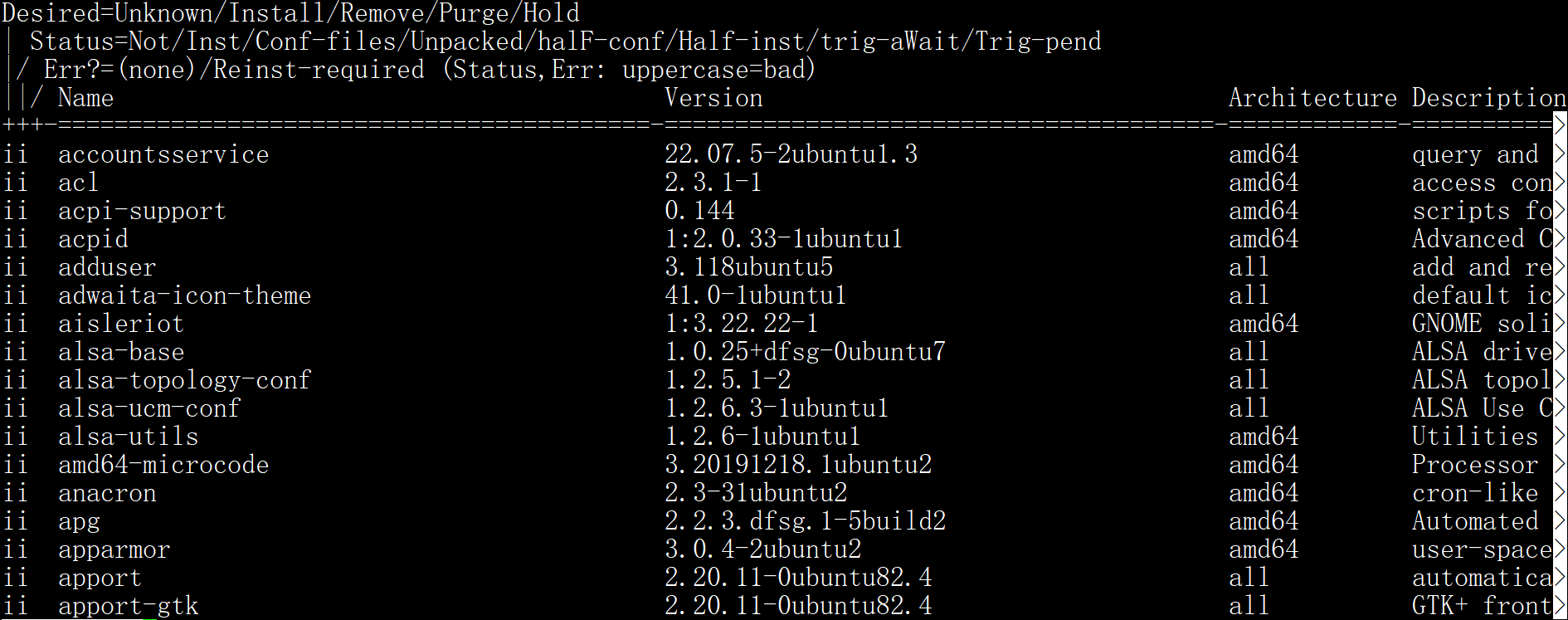
查看软件包是否安装
bash
[root@ubuntu2404 ~]# dpkg-query -l openssh-server
-s 查询系统中软件包状态
bash
# 查询系统中所有安装软件包状态,状态信息存储在状态数据库
[root@ubuntu2404 ~]# dpkg-query -s

# 查询系统中特定软件包状态
[root@ubuntu2404 ~]# dpkg-query -s openssh-server
Package: openssh-server
Status: install ok installed
Priority: optional
Section: net
Installed-Size: 1501
Maintainer: Ubuntu Developers <ubuntu-devel-discuss@lists.ubuntu.com>
Architecture: amd64
Multi-Arch: foreign
Source: openssh
Version: 1:8.9p1-3ubuntu0.1
......
-p 查询系统中软件包详细信息
bash
# 查询系统中安装软件包详细信息,详细信息存放在/var/lib/dpkg/available
# 部分软件包没有详细信息
[root@ubuntu2404 ~]# dpkg-query -p

# 查询系统中特定软件包详细信息
[root@ubuntu2404 ~]# dpkg-query -p adduser

......
-W 查询系统中已安装软件包版本
bash
# 查询系统中所有安装软件包版本
[root@ubuntu2404 ~]# dpkg-query -W
openssh-server	1:8.9p1-3ubuntu0.1

# 查询系统中特定软件包版本
[root@ubuntu2404 ~]# dpkg-query -W openssh-server
openssh-server	1:8.9p1-3ubuntu0.1
-L 查看已安装软件包中文件清单
bash
[root@ubuntu2404 ~]# dpkg-query -L openssh-server
/.
/etc
/etc/default
/etc/default/ssh
/etc/init.d
......
-c 查看已安装软件包中控制文件
bash
# 提供控制文件完整路径
[root@ubuntu2404 ~]# dpkg-query -c openssh-server
/var/lib/dpkg/info/openssh-server.templates
/var/lib/dpkg/info/openssh-server.config
/var/lib/dpkg/info/openssh-server.md5sums
/var/lib/dpkg/info/openssh-server.preinst
/var/lib/dpkg/info/openssh-server.postinst
/var/lib/dpkg/info/openssh-server.postrm
/var/lib/dpkg/info/openssh-server.prerm

# 只提供控制文件名
[root@ubuntu2404 ~]# dpkg-query --control-list openssh-server
templates
config
md5sums
preinst
postinst
postrm
prerm

# 查看控制文件内容,例如config
[root@ubuntu2404 ~]# dpkg-query --control-show openssh-server config
#! /bin/sh
set -e

. /usr/share/debconf/confmodule
db_version 2.0
......
-S 查看系统中文件属于哪个软件包
bash
[root@ubuntu2404 ~]# dpkg-query -S  'bin/rz'
lrzsz: /usr/bin/rz
dpkg-deb
作用:分析deb文件信息。
帮助信息
bash
[root@ubuntu2404 ~]# dpkg-deb --help
Usage: dpkg-deb [<option>...] <command>

Commands:
  -b|--build <directory> [<deb>]   Build an archive.
  -c|--contents <deb>              List contents.
  -I|--info <deb> [<cfile>...]     Show info to stdout.
  -W|--show <deb>                  Show information on package(s)
  -f|--field <deb> [<cfield>...]   Show field(s) to stdout.
  -e|--control <deb> [<directory>] Extract control info.
  -x|--extract <deb> <directory>   Extract files.
  -X|--vextract <deb> <directory>  Extract & list files.
  -R|--raw-extract <deb> <directory>
                                   Extract control info and files.
  --ctrl-tarfile <deb>             Output control tarfile.
  --fsys-tarfile <deb>             Output filesystem tarfile.

  -?, --help                       Show this help message.
      --version                    Show the version.

<deb> is the filename of a Debian format archive.
<cfile> is the name of an administrative file component.
<cfield> is the name of a field in the main 'control' file.
-c 查看deb文件中文件清单
bash
[root@ubuntu2404 ~]# dpkg-deb -c openssh-server*deb
drwxr-xr-x root/root         0 2022-11-23 15:38 ./
drwxr-xr-x root/root         0 2022-11-23 15:38 ./etc/
drwxr-xr-x root/root         0 2022-11-23 15:38 ./etc/default/
-rw-r--r-- root/root       133 2022-11-15 11:31 ./etc/default/ssh
drwxr-xr-x root/root         0 2022-11-23 15:38 ./etc/init.d/
-rwxr-xr-x root/root      4060 2022-11-15 11:31 ./etc/init.d/ssh
......
-W 查看deb文件版本
bash
[root@ubuntu2404 ~]# dpkg-deb -W openssh-server_amd64.deb
openssh-server	1:8.9p1-3ubuntu0.1
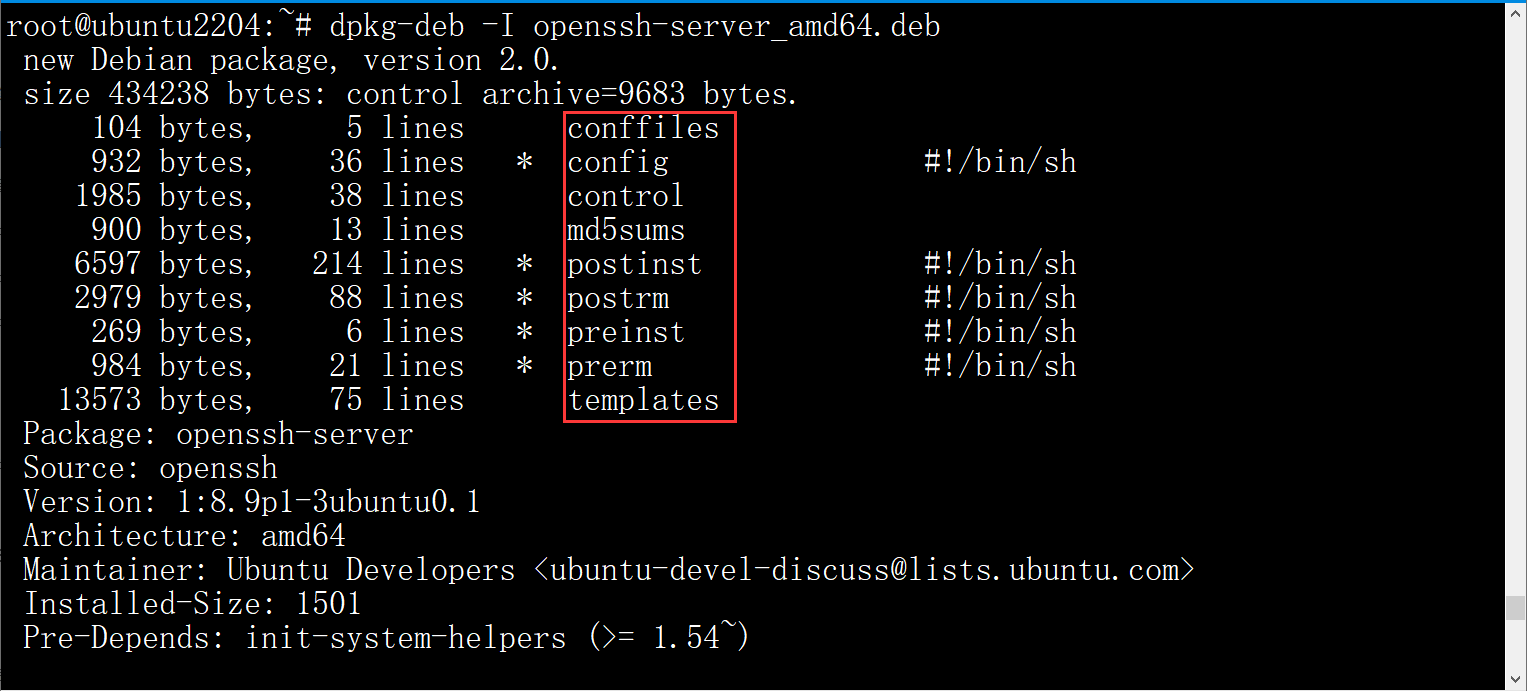
-I 查看deb文件中DEBIAN目录中元数据信息
DEBIAN目录中文件文件包括control、preinst、postinst、postrm、prerm、copyright、changlog、conffiles等。
bash
# 显示deb文件中DEBIAN目录中文件清单信息,并显示control内容
[root@ubuntu2404 ~]# dpkg-deb -I openssh-server_amd64.deb
 new Debian package, version 2.0.
 size 434238 bytes: control archive=9683 bytes.
     104 bytes,     5 lines      conffiles
     932 bytes,    36 lines   *  config               #!/bin/sh
    1985 bytes,    38 lines      control
     900 bytes,    13 lines      md5sums
    6597 bytes,   214 lines   *  postinst             #!/bin/sh
    2979 bytes,    88 lines   *  postrm               #!/bin/sh
     269 bytes,     6 lines   *  preinst              #!/bin/sh
     984 bytes,    21 lines   *  prerm                #!/bin/sh
   13573 bytes,    75 lines      templates
 Package: openssh-server
 Source: openssh
 Version: 1:8.9p1-3ubuntu0.1
 Architecture: amd64
 Maintainer: Ubuntu Developers <ubuntu-devel-discuss@lists.ubuntu.com>
.....
bash
# 例如查看文件MD5值
[root@ubuntu2404 ~]# dpkg-deb -I openssh-server_amd64.deb md5sums
8ec138e332aa1fbc3f081c17e81b62f9  lib/systemd/system/rescue-ssh.target
3841c38ccbff81c6bcab65bfd307c41c  lib/systemd/system/ssh.service
3f25171928b9546beb6a67bf51694eb3  lib/systemd/system/ssh.socket
bc5513f9fb433034b2986886e1af71df  lib/systemd/system/ssh@.service
4b50d38888a7c2093ea4928dca327287  usr/lib/openssh/ssh-session-cleanup
5899b256c7cff9db49c4555479b05b45  usr/sbin/sshd
f410eed89eecfb2bcf29440141a49d4f  usr/share/apport/package-hooks/openssh-server.py
77862d01cdeb1232790155687382fdad  usr/share/doc/openssh-client/examples/ssh-session-cleanup.service
b3cce9472de613cc6cb967aa63a7e28f  usr/share/man/man5/moduli.5.gz
d6f0d424d86f689708da000cfd8b9c0c  usr/share/man/man5/sshd_config.5.gz
ac7abad4e73226affab0c56e47cf8b68  usr/share/man/man8/sshd.8.gz
30e0fe758429c57d35a5e71dbd8dd2f8  usr/share/openssh/sshd_config
cb02155c6c0d5678ef2e827ebb983a3d  usr/share/openssh/sshd_config.md5sum
-f 查看deb文件control信息
bash
[root@ubuntu2404 ~]# dpkg-deb -f openssh-server_amd64.deb
Package: openssh-server
Source: openssh
Version: 1:8.9p1-3ubuntu0.1
Architecture: amd64
Maintainer: Ubuntu Developers <ubuntu-devel-discuss@lists.ubuntu.com>
Installed-Size: 1501
.....

# 显示control中特定属性信息
[root@ubuntu2404 ~]# dpkg-deb -f openssh-server_amd64.deb Maintainer
Ubuntu Developers <ubuntu-devel-discuss@lists.ubuntu.com>
-e 提取deb文件中DEBIAN目录
bash
[root@ubuntu2404 ~]# dpkg-deb -e openssh-server_amd64.deb

[root@ubuntu2404 ~]# ls
DEBIAN  openssh-server_amd64.deb
[root@ubuntu2404 ~]# ls DEBIAN/
conffiles  config  control  md5sums  postinst  postrm  preinst  prerm  templates
-x 提取deb文件中软件安装文件
bash
[root@ubuntu2404 ~]# dpkg-deb -x openssh-server_amd64.deb openssh-server
[root@ubuntu2404 ~]# ls openssh-server
etc  lib  usr
-X 提取并查看deb文件中软件安装文件
bash
[root@ubuntu2404 ~]# dpkg-deb -X openssh-server_amd64.deb ./openssh-server
./
./etc/
./etc/default/
./etc/default/ssh
./etc/init.d/
......
[root@ubuntu2404 ~]# ls openssh-server
etc  lib  usr
-R 同时提取deb文件中DEBIAN目录和软件安装文件
bash
[root@ubuntu2404 ~]# dpkg-deb -R openssh-server_amd64.deb ./openssh-server
[root@ubuntu2404 ~]# ls openssh-server
DEBIAN  etc  lib  usr
dpkg
作用:主要用于安装 、卸载 和验证 deb文件,其他功能参考 dpkg-query 和 dpkg-deb 命令。
帮助信息
bash
[root@ubuntu2404 ~]# dpkg --help
Usage: dpkg [<option>...] <command>

Commands:
  -i|--install       <.deb file name>... | -R|--recursive <directory>...
  --unpack           <.deb file name>... | -R|--recursive <directory>...
  -A|--record-avail  <.deb file name>... | -R|--recursive <directory>...
  --configure        <package>... | -a|--pending
  --triggers-only    <package>... | -a|--pending
  -r|--remove        <package>... | -a|--pending
  -P|--purge         <package>... | -a|--pending
  -V|--verify [<package>...]       Verify the integrity of package(s).
  --get-selections [<pattern>...]  Get list of selections to stdout.
  --set-selections                 Set package selections from stdin.
  --clear-selections               Deselect every non-essential package.
  --update-avail [<Packages-file>] Replace available packages info.
  --merge-avail [<Packages-file>]  Merge with info from file.
  --clear-avail                    Erase existing available info.
  --forget-old-unavail             Forget uninstalled unavailable pkgs.

  -p|--print-avail [<package>...]  Display available version details.

  -C|--audit [<package>...]        Check for broken package(s).
  --yet-to-unpack                  Print packages selected for installation.
  --predep-package                 Print pre-dependencies to unpack.
  --add-architecture <arch>        Add <arch> to the list of architectures.
  --remove-architecture <arch>     Remove <arch> from the list of architectures.
  --print-architecture             Print dpkg architecture.
  --print-foreign-architectures    Print allowed foreign architectures.
  --assert-help                    Show help on assertions.
  --assert-<feature>               Assert support for the specified feature.
  --validate-<thing> <string>      Validate a <thing>'s <string>.
  --compare-versions <a> <op> <b>  Compare version numbers - see below.
  --force-help                     Show help on forcing.
  -Dh|--debug=help                 Show help on debugging.

  -?, --help                       Show this help message.
      --version                    Show the version.

Validatable things: pkgname, archname, trigname, version.

Use dpkg with -b, --build, -c, --contents, -e, --control, -I, --info,   -f, --field, -x, --extract, -X, --vextract, --ctrl-tarfile, --fsys-tarfile on archives (type dpkg-deb --help).

Options:
  --admindir=<directory>     Use <directory> instead of /var/lib/dpkg.
  --root=<directory>         Install on a different root directory.
  --instdir=<directory>      Change installation dir without changing admin dir.
  --pre-invoke=<command>     Set a pre-invoke hook.
  --post-invoke=<command>    Set a post-invoke hook.
  --path-exclude=<pattern>   Do not install paths which match a shell pattern.
  --path-include=<pattern>   Re-include a pattern after a previous exclusion.
  -O|--selected-only         Skip packages not selected for install/upgrade.
  -E|--skip-same-version     Skip packages whose same version is installed.
  -G|--refuse-downgrade      Skip packages with earlier version than installed.
  -B|--auto-deconfigure      Install even if it would break some other package.
  --[no-]triggers            Skip or force consequential trigger processing.
  --verify-format=<format>   Verify output format (supported: 'rpm').
  --no-pager                 Disables the use of any pager.
  --no-debsig                Do not try to verify package signatures.
  --no-act|--dry-run|--simulate
                             Just say what we would do - don't do it.
  -D|--debug=<octal>         Enable debugging (see -Dhelp or --debug=help).
  --status-fd <n>            Send status change updates to file descriptor <n>.
  --status-logger=<command>  Send status change updates to <command>'s stdin.
  --log=<filename>           Log status changes and actions to <filename>.
  --ignore-depends=<package>[,...]
                             Ignore dependencies involving <package>.
  --force-<thing>[,...]      Override problems (see --force-help).
  --no-force-<thing>[,...]   Stop when problems encountered.
  --refuse-<thing>[,...]     Ditto.
  --abort-after <n>          Abort after encountering <n> errors.
  --robot                    Use machine-readable output on some commands.

Comparison operators for --compare-versions are:
  lt le eq ne ge gt       (treat empty version as earlier than any version);
  lt-nl le-nl ge-nl gt-nl (treat empty version as later than any version);
  < << <= = >= >> >       (only for compatibility with control file syntax).

Use 'apt' or 'aptitude' for user-friendly package management.
等同 dpkg-query 命令的选项
bash
  -s|--status [<package>...]       Display package status details.
  -p|--print-avail [<package>...]  Display available version details.
  -L|--listfiles <package>...      List files 'owned' by package(s).
  -l|--list [<pattern>...]         List packages concisely.
  -S|--search <pattern>...         Find package(s) owning file(s).
等同 dpkg-deb 命令的选项
bash
Use dpkg with -b, --build, -c, --contents, -e, --control, -I, --info,
  -f, --field, -x, --extract, -X, --vextract, --ctrl-tarfile, --fsys-tarfile
on archives (type dpkg-deb --help).
自己特有的选项
bash
  -i|--install       <.deb file name>... | -R|--recursive <directory>...
  --unpack           <.deb file name>... | -R|--recursive <directory>...
  -A|--record-avail  <.deb file name>... | -R|--recursive <directory>...
  --configure        <package>... | -a|--pending
  --triggers-only    <package>... | -a|--pending
  -r|--remove        <package>... | -a|--pending
  -P|--purge         <package>... | -a|--pending
  -V|--verify [<package>...]       Verify the integrity of package(s).
示例:
bash
# 安装
[root@ubuntu2404 ~]# dpkg -i lrzsz_0.12.21-10_amd64.deb
Selecting previously unselected package lrzsz.
(Reading database ... 201877 files and directories currently installed.)
Preparing to unpack lrzsz_0.12.21-10_amd64.deb ...
Unpacking lrzsz (0.12.21-10) ...
Setting up lrzsz (0.12.21-10) ...
Processing triggers for man-db (2.10.2-1) ...

# 验证
[root@ubuntu2404 ~]# mv /usr/share/man/man1/sz.1.gz .
[root@ubuntu2404 ~]# dpkg -V lrzsz
missing     /usr/share/man/man1/sz.1.gz
[root@ubuntu2404 ~]# mv sz.1.gz /usr/share/man/man1
[root@ubuntu2404 ~]# dpkg -V lrzsz

# 卸载
[root@ubuntu2404 ~]# dpkg -r lrzsz
(Reading database ... 201897 files and directories currently installed.)
Removing lrzsz (0.12.21-10) ...
Processing triggers for man-db (2.10.2-1) ...
无法解决有依赖的安装和卸载。
使用apt管理软件包
apt 和 其他apt命令的渊源
Debian是很多Linux发行版本的母版,比如Ubuntu,Linux Mint, elementary OS等。它有一个稳健的软件包系统,每一个组件和硬件程序构建成软件包,并安装到你的系统中。Debian使用一个名叫Advanced Packaging Tool (APT)的工具集,来管理这个软件包系统。
请注意:请不要将APT工具集与apt命令混淆,他们并不相同。
有很多工具可以与APT进行交互,允许你去安装、卸载和管理基于Linux发行版本的包。apt-get和apt-cache就是这样的命令行工具,且广泛使用。
引入apt命令集就是为了解决这个问题。apt由一些来自apt-get和apt-cache且广泛使用的特性组成,同时搁置了那些令人费解且少用的特性。它也能管理apt.conf文件。
使用apt,你不必在apt-get和apt-cache命令间来回切换。apt更加的结构化,给你提供必要选项,来管理软件包。
命令区别
虽然 apt 与 apt-get 有一些类似的命令选项,但它并不能完全向下兼容 apt-get 命令。也就是说,可以用 apt 替换部分 apt-get 系列命令,但不是全部。
| apt 命令 | 取代的命令 | 命令的功能 |
|---|---|---|
| apt install | apt-get install | 安装软件包 |
| apt remove | apt-get remove | 移除软件包 |
| apt purge | apt-get purge | 移除软件包及配置文件 |
| apt update | apt-get update | 刷新存储库索引 |
| apt upgrade | apt-get upgrade | 升级所有可升级的软件包 |
| apt autoremove | apt-get autoremove | 自动删除不需要的包 |
| apt full-upgrade | apt-get dist-upgrade | 在升级软件包时自动处理依赖关系 |
| apt search | apt-cache search | 搜索应用程序 |
| apt show | apt-cache show | 显示装细节 |
当然,apt 还有一些自己的命令:
| 新的apt命令 | 命令的功能 |
|---|---|
| apt list | 列出包含条件的包(已安装,可升级等) |
| apt edit-sources | 编辑源列表 |
**需要大家注意的是:**apt 命令也还在不断发展, 因此,你可能会在将来的版本中看到新的选项。
我应该使用apt还是apt-get?
既然两个命令都有用,那么我该使用 apt 还是 apt-get 呢?作为一个常规 Linux 用户,系统极客建议大家尽快适应并开始首先使用 apt。不仅因为广大 Linux 发行商都在推荐 apt,更主要的还是它提供了 Linux 包管理的必要选项。
最重要的是,apt 命令选项更少更易记,因此也更易用,所以没理由继续坚持 apt-get。
apt
子命令
bash
[root@ubuntu2404 ~]# apt  --<tab><tab>
autoclean     depends       install       reinstall     update
autopurge     dist-upgrade  list          remove        upgrade
autoremove    download      moo           search
build-dep     edit-sources  policy        show
changelog     full-upgrade  purge         showsrc
clean         help          rdepends      source
帮助信息
bash
[root@ubuntu2404 ~]# apt --help
apt 2.4.5 (amd64)
Usage: apt [options] command

apt is a commandline package manager and provides commands for
searching and managing as well as querying information about packages.
It provides the same functionality as the specialized APT tools,
like apt-get and apt-cache, but enables options more suitable for
interactive use by default.

Most used commands:
  list - list packages based on package names
  search - search in package descriptions
  show - show package details
  install - install packages
  reinstall - reinstall packages
  remove - remove packages
  autoremove - Remove automatically all unused packages
  update - update list of available packages
  upgrade - upgrade the system by installing/upgrading packages
  full-upgrade - upgrade the system by removing/installing/upgrading packages
  edit-sources - edit the source information file
  satisfy - satisfy dependency strings

See apt(8) for more information about the available commands.
Configuration options and syntax is detailed in apt.conf(5).
Information about how to configure sources can be found in sources.list(5).
Package and version choices can be expressed via apt_preferences(5).
Security details are available in apt-secure(8).
                                        This APT has Super Cow Powers.
update 子命令
update - update list of available packages
从软件仓库中获取最新软件清单。
**提醒:**这是执行大部分apt命令前要执行的命令。
bash
[root@ubuntu2404 ~]# apt updatelist 子命令
list - list packages based on package names
查看软件仓库中软件清单。
bash
# 可用于查看的选项
[root@ubuntu2404 ~]# apt list --<tab><tab>
--all-versions      --manual-installed  --upgradable
--installed         --target-release    --verbose

# 查看软件包清单
[root@ubuntu2404 ~]# apt list

WARNING: apt does not have a stable CLI interface. Use with caution in scripts.

Listing...
0ad-data-common/jammy,jammy 0.0.25b-1 all
0ad-data/jammy,jammy 0.0.25b-1 all
0ad/jammy 0.0.25b-2 amd64
0install-core/jammy 2.16-2 amd64
......

# 查看特定软件包
[root@ubuntu2404 ~]# apt list openssh-server
Listing... Done
openssh-server/jammy-updates,now 1:8.9p1-3ubuntu0.1 amd64 [installed]
openssh-server/jammy-updates 1:8.9p1-3ubuntu0.1 i386

# 查看特定软件包所有版本
[root@ubuntu2404 ~]# apt list openssh-server --all-versions
Listing... Done
openssh-server/jammy-updates,now 1:8.9p1-3ubuntu0.1 amd64 [installed]
openssh-server/jammy 1:8.9p1-3 amd64

openssh-server/jammy-updates 1:8.9p1-3ubuntu0.1 i386
openssh-server/jammy 1:8.9p1-3 i386
show 子命令
show - show package details
查看仓库中软件包详细信息。
bash
[root@ubuntu2404 ~]# apt show openssh-server
# 类似 dpkg -s openssh-server
search 子命令
search - search in package descriptions
bash
[root@ubuntu2404 ~]# apt search --<tab><tab>
--full        --names-only

[root@ubuntu2404 ~]# apt search --names-only apache2
install 子命令
install - install packages
从仓库中获取软件包并安装。
bash
[root@ubuntu2404 ~]# apt install --<tab><tab>
--allow-change-held-packages   --fix-broken                 --purge
--allow-downgrades             --fix-missing                --reinstall
--allow-insecure-repositories  --fix-policy                 --remove
--allow-remove-essential       --force-yes                  --show-progress
--allow-unauthenticated        --ignore-hold                --show-upgraded
--arch-only                    --ignore-missing             --simulate
--assume-no                    --install-recommends         --solver
--assume-yes                   --install-suggests           --target-release
--auto-remove                  --no-install-recommends      --trivial-only
--download                     --no-install-suggests        --upgrade
--download-only                --only-upgrade               --verbose-versions
--dry-run                      --print-uris

[root@ubuntu2404 ~]# apt install apache2 -y

# 安装特定版本
[root@ubuntu2404 ~]# apt install apache2=2.4.52-1ubuntu4.5
reinstall 子命令
reinstall - reinstall packages
从仓库中获取软件包并再次安装(系统中已安装)。
bash
[root@ubuntu2404 ~]# apt reinstall apache2 -yremove 子命令
remove - remove packages
卸载系统中已安装软件包。
bash
[root@ubuntu2404 ~]# apt remove apache2 -y
Reading package lists... Done
Building dependency tree... Done
Reading state information... Done
The following packages were automatically installed and are no longer required:
  apache2-bin apache2-data apache2-utils libapr1 libaprutil1 libaprutil1-dbd-sqlite3
  libaprutil1-ldap
Use 'apt autoremove' to remove them.
The following packages will be REMOVED:
  apache2
0 upgraded, 0 newly installed, 1 to remove and 282 not upgraded.
After this operation, 546 kB disk space will be freed.
(Reading database ... 202598 files and directories currently installed.)
Removing apache2 (2.4.52-1ubuntu4.5) ...
Processing triggers for man-db (2.10.2-1) ...
Processing triggers for ufw (0.36.1-4build1) ...
autoremove 子命令
autoremove - Remove automatically all unused packages
bash
[root@ubuntu2404 ~]# apt autoremove -yupgrade 子命令
upgrade - upgrade the system by installing/upgrading packages
bash
# 升级系统所有可更新软件包
[root@ubuntu2404 ~]# apt upgrade

# 升级系统中特定软件包
[root@ubuntu2404 ~]# apt upgrade openssh-server -y
full-upgrade 子命令
full-upgrade - upgrade the system by removing/installing/upgrading packages
bash
# 升级系统所有可更新软件包
[root@ubuntu2404 ~]# apt full-upgrade

# 升级系统中特定软件包
[root@ubuntu2404 ~]# apt full-upgrade openssh-server -y
download 子命令
download - download packages
bash
[root@ubuntu2404 ~]# apt download openssh-server
[root@ubuntu2404 ~]# ls
openssh-server_1%3a8.9p1-3ubuntu0.1_amd64.deb
edit-sources 子命令
edit-sources - edit the source information file
bash
[root@ubuntu2404 ~]# export EDITOR=vim
[root@ubuntu2404 ~]# apt edit-sources
# 使用vim编辑文件 /etc/apt/sources.list
apt-file
作用:查找软件包中文件。
apt-file is a command line tool for searching files in packages for the APT package management system.
帮助信息
bash
[root@ubuntu2404 ~]# apt-file --help

apt-file [options] action [pattern]
apt-file [options] -f action <file>
apt-file [options] -D action <debfile>

Pattern options:
================

    --fixed-string     -F               Do not expand pattern
    --from-deb         -D               Use file list of .deb package(s) as
                                        patterns; implies -F
    --from-file        -f               Read patterns from file(s), one per line
                                        (use '-' for stdin)
    --ignore-case      -i               Ignore case distinctions
    --regexp           -x               pattern is a regular expression
    --substring-match                   pattern is a substring (no glob/regex)


Search filter options:
======================

    --architecture     -a  <arch>       Use specific architecture [L]
    --index-names      -I  <names>      Only search indices listed in <names> [L]
    --filter-suites        <suites>     Only search indices for the listed <suites> [L]
                                        (E.g. "unstable")
    --filter-origins       <origins>    Only search indices from <origins> [L]
                                        (E.g. "Debian")

Other options:
==============

    --config           -c <file>        Parse the given APT config file [R]
    --option           -o <A::B>=<V>    Set the APT config option A::B to "V" [R]
    --package-only     -l               Only display packages name
    --verbose          -v               run in verbose mode [R]
    --help             -h               Show this help.
                       --               End of options (necessary if pattern
                                        starts with a '-')

[L]: Takes a comma-separated list of values.
[R]: The option can be used repeatedly

Action:
    list|show          <pattern>        List files in packages
    list-indices                        List indices configured in APT.
    search|find        <pattern>        Search files in packages
    update                              Fetch Contents files from apt-sources.
示例
bash
# 更新apt仓库中文件清单缓存
[root@ubuntu2404 ~]# apt-file update

# 仓库中某个软件包的文件清单
[root@ubuntu2404 ~]# apt-file list openssh-server
openssh-server: /etc/default/ssh
openssh-server: /etc/init.d/ssh
openssh-server: /etc/pam.d/sshd
openssh-server: /etc/ssh/moduli
openssh-server: /etc/ufw/applications.d/openssh-server
openssh-server: /lib/systemd/system/rescue-ssh.target
... ...

# 使用正则表达式查询ifconfig工具由哪个软件包提供
[root@ubuntu2404 ~]# apt-file -x search '.*bin/ifconfig$'
net-tools: /sbin/ifconfig
apt-get
参考apt命令即可。
bash
[root@ubuntu2404 ~]# apt-get --help
apt 2.4.5 (amd64)
Usage: apt-get [options] command
       apt-get [options] install|remove pkg1 [pkg2 ...]
       apt-get [options] source pkg1 [pkg2 ...]

apt-get is a command line interface for retrieval of packages
and information about them from authenticated sources and
for installation, upgrade and removal of packages together
with their dependencies.

Most used commands:
  update - Retrieve new lists of packages
  upgrade - Perform an upgrade
  install - Install new packages (pkg is libc6 not libc6.deb)
  reinstall - Reinstall packages (pkg is libc6 not libc6.deb)
  remove - Remove packages
  purge - Remove packages and config files
  autoremove - Remove automatically all unused packages
  dist-upgrade - Distribution upgrade, see apt-get(8)
  dselect-upgrade - Follow dselect selections
  build-dep - Configure build-dependencies for source packages
  satisfy - Satisfy dependency strings
  clean - Erase downloaded archive files
  autoclean - Erase old downloaded archive files
  check - Verify that there are no broken dependencies
  source - Download source archives
  download - Download the binary package into the current directory
  changelog - Download and display the changelog for the given package

See apt-get(8) for more information about the available commands.
Configuration options and syntax is detailed in apt.conf(5).
Information about how to configure sources can be found in sources.list(5).
Package and version choices can be expressed via apt_preferences(5).
Security details are available in apt-secure(8).
apt-cache
参考apt命令即可。
bash
[root@ubuntu2404 ~]# apt-cache --help
apt 2.4.5 (amd64)
Usage: apt-cache [options] command
       apt-cache [options] show pkg1 [pkg2 ...]

apt-cache queries and displays available information about installed
and installable packages. It works exclusively on the data acquired
into the local cache via the 'update' command of e.g. apt-get. The
displayed information may therefore be outdated if the last update was
too long ago, but in exchange apt-cache works independently of the
availability of the configured sources (e.g. offline).

Most used commands:
  showsrc - Show source records
  search - Search the package list for a regex pattern
  depends - Show raw dependency information for a package
  rdepends - Show reverse dependency information for a package
  show - Show a readable record for the package
  pkgnames - List the names of all packages in the system
  policy - Show policy settings

See apt-cache(8) for more information about the available commands.
Configuration options and syntax is detailed in apt.conf(5).
Information about how to configure sources can be found in sources.list(5).
Package and version choices can be expressed via apt_preferences(5).
Security details are available in apt-secure(8).
apt-key
作用:管理apt仓库key。
bash
[root@ubuntu2404 ~]# apt-key
Usage: apt-key [--keyring file] [command] [arguments]

Manage apt's list of trusted keys

  apt-key add <file>          - add the key contained in <file> ('-' for stdin)
  apt-key del <keyid>         - remove the key <keyid>
  apt-key export <keyid>      - output the key <keyid>
  apt-key exportall           - output all trusted keys
  apt-key update              - update keys using the keyring package
  apt-key net-update          - update keys using the network
  apt-key list                - list keys
  apt-key finger              - list fingerprints
  apt-key adv                 - pass advanced options to gpg (download key)

If no specific keyring file is given the command applies to all keyring files.
管理软件存储库
软件存储库格式
每行记录格式:
档案类型 镜像url 版本代号 软件包分类示例:
bash
deb http://mirrors.aliyun.com/ubuntu focal main restricted
deb http://mirrors.aliyun.com/ubuntu focal universe
deb http://mirrors.aliyun.com/ubuntu focal multiverse
deb http://mirrors.aliyun.com/ubuntu focal-updates main restricted
deb http://mirrors.aliyun.com/ubuntu focal-updates universe
deb http://mirrors.aliyun.com/ubuntu focal-updates multiverse
deb http://mirrors.aliyun.com/ubuntu focal-backports main restricted universe multiverse
deb http://mirrors.aliyun.com/ubuntu focal-security main restricted
deb http://mirrors.aliyun.com/ubuntu focal-security universe
deb http://mirrors.aliyun.com/ubuntu focal-security multiverse
deb https://mirrors.aliyun.com/kubernetes/apt/ kubernetes-xenial main
deb [arch=amd64] https://mirrors.aliyun.com/docker-ce/linux/ubuntu focal stable
档案类型
-
deb:档案类型为二进制预编译软件包,一般我们所用的档案类型。
-
deb-src:软件包的源代码。
简言之,一般我们只想要安装该软件而不想要去重新编译它时,就在这一栏填入deb,如果你想取得某软件的原始码(sources code),就得加入deb-src,当然也可以两行都写。
镜像url
镜像url指的就是软件套件来源位置。当执行apt指令时,就会到这些位置去搜寻软件数据库。位置可以是file、cdrom、http、ftp、copy、rsh、ssh等,用的最多的是http/https/ftp。
以阿里镜像为例,在浏览器打开出现以如下内容:
http://mirrors.aliyun.com/ubuntu/
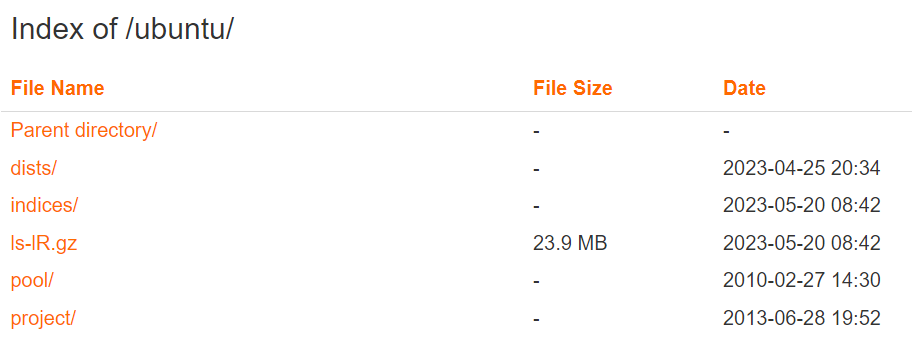
每一个源目录下都应该至少包含dists和pool两个目录,否则就是无效的源。
-
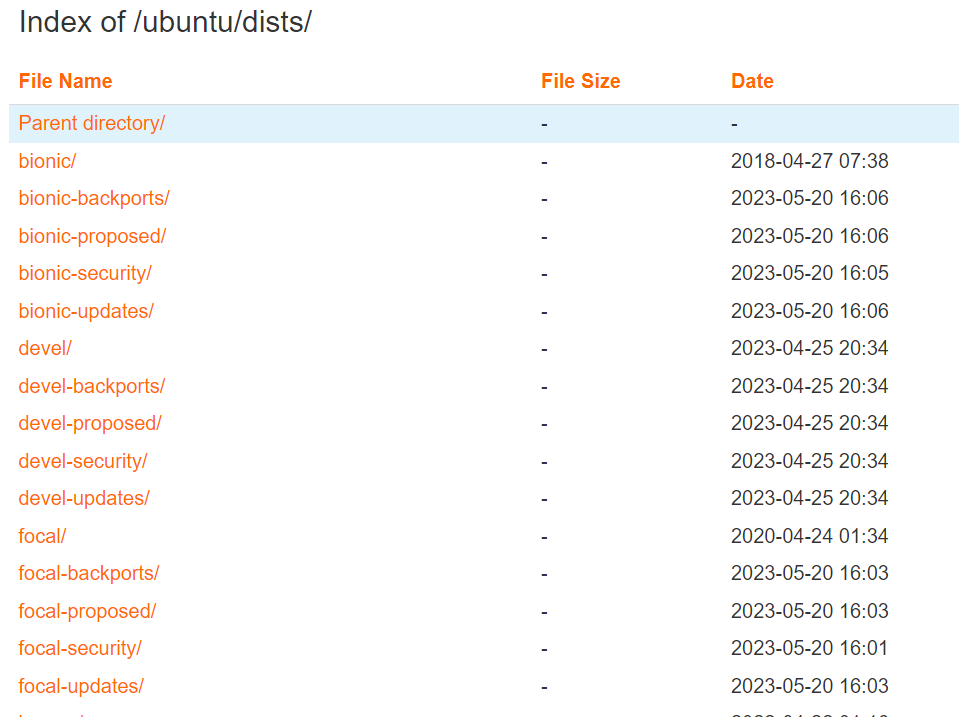
/dists/ 目录包含"发行版"(distributions), 此处是获得 Debian 发布版本(releases)和已发布版本(pre-releases)的软件包的正规途径. 有些旧软件包及 packages.gz 文件仍在里面.
-
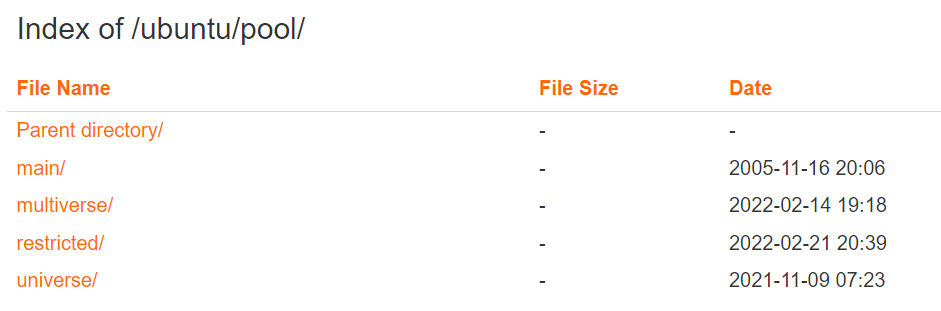
/pool/ 目录为软件包的物理地址。软件包均放进一个巨大的 "池子(pool)", 按照源码包名称分类存放. 为了方便管理, pool 目录下按属性再分类, 分类下面再按源码包名称的首字母归档. 这些目录包含的文件有: 运行于各种系统架构的二进制软件包, 生成这些二进制软件包的源码包.
-
/indices/:维护人员文件和重载文件.
-
/project/:大部分为开发人员的资源, 如:project/experimental/,本目录包含了处于开发中的软件包和工具, 它们均处于 alpha 测试阶段.
版本代号
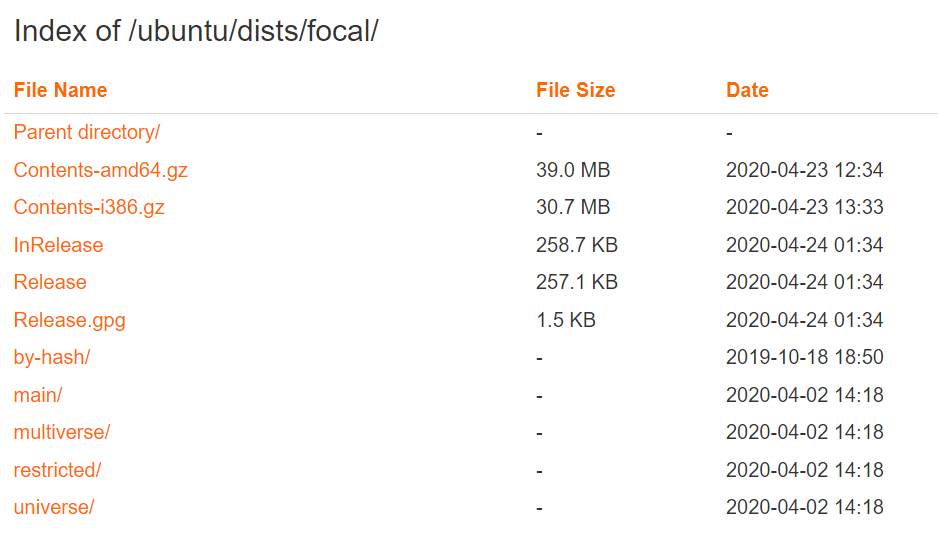
发行版的具体代号,如ubuntu 20.04是focal,Ubuntu18.04是bionic,16.04是xenial等。另外,在发行版后还可能有进一步的指定,如xenial-updates等
软件包分类
-
main: 官方支持的自由软件。
-
restricted: 官方支持的非完全自由的软件。
-
universe: 社区维护的自由软件。
-
multiverse: 非自由软件。
配置软件存储库
配置文件
- /etc/apt/sources.list
- /etc/apt/sources.list.d/*.list
配置过程
bash
# 1. 复制源文件备份,以防万一
song@ubuntu1804:~$ sudo cp /etc/apt/sources.list /etc/apt/sources.list.bak

# 2. 查看新版本信息。Ubuntu18.04版之前的任一版更改apt源为国内源方法内容大同小异,每一版内容不同的地方就是版本号。
song@ubuntu1804:~$ lsb_release  -c
Codename: bionic

# 3. 编辑源列表文件
song@ubuntu1804:~$ sudo vi /etc/apt/sources.list
deb http://mirrors.aliyun.com/ubuntu/ bionic main restricted universe multiverse
deb-src http://mirrors.aliyun.com/ubuntu/ bionic main restricted universe multiverse
deb http://mirrors.aliyun.com/ubuntu/ bionic-security main restricted universe multiverse
deb-src http://mirrors.aliyun.com/ubuntu/ bionic-security main restricted universe multiverse
deb http://mirrors.aliyun.com/ubuntu/ bionic-updates main restricted universe multiverse
deb-src http://mirrors.aliyun.com/ubuntu/ bionic-updates main restricted universe multiverse
deb http://mirrors.aliyun.com/ubuntu/ bionic-proposed main restricted universe multiverse
deb-src http://mirrors.aliyun.com/ubuntu/ bionic-proposed main restricted universe multiverse
deb http://mirrors.aliyun.com/ubuntu/ bionic-backports main restricted universe multiverse
deb-src http://mirrors.aliyun.com/ubuntu/ bionic-backports main restricted universe multiverse

# 4. 执行以下命令获取最新软件列表
song@ubuntu1804:~$ sudo apt-get update