【HarmonyOS 6.1 全场景实战】《灵犀厨房》实战(番外篇:元服务实战------从零搭建云数据库,让"疾风劲草"App拥有云端能力
专栏:HarmonyOS 6.1.0 全场景实战|手把手带你打造《灵犀厨房》AI 厨艺助手
摘要 :我们的《灵犀厨房》经过33篇打磨,已经拥有了本地数据库、推荐引擎、语音播报等强大功能。但有一个短板始终没补上------数据无法跨设备同步,用户换手机就得重新设置偏好和收藏 。今天,我们正式跨入"元服务"与"云开发"领域!所谓元服务,就像应用界的"小程序"------免安装、即用即走,而云开发则为它提供了"云端大脑"。本篇将手把手带你:在AppGallery Connect创建元服务项目、配置签名证书、开通云数据库,并编写代码实现数据查询。我们将用"疾风劲草"项目作为示例,从零搭建一个能读取云端图书信息的元服务。读完本篇,你会掌握HarmonyOS元服务的完整上云流程,为后续《灵犀厨房》的云端同步打下坚实基础。
一、元服务与云开发:为什么需要"云"?
1.1 元服务是什么?
想象你去一家餐厅,不用下载整本菜单App,只需扫描桌码打开一个轻量级卡片 ------点完菜、结完账,用完即走,不留痕迹。这就是元服务(Atomic Service):无需安装、自动更新、用完即走,是HarmonyOS面向服务化生态的重要形态。
元服务本质是一种特殊的HAP包,体积小(通常<10MB),启动快,适合提供单一聚焦的功能。未来《灵犀厨房》的菜谱分享、智能推荐卡片等模块,都可以做成元服务,让用户不下载App也能体验核心功能。
1.2 云开发:元服务的"加油站"
元服务本身是"轻装",但需要后端能力支持数据存储、用户认证、推送等。AppGallery Connect(AGC)云开发提供了一站式后端服务:
- 云数据库:存储结构化数据(如菜谱、用户偏好)
- 云存储:存放图片、视频等文件
- 云函数:执行服务端逻辑(如推荐算法)
这些服务都集成在AGC平台上,HarmonyOS SDK 已封装好调用接口,我们只需在工程中引入依赖即可。本篇聚焦云数据库,展示如何让元服务读写云端数据。
二、准备工作:在AGC创建项目与元服务
2.1 创建项目
登录 AppGallery Connect,点击「我的项目」→「添加项目」,填写项目名称(如"疾风劲草"),选择应用类型为"元服务(HarmonyOS)"。
2.2 添加元服务应用
在项目内点击「添加应用」,填写:
- 平台:HarmonyOS
- 应用类型:元服务
- 应用名称:Jifeng(自定义)
- 包名 :按规范填写,例如
com.atomicservice.6917609121522592xxx(最终会生成)
创建完成后,记录 Client ID 和 Client Secret(在"项目设置" → "应用信息"中查看),后续需要在代码中配置。
2.3 配置权限和metadata
在 module.json5 中添加 ohos.permission.INTERNET 权限,并配置 client_id 元数据:
json
"requestPermissions": [
  {
    "name": "ohos.permission.INTERNET"
  }
],
"metadata": [
  {
    "name": "client_id",
    "value": "691760xxxxxxxx"   // 替换为你从AGC获取的Client ID
  }
]为什么需要client_id? 这是华为账号体系认证的凭证,用于后续的匿名登录和用户鉴权。
三、签名与证书配置(关键步骤)
元服务上架和调试需要正式签名,以下是完整流程(附截图示意):
3.1 生成CSR证书请求
在DevEco Studio中,选择 Build → Generate Key and CSR,填写信息后生成 .csr 文件和 .p12 密钥库。
3.2 申请调试证书
登录AGC,在"我的项目" → "证书管理"中,上传CSR文件,申请调试证书(HarmonyOS Debug Certificate),下载 .cer 文件。
3.3 注册设备
在AGC"设备管理"中,添加你用于调试的真机设备(通过UDID),以便生成匹配的Profile。
3.4 申请调试Profile
在"Profile管理"中创建调试Profile,选择证书和已注册设备,下载 .p7b 文件。
3.5 添加公钥指纹
在AGC"项目设置" → "证书管理" → "添加公钥指纹",将 .cer 证书的公钥指纹填入(参考官方文档)。
3.6 手动配置签名
在DevEco Studio中,打开 File → Project Structure → Modules → entry,在"Signing"选项卡中:
- 配置
storeFile(.p12文件路径)、storePassword、keyAlias、keyPassword - 配置
certFile(.cer文件路径)、profileFile(.p7b文件路径)
点击"Apply"和"OK"完成配置。
提示:这些配置确保你的元服务可以正常在真机调试和后续上架,缺一不可。
四、开通云数据库服务
在AGC控制台,依次开通:
- 云数据库 :创建存储区(如
JifengStorage) - 云存储(可选)
- 云函数(可选)
4.1 开启认证服务
云数据库需要用户身份认证。在AGC"认证服务"中,启用 匿名账号 和 华为账号(用于后续用户登录)。我们测试阶段使用匿名登录,无需用户主动注册。
4.2 创建数据库对象类型
在云数据库页面,新建对象类型,命名为 BookInfo,添加字段:
| 字段名 | 类型 | 说明 |
|---|---|---|
| id | Integer | 主键 |
| bookName | String | 书名 |
| author | String | 作者 |
| price | Double | 价格 |
| borrowerId | Integer | 借阅者ID |
| borrowerName | String | 借阅者姓名 |
| borrowerTime | Date | 借阅时间 |
设置权限:允许"World"读取,允许"Authenticated"读取,"Creator"和"Administrator"可增删改。
4.3 导出schema.json
创建完成后,点击「导出」生成 schema.json 文件,下载到本地。后续需要将此文件放入项目的 rawfile 目录中。
五、在DevEco Studio中集成云数据库
5.1 添加依赖
在 entry/oh-package.json5 中添加华为账号SDK:
json
{
  "dependencies": {
    "@hw-agconnect/auth": "^1.0.5"
  }
}
执行 ohpm install 安装。
5.2 放置schema.json
将导出的 schema.json 复制到 entry/src/main/resources/rawfile/ 目录下。
5.3 创建实体类
在 ets/model/ 下新建 BookInfo.ets,继承 cloudDatabase.DatabaseObject,并实现 naturalbase_ClassName() 方法返回对象类型名称:
typescript
// model/BookInfo.ets
import { cloudDatabase } from '@kit.CloudFoundationKit';

class BookInfo extends cloudDatabase.DatabaseObject {
  // ★ 必须与 AGC 控制台的对象类型名称完全一致
  public naturalbase_ClassName(): string {
    return "BookInfo";
  }

  // 字段定义(与 schema.json 完全对应)
  public id: number | undefined;
  public bookName: string | undefined;
  public author: string | undefined;
  public price: number | undefined;
  public borrowerId: number | undefined;
  public borrowerName: string | undefined;
  public borrowerTime: Date | undefined;
}

export { BookInfo };
5.4 放置agconnect-services.json
从AGC"项目设置" → "凭证"下载 agconnect-services.json,放入 entry/src/main/resources/rawfile/ 目录,用于SDK初始化。
六、核心代码解析
6.1 EntryAbility:云服务初始化的"总调度"
EntryAbility 是元服务入口,负责初始化云服务。关键流程如下:
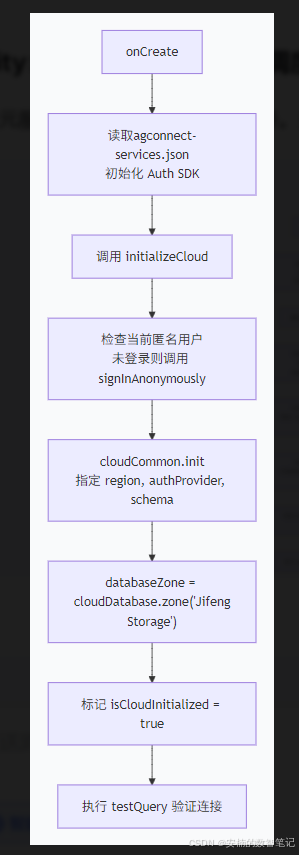
关键代码片段:
typescript
// 匿名登录
let currentUser = await auth.getCurrentUser();
if (currentUser === null) {
  let signInResult = await auth.signInAnonymously();
  currentUser = signInResult.getUser();
}

// 初始化 cloudCommon
cloudCommon.init({
  region: cloudCommon.CloudRegion.CHINA,
  authProvider: auth.getAuthProvider(),
  functionOptions: { timeout: 30 * 1000 },
  databaseOptions: { schema: 'schema.json', traceId: 'JifengApp' }
});

// 获取数据库存储区
databaseZone = cloudDatabase.zone('JifengStorage');
完整代码:
typescript
// entryability/EntryAbility.ets
import { AbilityConstant, UIAbility, Want } from '@kit.AbilityKit';
import { hilog } from '@kit.PerformanceAnalysisKit';
import { window } from '@kit.ArkUI';
import { cloudDatabase, cloudCommon } from '@kit.CloudFoundationKit';
import { BookInfo } from '../model/BookInfo';
import auth from '@hw-agconnect/auth';
import { BusinessError } from '@kit.BasicServicesKit';
import { buffer } from '@kit.ArkTS';

const DOMAIN = 0x0000;
const TAG = 'EntryAbility';

// ★ 导出供页面使用的全局变量
export let databaseZone: cloudDatabase.DatabaseZone;
export let isCloudInitialized: boolean = false;

export default class EntryAbility extends UIAbility {
  private authProvider: auth.AuthProvider | null = null;

  onCreate(want: Want, launchParam: AbilityConstant.LaunchParam): void {
    hilog.info(DOMAIN, TAG, '%{public}s', 'Ability onCreate');

    // 1. 初始化 Auth SDK
    try {
      const file = this.context.resourceManager.getRawFileContentSync('agconnect-services.json');
      const json: string = buffer.from(file.buffer).toString();
      auth.init(this.context, json);
      this.authProvider = auth.getAuthProvider();
      hilog.info(DOMAIN, TAG, 'Auth SDK initialized successfully');
    } catch (err) {
      hilog.error(DOMAIN, TAG, `Failed to init auth SDK: ${JSON.stringify(err)}`);
    }

    // 2. 执行云服务初始化
    this.initializeCloud();
  }

  // ★ 核心:初始化云服务(匿名登录 + cloudCommon + DatabaseZone)
  async initializeCloud(): Promise<void> {
    try {
      // 步骤1:匿名登录(获取用户身份)
      let currentUser = await auth.getCurrentUser();
      if (currentUser === null) {
        const signInResult = await auth.signInAnonymously();
        hilog.info(DOMAIN, TAG, '✅ 匿名登录成功,用户UID: %{public}s', signInResult.getUser().getUid());
        currentUser = signInResult.getUser();
      } else {
        hilog.info(DOMAIN, TAG, '✅ 用户已登录,UID: %{public}s', currentUser.getUid());
      }

      // 步骤2:初始化 cloudCommon(统一配置)
      cloudCommon.init({
        region: cloudCommon.CloudRegion.CHINA,
        authProvider: this.authProvider!,
        functionOptions: { timeout: 30 * 1000 },
        databaseOptions: {
          schema: 'schema.json',  // 对应 rawfile 下的文件名
          traceId: 'JifengApp'
        }
      });
      hilog.info(DOMAIN, TAG, '✅ cloudCommon initialized successfully');

      // 步骤3:获取数据库存储区(必须与AGC控制台创建的存储区名称一致)
      databaseZone = cloudDatabase.zone('JifengStorage');
      hilog.info(DOMAIN, TAG, '✅ DatabaseZone initialized successfully');

      // 标记初始化完成
      isCloudInitialized = true;

      // 步骤4:测试查询(验证连通性)
      await this.testQuery();

    } catch (error) {
      const err = error as BusinessError;
      hilog.error(DOMAIN, TAG, `❌ 初始化失败: code=${err?.code}, message=${err?.message}`);
    }
  }

  // ★ 测试查询:查询所有 BookInfo
  async testQuery(): Promise<void> {
    try {
      hilog.info(DOMAIN, TAG, 'Starting test query...');
      const condition = new cloudDatabase.DatabaseQuery(BookInfo);
      const resultArray = await databaseZone.query(condition);
      hilog.info(DOMAIN, TAG, `✅ Query succeeded! Result count: ${resultArray.length}`);
      if (resultArray.length > 0) {
        hilog.info(DOMAIN, TAG, `📖 首条数据: ${JSON.stringify(resultArray[0])}`);
      }
    } catch (err) {
      const error = err as BusinessError;
      hilog.error(DOMAIN, TAG, `❌ Test query failed: code=${error?.code}, message=${error?.message}`);
    }
  }

  onWindowStageCreate(windowStage: window.WindowStage): void {
    hilog.info(DOMAIN, TAG, '%{public}s', 'Ability onWindowStageCreate');
    windowStage.loadContent('pages/Index', (err) => {
      if (err.code) {
        hilog.error(DOMAIN, TAG, 'Failed to load content. Cause: %{public}s', JSON.stringify(err));
        return;
      }
      hilog.info(DOMAIN, TAG, 'Succeeded in loading the content.');
    });
  }

  onDestroy(): void { hilog.info(DOMAIN, TAG, '%{public}s', 'Ability onDestroy'); }
  onWindowStageDestroy(): void { hilog.info(DOMAIN, TAG, '%{public}s', 'Ability onWindowStageDestroy'); }
  onForeground(): void { hilog.info(DOMAIN, TAG, '%{public}s', 'Ability onForeground'); }
  onBackground(): void { hilog.info(DOMAIN, TAG, '%{public}s', 'Ability onBackground'); }
}
为什么需要匿名登录? 云数据库要求请求携带用户身份,匿名登录为未注册用户提供临时UID,让数据读写无需显式账号密码。
6.2 Index.ets:页面展示查询结果
页面 Index 负责查询 BookInfo 数据并渲染。核心逻辑:
aboutToAppear中调用waitForInitialization,轮询等待isCloudInitialized变为true(因为初始化是异步的)。- 初始化完成后,执行
queryAll()查询所有书籍,以及queryBook('唐诗三百首')按书名查询。
typescript
// 查询所有图书
async queryAll() {
  let condition = new cloudDatabase.DatabaseQuery(BookInfo);
  let resultArray = await databaseZone.query(condition);
  this.bookList = resultArray;
}

// 按书名查询
async queryBook(bookName: string) {
  let condition = new cloudDatabase.DatabaseQuery(BookInfo);
  condition.equalTo('bookName', bookName);
  let resultArray = await databaseZone.query(condition);
  if (resultArray.length > 0) this.bookInfo = resultArray[0];
}
页面用 Text 展示 bookInfo 的书名、作者、价格,简单清晰。
完整代码:
typescript
// pages/Index.ets
import { BusinessError } from '@kit.BasicServicesKit';
import { hilog } from '@kit.PerformanceAnalysisKit';
import { cloudDatabase } from '@kit.CloudFoundationKit';
import { BookInfo } from '../model/BookInfo';
import { databaseZone, isCloudInitialized } from '../entryability/EntryAbility';

const DOMAIN = 0x0000;

@Entry
@Component
struct Index {
  @State bookList: BookInfo[] = [];          // ★ 完整列表
  @State searchKeyword: string = '';         // ★ 搜索关键词
  @State isLoading: boolean = true;          // ★ 加载状态
  @State isRefreshing: boolean = false;      // ★ 下拉刷新状态

  private condition = new cloudDatabase.DatabaseQuery(BookInfo);

  aboutToAppear() {
    hilog.info(DOMAIN, 'testTag', 'Index aboutToAppear');
    this.waitForInitialization();
  }

  // ★ 等待云初始化完成(轮询机制)
  async waitForInitialization(): Promise<void> {
    let retryCount = 0;
    const maxRetry = 30; // 最多等待 3 秒(每 100ms 一次)

    while (!isCloudInitialized && retryCount < maxRetry) {
      await this.delay(100);
      retryCount++;
    }

    if (isCloudInitialized) {
      hilog.info(DOMAIN, 'testTag', '✅ Cloud initialized, loading books...');
      await this.queryAllBooks();
    } else {
      hilog.error(DOMAIN, 'testTag', '❌ Cloud initialization timeout');
    }
    this.isLoading = false;
  }

  delay(ms: number): Promise<void> {
    return new Promise(resolve => setTimeout(resolve, ms));
  }

  // ★ 查询所有书籍(填充列表)
  async queryAllBooks(): Promise<void> {
    try {
      const resultArray = await databaseZone.query(this.condition);
      this.bookList = resultArray;
      hilog.info(DOMAIN, 'testTag', `✅ 查询成功,共 ${resultArray.length} 本书`);
    } catch (err) {
      const error = err as BusinessError;
      hilog.error(DOMAIN, 'testTag', `❌ 查询失败: ${error?.message}`);
    }
  }

  // ★ 按书名搜索
  async searchBooks(keyword: string): Promise<void> {
    if (!keyword.trim()) {
      await this.queryAllBooks();
      return;
    }
    try {
      const condition = new cloudDatabase.DatabaseQuery(BookInfo);
      condition.like('bookName', `%${keyword}%`);  // 模糊搜索
      const resultArray = await databaseZone.query(condition);
      this.bookList = resultArray;
      hilog.info(DOMAIN, 'testTag', `🔍 搜索结果: ${resultArray.length} 条`);
    } catch (err) {
      const error = err as BusinessError;
      hilog.error(DOMAIN, 'testTag', `❌ 搜索失败: ${error?.message}`);
    }
  }

  // ★ 下拉刷新
  async onRefresh(): Promise<void> {
    this.isRefreshing = true;
    await this.queryAllBooks();
    this.isRefreshing = false;
  }

  build() {
    Column() {
      // --- 标题栏 ---
      Row() {
        Text('📚 云端书库')
          .fontSize(22)
          .fontWeight(FontWeight.Bold)
          .fontColor('#333')
        Blank()
        Text(`共 ${this.bookList.length} 本`)
          .fontSize(13)
          .fontColor('#999')
      }
      .width('100%')
      .padding({ left: 16, right: 16, top: 16, bottom: 8 })

      // --- 搜索框 ---
      Row() {
        TextInput({ placeholder: '🔍 搜索书名...', text: this.searchKeyword })
          .layoutWeight(1)
          .height(36)
          .backgroundColor('#F5F5F5')
          .borderRadius(18)
          .padding({ left: 12 })
          .onChange((value: string) => {
            this.searchKeyword = value;
          })
        Button('搜索')
          .height(36)
          .padding({ left: 12, right: 12 })
          .backgroundColor('#FF6B35')
          .fontColor(Color.White)
          .borderRadius(18)
          .onClick(() => {
            this.searchBooks(this.searchKeyword);
          })
      }
      .width('100%')
      .padding({ left: 16, right: 16, bottom: 8 })

      // --- 加载状态 ---
      if (this.isLoading) {
        Column() {
          LoadingProgress().width(40).height(40).color('#FF6B35')
          Text('正在连接云端...').fontSize(14).fontColor('#999').margin({ top: 12 })
        }
        .width('100%')
        .layoutWeight(1)
        .justifyContent(FlexAlign.Center)
      } else {
        // --- 下拉刷新 + 列表 ---
        Refresh({ refreshing: $$this.isRefreshing }) {
          if (this.bookList.length === 0) {
            Column() {
              Text('📭').fontSize(48)
              Text('暂无书籍,请在云端添加数据')
                .fontSize(14)
                .fontColor('#999')
                .margin({ top: 8 })
            }
            .width('100%')
            .height(200)
            .justifyContent(FlexAlign.Center)
          } else {
            List() {
              ForEach(this.bookList, (item: BookInfo, index: number) => {
                ListItem() {
                  this.BookCard(item, index)
                }
              }, (item: BookInfo) => item.id?.toString() ?? Math.random().toString())
            }
            .width('100%')
            .layoutWeight(1)
            .scrollBar(BarState.Off)
          }
        }
        .onRefreshing(() => {
          this.onRefresh();
        })
        .layoutWeight(1)
      }
    }
    .width('100%')
    .height('100%')
    .backgroundColor('#F8F8F8')
  }

  // ★ 书籍卡片子组件
  @Builder
  BookCard(item: BookInfo, index: number) {
    Column() {
      Row() {
        // 序号
        Text(`${index + 1}`)
          .fontSize(12)
          .fontColor('#CCC')
          .width(30)
        // 书名
        Text(item.bookName ?? '未命名')
          .fontSize(16)
          .fontWeight(FontWeight.Medium)
          .fontColor('#333')
          .layoutWeight(1)
        // 价格
        Text(`¥${item.price?.toFixed(2) ?? '0.00'}`)
          .fontSize(16)
          .fontWeight(FontWeight.Bold)
          .fontColor('#FF6B35')
      }
      .width('100%')

      Row() {
        Text(`✍️ ${item.author ?? '佚名'}`)
          .fontSize(13)
          .fontColor('#999')
        Blank()
        if (item.borrowerName) {
          Text(`📖 借阅者: ${item.borrowerName}`)
            .fontSize(12)
            .fontColor('#4CAF50')
        }
      }
      .width('100%')
      .margin({ top: 4 })
    }
    .width('100%')
    .padding(14)
    .backgroundColor(Color.White)
    .borderRadius(12)
    .shadow({ radius: 4, color: '#0A000000', offsetY: 1 })
    .margin({ bottom: 8 })
  }
}
6.3 关键配置文件
app.json5 :必须包含 "bundleType": "atomicService",标识这是元服务。
json
{
  "app": {
    "bundleName": "com.atomicservice.6917609121522592xxx",
    "bundleType": "atomicService",
    ...
  }
}module.json5:metadata 中配置 client_id,这是华为账号鉴权的必需品。
七、运行调试与日志分析
将真机连接到DevEco Studio,运行元服务。成功日志如下(关键行已标注释):
Ability onCreate
Auth SDK initialized successfully           // Auth SDK 加载成功
用户已登录,UID: 1979984820398242880        // 匿名登录成功
cloudCommon initialized successfully        // 云服务初始化成功
DatabaseZone initialized successfully       // 存储区创建成功
Starting test query...                     // 开始测试查询
Query succeeded! Result count: 1            // 查询到1条数据
Succeeded in querying data, result: [{"id":1,"bookName":"唐诗三百首","author":"中国","price":205}]   // 数据返回
页面会显示书名、作者和价格,证明云数据库已打通。
可能出现的问题:
| 错误现象 | 可能原因 | 解决方案 |
|---|---|---|
Cloud initialization timeout |
schema.json 未正确放置或网络问题 |
检查 rawfile 目录是否存在 schema.json,并确保真机可联网 |
auth init failed |
agconnect-services.json 缺失或格式错误 |
重新下载并放置到正确目录 |
Query returns 0 |
云数据库中无数据或权限不足 | 在AGC控制台手动添加一条测试数据,检查权限设置 |
八、总结与下篇预告
今天,我们完成了《灵犀厨房》云开发的第一步:
- 在AGC创建了元服务项目,配置了签名证书
- 开通了云数据库,创建了对象类型和存储区
- 编写了初始化代码,实现匿名登录和云数据库查询
- 成功读取了云端数据并在页面展示
这相当于为我们的App装上了"云端翅膀"------从此数据不再局限于本地。后续我们将把《灵犀厨房》的用户偏好、收藏菜谱、健康数据等全部迁移到云数据库,实现多设备同步。
下篇预告 :第33篇《云数据库实战:为灵犀厨房构建用户数据同步服务》。我们将改造现有的本地 RelationalStore,让用户登录后自动拉取云端档案,修改后自动上传,真正做到"一次设置,处处可用"。
📋 任务简报
| 维度 | 内容 |
|---|---|
| 章节 | 第34篇:元服务实战------从零搭建云数据库 |
| 核心技术 | AGC云开发、匿名登录、cloudCommon、cloudDatabase |
| 新增文件 | BookInfo.ets、schema.json、agconnect-services.json |
| 修改文件 | EntryAbility.ets、Index.ets、module.json5、app.json5、oh-package.json5 |
| 关键操作 | 证书签名、Profile配置、云数据库创建 |
📚 专栏全部源码 :Gitee 开源仓库(基础框架可见,完整工程请下载配套资源包)
如果你觉得本篇帮你理清了元服务和云数据库的集成路径,欢迎点赞 👍、收藏 ⭐ 和评论 💬。你的支持是我持续输出高质量鸿蒙技术内容的全部动力!
下一期,我们让《灵犀厨房》的数据"飞"上云端,实现真正的跨设备同步。不见不散!