常见写mcp的语言有node.js还有python.今天用rust写一下本地自定义的mcp.
一、toml
bash
[package]
name = "mcp-demo-server"
version = "0.1.0"
edition = "2021"
description = "MCP (Model Context Protocol) 示例服务器 --- Rust 实现"
license = "MIT"

[dependencies]
rmcp = { version = "1.7", features = ["transport-io", "schemars"] }
serde = { version = "1", features = ["derive"] }
tokio = { version = "1", features = ["rt-multi-thread", "macros"] }
anyhow = "1"
serde_json = "1"
uuid = { version = "1", features = ["v4", "v7"] }
chrono = "0.4"二、main.rs
rust
//! # MCP Demo Server (Rust)
//!
//! 一个基于 Model Context Protocol 的示例服务器,使用最新的 rmcp 1.x SDK。
//! 提供了天气查询、计算器、时间日期、UUID 生成、文本统计五个实用工具。
//!
//! ## 快速开始
//!
//! ```bash
//! cargo build --release
//! ```
//!
//! ## 命令行参数
//!
//! ```bash
//! mcp-demo-server --name "我的服务" --log-level debug
//! ```
//!
//! | 参数           | 说明                          | 默认值            |
//! |----------------|-------------------------------|-------------------|
//! | `--name`       | 服务器展示名称                 | MCP Demo Server   |
//! | `--log-level`  | 日志级别: trace/debug/info     | info              |
//!
//! ## 在 MCP 客户端中配置(opencode.jsonc)
//!
//! `command` 用**数组**传参,每个元素是一个独立的 argv,
//! 无需手动转义引号或空格:
//!
//! ```jsonc
//! {
//!   "mcpServers": {
//!     "demo-server": {
//!       "command": [
//!         "C:\\Users\\songroom\\rust-mcp-example\\target\\debug\\mcp-demo-server.exe",
//!         "--name",
//!         "我的 Demo 服务",
//!         "--log-level",
//!         "debug"
//!       ],
//!       "enabled": true,
//!       "type": "local"
//!     }
//!   }
//! }
//! ```
//!
//! ## 可用工具
//!
//! | 工具名              | 功能                            |
//! |---------------------|---------------------------------|
//! | `get_weather`       | 查询城市天气(模拟数据)         |
//! | `calculate`         | 四则运算 + 幂运算                |
//! | `get_current_time`  | 获取当前日期时间与 Unix 时间戳   |
//! | `generate_uuid`     | 生成 UUID v4 / v7               |
//! | `text_stats`        | 文本统计:字数、行数、词频等     |

use rmcp::{
    handler::server::wrapper::Parameters,
    schemars, tool, tool_router,
    ServiceExt,
    transport::stdio,
};
use chrono::Local;

// ============================================================================
// 参数结构体
// ============================================================================

/// 天气查询参数
#[derive(Debug, serde::Deserialize, schemars::JsonSchema)]
struct WeatherParams {
    /// 城市名称,如 "Beijing", "Shanghai", "Tokyo", "London"
    city: String,
}

/// 计算器参数
#[derive(Debug, serde::Deserialize, schemars::JsonSchema)]
struct CalcParams {
    /// 运算类型: add, subtract, multiply, divide, power
    operation: String,
    /// 左操作数
    a: f64,
    /// 右操作数
    b: f64,
}

/// UUID 生成参数
#[derive(Debug, serde::Deserialize, schemars::JsonSchema)]
struct UuidParams {
    /// UUID 版本: "v4" 或 "v7",默认 "v4"
    #[schemars(description = "UUID 版本: v4 或 v7")]
    version: Option<String>,
    /// 生成数量,默认 1,最大 10
    #[schemars(description = "生成数量,默认 1,最大 10")]
    count: Option<usize>,
}

/// 文本统计参数
#[derive(Debug, serde::Deserialize, schemars::JsonSchema)]
struct TextStatsParams {
    /// 待分析的文本内容
    text: String,
    /// 需要统计的词(可选,多个用逗号分隔)
    target_words: Option<String>,
}

// ============================================================================
// 服务器定义
// ============================================================================

#[derive(Clone)]
struct DemoServer;

/// 使用 `#[tool_router(server_handler)]` 宏:
/// - 自动生成工具的 JSON Schema 描述
/// - 自动实现 `ServerHandler` trait(处理 tools/list, tools/call 等协议消息)
/// - 通过 stdio 传输与 MCP 客户端通信
#[tool_router(server_handler)]
impl DemoServer {
    // ========================================================================
    // 工具 1: 天气查询
    // ========================================================================
    #[tool(description = "查询指定城市的天气信息(模拟数据)。输入城市英文名,返回温度、湿度、天气状况。支持城市:Beijing, Shanghai, Tokyo, London, New York, Paris, Sydney")]
    fn get_weather(
        &self,
        Parameters(WeatherParams { city }): Parameters<WeatherParams>,
    ) -> String {
        let (temp, humidity, condition) = match city.to_lowercase().as_str() {
            "beijing"  => (32.0, 45, "☀️ 晴"),
            "shanghai" => (28.0, 70, "🌧️ 多云转小雨"),
            "tokyo"    => (26.0, 65, "☁️ 阴"),
            "london"   => (18.0, 80, "🌧️ 小雨"),
            "new york" => (30.0, 55, "⛅ 晴转多云"),
            "paris"    => (24.0, 60, "☀️ 晴"),
            "sydney"   => (20.0, 50, "☀️ 晴"),
            other      => {
                // 对未知城市返回默认模拟值
                return serde_json::json!({
                    "city": city,
                    "temperature_celsius": 25.0,
                    "humidity_percent": 55,
                    "condition": "❓ 暂无精确数据",
                    "source": "模拟数据 · Rust MCP Demo Server",
                    "note": format!("城市 \"{}\" 不在预置列表中,返回默认模拟值", other)
                }).to_string();
            }
        };

        serde_json::json!({
            "city": city,
            "temperature_celsius": temp,
            "humidity_percent": humidity,
            "condition": condition,
            "source": "模拟数据 · Rust MCP Demo Server"
        })
        .to_string()
    }

    // ========================================================================
    // 工具 2: 计算器
    // ========================================================================
    #[tool(description = "执行数学运算。支持: add(加), subtract(减), multiply(乘), divide(除), power(幂)。示例: operation=\"add\", a=3, b=5 → 8")]
    fn calculate(
        &self,
        Parameters(CalcParams { operation, a, b }): Parameters<CalcParams>,
    ) -> String {
        let result = match operation.to_lowercase().as_str() {
            "add"      => a + b,
            "subtract" => a - b,
            "multiply" => a * b,
            "divide"   => {
                if b == 0.0 {
                    return serde_json::json!({
                        "error": "除数不能为零",
                        "operation": operation,
                        "a": a,
                        "b": b
                    }).to_string();
                }
                a / b
            }
            "power"    => a.powf(b),
            other      => {
                return serde_json::json!({
                    "error": format!("不支持的运算类型: \"{}\"。支持: add, subtract, multiply, divide, power", other),
                    "operation": operation
                }).to_string();
            }
        };

        serde_json::json!({
            "operation": operation,
            "a": a,
            "b": b,
            "result": result,
            "formula": match operation.to_lowercase().as_str() {
                "add"      => format!("{} + {} = {}", a, b, result),
                "subtract" => format!("{} - {} = {}", a, b, result),
                "multiply" => format!("{} × {} = {}", a, b, result),
                "divide"   => format!("{} ÷ {} = {:.4}", a, b, result),
                "power"    => format!("{} ^ {} = {}", a, b, result),
                _          => format!("result = {}", result),
            }
        })
        .to_string()
    }

    // ========================================================================
    // 工具 3: 当前时间
    // ========================================================================
    #[tool(description = "获取当前日期时间和 Unix 时间戳。返回 ISO 8601 格式日期、时间、星期、Unix 秒/毫秒。")]
    fn get_current_time(&self) -> String {
        let now = Local::now();
        let timestamp = now.timestamp();

        serde_json::json!({
            "iso8601": now.format("%Y-%m-%dT%H:%M:%S%.3f%:z").to_string(),
            "date": now.format("%Y-%m-%d").to_string(),
            "time": now.format("%H:%M:%S").to_string(),
            "weekday": now.format("%A").to_string(),
            "weekday_cn": match now.format("%A").to_string().as_str() {
                "Monday"    => "星期一",
                "Tuesday"   => "星期二",
                "Wednesday" => "星期三",
                "Thursday"  => "星期四",
                "Friday"    => "星期五",
                "Saturday"  => "星期六",
                "Sunday"    => "星期日",
                _           => "未知",
            },
            "unix_seconds": timestamp,
            "unix_millis": timestamp * 1000,
            "timezone": now.format("%:z").to_string(),
        })
        .to_string()
    }

    // ========================================================================
    // 工具 4: UUID 生成
    // ========================================================================
    #[tool(description = "生成 UUID。默认生成 v4(随机),可选 v7(时间排序)。一次可生成多个。")]
    fn generate_uuid(
        &self,
        Parameters(UuidParams { version, count }): Parameters<UuidParams>,
    ) -> String {
        let count = count.unwrap_or(1).min(10).max(1);
        let version = version.unwrap_or_else(|| "v4".to_string());

        let uuids: Vec<String> = match version.to_lowercase().as_str() {
            "v4" => (0..count).map(|_| uuid::Uuid::new_v4().to_string()).collect(),
            "v7" => (0..count).map(|_| uuid::Uuid::now_v7().to_string()).collect(),
            _ => {
                return serde_json::json!({
                    "error": format!("不支持的 UUID 版本: \"{}\"。支持: v4, v7", version)
                }).to_string();
            }
        };

        serde_json::json!({
            "version": version,
            "count": count,
            "uuids": uuids
        })
        .to_string()
    }

    // ========================================================================
    // 工具 5: 文本统计
    // ========================================================================
    #[tool(description = "分析文本统计信息:字符数、单词数、行数、中文字数。可选查询特定词的词频。")]
    fn text_stats(
        &self,
        Parameters(TextStatsParams { text, target_words }): Parameters<TextStatsParams>,
    ) -> String {
        let char_count = text.chars().count();
        let char_no_whitespace = text.chars().filter(|c| !c.is_whitespace()).count();
        let line_count = text.lines().count();

        // 单词统计(按空白分割)
        let words: Vec<&str> = text.split_whitespace().collect();
        let word_count = words.len();

        // 中文字符数
        let chinese_count = text.chars().filter(|c| {
            let cu = *c as u32;
            (0x4E00..=0x9FFF).contains(&cu)      // CJK 统一表意文字
                || (0x3400..=0x4DBF).contains(&cu) // CJK 扩展 A
                || (0x20000..=0x2A6DF).contains(&cu) // CJK 扩展 B
        }).count();

        // 词频分析
        let mut word_freq = None;
        if let Some(targets) = target_words {
            let targets: Vec<&str> = targets.split(',').map(|s| s.trim()).collect();
            let mut freq_map = serde_json::Map::new();
            for target in &targets {
                let count = text.match_indices(target).count();
                freq_map.insert(target.to_string(), serde_json::Value::Number(count.into()));
            }
            word_freq = Some(serde_json::Value::Object(freq_map));
        }

        let mut result = serde_json::json!({
            "characters": {
                "total": char_count,
                "no_whitespace": char_no_whitespace,
                "chinese": chinese_count
            },
            "words": word_count,
            "lines": line_count,
            "estimated_reading_time_seconds": (word_count as f64 / 3.0).ceil() as u64
        });

        if let Some(freq) = word_freq {
            result["target_word_frequencies"] = freq;
        }

        result.to_string()
    }
}

// ============================================================================
// 启动入口
// ============================================================================

/// 从命令行参数中解析配置。
///
/// opencode.jsonc 中 "command": ["exe", "--name", "xxx", "--log-level", "debug"]
/// 等价于 shell 中执行:exe --name xxx --log-level debug
fn parse_args() -> (String, String) {
    let mut name = "MCP Demo Server".to_string();
    let mut log_level = "info".to_string();
    let args: Vec<String> = std::env::args().collect();
    let mut i = 1;
    while i < args.len() {
        match args[i].as_str() {
            "--name" => {
                i += 1;
                if i < args.len() {
                    name = args[i].clone();
                }
            }
            "--log-level" => {
                i += 1;
                if i < args.len() {
                    log_level = args[i].clone();
                }
            }
            other => {
                eprintln!("警告: 未知参数 \"{}\",已忽略", other);
            }
        }
        i += 1;
    }
    (name, log_level)
}

#[tokio::main]
async fn main() -> anyhow::Result<()> {
    let (server_name, log_level) = parse_args();

    // 向 stderr 输出启动日志(stdout 被 MCP 协议占用)
    eprintln!("╔════════════════════════════════════════════════════╗");
    eprintln!("║   {} --- Rust + rmcp 1.x       ║", server_name);
    eprintln!("╠════════════════════════════════════════════════════╣");
    eprintln!("║   传输层: stdio                                   ║");
    eprintln!("║   日志级别: {:<38}║", log_level);
    eprintln!("║   可用工具:                                       ║");
    eprintln!("║     • get_weather     --- 天气查询                  ║");
    eprintln!("║     • calculate       --- 数学运算                  ║");
    eprintln!("║     • get_current_time --- 当前日期时间              ║");
    eprintln!("║     • generate_uuid   --- UUID 生成                 ║");
    eprintln!("║     • text_stats      --- 文本统计                  ║");
    eprintln!("╚════════════════════════════════════════════════════╝");

    // 通过 stdio(标准输入/输出)启动 MCP 服务器
    // .serve() 自动处理 MCP 协议的初始化握手、能力协商等
    let service = DemoServer.serve(stdio()).await?;

    // 阻塞等待,直到 MCP 客户端断开连接
    service.waiting().await?;
    Ok(())
}
三、opencode.jsonc配置
在我的opencode.jsonc文件中,增加demo-server mcp的配置:
bash
{
  "plugin": [
    "oh-my-openagent@latest",
    "opencode-skill-creator"
  ],
  "$schema": "https://opencode.ai/config.json",
  "mcp": {
    "next-ai-draw-io": {
      "command": [
        "npx",
        "@next-ai-drawio/mcp-server@latest"
      ],
      "enabled": true,
      "type": "local"
    },
    "demo-server": {
      "command": [
        "C:\\Users\\songroom\\rust-mcp-example\\target\\debug\\mcp-demo-server.exe",
        "--name",
        "我的 Demo 服务",
        "--log-level",
        "debug"
      ],
      "enabled": true,
      "type": "local"
    }
  }
可以看出,rust版本和node.js中command还是有一些不同,直接是可执行文件。python版本,可以看到"py",node.js版本"npx"。
四、运行
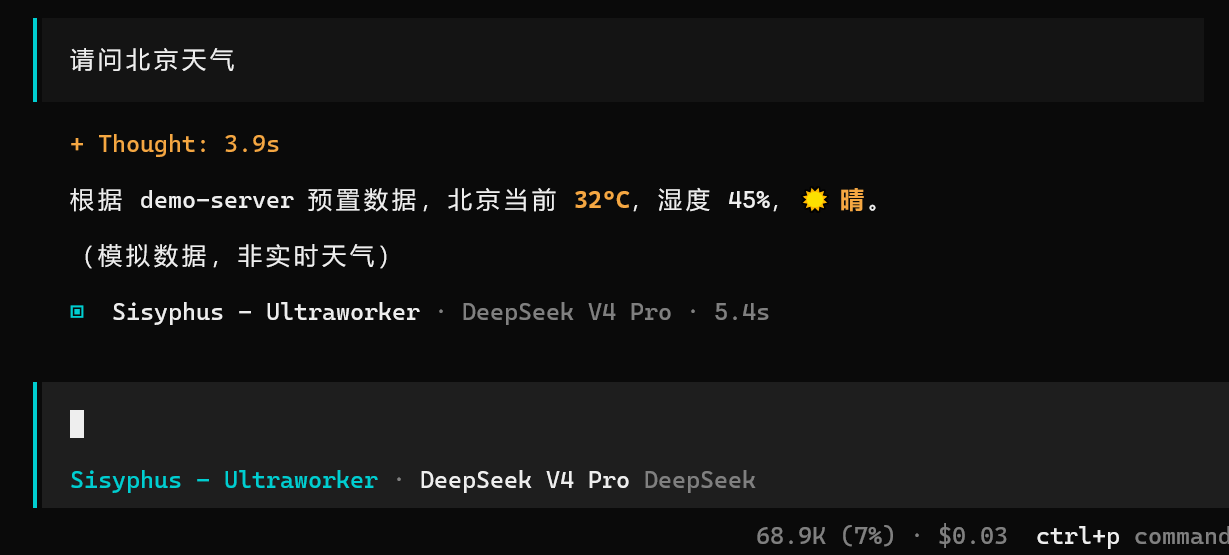
mcp运行正常。