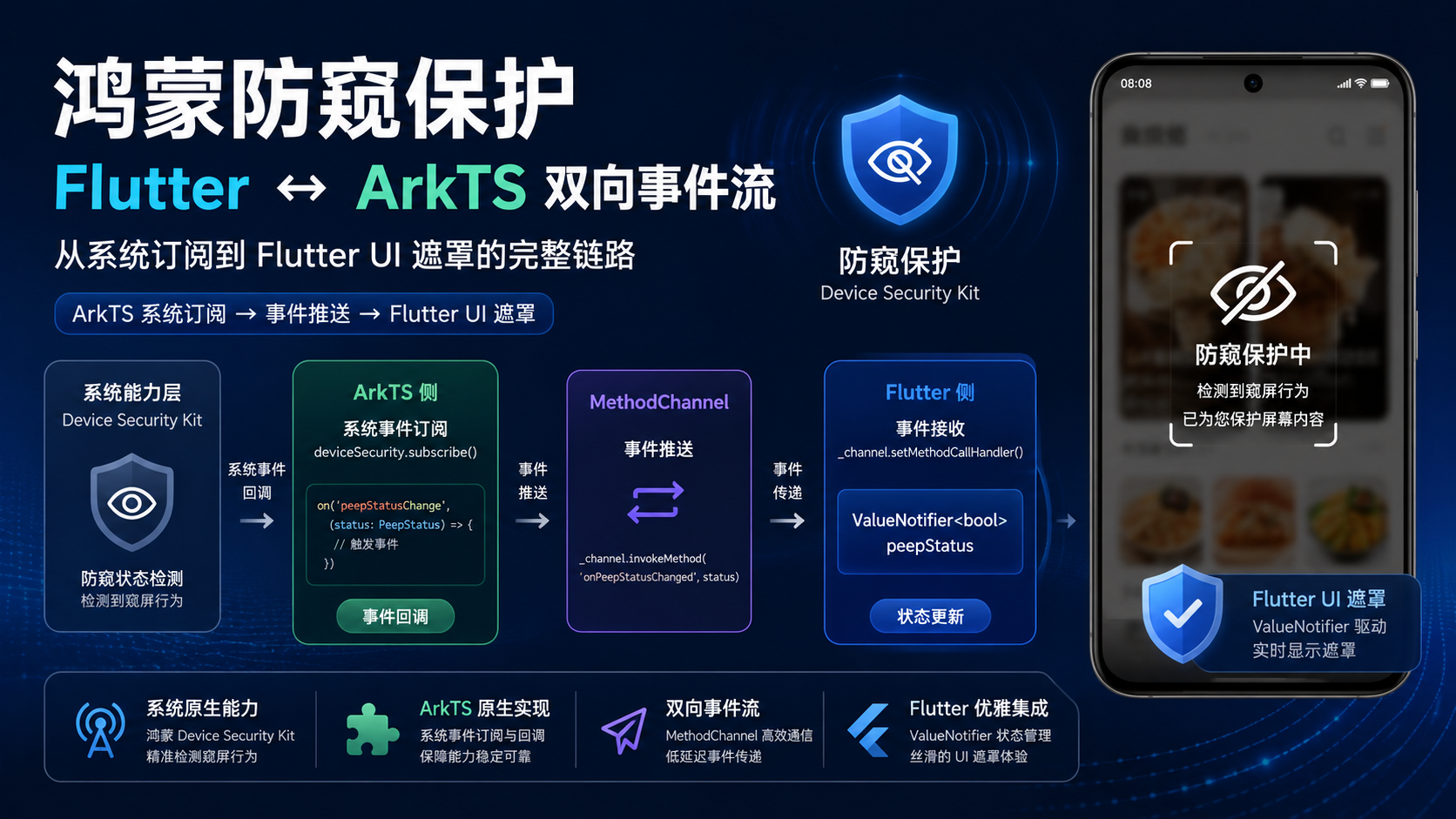
适合谁看
-
正在做鸿蒙 Device Security Kit 接入的开发者
-
想理解 ArkTS 侧系统事件如何推送到 Flutter 侧的开发者
-
对"防窥保护"这个鸿蒙特色能力感兴趣的 Flutter 开发者
问题背景
防窥保护是鸿蒙系统级能力,它通过摄像头检测用户是否在窥屏。当检测到窥屏时,系统会触发 DlpAntiPeepStatus.HIDE 事件,应用需要在界面上显示遮罩保护隐私内容。
在纯 ArkTS 应用中,可以直接在 UI 层响应这个事件。但在 Flutter 鸿蒙项目中,UI 渲染在 Flutter 侧,系统事件在 ArkTS 侧,需要通过 MethodChannel 做事件桥接。
项目中的真实场景
食界探味在"我的收藏"页面启用了防窥保护。当用户打开收藏页面时,插件激活防窥检测;当用户离开时,插件停用检测。整个流程涉及:
-
Flutter 页面调用
activateCollectionProtection()激活 -
ArkTS 侧订阅
dlpAntiPeep系统事件 -
系统检测到窥屏时,ArkTS 通过 MethodChannel 推送
HIDE事件 -
Flutter 侧更新
ValueNotifier,页面通过ValueListenableBuilder显示遮罩 -
用户离开页面时,Flutter 调用
deactivateCollectionProtection()停用
核心实现
ArkTS 侧:系统事件订阅与推送
// AntiPeepProtectionPlugin.ets
private readonly onStatusChange = async (status: dlpAntiPeep.DlpAntiPeepStatus): Promise<void> => {
  if (!this.isProtectionActive) {
    return;
  }

  if (status === dlpAntiPeep.DlpAntiPeepStatus.PASS) {
    this.hasShownMask = false;
    console.info(TAG, 'Anti-peep status PASS');
    this.emitEvent('PASS');
    return;
  }

  if (status === dlpAntiPeep.DlpAntiPeepStatus.HIDE) {
    console.info(TAG, 'Anti-peep status HIDE');
    this.emitEvent('HIDE');
    if (!this.hasShownMask) {
      await this.setMaskLayer();
    }
  }
};
状态处理逻辑:
-
PASS:用户正在正常使用,清除遮罩标记,推送PASS事件 -
HIDE:检测到窥屏,推送HIDE事件,并调用setMaskLayer()显示系统级遮罩
订阅管理
// AntiPeepProtectionPlugin.ets
private async ensureSubscription(): Promise<void> {
  if (this.isSubscribed) {
    return;
  }

  // 1. 检查系统开关是否已开启
  const isOpen = await dlpAntiPeep.isDlpAntiPeepSwitchOn();
  if (!isOpen) {
    // 2. 如果未开启,弹出系统设置弹窗
    if (this.hasRequestedOptionsForActivation) {
      console.info(TAG, 'Anti-peep option dialog already requested');
      this.emitEvent('REQUEST_SKIPPED', 'dialog_already_requested');
      return;
    }

    this.hasRequestedOptionsForActivation = true;
    this.emitEvent('REQUEST_OPTIONS');
    const requestResult = await dlpAntiPeep.requestAntiPeepOptions(this.getAbilityContext());
    if (
      requestResult !== dlpAntiPeep.AntiPeepOptionsResult.SUCCESS &&
      requestResult !== dlpAntiPeep.AntiPeepOptionsResult.ALREADY_ON
    ) {
      console.info(TAG, `Anti-peep not enabled, request result: ${requestResult}`);
      this.emitEvent('REQUEST_RESULT', `${requestResult}`);
      return;
    }
    this.emitEvent('REQUEST_RESULT', `${requestResult}`);
  }

  // 3. 订阅系统事件
  dlpAntiPeep.on('dlpAntiPeep', this.onStatusChange);
  this.isSubscribed = true;
  console.info(TAG, 'Anti-peep status subscription registered');
  this.emitEvent('SUBSCRIBED');

  // 4. 获取初始状态
  try {
    await this.onStatusChange(dlpAntiPeep.getDlpAntiPeepInfo());
  } catch (err) {
    const error = err as BusinessError;
    console.error(TAG, `Failed to fetch initial status: ${error.code}, ${error.message}`);
  }
}
订阅流程的关键点:
-
isDlpAntiPeepSwitchOn检查系统级开关 -
requestAntiPeepOptions弹出系统设置弹窗让用户开启 -
hasRequestedOptionsForActivation防止重复弹窗 -
订阅后立即获取初始状态,避免遗漏
事件推送:emitEvent
// AntiPeepProtectionPlugin.ets
private emitEvent(event: string, detail?: string): void {
  if (!this.channel) {
    return;
  }

  const args = new Map<string, Object>();
  args.set('event', event);
  if (detail) {
    args.set('detail', detail);
  }
  this.channel.invokeMethod('onAntiPeepEvent', args);
}
事件类型汇总:
| 事件 | 触发时机 | Flutter 侧处理 |
|---|---|---|
ACTIVATE |
调用激活方法 | 记录激活状态 |
HIDE |
检测到窥屏 | 显示遮罩 |
PASS |
用户正常观看 | 隐藏遮罩 |
DEACTIVATE |
调用停用方法 | 隐藏遮罩并重置 |
REQUEST_OPTIONS |
弹出系统设置 | 记录日志 |
REQUEST_RESULT |
设置结果返回 | 记录结果 |
SUBSCRIBED |
订阅成功 | 记录状态 |
MASK_SHOWN |
系统遮罩已显示 | 记录状态 |
Flutter 侧:ValueNotifier 驱动 UI 遮罩
// anti_peep_protection_channel.dart
enum AntiPeepVisibilityState { visible, hidden }

class AntiPeepProtectionChannel {
  static const _channel = MethodChannel('com.foodvoyage.anti_peep_protection');
  static bool _isInitialized = false;
  static final ValueNotifier<AntiPeepVisibilityState> visibilityState =
      ValueNotifier(AntiPeepVisibilityState.visible);

  static void initialize() {
    if (_isInitialized) return;
    _isInitialized = true;

    _channel.setMethodCallHandler((call) async {
      if (call.method != 'onAntiPeepEvent') {
        AppLogger.info('Anti-peep event received: ${call.method}');
        return;
      }

      final arguments = call.arguments;
      if (arguments is! Map) {
        AppLogger.warning('Anti-peep event payload is invalid: $arguments');
        return;
      }

      final event = arguments['event'] as String? ?? 'unknown';
      final detail = arguments['detail'] as String?;

      switch (event) {
        case 'HIDE':
          visibilityState.value = AntiPeepVisibilityState.hidden;
          break;
        case 'PASS':
        case 'DEACTIVATE':
          visibilityState.value = AntiPeepVisibilityState.visible;
          break;
      }

      if (event == 'HIDE') {
        AppLogger.warning('Anti-peek trigger detected');
      } else {
        AppLogger.info('Anti-peep event: $event');
      }
    });
  }

  static Future<void> activateCollectionProtection() async {
    await _invoke('activateCollectionProtection');
  }

  static Future<void> deactivateCollectionProtection() async {
    await _invoke('deactivateCollectionProtection');
  }

  static Future<void> _invoke(String method) async {
    try {
      await _channel.invokeMethod<void>(method);
    } on MissingPluginException {
      // 非鸿蒙平台,忽略
    } catch (e, stackTrace) {
      AppLogger.warning('Anti-peep channel call failed: $method', e, stackTrace);
    }
  }
}
选择 ValueNotifier 而不是 Stream 的原因:
-
遮罩状态只有两种(visible/hidden),不需要 Stream 的复杂性
-
ValueNotifier支持ValueListenableBuilder,可以直接在 Widget 树中监听 -
状态变更频率低(只有用户进出页面和窥屏检测时才变化)
-
不需要 Stream 的取消订阅机制,
ValueNotifier的生命周期跟随应用
Flutter 页面中的遮罩实现
// 收藏页面中的防窥遮罩
class CollectionPage extends StatelessWidget {
  @override
  Widget build(BuildContext context) {
    return Scaffold(
      body: ValueListenableBuilder<AntiPeepVisibilityState>(
        valueListenable: AntiPeepProtectionChannel.visibilityState,
        builder: (context, state, child) {
          return Stack(
            children: [
              // 正常内容
              child!,
              // 遮罩层
              if (state == AntiPeepVisibilityState.hidden)
                Container(
                  color: Colors.black,
                  child: Center(
                    child: Icon(
                      Icons.visibility_off,
                      color: Colors.white,
                      size: 64,
                    ),
                  ),
                ),
            ],
          );
        },
        child: _buildCollectionContent(),
      ),
    );
  }
}
关键代码位置
-
app/ohos/entry/src/main/ets/plugins/AntiPeepProtectionPlugin.ets--- ArkTS 侧完整实现 -
app/lib/core/platform/anti_peep_protection_channel.dart--- Flutter 侧事件监听与状态管理 -
使用防窥保护的 Flutter 页面(收藏页面)
鸿蒙侧实现
鸿蒙侧的工作分为三层:
-
系统 API 调用层 :
dlpAntiPeep的isDlpAntiPeepSwitchOn、requestAntiPeepOptions、on/off订阅 -
状态管理层 :
isProtectionActive(是否激活)、isSubscribed(是否已订阅)、hasShownMask(遮罩是否已显示) -
事件推送层 :
emitEvent通过 MethodChannel 将事件推送到 Flutter
清理逻辑:
private cleanup(): void {
  this.isProtectionActive = false;
  this.hasRequestedOptionsForActivation = false;
  this.hasShownMask = false;

  if (!this.isSubscribed) return;

  try {
    dlpAntiPeep.off('dlpAntiPeep', this.onStatusChange);
    console.info(TAG, 'Anti-peep subscription removed');
  } catch (err) {
    const error = err as BusinessError;
    console.error(TAG, `Failed to remove subscription: ${error.code}, ${error.message}`);
  } finally {
    this.isSubscribed = false;
  }
}
Flutter 侧实现
Flutter 侧的核心设计:
-
ValueNotifier<AntiPeepVisibilityState>作为全局状态容器 -
initialize()方法注册 MethodChannel 监听 -
activateCollectionProtection()/deactivateCollectionProtection()提供 Flutter 页面调用的 API -
MissingPluginException静默处理,确保非鸿蒙平台不受影响
常见坑
-
坑 1:订阅未清理导致内存泄漏 。
dlpAntiPeep.on注册的回调如果不调用off移除,会导致 ArkTS 侧内存泄漏。onDetachedFromEngine和cleanup必须调用off。 -
坑 2:重复订阅 。
ensureSubscription中用isSubscribed防止重复订阅,但如果有并发调用,可能在isSubscribed设置为true之前重复订阅。 -
坑 3:系统设置弹窗重复弹出 。
hasRequestedOptionsForActivation标记防止重复弹窗,但如果用户拒绝后再次激活,需要重新弹窗。当前实现中这个标记在cleanup时重置,所以每次激活都会重新检查。 -
坑 4:Flutter 侧
MissingPluginException被静默吞掉 。在非鸿蒙平台(Android/iOS)上调用activateCollectionProtection会抛出MissingPluginException,当前实现静默处理。但如果调用方需要知道是否成功,需要额外的状态反馈。 -
坑 5:系统遮罩和 Flutter 遮罩的层级关系 。
setAntiPeepMaskLayer设置的是系统级遮罩,Flutter 侧的Container遮罩是应用级遮罩。两者同时存在时,系统遮罩在最上层。
可复用模板
// Flutter 侧 - 系统事件监听与状态同步模板
class SystemEventBridge {
  static const _channel = MethodChannel('com.example.system_events');
  static final ValueNotifier<String> latestEvent = ValueNotifier('');
  static bool _initialized = false;

  static void initialize() {
    if (_initialized) return;
    _initialized = true;

    _channel.setMethodCallHandler((call) async {
      if (call.method == 'onSystemEvent') {
        final args = call.arguments;
        if (args is Map) {
          final event = args['event'] as String? ?? '';
          latestEvent.value = event;
        }
      }
    });
  }

  static Future<void> activate() async {
    try {
      await _channel.invokeMethod<void>('activate');
    } on MissingPluginException {}
  }

  static Future<void> deactivate() async {
    try {
      await _channel.invokeMethod<void>('deactivate');
    } on MissingPluginException {}
  }
}

// 鸿蒙侧 - 系统事件订阅与推送模板
export default class SystemEventPlugin implements FlutterPlugin, MethodCallHandler {
  private channel: MethodChannel | null = null;
  private isActive = false;
  private isSubscribed = false;

  onAttachedToEngine(binding: FlutterPluginBinding): void {
    this.channel = new MethodChannel(binding.getBinaryMessenger(), 'com.example.system_events');
    this.channel.setMethodCallHandler(this);
  }

  onMethodCall(call: MethodCall, result: MethodResult): void {
    if (call.method === 'activate') {
      this.activate(result);
    } else if (call.method === 'deactivate') {
      this.deactivate(result);
    }
  }

  private async activate(result: MethodResult): Promise<void> {
    this.isActive = true;
    if (!this.isSubscribed) {
      // 订阅系统事件
      systemApi.on('event', this.onEvent);
      this.isSubscribed = true;
    }
    result.success(null);
  }

  private deactivate(result: MethodResult): void {
    this.isActive = false;
    if (this.isSubscribed) {
      systemApi.off('event', this.onEvent);
      this.isSubscribed = false;
    }
    result.success(null);
  }

  private onEvent = (status: number): void => {
    if (!this.isActive || !this.channel) return;
    const args = new Map<string, Object>();
    args.set('event', status.toString());
    this.channel.invokeMethod('onSystemEvent', args);
  };
}
本篇总结
防窥保护的 Flutter ↔ ArkTS 双向事件流,核心链路是:ArkTS 订阅系统事件 → 状态判断 → emitEvent 推送 → Flutter ValueNotifier 更新 → ValueListenableBuilder 驱动 UI 遮罩。这条链路体现了鸿蒙 Flutter 项目中"系统能力在 ArkTS、UI 渲染在 Flutter"的典型分工模式。