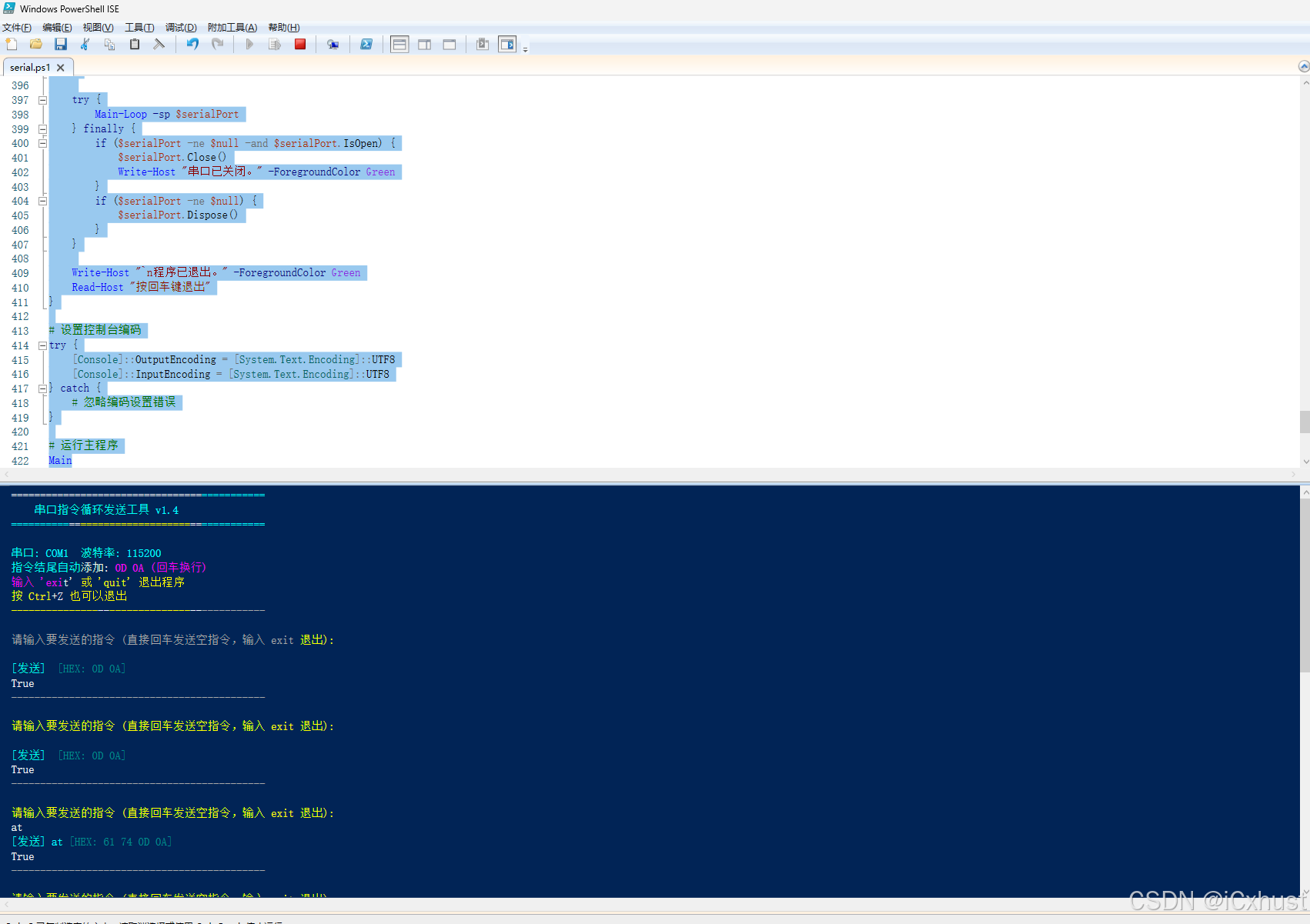
<#
.SYNOPSIS
    串口指令循环发送工具
.DESCRIPTION
    选择串口和波特率,循环发送字符串+0D 0A(回车换行),按Ctrl+Z退出
.NOTES
    作者: AI Assistant
    版本: 1.4
    修复: 使用更明确的Write方法调用
#>

# 导入所需命名空间
Add-Type -AssemblyName System.IO.Ports

# 全局变量
$serialPort = $null
$running = $true

# 检查是否在控制台环境中
function Test-ConsoleEnvironment {
    try {
        $null = [Console]::KeyAvailable
        return $true
    } catch {
        return $false
    }
}

# 清屏函数
function Clear-Console {
    Clear-Host
    Write-Host "============================================" -ForegroundColor Cyan
    Write-Host "    串口指令循环发送工具 v1.4" -ForegroundColor Yellow
    Write-Host "============================================" -ForegroundColor Cyan
    Write-Host ""
}

# 获取可用串口列表
function Get-AvailablePorts {
    $ports = [System.IO.Ports.SerialPort]::GetPortNames()
    if ($ports.Count -eq 0) {
        Write-Host "未检测到可用串口!" -ForegroundColor Red
        return $null
    }
    return $ports
}

# 选择串口
function Select-Port {
    $ports = Get-AvailablePorts
    if ($ports -eq $null) {
        return $null
    }

    Write-Host "可用串口列表:" -ForegroundColor Green
    for ($i = 0; $i -lt $ports.Count; $i++) {
        Write-Host "  $($i+1). $($ports[$i])" -ForegroundColor White
    }
    Write-Host ""

    do {
        $choice = Read-Host "请选择串口编号 (1-$($ports.Count))"
        $index = [int]$choice - 1
        if ($index -ge 0 -and $index -lt $ports.Count) {
            return $ports[$index]
        }
        Write-Host "无效选择,请重新输入!" -ForegroundColor Red
    } while ($true)
}

# 选择波特率
function Select-BaudRate {
    $baudRates = @(300, 1200, 2400, 4800, 9600, 19200, 38400, 57600, 115200, 230400, 460800, 921600)

    Write-Host "常用波特率:" -ForegroundColor Green
    for ($i = 0; $i -lt $baudRates.Count; $i++) {
        Write-Host "  $($i+1). $($baudRates[$i])" -ForegroundColor White
    }
    Write-Host "  0. 自定义波特率" -ForegroundColor White
    Write-Host ""

    do {
        $choice = Read-Host "请选择波特率编号 (0-$($baudRates.Count))"
        $index = [int]$choice - 1

        if ($choice -eq "0") {
            do {
                $customBaud = Read-Host "请输入自定义波特率"
                if ([int]::TryParse($customBaud, [ref]$null)) {
                    return [int]$customBaud
                }
                Write-Host "无效波特率,请重新输入!" -ForegroundColor Red
            } while ($true)
        }

        if ($index -ge 0 -and $index -lt $baudRates.Count) {
            return $baudRates[$index]
        }
        Write-Host "无效选择,请重新输入!" -ForegroundColor Red
    } while ($true)
}

# 设置串口参数
function Setup-SerialPort {
    param(
        [string]$portName,
        [int]$baudRate
    )

    try {
        $sp = New-Object System.IO.Ports.SerialPort
        $sp.PortName = $portName
        $sp.BaudRate = $baudRate
        $sp.Parity = [System.IO.Ports.Parity]::None
        $sp.DataBits = 8
        $sp.StopBits = [System.IO.Ports.StopBits]::One
        $sp.ReadTimeout = 2000
        $sp.WriteTimeout = 2000
        $sp.DtrEnable = $true
        $sp.RtsEnable = $true
        $sp.NewLine = "`r`n"

        return $sp
    } catch {
        Write-Host "创建串口对象失败: $_" -ForegroundColor Red
        return $null
    }
}

# 打开串口
function Open-Port {
    param([System.IO.Ports.SerialPort]$sp)

    try {
        if ($sp.IsOpen) {
            $sp.Close()
        }
        $sp.Open()
        Write-Host "✓ 串口 $($sp.PortName) 已成功打开 (波特率: $($sp.BaudRate))" -ForegroundColor Green
        return $true
    } catch {
        Write-Host "✗ 打开串口失败: $_" -ForegroundColor Red
        return $false
    }
}

# 发送指令 - 使用 WriteLine 方法(最简单可靠)
function Send-Command {
    param(
        [System.IO.Ports.SerialPort]$sp,
        [string]$command
    )

    try {
        if (-not $sp.IsOpen) {
            Write-Host "串口未打开,无法发送指令!" -ForegroundColor Red
            return $false
        }

        # 方法1: 使用 WriteLine 自动添加换行符
        # 但 WriteLine 默认添加的是 NewLine 属性的值
        # 我们已经在 Setup-SerialPort 中设置 NewLine = "`r`n"
        $sp.WriteLine($command)

        # 显示发送的指令
        Write-Host "[发送] $command" -ForegroundColor Cyan

        # 尝试读取响应
        try {
            Start-Sleep -Milliseconds 100
            if ($sp.BytesToRead -gt 0) {
                $response = $sp.ReadExisting()
                if ($response) {
                    Write-Host "[接收] $response" -ForegroundColor Green
                }
            }
        } catch {
            # 忽略读取错误
        }

        return $true
    } catch {
        Write-Host "发送指令失败: $_" -ForegroundColor Red
        return $false
    }
}

# 发送指令 - 使用字节数组(备用方法)
function Send-CommandBytes {
    param(
        [System.IO.Ports.SerialPort]$sp,
        [string]$command
    )

    try {
        if (-not $sp.IsOpen) {
            Write-Host "串口未打开,无法发送指令!" -ForegroundColor Red
            return $false
        }

        # 使用 [byte[]] 类型强制转换来避免重载歧义
        [byte[]]$stringBytes = [System.Text.Encoding]::ASCII.GetBytes($command)
        [byte[]]$crlfBytes = @(0x0D, 0x0A)
        [byte[]]$sendBytes = $stringBytes + $crlfBytes

        # 使用 [System.IO.Ports.SerialPort] 的 Write 方法
        # 明确指定参数类型
        $sp.Write($sendBytes, 0, $sendBytes.Length)

        # 显示十六进制
        $hexString = ""
        foreach ($byte in $sendBytes) {
            $hexString += $byte.ToString("X2") + " "
        }
        $hexString = $hexString.Trim()

        Write-Host "[发送] $command" -ForegroundColor Cyan -NoNewline
        Write-Host " [HEX: $hexString]" -ForegroundColor DarkCyan

        # 尝试读取响应
        try {
            Start-Sleep -Milliseconds 100
            if ($sp.BytesToRead -gt 0) {
                [byte[]]$responseBytes = New-Object byte[] $sp.BytesToRead
                $bytesRead = $sp.Read($responseBytes, 0, $responseBytes.Length)

                if ($bytesRead -gt 0) {
                    $responseString = [System.Text.Encoding]::ASCII.GetString($responseBytes, 0, $bytesRead)
                    Write-Host "[接收] $responseString" -ForegroundColor Green
                }
            }
        } catch {
            # 忽略读取错误
        }

        return $true
    } catch {
        Write-Host "发送指令失败: $_" -ForegroundColor Red
        return $false
    }
}

# 发送指令 - 使用 BaseStream 直接写入(最可靠)
function Send-CommandStream {
    param(
        [System.IO.Ports.SerialPort]$sp,
        [string]$command
    )

    try {
        if (-not $sp.IsOpen) {
            Write-Host "串口未打开,无法发送指令!" -ForegroundColor Red
            return $false
        }

        # 获取串口的底层流
        $stream = $sp.BaseStream

        # 准备要发送的数据
        [byte[]]$stringBytes = [System.Text.Encoding]::ASCII.GetBytes($command)
        [byte[]]$crlfBytes = @(0x0D, 0x0A)
        [byte[]]$sendBytes = $stringBytes + $crlfBytes

        # 通过流写入数据
        $stream.Write($sendBytes, 0, $sendBytes.Length)
        $stream.Flush()

        # 显示十六进制
        $hexString = ""
        foreach ($byte in $sendBytes) {
            $hexString += $byte.ToString("X2") + " "
        }
        $hexString = $hexString.Trim()

        Write-Host "[发送] $command" -ForegroundColor Cyan -NoNewline
        Write-Host " [HEX: $hexString]" -ForegroundColor DarkCyan

        # 尝试读取响应
        try {
            Start-Sleep -Milliseconds 100
            if ($sp.BytesToRead -gt 0) {
                [byte[]]$responseBytes = New-Object byte[] $sp.BytesToRead
                $bytesRead = $stream.Read($responseBytes, 0, $responseBytes.Length)

                if ($bytesRead -gt 0) {
                    $responseString = [System.Text.Encoding]::ASCII.GetString($responseBytes, 0, $bytesRead)
                    Write-Host "[接收] $responseString" -ForegroundColor Green
                }
            }
        } catch {
            # 忽略读取错误
        }

        return $true
    } catch {
        Write-Host "发送指令失败: $_" -ForegroundColor Red
        return $false
    }
}

# 检查退出条件
function Check-ExitRequest {
    param([string]$inputText)

    if ($inputText -eq [char]26) {
        return $true
    }

    if ($inputText -eq "exit" -or $inputText -eq "quit" -or $inputText -eq "q") {
        Write-Host "检测到退出命令" -ForegroundColor Yellow
        return $true
    }

    return $false
}

# 主循环
function Main-Loop {
    param([System.IO.Ports.SerialPort]$sp)

    Clear-Console
    Write-Host "串口: $($sp.PortName)  波特率: $($sp.BaudRate)" -ForegroundColor Magenta
    Write-Host "指令结尾自动添加: 0D 0A (回车换行)" -ForegroundColor Yellow
    Write-Host "输入 'exit' 或 'quit' 退出程序" -ForegroundColor Yellow
    Write-Host "按 Ctrl+Z 也可以退出" -ForegroundColor Yellow
    Write-Host "--------------------------------------------" -ForegroundColor Gray
    Write-Host ""

    $isConsole = Test-ConsoleEnvironment

    while ($running) {
        try {
            if ($isConsole) {
                if ([Console]::KeyAvailable) {
                    $key = [Console]::ReadKey($true)
                    if ($key.Modifiers -eq [ConsoleModifiers]::Control -and $key.KeyChar -eq 26) {
                        $script:running = $false
                        Write-Host "`n检测到 Ctrl+Z,正在退出..." -ForegroundColor Yellow
                        break
                    }
                }
            }

            Write-Host "请输入要发送的指令 (直接回车发送空指令,输入 exit 退出):" -ForegroundColor Yellow
            $command = Read-Host

            if (Check-ExitRequest -inputText $command) {
                $script:running = $false
                break
            }

            # 使用最可靠的发送方法 - BaseStream
            Send-CommandStream -sp $sp -command $command

            Write-Host "--------------------------------------------" -ForegroundColor Gray
            Write-Host ""

        } catch {
            if ($_.Exception.Message -match "管道|已关闭") {
                Write-Host "串口连接已断开..." -ForegroundColor Red
                break
            }
            Write-Host "发生错误: $_" -ForegroundColor Red
        }
    }
}

# 主程序
function Main {
    Clear-Console

    $portName = Select-Port
    if ($portName -eq $null) {
        Write-Host "没有可用串口,程序退出。" -ForegroundColor Red
        Read-Host "按回车键退出"
        return
    }

    $baudRate = Select-BaudRate
    if ($baudRate -eq $null) {
        Write-Host "未选择波特率,程序退出。" -ForegroundColor Red
        Read-Host "按回车键退出"
        return
    }

    $script:serialPort = Setup-SerialPort -portName $portName -baudRate $baudRate
    if ($serialPort -eq $null) {
        Read-Host "按回车键退出"
        return
    }

    if (-not (Open-Port -sp $serialPort)) {
        Read-Host "按回车键退出"
        return
    }

    try {
        Main-Loop -sp $serialPort
    } finally {
        if ($serialPort -ne $null -and $serialPort.IsOpen) {
            $serialPort.Close()
            Write-Host "串口已关闭。" -ForegroundColor Green
        }
        if ($serialPort -ne $null) {
            $serialPort.Dispose()
        }
    }

    Write-Host "`n程序已退出。" -ForegroundColor Green
    Read-Host "按回车键退出"
}

# 设置控制台编码
try {
    [Console]::OutputEncoding = [System.Text.Encoding]::UTF8
    [Console]::InputEncoding = [System.Text.Encoding]::UTF8
} catch {
    # 忽略编码设置错误
}

# 运行主程序
Main