OpenAI API Tool Call:模型如何调用你的函数
一句话理解 Tool Call:模型负责判断"该调用什么、参数是什么",应用负责真正执行函数,再把结果交还给模型组织答案。
它不是让大模型直接运行你的代码,而是一套连接大模型与外部能力的协议。数据库查询、天气接口、订单系统,都可以通过同一套模式接入。
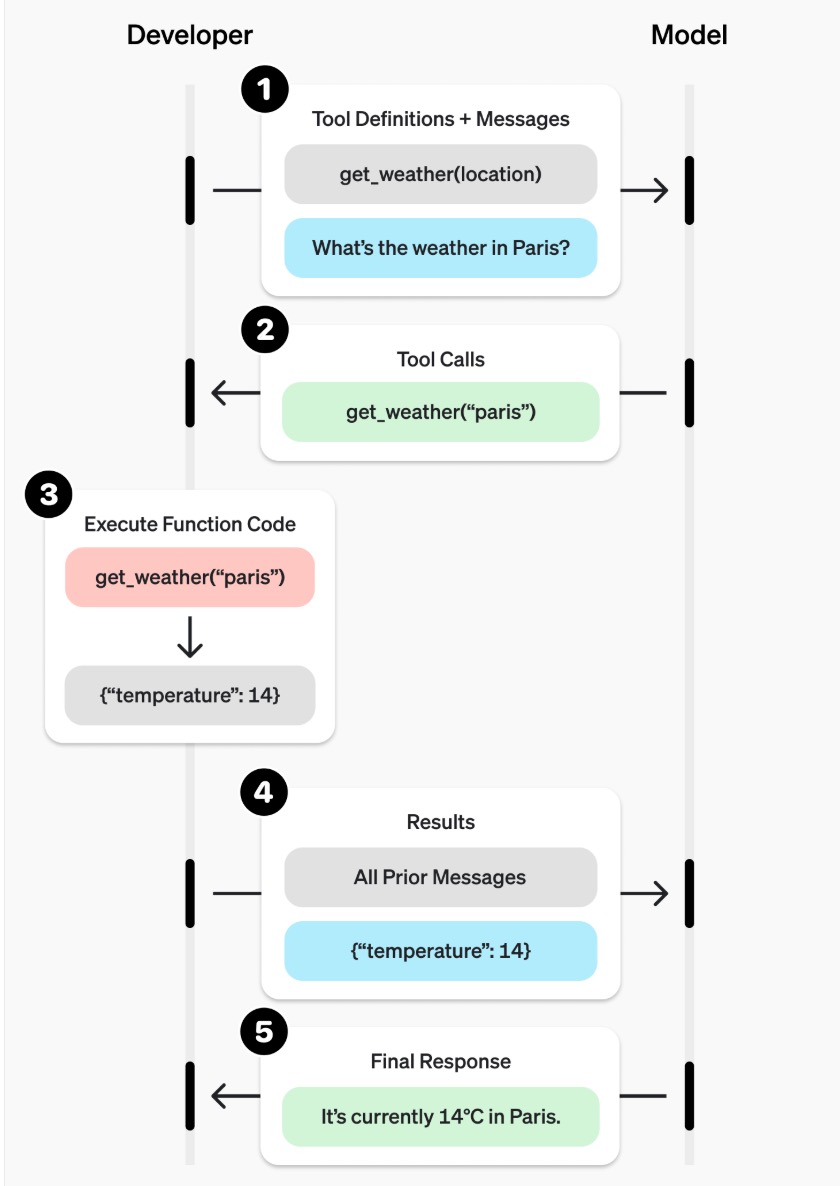
核心流程
以 weather_call.py 中的天气查询为例,一次完整调用分为 5 步:
- 应用把用户问题和工具定义一起发给模型。
- 模型返回
tool_calls,给出函数名和 JSON 参数。 - 应用解析参数,执行本地的
get_weather()。 - 应用通过
tool_call_id把执行结果回传给模型。 - 模型结合上下文和工具结果,生成最终自然语言回答。
关键点是:第 3 步发生在应用侧,不在模型内部。 因此,鉴权、参数校验和函数执行仍由开发者控制。
Python 核心代码
先安装依赖:
bash
python -m pip install openai python-dotenv在同级目录创建 .env:
plain
OPENAI_API_KEY=你的_API_Key
OPENAI_BASE_URL=你的_API_地址
OPENAI_MODEL=服务方支持的模型名下面是tools/tool_calls 完整流程:
python
import json
import os

from dotenv import find_dotenv, load_dotenv
from openai import OpenAI


load_dotenv(find_dotenv(), override=True)

MODEL = os.environ["OPENAI_MODEL"]

WEATHER_DATA = {
    "北京": {"condition": "晴", "temperature": 26},
    "上海": {"condition": "多云", "temperature": 24},
    "杭州": {"condition": "小雨", "temperature": 22},
}

WEATHER_TOOL = {
    "type": "function",
    "function": {
        "name": "get_weather",
        "description": "查询指定城市的当前天气。",
        "parameters": {
            "type": "object",
            "properties": {
                "location": {"type": "string", "description": "城市名称"},
                "unit": {
                    "type": "string",
                    "enum": ["celsius", "fahrenheit"],
                },
            },
            "required": ["location", "unit"],
            "additionalProperties": False,
        },
    },
}

def create_client():
    return OpenAI(
        api_key=os.environ["OPENAI_API_KEY"],
        base_url=os.environ["OPENAI_BASE_URL"],
    )

def get_weather(location, unit="celsius"):
    """本地模拟天气数据,真实项目可替换为 HTTP API 或数据库。"""
    city = next((name for name in WEATHER_DATA if name in location), None)
    if city is None:
        return {"status": "not_found", "location": location}

    weather = WEATHER_DATA[city]
    temperature = weather["temperature"]
    if unit == "fahrenheit":
        temperature = round(temperature * 9 / 5 + 32, 1)

    return {
        "status": "ok",
        "location": city,
        "condition": weather["condition"],
        "temperature": temperature,
        "unit": unit,
    }

def dispatch_function(name, arguments):
    """解析模型参数,只调用白名单内的函数。"""
    try:
        params = json.loads(arguments)
        if name != "get_weather":
            return {"error": f"未知函数: {name}"}
        return get_weather(**params)
    except (json.JSONDecodeError, TypeError) as exc:
        return {"error": str(exc)}

def run_tool_call(client, question):
    messages = [{"role": "user", "content": question}]

    # 第一次请求:让模型决定是否调用工具。
    response = client.chat.completions.create(
        model=MODEL,
        messages=messages,
        tools=[WEATHER_TOOL],
        tool_choice="auto",
    )
    assistant_message = response.choices[0].message
    tool_calls = assistant_message.tool_calls
    if not tool_calls:
        return assistant_message.content

    # 保留模型返回的 tool_calls。
    messages.append(
        {
            "role": "assistant",
            "content": assistant_message.content,
            "tool_calls": [
                {
                    "id": call.id,
                    "type": call.type,
                    "function": {
                        "name": call.function.name,
                        "arguments": call.function.arguments,
                    },
                }
                for call in tool_calls
            ],
        }
    )

    # 应用执行函数,并通过 tool_call_id 回传结果。
    for call in tool_calls:
        result = dispatch_function(
            call.function.name,
            call.function.arguments,
        )
        messages.append(
            {
                "role": "tool",
                "tool_call_id": call.id,
                "content": json.dumps(result, ensure_ascii=False),
            }
        )

    # 第二次请求:模型根据工具结果生成最终回答。
    final_response = client.chat.completions.create(
        model=MODEL,
        messages=messages,
    )
    return final_response.choices[0].message.content


if __name__ == "__main__":
    client = create_client()
    print(run_tool_call(client, "上海现在天气怎么样?"))
运行:
bash
python weather_call.py代码中必须理解的 4 个点
WEATHER_TOOL是给模型看的接口说明,使用 JSON Schema 约束参数。tool_choice="auto"不会强制调用工具,因此tool_calls可能为空。- 模型返回的函数名和参数不可信,应用必须使用函数白名单和参数校验。
tool_call_id用来关联调用与结果,不能省略;一次响应也可能包含多个调用。
真实项目中,通常只需要把 get_weather() 替换为实际 HTTP API、数据库查询或业务方法,其他调用流程基本不变。
工程注意点
- 支付、删除、发布等有副作用的工具,需要鉴权、幂等和人工确认。
- 外部接口应设置超时和重试,并记录函数名、参数、耗时与结果。
- 复杂任务可能连续产生
tool_calls,生产代码应增加循环次数上限。
结论
Tool Call 的本质不是"模型执行函数",而是一个受控闭环:
模型生成调用意图 → 应用执行真实能力 → 模型解释执行结果