
HarmonyOS API 24 多 App 集成开发实战:从 AI 剧本到 AI 文案创作助手
项目 : AI App Hub(demo012)
平台 : HarmonyOS · ArkTS · API 24 · Stage 模型
构建 : Hvigor 6.1.0
核心模块 : AI 剧本 + AI 图像识别 + AI 文案创作助手
字数: ≈ 10,000 字
目录
- 引言
- 项目概览与技术栈
- [HarmonyOS API 24 开发环境](#HarmonyOS API 24 开发环境)
- [统一应用架构:AI App Hub](#统一应用架构:AI App Hub)
- [ArkTS 语言严格模式合规](#ArkTS 语言严格模式合规)
- [AI 文案创作助手模块详解](#AI 文案创作助手模块详解)
- [AI 剧本生成引擎](#AI 剧本生成引擎)
- [AI 图像识别引擎](#AI 图像识别引擎)
- [数据持久化:AppStorage 实践](#数据持久化:AppStorage 实践)
- 组件化设计与回调传递
- [状态管理:@State / @Prop](#状态管理:@State / @Prop)
- [ArkTS 编译错误全记录](#ArkTS 编译错误全记录)
- 测试策略
- 构建配置与性能优化
- 总结与展望
1. 引言
在移动端应用开发领域,HarmonyOS 作为一个快速增长平台,为开发者提供了独特的 ArkTS 语言和 ArkUI 框架。ArkTS 作为 TypeScript 的严格子集,在类型安全方面做出了大量设计决策,这些决策既带来了运行时稳定性的提升,也给开发者带来了新的学习曲线。
本文以 AI App Hub 项目为载体,分享在 HarmonyOS API 24 上使用 ArkTS 开发多应用集成平台的实际经验。该项目将三个 AI 辅助创意工具------AI 剧本创作 、AI 图像识别 和 AI 文案创作助手------整合到一个统一的应用中,通过启动器页面让用户自由切换。
文章将重点围绕:
- ArkTS 严格模式下的语法合规改造
- 单组件多页面路由架构的设计与实现
- 模板引擎驱动的 AI 内容生成原理
- 组件化回调传递的正确模式
- AppStorage 数据持久化的最佳实践
- 编译错误全记录------从 Rollup 到 ArkTS 编译器的完整踩坑指南
2. 项目概览与技术栈
2.1 三模块功能矩阵
| 模块 | 页面数 | 核心功能 |
|---|---|---|
| AI 剧本 | 6 | 10 题材剧本生成、角色管理、续写、导出 |
| AI 图像识别 | 5 | 10 类别识别、历史记录、统计面板 |
| AI 文案创作助手 | 4 | 10 类型文案生成、收藏、复制 |
2.2 技术栈规格
| 层级 | 技术选型 | 版本/备注 |
|---|---|---|
| 编程语言 | ArkTS | TypeScript 严格子集,无 any/解构/展开 |
| UI 框架 | ArkUI | 声明式 @Component / @Builder |
| 状态管理 | @State / @Prop | 组件内响应式 |
| 数据持久化 | AppStorage | 全局 KV 存储 |
| 构建系统 | Hvigor | 6.1.0 |
| 目标 API | API 24 | Stage 模型 |
| 页面路由 | 单组件条件渲染 | @State page 控制 16 个分支 |
2.3 项目文件结构
entry/src/main/ets/
├── pages/
│   └── 111.ets                ← 统一入口(229 行)
├── components/                ← 13 个可复用组件
│   ├── ScriptCard.ets
│   ├── ScriptResultCard.ets
│   ├── ResultCard.ets
│   ├── ImagePicker.ets
│   ├── CopyCard.ets
│   └── CopyResultCard.ets     ← AI 文案组件
├── model/
│   ├── ScriptTypes/Generator/Storage.ets   ← AI 剧本
│   ├── ImageTypes/RecognitionEngine/Storage.ets ← AI 图像
│   └── CopyTypes/Generator/Storage.ets     ← AI 文案(新增)
├── entryability/
│   └── EntryAbility.ets
└── entrybackupability/
    └── EntryBackupAbility.ets
3. HarmonyOS API 24 开发环境
3.1 开发工具链
| 组件 | 版本/路径 |
|---|---|
| IDE | DevEco Studio(基于 IntelliJ IDEA) |
| SDK | API 24(HarmonyOS) |
| 构建工具 | Hvigor 6.1.0(D:\DevEco Studio\tools\hvigor\) |
| Node.js | 内置于 DevEco Studio |
| 应用模型 | Stage 模型 |
3.2 API 24 的新特性
API 24 对应 HarmonyOS 的中期版本,主要改进包括:
- ArkTS 编译器更严格的类型检查
- AppStorage 增强的响应式绑定
- 更完善的 @Builder 方法支持
4. 统一应用架构:AI App Hub
4.1 架构设计
整个应用采用 单 Entry 组件 + 条件渲染 架构:
typescript
@Entry
@Component
struct AppMain {
  @State private page: string = 'launcher';

  build() {
    Stack() {
      Column() {
        if (this.page === 'launcher') { this.Launcher(); }
        else if (this.page === 's_home') { this.SHome(); }
        // ... AI剧本 6 个页面
        else if (this.page === 'i_home') { this.IHome(); }
        // ... AI图像识别 5 个页面
        else if (this.page === 'c_home') { this.CHome(); }
        else if (this.page === 'c_gen') { this.CGen(); }
        else if (this.page === 'c_list') { this.CList(); }
        else if (this.page === 'c_detail') { this.CDetail(); }
      }
    }
  }
}
共 16 个页面路由 ,全部由 1 个 @State page 变量控制。
4.2 启动器页面
typescript
@Builder Launcher() {
  Scroll() {
    Column() {
      // 品牌区
      Column() {
        Text('AI App Hub').fontSize(28).fontWeight(FontWeight.Bold).fontColor(Color.White)
        Text('选择应用开始使用').fontSize(13).fontColor('rgba(255,255,255,0.7)')
      }
      .backgroundColor('#1A1A2E')

      // 3 个 App 入口卡片
      this.AppCard('🎭', 'AI 剧本', 'AI 辅助剧本创作', '#1A1A2E', ...)
      this.AppCard('📷', 'AI 图像识别', '智能识别图片内容', '#4A90D9', ...)
      this.AppCard('📝', 'AI 文案创作', '营销文案智能生成', '#6366f1', ...)
    }
  }
}
4.3 单组件路由 vs 多页面路由
| 对比维度 | 单组件 + @State | 多页面 + router |
|---|---|---|
| 状态共享 | 直接访问 | 需跨页面传参 |
| 切换速度 | 瞬时 | 有生命周期开销 |
| 文件大小 | 单文件较大 | 多文件分散 |
| 适用场景 | < 20 页面 | 大规模应用 |
| 调试难度 | 低 | 中 |
本项目的 16 个页面非常适合单组件模式。
5. ArkTS 语言严格模式合规
5.1 严格模式配置
json5
// entry/build-profile.json5
{
  apiType: "stageMode",
  buildOption: {
    arkOptions: {
      strictMode: "strict"
    }
  }
}
5.2 七条核心规则
规则 1:禁止解构赋值
typescript
// ❌ 错误
const { name, age } = person;

// ✅ 正确
const name = person.name;
const age = person.age;
规则 2:禁止展开运算符
typescript
// ❌ 错误
const newObj = { ...oldObj, extra: true };

// ✅ 正确
const newObj: MyType = {
  field1: oldObj.field1,
  field2: oldObj.field2,
  extra: true,
};
规则 3:禁止 any / unknown
typescript
// ❌ 错误
let data: any;

// ✅ 正确
let data: string = '';
let result: Script | null = null;
JSON 解析时使用类型断言:
typescript
const parsed: object = JSON.parse(data);
if (Array.isArray(parsed)) {
  for (let i = 0; i < parsed.length; i++) {
    result.push(parsed[i] as Script);
  }
}
规则 4:禁止内联对象类型
typescript
// ❌ 错误 (arkts-no-obj-literals-as-types)
const map: Record<string, { labels: string[]; icon: string }> = {};

// ✅ 正确------定义显式接口
export interface LabelTemplate {
  icon: string;
  labels: string[];
}
const map: Record<string, LabelTemplate> = {};这也是本项目中最容易触发的错误之一。ForEach 回调中如果写了 (item: { category: string; count: number }) 就会触发此错误,必须改为 (item: CategoryCount)。
规则 5:@Builder 内禁止赋值逻辑
typescript
// ❌ 错误
@Builder
MyView() {
  this.page = 'home';  // 非 UI 语句
  Text('hello')
}

// ✅ 正确------所有逻辑在事件处理器中
@Builder
MyView() {
  Text('hello').onClick(() => { this.page = 'home'; })
}
规则 6:禁止链式 setter 回调
typescript
// ❌ 错误------组件构造返回 void
ScriptCard({ script: item })
  .setOnTap(() => {})

// ✅ 正确------构造参数传递
ScriptCard({
  script: item,
  onTap: () => {},
})
规则 7:禁止简写属性语法
typescript
// ❌ 错误------简写属性
CopyCard({ item, onTap: ... })

// ✅ 正确------完整属性名
CopyCard({ item: item, onTap: ... })
6. AI 文案创作助手模块详解
6.1 模块概述
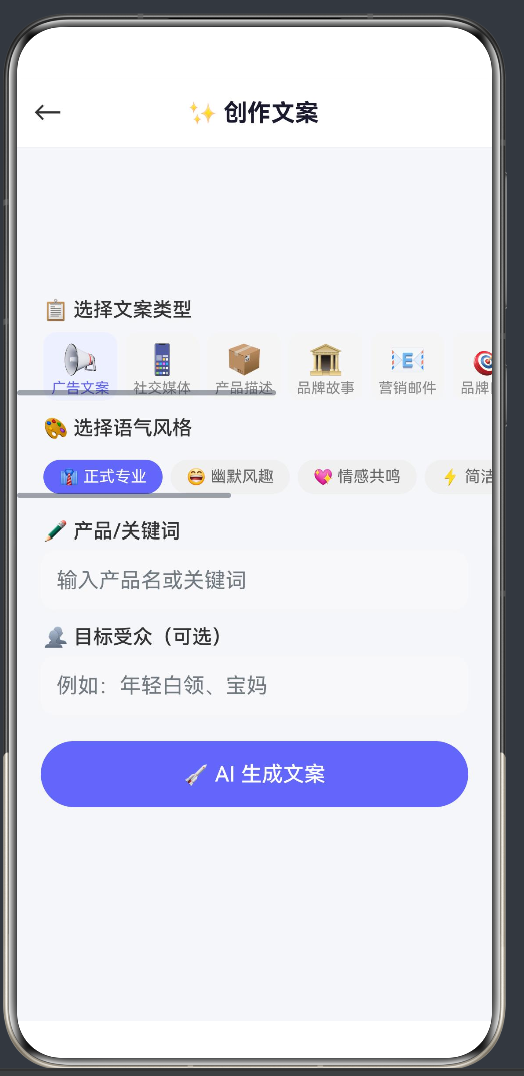
AI 文案创作助手是项目最新加入的模块,支持 10 种文案类型 × 8 种语气风格的组合生成。
6.2 文案类型与风格
10 种文案类型:
typescript
export const COPY_GENRES: CopyGenre[] = [
  { id: 'ad',        name: '广告文案',   icon: '📢', desc: '产品推广、品牌广告' },
  { id: 'social',    name: '社交媒体',   icon: '📱', desc: '微博、小红书、抖音' },
  { id: 'product',   name: '产品描述',   icon: '📦', desc: '电商详情页' },
  { id: 'brand',     name: '品牌故事',   icon: '🏛️', desc: '品牌理念、企业简介' },
  { id: 'email',     name: '营销邮件',   icon: '📧', desc: '推广邮件、活动邀请' },
  { id: 'slogan',    name: '品牌口号',   icon: '🎯', desc: '品牌Slogan' },
  { id: 'seo',       name: 'SEO文案',    icon: '🔍', desc: '搜索引擎优化' },
  { id: 'video',     name: '视频脚本',   icon: '🎬', desc: '短视频脚本' },
  { id: 'press',     name: '新闻稿',     icon: '📰', desc: '产品发布' },
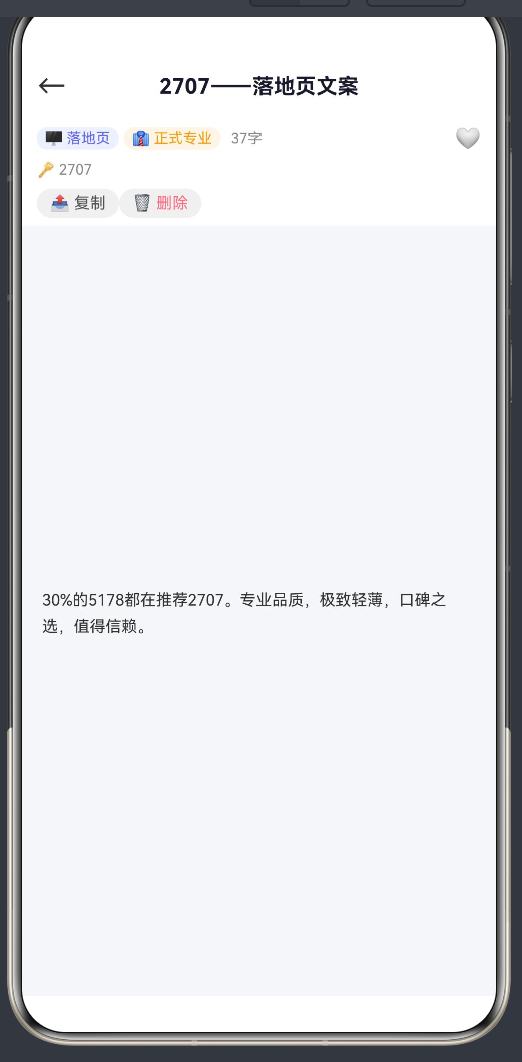
  { id: 'landing',   name: '落地页',     icon: '🖥️', desc: '活动页面' },
];
8 种语气风格:
typescript
export const COPY_STYLES: CopyStyle[] = [
  { id: 'formal',    name: '正式专业', icon: '👔' },
  { id: 'humorous',  name: '幽默风趣', icon: '😄' },
  { id: 'emotional', name: '情感共鸣', icon: '💖' },
  { id: 'concise',   name: '简洁有力', icon: '⚡' },
  { id: 'story',     name: '故事叙述', icon: '📖' },
  { id: 'urgency',   name: '紧迫感',   icon: '🔥' },
  { id: 'authority', name: '权威可信', icon: '🏆' },
  { id: 'friendly',  name: '亲切自然', icon: '☺️' },
];
6.3 模板引擎
文案生成基于模板 + 变量替换:
typescript
const COPY_TEMPLATES: Record<string, string[]> = {
  'ad': [
    '还在为{PROBLEM}烦恼吗?{PRODUCT}来帮您!{FEATURE1}、{FEATURE2},三重优势。限时特惠{PRICE}!',
    '别人都在用{PRODUCT}了,你还在等什么?{FEATURE1},让{PROBLEM}成为过去式。',
  ],
  'social': [
    '📢 安利一款好物------{PRODUCT}!✨\n{FEATURE1},太好用了!\n#{HASHTAG}',
    '干货分享 | {TOPIC}的小技巧\n1. {TIP1}\n2. {TIP2}\n3. {TIP3}',
  ],
  // ... 其他类型
};

export function generateCopy(genre: string, style: string, keywords: string, audience: string): CopyItem {
  const templates = COPY_TEMPLATES[genre] || COPY_TEMPLATES['ad'];
  const template = templates[Math.floor(Math.random() * templates.length)];
  // 变量替换
  const content = template
    .replace(/\{PRODUCT\}/g, keywords || '产品')
    .replace(/\{FEATURE1\}/g, FEATURES[Math.floor(Math.random() * FEATURES.length)])
    .replace(/\{PRICE\}/g, getRandomPrice())
    // ... 更多替换
  return { id: genCopyId(), ... } as CopyItem;
}
6.4 生成页面实现
typescript
@Builder CGen() {
  Column() {
    this.NavBar('✨ 创作文案', 'c_home')
    Scroll() {
      Column() {
        // 文案类型选择器(水平滚动)
        Scroll() {
          Row() {
            ForEach(COPY_GENRES, (g: CopyGenre, i: number) => {
              Column() {
                Text(g.icon).fontSize(22)
                Text(g.name).fontSize(11)
              }.backgroundColor(i === this.cGenreIdx ? '#EEF0FF' : '#F5F5F5')
              .onClick(() => { this.cGenreIdx = i; this.cShow = false; })
            })
          }
        }

        // 语气风格选择器
        // 关键词输入
        // 目标受众输入

        // 生成按钮
        Button() { Text('🚀 AI 生成文案') }
          .enabled(!this.cLoading)
          .onClick(() => {
            this.cLoading = true;
            setTimeout(() => {
              this.cResult = generateCopy(...);
              this.cShow = true; this.cLoading = false;
            }, 1000);
          })

        // 结果展示
        if (this.cShow && this.cResult !== null) {
          CopyResultCard({ item: this.cResult!, onRegenerate: ..., onSave: ... })
        }
      }
    }
  }
}
6.5 数据模型
typescript
export interface CopyItem {
  id: string;           // 唯一标识
  title: string;        // 标题
  genre: string;        // 文案类型
  style: string;        // 语气风格
  content: string;      // 文案内容
  keywords: string;     // 关键词
  targetAudience: string;// 目标受众
  createdAt: number;    // 创建时间
  updatedAt: number;    // 更新时间
  wordCount: number;    // 字数
  isFavorite: boolean;  // 是否收藏
}
7. AI 剧本生成引擎
7.1 剧本结构
typescript
export interface Script {
  id: string;                // 唯一标识
  title: string;             // 标题
  genre: string;             // 题材(10 选 1)
  style: string;             // 风格(5 选 1)
  logline: string;           // 故事梗概
  content: string;           // 剧本正文
  characters: ScriptCharacter[];  // 角色列表
  scenes: SceneInfo[];       // 场景列表
  wordCount: number;         // 字数
  isFavorite: boolean;       // 收藏
  actCount: number;          // 幕数
}
7.2 角色生成算法
typescript
function generateCharacter(index: number, total: number, genre: string): ScriptCharacter {
  const isMale = Math.random() > 0.5;
  const names = isMale ? MALE_NAMES : FEMALE_NAMES;
  const name = names[Math.floor(Math.random() * names.length)];
  const trait = TRAITS[Math.floor(Math.random() * TRAITS.length)];

  // 主角/反派/配角分配
  let role: string;
  if (index === 0) { role = 'protagonist'; }
  else if (index === 1) { role = total > 2 ? 'antagonist' : 'supporting'; }
  else { role = 'supporting'; }

  return { id: charId(), name, age, gender, personality: trait, role, ... };
}
7.3 场景地点库
typescript
const LOCATIONS: Record<string, string[]> = {
  'comedy':  ['咖啡馆', '学校教室', '写字楼', '菜市场', '地铁站'],
  'tragedy': ['废弃医院', '老宅', '悬崖边', '墓地', '雨夜街头'],
  'mystery': ['古堡', '地下室', '密室', '警局', '废弃工厂'],
  'sci-fi':  ['太空站', '实验室', '虚拟世界', '时间管理局', 'AI核心舱'],
  'romance': ['海边', '樱花树下', '书店', '音乐厅', '天台'],
  // ...
};
8. AI 图像识别引擎
8.1 识别类别
typescript
export const CATEGORY_LIST: CategoryInfo[] = [
  { id: 'animal',    name: '动物',   icon: '🐾', color: '#22c55e' },
  { id: 'plant',     name: '植物',   icon: '🌿', color: '#16a34a' },
  { id: 'food',      name: '美食',   icon: '🍕', color: '#f59e0b' },
  { id: 'landscape', name: '风景',   icon: '🏔️', color: '#3b82f6' },
  { id: 'person',    name: '人物',   icon: '👤', color: '#8b5cf6' },
  { id: 'vehicle',   name: '交通',   icon: '🚗', color: '#ef4444' },
  { id: 'building',  name: '建筑',   icon: '🏠', color: '#ec4899' },
  { id: 'text',      name: '文字',   icon: '📝', color: '#6366f1' },
  { id: 'object',    name: '物品',   icon: '📦', color: '#14b8a6' },
  { id: 'art',       name: '艺术',   icon: '🎨', color: '#f97316' },
];
8.2 模拟识别引擎
typescript
export function recognizeImage(imagePath: string): RecognitionResult {
  const mainCategory = CATEGORY_LIST[Math.floor(Math.random() * CATEGORY_LIST.length)];
  const template = LABEL_TEMPLATES[mainCategory.id];
  const mainLabel = template.labels[Math.floor(Math.random() * template.labels.length)];
  const mainConfidence = 75 + Math.floor(Math.random() * 20);

  // 生成 2-3 个次要标签
  const labels: RecognitionLabel[] = [/* ... */];
  labels.sort((a, b) => b.confidence - a.confidence);

  return {
    id: genResultId(),
    labels, dominantLabel: mainLabel,
    dominantConfidence: mainConfidence,
    processingTimeMs: endTime - startTime,
  };
}
8.3 置信度可视化
typescript
export function getConfidenceColor(confidence: number): string {
  if (confidence >= 90) return '#22c55e';  // 绿色 - 极高
  if (confidence >= 75) return '#16a34a';  // 深绿 - 高
  if (confidence >= 55) return '#f59e0b';  // 橙色 - 中
  if (confidence >= 35) return '#f97316';  // 深橙 - 低
  return '#ef4444';                        // 红色 - 极低
}
9. 数据持久化:AppStorage 实践
9.1 存储设计
每个模块使用独立的 AppStorage key:
typescript
// AI 剧本
const KEY_SCRIPTS = 'ai_script_list_v3';

// AI 图像识别
const KEY_HISTORY = 'image_ai_history_v1';

// AI 文案创作助手
const KEY_COPIES = 'ai_copy_list_v1';
9.2 CRUD 模式
所有写操作遵循"全量读取 → 修改 → 全量写入"模式:
typescript
export function addCopy(item: CopyItem): CopyItem[] {
  const list = loadCopies();
  const newList: CopyItem[] = [item];
  for (let i = 0; i < list.length; i++) { newList.push(list[i]); }
  if (newList.length > 200) { newList.length = 200; }
  save(newList);
  return newList;
}
9.3 防崩溃处理
typescript
export function loadCopies(): CopyItem[] {
  try {
    const data = AppStorage.get<string>(KEY);
    if (data) {
      const parsed: object = JSON.parse(data);
      if (Array.isArray(parsed)) {
        const r: CopyItem[] = [];
        for (let i = 0; i < parsed.length; i++) { r.push(parsed[i] as CopyItem); }
        return r;
      }
    }
  } catch (_) {}
  return [];
}
10. 组件化设计与回调传递
10.1 可复用组件
| 组件 | 用途 | 构造参数 |
|---|---|---|
ScriptCard |
剧本列表卡片 | script, onTap, onFav |
ScriptResultCard |
生成结果 | script, onRegenerate, onSave |
ResultCard |
识别结果 | result, onDelete |
ImagePicker |
图片选择 | onPickFromGallery, onTakePhoto |
CopyCard |
文案卡片 | item, onTap, onFav |
CopyResultCard |
文案结果 | item, onRegenerate, onSave |
10.2 回调传递的正确模式
在 ArkTS 中,组件构造参数是传递回调的唯一方式:
typescript
// ✅ 正确------构造参数传递
CopyCard({
  item: item,
  onTap: (ci: CopyItem) => { this.cDetail = ci; this.page = 'c_detail'; },
  onFav: (id: string) => { this.copies = toggleFav(id); this.refreshStats('c'); }
})

// ❌ 错误------链式 setter 不合法
CopyCard({ item: item })
.setOnTap(() => {}) // 编译错误:返回 void组件内部实现:
typescript
@Component
export struct CopyCard {
  @Prop item: CopyItem = {} as CopyItem;
  // 公开属性(非 private)------可构造参数
  onTap: (item: CopyItem) => void = () => {};
  onFav: (id: string) => void = () => {};

  build() {
    Column() {
      // UI ...
    }.onClick(() => { this.onTap(this.item); })
  }
}
关键点:
- 回调属性不能是
private - 不需要 setter 方法
- 默认值为空函数
() => {}
11. 状态管理:@State / @Prop
11.1 三级响应式体系
| 装饰器 | 作用域 | 用途 |
|---|---|---|
@State |
当前组件 | 私有状态,变化触发 UI 重绘 |
@Prop |
父→子单向 | 接收父组件传入的数据 |
11.2 状态变量分布
typescript
// 通用
@State private page: string = 'launcher';
@State private toastMsg: string = '';
@State private showToast: boolean = false;

// AI 剧本(约 20 个状态)
@State private scripts: Script[] = [];
@State private genGenreIdx: number = 0;
@State private genLoading: boolean = false;

// AI 图像识别(约 5 个状态)
@State private imgResults: RecognitionResult[] = [];
@State private imgLoading: boolean = false;

// AI 文案创作助手(约 10 个状态)
@State private copies: CopyItem[] = [];
@State private cGenreIdx: number = 0;
@State private cLoading: boolean = false;
11.3 数组更新陷阱
typescript
// ❌ 无效------不触发 UI 重绘
this.copies[0].title = '新标题';

// ✅ 有效------替换整个数组引用
const newList: CopyItem[] = [];
for (let i = 0; i < this.copies.length; i++) {
  if (i === 0) {
    newList.push({ ...this.copies[i], title: '新标题' });
  } else {
    newList.push(this.copies[i]);
  }
}
this.copies = newList;
12. ArkTS 编译错误全记录
在开发过程中,我们遇到了 8 个典型的编译错误:
错误 1:Rollup 解析错误
症状 :Unexpected token (Note that you need plugins to import files that are not JavaScript)
原因 :非 @Builder 方法(如 doGenerateCopy())放在 @Builder 方法之间,Rollup 的 JavaScript 预处理器无法解析 ArkTS 语法。
修复 :将所有非 @Builder 方法移到所有 @Builder 方法之前。
错误 2:@Builder 内赋值语句
错误码 :10905204
症状 :'this.page = 'launcher';' does not meet UI component syntax
原因 :@Builder 方法体内包含非 UI 语句。
修复:将赋值语句移到事件处理器中。
错误 3:内联对象类型
错误码 :10605040
症状 :Object literals cannot be used as type declarations
原因 :Record<string, { labels: string[]; icon: string }> 中的内联类型。
修复 :定义显式接口 LabelTemplate。
错误 4:索引访问类型
错误码 :10605028
症状 :Indexed access types are not supported
原因 :Script['characters'] 语法。
修复 :使用显式类型 ScriptCharacter[]。
错误 5:组件回调链式调用
错误码 :10505001
症状 :Property 'setOnFav' does not exist on type 'void'
原因 :组件构造返回 void,不能链式调用。
修复:使用构造参数传递回调。
错误 6:简写属性
症状 :组件构造中使用 { item } 而非 { item: item }。
修复:使用完整属性名。
错误 7:未解析的导入
症状 :Could not resolve "../components/ImagePicker"
原因:组件文件不存在。
修复:创建缺失的组件文件。
错误 8:@Builder 内变量声明
症状 :Only UI component syntax can be written here
原因 :@Builder 内有 const stats = getStats()。
修复 :将函数调用移到父 @Builder 外部,通过参数传递。
13. 测试策略
13.1 测试架构
entry/src/test/
├── LocalUnit.test.ets    ← 单元测试
└── List.test.ets         ← 集成测试

entry/src/ohosTest/
└── ets/test/Ability.test.ets  ← Ability 测试
13.2 单元测试用例
typescript
// Copy 模块
generateCopy_returns_valid_item
generateCopy_all_genres
genCopyId_is_unique
COPY_GENRES_has_10_items
COPY_STYLES_has_8_items
genreName_returns_name
styleName_returns_name

// Recognition 模块
recognizeImage_returns_valid_result
recognizeImage_labels_sorted
getConfidenceLevel_correct
genResultId_unique
CATEGORY_LIST_has_10_items
13.3 集成测试用例
typescript
// Copy 存储
add_and_load → 验证 addCopy 后 loadCopies 能找到
delete       → 验证 deleteCopy 后数据已移除
getStats     → 验证统计数据正确

// Recognition 存储
add_and_load_result
delete_result
clear_all_history
get_stats
14. 构建配置与性能优化
14.1 Hvigor 配置
json5
{
  modelVersion: "6.1.0",
  execution: {
    // daemon: true,
    // incremental: true,
    // parallel: true,
  }
}
14.2 严格模式
json5
{
  apiType: "stageMode",
  buildOption: {
    arkOptions: {
      strictMode: "strict"
    }
  }
}
14.3 页面路由注册
json5
{
  profile: {
    main_pages: {
      src: ["pages/111"]
    }
  }
}
14.4 性能建议
- 限制列表长度:AppStorage 数据上限设为 200 条
- 使用 setTimeout 模拟延迟:模板引擎瞬时完成但 UI 延迟 1000-1200ms 展示
- 紧凑的数据模型:每个接口只包含必要字段
- 避免不必要的 @State:只将需要触发 UI 更新的变量设为 @State
15. 总结与展望
15.1 项目成果
通过 AI App Hub 项目,我们验证了在 HarmonyOS API 24 上使用 ArkTS 开发多应用集成平台的可行性。项目包含:
- 3 个 AI 辅助创意工具模块
- 16 个页面路由,统一由单组件管理
- 6 个可复用组件,采用构造参数回调模式
- 9 个数据模型文件,覆盖类型定义、生成引擎、存储层
- 8 个编译错误的完整修复经验
15.2 可扩展方向
- 接入真实 LLM API:将模板引擎替换为调用大语言模型
- 更多 App 模块:盲盒贴纸、AR 饮食识别、视频剪辑
- 云端同步:基于 HarmonyOS 云开发实现多设备同步
- 分布式协作:利用 HarmonyOS 分布式能力
- 性能优化:对单页面进行代码拆分
15.3 开发建议
- 类型先行:所有接口和函数必须显式标注类型
- @Builder 只放 UI:所有逻辑在 struct 方法或事件处理器中完成
- 回调用构造参数:不要写 setter 方法
- 不要使用简写属性 :
{ key: value }而非{ key } - 所有常规方法在 @Builder 之前:避免 Rollup 解析错误
- 版本化存储 key :AppStorage key 加
_vN后缀
附录
A. 关键源码索引
| 文件 | 行数 | 功能 |
|---|---|---|
pages/111.ets |
229 | 统一入口,16 页面路由 |
model/CopyTypes.ets |
75 | 文案类型定义 & 常量 |
model/CopyGenerator.ets |
54 | 文案生成引擎 |
model/CopyStorage.ets |
52 | 文案存储 CRUD |
model/ImageTypes.ets |
95 | 图像识别类型 |
model/ScriptTypes.ets |
206 | 剧本类型定义 |
model/ScriptGenerator.ets |
601 | 剧本生成引擎 |
components/CopyCard.ets |
30 | 文案卡片组件 |
components/CopyResultCard.ets |
31 | 文案结果卡片 |
B. 依赖清单
@ohos/hamock@1.0.0         # 测试 Mock
@ohos/hypium@1.0.25        # 测试框架
@kit.BasicServicesKit       # pasteboard API
@kit.ArkData                # 数据存储
@kit.AbilityKit             # Ability 框架
@kit.PerformanceAnalysisKit # hilog 日志
C. 参考资源
本文基于 demo012 项目实际源码编写
平台 : HarmonyOS API 24 | 语言 : ArkTS | 构建 : Hvigor 6.1.0
许可 : MIT License | 最后更新: 2026-06-20