生命周期
* 父容器会调用自己的生命周期方法时,会调用子容器的生命周期方法,如start();
* 在一些容器的生命周期方法内,通常会触发自己事件管理器LifecycleSupport,在调用前后会触发相应的事件
* 事件管理器内注册了许多对应事件的监听器,触发相应的事件从而调用了对应的监听器
public class SimpleContext implements Context, Pipeline, Lifecycle {
//...
protected LifecycleSupport lifecycle = new LifecycleSupport(this );
// 增删改查
public void addLifecycleListener(LifecycleListener listener) {
lifecycle .addLifecycleListener(listener);
}
// 调用生命周期方法
public synchronized void start() throws LifecycleException {
// 触发事件 BEFORE_START_EVENT ,对应的监听器会被调用
lifecycle .fireLifecycleEvent(BEFORE_START_EVENT, null );
started = true ;
try {
//...
// Start our child containers, if any
Container children\[\] = findChildren();
for (int i = 0; i < children.length ; i++) {
if (childreni instanceof Lifecycle)
((Lifecycle) childreni).start();
}
// 触发事件 START_EVENT
lifecycle .fireLifecycleEvent(START_EVENT, null );
}
catch (Exception e) {e.printStackTrace();
}
/// 触发事件 AFTER_START_EVENT
lifecycle .fireLifecycleEvent(AFTER_START_EVENT, null );
}
}
public final class LifecycleSupport {
// 底层为监听 器类数组
private LifecycleListener listeners \[\] = new LifecycleListener0;
// 读表方法进行修改
public void addLifecycleListener(LifecycleListener listener) {
synchronized (listeners ) {
LifecycleListener results\[\] = new LifecycleListener****listeners**** .****length**** + 1;
for (int i = 0; i < listeners .length ; i++)
resultsi = listeners i;
results****listeners**** .****length**** = listener;
listeners = results;
}
}
// 调用监听器类
public void fireLifecycleEvent(String type, Object data) {
// 把容器对象、事件类型、数据包装为一个 Event 对象。
LifecycleEvent event = new LifecycleEvent(lifecycle, type, data);
LifecycleListener interested\[\] = null ;
synchronized (listeners ) {
interested = (LifecycleListener\[\]) listeners .clone();
}
// 调用所有注册进来的监听器的 lifecycleEvent(event)
for (int i = 0; i < interested.length ; i++)
interestedi.lifecycleEvent(event);
}
}
载入器
概述
* 不同应用相互隔离
servlet容器需要实现一个自定义的载入器, 而不能使用简单地使用系统的类载入器, 因为servlet 容器不应该完全信任它正在运行的servlet类
如果使用系统类的载入器载入某个servlet类所使用的全部类, 那么servlet就能够访问所有的类, 包括当前运行的Java虚拟机(Java Virtual Machine, NM)中环境变量CLASSPATH指明
的路径下的所有的类和库。这是非常危险的。
servlet 应该只允许载人WEB-INF/classes目录及其子目录下的类(即只能访问应用项目中的代码), 和从部署的库到WEB INF/llb目录载入类
* 在Catalina 中, 载入器是org.apache.catalina.Loader接口的实例。Tomcat中需要实现自定义载入器的另一个原因是, 为了提供自动重载的功能,
当WEB INF/classes目录或WEB-INF/lib目录下的类发生变化肘, Web应用程序会重新载入这些类。
在Tomcat的载入器的实现中, 类载入器使用一个额外的线程来不断地检查servlet类和其他类的文件的时间戳。
若要支持自动重载功能, 则载入器必须实现org.apacbe.catalina.loader.Reloader接口。
* 两个术语需要注意: 仓库(repository)和资源(resource)。仓库表示类载入器会在哪里搜索要载入的类, 而资源指的是一个类载入器中的DirContext对象
* 什么不使用java中的classpath环境变量的原因了,java的classpath是声明依赖类库默认的地方,Tomcat的start脚本忽略了这个变量
在创建Tomcat系统Classloader的时候产生了自己的classpaths。在catalina.sh脚本中CLASSPATH会被重置了,如果需要给项目指定额外CLASSPATH可以在名为setenv.sh添加。
* Tomcat6的启动过程。
-
JVM的Bootstrap Loader(根类加载器)加载java的核心类库。java虚拟机使用JAVA_HOME环境变量来定位核心库的位置。
-
startup.sh,使用start参数调用Catalina.sh,修改classpath为加载bootstrap.jar和tomcat-juli.jar。这些资源仅对Tomcat可见。
-
为每一个部署的Context创建ClassLoader,加载位于每个web应用程序WEB-INF/classes和WEB-INF/lib目录下的所有类和jar文件。每个web应用程序仅仅可见自己目录下的资源。
-
Common ClassLoader加载位于$CATALINA_HOME/lib目录下的所有类和jar文件,这些资源对所有应用程序和Tomcat可见。
Loader接口
在载入Web 应用程序中需要的servlet 类及其相关类时要遵守一些明确的规则。例如, 应用程序中的servlet 只能引用部署在WEB-INF/classes 目录及其子目录下的类。但是,servlet 类不能访问其他路径中的类, 即使这些类包含在运行当前Tomcat 的JVM的CLASSPATH 环境变量中。此外, servlet 类只能访问WEB-INF/lib 目录下的库, 其他目录中的类库均不能访问。
当与某个载入器相关联的容器需要使用某个Servlet类时, 即当该类的某个方法被调用时,容器会先调用载入器的getClassLoader()。方法来获取类载入器的实例。然后,容器会调用类载入器的loadClass()方法来载入这个servlet类。
public interface Loader {
// 获取类加载器实例
public ClassLoader getClassLoader();
// 委托的父类加载器
public boolean getDelegate();
public void setDelegate(boolean delegate);
// 与 Context 容器相关联
public Container getContainer();
public void setContainer(Container container);
public DefaultContext getDefaultContext();
public void setDefaultContext(DefaultContext defaultContext);
// 类加载本身是否支持重加载
public boolean getReloadable();
public void setReloadable(boolean reloadable);
// 是否自动加载仓库中的类
public boolean modified();
// 添加类的仓库,即 WEB-INF/classes 和 WEB-INF/lib
public void addPropertyChangeListener(PropertyChangeListener listener);
public void addRepository(String repository);
public String\[\] findRepositories();
public void removePropertyChangeListener(PropertyChangeListener listener);
public String getInfo();
}
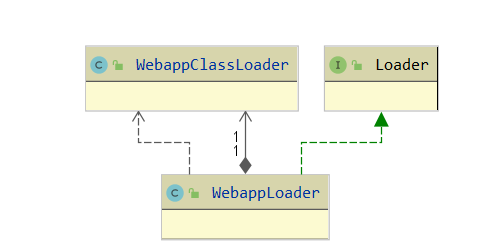
Webapploader类
* WebappLoader类实现Loader 接口, 其实例就是Web应用程序中的载入器, 负责载入Web应用程序中所使用到的类
WebappLoader类会创建WebappClassLoader类的一个实例作为其类加载器并处理好仓库和资源
-
可以设置仓库路径,最终会加入到 WebappClassLoader的url中super.addURL(url),,表示可以加载的资源路径
-
同时处理当前应用Context的/WEB-INF/lib"和"/WEB-INF/classes"的路径的资源,也加入到WebappClassLoader中
* 像其他的Catalina组件一样,WebappLoader类也实现了Lifecycle接口, 可以由其相关联的容器来启动或关闭。
* 此外,WebappLoader类还实现java.Jang.Runnab)e接口,这样,它就可以指定一个线程来不断地调用modified()方法。
如果modified()方法返回true, WebappLoader的实例会通知其关联的servlet容器(在这里是Context类的实例)。然后由Context实例自己去完成servlet类的重新载入
public class WebappLoader implements Lifecycle, Loader, PropertyChangeListener, Runnable {
// 加载器相关
// 类加载器
private WebappClassLoader classLoader = null ;
// 委托的父加载器
private boolean delegate = false ;
private String loaderClass = "org.apache.catalina.loader.WebappClassLoader" ;
private ClassLoader parentClassLoader = null ;
private String repositories \[\] = new String0;
// 自动加载循环查询
private int checkInterval = 15;
private boolean reloadable = false ;
private Thread thread = null ;
private boolean threadDone = false ;
private String threadName = "WebappLoader" ;
// 关联的容器
private Container container = null ;
protected DefaultContext defaultContext = null ;
// 其他
protected PropertyChangeSupport support = new PropertyChangeSupport(this );
private static final String info ="org.apache.catalina.loader.WebappLoader/1.0" ;
private boolean started = false ;
protected LifecycleSupport lifecycle = new LifecycleSupport(this );
protected static final StringManager sm = StringManager.getManager (Constants.Package );
private int debug = 0;
//============= 构造方法 ===========================================
public WebappLoader() { this (null );}
public WebappLoader(ClassLoader parent) {
super ();
this .parentClassLoader = parent;
}
//============== 属性的 set/getter==========================================
public int set/getCheckInterval/DefaultContext/Debug/Delegate/LoaderClass/ClassLoader() {return (this .checkInterval );}
public boolean modified() {
return (classLoader .modified());
}
//==============Container 处理 ==========================================
// 在修改容器后,需要根据新设置的 reloadable 调整后台线程的 Start 和 Stop
public Container getContainer() {return (container ); }
public void setContainer(Container container) {
// 监听事件的触发
// Register with the new Container (if any)
this .container = container;
// 有新设置的容器的 Reloadabl 属性,更新当前类的 Reloadabl 属性
if ((this .container != null ) && (this .container instanceof Context)) {
setReloadable( ((Context) this .container ).getReloadable() );
}
}
public boolean getReloadable() {return (this .reloadable );}
public void setReloadable(boolean reloadable) {
// 监听事件的触发
boolean oldReloadable = this .reloadable ;
// 根据新设置的 reloadable 调整后台线程的 Start 和 Stop
if (!started )return ;
if (!oldReloadable && this .reloadable )
threadStart();
else if (oldReloadable && !this .reloadable )
threadStop();
}
//============== 加载器是否需要重新加载的循环监听 ====================================
private void threadStart() {
// 条件判断
if (thread != null ) return ;
if (!reloadable ) throw new IllegalStateException(sm .getString("webappLoader.notReloadable" ));
if (!(container instanceof Context)) throw new IllegalStateException (sm .getString("webappLoader.notContext" ));
// 开启一个线程
threadDone = false ;
threadName = "WebappLoader"**** + ****container**** .getName() + ****"" ;
thread = new Thread(this , threadName );
thread .setDaemon(true );
thread .start();
}
// 这里注意 interrupt 和 join
private void threadStop() {
if (thread == null )return ;
threadDone = true ;
thread .interrupt(); // 因为在 run() 中有 sleep 的存在,所以这里需要调用 interrupt ,使得 run 中立即抛出一个 InterruptedException 以走下去
try {
thread .join(); // 这里让 run() 走完,完全退出 run() 后在把 thread 置为 null
} catch (InterruptedException e) {
;
}
thread = null ;
}
// 一个后台线程不断循环的监听 classLoader.modified() ,如果返回 true ,就新起线程调用容器的 reload() 方法
public void run() {
while (!threadDone ) {
// 循环检查的间隔 , Thread.sleep(checkInterval * 1000L);
threadSleep();
if (!started ) break ;
try {
// 循环的检查类加载器的 modified 表示,当为 true 时,跳出循环
if (!classLoader .modified())
continue ;
} catch (Exception e) {
continue ;
}
// ((Context) container).reload();
notifyContext();
break ;
}
}
//============== 给加载器点击仓库路径 ====================================
public void addRepository(String repository) {
// 添加进 repositories 数组 repositories
// 之后需要更新下 servletContext 对象的 CLASS_PATH_ATTR ,为 jsp 编译器所用
if (started && (classLoader != null )) {
classLoader .addRepository(repository);
setClassPath();
}
}
// 获取所有的仓库路径(包括父加载器的),以 ; 拼接,设置到 servletContext 的 Globals.CLASS_PATH_ATTR 属性中方你
// 如 D:/Notes/Java Web/Tomcat/ 源码 /HowTomcatWork/myApp/WEB-INF/classes/;/E:/DevelopKit/JDK/jre/lib/charsets.jar;/E:/DevelopKit/JDK/jre/lib/deploy.jar
private void setClassPath() {
if (!(container instanceof Context)) return ;
// 获取当前对应的 Context 对象
ServletContext servletContext =((Context) container ).getServletContext();
if (servletContext == null ) return ;
StringBuffer classpath = new StringBuffer();
// 获取当前 WebappClassLoader
ClassLoader loader = getClassLoader();
int layers = 0;
int n = 0;
while ((layers < 3) && (loader != null )) {
if (!(loader instanceof URLClassLoader))
break ;
URL repositories\[\] = ((URLClassLoader) loader).getURLs();
for (int i = 0; i < repositories.length ; i++) {
String repository = repositoriesi.toString();
if (repository.startsWith("file://" ))
repository = repository.substring(7);
else if (repository.startsWith("file:" ))
repository = repository.substring(5);
else if (repository.startsWith("jndi:" ))
repository = servletContext.getRealPath(repository.substring(5));
else
continue ;
if (repository == null )
continue ;
if (n > 0)
classpath.append(File.pathSeparator );
classpath.append(repository);
n++;
}
loader = loader.getParent();
layers++;
}
servletContext.setAttribute(Globals.CLASS_PATH_ATTR ,classpath.toString());
}
//============== 生命周期方法 ====================================
//start() 方法
public void start() throws LifecycleException {
// 预条件判断和触发事件
if (started ) throw new LifecycleException(sm .getString("webappLoader.alreadyStarted" ));
lifecycle .fireLifecycleEvent(START_EVENT , null );
started = true ;
if (container .getResources() == null ) return ;
// Register a stream handler factory for the JNDI protocol
URLStreamHandlerFactory streamHandlerFactory = new DirContextURLStreamHandlerFactory();
try {
URL.setURLStreamHandlerFactory(streamHandlerFactory);
} catch (Throwable t) {
// Ignore the error here.
}
// Construct a class loader based on our current repositories list
try {
// 创建加载器,如果存在 parentClassLoader ,将其作为参数以创建 WebappClassLoader ,没有就使用空参数的构造器进行创建即可
classLoader = createClassLoader();
//// 获取 Context 容器目录上下文 DirContext ,即 contex 指定的 docBas 目录上下文
// 再 host 指定的 appBase 目录下文件,可以是目录,也可是 war 包
classLoader .setResources(container .getResources()); // 把 DirContext 设置进来
classLoader .setDebug(this .debug );
classLoader .setDelegate(this .delegate );
for (int i = 0; i < repositories .length ; i++) {
classLoader .addRepository(repositories i);
}
// 添加标准的仓库: "/WEB-INF/lib" 和 "/WEB-INF/classes"
//classLoader.addRepository(classesPath + "/", classRepository);
//classLoader.addJar(filename, WEB-INF/lib 下的所有 jarFile, destFile);
setRepositories();
// 添加 WEB-INF/classe 和 /WEB-INF/lib 到 servletContext.setAttribute(Globals.CLASS_PATH_ATTR,classpath.toString());
setClassPath();
// 添加对应用项目根目录,对应工作目录、 /WEB-INF/lib" 和 "/WEB-INF/classes 目录的权限,
setPermissions();
if (classLoader instanceof Lifecycle)
((Lifecycle) classLoader ).start();
// Binding the Webapp class loader to the directory context
DirContextURLStreamHandler.bind((ClassLoader) classLoader , this .container .getResources());
} catch (Throwable t) {
throw new LifecycleException("start: " , t);
}
// Validate that all required packages are actually available
validatePackages();
// Start our background thread if we are reloadable
if (reloadable ) {
log(sm .getString("webappLoader.reloading" ));
try {
threadStart();
} catch (IllegalStateException e) {
throw new LifecycleException(e);
}
}
}
// 添加标准的仓库: "/WEB-INF/lib" 和 "/WEB-INF/classes"
private void setRepositories() {
if (!(container instanceof Context)) return ;
ServletContext servletContext = ((Context) container ).getServletContext();
if (servletContext == null )return ;
// 运行时生成的文件,在 work 目录
File workDir =(File) servletContext.getAttribute(Globals.WORK_DIR_ATTR );
if (workDir == null ) return ;
log(sm .getString("webappLoader.deploy" , workDir.getAbsolutePath()));
// 应用 Context 设置的对应的目录文件上下文 FileDirContext ,可以获取指定目录的属性信息 ;
DirContext resources = container .getResources();
// 设置 /WEB-INF/classes 仓库
String classesPath = "/WEB-INF/classes" ;
DirContext classes = null ;
try {
//JNDI 获取 /WEB-INF/classes 的目录上下文
Object object = resources.lookup(classesPath);
if (object instanceof DirContext) {
classes = (DirContext) object;
}
} catch (NamingException e) { }
// 如果存在
if (classes != null ) {
File classRepository = null ;
// 获取 D:\Notes\Java Web\Tomcat\ 源码 \HowTomcatWork\myApp\WEB-INF\classes 绝对
String absoluteClassesPath = servletContext.getRealPath(classesPath);
//absoluteClassesPath 不为空说明, WEB-INF\classes 一即存在文件
if (absoluteClassesPath != null ) {
classRepository = new File(absoluteClassesPath);
} else {
// 如果项目时 war 的形式,就为空
// 就需要在工作目录创建一样的目录,同时把 war 里的 class 文件还在 work 运行目录中,需要从那里拷贝到新的 \myApp\WEB-INF\classes 中
classRepository = new File(workDir, classesPath);//D:\Notes\Java Web\Tomcat\ 源码 \HowTomcatWork\work\\\myApp\WEB-INF\classes
classRepository.mkdirs();
copyDir(classes, classRepository);
}
// 第一个参数为相对路径的字符串 \WEB-INF\classes ,第二个参数为 classes 绝对路径的目录 file 对象
classLoader .addRepository(classesPath + "/" , classRepository);
}
// 设置 /WEB-INF/lib 仓库
String libPath = "/WEB-INF/lib" ;
classLoader .setJarPath(libPath);
DirContext libDir = null ;
try {
Object object = resources.lookup(libPath);
if (object instanceof DirContext)
libDir = (DirContext) object;
} catch (NamingException e) {}
if (libDir != null ) {
boolean copyJars = false ;
String absoluteLibPath = servletContext.getRealPath(libPath);
File destDir = null ;
if (absoluteLibPath != null ) {
destDir = new File(absoluteLibPath);
} else {
copyJars = true ;
destDir = new File(workDir, libPath);
destDir.mkdirs();
}
//classLoader.addJar 添加 WEB-INF/lib 路径下的每一个 jar
try {
NamingEnumeration enum = resources.listBindings(libPath);
while (enum .hasMoreElements()) {
Binding binding = (Binding) enum .nextElement();
String filename = libPath + "/" + binding.getName();
if (!filename.endsWith(".jar" ))
continue ;
File destFile = new File(destDir, binding.getName());
Resource jarResource = (Resource) binding.getObject();
if (copyJars) {
if (!copy(jarResource.streamContent(),
new FileOutputStream(destFile)))
continue ;
}
JarFile jarFile = new JarFile(destFile);
classLoader .addJar(filename, jarFile, destFile);
}
} catch (NamingException e) {
} catch (IOException e) {
e.printStackTrace();
}
}
}
//
public void stop() throws LifecycleException {
// Validate and update our current component state
if (!started )
throw new LifecycleException
(sm .getString("webappLoader.notStarted" ));
if (debug >= 1)
log(sm .getString("webappLoader.stopping" ));
lifecycle .fireLifecycleEvent(STOP_EVENT , null );
started = false ;
// Stop our background thread if we are reloadable
if (reloadable )
threadStop();
// Remove context attributes as appropriate
if (container instanceof Context) {
ServletContext servletContext =((Context) container ).getServletContext();
servletContext.removeAttribute(Globals.CLASS_PATH_ATTR );
}
// Throw away our current class loader
if (classLoader instanceof Lifecycle)
((Lifecycle) classLoader ).stop();
DirContextURLStreamHandler.unbind((ClassLoader) classLoader );
classLoader = null ;
}
// 配置加载器的权限
private void setPermissions() {
if (System.getSecurityManager () == null ) return ;
if (!(container instanceof Context)) return ;
ServletContext servletContext =((Context) container ).getServletContext();
// 工作目录的权限,读写删除
File workDir = (File) servletContext.getAttribute(Globals.WORK_DIR_ATTR );
if (workDir != null ) {
try {
String workDirPath = workDir.getCanonicalPath();
classLoader .addPermission (new FilePermission(workDirPath, "read,write" ));
classLoader .addPermission (new FilePermission(workDirPath + File.separator + "-" , "read,write,delete" ));
} catch (IOException e) {
// Ignore
}
}
// 对应用根目录的权限
try {
URL rootURL = servletContext.getResource("/" );
classLoader .addPermission(rootURL);
String contextRoot = servletContext.getRealPath("/" );
if (contextRoot != null ) {
try {
contextRoot =(new File(contextRoot)).getCanonicalPath()+ File.separator ;
classLoader .addPermission(contextRoot);
} catch (IOException e) {
// Ignore
}
}
// 对 /WEB-INF/classes/ 、 /WEB-INF/lib/
URL classesURL = servletContext.getResource("/WEB-INF/classes/" );
if (classesURL != null )
classLoader .addPermission(classesURL);
URL libURL = servletContext.getResource("/WEB-INF/lib/" );
if (libURL != null ) {
classLoader .addPermission(libURL);
}
if (contextRoot != null ) {
if (libURL != null ) {
File rootDir = new File(contextRoot);
File libDir = new File(rootDir, "WEB-INF/lib/" );
String path = null ;
try {
path = libDir.getCanonicalPath() + File.separator ;
} catch (IOException e) {
}
if (path != null )
classLoader .addPermission(path);
}
} else {
if (workDir != null ) {
if (libURL != null ) {
File libDir = new File(workDir, "WEB-INF/lib/" );
String path = null ;
try {
path = libDir.getCanonicalPath() + File.separator ;
} catch (IOException e) {
}
classLoader .addPermission(path);
}
if (classesURL != null ) {
File classesDir =new File(workDir, "WEB-INF/classes/" );
String path = null ;
try {
path = classesDir.getCanonicalPath()
- File.separator ;
} catch (IOException e) {
}
classLoader .addPermission(path);
}
}
}
} catch (MalformedURLException e) {
}
}
// 校验 classLoader 要求的包是否存在
private void validatePackages() throws LifecycleException {
ClassLoader classLoader = getClassLoader();
if (classLoader instanceof WebappClassLoader) {
Extension available\[\] = ((WebappClassLoader) classLoader).findAvailable();
Extension required\[\] = ((WebappClassLoader) classLoader).findRequired();
for (int i = 0; i < required.length ; i++) {
boolean found = false ;
for (int j = 0; j < available.length ; j++) {
if (availablej.isCompatibleWith(requiredi)) {
found = true ;
break ;
}
}
if (!found)
throw new LifecycleException("Missing optional package " + requiredi);
}
}
}
}
WebappClassLoader 类加载器
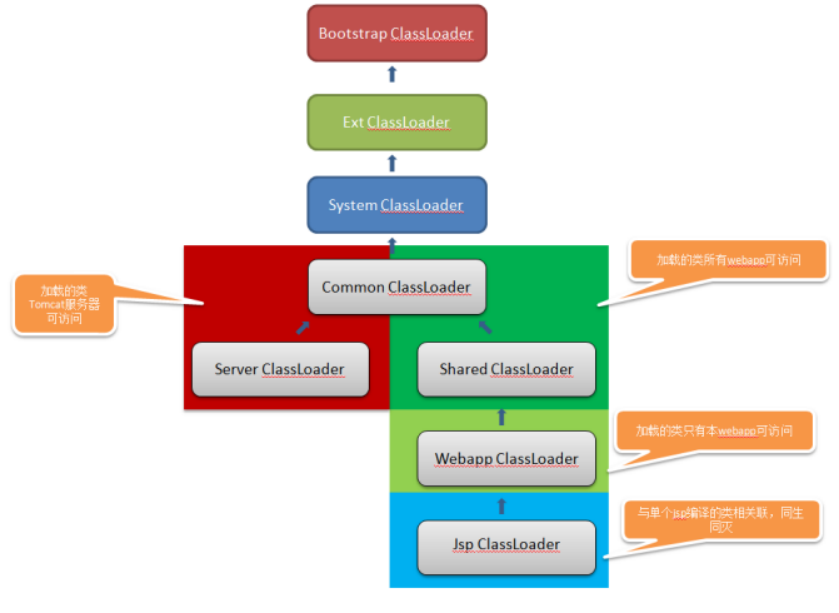
* WebappClassLoader怎么做到类加载的隔离和安全性控制:
WebappClassLoader继承URLClassLoader当父加载器未指定时,就默认为系统加载器,所有由此WebappClassLoader创建的sevrvlet是可以访问系统加载器及其父加载器加载过的类,
如Object、String等,但是在catalina.sh脚本中CLASSPATH被重置,所以,即使你把自定义类放在运行当前Tomcat 的JVM的CLASSPATH 环境变量中也无效
* 所以指定的类只能回到WebappClassLoader进行加载,在WebappClassLoader中固定指定了/WEB-INF/classes/和"WEB-INF/lib/,所以这就限制了servlet只能加载这两个目录下的文件。
当然对于JVM核心类和Tomcat核心类是可以访问到的(见下第三步)。
* 比如在WEB-INF/classes/用户自定义一个同的Object类,会先交给系统加载器加载,由于classpath被重改了,就找不到,再依次交给Extension 、Bootstrap ,最终找到返回。
用户自定义的Object不会被加载,此时系统加载器加载及其父类都找不到,此时只能回到WebappClassLoader记载,在自己的仓库同样找不到,就返回异常了
* 最主要的是重写了方法loadClass,破坏了双亲委托加载模型。载入类时, WebappClassLoader类要遵守如下规则:
-
因为所有已经载入的类都会缓存起来, 所以载入类时要先检查本地缓存
-
若本地缓存中没有, 则检查上一层缓存, 即调用java.lang.ClassLoader类的findLoadedClass()方法查找已经加载的类
-
若两个缓存中都没有, 则使用系统类载入器(AppClassLoader)进行加载, 防止Web应用程序中的类覆盖J2EE的类。如Object。
这里如果是自定义的servlet类,系统类载入器是找不到,因为Tomcat指定的classpath没有包含应用目录
- 若启用了SecurityManager, 则检查是否允许载入该类。若该类是禁止载入的类, 抛出Cl assNotF oundException异常
一般只允许/WEB-INF/classes/和"WEB-INF/lib/下类文件
-
若打开标志位delegate,或者待载入的类是属于包触发器中的包名, 则调用父载入器来载入相关类。如果父类载入器为null, 则使用系统的类载人器
-
从当前仓库中载入相关类(通过JNDI Resource等查找文件)
从本地仓库中,即/WEB-INF/classes/和"WEB-INF/lib/(Webapploader的start方法添加的)找;
找不到在从外部的仓库中查找(即调用WebappClassLoader.addRepository(String repository) 添加进来的外部仓库加入到URLClassLoader)
找到的话还会put进resourceEntries缓存中
- 若当前仓库中没有需要的类, 且标志位delegte关闭, 则使用父类载入器。若父类载入器为null, 则使用系统的类载入器进行加载:
若仍未找到需要的类, 则抛出ClassNotFoundExc eption异常。
- modifie判断仓库的文件修改有修改
判断文件的修改时间是否一致
- 查找是否有删除或新增jar文件
* 在创建WebappClassLoader是是可以指定父类的
这个父类代表的是WebappClassLoader的父类变量,这个父类可以其他的自定义的加载器,也可以是系统加载器,是任意指定的。在WebappClassLoader中重写的loadClass中,
此父类是在第五步之后使用的
public class WebappClassLoader extends URLClassLoader implements Reloader, Lifecycle {
// 触发器中指定了 WebappClassLoader 不允许加载的类、包
private static final String\[\] triggers = {
"javax.servlet.Servlet" // Servlet API
};
private static final String\[\] packageTriggers = {
"javax" , // Java extensions
"org.xml.sax" , // SAX 1 & 2
"org.w3c.dom" , // DOM 1 & 2
"org.apache.xerces" , // Xerces 1 & 2
"org.apache.xalan" // Xalan
};
//Webapploader 的 start 内会把 /WEB-INF/classes/ 添加到 repositories ,把 "WEB-INF/lib 里的 jar 文件添加到 JarFile
protected String\[\] repositories = new String0;
protected JarFile\[\] jarFiles = new JarFile0;
public Class loadClass(String name, boolean resolve)throws ClassNotFoundException {
Class clazz = null ;
// Don't load classes if class loader is stopped
//1 、在本地缓存 resourceEntries 变量中查找, resourceEntries 保存了加载过的 class 文件字节流等信息
clazz = findLoadedClass0(name);
if (clazz != null ) {
if (resolve) resolveClass(clazz);// 进行加载
return (clazz);
}
//2 、调用 java.lang.ClassLoader 类的 findLoadedClass() 方法查找已经加载的类,这是原生方法 -- 也是一层缓存
clazz = findLoadedClass(name);
if (clazz != null ) {
if (resolve) resolveClass(clazz);
return (clazz);
}
//3 、使用系统的类载入器进行加载, 防止 Web 应用程序中的类覆盖 J2EE 的类。如 Object 。
try {
clazz = system.loadClass(name);
if (clazz != null ) {
if (resolve) resolveClass(clazz);
return (clazz);
}
} catch (ClassNotFoundException e) {
// Ignore
}
//4 、文件权限判断,是的当前加载器只能访问特定目录的文件 , 即 /WEB-INF/classes/ 和 "WEB-INF/lib/
if (securityManager != null ) {
//...
}
}
boolean delegateLoad = delegate || filter(name);
//5 、如有委托,只有父加载器 parent 或者 system 加载器去加载
if (delegateLoad ) {
ClassLoader loader = parent ;
if (loader == null ) loader = system;
try {
clazz = loader.loadClass(name);
if (clazz != null ) {
if (resolve)resolveClass(clazz);
return (clazz);
}
} catch (ClassNotFoundException e) {
;
}
}
//6 、从本地仓库中,即 /WEB-INF/classes/ 和 "WEB-INF/lib/ ( Webapploader 的 start 方法添加的)找;找不到在从外部的仓库中查找
try {
clazz = findClass(name); // 见下代码
if (clazz != null ) {
if (resolve) resolveClass(clazz);
return (clazz);
}
} catch (ClassNotFoundException e) {
;
}
//7 、 delegte 关闭, 则使用父类载入器。若父类载入器为 null , 则使用系统的类载入器进行加载:
if (!delegateLoad ) {
ClassLoader loader = parent ;
if (loader == null )
loader = system;
try {
clazz = loader.loadClass(name);
if (clazz != null ) {
if (resolve)
resolveClass(clazz);
return (clazz);
}
} catch (ClassNotFoundException e) {
;
}
}
//8 、都找不到、抛出异常
throw new ClassNotFoundException(name);
}
public Class findClass(String name) throws ClassNotFoundException {
// 安全判断
if (securityManager != null ) {
//...
}
// 从本地仓库中,即 /WEB-INF/classes/ 和 "WEB-INF/lib/ ( Webapploader 的 start 方法添加的)找;
// 找不到在从外部的仓库中查找(即调用 WebappClassLoader.addRepository(String repository) 添加进来的外部仓库加入到 URLClassLoader )
Class clazz = null ;
try {
try {
// 从 repositories 和 jarFiles 保存的目录中,查找对应 class 文件
clazz = findClassInternal(name);
} catch (XXXException e) { throw e; }
if ((clazz == null ) && hasExternalRepositories) {
try {
// 如果有外部仓库,就交给 URLClassLoader 加载
clazz = super .findClass(name);
}catch (RuntimeException e) {
throw e;
}
}
if (clazz == null ) {
throw new ClassNotFoundException(name);
}
} catch (ClassNotFoundException e) {
throw e;
}
return (clazz);
}
public void addRepository(String repository) {
if (repository.startsWith("/WEB-INF/lib" ) || repository.startsWith("/WEB-INF/classes" ))
return ;
try {
URL url = new URL(repository);
super .addURL(url);
hasExternalRepositories = true ;
} catch (MalformedURLException e) {
throw new IllegalArgumentException(e.toString());
}
}
protected Class findClassInternal(String name) throws ClassNotFoundException {
// 伪代码
String tempPath = name.replace('.' , '/' );
String classPath = tempPath + ".class" ;
ResourceEntry entry = null ;
// 主要这一步
entry = findResourceInternal(name, classPath);
packageName = name.substring(0, pos);
definePackage(packageName, entry.manifest, entry.codeBase);
clazz = defineClass(name, entry.binaryContent, 0,
entry.binaryContent.length,
codeSource);
entry.loadedClass = clazz;
return clazz;
}
protected ResourceEntry findResourceInternal(String name, String path) {
ResourceEntry entry = (ResourceEntry) resourceEntries.get(name);
if (entry != null )
return entry;
int contentLength = -1;
InputStream binaryStream = null ;
int jarFilesLength = jarFiles .length ;
int repositoriesLength = repositories .length ;
int i;
Resource resource = null ;
for (i = 0; (entry == null ) && (i < repositoriesLength); i++) {
try {
String fullPath = repositories i + path;
// 获取指定文件的,若为文件,则会返回 new FileResource(file); ,底层使用文件流
Object lookupResult = resources.lookup(fullPath);
if (lookupResult instanceof Resource) {
resource = (Resource) lookupResult;
}
entry = new ResourceEntry();
try {
entry.source = getURL(new File(filesi, path));
entry.codeBase = entry.source;
} catch (MalformedURLException e) { return null ;}
// 获取文件的属性
ResourceAttributes attributes =
(ResourceAttributes) resources.getAttributes(fullPath);
contentLength = (int ) attributes.getContentLength();
entry.lastModified = attributes.getLastModified();
if (resource != null ) {
// 文件流
binaryStream = resource.streamContent();
synchronized (allPermission) {
// 加入 paths ,记录文件的最后修改时间
paths = result;
}
}
} catch (NamingException e) {
}
}
if ((entry == null ) && (notFoundResources.containsKey(name)))
return null ;
JarEntry jarEntry = null ;
for (i = 0; (entry == null ) && (i < jarFilesLength); i++) {
// 在 lib 中的 jar 查找文件
}
// 翻转好 ResourceEntry 返回(记录了文件的文件流、文件信息等)
return entry;
}
// 判断仓库的文件修改有修改
public boolean modified() {
// 表示已经加载过的类文件,在 findResourceInternal 内会添加
int length = paths.length;
int length2 = lastModifiedDates.length;
if (length > length2)
length = length2;
// 判断文件的修改事件
for (int i = 0; i < length; i++) {
try {
long lastModified =
((ResourceAttributes) resources.getAttributes(pathsi))
.getLastModified();
if (lastModified != lastModifiedDatesi) {
return (true );
}
} catch (NamingException e) {
return (true );
}
}
length = jarNames.length;
// 查找是否有删除或新增 jar 文件
if (getJarPath() != null ) {
try {
NamingEnumeration enum = resources.listBindings(getJarPath());
int i = 0;
// 查找是否有删除 jar 文件
while (enum .hasMoreElements() && (i < length)) {
NameClassPair ncPair = (NameClassPair) enum .nextElement();
String name = ncPair.getName();
if (!name.endsWith(".jar" ))
continue ;
if (!name.equals(jarNamesi)) {
return (true );
}
i++;
}
// 查找是否有新增 jar 文件
if (enum .hasMoreElements()) {
while (enum .hasMoreElements()) {
NameClassPair ncPair = (NameClassPair) enum .nextElement();
String name = ncPair.getName();
if (name.endsWith(".jar" )) {
return (true );
}
}
} else if (i < jarNames.length) {
return (true );
}
} catch (ClassCastException e) {
log(" Failed tracking modifications of '"
- getJarPath() + "' : " + e.getMessage());
}
}
// No classes have been modified
return (false );
}
}
启动Tomcat
概述
* 重点关注启动Tomcat时会用到的两个类, 分别是Catalina类和Bootstrap类,它们都位于org.apacbe.catalina.startup包下:
-
Catalina类用于启动或关闭Server对象, 并负责解析Tomcat配置文件: server.xml文件。
-
Bootstrap类是一个入口点, 负责创建Catalina实例,并调用其process()方法。
* 理论上, 这两个类可以合并为一个。但为了支持To mca t的多种运行模式, 而提供了多种启动类。
例如,上面说到的Bootstrap类是作为一个独立的应用程序运行Tomcat的。而另一个类org.apache.catalina. startup.BootstrapService 可以使Tom cat作为一个Windows NT 服务来运行。
Bootstrap类
* Bootstrap类提供了启动Tomcat的入口点, 当运行startup.bat文件或startup.sh文件时, 实际上是调用了该类的main方法。
* 主要流程
-
环境变量的设置:获取catalina.home(默认为user.dir);catalina.base(默认为catalina.home)
-
创建3和类记载器,commonLoader、 ClassLoader catalinaLoader 、ClassLoader sharedLoader
-
使用catalinaLoader加载器去记载Tomcat自带的类,即server目录,存放Tomcat服务器所需的各自jar文件(web应用是不能访问的)
-
创建Catalina实例,调用setParentClassLoader(sharedLoader)和process(args)方法
Catalina类
* Catalina类是启动类。它包含一个Digester对象, 用于解析位于%CATALINE_HOME%/conf目录下的server.xml 文件---代表了Server和service
* 一般需要通过Boostrap实例化Catalina后,调用其process()方法,但在调用该方法时,
需要传入适当的参数。第1个参数是start(表示要启动Tomcat), 或stop(表示要向Tomcat发送一条关闭命令)。还有其他可选的参数, 包括-help 、-config 、-debug和-nonaming。
* conf/server.xml举例
<Server port ="8005" shutdown ="SHUTDOWN" >
<Listener className ="org.apache.catalina.startup.VersionLoggerListener" />
<!-- 略 -->
<GlobalNamingResources >
<Resource name ="UserDatabase" auth ="Container"
type ="org.apache.catalina.UserDatabase" />
</GlobalNamingResources >
<Service name ="Catalina" >
<Connector port ="8080" protocol ="HTTP/1.1"
connectionTimeout ="20000"
redirectPort ="8443" />
<Engine name ="Catalina" defaultHost ="localhost" >
<Cluster className ="org.apache.catalina.ha.tcp.SimpleTcpCluster" />
<Realm className ="org.apache.catalina.realm.LockOutRealm" >
<Realm className ="org.apache.catalina.realm.UserDatabaseRealm"
resourceName ="UserDatabase" />
</Realm >
<Host name ="localhost" appBase ="webapps"
unpackWARs ="true" autoDeploy ="true" >
<Valve className ="org.apache.catalina.authenticator.SingleSignOn" />
</Host >
</Engine >
</Service >
</Server >
* process方法作为入口:
-
设置catalina.home、catalina.base环境变量
-
解析参数,根据参数调用不用的方法,如start
start方法作用是初始化和启动server.xml配置的Server服务器组件,如果为相对路径则文件路径以开头catalina.base
- 先解析server.xml配置文件,初始化了从<server>到<Context>的作用组件负责到此Catalina对象中
例如初始化了Catalina对象中的Server server以及其内的StandardHost实例,且添加apache.catalina.startup.HostConfig类型的生命周期监听器(会扫描部署context程序)
如果需要,配置好启动命名服务、安全管理器组件的环境变量设置
-
调用Server的server.initialize()和start(),开始启动服务
-
创建一个关闭的钩子,以调用stop方法
-
最终会调用StandardContext的start,其会触发ContextConfig进一步解析了web.xml
-
调用server的await方法,阻塞监听shutdown命令,以关闭server
* stop方法作用关闭Server服务器组件
先解析server.xml配置文件,获取到配置中<Server>的port和shutdown配置的值
对指定的服务端口发送shutdown命令即可。则对应端口的server会接受到这条命令使得其awai方法结束(在start方法中有调用await方法),程序会走下去,调用server的stop方法
public class Catalina {
// 在解析调用参数时,会赋值这些属性
protected String configFile = "conf/server.xml" ;
protected boolean debug = false ;
protected boolean starting = false ;
protected boolean stopping = false ;
protected boolean useNaming = true ;
protected Server server = null ;
protected ClassLoader parentClassLoader = ClassLoader.getSystemClassLoader ();
// ----------------------------------------------------------- Main Program
// 主方法,启动的入口
public void process(String args\[\]) {
// 设置 catalina.home ,默认取 user.dir ,即调用 java 命令的目录
setCatalinaHome();
// 设置 catalina.base ,默认取 catalina.home
setCatalinaBase();
try {
// 解析参数,设置当前类中属性值,如参数为 -start ,则属性 starting 置为 true;
if (arguments(args))
execute();
} catch (Exception e) {
e.printStackTrace(System.out );
}
}
protected void execute() throws Exception {
if (starting ) start();
else if (stopping ) stop();
}
// --------------------------------------------------------- Public Methods
protected void start() {
// 根据 server 配置文件,初始化了 server 到 context
Digester digester = createStartDigester();
File file = configFile ();// 获取 configFile 配置的 xml 路径,如果为相对路径则以开头 catalina.base
try {
InputSource is = new InputSource("file://" + file.getAbsolutePath());
FileInputStream fis = new FileInputStream(file);
is.setByteStream(fis);
digester.push(this );// 使用当前 catalina 对象作为 digester 栈的第一个对象
digester.parse(is);
fis.close();
} catch (Exception e) {
System.exit (1);
}
// 如果启动命名服务,则设置相关的属性
if (!useNaming ) {
System.setProperty ("catalina.useNaming" , "false" );
} else {
System.setProperty ("catalina.useNaming" , "true" );
String value = "org.apache.naming" ;
String oldValue = System.getProperty (javax.naming.Context.URL_PKG_PREFIXES );
if (oldValue != null ) {
value = value + ":" + oldValue;
}
System.setProperty (javax.naming.Context.URL_PKG_PREFIXES , value);
value = System.getProperty (javax.naming.Context.INITIAL_CONTEXT_FACTORY );
if (value == null ) {
System.setProperty (javax.naming.Context.INITIAL_CONTEXT_FACTORY ,
"org.apache.naming.java.javaURLContextFactory" );
}
}
// 安全管理器相关的设置
if (System.getSecurityManager () != null ) {
String access = Security.getProperty("package.access" );
if (access != null && access.length() > 0)
access += "," ;
else
access = "sun.," ;
Security.setProperty("package.access" ,
access + "org.apache.catalina.,org.apache.jasper." );
String definition = Security.getProperty("package.definition" );
if (definition != null && definition.length() > 0)
definition += "," ;
else
definition = "sun.," ;
Security.setProperty("package.definition" ,
definition + "java.,org.apache.catalina.,org.apache.jasper." );
}
// 创建一个关闭的钩子,以调用 stop 方法
Thread shutdownHook = new CatalinaShutdownHook();
// 启动 server ,调用其 initialize 和 start 方法
if (server instanceof Lifecycle) {
try {
server .initialize();
((Lifecycle) server ).start();// 最终会调用 StandardContext 的 start ,其会触发 ContextConfig 进一步解析了 web.xml
try {
// 注册关闭钩子
Runtime.getRuntime ().addShutdownHook(shutdownHook);
} catch (Throwable t) {
}
// 阻塞监听 shutdown 命令
server .await();
} catch (LifecycleException e) {
}
// 走到这里,就说明需要调用 stop
if (server instanceof Lifecycle) {
try {
try {
Runtime.getRuntime ().removeShutdownHook(shutdownHook);
} catch (Throwable t) {
}
((Lifecycle) server ).stop();
} catch (LifecycleException e) {
}
}
}
}
// 给服务发送 shutdown 命名
protected void stop() {
// 使用 StopDigester 解析下文件的 <server> 创建 StandardServer 对象,以获得 server.getPort() 和 server.getShutdown() ,
Digester digester = createStopDigester();
File file = configFile ();
try {
InputSource is = new InputSource("file://" + file.getAbsolutePath());
FileInputStream fis = new FileInputStream(file);
is.setByteStream(fis);
digester.push(this );
digester.parse(is);
fis.close();
} catch (Exception e) {
System.exit (1);
}
// 给服务发送 shutdown 命名
try {
Socket socket = new Socket("127.0.0.1" , server .getPort());
OutputStream stream = socket.getOutputStream();
String shutdown = server .getShutdown();
for (int i = 0; i < shutdown.length(); i++)
stream.write(shutdown.charAt(i));
stream.flush();
stream.close();
socket.close();
} catch (IOException e) {
System.exit (1);
}
}
/// 根据 server 配置文件,初始化了 server 到 context
protected Digester createStartDigester() {
// Initialize the digester
Digester digester = new Digester();
if (debug )
digester.setDebug(999);
digester.setValidating(false );
// Configure the actions we will be using
digester.addObjectCreate("Server" ,
"org.apache.catalina.core.StandardServer" ,
"className" );
digester.addSetProperties("Server" );
digester.addSetNext("Server" ,
"setServer" ,
"org.apache.catalina.Server" );
digester.addObjectCreate("Server/GlobalNamingResources" ,
"org.apache.catalina.deploy.NamingResources" );
digester.addSetProperties("Server/GlobalNamingResources" );
digester.addSetNext("Server/GlobalNamingResources" ,
"setGlobalNamingResources" ,
"org.apache.catalina.deploy.NamingResources" );
digester.addObjectCreate("Server/Listener" ,
null , // MUST be specified in the element
"className" );
digester.addSetProperties("Server/Listener" );
digester.addSetNext("Server/Listener" ,
"addLifecycleListener" ,
"org.apache.catalina.LifecycleListener" );
digester.addObjectCreate("Server/Service" ,
"org.apache.catalina.core.StandardService" ,
"className" );
digester.addSetProperties("Server/Service" );
digester.addSetNext("Server/Service" ,
"addService" ,
"org.apache.catalina.Service" );
digester.addObjectCreate("Server/Service/Listener" ,
null , // MUST be specified in the element
"className" );
digester.addSetProperties("Server/Service/Listener" );
digester.addSetNext("Server/Service/Listener" ,
"addLifecycleListener" ,
"org.apache.catalina.LifecycleListener" );
digester.addObjectCreate("Server/Service/Connector" ,
"org.apache.catalina.connector.http.HttpConnector" ,
"className" );
digester.addSetProperties("Server/Service/Connector" );
digester.addSetNext("Server/Service/Connector" ,
"addConnector" ,
"org.apache.catalina.Connector" );
digester.addObjectCreate("Server/Service/Connector/Factory" ,
"org.apache.catalina.net.DefaultServerSocketFactory" ,
"className" );
digester.addSetProperties("Server/Service/Connector/Factory" );
digester.addSetNext("Server/Service/Connector/Factory" ,
"setFactory" ,
"org.apache.catalina.net.ServerSocketFactory" );
digester.addObjectCreate("Server/Service/Connector/Listener" ,
null , // MUST be specified in the element
"className" );
digester.addSetProperties("Server/Service/Connector/Listener" );
digester.addSetNext("Server/Service/Connector/Listener" ,
"addLifecycleListener" ,
"org.apache.catalina.LifecycleListener" );
// Add RuleSets for nested elements
digester.addRuleSet(new NamingRuleSet("Server/GlobalNamingResources/" ));
digester.addRuleSet(new EngineRuleSet("Server/Service/" ));
digester.addRuleSet(new HostRuleSet("Server/Service/Engine/" ));// 重要
digester.addRuleSet(new ContextRuleSet("Server/Service/Engine/Default" ));
digester.addRuleSet(new NamingRuleSet("Server/Service/Engine/DefaultContext/" ));
digester.addRuleSet(new ContextRuleSet("Server/Service/Engine/Host/Default" ));
digester.addRuleSet(new NamingRuleSet("Server/Service/Engine/Host/DefaultContext/" ));
digester.addRuleSet(new ContextRuleSet("Server/Service/Engine/Host/" ));
digester.addRuleSet(new NamingRuleSet("Server/Service/Engine/Host/Context/" ));
digester.addRule("Server/Service/Engine" ,
new SetParentClassLoaderRule(digester,
parentClassLoader ));
return (digester);
}
// --------------------------------------- CatalinaShutdownHook Inner Class
protected class CatalinaShutdownHook extends Thread {
public void run() {
if (server != null ) {
try {
((Lifecycle) server ).stop();
} catch (LifecycleException e) {
}
}
}
}
}
启动脚本
* 启动顺序:startup.sh --> 调用catalina.sh(里面调用setclasspath.sh)
先找到Catalina.home的路径值到EXECUTABLE变量中。由于在调用startup.sh有两种方法,
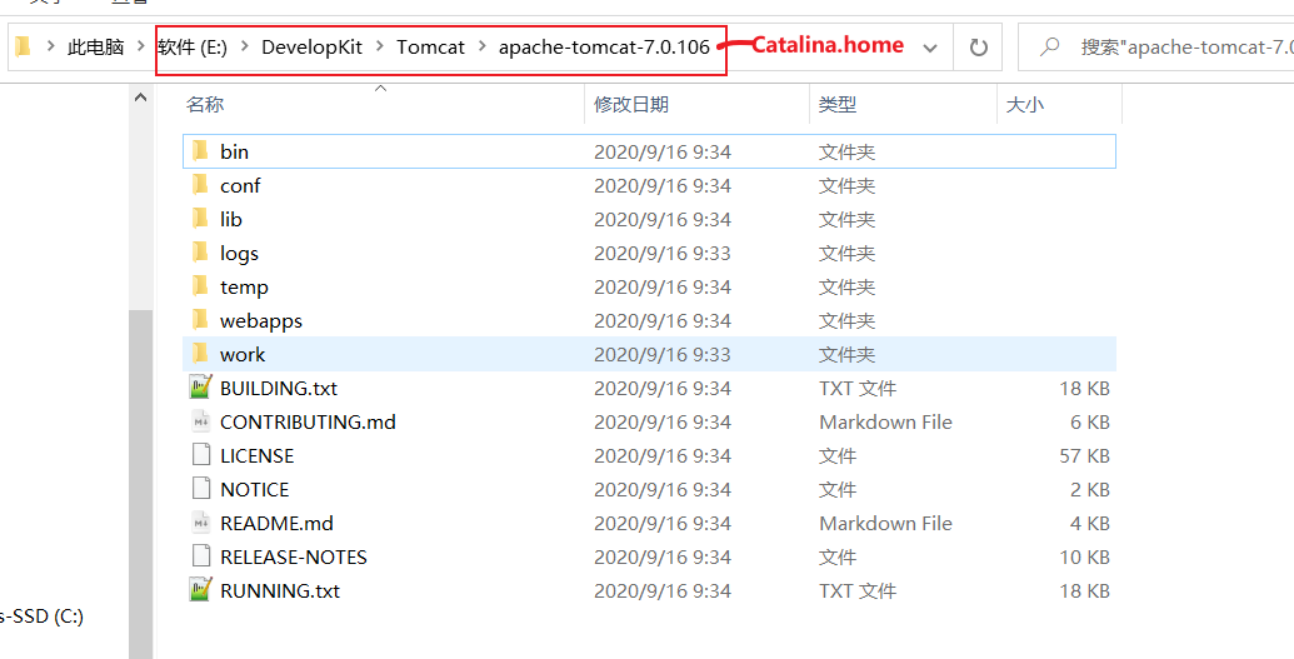
一是在bin目录下直接调用startup.sh;或者是在父目录调用bin/startup.sh。所以Catalina.home的路径为 . 或者 ..
翻转参数到CMD_LINE_ARGS中
- 调用catalina.sh,即call EXECUTABLE CMD_LINE_ARGS
调用setenv.sh以设置环境变量,不存在就报错
若setclasspath.sh存在,则设置BASEDIR = Catalina.home; 调用setclasspath.sh,不存在就报错
判断JAVA_HOME环境变量是否存在,不存在就报错
判断JRE_HOME环境变量是否存在,不存在就默认为JAVA_HOME的值
设置好将在catalina脚本使用的变量
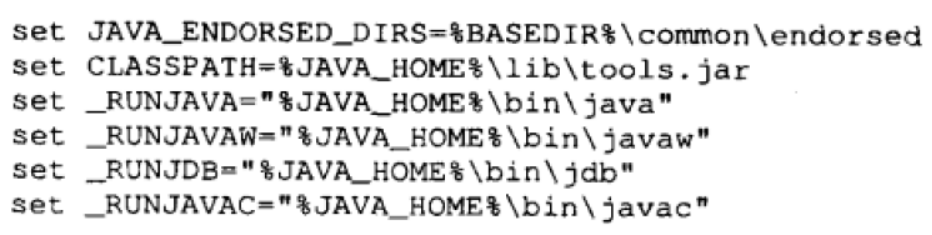
* 设置CLASSPATH变量(主要)---只有java和tomcat内部类
- 如果存在JSSE_HOME时设置为
CLASSPATH=%CLASSPATH%(值见上图);%JSSE_HOME%\lib\jcert.jar; %JSSE_HOME%lib\jnet.jar;%JSSE_HOME%\lib\ jsse. jar
- 不存JSSE_HOME时设置为
CLASSPATH=%CLASSPATH%;%JSSE_HOME%\lib\boostrapjar(Tomcat的Boostrap类,如上节)
* 设置CATALINE_BASE变量,默认为CATALINA_HOME
* 设置CATALINE_TMPDIR变量,默认为CATALINE_BASE/temp
* 设置变量_EXECJAVA为 _RUNJAVA的值,即javahome下bin的java.exe程序,用于运行java命令
接着,设置一些变量

判断执行脚本的参数,调用不同的分支
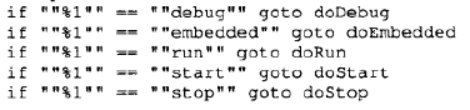
doStart会根据是否有-sercurity参数,使得_EXECJAVA有两种可能的值

最后拼接各个变量,形成java命令
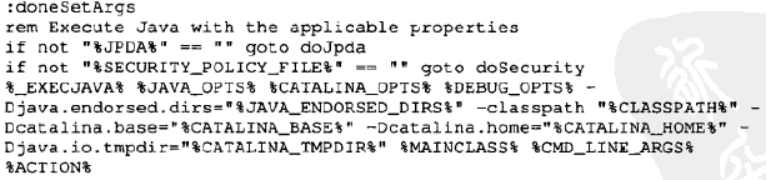
例如:表示使用java.exe调用Boostrap的main方法,-xxx是环境变量、start是main的入参

部署器
概述
* 部署器是org.apache.catalina.Deployer 接口的实例
* 部署一个Web 应用程序。在Tomcat 中 。部署器与一个Host 实例相关联, 用来安装Context 实例。
安装Context 实例的意思是, 创建一个StandardContext 实例, 并该实例添加到Host 实例中。创建的Context 实例会随其父容器Host 实例一起启动。
但是, 部署器也可以用来单独地启动和关闭Context 实例。
* Context实例如何被添加到Host容器中的呢?答案在于StandardHost实例中使用的apache.catalina.startup.HostConfig类型的生命周期监听器。
当调用Standard.Host实例的star方法肘, 它会触发START事件。HostConfig实例会对此事件进行相应,会逐个部署并安装指定目录中的所有Web应用程序。
* 部署之后的Context是没有进行启动的,即没有调用Context的start(),就没有对Context进行配置初始化
需要通过调用Host关联的Deployer提供的start方法对指定的Context进行启动
3种部署方法
将war包丢进webapps
将web工程打成war(web项目编译后的结果),丢进tomcat/webapps目录即可,tomcat会自动解压。无需修改任何配置文件即可完成部署
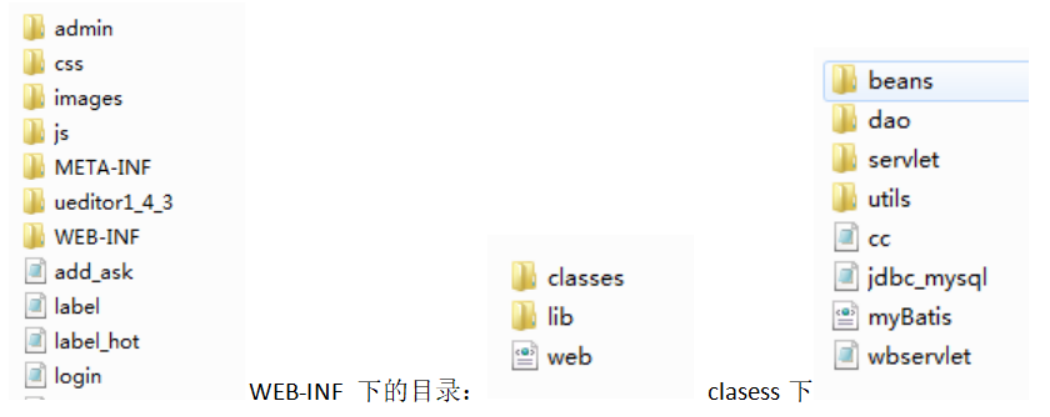
启动tomcat服务器(双击 apache-tomcat...\bin 目录下的 startup.bat,启动服务器)
在浏览器输入:http://localhost:8080/项目名/访问的文件名
配置Server.xml部署Web工程
编辑conf/server.xml
打开tomcat下conf/server.xml,在 标签之间输入项目配置信息:
path:浏览器访问时的路径名
docBase:web项目的WebRoot所在的路径,注意是WebRoot的路径,不是项目的路径。其实也就是编译后的项目,或者说你项目所在地方
reloadble:设定项目有改动时,tomcat是否重新加载该项目
<Context path="/WebProject" docBase="项目存放的路径(可任意)" reloadable="true" />
双击 startup.bat,启动 tomcat 服务器,然后在浏览器输入访问的项目名称路径
添加项目名.xml描述符方式部署Web工程
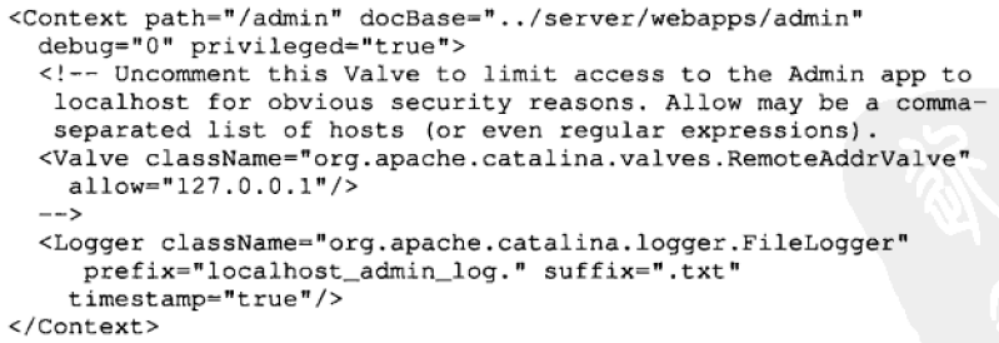
进入到 apache-tomcat-7.0.52\conf\Catalina\localhost 目录(这是tomcat默认指定的,自定义的依据虚拟服务器名称一致),新建一个 项目名.xml 文件
添加如下内容:
docBase还是指向WEB工程的绝对路径。
<Context docBase="D:/WebProject" reloadable="true" />
此时启动tomcat,浏览器输入:localhost:8080/xml文件名/访问的文件名
总结:
第一种方法比较普通,但是我们需要将编译好的项目重新 copy 到 webapps 目录下,多出了两步操作
第二种方法直接在 server.xml 文件中配置,但是从 tomcat5.0版本开始后,server.xml 文件作为 tomcat 启动的主要配置文件,一旦 tomcat 启动后,便不会再读取这个文件,因此无法再 tomcat 服务启动后发布 web 项目
第三种方法是最好的,每个项目分开配置,tomcat 将以\conf\Catalina\localhost 目录下的 xml 文件的文件名作为 web 应用的上下文路径,而不再理会 中配置的 path 路径,因此在配置的时候,可以不写 path。
通常我们使用第三种方法
HostConfig监听器
* 监听START_EVENT调用start方法和STOP_EVENT调用stop方法,进行部署Context应用:
* 扫描3中部署方式,创建和安装对应的Context
* 启动一个热部署后台线程,判断已经部署的context的web.xml有没有被修改,如果有,重启下context
public class HostConfig implements LifecycleListener, Runnable {
protected String configClass = "org.apache.catalina.startup.ContextConfig" ;
protected String contextClass = "org.apache.catalina.core.StandardContext" ;
protected Host host = null ;
protected static final StringManager sm = StringManager.getManager (Constants.Package );
// 已经部署的 Context
protected ArrayList deployed = new ArrayList();
// 热部署后台线程间隔检查时间
private int checkInterval = 15;
private Thread thread = null ;
private boolean threadDone = false ;
private String threadName = "HostConfig" ;
private HashMap webXmlLastModified = new HashMap();
// 是否对 war 进行解压
private boolean unpackWARs = false ;
// 支持 xml 文件部署
private boolean deployXML = false ;
// 是否启动线程进行热部署
private boolean liveDeploy = false ;
// ------------------------------------------------------------- Properties
//
public String get/setXXX() {
return (this .configClass );
}
// --------------------------------------------------------- Public Methods
// 监听 START_EVENT 调用 start 方法和 STOP_EVENT 调用 stop 方法,进行部署 Context 应用
public void lifecycleEvent(LifecycleEvent event) {
// 设置一些状态值
try {
host = (Host) event.getLifecycle();
if (host instanceof StandardHost) {
int hostDebug = ((StandardHost) host ).getDebug();
if (hostDebug > this .debug) {
this .debug = hostDebug;
}
setDeployXML(((StandardHost) host ).isDeployXML()); // 部署使用 xml 配置的文件
setLiveDeploy(((StandardHost) host ).getLiveDeploy());// 启动线程进行热部署
setUnpackWARs(((StandardHost) host ).isUnpackWARs());// 解压 war 包
}
} catch (ClassCastException e) {
return ;
}
// Process the event that has occurred
if (event.getType().equals(Lifecycle.START_EVENT ))
start();
else if (event.getType().equals(Lifecycle.STOP_EVENT ))
stop();
}
// ================================start 方法 ==================================
protected void start() {
// 启动时自动部署
if (host .getAutoDeploy()) {
deployApps();
}
// 进行热部署的监控
if (isLiveDeploy()) {
threadStart();
}
}
protected void deployApps() {
if (!(host instanceof Deployer))
return ;
//host 的根目录,一般为 %catalina.base%/webapps ( host 标签中的 appBase="webapps" 指定)
File appBase = appBase();
if (!appBase.exists() || !appBase.isDirectory())
return ;
//files\[\] :获取其第一层的子目录名称和文件名称
String files\[\] = appBase.list();
// 扫描目录下的 xml 、 war 、目录,创建 url ,使用 Deployer 进行安装(这里安装后没有立即 start )
deployDescriptors(appBase, files);
deployWARs(appBase, files);
deployDirectories(appBase, files);
}
/**
* 部署 xml 文件描述符,找到 appBase 下的所有 .xml 文件生成 URL 对象,交给 Deployer 去部署
*/
protected void deployDescriptors(File appBase, String\[\] files) {
if (!deployXML )
return ;
for (int i = 0; i < files.length ; i++) {
if (filesi.equalsIgnoreCase("META-INF" ))
continue ;
if (filesi.equalsIgnoreCase("WEB-INF" ))
continue ;
if (deployed .contains(filesi))
continue ;
File dir = new File(appBase, filesi);
if (filesi.toLowerCase().endsWith(".xml" )) {
deployed .add(filesi);
String file = filesi.substring(0, filesi.length() - 4);
String contextPath = "/" + file;
if (file.equals("ROOT" )) {
contextPath = "" ;
}
if (host .findChild(contextPath) != null ) {
continue ;
}
// Assume this is a configuration descriptor and deploy it
try {
URL config = new URL("file" , null , dir.getCanonicalPath());
((Deployer) host ).install(config, null );
} catch (Throwable t) {
}
}
}
}
/**
* Deploy WAR files.
* 部署 war 包,如果设置可以解压那么先解压 war 后把新建的目录交给部署器,否则直接把 war 交给部署器
*/
protected void deployWARs(File appBase, String\[\] files) {
for (int i = 0; i < files.length ; i++) {
if (filesi.equalsIgnoreCase("META-INF" ))
continue ;
if (filesi.equalsIgnoreCase("WEB-INF" ))
continue ;
if (deployed .contains(filesi))
continue ;
File dir = new File(appBase, filesi);
if (filesi.toLowerCase().endsWith(".war" )) {
deployed .add(filesi);
String contextPath = "/" + filesi;
int period = contextPath.lastIndexOf("." );
if (period >= 0)
contextPath = contextPath.substring(0, period);
if (contextPath.equals("/ROOT" ))
contextPath = "" ;
if (host .findChild(contextPath) != null )
continue ;
if (isUnpackWARs()) {
// 使用 jar : file 对 war 包进行解压
log(sm .getString("hostConfig.expand" , filesi));
try {
URL url = new URL("jar:file:" + dir.getCanonicalPath() + "!/" );
String path = expand(url);
url = new URL("file:" + path);
((Deployer) host ).install(contextPath, url);
} catch (Throwable t) {
}
} else {
log(sm .getString("hostConfig.deployJar" , filesi));
try {
URL url = new URL("file" , null , dir.getCanonicalPath());
url = new URL("jar:" + url.toString() + "!/" );
((Deployer) host ).install(contextPath, url);
} catch (Throwable t) {
}
}
}
}
}
/**
* Deploy directories.
* 部署目录,先校验下此目录下是否存在 WEB-INF 且可读,可以就直接把目录交给部署器部署
*/
protected void deployDirectories(File appBase, String\[\] files) {
for (int i = 0; i < files.length ; i++) {
if (filesi.equalsIgnoreCase("META-INF" ))
continue ;
if (filesi.equalsIgnoreCase("WEB-INF" ))
continue ;
if (deployed .contains(filesi))
continue ;
File dir = new File(appBase, filesi);
if (dir.isDirectory()) {
deployed .add(filesi);
File webInf = new File(dir, "/WEB-INF" );
if (!webInf.exists() || !webInf.isDirectory() ||
!webInf.canRead())
continue ;
String contextPath = "/" + filesi;
if (filesi.equals("ROOT" ))
contextPath = "" ;
if (host .findChild(contextPath) != null )
continue ;
try {
URL url = new URL("file" , null , dir.getCanonicalPath());
((Deployer) host ).install(contextPath, url);
} catch (Throwable t) {
}
}
}
}
// ================================ 热部署线程 ==================================
/**
* 定时的重新部署重新(已部署的会过滤。新增的 context 会部署)
* 判断已经部署的 context 的 web.xml 有没有被修改,如果有,重启下 context
*/
public void run() {
while (!threadDone ) {
// Wait for our check interval
threadSleep();
// 部署应用
deployApps();
// 检查 webXml 文件的 LastModified ,如果不同就对对应的 Context 进行 stop->start
checkWebXmlLastModified();
}
}
protected void threadStart() {
if (thread != null ) return ;
threadDone = false ;
threadName = "HostConfig"**** + ****host**** .getName() + ****"" ;
thread = new Thread(this , threadName );
thread .setDaemon(true );
thread .start();
}
// ================================stop 方法 ==================================
protected void stop() {
threadStop();
//host remove 所有的 context 子容器( ((Deployer) host).findDeployedApps() )即可
undeployApps();
}
protected void threadStop() {
if (thread == null ) return ;
threadDone = true ;
thread .interrupt();// 因为在 run() 中有 sleep 的存在,所以这里需要调用 interrupt ,使得 run 中立即抛出一个 InterruptedException 以走下去
try {
thread .join();// 这里让 thread 线程走完
} catch (InterruptedException e) {
;
}
thread = null ;
}
}
Deployer部署器 StandardContext
核心作用是根据URL资源对象或配置文件进行创建对应StandardContext对象,并添加到关联的Host中:
install(String contextPath, URL war):处理基于目录或war文件的部署
install(URL config, URL war) :处理基于Context描述符文件的部署
提供了启动和停止已经部署安装的context的方法
public class StandardHostDeployer implements Deployer {
public StandardHostDeployer(StandardHost host) {
super ();
this .host = host;
}
// ----------------------------------------------------- Instance Variables
private Context context = null ;
//context 的 digest 解析
private Digester digester = null ;
private ContextRuleSet contextRuleSet = null ;
private NamingRuleSet namingRuleSet = null ;
protected StandardHost host = null ;
private String overrideDocBase = null ;
protected static StringManager sm = StringManager.getManager (Constants.Package );
//=========================================== 核心方法:安装部署 Context==============================
// 方法一:处理基于目录或 war 文件的部署
//contextPath 表示 conetxt 对应的文档路径,如 /kaka
//war 表示对应的资源 URL 对象
public synchronized void install(String contextPath, URL war) throws IOException {
// 参数校验
if (contextPath == null ) throw new IllegalArgumentException();
if (!contextPath.equals("" ) && !contextPath.startsWith("/" )) throw new IllegalArgumentException();
if (findDeployedApp(contextPath) != null ) throw new IllegalArgumentException();
if (war == null ) throw new IllegalArgumentException();
// 截取出 Context 的根目录名称
String url = war.toString();
String docBase = null ;
if (url.startsWith("jar:" )) {
url = url.substring(4, url.length() - 2);
}
if (url.startsWith("file://" ))
docBase = url.substring(7);
else if (url.startsWith("file:" ))
docBase = url.substring(5);
else throw new IllegalArgumentException();
// 创建 StandardContext 对象,配置 Path 、 DocBase 值,添加初始化配置监听器
try {
Class clazz = Class.forName (host .getContextClass());
Context context = (Context) clazz.newInstance();
context.setPath(contextPath);
context.setDocBase(docBase);
if (context instanceof Lifecycle) {
clazz = Class.forName (host .getConfigClass());
LifecycleListener listener = (LifecycleListener) clazz.newInstance();
((Lifecycle) context).addLifecycleListener(listener);
}
// 把 StandardContext 对象加入到 Host ,并触发对应的事件
host .fireContainerEvent(PRE_INSTALL_EVENT , context);
host .addChild(context);
host .fireContainerEvent(INSTALL_EVENT , context);
} catch (Exception e) {
throw new IOException(e.toString());
}
}
// 方法二:处理基于 Context 描述符文件的部署
public synchronized void install(URL config, URL war) throws IOException {...}
protected Digester createDigester() {
if (digester == null ) {
digester = new Digester();
if (host .getDebug() > 0)
digester .setDebug(3);
digester .setValidating(false );
contextRuleSet = new ContextRuleSet("" );
digester .addRuleSet(contextRuleSet );
namingRuleSet = new NamingRuleSet("Context/" );
digester .addRuleSet(namingRuleSet );
}
return (digester );
}
//=============================== 启动和停止已经部署安装的 context==================================
public void start/stop(String contextPath) throws IOException {
// Validate the format and state of our arguments
if (contextPath == null )
throw new IllegalArgumentException
(sm .getString("standardHost.pathRequired" ));
if (!contextPath.equals("" ) && !contextPath.startsWith("/" ))
throw new IllegalArgumentException
(sm .getString("standardHost.pathFormat" , contextPath));
Context context = findDeployedApp(contextPath);
if (context == null )
throw new IllegalArgumentException
(sm .getString("standardHost.pathMissing" , contextPath));
host .log("standardHost.start " + contextPath);
try {
((Lifecycle) context).start()/stop();
} catch (LifecycleException e) {
host .log("standardHost.start " + contextPath + ": " , e);
throw new IllegalStateException
("standardHost.start " + contextPath + ": " + e);
}
}
//============================================ 其他方法 ======================================
String getName() { return (host .getName()); }
public ClassLoader getParentClassLoader() { return (host .getParentClassLoader()); }
//DeployedApp 查找和删除,基于 host.Child 处理
// 已经部署的 APP 就是 host 已经添加的子容器
public Context findyDeployedApp(String contextPath) {
return ((Context) host .findChild(contextPath));
}
public String\[\] findDeployedApps() {
}
public void remove(String contextPath) throws IOException {
}
public void addChild(Container child) {
context = (Context) child;
if (this .overrideDocBase != null )
context .setDocBase(this .overrideDocBase );
host .fireContainerEvent(PRE_INSTALL_EVENT , context );
host .addChild(child);
host .fireContainerEvent(INSTALL_EVENT , context );
}
}