本文介绍Supervisor的安装,采用yum进行安装。关于yum源的配置查看我之前的文章《CentOS的yum源》 的介绍。
1、查看CentOS版本

2、安装EPEL源
Supervisor 在 CentOS 默认源里没有,需要先装 EPEL:
bash
yum install -y epel-release3、安装 supervisor
bash
yum install -y supervisor4、设置开机自启并启动服务和查看运行状态
bash
systemctl enable supervisord
systemctl start supervisord
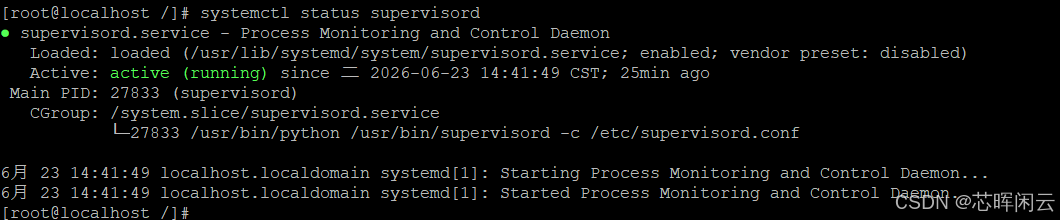
systemctl status supervisord
这里发现服务器并没有启动成功

5、重新配置systemd服务
bash
vim /usr/lib/systemd/system/supervisord.service内容如下:
bash
[Unit]
Description=Process Monitoring and Control Daemon
After=network.target

[Service]
Type=forking
ExecStart=/usr/bin/supervisord -c /etc/supervisord.conf
ExecStop=/usr/bin/supervisorctl shutdown
ExecReload=/usr/bin/supervisorctl reload
KillMode=process
Restart=on-failure
RestartSec=5s

[Install]
WantedBy=multi-user.target
保存后执行
bash
systemctl daemon-reload
systemctl start supervisord
查询验证,启动OK了。
6、基础命令
bash
# 进入交互模式
supervisorctl

# 常用非交互命令
supervisorctl status        # 查看所有进程状态
supervisorctl start 程序名  # 启动
supervisorctl stop 程序名   # 停止
supervisorctl restart 程序名 # 重启
supervisorctl reload        # 重新加载配置(不中断运行进程)
supervisorctl update        # 新增/修改配置后更新
supervisorctl shutdown      # 关闭 supervisord 服务
7、配置 Supervisor 启动 SpringBoot Jar
新建配置文件
bash
vim /etc/supervisord.d/business-server.ini
bash
[program:business-server]
command=/java/jdk1.8.0_491/bin/java -jar /opt/soft/businessServer/huihezn-business-server-0.0.1.jar
directory=/opt/soft/businessServer
user=root
autostart=true
autorestart=true
startretries=3
startsecs=5
stopwaitsecs=10
stdout_logfile=/var/log/supervisord/huihezn-business-server.log
stderr_logfile=/var/log/supervisord/huihezn-business-server.err.log
stdout_logfile_maxbytes=5MB
stdout_logfile_backups=5
redirect_stderr=true
字段说明
program→ 进程名,supervisorctl 操作时用这个名字
command → 启动命令(必须写绝对路径或直接 java)
directory → jar 所在目录,避免读取配置文件路径出错
autostart=true → 开机自启
autorestart=true → 程序挂了自动重启
startsecs=5 → 启动 5 秒后正常才算启动成功
stdout_logfile → 日志路径,必须先创建目录
创建日志文件夹
bash
mkdir -p /var/log/supervisord8、加载服务并启动
bash
# 重新加载配置
supervisorctl update

# 启动
supervisorctl start business-server

# 查看状态
supervisorctl status

# 查看日志
tail -f /var/log/supervisord/business-server.log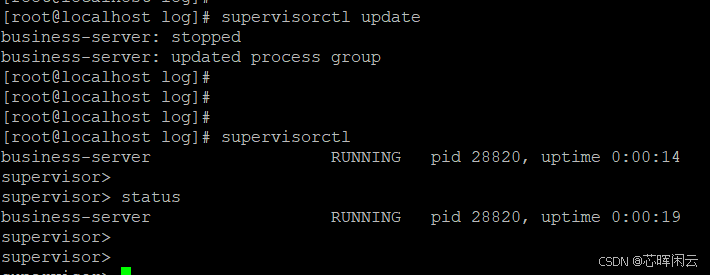
自此安装OK