为什么需要NDK构建UI?
HarmonyOS NEXT的ArkUI框架功能已经很完善了,为什么还要用NDK来构建UI?这个问题我自己也困惑过一段时间。
简单来说,ArkTS在UI描述和业务逻辑上非常高效,但涉及到高性能计算、复杂图形渲染、或者需要复用现有C/C++库的场景时,JS/Native的边界就成了性能瓶颈。
举个例子:一个实时视频滤镜应用,如果每一帧的像素处理都通过ArkTS调用,即使使用N-API,频繁的跨语言调用开销也会让帧率直接腰斩。再比如音视频编解码、3D渲染引擎、游戏引擎内部的UI逻辑,这些场景天然就在C++侧运行。
NDK构建UI的定位不是替代ArkUI,而是在需要高性能或复用C/C++能力的特定UI组件上,提供一个Native渲染的入口。
适用场景:
- 高性能图形渲染UI(如游戏HUD、实时特效控制面板)
- 复用现有C/C++图形库的UI组件
- 需要精细控制渲染管线的自定义组件
不适合场景:
- 简单列表、表单、布局切换(ArkUI足矣)
- 需要频繁动态修改的UI(ArkUI的响应式机制更成熟)
环境说明
在开始之前,确保你的开发环境已准备就绪:
text
DevEco Studio 版本:DevEco Studio 6.1.0 及以上
HarmonyOS SDK 版本:HarmonyOS 6.1.0(23) 及以上
目标设备:手机(API 23+)
核心实现:从零搭建NDK UI组件
整个流程分为三步:创建NDK工程 -> 编写C++组件 -> 注册并调用。
第一步:创建支持NDK的工程
在DevEco Studio中创建新项目,选择**Native C++**模板。这个模板会帮你初始化CMakeLists.txt和cpp目录。
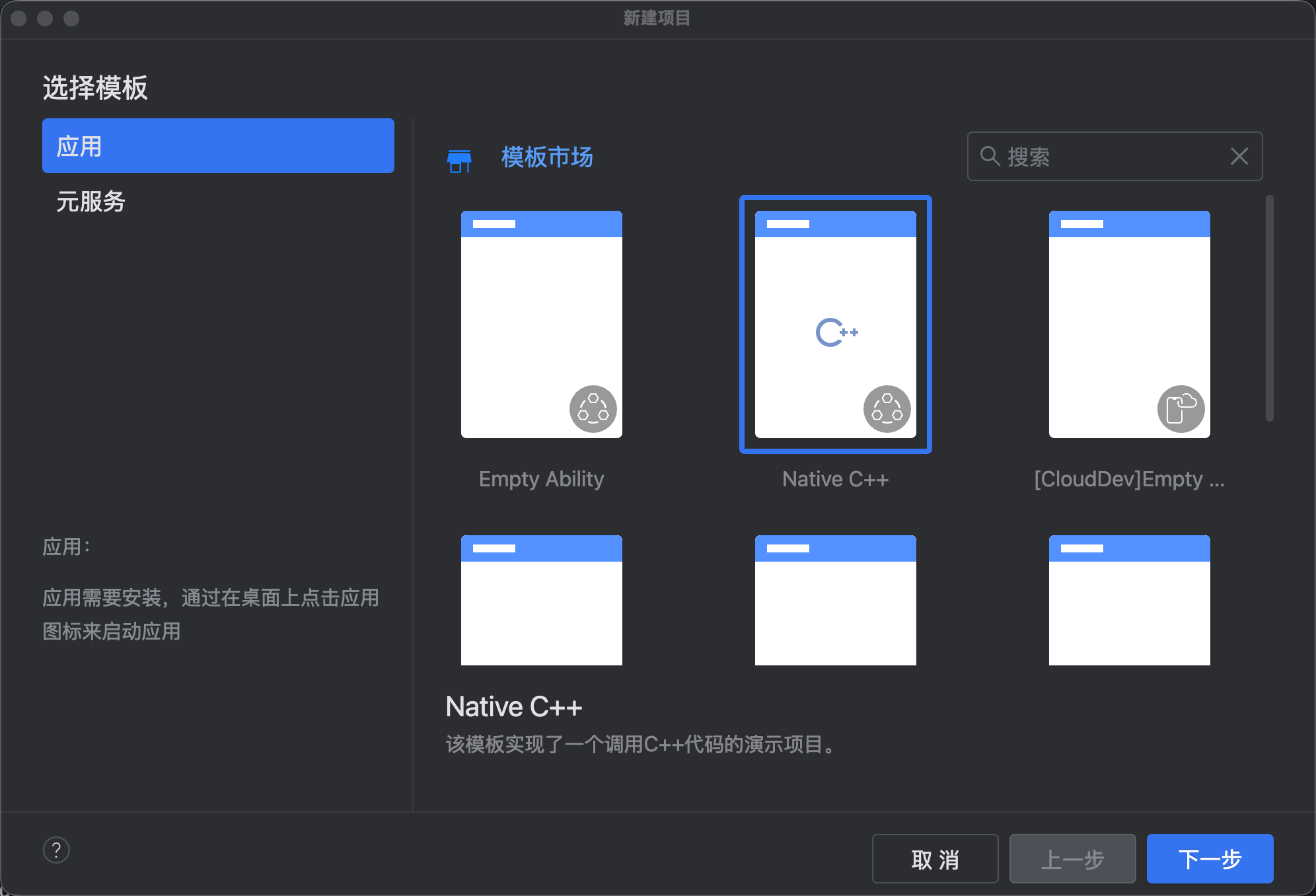
创建完成后,项目结构如下:
MyNativeApp/
├── entry/
│   ├── src/
│   │   ├── main/
│   │   │   ├── cpp/
│   │   │   │   ├── CMakeLists.txt
│   │   │   │   ├── napi_init.cpp
│   │   │   │   └── (你的C++组件文件)
│   │   │   ├── ets/
│   │   │   │   └── (ArkTS页面)
│   │   │   └── resources/
│   │   └── module.json5
│   └── build-profile.json5
第二步:编写C++ UI组件
我们先创建一个非常简单的Native UI组件------一个自定义绘制的圆形按钮。
文件:entry/src/main/cpp/MyNativeButton.h
cpp
#ifndef MY_NATIVE_BUTTON_H
#define MY_NATIVE_BUTTON_H

#include <ace/xcomponent/native_interface_xcomponent.h>
#include <native_window/external_window.h>
#include <EGL/egl.h>
#include <EGL/eglext.h>
#include <GLES3/gl3.h>
#include <string>

class MyNativeButton {
public:
    MyNativeButton() = default;
    ~MyNativeButton();

    // 初始化EGL和OpenGL上下文
    bool Initialize(OH_NativeXComponent* component, int width, int height);
    // 执行渲染
    void Render();
    // 销毁资源
    void Destroy();

    // 处理触摸事件
    void OnTouchEvent(OH_NativeXComponent* component, TouchEventType type, float x, float y);

private:
    void CreateEGLContext();
    void DestroyEGLContext();

    OH_NativeXComponent* nativeComponent_ = nullptr;
    EGLDisplay eglDisplay_ = EGL_NO_DISPLAY;
    EGLContext eglContext_ = EGL_NO_CONTEXT;
    EGLSurface eglSurface_ = EGL_NO_SURFACE;
    int width_ = 0;
    int height_ = 0;
};

#endif // MY_NATIVE_BUTTON_H
文件:entry/src/main/cpp/MyNativeButton.cpp
cpp
#include "MyNativeButton.h"
#include <hilog/log.h>

#undef LOG_DOMAIN
#undef LOG_TAG
#define LOG_DOMAIN 0x0000
#define LOG_TAG "MyNativeButton"

MyNativeButton::~MyNativeButton() {
    Destroy();
}

bool MyNativeButton::Initialize(OH_NativeXComponent* component, int width, int height) {
    nativeComponent_ = component;
    width_ = width;
    height_ = height;

    // 获取NativeWindow
    if (nativeComponent_ == nullptr) {
        OH_LOG_Print(LOG_APP, LOG_ERROR, LOG_DOMAIN, LOG_TAG, "nativeComponent_ is null");
        return false;
    }

    uint64_t windowId = 0;
    int32_t ret = OH_NativeXComponent_GetXComponentId(nativeComponent_, &windowId);
    if (ret != OH_NATIVEXCOMPONENT_RESULT_SUCCESS) {
        OH_LOG_Print(LOG_APP, LOG_ERROR, LOG_DOMAIN, LOG_TAG, "GetXComponentId failed");
        return false;
    }

    // 获取NativeWindow
    NativeWindow* nativeWindow = nullptr;
    ret = OH_NativeXComponent_GetNativeWindow(nativeComponent_, &nativeWindow);
    if (ret != OH_NATIVEXCOMPONENT_RESULT_SUCCESS) {
        OH_LOG_Print(LOG_APP, LOG_ERROR, LOG_DOMAIN, LOG_TAG, "GetNativeWindow failed: %d", ret);
        return false;
    }

    if (nativeWindow == nullptr) {
        OH_LOG_Print(LOG_APP, LOG_ERROR, LOG_DOMAIN, LOG_TAG, "nativeWindow is null");
        return false;
    }

    // 创建EGL上下文
    CreateEGLContext();

    // 设置EGL窗口
    eglSurface_ = eglCreateWindowSurface(eglDisplay_, GetEGLConfig(), nativeWindow, nullptr);
    if (eglSurface_ == EGL_NO_SURFACE) {
        OH_LOG_Print(LOG_APP, LOG_ERROR, LOG_DOMAIN, LOG_TAG, "eglCreateWindowSurface failed");
        return false;
    }

    // 绑定上下文
    if (!eglMakeCurrent(eglDisplay_, eglSurface_, eglSurface_, eglContext_)) {
        OH_LOG_Print(LOG_APP, LOG_ERROR, LOG_DOMAIN, LOG_TAG, "eglMakeCurrent failed");
        return false;
    }

    // 设置视口
    glViewport(0, 0, width_, height_);

    OH_LOG_Print(LOG_APP, LOG_INFO, LOG_DOMAIN, LOG_TAG, "Initialize success, width: %d, height: %d", width_, height_);
    return true;
}

void MyNativeButton::CreateEGLContext() {
    // 获取默认EGL Display
    eglDisplay_ = eglGetDisplay(EGL_DEFAULT_DISPLAY);
    if (eglDisplay_ == EGL_NO_DISPLAY) {
        OH_LOG_Print(LOG_APP, LOG_ERROR, LOG_DOMAIN, LOG_TAG, "eglGetDisplay failed");
        return;
    }

    EGLint major, minor;
    if (!eglInitialize(eglDisplay_, &major, &minor)) {
        OH_LOG_Print(LOG_APP, LOG_ERROR, LOG_DOMAIN, LOG_TAG, "eglInitialize failed");
        return;
    }

    // 配置EGL属性
    const EGLint attribs[] = {
        EGL_SURFACE_TYPE, EGL_WINDOW_BIT,
        EGL_RENDERABLE_TYPE, EGL_OPENGL_ES3_BIT,
        EGL_BLUE_SIZE, 8,
        EGL_GREEN_SIZE, 8,
        EGL_RED_SIZE, 8,
        EGL_ALPHA_SIZE, 8,
        EGL_DEPTH_SIZE, 16,
        EGL_STENCIL_SIZE, 8,
        EGL_NONE
    };

    EGLint numConfigs;
    if (!eglChooseConfig(eglDisplay_, attribs, nullptr, 0, &numConfigs)) {
        OH_LOG_Print(LOG_APP, LOG_ERROR, LOG_DOMAIN, LOG_TAG, "eglChooseConfig failed");
        return;
    }

    EGLConfig config;
    if (!eglChooseConfig(eglDisplay_, attribs, &config, 1, &numConfigs)) {
        OH_LOG_Print(LOG_APP, LOG_ERROR, LOG_DOMAIN, LOG_TAG, "eglChooseConfig failed 2");
        return;
    }

    // 创建EGL上下文
    EGLint contextAttribs[] = {EGL_CONTEXT_CLIENT_VERSION, 3, EGL_NONE};
    eglContext_ = eglCreateContext(eglDisplay_, config, EGL_NO_CONTEXT, contextAttribs);
    if (eglContext_ == EGL_NO_CONTEXT) {
        OH_LOG_Print(LOG_APP, LOG_ERROR, LOG_DOMAIN, LOG_TAG, "eglCreateContext failed");
        return;
    }

    eglConfig_ = config; // 记住config
}

void MyNativeButton::Render() {
    // 清屏
    glClearColor(0.0f, 0.0f, 0.0f, 0.0f);
    glClear(GL_COLOR_BUFFER_BIT | GL_DEPTH_BUFFER_BIT);

    // 绘制一个圆形按钮(简单实现)
    // 实际项目中可以使用更复杂的渲染逻辑
    float radius = 50.0f;
    glm::vec2 center(width_ / 2.0f, height_ / 2.0f);

    // 这里省略OpenGL绘制圆的代码,重点展示流程
    // ...

    // 交换缓冲区
    if (eglSwapBuffers(eglDisplay_, eglSurface_) != EGL_TRUE) {
        OH_LOG_Print(LOG_APP, LOG_ERROR, LOG_DOMAIN, LOG_TAG, "eglSwapBuffers failed");
    }
}

void MyNativeButton::Destroy() {
    DestroyEGLContext();
}

void MyNativeButton::DestroyEGLContext() {
    if (eglDisplay_ == EGL_NO_DISPLAY) return;

    eglMakeCurrent(eglDisplay_, EGL_NO_SURFACE, EGL_NO_SURFACE, EGL_NO_CONTEXT);

    if (eglContext_ != EGL_NO_CONTEXT) {
        eglDestroyContext(eglDisplay_, eglContext_);
        eglContext_ = EGL_NO_CONTEXT;
    }

    if (eglSurface_ != EGL_NO_SURFACE) {
        eglDestroySurface(eglDisplay_, eglSurface_);
        eglSurface_ = EGL_NO_SURFACE;
    }

    eglTerminate(eglDisplay_);
    eglDisplay_ = EGL_NO_DISPLAY;
}

void MyNativeButton::OnTouchEvent(OH_NativeXComponent* component, TouchEventType type, float x, float y) {
    if (type == TOUCH_EVENT_TYPE_DOWN) {
        OH_LOG_Print(LOG_APP, LOG_INFO, LOG_DOMAIN, LOG_TAG, "Touch down at (%f, %f)", x, y);
        // 可以在这里触发UI状态变化,通过回调反馈给ArkTS
    } else if (type == TOUCH_EVENT_TYPE_UP) {
        OH_LOG_Print(LOG_APP, LOG_INFO, LOG_DOMAIN, LOG_TAG, "Touch up at (%f, %f)", x, y);
    }
}
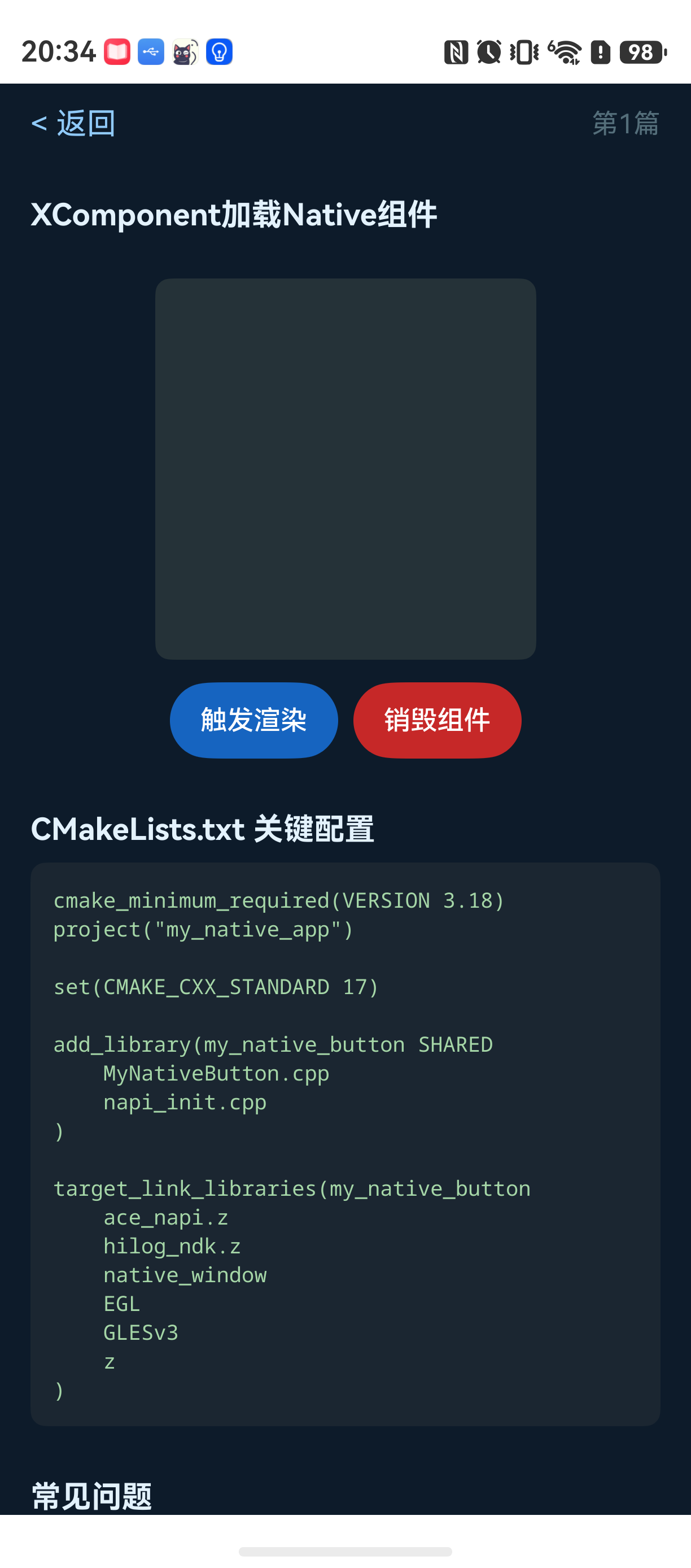
第三步:配置CMakeLists.txt
文件:entry/src/main/cpp/CMakeLists.txt
cmake
cmake_minimum_required(VERSION 3.18)
project("my_native_app")

# 设置C++标准
set(CMAKE_CXX_STANDARD 17)

# 添加共享库
add_library(my_native_button SHARED
    MyNativeButton.cpp
    napi_init.cpp
)

# 链接必要的库
target_link_libraries(my_native_button
    ace_napi.z
    hilog_ndk.z
    native_window
    EGL
    GLESv3
    z
)
第四步:编写N-API接口
文件:entry/src/main/cpp/napi_init.cpp
cpp
#include "napi/native_api.h"
#include "MyNativeButton.h"
#include <hilog/log.h>

// 全局实例映射
std::unordered_map<std::string, MyNativeButton*> g_buttonMap;

// 初始化组件
static napi_value InitComponent(napi_env env, napi_callback_info info) {
    size_t argc = 2;
    napi_value args[2] = {nullptr};

    napi_get_cb_info(env, info, &argc, args, nullptr, nullptr);

    // 获取组件ID(字符串)
    char componentId[256];
    size_t length;
    napi_get_value_string_utf8(env, args[0], componentId, sizeof(componentId), &length);

    // 获取Native XComponent句柄
    OH_NativeXComponent* nativeComponent;
    napi_get_native_pointer(env, args[1], (void**)&nativeComponent);

    // 创建并初始化组件
    auto* button = new MyNativeButton();
    if (!button->Initialize(nativeComponent, 200, 200)) { // 默认宽高
        delete button;
        return nullptr;
    }

    g_buttonMap[std::string(componentId)] = button;

    return nullptr;
}

// 渲染组件
static napi_value RenderComponent(napi_env env, napi_callback_info info) {
    size_t argc = 1;
    napi_value args[1] = {nullptr};

    napi_get_cb_info(env, info, &argc, args, nullptr, nullptr);

    char componentId[256];
    size_t length;
    napi_get_value_string_utf8(env, args[0], componentId, sizeof(componentId), &length);

    auto it = g_buttonMap.find(std::string(componentId));
    if (it != g_buttonMap.end()) {
        it->second->Render();
    }

    return nullptr;
}

// 注册模块
EXTERN_C_START
static napi_value Init(napi_env env, napi_value exports) {
    napi_property_descriptor desc[] = {
        { "initComponent", nullptr, InitComponent, nullptr, nullptr, nullptr, napi_default, nullptr },
        { "renderComponent", nullptr, RenderComponent, nullptr, nullptr, nullptr, napi_default, nullptr },
    };
    napi_define_properties(env, exports, sizeof(desc) / sizeof(desc[0]), desc);
    return exports;
}
EXTERN_C_END

static napi_module demoModule = {
    .nm_version = 1,
    .nm_flags = 0,
    .nm_filename = nullptr,
    .nm_register_func = Init,
    .nm_modname = "my_native_button",
    .nm_priv = nullptr,
    .reserved = { 0 },
};

extern "C" __attribute__((constructor)) void RegisterModule() {
    napi_module_register(&demoModule);
}
第五步:在ArkUI中加载Native组件
文件:entry/src/main/ets/pages/Index.ets
typescript
import { XComponent, NodeContent } from '@kit.ArkUI';
import nativeButton from 'libmy_native_button.so';

@Entry
@Component
struct Index {
  @State buttonWidth: number = 200
  @State buttonHeight: number = 200
  private xcomponentController: XComponentController = new XComponentController()

  build() {
    Column() {
      Text("HarmonyOS NDK UI 示例")
        .fontSize(20)
        .fontWeight(FontWeight.Bold)
        .margin({ bottom: 20 })

      // 使用XComponent承载Native UI
      XComponent({
        id: 'myNativeButton',
        type: XComponentType.SURFACE,
        controller: this.xcomponentController
      })
        .width(this.buttonWidth)
        .height(this.buttonHeight)
        .onLoad(() => {
          // 获取Native XComponent实例并传给C++层
          let nativeXComponent = this.xcomponentController.getNativeXComponent();
          if (nativeXComponent) {
            nativeButton.initComponent('myNativeButton', nativeXComponent);
            // 主动触发渲染
            nativeButton.renderComponent('myNativeButton');
          }
        })

      Button("点击触发渲染")
        .margin({ top: 20 })
        .onClick(() => {
          nativeButton.renderComponent('myNativeButton');
        })
    }
    .width('100%')
    .height('100%')
    .padding(16)
  }
}
常见问题
问题1:页面返回后Native组件崩溃
现象:从页面A跳转到页面B,再返回页面A时,Native渲染组件直接闪退。
原因:XComponent销毁时,C++侧的EGL上下文和资源没有被正确释放。页面返回后,系统尝试重建XComponent,但C++层仍在拿着旧的资源句柄。
解决方案:在ArkTS页面onPageHide或页面销毁时,主动调用C++销毁接口,并在ArkUI中监听XComponent销毁事件。
typescript
@Entry
@Component
struct Index {
  aboutToDisappear() {
    nativeButton.destroyComponent('myNativeButton');
  }
}
问题2:CMakeLists.txt中缺少必要的库导致链接失败
现象 :编译时出现undefined reference错误,例如eglMakeCurrent。
原因:HarmonyOS的NDK开发环境与标准Android有一定区别,部分库的全路径不自动包含。
解决方案 :手动添加EGL、GLESv3、native_window依赖。注意顺序:先写自己写的cpp,再写依赖库。
cmake
target_link_libraries(my_native_button
    ace_napi.z    # HarmonyOS特有的N-API库
    hilog_ndk.z   # 日志库
    native_window # 窗口管理
    EGL           # EGL库
    GLESv3        # OpenGL ES库
    z             # 压缩库
)
问题3:XComponent onLoad回调中获取NativeWindow失败
现象 :OH_NativeXComponent_GetNativeWindow返回失败(非零)。
原因:XComponent的Surface创建是异步的,onLoad回调表示组件加载完成,但Surface可能还未完全可用。
解决方案 :在onLoad后加入一个微任务延迟,或者使用setTimeout等待一帧再操作。
typescript
.onLoad(() => {
  setTimeout(() => {
    let nativeXComponent = this.xcomponentController.getNativeXComponent();
    // 现在安全了
  }, 100);
})
最佳实践
-
不要在Render()中频繁申请/释放资源:EGL上下文切换和资源创建是重量级操作。应该在Initialize阶段做好所有准备工作,Render只处理绘制逻辑。
-
使用Hilog进行调试而非printf :
OH_LOG_Print是HarmonyOS NDK推荐的日志接口,支持错误级别和标签分类,在DevEco Studio的Logcat中能清晰过滤。 -
触摸事件回调频率远高于ArkUI的gesture:Native侧的触摸事件回调是原始事件流,频率可能高达120Hz。不建议在回调中直接做重渲染操作,应该累积坐标变化后,在下一帧Render时统一处理。
这篇文章里展示的只是一个最简Demo,实际项目中需要处理更多细节:资源池管理、多组件并发渲染、ArkTS侧状态同步。如果你在实际开发中遇到类似问题,可以重点检查生命周期和资源释放逻辑。