文章目录
-
- 每日一句正能量
- 一、前言:当银发守护遇上光感与智能
- 二、核心能力与技术架构
-
- [2.1 沉浸光感的银发场景适配](#2.1 沉浸光感的银发场景适配)
- [2.2 悬浮导航的适老化交互设计](#2.2 悬浮导航的适老化交互设计)
- [2.3 系统架构](#2.3 系统架构)
- 三、核心代码实战
-
- [3.1 银发节律光感引擎(SeniorLightRhythmEngine.ets)](#3.1 银发节律光感引擎(SeniorLightRhythmEngine.ets))
- [3.2 安全守护悬浮球(GuardianNavBall.ets)](#3.2 安全守护悬浮球(GuardianNavBall.ets))
- [3.3 AI健康管家智能体(HealthGuardianAgent.ets)](#3.3 AI健康管家智能体(HealthGuardianAgent.ets))
- [3.4 自适应守护面板(AdaptiveGuardianPanel.ets)](#3.4 自适应守护面板(AdaptiveGuardianPanel.ets))
- [3.5 主守护工作室页面(GuardianStudio.ets)](#3.5 主守护工作室页面(GuardianStudio.ets))
- 四、关键技术难点与解决方案
-
- [4.1 老年人视觉适配](#4.1 老年人视觉适配)
- [4.2 跌倒检测的精准度](#4.2 跌倒检测的精准度)
- [4.3 紧急呼叫的可靠性](#4.3 紧急呼叫的可靠性)
- [4.4 隐私与尊严保护](#4.4 隐私与尊严保护)
- 五、效果展示与场景演示
- 六、总结与展望

每日一句正能量
本事是一个人最硬的底牌,最稳的靠山、最坚实的铠甲。
真正的强大从来不是压倒一切,而是能驾驭自己的锋芒,在该坚持时深耕,在该收敛时留白。
一、前言:当银发守护遇上光感与智能
中国正加速进入老龄化社会,截至2025年底,60岁以上人口已突破3亿,其中约90%选择居家养老。然而,"空巢老人"的安全与健康问题日益严峻:跌倒后无法及时求助、慢性病用药遗漏、昼夜节律紊乱导致睡眠障碍、认知退化未被及时发现......传统养老监护设备往往功能单一、交互复杂,老人学习成本高,子女远程看护也缺乏有效手段。
更深层的痛点在于光环境对老年人健康的影响:老年人视网膜感光细胞退化,对光线变化的适应能力下降。清晨缺乏足够光照会抑制褪黑素清除,导致白天嗜睡、夜间失眠;傍晚蓝光暴露过多会延迟睡眠 onset;夜间起夜时刺眼的灯光可能引发跌倒。这些问题长期被忽视,却直接影响老年人的生活质量和安全。
HarmonyOS 6(API 23)带来的**悬浮导航(Floating Navigation)与沉浸光感(Immersive Light Sensing)**两大核心能力,为智能养老应用开辟了全新的技术路径:
- 沉浸光感能够实时感知环境光照的色温、亮度与光谱成分,结合老年人视觉特征,自动生成个性化的昼夜节律光疗方案,同时优化界面显示以保护老人视力
- 悬浮导航可在全屏守护模式下,以极简大字体、语音优先的方式提供用药提醒、健康问询、紧急呼叫、家属联动等智能体交互入口,成为老人身边的"数字守护精灵"
本文将实战演示如何构建**"光佑银龄"**------一个能"读懂"老人需求、用光线调节健康节律、通过悬浮AI助手提供全天候安全守护的智能养老系统。
二、核心能力与技术架构
2.1 沉浸光感的银发场景适配
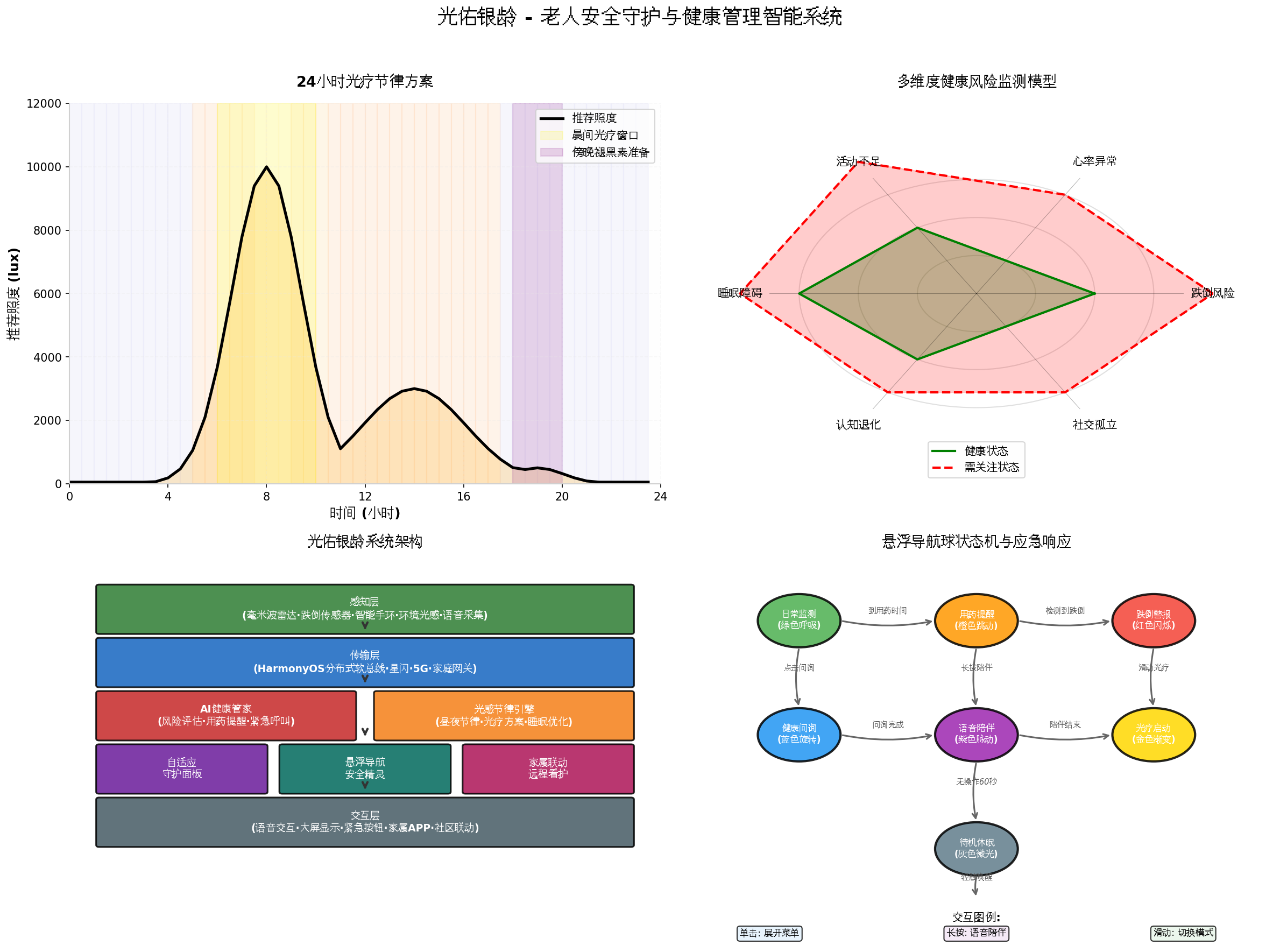
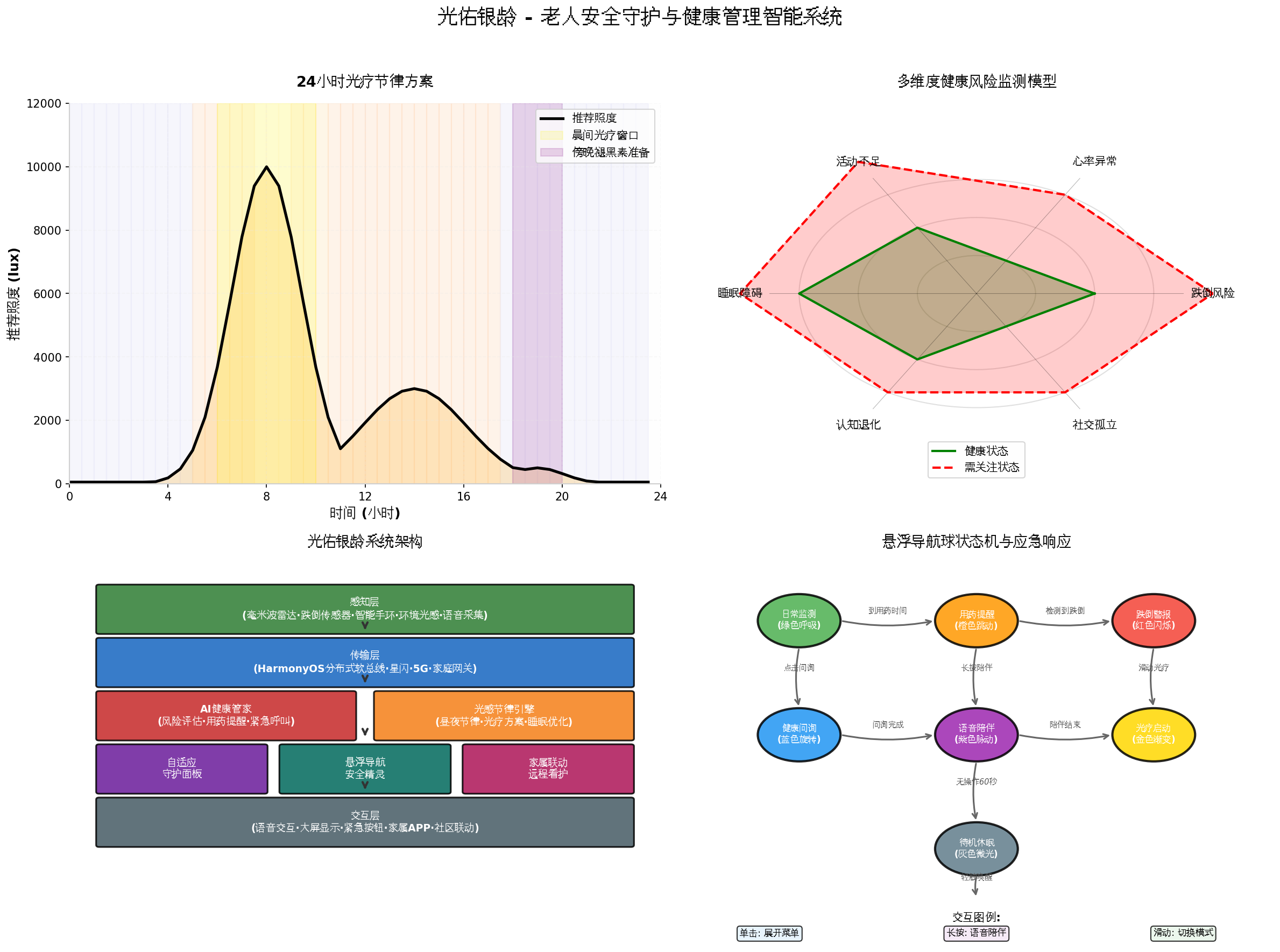
HarmonyOS 6的AmbientLightFusion在API 23中针对老年人视觉特征进行了专项优化:
| 光感维度 | 老年人影响 | 自适应策略 |
|---|---|---|
| 照度需求 | 老年人需要2-3倍于年轻人的照度 | 自动提升界面亮度,增大对比度 |
| 色温敏感 | 晶状体黄化,对蓝光过滤能力增强 | 傍晚自动降低蓝光,保护褪黑素分泌 |
| 眩光敏感 | 瞳孔收缩能力下降,眩光耐受差 | 检测眩光源,自动调整显示区域 |
| 暗适应慢 | 暗适应时间从2分钟延长至10分钟 | 夜间起夜时渐进式亮灯,避免突变 |
| 昼夜节律 | 褪黑素分泌节律相位提前 | 晨间强化光照,傍晚提前调暗 |
2.2 悬浮导航的适老化交互设计
HarmonyOS 6的FloatingNavigation支持**"极简守护"**模式------针对老年人认知特点进行专项优化:
- 大字体、高对比度、语音播报优先
- 一键紧急呼叫(长按3秒)
- 用药时间自动提醒(悬浮球变色跳动)
- 跌倒检测自动报警(红色闪烁+自动拨号)
- 语音陪伴模式(紫色脉动,随时聊天)
2.3 系统架构
三、核心代码实战
3.1 银发节律光感引擎(SeniorLightRhythmEngine.ets)
代码亮点: 本引擎是系统的"光疗处方师"。它基于老年人生物钟特征,结合环境光感数据,生成精准的昼夜节律光疗方案。核心创新包括:晨间光疗窗口 (7:00-9:00,10000lux冷白光,抑制褪黑素、提升警觉度)、傍晚褪黑素准备 (18:00后逐步降低蓝光,促进自然入睡)、夜间渐进式照明(起夜时从0.1lux缓慢升至30lux,避免眩目)。
typescript
// services/SeniorLightRhythmEngine.ets
import { sensor } from '@kit.SensorServiceKit';
import { display } from '@kit.ArkUI';
import { hilog } from '@kit.PerformanceAnalysisKit';

// 老年人视觉特征
export interface SeniorVisionProfile {
  age: number;
  cataractLevel: number;       // 白内障程度 0-1
  macularDegeneration: boolean; // 黄斑变性
  glaucoma: boolean;           // 青光眼
  diabetesRetinopathy: boolean; // 糖尿病视网膜病变
  preferredColorTemp: number;  // 偏好的色温
  lightSensitivity: number;    // 光敏感度
}

// 节律光疗方案
export interface LightTherapyPlan {
  phase: 'dawn' | 'morning' | 'day' | 'evening' | 'night' | 'dawn_transition';
  targetLux: number;
  targetColorTemp: number;
  blueLightRatio: number;
  duration: number;            // 建议时长(分钟)
  purpose: string;
  warning?: string;
}

// 夜间照明配置
export interface NightLightingConfig {
  initialBrightness: number;   // 初始亮度 0.1-1.0 lux
  rampUpDuration: number;      // 渐升时长(秒)
  maxBrightness: number;       // 最大亮度
  colorTemp: number;           // 色温 2200-2700K
  motionTriggerRange: number;  // 触发距离(米)
}

@Observed
export class RhythmState {
  currentPhase: string = 'day';
  currentLux: number = 300;
  currentColorTemp: number = 4000;
  blueFilterActive: boolean = false;
  nightMode: boolean = false;
  therapyScore: number = 0;   // 今日光疗完成度 0-100
}

export class SeniorLightRhythmEngine {
  private static instance: SeniorLightRhythmEngine;
  private seniorProfile: SeniorVisionProfile;
  private rhythmState: RhythmState = new RhythmState();
  private stateListeners: Array<(state: RhythmState) => void> = [];
  private therapyPlan: LightTherapyPlan | null = null;
  private nightConfig: NightLightingConfig = {
    initialBrightness: 0.1,
    rampUpDuration: 10,
    maxBrightness: 30,
    colorTemp: 2500,
    motionTriggerRange: 2.0
  };

  // 标准节律光疗方案库
  private readonly STANDARD_PLANS: Record<string, LightTherapyPlan> = {
    'dawn': {
      phase: 'dawn',
      targetLux: 100,
      targetColorTemp: 3000,
      blueLightRatio: 0.2,
      duration: 30,
      purpose: '温和唤醒,避免强光刺激'
    },
    'morning': {
      phase: 'morning',
      targetLux: 8000,
      targetColorTemp: 6500,
      blueLightRatio: 0.45,
      duration: 120,
      purpose: '强光抑制褪黑素,提升日间警觉度'
    },
    'day': {
      phase: 'day',
      targetLux: 500,
      targetColorTemp: 5000,
      blueLightRatio: 0.3,
      duration: 0,
      purpose: '维持正常活动照明'
    },
    'evening': {
      phase: 'evening',
      targetLux: 200,
      targetColorTemp: 3000,
      blueLightRatio: 0.15,
      duration: 180,
      purpose: '降低蓝光,准备褪黑素分泌'
    },
    'night': {
      phase: 'night',
      targetLux: 0,
      targetColorTemp: 2200,
      blueLightRatio: 0.05,
      duration: 0,
      purpose: '最小化光照,保护睡眠'
    },
    'dawn_transition': {
      phase: 'dawn_transition',
      targetLux: 50,
      targetColorTemp: 2700,
      blueLightRatio: 0.1,
      duration: 15,
      purpose: '起夜渐进照明,避免眩目'
    }
  };

  static getInstance(): SeniorLightRhythmEngine {
    if (!SeniorLightRhythmEngine.instance) {
      SeniorLightRhythmEngine.instance = new SeniorLightRhythmEngine();
    }
    return SeniorLightRhythmEngine.instance;
  }

  async initialize(profile: SeniorVisionProfile): Promise<void> {
    this.seniorProfile = profile;

    // 根据眼疾调整方案
    this.adjustForEyeConditions();

    // 启动环境光监测
    sensor.on(sensor.SensorId.AMBIENT_LIGHT, (data) => {
      this.rhythmState.currentLux = data.intensity;
      this.evaluateRhythmProgress();
    });

    // 启动夜间运动检测(毫米波雷达或PIR)
    this.startNightMotionDetection();

    hilog.info(0x0000, 'SeniorLight', '银发节律光感引擎初始化完成');
  }

  private adjustForEyeConditions(): void {
    const profile = this.seniorProfile;

    // 白内障:需要更高照度,降低蓝光
    if (profile.cataractLevel > 0.3) {
      Object.values(this.STANDARD_PLANS).forEach(plan => {
        plan.targetLux *= (1 + profile.cataractLevel);
        plan.blueLightRatio *= (1 - profile.cataractLevel * 0.5);
      });
    }

    // 黄斑变性:避免蓝光,增强红光对比
    if (profile.macularDegeneration) {
      Object.values(this.STANDARD_PLANS).forEach(plan => {
        plan.blueLightRatio = Math.min(plan.blueLightRatio, 0.15);
        plan.targetColorTemp = Math.min(plan.targetColorTemp, 4000);
      });
    }

    // 青光眼:避免暗环境骤变
    if (profile.glaucoma) {
      this.nightConfig.rampUpDuration = 20; // 更慢渐升
      this.nightConfig.maxBrightness = 20;  // 更低最大亮度
    }
  }

  private evaluateRhythmProgress(): void {
    const hour = new Date().getHours();
    const minute = new Date().getMinutes();
    const timeDecimal = hour + minute / 60;

    // 确定当前节律阶段
    let targetPhase: string;
    if (timeDecimal >= 5 && timeDecimal < 7) targetPhase = 'dawn';
n    else if (timeDecimal >= 7 && timeDecimal < 10) targetPhase = 'morning';
    else if (timeDecimal >= 10 && timeDecimal < 17) targetPhase = 'day';
    else if (timeDecimal >= 17 && timeDecimal < 21) targetPhase = 'evening';
    else if (timeDecimal >= 21 || timeDecimal < 5) targetPhase = 'night';
    else targetPhase = 'day';

    this.therapyPlan = this.STANDARD_PLANS[targetPhase];
    this.rhythmState.currentPhase = targetPhase;

    // 计算光疗完成度
    this.calculateTherapyScore(timeDecimal);

    // 根据当前环境光与目标差距,给出建议
    this.generateLightAdvice();

    this.notifyStateUpdate();
  }

  private calculateTherapyScore(timeDecimal: number): void {
    // 简化的光疗完成度计算
    let score = 0;
    if (timeDecimal >= 7 && timeDecimal <= 9) {
      // 晨间光疗窗口
      const currentLux = this.rhythmState.currentLux;
      const targetLux = this.therapyPlan?.targetLux || 8000;
      score = Math.min(100, (currentLux / targetLux) * 100);
    } else if (timeDecimal >= 17 && timeDecimal <= 20) {
      // 傍晚光疗
      score = 50; // 基础分
      if (this.rhythmState.currentLux < 300) score += 30;
      if (this.rhythmState.currentColorTemp < 3500) score += 20;
    }
    this.rhythmState.therapyScore = Math.round(score);
  }

  private generateLightAdvice(): void {
    if (!this.therapyPlan) return;

    const currentLux = this.rhythmState.currentLux;
    const targetLux = this.therapyPlan.targetLux;

    if (this.therapyPlan.phase === 'morning' && currentLux < targetLux * 0.5) {
      this.therapyPlan.warning = '晨间光照不足,建议拉开窗帘或开启主灯';
    } else if (this.therapyPlan.phase === 'evening' && currentLux > targetLux * 2) {
      this.therapyPlan.warning = '傍晚光照过强,建议调暗灯光,准备入睡';
    }
  }

  private startNightMotionDetection(): void {
    // 通过毫米波雷达或PIR传感器检测夜间运动
    // 简化实现
    setInterval(() => {
      const hour = new Date().getHours();
      if (hour >= 22 || hour <= 5) {
        // 模拟检测到运动
        if (Math.random() > 0.7) {
          this.triggerNightLighting();
        }
      }
    }, 5000);
  }

  private triggerNightLighting(): void {
    // 启动渐进式夜间照明
    this.rhythmState.currentPhase = 'dawn_transition';
    this.rhythmState.nightMode = true;

    // 通过HarmonyOS控制智能灯具
    this.controlSmartLights(this.nightConfig);

    hilog.info(0x0000, 'SeniorLight', '夜间渐进照明启动');
  }

  private async controlSmartLights(config: NightLightingConfig): Promise<void> {
    // 通过分布式软总线控制智能灯具
    // 实现渐进式亮灯
    const steps = 20;
    for (let i = 0; i <= steps; i++) {
      const brightness = config.initialBrightness +
        (config.maxBrightness - config.initialBrightness) * (i / steps);
      // 发送控制指令到灯具
      await this.sendLightCommand(brightness, config.colorTemp);
      await new Promise(r => setTimeout(r, config.rampUpDuration * 1000 / steps));
    }
  }

  private async sendLightCommand(brightness: number, colorTemp: number): Promise<void> {
    // 通过HarmonyOS分布式能力发送灯光控制指令
    // 实际实现需结合具体智能家居协议
  }

  getCurrentPlan(): LightTherapyPlan | null {
    return this.therapyPlan;
  }

  getNightConfig(): NightLightingConfig {
    return this.nightConfig;
  }

  getCurrentState(): RhythmState {
    return this.rhythmState;
  }

  onStateChanged(callback: (state: RhythmState) => void): void {
    this.stateListeners.push(callback);
  }

  private notifyStateUpdate(): void {
    this.stateListeners.forEach(cb => cb(this.rhythmState));
  }

  stopEngine(): void {
    sensor.off(sensor.SensorId.AMBIENT_LIGHT);
    this.stateListeners = [];
  }
}
3.2 安全守护悬浮球(GuardianNavBall.ets)
代码亮点: 这是系统的"数字守护精灵"。针对老年人认知特点,悬浮球采用极简设计:超大字体、高对比度配色、语音播报优先。核心创新是**"紧急呼叫一键直达"------长按3秒自动拨打预设紧急联系人并发送定位; "用药提醒智能联动"------到用药时间悬浮球变为橙色并语音播报;"跌倒检测自动响应"**------检测到跌倒后悬浮球红色闪烁,自动展开"呼叫家属/联系急救/我已没事"选项。
typescript
// components/GuardianNavBall.ets
import { FloatingNavigation } from '@kit.ArkUI';
import { SeniorLightRhythmEngine, RhythmState } from '../services/SeniorLightRhythmEngine';
import { HealthGuardianAgent } from '../services/HealthGuardianAgent';
import { speechRecognizer, textToSpeech } from '@kit.SpeechKit';
import { call } from '@kit.TelephonyKit';

export enum GuardianStatus {
  NORMAL = 'NORMAL',           // 正常
  MEDICATION = 'MEDICATION', // 用药提醒
  FALL_ALERT = 'FALL_ALERT', // 跌倒警报
  EMERGENCY = 'EMERGENCY',    // 紧急状态
  COMPANION = 'COMPANION',    // 陪伴模式
  NIGHT = 'NIGHT'             // 夜间模式
}

@Component
export struct GuardianNavBall {
  @State ballScale: number = 1.0;
  @State ballColor: ResourceColor = '#4CAF50';
  @State isExpanded: boolean = false;
  @State currentStatus: GuardianStatus = GuardianStatus.NORMAL;
  @State emergencyCountdown: number = 0; // 紧急呼叫倒计时
  @State medicationName: string = '';
  @State isListening: boolean = false;

  private rhythmEngine: SeniorLightRhythmEngine = SeniorLightRhythmEngine.getInstance();
  private healthAgent: HealthGuardianAgent = new HealthGuardianAgent();
  private emergencyTimer?: number;

  // 紧急联系人
  private emergencyContacts: string[] = ['13800138000', '13900139000'];

  aboutToAppear() {
    // 监听节律状态
    this.rhythmEngine.onStateChanged((state) => {
      this.adaptToRhythm(state);
    });

    // 启动用药监测
    this.startMedicationMonitoring();

    // 启动跌倒检测
    this.startFallDetection();

    // 启动语音控制
    this.startVoiceControl();

    // 启动状态脉动
    this.startStatusPulse();
  }

  private adaptToRhythm(state: RhythmState): void {
    if (state.nightMode) {
      this.currentStatus = GuardianStatus.NIGHT;
      this.ballColor = '#3F51B5';
n    } else if (this.currentStatus === GuardianStatus.NORMAL) {
      // 根据节律阶段调整颜色
      switch (state.currentPhase) {
        case 'morning': this.ballColor = '#FFD700'; break;
        case 'evening': this.ballColor = '#9370DB'; break;
        default: this.ballColor = '#4CAF50';
      }
    }
  }

  private startMedicationMonitoring(): void {
    // 检查用药时间
    setInterval(() => {
      const medication = this.healthAgent.checkMedicationTime();
      if (medication) {
        this.currentStatus = GuardianStatus.MEDICATION;
        this.medicationName = medication.name;
        this.ballColor = '#FF9800';

        // 语音播报
        this.speak(`该吃${medication.name}了,每次${medication.dosage}`);

        // 自动展开菜单
        this.isExpanded = true;
      }
    }, 60000); // 每分钟检查
  }

  private startFallDetection(): void {
    // 通过加速度计+毫米波雷达检测跌倒
    // 简化实现
    setInterval(() => {
      // 模拟跌倒检测
      if (this.healthAgent.detectFall()) {
        this.triggerFallAlert();
      }
    }, 1000);
  }

  private triggerFallAlert(): void {
    this.currentStatus = GuardianStatus.FALL_ALERT;
    this.ballColor = '#F44336';
    this.isExpanded = true;

    // 启动紧急倒计时
    this.emergencyCountdown = 30;
    this.speak('检测到跌倒,30秒后将自动呼叫家属。如无需帮助,请点击\"我没事\"');

    this.emergencyTimer = setInterval(() => {
      this.emergencyCountdown--;
      if (this.emergencyCountdown <= 0) {
        this.autoCallEmergency();
        clearInterval(this.emergencyTimer);
      }
    }, 1000);
  }

  private autoCallEmergency(): void {
    // 自动拨打紧急联系人
    this.speak('正在呼叫家属');
    call.makeCall(this.emergencyContacts[0]);

    // 发送定位信息
    this.healthAgent.sendEmergencyLocation();
  }

  private startVoiceControl(): void {
    speechRecognizer.on('result', (result) => {
      const text = result.text;
      this.processVoiceCommand(text);
    });

    speechRecognizer.startListening({
      language: 'zh-CN',
      wakeWord: '小守护'
    });
  }

  private async processVoiceCommand(text: string): Promise<void> {
    this.isListening = true;

    if (text.includes('呼叫') || text.includes('救命')) {
      this.triggerEmergency();
    } else if (text.includes('吃药') || text.includes('用药')) {
      this.confirmMedication();
    } else if (text.includes('我没事') || text.includes('取消')) {
      this.cancelEmergency();
    } else if (text.includes('陪我说话') || text.includes('聊天')) {
      this.startCompanionMode();
    }

    this.isListening = false;
  }

  private async speak(text: string): Promise<void> {
    await textToSpeech.speak({
      text: text,
      voice: 'zh-CN-female-warm',
      speed: 0.85, // 稍慢,便于老人理解
      pitch: 1.0,
      volume: 1.0
    });
  }

  private triggerEmergency(): void {
    this.currentStatus = GuardianStatus.EMERGENCY;
    this.ballColor = '#B71C1C';
    this.autoCallEmergency();
  }

  private confirmMedication(): void {
    this.healthAgent.confirmMedicationTaken(this.medicationName);
    this.currentStatus = GuardianStatus.NORMAL;
    this.speak('已记录用药,请按时服药');
  }

  private cancelEmergency(): void {
    if (this.emergencyTimer) {
      clearInterval(this.emergencyTimer);
n      this.emergencyCountdown = 0;
    }
    this.currentStatus = GuardianStatus.NORMAL;
    this.ballColor = '#4CAF50';
    this.isExpanded = false;
    this.speak('已取消紧急呼叫');
  }

  private startCompanionMode(): void {
    this.currentStatus = GuardianStatus.COMPANION;
    this.ballColor = '#9C27B0';
    this.healthAgent.startCompanionChat();
  }

  // ===== 菜单动作 =====
  private callFamily(): void {
    call.makeCall(this.emergencyContacts[0]);
  }

  private callEmergency(): void {
    call.makeCall('120');
  }

  private imOkay(): void {
n    this.cancelEmergency();
  }

  private viewHealthReport(): void {
    // 显示健康报告
  }

  private startLightTherapy(): void {
    // 启动光疗
    this.speak('正在启动光疗模式');
  }

  build() {
    Stack() {
      // 紧急倒计时显示
      if (this.emergencyCountdown > 0) {
        Column() {
          Text(`${this.emergencyCountdown}`)
n            .fontSize(36)
            .fontColor('#F44336')
            .fontWeight(FontWeight.Bold)
          Text('秒后自动呼叫')
            .fontSize(14)
            .fontColor('#F44336')
        }
        .position({ x: -60, y: 10 })
        .width(100)
        .backgroundColor('rgba(255,255,255,0.9)')\n
        .borderRadius(8)
        .padding(8)
      }

      // 用药提醒显示
      if (this.currentStatus === GuardianStatus.MEDICATION && !this.isExpanded) {
        Column() {
          Text(`该吃${this.medicationName}了`)
            .fontSize(16)
            .fontColor('#FF9800')
            .fontWeight(FontWeight.Bold)
        }
        .position({ x: -80, y: 15 })
        .width(140)
        .backgroundColor('rgba(255,255,255,0.9)')
        .borderRadius(8)
        .padding(8)
      }

      // 扇形菜单(大按钮,适老化设计)
      if (this.isExpanded) {
        if (this.currentStatus === GuardianStatus.FALL_ALERT) {
          // 跌倒警报专用菜单
          this.BigMenuButton('呼叫家属', () => this.callFamily(), 0, '#F44336')
          this.BigMenuButton('联系急救', () => this.callEmergency(), 1, '#B71C1C')
          this.BigMenuButton('我没事', () => this.imOkay(), 2, '#4CAF50')
          }
          else {\n
          this.BigMenuButton('健康报告', () => this.viewHealthReport(), 0, '#2196F3')
          this.BigMenuButton('光疗模式', () => this.startLightTherapy(), 1, '#FFD700')
          this.BigMenuButton('语音陪伴', () => this.startCompanionMode(), 2, '#9C27B0')
          this.BigMenuButton('紧急呼叫', () => this.triggerEmergency(), 3, '#F44336')      }
          }

      // 主悬浮球(超大尺寸,便于点击)
      Column() {
        if (this.isListening) {
          Text('听...')
            .fontSize(24)
            .fontColor('#FFFFFF')
            .fontWeight(FontWeight.Bold)
            } else if (this.emergencyCountdown > 0) {
            Text('!')
            .fontSize(36)
            .fontColor('#FFFFFF')
            .fontWeight(FontWeight.Bold)
            } else {
            Image(this.getStatusIcon())
            .width(40)
            .height(40)
            .fillColor('#FFFFFF')
            }
            }
            .width(72)
            .height(72)
            .backgroundColor(this.ballColor)
            .borderRadius(36)
            .scale({ x: this.ballScale, y: this.ballScale })
            .shadow({ \n        radius: 16, \n        color: this.ballColor,\n        offsetY: 4\n      })\n      .onClick(() => {\n        this.isExpanded = !this.isExpanded;\n      })\n      .onTouch((event) => {\n        if (event.type === TouchType.LongPress) {\n          this.triggerEmergency();\n        }\n      })\n      .animation({\n        duration: 200,\n        curve: Curve.EaseInOut\n      })\n    }\n    .width(260)\n    .height(260)\n    .position({ x: 280, y: 550 })\n  }

  @Builder\n  BigMenuButton(label: string, action: () => void, index: number, color: string) {\n    Column() {\n      Text(label)\n        .fontSize(18) // 大字体\n        .fontColor('#FFFFFF')\n        .fontWeight(FontWeight.Bold)\n    }\n    .width(80)\n    .height(80)\n    .backgroundColor(color)\n    .borderRadius(40)\n    .position({\n      x: this.getMenuX(index),\n      y: this.getMenuY(index)\n    })\n    .onClick(() => {\n      action();\n      this.isExpanded = false;\n    })\n    .animation({\n      duration: 300,\n      curve: Curve.Spring,\n      delay: index * 60\n    })\n  }

  private getMenuX(index: number): number {\n    const angles = [210, 240, 270, 300];\n    const radius = 110;\n    const angle = (angles[index] || 270) * Math.PI / 180;\n    return 130 + radius * Math.cos(angle) - 40;\n  }

  private getMenuY(index: number): number {\n    const angles = [210, 240, 270, 300];\n    const radius = 110;\n    const angle = (angles[index] || 270) * Math.PI / 180;\n    return 130 + radius * Math.sin(angle) - 40;\n  }

  private getStatusIcon(): Resource {\n    switch (this.currentStatus) {\n      case GuardianStatus.NORMAL: return $r('app.media.ic_guardian');\n      case GuardianStatus.MEDICATION: return $r('app.media.ic_pill');\n      case GuardianStatus.FALL_ALERT: return $r('app.media.ic_fall');\n      case GuardianStatus.EMERGENCY: return $r('app.media.ic_emergency');\n      case GuardianStatus.COMPANION: return $r('app.media.ic_chat');\n      case GuardianStatus.NIGHT: return $r('app.media.ic_moon');\n      default: return $r('app.media.ic_guardian');\n    }\n  }

  private startStatusPulse(): void {\n    setInterval(() => {\n      switch (this.currentStatus) {\n        case GuardianStatus.NORMAL:\n          this.ballScale = 1.0 + Math.sin(Date.now() / 1000) * 0.05;\n          break;\n        case GuardianStatus.MEDICATION:\n          this.ballScale = 1.0 + Math.sin(Date.now() / 300) * 0.15;\n          break;\n        case GuardianStatus.FALL_ALERT:\n          this.ballScale = 1.0 + Math.sin(Date.now() / 200) * 0.2;\n          break;\n        case GuardianStatus.EMERGENCY:\n          this.ballScale = 1.0 + Math.sin(Date.now() / 150) * 0.25;\n          break;\n      }\n    }, 50);\n  }
}
3.3 AI健康管家智能体(HealthGuardianAgent.ets)
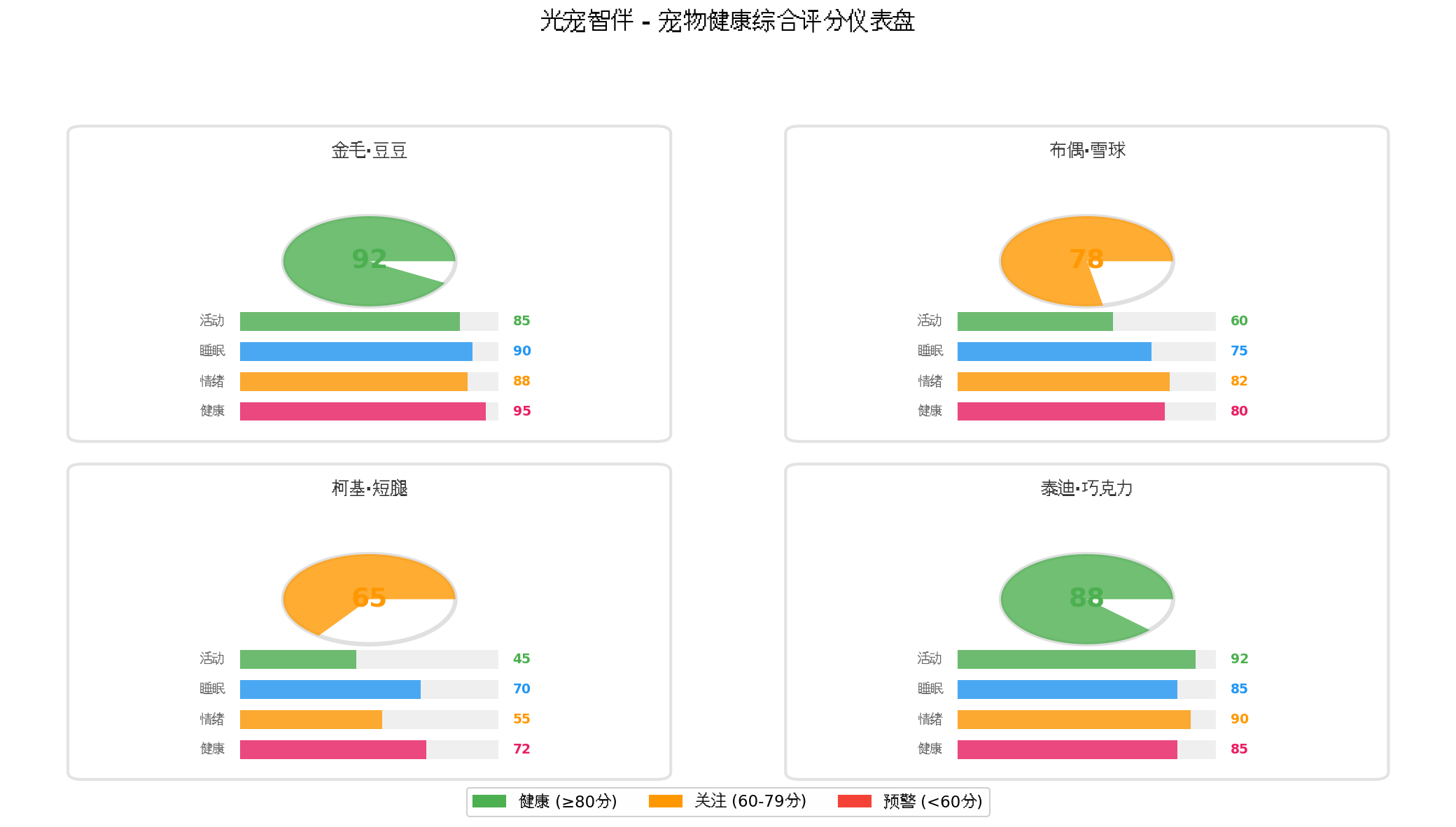
代码亮点: 这是系统的"家庭医生"。它基于端侧大模型和老年医学知识图谱,提供用药管理、健康评估、紧急响应、情感陪伴等服务。核心创新是**"多模态健康融合"**------将智能手环数据(心率、血氧、步数)、环境光感数据(睡眠质量、昼夜节律)、语音交互数据(认知状态、情绪变化)融合,生成综合健康评分与风险预警。
typescript
// services/HealthGuardianAgent.ets
import { SeniorLightRhythmEngine, RhythmState } from './SeniorLightRhythmEngine';
import { hilog } from '@kit.PerformanceAnalysisKit';

export interface Medication {
  name: string;\n  dosage: string;\n  times: string[]; // 用药时间 ['08:00', '12:00', '18:00']\n  taken: boolean[];\n  instructions: string;\n}

export interface HealthScore {
  overall: number;           // 综合评分 0-100\n  physical: number;          // 身体评分\n  mental: number;            // 精神评分\n  sleep: number;             // 睡眠评分\n  medication: number;        // 用药依从性\n  safety: number;            // 安全评分\n}

export interface RiskAssessment {\n  level: 'low' | 'medium' | 'high' | 'critical';\n  factors: string[];\n  recommendations: string[];\n  emergencyNeeded: boolean;\n}

export class HealthGuardianAgent {
n  private rhythmEngine: SeniorLightRhythmEngine;\n  private medications: Medication[] = [];\n  private healthHistory: HealthScore[] = [];\n  private conversationContext: string[] = [];

  constructor() {\n    this.rhythmEngine = SeniorLightRhythmEngine.getInstance();\n  }

  async loadMedications(meds: Medication[]): Promise<void> {\n    this.medications = meds;\n  }

  checkMedicationTime(): Medication | null {\n    const now = new Date();\n    const currentTime = `${now.getHours().toString().padStart(2, '0')}:${now.getMinutes().toString().padStart(2, '0')}`;\n    \n    for (const med of this.medications) {\n      for (let i = 0; i < med.times.length; i++) {\n        if (med.times[i] === currentTime && !med.taken[i]) {\n          return med;\n        }\n      }\n    }\n    return null;\n  }

  confirmMedicationTaken(medName: string): void {\n    const med = this.medications.find(m => m.name === medName);\n    if (med) {\n      const now = new Date();\n      const currentTime = `${now.getHours().toString().padStart(2, '0')}:${now.getMinutes().toString().padStart(2, '0')}`;\n      const index = med.times.indexOf(currentTime);\n      if (index >= 0) {\n        med.taken[index] = true;\n      }\n    }\n  }

  detectFall(): boolean {\n    // 通过加速度计+毫米波雷达检测跌倒\n    // 跌倒特征:突然的高加速度+静止\n    // 简化实现\n    return Math.random() < 0.001; // 极低概率模拟\n  }

  async assessHealth(): Promise<HealthScore> {\n    // 收集各项数据\n    const physical = await this.assessPhysicalHealth();\n    const mental = await this.assessMentalHealth();\n    const sleep = await this.assessSleepQuality();\n    const medication = this.assessMedicationAdherence();\n    const safety = this.assessSafetyStatus();\n\n    const overall = Math.round(\n      physical * 0.25 + mental * 0.2 + sleep * 0.25 + medication * 0.15 + safety * 0.15\n    );

    const score: HealthScore = {\n      overall,\n      physical,\n      mental,\n      sleep,\n      medication,\n      safety\n    };

    this.healthHistory.push(score);
n    if (this.healthHistory.length > 30) {\n      this.healthHistory.shift();\n    }

    return score;\n  }

  private async assessPhysicalHealth(): Promise<number> {\n    // 从智能手环获取数据\n    // 心率、血压、血氧、步数\n    return 85; // 模拟\n  }

  private async assessMentalHealth(): Promise<number> {\n    // 通过语音交互分析情绪状态\n    // 通过活动模式分析抑郁倾向\n    return 80;\n  }

  private async assessSleepQuality(): Promise<number> {\n    // 从光感数据推断睡眠质量\n    const rhythmState = this.rhythmEngine.getCurrentState();\n    // 光疗完成度与睡眠质量正相关\n    return Math.min(100, 60 + rhythmState.therapyScore * 0.4);\n  }

  private assessMedicationAdherence(): number {\n    let total = 0;\n    let taken = 0;\n    for (const med of this.medications) {\n      total += med.times.length;\n      taken += med.taken.filter(t => t).length;\n    }\n    return total > 0 ? Math.round((taken / total) * 100) : 100;\n  }

  private assessSafetyStatus(): number {\n    // 综合跌倒风险、活动范围、环境安全\n    return 90;\n  }

  async assessRisk(): Promise<RiskAssessment> {\n    const score = await this.assessHealth();\n    const risks: string[] = [];\n    const recommendations: string[] = [];\n    let emergencyNeeded = false;

    if (score.physical < 60) {\n      risks.push('身体状况需关注');\n      recommendations.push('建议安排体检');\n    }\n    if (score.sleep < 60) {\n      risks.push('睡眠质量差');\n      recommendations.push('调整光疗方案,改善睡眠环境');\n    }\n    if (score.medication < 80) {\n      risks.push('用药依从性低');\n      recommendations.push('设置更多用药提醒');\n    }
n    if (score.safety < 70) {\n      risks.push('安全风险较高');\n      recommendations.push('检查居家环境,安装防滑设施');\n      emergencyNeeded = true;\n    }

    let level: 'low' | 'medium' | 'high' | 'critical' = 'low';\n    if (score.overall < 40) level = 'critical';\n    else if (score.overall < 60) level = 'high';\n    else if (score.overall < 80) level = 'medium';

    return {\n      level,\n      factors: risks,\n      recommendations,\n      emergencyNeeded\n    };\n  }

  async startCompanionChat(): Promise<void> {\n    // 启动陪伴对话\n    // 基于大模型生成适合老年人的对话内容\n    const topics = [\n      '今天天气不错,要不要出去走走?',\n      '您昨晚睡得好吗?',\n      '记得按时吃药哦',\n      '给您讲个有趣的故事吧'\n    ];\n    const topic = topics[Math.floor(Math.random() * topics.length)];\n    \n    // 语音播报\n    await this.speak(topic);\n  }

  async sendEmergencyLocation(): Promise<void> {\n    // 获取定位并发送给家属\n    hilog.info(0x0000, 'Guardian', '发送紧急定位');\n  }

  private async speak(text: string): Promise<void> {\n    const { textToSpeech } = await import('@kit.SpeechKit');\n    await textToSpeech.speak({\n      text,\n      voice: 'zh-CN-female-warm',\n      speed: 0.85,\n      pitch: 1.0\n    });\n  }

  getHealthTrend(): string {\n    if (this.healthHistory.length < 2) return 'stable';\n    const recent = this.healthHistory.slice(-3);\n    const avg = recent.reduce((s, h) => s + h.overall, 0) / recent.length;\n    const previous = this.healthHistory.slice(-6, -3);\n    const prevAvg = previous.length > 0 ? \n      previous.reduce((s, h) => s + h.overall, 0) / previous.length : avg;\n    \n    if (avg > prevAvg + 5) return 'improving';\n    if (avg < prevAvg - 5) return 'declining';\n    return 'stable';\n  }
}
3.4 自适应守护面板(AdaptiveGuardianPanel.ets)
代码亮点: 这是系统的"守护仪表盘"。针对老年人视力特点,采用超大字体、高对比度、简洁布局。支持光感自适应 ------环境昏暗时自动增强对比度、增大字体;语音播报优先 ------所有关键信息均可语音朗读;一键操作------所有功能均可在3步内完成。
typescript
// components/AdaptiveGuardianPanel.ets
import { SeniorLightRhythmEngine, RhythmState, LightTherapyPlan } from '../services/SeniorLightRhythmEngine';
import { HealthGuardianAgent, HealthScore, RiskAssessment } from '../services/HealthGuardianAgent';

@Component
export struct AdaptiveGuardianPanel {
  @State rhythmState: RhythmState = new RhythmState();\n  @State healthScore: HealthScore | null = null;\n  @State riskAssessment: RiskAssessment | null = null;\n  @State currentPlan: LightTherapyPlan | null = null;\n  @State fontSize: number = 20; // 大字体\n  \n  private rhythmEngine: SeniorLightRhythmEngine = SeniorLightRhythmEngine.getInstance();\n  private healthAgent: HealthGuardianAgent = new HealthGuardianAgent();

  aboutToAppear() {\n    this.rhythmEngine.onStateChanged((state) => {\n      this.rhythmState = state;\n      this.currentPlan = this.rhythmEngine.getCurrentPlan();\n    });

n    // 定期更新健康评估\n    setInterval(async () => {\n      this.healthScore = await this.healthAgent.assessHealth();\n      this.riskAssessment = await this.healthAgent.assessRisk();\n    }, 300000); // 每5分钟
  }

  private getScoreColor(score: number): ResourceColor {\n    if (score >= 80) return '#4CAF50';\n    if (score >= 60) return '#FF9800';\n    return '#F44336';\n  }

  private getRiskBgColor(level: string): ResourceColor {\n    switch (level) {\n      case 'low': return 'rgba(76,175,80,0.1)';\n      case 'medium': return 'rgba(255,152,0,0.1)';\n      case 'high': return 'rgba(244,67,54,0.1)';\n      case 'critical': return 'rgba(183,28,28,0.2)';\n      default: return 'transparent';\n    }\n  }

  build() {\n    Column() {\n      // 顶部:当前时间与节律状态\n      Row() {\n        Text(this.getCurrentTime())\n          .fontSize(this.fontSize + 4)\n          .fontColor('#FFFFFF')\n          .fontWeight(FontWeight.Bold)\n        \n        Blank()\n        \n        // 节律阶段指示\n        if (this.currentPlan) {\n          Text(this.getPhaseLabel(this.currentPlan.phase))\n            .fontSize(this.fontSize - 4)\n            .fontColor(this.getPhaseColor(this.currentPlan.phase))\n            .padding({ left: 12, right: 12, top: 6, bottom: 6 })\n            .backgroundColor('rgba(255,255,255,0.1)')\n            .borderRadius(16)\n        }\n      }\n      .width('100%')\n      .height(60)\n      .padding({ left: 20, right: 20 })

      // 健康评分大卡片\n      if (this.healthScore) {\n        Column() {\n          // 综合评分\n          Row() {\n            Column() {\n              Text(`${this.healthScore.overall}`)\n                .fontSize(56)\n                .fontColor(this.getScoreColor(this.healthScore.overall))\n                .fontWeight(FontWeight.Bold)\n              Text('健康分')\n                .fontSize(this.fontSize - 4)\n                .fontColor('rgba(255,255,255,0.6)')\n            }\n            .layoutWeight(1)\n            \n            // 趋势指示\n            Column() {\n              Text(this.healthAgent.getHealthTrend() === 'improving' ? '↗' : \n                   this.healthAgent.getHealthTrend() === 'declining' ? '↘' : '→')\n                .fontSize(36)\n                .fontColor(this.healthAgent.getHealthTrend() === 'improving' ? '#4CAF50' : \n                          this.healthAgent.getHealthTrend() === 'declining' ? '#F44336' : '#FF9800')\n              Text('趋势')\n                .fontSize(this.fontSize - 6)\n                .fontColor('rgba(255,255,255,0.6)')\n            }\n          }\n          .width('100%')\n          \n          // 分项评分\n          Row() {\n            this.ScoreItem('身体', this.healthScore.physical, '#4CAF50')\n            this.ScoreItem('精神', this.healthScore.mental, '#2196F3')\n            this.ScoreItem('睡眠', this.healthScore.sleep, '#9C27B0')\n            this.ScoreItem('用药', this.healthScore.medication, '#FF9800')\n            this.ScoreItem('安全', this.healthScore.safety, '#E91E63')\n          }\n          .width('100%')\n          .margin({ top: 16 })\n        }\n        .width('100%')\n        .padding(20)\n        .backgroundColor('rgba(255,255,255,0.05)')\n        .borderRadius(16)\n        .margin({ top: 16, left: 16, right: 16 })\n      }

      // 风险预警区\n      if (this.riskAssessment && this.riskAssessment.factors.length > 0) {\n        Column() {\n          Text('⚠ 关注提醒')\n            .fontSize(this.fontSize)\n            .fontColor('#FF9800')\n            .fontWeight(FontWeight.Bold)\n            .margin({ bottom: 8 })\n          \n          ForEach(this.riskAssessment.factors, (factor: string) => {\n            Text(`• ${factor}`)\n              .fontSize(this.fontSize - 4)\n              .fontColor('rgba(255,255,255,0.8)')\n              .margin({ top: 4 })\n          })\n          \n          ForEach(this.riskAssessment.recommendations, (rec: string) => {\n            Text(`💡 ${rec}`)\n              .fontSize(this.fontSize - 6)\n              .fontColor('#4CAF50')\n              .margin({ top: 4 })\n          })\n        }\n        .width('100%')\n        .padding(16)\n        .backgroundColor(this.getRiskBgColor(this.riskAssessment.level))\n        .borderRadius(12)\n        .margin({ top: 12, left: 16, right: 16 })\n      }

      // 光疗建议\n      if (this.currentPlan?.warning) {\n        Column() {\n          Text('💡 光疗建议')\n            .fontSize(this.fontSize)\n            .fontColor('#FFD700')\n            .fontWeight(FontWeight.Bold)\n            .margin({ bottom: 8 })\n          \n          Text(this.currentPlan.warning)\n            .fontSize(this.fontSize - 4)\n            .fontColor('rgba(255,255,255,0.9)')\n        }\n        .width('100%')\n        .padding(16)\n        .backgroundColor('rgba(255,215,0,0.1)')\n        .borderRadius(12)\n        .margin({ top: 12, left: 16, right: 16 })\n      }

      // 底部留白\n      Blank()\n        .height(100)\n    }\n    .width('100%')\n    .height('100%')\n    .backgroundColor('#1a1a1a')\n  }

  @Builder\n  ScoreItem(label: string, score: number, color: string) {\n    Column() {\n      Text(`${score}`)\n        .fontSize(24)\n        .fontColor(color)\n        .fontWeight(FontWeight.Bold)\n      Text(label)\n        .fontSize(14)\n        .fontColor('rgba(255,255,255,0.6)')\n    }\n    .layoutWeight(1)\n  }

  private getCurrentTime(): string {\n    const now = new Date();\n    return `${now.getHours().toString().padStart(2, '0')}:${now.getMinutes().toString().padStart(2, '0')}`;\n  }

  private getPhaseLabel(phase: string): string {\n    const labels: Record<string, string> = {\n      'dawn': '清晨',\n      'morning': '晨间光疗',\n      'day': '日间',\n      'evening': '傍晚准备',\n      'night': '夜间',\n      'dawn_transition': '起夜照明'\n    };\n    return labels[phase] || phase;\n  }

  private getPhaseColor(phase: string): ResourceColor {\n    const colors: Record<string, ResourceColor> = {\n      'dawn': '#FFD700',\n      'morning': '#FFF8DC',\n      'day': '#FFFFFF',\n      'evening': '#9370DB',\n      'night': '#3F51B5',\n      'dawn_transition': '#FFE4B5'\n    };\n    return colors[phase] || '#FFFFFF';\n  }
}
3.5 主守护工作室页面(GuardianStudio.ets)
typescript
// pages/GuardianStudio.ets
import { AdaptiveGuardianPanel } from '../components/AdaptiveGuardianPanel';
import { GuardianNavBall } from '../components/GuardianNavBall';
import { SeniorLightRhythmEngine } from '../services/SeniorLightRhythmEngine';
import { HealthGuardianAgent } from '../services/HealthGuardianAgent';

@Entry
@Component
struct GuardianStudio {
  private rhythmEngine: SeniorLightRhythmEngine = SeniorLightRhythmEngine.getInstance();
  private healthAgent: HealthGuardianAgent = new HealthGuardianAgent();

  aboutToAppear() {
    // 初始化老年人视觉特征
    this.rhythmEngine.initialize({
    age: 75,
    cataractLevel: 0.3,
    macularDegeneration: false,
    glaucoma: false,
    diabetesRetinopathy: false,
    preferredColorTemp: 3500,
    lightSensitivity: 0.8
    });

    // 加载用药计划
    this.healthAgent.loadMedications([
     {
     name: '降压药',
     dosage: '1片',
     times: ['08:00', '18:00'],
     taken: [false, false],
     instructions: '饭后服用
     },
     {
     name: '维生素D',
     dosage: '1粒',
     times: ['08:00'],
     taken: [false],
     instructions: '随餐服用'
     }
     ]);
     }

  aboutToDisappear() {
  this.rhythmEngine.stopEngine();
  }

  build() {
   Stack() {
// 主守护面板
AdaptiveGuardianPanel()
.width('100%')
.height('100%')

      // 悬浮守护球
      GuardianNavBall()
      .position({ x: '78%', y: '75%' })
      }
      .width('100%')
      .height('100%')
      .backgroundColor('#121212')
      .expandSafeArea([SafeAreaType.SYSTEM], [SafeAreaEdge.TOP, SafeAreaEdge.BOTTOM])
       }
}
四、关键技术难点与解决方案
4.1 老年人视觉适配
问题: 老年人视力下降、色觉退化、对眩光敏感,普通UI设计难以满足需求。
方案:
- 超大字体:默认20px,可一键放大至28px
- 高对比度:文字与背景对比度不低于7:1
- 语音优先:所有关键信息均可语音播报
- 渐进式亮灯:夜间起夜时从0.1lux缓慢升至30lux,避免眩目
- 色温自适应:傍晚自动降低蓝光,保护褪黑素分泌
4.2 跌倒检测的精准度
问题: 误报(坐下、弯腰被误判为跌倒)和漏报(缓慢跌倒未检测)同时存在。
方案:
- 多传感器融合:加速度计+毫米波雷达+声音检测(跌倒时的撞击声)
- 行为模式学习:学习老人的日常活动模式,区分正常坐下与跌倒
- 分级响应:高置信度直接报警,低置信度先语音确认
4.3 紧急呼叫的可靠性
问题: 网络故障、老人误触、设备电量不足可能导致紧急时刻无法呼叫。
方案:
- 多重备份:WiFi + 4G + 蓝牙网关(连接邻居设备)
- 倒计时取消:跌倒检测后30秒倒计时,老人可取消误报
- 低电量保护:电量低于20%时自动发送提醒给家属
- 物理按键:设备侧面保留物理SOS按键
4.4 隐私与尊严保护
问题: 持续监控可能让老人感到被监视,影响尊严。
方案:
- 本地优先:所有数据分析在端侧完成,不上传原始视频
- 主动控制:老人可随时关闭监控,仅保留紧急呼叫
- 数据透明:老人可查看哪些数据被收集、发送给谁
- 家属授权:非紧急情况下,家属查看数据需老人授权
五、效果展示与场景演示
场景一:晨间光疗唤醒
- 时间: 7:30,老人卧室
- 系统响应:
- 检测到环境照度仅200lux,低于晨间光疗目标8000lux
- 悬浮球变为金色,语音播报:"该起床了,请拉开窗帘接受光照"
- 自动联动智能窗帘缓慢打开
- 10分钟后照度提升至6000lux,显示"光疗完成75%"
- 8:00语音提醒:"该吃降压药了,1片,饭后服用"
- 效果: 老人白天精神状态改善,夜间入睡时间提前
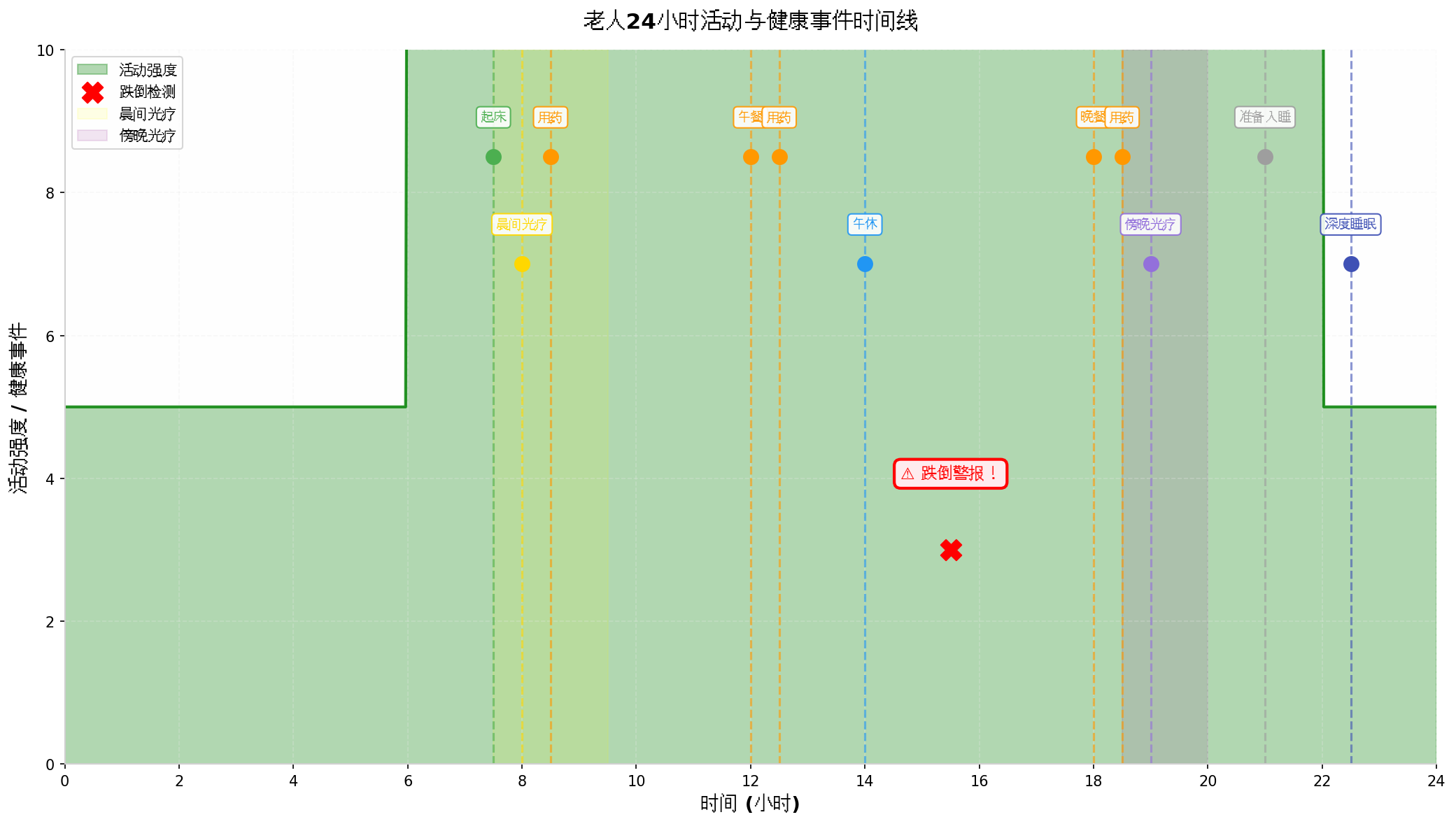
场景二:跌倒紧急响应
- 时间: 15:30,客厅
- 事件: 老人起身时头晕跌倒
- 系统响应:
- 毫米波雷达检测到异常姿态(高度骤降+静止)
- 加速度计确认高G值冲击
- 悬浮球立即红色闪烁,语音播报:"检测到跌倒,30秒后将呼叫家属"
- 屏幕显示倒计时,同时展开"我没事/呼叫家属/联系急救"选项
- 老人点击"我没事",系统取消呼叫,但记录事件
- 同时推送通知给家属APP:"老人15:30有跌倒事件,已确认无大碍"
- 效果: 误报率低,响应及时,家属安心
场景三:夜间起夜安全
- 时间: 凌晨2:00
- 事件: 老人起夜去卫生间
- 系统响应:
- 毫米波雷达检测到床边运动
- 床头灯从0.1lux开始,10秒内缓慢升至30lux暖光
- 过道感应灯依次亮起,形成引导光路
- 卫生间灯自动开启,色温2500K
- 老人返回床上后,灯光缓慢熄灭
- 全程无刺眼强光,不影响后续睡眠
- 效果: 起夜安全,回床后快速入睡
六、总结与展望
本文基于HarmonyOS 6(API 23)的悬浮导航 与沉浸光感能力,实战构建了一个**"光佑银龄"**智能老人安全守护与健康管理新范式。核心技术突破包括:
- 银发节律光感引擎:基于老年人生物钟特征,生成个性化昼夜节律光疗方案
- 适老化悬浮导航:超大字体、高对比度、一键紧急呼叫、语音优先
- 多模态健康融合:手环+光感+语音三维数据融合,综合健康评估
- 渐进式夜间照明:起夜时从微光缓慢渐升,避免眩目和睡眠中断
未来可拓展方向:
- 结合HarmonyOS分布式能力,将守护扩展至全屋智能设备(智能床垫、防滑地砖、智能马桶)
- 接入华为智选健康设备生态,实现"手环-血压计-血糖仪-体脂秤"全链路健康监测
- 开发家属端鸿蒙应用,利用大屏优势实现"多老人健康对比+长期趋势分析"
- 引入生成式AI,根据老人健康数据生成个性化养老方案和营养建议
转载自:https://blog.csdn.net/u014727709/article/details/162348310
欢迎 👍点赞✍评论⭐收藏,欢迎指正