曲线动画 · Curve Animate · ▶ 在线运行案例
- 案例合集: 三维可视化功能案例(threehub.cn)
- 开源仓库github地址: https://github.com/z2586300277/three-cesium-examples
- 400个案例代码: 网盘链接
你将学到什么
- OrbitControls 相机轨道交互
- CatmullRomCurve3 样条曲线路径
- glTF/Draco 模型加载与优化
- BufferGeometry 自定义顶点/索引数据
requestAnimationFrame渲染循环与resize自适应
效果说明
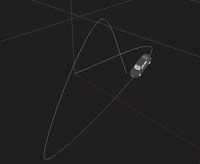
本案例演示 曲线动画 效果:基于 WebGL 实现「曲线动画」可视化效果,附完整可运行源码;核心用到 OrbitControls、CatmullRomCurve3、glTF/Draco。建议先打开文首在线案例查看动态画面,再对照下方源码逐步理解。
核心概念
- Scene / Camera / WebGLRenderer 构成最小渲染闭环;大场景可开
logarithmicDepthBuffer缓解 Z-fighting。 - OrbitControls 提供轨道旋转/缩放;开启
enableDamping后需在 animate 中controls.update()。 - 曲线类
getPoints(n)将贝塞尔/样条离散为路径点,再写入 BufferGeometry 驱动飞线或路径动画。
实现步骤
- 搭建 Scene、PerspectiveCamera、WebGLRenderer,挂载 canvas 并处理
resize - 异步加载模型 / 3D Tiles / GeoJSON 等资源并加入 scene 或 entities
- 用曲线离散点构建 BufferGeometry,写入自定义 attribute 驱动动画
- 创建 OrbitControls(及 Raycaster 等交互控件,若源码包含)
- 在
requestAnimationFrame循环中更新状态并 render(Cesium 为viewer.render或自动渲染)
代码要点
  import * as THREE from 'three'

  import { OrbitControls } from 'three/examples/jsm/controls/OrbitControls.js'
  import { GLTFLoader } from 'three/examples/jsm/loaders/GLTFLoader.js'
  import { DRACOLoader } from 'three/examples/jsm/loaders/DRACOLoader.js'


  const box = document.getElementById('box')


  const scene = new THREE.Scene()


  const camera = new THREE.PerspectiveCamera(75, box.clientWidth / box.clientHeight, 0.1, 1000)


  camera.position.set(30, 30, 30)


  const renderer = new THREE.WebGLRenderer({ antialias: true, alpha: true, logarithmicDepthBuffer: true })


  renderer.setSize(box.clientWidth, box.clientHeight)


  box.appendChild(renderer.domElement)


  new OrbitControls(camera, renderer.domElement)


  window.onresize = () => {


  renderer.setSize(box.clientWidth, box.clientHeight)


  camera.aspect = box.clientWidth / box.clientHeight


  camera.updateProjectionMatrix()


  }


  scene.add(new THREE.AmbientLight(0xffffff, 4))


  scene.add(new THREE.AxesHelper(1000))


  // 创建一个曲线
  const curve = new THREE.CatmullRomCurve3([


  new THREE.Vector3(0, 0, 0),


  new THREE.Vector3(20, 15, 0),


  new THREE.Vector3(15, 0, 20),


  new THREE.Vector3(5, 15, -5),


  new THREE.Vector3(10, 0, -10)


  ])


  // 创建曲线几何
  const geometry = new THREE.BufferGeometry().setFromPoints(curve.getPoints(500))


  // 创建曲线材质
  const material = new THREE.LineBasicMaterial({ color: 0xffffff })


  // 创建曲线
  const curveMesh = new THREE.Line(geometry, material)


  // 添加曲线到场景
  scene.add(curveMesh)


  let car = null


  const loader = new GLTFLoader()


  loader.setDRACOLoader(new DRACOLoader().setDecoderPath(FILE_HOST + 'js/three/draco/'))


  loader.load(


  HOST + '/files/model/car.glb',


  gltf => {


  car = gltf.scene


  scene.add(car)
          // 定义时间
          let t = 0


  car.render = () => {


  t += 0.0004


  const point = curve.getPointAt(t % 1) // 获取当前点


  car.position.set(point.x, point.y, point.z) // 设置位置


  car.lookAt(curve.getPointAt((t + 0.01) % 1)) // 朝向下一个点


  }


  },


  (xhr) => { },


  (e) => { }


  )


  animate()


  function animate() {


  requestAnimationFrame(animate)


  car?.render()


  renderer.render(scene, camera)


  `}
`完整源码:GitHub
小结
- 本文提供 曲线动画 完整 Three.js 源码与在线 Demo,建议先运行案例再改 uniform/参数做二次实验
- 更多 Three.js 实战案例见 three-cesium-examples 合集 与 GitHub 开源仓库