大家好,我是鸿蒙 Jack。本期以我的《时光旅记》APP 为例,讲一个很常见但真正落地时并不简单的能力:如何用 Push Kit 实现倒数日到日提醒。
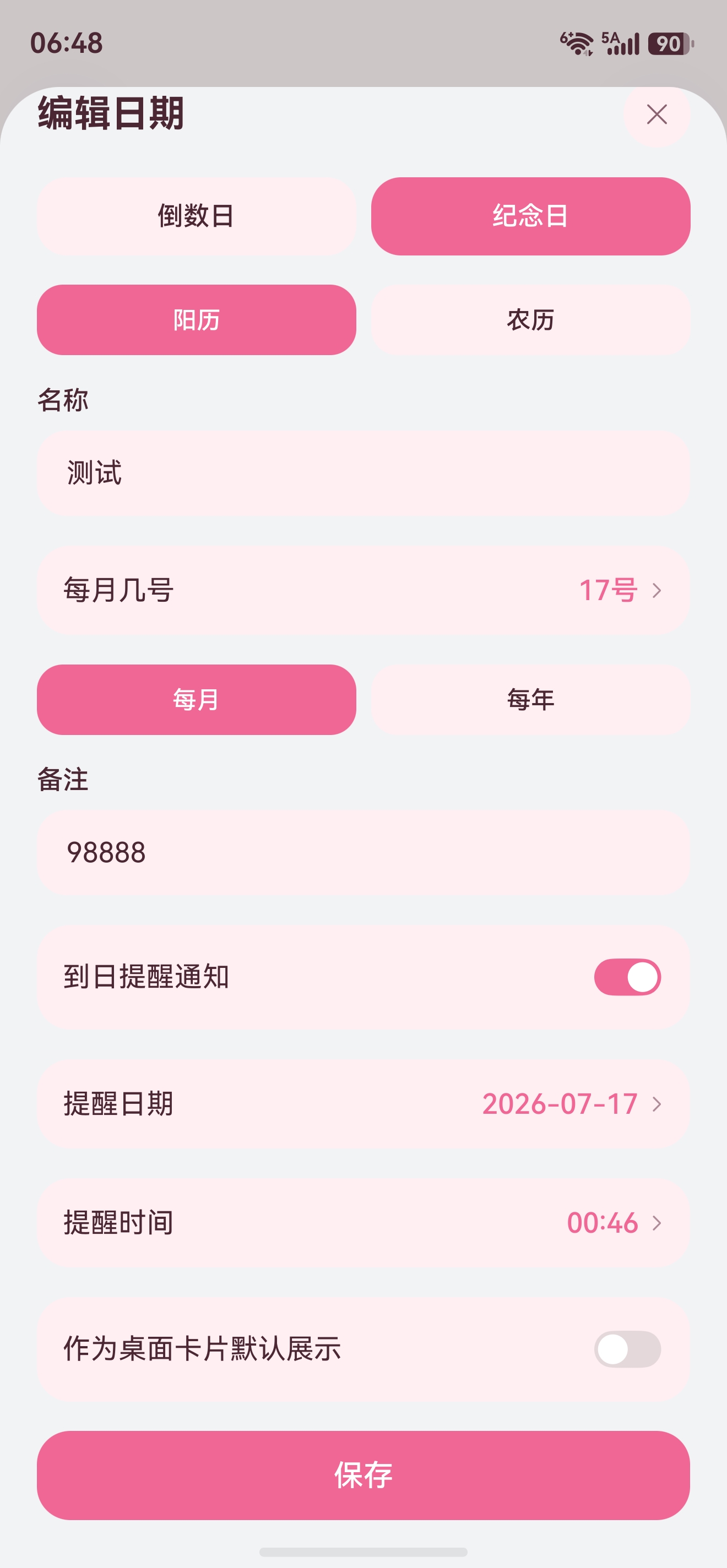
《时光旅记》里有一个"倒数日"工具,用户可以记录考试、旅行、生日、纪念日、项目截止日,也可以把某个倒数日加到桌面卡片。只看页面展示,倒数日并不复杂:保存标题、目标日期,然后计算距离今天还有多少天。但"到日提醒通知"不一样,用户希望 APP 退出后、进程不在后台时,到了提醒日期也能收到通知。这种场景不能依赖端侧定时器,也不能假设应用一直存活,必须把提醒触发交给服务端,再通过系统级推送通道触达设备。
我这次的实现思路是:端侧负责通知授权、Push Token 获取、倒数日编辑和订阅同步;服务端负责订阅持久化、定时扫描、分布式去重、异步排队和 Push Kit REST API 下发。用户在《时光旅记》中打开"到日提醒通知"后,保存的不是一个简单本地开关,而是一条可以被服务端按时间触发的订阅。
这篇文章会结合我项目里的真实代码讲清楚整条链路。
技术栈先讲清楚
这条链路名字叫 Push Kit,但真正用到的技术栈不止 Push Kit。
端侧是 HarmonyOS ArkTS 和 ArkUI。倒数日页面用 ArkUI 组件实现编辑、列表、日期选择和开关;通知授权使用 Notification Kit 的 notificationManager.isNotificationEnabled()、requestEnableNotification();推送目标标识使用 Push Kit 的 pushService.getToken();订阅同步使用 Network Kit 的 http.createHttp();Push Token 缓存使用 ArkData 的 preferences。
服务端是 Spring Boot。登录校验使用 Sa-Token;接口层使用 Spring MVC;订阅表用 MySQL;持久化用 Spring Data JPA;到期扫描用 Spring Scheduling;多实例调度和重复消费控制用 Redis;提醒发送排队用 RabbitMQ;调用华为 Push Kit REST API 用 Java HttpClient;服务账号鉴权通过私钥生成 PS256 JWT,然后作为 Bearer Token 调用 messages:send。
这里有个容易误解的点:代码里的 deviceId 字段,实际存的是 pushService.getToken() 返回的 Push Token,并不是系统设备 ID。这个命名来自项目早期旅行出发提醒的字段复用,如果从零设计,我会直接命名为 pushToken。文章为了和项目代码一致仍然写 deviceId,但大家要清楚它的真实含义。
Push Kit 的官方流程也正好对应这个实现:应用获取 Push Token,上报服务端;服务端向 Push Kit 云侧发送消息;Push Kit 通过系统通道把消息投递到设备。通知能否展示,还要看用户是否允许通知,所以端侧保存提醒前必须先走 Notification Kit 授权。
官方文档建议放在手边:
Push Kit 基础能力:https://developer.huawei.com/consumer/cn/doc/harmonyos-references/push-pushservice
获取 Push Token:https://developer.huawei.com/consumer/cn/doc/harmonyos-guides/push-get-token
Push REST API 请求体参数:https://developer.huawei.com/consumer/cn/doc/harmonyos-references/push-scenariozed-api-request-param
Notification Kit 通知授权:https://developer.huawei.com/consumer/cn/doc/harmonyos-guides/notification-enable
整体架构
先看架构图。端侧只有一个普通 HTTPS 接口同步订阅,但服务端内部有定时扫描、队列解耦、Redis 锁和 Push Kit 云侧调用。
#mermaid-svg-AE3yp4xQvSvAyOSb{font-family:"trebuchet ms",verdana,arial,sans-serif;font-size:16px;fill:#333;}@keyframes edge-animation-frame{from{stroke-dashoffset:0;}}@keyframes dash{to{stroke-dashoffset:0;}}#mermaid-svg-AE3yp4xQvSvAyOSb .edge-animation-slow{stroke-dasharray:9,5!important;stroke-dashoffset:900;animation:dash 50s linear infinite;stroke-linecap:round;}#mermaid-svg-AE3yp4xQvSvAyOSb .edge-animation-fast{stroke-dasharray:9,5!important;stroke-dashoffset:900;animation:dash 20s linear infinite;stroke-linecap:round;}#mermaid-svg-AE3yp4xQvSvAyOSb .error-icon{fill:#552222;}#mermaid-svg-AE3yp4xQvSvAyOSb .error-text{fill:#552222;stroke:#552222;}#mermaid-svg-AE3yp4xQvSvAyOSb .edge-thickness-normal{stroke-width:1px;}#mermaid-svg-AE3yp4xQvSvAyOSb .edge-thickness-thick{stroke-width:3.5px;}#mermaid-svg-AE3yp4xQvSvAyOSb .edge-pattern-solid{stroke-dasharray:0;}#mermaid-svg-AE3yp4xQvSvAyOSb .edge-thickness-invisible{stroke-width:0;fill:none;}#mermaid-svg-AE3yp4xQvSvAyOSb .edge-pattern-dashed{stroke-dasharray:3;}#mermaid-svg-AE3yp4xQvSvAyOSb .edge-pattern-dotted{stroke-dasharray:2;}#mermaid-svg-AE3yp4xQvSvAyOSb .marker{fill:#333333;stroke:#333333;}#mermaid-svg-AE3yp4xQvSvAyOSb .marker.cross{stroke:#333333;}#mermaid-svg-AE3yp4xQvSvAyOSb svg{font-family:"trebuchet ms",verdana,arial,sans-serif;font-size:16px;}#mermaid-svg-AE3yp4xQvSvAyOSb p{margin:0;}#mermaid-svg-AE3yp4xQvSvAyOSb .label{font-family:"trebuchet ms",verdana,arial,sans-serif;color:#333;}#mermaid-svg-AE3yp4xQvSvAyOSb .cluster-label text{fill:#333;}#mermaid-svg-AE3yp4xQvSvAyOSb .cluster-label span{color:#333;}#mermaid-svg-AE3yp4xQvSvAyOSb .cluster-label span p{background-color:transparent;}#mermaid-svg-AE3yp4xQvSvAyOSb .label text,#mermaid-svg-AE3yp4xQvSvAyOSb span{fill:#333;color:#333;}#mermaid-svg-AE3yp4xQvSvAyOSb .node rect,#mermaid-svg-AE3yp4xQvSvAyOSb .node circle,#mermaid-svg-AE3yp4xQvSvAyOSb .node ellipse,#mermaid-svg-AE3yp4xQvSvAyOSb .node polygon,#mermaid-svg-AE3yp4xQvSvAyOSb .node path{fill:#ECECFF;stroke:#9370DB;stroke-width:1px;}#mermaid-svg-AE3yp4xQvSvAyOSb .rough-node .label text,#mermaid-svg-AE3yp4xQvSvAyOSb .node .label text,#mermaid-svg-AE3yp4xQvSvAyOSb .image-shape .label,#mermaid-svg-AE3yp4xQvSvAyOSb .icon-shape .label{text-anchor:middle;}#mermaid-svg-AE3yp4xQvSvAyOSb .node .katex path{fill:#000;stroke:#000;stroke-width:1px;}#mermaid-svg-AE3yp4xQvSvAyOSb .rough-node .label,#mermaid-svg-AE3yp4xQvSvAyOSb .node .label,#mermaid-svg-AE3yp4xQvSvAyOSb .image-shape .label,#mermaid-svg-AE3yp4xQvSvAyOSb .icon-shape .label{text-align:center;}#mermaid-svg-AE3yp4xQvSvAyOSb .node.clickable{cursor:pointer;}#mermaid-svg-AE3yp4xQvSvAyOSb .root .anchor path{fill:#333333!important;stroke-width:0;stroke:#333333;}#mermaid-svg-AE3yp4xQvSvAyOSb .arrowheadPath{fill:#333333;}#mermaid-svg-AE3yp4xQvSvAyOSb .edgePath .path{stroke:#333333;stroke-width:2.0px;}#mermaid-svg-AE3yp4xQvSvAyOSb .flowchart-link{stroke:#333333;fill:none;}#mermaid-svg-AE3yp4xQvSvAyOSb .edgeLabel{background-color:rgba(232,232,232, 0.8);text-align:center;}#mermaid-svg-AE3yp4xQvSvAyOSb .edgeLabel p{background-color:rgba(232,232,232, 0.8);}#mermaid-svg-AE3yp4xQvSvAyOSb .edgeLabel rect{opacity:0.5;background-color:rgba(232,232,232, 0.8);fill:rgba(232,232,232, 0.8);}#mermaid-svg-AE3yp4xQvSvAyOSb .labelBkg{background-color:rgba(232, 232, 232, 0.5);}#mermaid-svg-AE3yp4xQvSvAyOSb .cluster rect{fill:#ffffde;stroke:#aaaa33;stroke-width:1px;}#mermaid-svg-AE3yp4xQvSvAyOSb .cluster text{fill:#333;}#mermaid-svg-AE3yp4xQvSvAyOSb .cluster span{color:#333;}#mermaid-svg-AE3yp4xQvSvAyOSb div.mermaidTooltip{position:absolute;text-align:center;max-width:200px;padding:2px;font-family:"trebuchet ms",verdana,arial,sans-serif;font-size:12px;background:hsl(80, 100%, 96.2745098039%);border:1px solid #aaaa33;border-radius:2px;pointer-events:none;z-index:100;}#mermaid-svg-AE3yp4xQvSvAyOSb .flowchartTitleText{text-anchor:middle;font-size:18px;fill:#333;}#mermaid-svg-AE3yp4xQvSvAyOSb rect.text{fill:none;stroke-width:0;}#mermaid-svg-AE3yp4xQvSvAyOSb .icon-shape,#mermaid-svg-AE3yp4xQvSvAyOSb .image-shape{background-color:rgba(232,232,232, 0.8);text-align:center;}#mermaid-svg-AE3yp4xQvSvAyOSb .icon-shape p,#mermaid-svg-AE3yp4xQvSvAyOSb .image-shape p{background-color:rgba(232,232,232, 0.8);padding:2px;}#mermaid-svg-AE3yp4xQvSvAyOSb .icon-shape .label rect,#mermaid-svg-AE3yp4xQvSvAyOSb .image-shape .label rect{opacity:0.5;background-color:rgba(232,232,232, 0.8);fill:rgba(232,232,232, 0.8);}#mermaid-svg-AE3yp4xQvSvAyOSb .label-icon{display:inline-block;height:1em;overflow:visible;vertical-align:-0.125em;}#mermaid-svg-AE3yp4xQvSvAyOSb .node .label-icon path{fill:currentColor;stroke:revert;stroke-width:revert;}#mermaid-svg-AE3yp4xQvSvAyOSb :root{--mermaid-font-family:"trebuchet ms",verdana,arial,sans-serif;} 华为 Push Kit
TimeImprintServer
时光旅记 HarmonyOS 端
CountdownDayPage
倒数日编辑
Notification Kit
通知授权
Push Kit
获取 Push Token
CountdownDayApiService
同步订阅
本地 Store
保存倒数日状态
CountdownDayController
REST API
CountdownDayService
校验与保存
MySQL
订阅表
Scheduler
扫描到期提醒
Redis
调度锁/处理锁
RabbitMQ
提醒队列
Listener
消费并组装通知
HuaweiPushService
调用 Push REST API
/v3/{projectId}/messages:send
系统级推送通道
设备通知中心
这套架构里有两个方向。保存方向由端侧发起:用户打开提醒开关,端侧请求通知授权,获取 Push Token,把倒数日订阅保存到服务端。触发方向由服务端发起:定时任务扫描到期订阅,投递 RabbitMQ,消费者二次校验并调用 Push Kit,下发成功后写回发送状态。
为什么不直接在端侧设置一个本地定时器?因为用户可能杀掉应用,系统也不会保证普通应用后台一直运行。为什么不直接在定时任务里调用 Push?因为 Push Kit 是外部网络调用,耗时、失败和频控都不可控,扫描任务应该尽快结束,把发送交给异步消费者更稳。
保存提醒的时序
用户看到的只是一个"到日提醒通知"开关,背后时序如下。
MySQL 后端接口 CountdownDayApiService PushKit NotificationKit CountdownDayPage 用户 MySQL 后端接口 CountdownDayApiService PushKit NotificationKit CountdownDayPage 用户 #mermaid-svg-61fw7GUxZsVey6jh{font-family:"trebuchet ms",verdana,arial,sans-serif;font-size:16px;fill:#333;}@keyframes edge-animation-frame{from{stroke-dashoffset:0;}}@keyframes dash{to{stroke-dashoffset:0;}}#mermaid-svg-61fw7GUxZsVey6jh .edge-animation-slow{stroke-dasharray:9,5!important;stroke-dashoffset:900;animation:dash 50s linear infinite;stroke-linecap:round;}#mermaid-svg-61fw7GUxZsVey6jh .edge-animation-fast{stroke-dasharray:9,5!important;stroke-dashoffset:900;animation:dash 20s linear infinite;stroke-linecap:round;}#mermaid-svg-61fw7GUxZsVey6jh .error-icon{fill:#552222;}#mermaid-svg-61fw7GUxZsVey6jh .error-text{fill:#552222;stroke:#552222;}#mermaid-svg-61fw7GUxZsVey6jh .edge-thickness-normal{stroke-width:1px;}#mermaid-svg-61fw7GUxZsVey6jh .edge-thickness-thick{stroke-width:3.5px;}#mermaid-svg-61fw7GUxZsVey6jh .edge-pattern-solid{stroke-dasharray:0;}#mermaid-svg-61fw7GUxZsVey6jh .edge-thickness-invisible{stroke-width:0;fill:none;}#mermaid-svg-61fw7GUxZsVey6jh .edge-pattern-dashed{stroke-dasharray:3;}#mermaid-svg-61fw7GUxZsVey6jh .edge-pattern-dotted{stroke-dasharray:2;}#mermaid-svg-61fw7GUxZsVey6jh .marker{fill:#333333;stroke:#333333;}#mermaid-svg-61fw7GUxZsVey6jh .marker.cross{stroke:#333333;}#mermaid-svg-61fw7GUxZsVey6jh svg{font-family:"trebuchet ms",verdana,arial,sans-serif;font-size:16px;}#mermaid-svg-61fw7GUxZsVey6jh p{margin:0;}#mermaid-svg-61fw7GUxZsVey6jh .actor{stroke:hsl(259.6261682243, 59.7765363128%, 87.9019607843%);fill:#ECECFF;}#mermaid-svg-61fw7GUxZsVey6jh text.actor>tspan{fill:black;stroke:none;}#mermaid-svg-61fw7GUxZsVey6jh .actor-line{stroke:hsl(259.6261682243, 59.7765363128%, 87.9019607843%);}#mermaid-svg-61fw7GUxZsVey6jh .innerArc{stroke-width:1.5;stroke-dasharray:none;}#mermaid-svg-61fw7GUxZsVey6jh .messageLine0{stroke-width:1.5;stroke-dasharray:none;stroke:#333;}#mermaid-svg-61fw7GUxZsVey6jh .messageLine1{stroke-width:1.5;stroke-dasharray:2,2;stroke:#333;}#mermaid-svg-61fw7GUxZsVey6jh #arrowhead path{fill:#333;stroke:#333;}#mermaid-svg-61fw7GUxZsVey6jh .sequenceNumber{fill:white;}#mermaid-svg-61fw7GUxZsVey6jh #sequencenumber{fill:#333;}#mermaid-svg-61fw7GUxZsVey6jh #crosshead path{fill:#333;stroke:#333;}#mermaid-svg-61fw7GUxZsVey6jh .messageText{fill:#333;stroke:none;}#mermaid-svg-61fw7GUxZsVey6jh .labelBox{stroke:hsl(259.6261682243, 59.7765363128%, 87.9019607843%);fill:#ECECFF;}#mermaid-svg-61fw7GUxZsVey6jh .labelText,#mermaid-svg-61fw7GUxZsVey6jh .labelText>tspan{fill:black;stroke:none;}#mermaid-svg-61fw7GUxZsVey6jh .loopText,#mermaid-svg-61fw7GUxZsVey6jh .loopText>tspan{fill:black;stroke:none;}#mermaid-svg-61fw7GUxZsVey6jh .loopLine{stroke-width:2px;stroke-dasharray:2,2;stroke:hsl(259.6261682243, 59.7765363128%, 87.9019607843%);fill:hsl(259.6261682243, 59.7765363128%, 87.9019607843%);}#mermaid-svg-61fw7GUxZsVey6jh .note{stroke:#aaaa33;fill:#fff5ad;}#mermaid-svg-61fw7GUxZsVey6jh .noteText,#mermaid-svg-61fw7GUxZsVey6jh .noteText>tspan{fill:black;stroke:none;}#mermaid-svg-61fw7GUxZsVey6jh .activation0{fill:#f4f4f4;stroke:#666;}#mermaid-svg-61fw7GUxZsVey6jh .activation1{fill:#f4f4f4;stroke:#666;}#mermaid-svg-61fw7GUxZsVey6jh .activation2{fill:#f4f4f4;stroke:#666;}#mermaid-svg-61fw7GUxZsVey6jh .actorPopupMenu{position:absolute;}#mermaid-svg-61fw7GUxZsVey6jh .actorPopupMenuPanel{position:absolute;fill:#ECECFF;box-shadow:0px 8px 16px 0px rgba(0,0,0,0.2);filter:drop-shadow(3px 5px 2px rgb(0 0 0 / 0.4));}#mermaid-svg-61fw7GUxZsVey6jh .actor-man line{stroke:hsl(259.6261682243, 59.7765363128%, 87.9019607843%);fill:#ECECFF;}#mermaid-svg-61fw7GUxZsVey6jh .actor-man circle,#mermaid-svg-61fw7GUxZsVey6jh line{stroke:hsl(259.6261682243, 59.7765363128%, 87.9019607843%);fill:#ECECFF;stroke-width:2px;}#mermaid-svg-61fw7GUxZsVey6jh :root{--mermaid-font-family:"trebuchet ms",verdana,arial,sans-serif;} alt 未授权 打开倒数日编辑弹窗 1 开启到日提醒通知 2 isNotificationEnabled() 3 requestEnableNotification(context) 4 点击保存 5 pushService.getToken() 6 Push Token 7 PUT /api/v1/countdown-days/{id} 8 提交倒数日订阅 9 upsert countdown_day_subscription 10 返回保存结果 11 保存成功 12 写入本地状态 13
我把通知授权放在用户打开开关时做,而不是等到保存后再做。这样用户拒绝授权时,页面能立刻提示"请先允许通知权限",不会出现后端已经保存了订阅但设备端无法展示通知的尴尬状态。
Push Token 放在保存时获取。原因也很直接:只有用户真正要开启提醒时,才需要把 token 上报到服务端。Push Token 一般不会频繁变化,但卸载重装、恢复出厂设置、删除 token 后重新获取等场景会导致旧 token 失效,所以生产环境最好在应用启动或登录后也做一次 token 刷新上报。
发送提醒的时序
服务端触发提醒时的链路如下。
设备 Huawei Push PushService Listener RabbitMQ MySQL Redis Scheduler 设备 Huawei Push PushService Listener RabbitMQ MySQL Redis Scheduler #mermaid-svg-oJiXeYw8yjjqocPL{font-family:"trebuchet ms",verdana,arial,sans-serif;font-size:16px;fill:#333;}@keyframes edge-animation-frame{from{stroke-dashoffset:0;}}@keyframes dash{to{stroke-dashoffset:0;}}#mermaid-svg-oJiXeYw8yjjqocPL .edge-animation-slow{stroke-dasharray:9,5!important;stroke-dashoffset:900;animation:dash 50s linear infinite;stroke-linecap:round;}#mermaid-svg-oJiXeYw8yjjqocPL .edge-animation-fast{stroke-dasharray:9,5!important;stroke-dashoffset:900;animation:dash 20s linear infinite;stroke-linecap:round;}#mermaid-svg-oJiXeYw8yjjqocPL .error-icon{fill:#552222;}#mermaid-svg-oJiXeYw8yjjqocPL .error-text{fill:#552222;stroke:#552222;}#mermaid-svg-oJiXeYw8yjjqocPL .edge-thickness-normal{stroke-width:1px;}#mermaid-svg-oJiXeYw8yjjqocPL .edge-thickness-thick{stroke-width:3.5px;}#mermaid-svg-oJiXeYw8yjjqocPL .edge-pattern-solid{stroke-dasharray:0;}#mermaid-svg-oJiXeYw8yjjqocPL .edge-thickness-invisible{stroke-width:0;fill:none;}#mermaid-svg-oJiXeYw8yjjqocPL .edge-pattern-dashed{stroke-dasharray:3;}#mermaid-svg-oJiXeYw8yjjqocPL .edge-pattern-dotted{stroke-dasharray:2;}#mermaid-svg-oJiXeYw8yjjqocPL .marker{fill:#333333;stroke:#333333;}#mermaid-svg-oJiXeYw8yjjqocPL .marker.cross{stroke:#333333;}#mermaid-svg-oJiXeYw8yjjqocPL svg{font-family:"trebuchet ms",verdana,arial,sans-serif;font-size:16px;}#mermaid-svg-oJiXeYw8yjjqocPL p{margin:0;}#mermaid-svg-oJiXeYw8yjjqocPL .actor{stroke:hsl(259.6261682243, 59.7765363128%, 87.9019607843%);fill:#ECECFF;}#mermaid-svg-oJiXeYw8yjjqocPL text.actor>tspan{fill:black;stroke:none;}#mermaid-svg-oJiXeYw8yjjqocPL .actor-line{stroke:hsl(259.6261682243, 59.7765363128%, 87.9019607843%);}#mermaid-svg-oJiXeYw8yjjqocPL .innerArc{stroke-width:1.5;stroke-dasharray:none;}#mermaid-svg-oJiXeYw8yjjqocPL .messageLine0{stroke-width:1.5;stroke-dasharray:none;stroke:#333;}#mermaid-svg-oJiXeYw8yjjqocPL .messageLine1{stroke-width:1.5;stroke-dasharray:2,2;stroke:#333;}#mermaid-svg-oJiXeYw8yjjqocPL #arrowhead path{fill:#333;stroke:#333;}#mermaid-svg-oJiXeYw8yjjqocPL .sequenceNumber{fill:white;}#mermaid-svg-oJiXeYw8yjjqocPL #sequencenumber{fill:#333;}#mermaid-svg-oJiXeYw8yjjqocPL #crosshead path{fill:#333;stroke:#333;}#mermaid-svg-oJiXeYw8yjjqocPL .messageText{fill:#333;stroke:none;}#mermaid-svg-oJiXeYw8yjjqocPL .labelBox{stroke:hsl(259.6261682243, 59.7765363128%, 87.9019607843%);fill:#ECECFF;}#mermaid-svg-oJiXeYw8yjjqocPL .labelText,#mermaid-svg-oJiXeYw8yjjqocPL .labelText>tspan{fill:black;stroke:none;}#mermaid-svg-oJiXeYw8yjjqocPL .loopText,#mermaid-svg-oJiXeYw8yjjqocPL .loopText>tspan{fill:black;stroke:none;}#mermaid-svg-oJiXeYw8yjjqocPL .loopLine{stroke-width:2px;stroke-dasharray:2,2;stroke:hsl(259.6261682243, 59.7765363128%, 87.9019607843%);fill:hsl(259.6261682243, 59.7765363128%, 87.9019607843%);}#mermaid-svg-oJiXeYw8yjjqocPL .note{stroke:#aaaa33;fill:#fff5ad;}#mermaid-svg-oJiXeYw8yjjqocPL .noteText,#mermaid-svg-oJiXeYw8yjjqocPL .noteText>tspan{fill:black;stroke:none;}#mermaid-svg-oJiXeYw8yjjqocPL .activation0{fill:#f4f4f4;stroke:#666;}#mermaid-svg-oJiXeYw8yjjqocPL .activation1{fill:#f4f4f4;stroke:#666;}#mermaid-svg-oJiXeYw8yjjqocPL .activation2{fill:#f4f4f4;stroke:#666;}#mermaid-svg-oJiXeYw8yjjqocPL .actorPopupMenu{position:absolute;}#mermaid-svg-oJiXeYw8yjjqocPL .actorPopupMenuPanel{position:absolute;fill:#ECECFF;box-shadow:0px 8px 16px 0px rgba(0,0,0,0.2);filter:drop-shadow(3px 5px 2px rgb(0 0 0 / 0.4));}#mermaid-svg-oJiXeYw8yjjqocPL .actor-man line{stroke:hsl(259.6261682243, 59.7765363128%, 87.9019607843%);fill:#ECECFF;}#mermaid-svg-oJiXeYw8yjjqocPL .actor-man circle,#mermaid-svg-oJiXeYw8yjjqocPL line{stroke:hsl(259.6261682243, 59.7765363128%, 87.9019607843%);fill:#ECECFF;stroke-width:2px;}#mermaid-svg-oJiXeYw8yjjqocPL :root{--mermaid-font-family:"trebuchet ms",verdana,arial,sans-serif;} alt 抢锁成功 抢 scheduler-lock 1 查询到期候选订阅 2 判断提醒时间/循环规则/发送标记 3 发布 subscriptionId 4 消费提醒消息 5 抢 reminder:{subscriptionId} 处理锁 6 读取订阅并二次校验 7 发送订阅通知 8 生成服务账号 JWT 9 POST messages:send 10 下发通知 11 写入 reminderSentAt/reminderSentKey 12
这里有三层防重复。第一层是 Scheduler 的 Redis 锁,避免多实例同时扫描。第二层是 reminderSentKey,同一天发过就不再发。第三层是消费者处理锁,避免 MQ 重复投递导致重复通知。Push 通知属于强打扰能力,重复发送一次,用户就会明显感知到产品不可靠。
端侧:Push Token 与通知授权
项目里 token 获取代码在 entry/src/main/ets/utils/RecallReminderService.ets。文件名叫 RecallReminder,是因为最早接入 Push 的功能是地点回忆提醒,后来倒数日和旅行出发提醒复用了同一套能力。实际项目里建议抽成 PushTokenService.ets。
这份代码是完整可用的最小版:查询通知授权、请求通知授权、缓存 Push Token。
ts
import { common, Context } from '@kit.AbilityKit';
import { preferences } from '@kit.ArkData';
import { notificationManager } from '@kit.NotificationKit';
import { pushService } from '@kit.PushKit';

const RUNTIME_PREFERENCES_NAME: string = 'time_imprint_recall_runtime';
const RUNTIME_STATE_KEY: string = 'recall_runtime_state';

interface PushRuntimeState {
  pushToken: string;
  pushTokenUpdatedAt: string;
}

export async function isReminderNotificationEnabled(): Promise<boolean> {
  try {
    return await notificationManager.isNotificationEnabled();
  } catch (_error) {
    return false;
  }
}

export async function requestReminderNotificationPermission(context: common.UIAbilityContext): Promise<boolean> {
  if (await isReminderNotificationEnabled()) {
    return true;
  }
  try {
    await notificationManager.requestEnableNotification(context);
  } catch (_error) {
  }
  return await isReminderNotificationEnabled();
}

export async function openReminderNotificationSettings(context: common.UIAbilityContext): Promise<void> {
  await notificationManager.openNotificationSettings(context);
}

export async function ensureReminderPushToken(context: Context): Promise<string> {
  const runtimeState: PushRuntimeState = readRuntimeState(context);
  if (runtimeState.pushToken.trim().length > 0) {
    return runtimeState.pushToken.trim();
  }
  try {
    const token: string = (await pushService.getToken()).trim();
    if (token.length === 0) {
      return '';
    }
    runtimeState.pushToken = token;
    runtimeState.pushTokenUpdatedAt = new Date().toISOString();
    writeRuntimeState(context, runtimeState);
    return token;
  } catch (_error) {
    return '';
  }
}

function readRuntimeState(context: Context): PushRuntimeState {
  try {
    const prefs = preferences.getPreferencesSync(context, { name: RUNTIME_PREFERENCES_NAME });
    const rawValue: string = prefs.getSync(RUNTIME_STATE_KEY, '') as string;
    if (rawValue.trim().length > 0) {
      const parsed = JSON.parse(rawValue) as Partial<PushRuntimeState>;
      return {
        pushToken: typeof parsed.pushToken === 'string' ? parsed.pushToken : '',
        pushTokenUpdatedAt: typeof parsed.pushTokenUpdatedAt === 'string' ? parsed.pushTokenUpdatedAt : ''
      };
    }
  } catch (_error) {
  }
  return {
    pushToken: '',
    pushTokenUpdatedAt: ''
  };
}

function writeRuntimeState(context: Context, runtimeState: PushRuntimeState): void {
  try {
    const prefs = preferences.getPreferencesSync(context, { name: RUNTIME_PREFERENCES_NAME });
    prefs.putSync(RUNTIME_STATE_KEY, JSON.stringify(runtimeState));
    prefs.flush();
  } catch (_error) {
  }
}
这段代码里我没有把系统异常直接抛给 UI。Push Token 获取失败的原因很多,可能是网络不可用,可能是 Push 权益没开,可能是应用身份校验失败。业务层拿到空字符串后,用"提醒通知暂时不可用,请稍后再试"提示用户会更稳。
Notification Kit 的授权也要注意:用户拒绝后,后续未必还能再次直接拉起授权弹窗,这时要引导用户进入通知设置页。我的设置页里也复用了 openReminderNotificationSettings() 这类能力。
端侧:页面和模型
倒数日编辑页负责把"名称、目标日期、提醒日期、提醒时间、循环规则"整理成一个表单,授权和 token 获取也在这里触发;真正的保存逻辑交给外层 MainPage.saveCountdownDay()。本地模型保留 reminderDeviceId、reminderSyncedAt、reminderLastError,用于展示同步状态。
端侧网络层就是一个很标准的 http.createHttp() 封装:统一加登录头,统一解析后端 envelope,PUT /api/v1/countdown-days/{sourceEventId} 负责 upsert,DELETE 负责删除。这里就不把网络封装再展开一遍了,核心是它把倒数日表单和后端订阅连接起来,而不是绕开 MainPage 直连服务端。
端侧:真正保存提醒的地方
CountdownDayPage 只是 UI,真正保存逻辑在 MainPage.saveCountdownDay()。这个函数把本地保存、登录判断、Push Token 获取、后端订阅同步串起来。
ts
private async saveCountdownDay(record: CountdownDayRecord): Promise<CountdownDayRecord | undefined> {
  if (this.store.countdownDays === undefined) {
    this.store.countdownDays = [];
  }

  let now: string = new Date().toISOString();
  let nextRecord: CountdownDayRecord = this.cloneCountdownDayRecord(record);
  if (nextRecord.id.length === 0) {
    nextRecord.id = createIdentifier('countdown');
    nextRecord.createdAt = now;
  }
  nextRecord.updatedAt = now;

  let existingIndex: number = this.store.countdownDays.findIndex((item: CountdownDayRecord) => item.id === nextRecord.id);
  if (existingIndex >= 0) {
    nextRecord.createdAt = this.store.countdownDays[existingIndex].createdAt;
    nextRecord.reminderDeviceId = this.store.countdownDays[existingIndex].reminderDeviceId;
  }

  if (nextRecord.isPinnedToWidget) {
    for (let i: number = 0; i < this.store.countdownDays.length; i++) {
      this.store.countdownDays[i].isPinnedToWidget = this.store.countdownDays[i].id === nextRecord.id;
    }
  }

  if (nextRecord.reminderEnabled) {
    if (!this.store.isLoggedIn || this.store.authTokenValue.trim().length === 0) {
      this.showToast('登录后才能开启提醒通知');
      openHuaweiLoginOverlay();
      return undefined;
    }

    let hostContext: Context | undefined = this.getUIContext().getHostContext();
    if (hostContext === undefined) {
      this.showToast('当前页面暂时无法开启提醒通知');
      return undefined;
    }

    let deviceId: string = await ensureReminderPushToken(hostContext);
    if (deviceId.length === 0) {
      this.showToast('提醒通知暂时不可用,请稍后再试');
      return undefined;
    }

    try {
      const syncTargetDate: string = this.resolveCountdownDayReminderTargetDate(nextRecord);
      await upsertCountdownDay({
        sourceEventId: nextRecord.id,
        kind: nextRecord.kind,
        title: nextRecord.title,
        targetDate: syncTargetDate,
        repeatRule: nextRecord.targetCalendar === 'lunar' ? 'none' : nextRecord.repeatRule,
        reminderDate: nextRecord.reminderDate,
        reminderTime: nextRecord.reminderTime,
        note: nextRecord.note,
        reminderEnabled: true,
        deviceId: deviceId
      }, this.store.authTokenName, this.store.authTokenValue);

      nextRecord.reminderDeviceId = deviceId;
      nextRecord.reminderSyncedAt = new Date().toISOString();
      nextRecord.reminderLastError = '';
    } catch (error) {
      const message: string = ((error as Error).message || '').trim();
      nextRecord.reminderLastError = message;
      this.showToast(message.length > 0 ? message : '提醒设置同步失败');
      return undefined;
    }
  } else if (this.store.isLoggedIn && this.store.authTokenValue.trim().length > 0 && nextRecord.id.length > 0) {
    try {
      const syncTargetDate: string = this.resolveCountdownDayReminderTargetDate(nextRecord);
      await upsertCountdownDay({
        sourceEventId: nextRecord.id,
        kind: nextRecord.kind,
        title: nextRecord.title,
        targetDate: syncTargetDate,
        repeatRule: nextRecord.targetCalendar === 'lunar' ? 'none' : nextRecord.repeatRule,
        reminderDate: nextRecord.reminderDate,
        reminderTime: nextRecord.reminderTime,
        note: nextRecord.note,
        reminderEnabled: false,
        deviceId: nextRecord.reminderDeviceId
      }, this.store.authTokenName, this.store.authTokenValue);
    } catch (_error) {
    }
  }

  if (existingIndex >= 0) {
    this.store.countdownDays[existingIndex] = nextRecord;
  } else {
    this.store.countdownDays.unshift(nextRecord);
  }

  this.commitStore();
  this.queueWidgetSnapshotSync();
  this.showToast('倒数日已保存');
  return this.cloneCountdownDayRecord(nextRecord);
}
这段代码里还有一个农历处理。端侧支持农历倒数日,但服务端当前扫描的是 LocalDate 阳历日期。所以同步前会调用 resolveCountdownDayReminderTargetDate() 转成服务端能识别的日期。对于农历纪念日,我当前把服务端循环规则降级为 none,避免服务端按阳历每年重复造成错发。后续如果要支持"每年农历生日提醒",服务端要保存农历月日和闰月信息,再按年份计算对应阳历日期。
端侧配置
端侧至少需要网络权限。通知授权不靠 requestPermissions,而是通过 Notification Kit 运行时接口请求。
json5
{
  "module": {
    "name": "entry",
    "type": "entry",
    "mainElement": "EntryAbility",
    "deviceTypes": [
      "phone",
      "tablet",
      "2in1"
    ],
    "requestPermissions": [
      {
        "name": "ohos.permission.INTERNET",
        "reason": "$string:permission_internet_reason",
        "usedScene": {
          "abilities": [
            "EntryAbility"
          ],
          "when": "always"
        }
      },
      {
        "name": "ohos.permission.GET_NETWORK_INFO",
        "reason": "$string:permission_network_info_reason",
        "usedScene": {
          "abilities": [
            "EntryAbility"
          ],
          "when": "always"
        }
      }
    ]
  }
}
Push Kit 还需要在 AppGallery Connect 开通推送服务,配置签名信息、包名和项目。没有开通权益时,端侧 getToken() 可能返回 Push rights 相关错误;服务端调用 REST API 也可能失败。联调前要确认 AGC 项目、签名证书、包名、服务账号和后端 projectId 是同一套。
如果要让通知点击直达倒数日详情,需要继续配置 clickAction.actionType=1 和 module.json5 里的 skills。当前《时光旅记》倒数日通知使用 actionType=0 打开首页,同时在 data 里带 target=feature、feature=countdown_day、sourceEventId,后续可以在应用入口解析这些参数完成跳转。
服务端:数据结构和接口
服务端只保存提醒订阅,不保存完整倒数日。核心字段就是 sourceEventId、title、targetDate、reminderDate、reminderTime、reminderEnabled、deviceId、reminderSentAt 和 reminderSentKey。owner_user_id + source_event_id 做唯一索引,保证端侧反复编辑的是同一条订阅。
请求 DTO 需要校验日期格式和 deviceId 非空。实体层就是标准 JPA 映射,Repository 负责查用户订阅和到期候选,Controller 只做登录校验和请求转发。这个模块的完整代码都已经在仓库里,文章里我不再把 DTO、实体、Repository、Controller 全量重复一遍,下面直接看真正决定 Push 能不能跑通的业务层。
服务端:保存订阅
CountdownDayService 做业务校验和 upsert。这里最重要的逻辑是:开启提醒必须有 Push Token;提醒目标变化时清空发送标记;如果保存时已经到期,就在事务提交后立即投递一条 MQ 消息。
java
@Service
public class CountdownDayService {
    private final CountdownDayRepository countdownDayRepository;
    private final UserService userService;
    private final CountdownDayReminderPublisher countdownDayReminderPublisher;

    public CountdownDayService(
        CountdownDayRepository countdownDayRepository,
        UserService userService,
        CountdownDayReminderPublisher countdownDayReminderPublisher
    ) {
        this.countdownDayRepository = countdownDayRepository;
        this.userService = userService;
        this.countdownDayReminderPublisher = countdownDayReminderPublisher;
    }

    @Transactional
    public CountdownDayResponse upsertCountdownDay(Long userId, String sourceEventId, CountdownDayRequest request) {
        String normalizedSourceEventId = trimText(sourceEventId);
        if (!normalizedSourceEventId.equals(trimText(request.sourceEventId()))) {
            throw new BusinessException(400, "倒数日标识不一致,请稍后重试");
        }

        boolean reminderEnabled = Boolean.TRUE.equals(request.reminderEnabled());
        LocalDate targetDate = parseTargetDate(request.targetDate());
        String eventType = "anniversary".equals(trimText(request.kind())) ? "anniversary" : "countdown";
        String repeatRule = normalizeRepeatRule(eventType, request.repeatRule());
        LocalDate reminderDate = parseReminderDate(request.reminderDate(), targetDate);
        LocalTime reminderTime = parseReminderTime(request.reminderTime());
        String deviceId = trimText(request.deviceId());

        if (reminderEnabled && !StringUtils.hasText(deviceId)) {
            throw new BusinessException(400, "开启提醒前需要先获取设备推送标识");
        }

        CountdownDaySubscription subscription = countdownDayRepository
            .findByOwnerUser_IdAndSourceEventId(userId, normalizedSourceEventId)
            .orElse(null);
        if (subscription == null) {
            AppUser ownerUser = userService.getRequiredUser(userId);
            subscription = new CountdownDaySubscription();
            subscription.setOwnerUser(ownerUser);
            subscription.setSourceEventId(normalizedSourceEventId);
        }

        LocalDate previousTargetDate = subscription.getTargetDate();
        LocalDate previousReminderDate = subscription.getReminderDate();
        LocalTime previousReminderTime = subscription.getReminderTime();
        String previousRepeatRule = trimText(subscription.getRepeatRule());
        String previousDeviceId = trimText(subscription.getDeviceId());

        subscription.setEventType(eventType);
        subscription.setTitle(trimText(request.title()));
        subscription.setTargetDate(targetDate);
        subscription.setRepeatRule(repeatRule);
        subscription.setReminderDate(reminderDate);
        subscription.setReminderTime(reminderTime);
        subscription.setNote(trimText(request.note()));
        subscription.setReminderEnabled(reminderEnabled);
        subscription.setDeviceId(reminderEnabled ? deviceId : previousDeviceId);
        subscription.setLastError("");

        if (!reminderEnabled || previousTargetDate == null || !previousTargetDate.equals(targetDate) ||
            previousReminderDate == null || !previousReminderDate.equals(reminderDate) ||
            previousReminderTime == null || !previousReminderTime.equals(reminderTime) ||
            !previousRepeatRule.equals(repeatRule) || !previousDeviceId.equals(deviceId)) {
            subscription.setReminderSentAt(null);
            subscription.setReminderSentKey("");
        }

        CountdownDaySubscription saved = countdownDayRepository.save(subscription);
        LocalDate today = LocalDate.now(ZoneId.of("Asia/Shanghai"));
        LocalTime nowTime = LocalTime.now(ZoneId.of("Asia/Shanghai"));
        if (Boolean.TRUE.equals(saved.getReminderEnabled()) && shouldPublishImmediately(saved, today, nowTime)) {
            Long savedId = saved.getId();
            TransactionSynchronizationManager.registerSynchronization(new TransactionSynchronization() {
                @Override
                public void afterCommit() {
                    countdownDayReminderPublisher.publishDueReminder(savedId);
                }
            });
        }
        return CountdownDayResponse.fromEntity(saved);
    }

    private LocalDate parseTargetDate(String value) {
        try {
            return LocalDate.parse(trimText(value));
        } catch (DateTimeParseException exception) {
            throw new BusinessException(400, "目标日期格式异常");
        }
    }

    private LocalDate parseReminderDate(String value, LocalDate fallbackTargetDate) {
        String normalized = trimText(value);
        if (!StringUtils.hasText(normalized)) {
            return fallbackTargetDate;
        }
        try {
            return LocalDate.parse(normalized);
        } catch (DateTimeParseException exception) {
            throw new BusinessException(400, "提醒日期格式异常");
        }
    }

    private LocalTime parseReminderTime(String value) {
        String normalized = trimText(value);
        if (!StringUtils.hasText(normalized)) {
            return LocalTime.of(9, 0);
        }
        try {
            return LocalTime.parse(normalized);
        } catch (DateTimeParseException exception) {
            throw new BusinessException(400, "提醒时间格式异常");
        }
    }

    private String normalizeRepeatRule(String eventType, String value) {
        String normalized = trimText(value);
        if (!"anniversary".equals(eventType)) {
            return "none";
        }
        if ("monthly".equals(normalized) || "yearly".equals(normalized)) {
            return normalized;
        }
        return "yearly";
    }

    private boolean shouldPublishImmediately(CountdownDaySubscription subscription, LocalDate today, LocalTime nowTime) {
        LocalDate reminderDate = subscription.getReminderDate() == null ? subscription.getTargetDate() : subscription.getReminderDate();
        if (reminderDate == null || reminderDate.isAfter(today)) {
            return false;
        }
        LocalTime reminderTime = subscription.getReminderTime() == null ? LocalTime.of(9, 0) : subscription.getReminderTime();
        if (reminderTime.isAfter(nowTime)) {
            return false;
        }
        String repeatRule = trimText(subscription.getRepeatRule());
        if ("monthly".equals(repeatRule)) {
            return Math.min(reminderDate.getDayOfMonth(), today.lengthOfMonth()) == today.getDayOfMonth();
        }
        if ("yearly".equals(repeatRule)) {
            return reminderDate.getMonth() == today.getMonth() &&
                Math.min(reminderDate.getDayOfMonth(), today.lengthOfMonth()) == today.getDayOfMonth();
        }
        return reminderDate.isEqual(today);
    }

    private String trimText(String value) {
        return value == null ? "" : value.trim();
    }
}
这里把 MQ 发布放到 afterCommit() 很关键。否则事务还没提交,消费者就可能查不到新订阅,或者查到旧值。提醒这种异步链路,一定要注意事务边界。
服务端:扫描到期提醒
定时任务每分钟执行一次。先抢 Redis 锁,再查候选订阅,然后根据提醒时间、循环规则和发送标记决定是否投递 MQ。
java
@Component
public class CountdownDayReminderScheduler {
    private static final int BATCH_SIZE = 100;
    private static final String SCHEDULER_LOCK_KEY = "time-imprint:countdown-day:scheduler-lock";

    private final CountdownDayRepository countdownDayRepository;
    private final CountdownDayReminderPublisher countdownDayReminderPublisher;
    private final StringRedisTemplate stringRedisTemplate;

    @Value("${app.countdown-day.scheduler.enabled:true}")
    private boolean schedulerEnabled;

    @Value("${app.countdown-day.scheduler.lock-ttl-seconds:55}")
    private long schedulerLockTtlSeconds;

    @Value("${app.countdown-day.scheduler.zone-id:Asia/Shanghai}")
    private String zoneId;

    @Scheduled(fixedDelayString = "${app.countdown-day.scheduler.fixed-delay-ms:60000}")
    public void enqueueDueCountdownDayReminders() {
        if (!schedulerEnabled || !acquireSchedulerLock()) {
            return;
        }
        ZoneId zone = ZoneId.of(zoneId);
        LocalDate today = LocalDate.now(zone);
        LocalTime nowTime = LocalTime.now(zone);
        String reminderKey = today.toString();
        List<CountdownDaySubscription> candidates =
            countdownDayRepository.findReminderCandidates(today, PageRequest.of(0, BATCH_SIZE));
        for (CountdownDaySubscription subscription : candidates) {
            if (!isDueToday(subscription, today, nowTime, reminderKey)) {
                continue;
            }
            countdownDayReminderPublisher.publishDueReminder(subscription.getId());
        }
    }

    private boolean isDueToday(
        CountdownDaySubscription subscription,
        LocalDate today,
        LocalTime nowTime,
        String reminderKey
    ) {
        if (reminderKey.equals(subscription.getReminderSentKey())) {
            return false;
        }
        LocalTime reminderTime = subscription.getReminderTime() == null ? LocalTime.of(9, 0) : subscription.getReminderTime();
        if (reminderTime.isAfter(nowTime)) {
            return false;
        }
        String repeatRule = subscription.getRepeatRule() == null ? "none" : subscription.getRepeatRule();
        if ("none".equals(repeatRule) && subscription.getReminderSentAt() != null) {
            return false;
        }
        LocalDate reminderDate = subscription.getReminderDate() == null
            ? subscription.getTargetDate()
            : subscription.getReminderDate();
        if (reminderDate == null) {
            return false;
        }
        if ("monthly".equals(repeatRule)) {
            return Math.min(reminderDate.getDayOfMonth(), today.lengthOfMonth()) == today.getDayOfMonth();
        }
        if ("yearly".equals(repeatRule)) {
            return reminderDate.getMonth() == today.getMonth() &&
                Math.min(reminderDate.getDayOfMonth(), today.lengthOfMonth()) == today.getDayOfMonth();
        }
        return reminderDate.isEqual(today) || reminderDate.isBefore(today);
    }

    private boolean acquireSchedulerLock() {
        Boolean locked = stringRedisTemplate.opsForValue().setIfAbsent(
            SCHEDULER_LOCK_KEY,
            Long.toString(System.currentTimeMillis()),
            Duration.ofSeconds(Math.max(5, schedulerLockTtlSeconds))
        );
        return Boolean.TRUE.equals(locked);
    }
}
monthly 和 yearly 的月末处理很重要。比如用户把纪念日设为 31 号,2 月没有 31 号,就用当月最后一天触发。否则每月提醒会在短月直接丢失。
服务端:RabbitMQ 发布和消费
MQ 配置很简单,一个 TopicExchange,一个 durable queue,一个 routing key。
java
@Configuration
public class CountdownDayAsyncConfig {
    @Bean
    public TopicExchange countdownDayAsyncExchange(
        @Value("${app.countdown-day.async.exchange:time-imprint.countdown-day.exchange}") String exchangeName
    ) {
        return new TopicExchange(exchangeName, true, false);
    }

    @Bean
    public Queue countdownDayReminderQueue(
        @Value("${app.countdown-day.async.reminder-queue:time-imprint.countdown-day.reminder}") String queueName
    ) {
        return QueueBuilder.durable(queueName).build();
    }

    @Bean
    public Binding countdownDayReminderBinding(
        @Qualifier("countdownDayReminderQueue") Queue countdownDayReminderQueue,
        @Qualifier("countdownDayAsyncExchange") TopicExchange countdownDayAsyncExchange,
        @Value("${app.countdown-day.async.reminder-routing-key:countdown-day.reminder.due}") String routingKey
    ) {
        return BindingBuilder.bind(countdownDayReminderQueue)
            .to(countdownDayAsyncExchange)
            .with(routingKey);
    }
}
发布器只投递 subscriptionId,不把整条订阅塞进 MQ。这样消费者拿到消息后会重新查数据库,能读到最新状态。如果用户刚关闭提醒,消费者二次校验时就不会再发。
java
@Service
public class CountdownDayReminderPublisher {
    private final RabbitTemplate rabbitTemplate;
    private final ObjectMapper objectMapper;
    private final String exchangeName;
    private final String routingKey;

    public CountdownDayReminderPublisher(
        RabbitTemplate rabbitTemplate,
        ObjectMapper objectMapper,
        @Value("${app.countdown-day.async.exchange:time-imprint.countdown-day.exchange}") String exchangeName,
        @Value("${app.countdown-day.async.reminder-routing-key:countdown-day.reminder.due}") String routingKey
    ) {
        this.rabbitTemplate = rabbitTemplate;
        this.objectMapper = objectMapper;
        this.exchangeName = exchangeName.trim();
        this.routingKey = routingKey.trim();
    }

    public void publishDueReminder(Long subscriptionId) {
        if (subscriptionId == null || subscriptionId <= 0) {
            return;
        }
        try {
            rabbitTemplate.convertAndSend(exchangeName, routingKey, objectMapper.writeValueAsString(new Message(subscriptionId)));
        } catch (Exception exception) {
            // 项目里这里会写 warn 日志,避免调度线程被单条消息打断。
        }
    }

    public record Message(Long subscriptionId) {
    }
}
消费者做二次校验、抢处理锁、调用 Push 服务。发送成功后写 reminderSentAt 和 reminderSentKey;失败则写 lastError,方便后台排查。
java
@Component
public class CountdownDayReminderListener {
    private static final String PROCESSING_LOCK_PREFIX = "time-imprint:countdown-day:reminder:";

    private final ObjectMapper objectMapper;
    private final CountdownDayRepository countdownDayRepository;
    private final HuaweiPushNotificationService pushService;
    private final StringRedisTemplate stringRedisTemplate;

    @RabbitListener(queues = "${app.countdown-day.async.reminder-queue:time-imprint.countdown-day.reminder}")
    @Transactional
    public void handleCountdownDayReminder(org.springframework.amqp.core.Message message) {
        Long subscriptionId = parseSubscriptionId(message);
        if (subscriptionId == null || subscriptionId <= 0 || !acquireProcessingLock(subscriptionId)) {
            return;
        }

        CountdownDaySubscription subscription = countdownDayRepository.findById(subscriptionId).orElse(null);
        LocalDate today = LocalDate.now(ZoneId.of("Asia/Shanghai"));
        if (subscription == null || !Boolean.TRUE.equals(subscription.getReminderEnabled()) ||
            today.toString().equals(subscription.getReminderSentKey())) {
            return;
        }

        String repeatRule = subscription.getRepeatRule() == null ? "none" : subscription.getRepeatRule();
        if ("none".equals(repeatRule) && subscription.getReminderSentAt() != null) {
            return;
        }

        LocalDate reminderDate = subscription.getReminderDate() == null
            ? subscription.getTargetDate()
            : subscription.getReminderDate();
        if (reminderDate == null || !isReminderDueToday(reminderDate, repeatRule, today)) {
            return;
        }

        try {
            String requestId = pushService.sendSubscriptionNotification(
                subscription.getDeviceId(),
                buildTitle(subscription),
                buildBody(subscription),
                Objects.hash(subscription.getSourceEventId(), subscription.getTargetDate()) & 0x7fffffff,
                buildClickAction(subscription),
                86400
            );
            subscription.setReminderSentAt(Instant.now());
            subscription.setReminderSentKey(today.toString());
            subscription.setLastError("");
        } catch (RuntimeException exception) {
            String reason = exception.getMessage() == null ? "Push发送失败" : exception.getMessage().trim();
            subscription.setLastError(reason.length() > 512 ? reason.substring(0, 512) : reason);
        }
    }

    private Long parseSubscriptionId(org.springframework.amqp.core.Message message) {
        try {
            if (message == null || message.getBody() == null || message.getBody().length == 0) {
                return null;
            }
            String payload = new String(message.getBody(), StandardCharsets.UTF_8).trim();
            return objectMapper.readValue(payload, CountdownDayReminderPublisher.Message.class).subscriptionId();
        } catch (Exception exception) {
            return null;
        }
    }

    private boolean acquireProcessingLock(Long subscriptionId) {
        Boolean locked = stringRedisTemplate.opsForValue().setIfAbsent(
            PROCESSING_LOCK_PREFIX + subscriptionId,
            Long.toString(System.currentTimeMillis()),
            Duration.ofMinutes(10)
        );
        return Boolean.TRUE.equals(locked);
    }

    private String buildTitle(CountdownDaySubscription subscription) {
        return trimText(subscription.getTitle()) + "-到咯!";
    }

    private String buildBody(CountdownDaySubscription subscription) {
        return trimText(subscription.getTitle()) + "-时间到了";
    }

    private Map<String, Object> buildClickAction(CountdownDaySubscription subscription) {
        Map<String, Object> clickAction = new LinkedHashMap<>();
        clickAction.put("actionType", 0);
        Map<String, Object> data = new LinkedHashMap<>();
        data.put("target", "feature");
        data.put("feature", "countdown_day");
        data.put("source", "countdown_day_reminder");
        data.put("sourceEventId", subscription.getSourceEventId());
        clickAction.put("data", data);
        return clickAction;
    }

    private boolean isReminderDueToday(LocalDate reminderDate, String repeatRule, LocalDate today) {
        if ("monthly".equals(repeatRule)) {
            return Math.min(reminderDate.getDayOfMonth(), today.lengthOfMonth()) == today.getDayOfMonth();
        }
        if ("yearly".equals(repeatRule)) {
            return reminderDate.getMonth() == today.getMonth() &&
                Math.min(reminderDate.getDayOfMonth(), today.lengthOfMonth()) == today.getDayOfMonth();
        }
        return reminderDate.isEqual(today);
    }

    private String trimText(String value) {
        return value == null ? "" : value.trim();
    }
}
这里我顺手把 notifyId 写成了 Objects.hash(...) & 0x7fffffff,比直接 Math.abs() 更稳,因为 Math.abs(Integer.MIN_VALUE) 仍然可能是负数。
服务端:调用 Push Kit REST API
下面是一个独立命名后的 Push 发送服务。我的项目里原文件叫 TravelDepartureReminderPushService,因为最早服务于旅行出发提醒;倒数日复用了其中的通用方法。为了文章更清晰,我这里命名成 HuaweiPushNotificationService。
java
@Service
public class HuaweiPushNotificationService {
    private static final String DEFAULT_TOKEN_URI = "https://oauth-login.cloud.huawei.com/oauth2/v3/token";

    private final ObjectMapper objectMapper;
    private final HttpClient httpClient = HttpClient.newBuilder().build();
    private final Object jwtLock = new Object();

    @Value("${app.huawei.push.send-url-template:https://push-api.cloud.huawei.com/v3/%s/messages:send}")
    private String sendUrlTemplate;

    @Value("${app.huawei.push.project-id:}")
    private String projectId;

    @Value("${app.huawei.push.service-account-key-path:}")
    private String serviceAccountKeyPath;

    private volatile String cachedJwt = "";
    private volatile Instant cachedJwtExpiresAt = Instant.EPOCH;

    public HuaweiPushNotificationService(ObjectMapper objectMapper) {
        this.objectMapper = objectMapper;
    }

    public String sendSubscriptionNotification(
        String pushToken,
        String title,
        String body,
        int notifyId,
        Map<String, Object> clickAction,
        int ttlSeconds
    ) {
        if (!StringUtils.hasText(projectId) || !StringUtils.hasText(pushToken)) {
            throw new BusinessException(500, "Push消息服务暂未配置完成");
        }

        String authToken = obtainServiceAccountJwt();
        String requestBody = toJson(buildPushRequestPayload(pushToken, title, body, notifyId, clickAction, ttlSeconds));
        HttpRequest request = HttpRequest.newBuilder()
            .uri(URI.create(String.format(sendUrlTemplate, projectId.trim())))
            .header(HttpHeaders.CONTENT_TYPE, MediaType.APPLICATION_JSON_VALUE)
            .header(HttpHeaders.AUTHORIZATION, "Bearer " + authToken)
            .header("push-type", "0")
            .POST(HttpRequest.BodyPublishers.ofString(requestBody))
            .build();

        try {
            HttpResponse<String> response = httpClient.send(request, HttpResponse.BodyHandlers.ofString());
            if (response.statusCode() < 200 || response.statusCode() >= 300) {
                throw new BusinessException(500, "Push发送失败");
            }
            Map<String, Object> parsed = objectMapper.readValue(response.body(), new TypeReference<Map<String, Object>>() {});
            Object requestId = parsed.get("requestId");
            return requestId instanceof String ? ((String) requestId).trim() : "";
        } catch (IOException | InterruptedException exception) {
            if (exception instanceof InterruptedException) {
                Thread.currentThread().interrupt();
            }
            throw new BusinessException(500, "Push发送失败");
        }
    }

    private Map<String, Object> buildPushRequestPayload(
        String pushToken,
        String title,
        String body,
        int notifyId,
        Map<String, Object> clickAction,
        int ttlSeconds
    ) {
        Map<String, Object> notification = new LinkedHashMap<>();
        notification.put("category", "SUBSCRIPTION");
        notification.put("title", title);
        notification.put("body", body);
        notification.put("notifyId", notifyId);
        notification.put("clickAction", clickAction);

        Map<String, Object> payload = new LinkedHashMap<>();
        payload.put("notification", notification);

        Map<String, Object> target = new LinkedHashMap<>();
        target.put("token", List.of(pushToken.trim()));

        Map<String, Object> pushOptions = new LinkedHashMap<>();
        pushOptions.put("testMessage", false);
        pushOptions.put("ttl", Math.max(60, ttlSeconds));

        Map<String, Object> bodyMap = new LinkedHashMap<>();
        bodyMap.put("payload", payload);
        bodyMap.put("target", target);
        bodyMap.put("pushOptions", pushOptions);
        return bodyMap;
    }

    private String obtainServiceAccountJwt() {
        Instant now = Instant.now();
        if (StringUtils.hasText(cachedJwt) && cachedJwtExpiresAt.isAfter(now.plusSeconds(300))) {
            return cachedJwt;
        }
        synchronized (jwtLock) {
            Instant refreshPoint = Instant.now();
            if (StringUtils.hasText(cachedJwt) && cachedJwtExpiresAt.isAfter(refreshPoint.plusSeconds(300))) {
                return cachedJwt;
            }
            ServiceAccountKey key = readServiceAccountKey();
            long issuedAt = Instant.now().getEpochSecond();
            long expiresAt = issuedAt + 3600L;
            cachedJwt = createServiceAccountJwt(key, issuedAt, expiresAt);
            cachedJwtExpiresAt = Instant.ofEpochSecond(expiresAt);
            return cachedJwt;
        }
    }

    private ServiceAccountKey readServiceAccountKey() {
        try {
            JsonNode root = objectMapper.readTree(Files.readString(Paths.get(serviceAccountKeyPath), StandardCharsets.UTF_8));
            return new ServiceAccountKey(
                root.path("project_id").asText("").trim(),
                root.path("key_id").asText("").trim(),
                root.path("private_key").asText("").trim(),
                root.path("sub_account").asText("").trim(),
                root.path("token_uri").asText("").trim()
            );
        } catch (IOException exception) {
            throw new BusinessException(500, "Push服务账号密钥文件读取失败");
        }
    }

    private String createServiceAccountJwt(ServiceAccountKey key, long issuedAt, long expiresAt) {
        try {
            String audience = StringUtils.hasText(key.tokenUri()) ? key.tokenUri() : DEFAULT_TOKEN_URI;
            Map<String, Object> header = new LinkedHashMap<>();
            header.put("kid", key.keyId());
            header.put("typ", "JWT");
            header.put("alg", "PS256");

            Map<String, Object> payload = new LinkedHashMap<>();
            payload.put("aud", audience);
            payload.put("iss", key.subAccount());
            payload.put("iat", issuedAt);
            payload.put("exp", expiresAt);

            String headerValue = base64Url(objectMapper.writeValueAsString(header).getBytes(StandardCharsets.UTF_8));
            String payloadValue = base64Url(objectMapper.writeValueAsString(payload).getBytes(StandardCharsets.UTF_8));
            String signingInput = headerValue + "." + payloadValue;
            byte[] signature = sign(signingInput, key.privateKey());
            return signingInput + "." + base64Url(signature);
        } catch (IOException exception) {
            throw new BusinessException(500, "Push服务账号鉴权令牌生成失败");
        }
    }

    private byte[] sign(String signingInput, String privateKeyValue) {
        try {
            Signature signature = Signature.getInstance("RSASSA-PSS");
            signature.setParameter(new PSSParameterSpec("SHA-256", "MGF1", MGF1ParameterSpec.SHA256, 32, 1));
            signature.initSign(parsePrivateKey(privateKeyValue));
            signature.update(signingInput.getBytes(StandardCharsets.UTF_8));
            return signature.sign();
        } catch (Exception exception) {
            throw new BusinessException(500, "Push服务账号鉴权令牌签名失败");
        }
    }

    private PrivateKey parsePrivateKey(String privateKeyValue) {
        try {
            String normalized = privateKeyValue
                .replace("-----BEGIN PRIVATE KEY-----", "")
                .replace("-----END PRIVATE KEY-----", "")
                .replaceAll("\\s", "");
            byte[] keyBytes = Base64.getDecoder().decode(normalized);
            return KeyFactory.getInstance("RSA").generatePrivate(new PKCS8EncodedKeySpec(keyBytes));
        } catch (Exception exception) {
            throw new BusinessException(500, "Push服务账号私钥解析失败");
        }
    }

    private String base64Url(byte[] value) {
        return Base64.getUrlEncoder().withoutPadding().encodeToString(value);
    }

    private String toJson(Object value) {
        try {
            return objectMapper.writeValueAsString(value);
        } catch (IOException exception) {
            throw new BusinessException(500, "提醒内容生成失败");
        }
    }

    private record ServiceAccountKey(
        String projectId,
        String keyId,
        String privateKey,
        String subAccount,
        String tokenUri
    ) {
    }
}
Push 请求体最终长这样:
json
{
  "payload": {
    "notification": {
      "category": "SUBSCRIPTION",
      "title": "考试倒计时-到咯!",
      "body": "考试倒计时-时间到了",
      "notifyId": 123456,
      "clickAction": {
        "actionType": 0,
        "data": {
          "target": "feature",
          "feature": "countdown_day",
          "source": "countdown_day_reminder",
          "sourceEventId": "countdown_xxx"
        }
      }
    }
  },
  "target": {
    "token": [
      "端侧 pushService.getToken 返回值"
    ]
  },
  "pushOptions": {
    "testMessage": false,
    "ttl": 86400
  }
}
category 我使用 SUBSCRIPTION,因为倒数日提醒是用户主动开启的订阅通知。调试阶段可以把 testMessage 设为 true,避免正式消息频控影响测试判断。上线后要按真实权益配置,不要把营销、运营类内容伪装成订阅提醒。
ttl 表示设备离线时 Push 服务器缓存消息的时间。倒数日不是秒级强时效,离线一天内收到仍然有意义,所以设置 86400 秒。如果是"出发前两小时提醒",ttl 就应该更短。
服务端配置
服务端配置可以这样写:
yaml
app:
  countdown-day:
    scheduler:
      enabled: ${TIME_IMPRINT_COUNTDOWN_DAY_SCHEDULER_ENABLED:true}
      fixed-delay-ms: ${TIME_IMPRINT_COUNTDOWN_DAY_FIXED_DELAY_MS:60000}
      lock-ttl-seconds: ${TIME_IMPRINT_COUNTDOWN_DAY_LOCK_TTL_SECONDS:55}
      zone-id: ${TIME_IMPRINT_COUNTDOWN_DAY_ZONE_ID:Asia/Shanghai}
    async:
      exchange: ${TIME_IMPRINT_COUNTDOWN_DAY_ASYNC_EXCHANGE:time-imprint.countdown-day.exchange}
      reminder-queue: ${TIME_IMPRINT_COUNTDOWN_DAY_REMINDER_QUEUE:time-imprint.countdown-day.reminder}
      reminder-routing-key: ${TIME_IMPRINT_COUNTDOWN_DAY_REMINDER_ROUTING_KEY:countdown-day.reminder.due}
  huawei:
    push:
      send-url-template: ${TIME_IMPRINT_HUAWEI_PUSH_SEND_URL_TEMPLATE:https://push-api.cloud.huawei.com/v3/%s/messages:send}
      project-id: ${TIME_IMPRINT_HUAWEI_PUSH_PROJECT_ID:你的项目ID}
      service-account-key-path: ${TIME_IMPRINT_HUAWEI_PUSH_SERVICE_ACCOUNT_KEY_PATH:/opt/timeimprint/keys/push-private.json}
服务账号 JSON 不要提交到公开仓库。部署时用环境变量指定私钥路径,文件挂载在服务器私有目录。project-id 必须和服务账号 JSON 里的 project_id 对应,否则应该直接报错,避免消息发到错误项目。
时间规则和重复发送
倒数日提醒最容易写错的不是 Push API,而是时间规则。
一次性倒数日:reminderDate <= today 且 reminderTime <= now 才能进入发送队列。发完写 reminderSentAt 和 reminderSentKey,后续不再发送。
每月纪念日:只比较"日",并对短月做兜底。比如 31 号的纪念日,在 2 月可以落到 2 月最后一天。
每年纪念日:比较月份和日期,同样对短月做兜底。这个逻辑适合阳历纪念日。农历纪念日不能直接套阳历规则。
时区要统一。我在保存立即触发、Scheduler 扫描和 Listener 二次校验中都使用 Asia/Shanghai。如果一处用系统默认时区,一处用 UTC,提醒很容易错几个小时,而且线上排查会很痛苦。
重复发送要从三个位置挡住:定时任务抢调度锁,避免多实例同时扫描;订阅表用 reminderSentKey 记录当天是否发过;消费者用 Redis 处理锁避免 MQ 重复投递造成重复通知。
联调检查
Push Kit 联调时,不要只盯代码。下面这些点都要过一遍。
-
AGC 是否开通 Push Kit,包名、签名证书、项目 ID 是否和当前安装包一致。
-
真机是否允许通知。先查
isNotificationEnabled(),未授权再调requestEnableNotification(context)。 -
pushService.getToken()是否返回非空。失败时优先看错误码,常见原因是 Push 权益未开、网络不可用、应用身份不匹配。 -
服务端
project-id和服务账号 JSON 里的project_id是否一致,私钥路径是否能被服务进程读取。 -
REST API 是否使用 v3 地址:
https://push-api.cloud.huawei.com/v3/{projectId}/messages:send。 -
请求头是否包含
Authorization: Bearer {jwt}、Content-Type: application/json、push-type: 0。 -
countdown_day_subscription表里reminder_enabled是否为 true,device_id是否有 Push Token,reminder_date和reminder_time是否已经到期。 -
RabbitMQ 的 exchange、queue、routing key 是否一致。看到 Scheduler 投递成功,不代表消费者已经发送成功。
-
Redis 处理锁是否挡住了重复测试。调试时频繁手动改时间,可能要等锁 TTL 过期。
-
服务端返回 requestId 但设备没收到时,要继续查通知授权、消息分类权益、频控、设备网络和 Push Kit 回执。
我会继续优化的点
当前实现已经能支撑《时光旅记》的倒数日提醒,但我后面还会继续优化。
第一,把全链路 deviceId 改名为 pushToken。字段名不影响运行,但会影响维护理解,Push Token 明确不是设备 ID。
第二,补应用启动后的 token 刷新上报。现在是在保存提醒时获取 token,如果用户很久不编辑倒数日但 token 变化,服务端旧订阅可能失效。
第三,补失败重试。当前发送失败只写 lastError。临时网络失败可以延迟重试,token 无效或权益错误则不应该无限重试。
第四,完善通知点击跳转。现在 clickAction.data 已经带了 sourceEventId,端侧只要在入口解析参数,就能直达倒数日页面并高亮对应卡片。
第五,补农历循环提醒。服务端需要保存农历月日、是否闰月,并按年份计算当年的阳历触发日。
第六,拆出独立 Push 模块。旅行出发提醒、地点回忆提醒、倒数日提醒都可以共用 HuaweiPushNotificationService,但文案组装和业务规则应该拆到各自的 builder 里。
小结
倒数日提醒不是简单调用一个 Push API。真正落到 APP 场景里,它要串起端侧通知授权、Push Token 获取、登录态、订阅接口、服务端定时任务、Redis 锁、RabbitMQ、服务账号鉴权、Push Kit REST API 和发送结果记录。
在《时光旅记》里,我把端侧定位成"让用户明确授权并保存提醒",把服务端定位成"在正确时间可靠触发提醒"。这套分层不仅适合倒数日,也能复用到旅行出发提醒、地点回忆提醒等用户主动订阅的场景。
最后再强调两个点:Push Token 不是用户 ID,也不是设备 ID;通知权限和消息分类权益会直接影响送达与展示。代码写通只是第一步,上线前一定要把 AGC 权益、真机授权、服务端日志和失败记录一起打通。