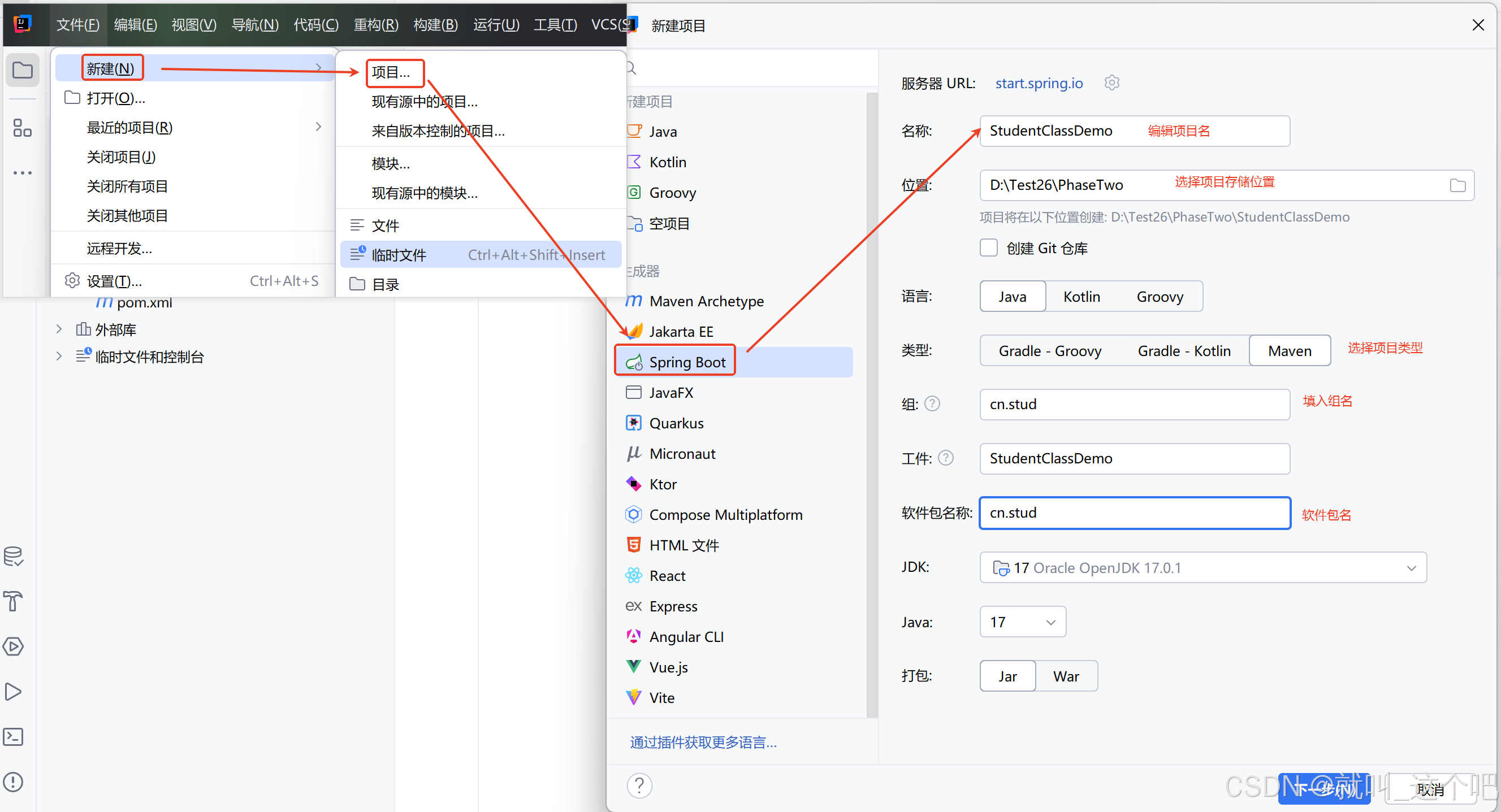
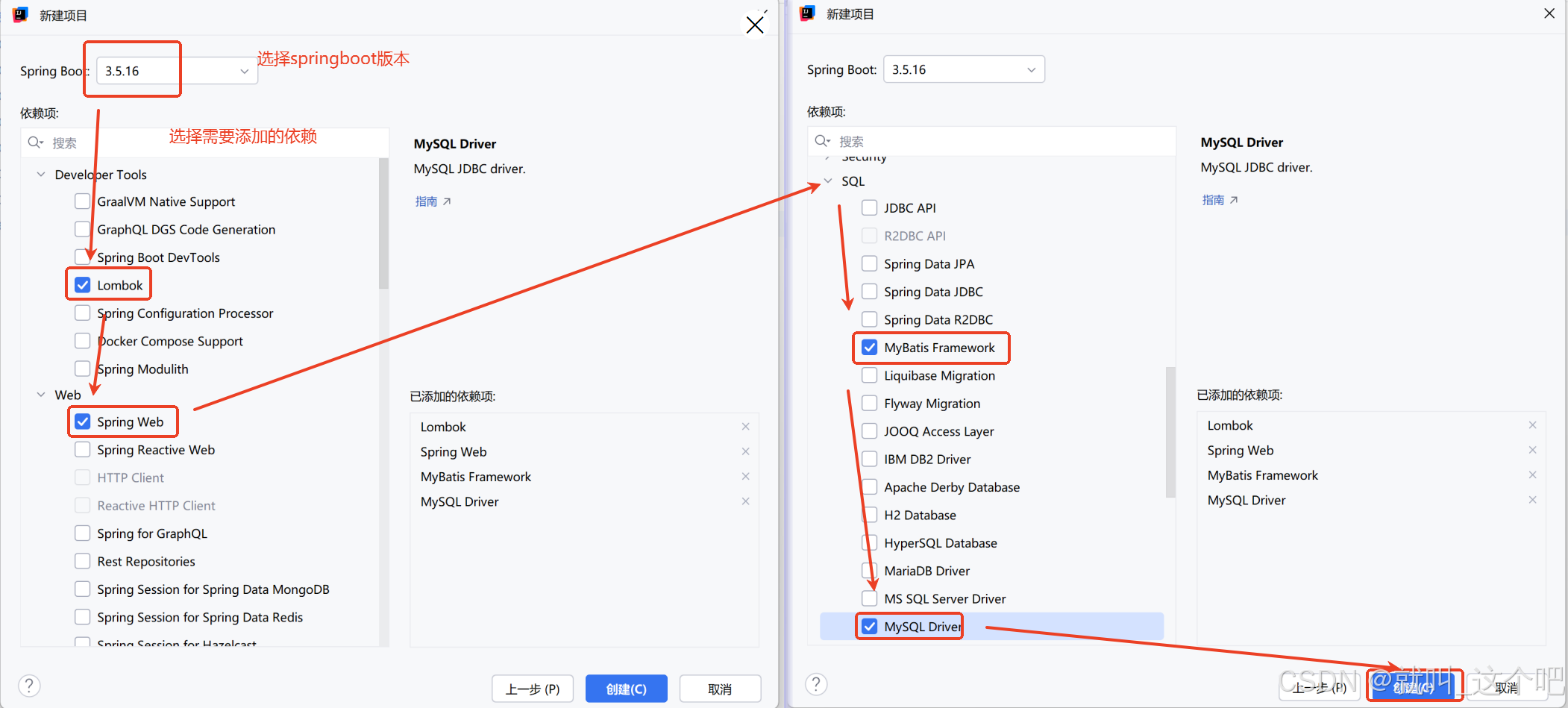
idea 中新建springboot项目步骤如图:
配置文件
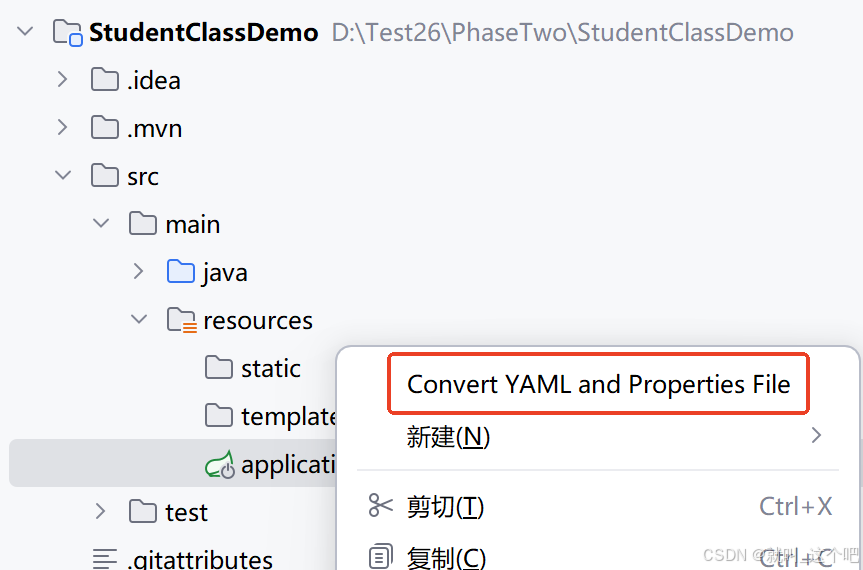
配置文件可以是properties或是yml,看个人使用习惯及公司开发要求,比较推荐yml层级分明,在项目中选中配置文件,右键可以切换文件类型
.properties
bash
spring.application.name=StudentClassDemo
# 数据库连接
spring.datasource.driver-class-name=com.mysql.cj.jdbc.Driver
spring.datasource.url=jdbc:mysql://localhost:3306/数据库名
spring.datasource.username=用户名
spring.datasource.password=密码
server.port=端口号,默认8080可省略
# mybaits文件加载位置
mybatis.mapper-locations=classpath:mapper/*Mapper.xml
# 开启驼峰命名
mybatis.configuration.map-underscore-to-camel-case=true
# 开启日志
mybatis.configuration.log-impl=org.apache.ibatis.logging.stdout.StdOutImpl
.yml
bash
mybatis:
    configuration:
        log-impl: org.apache.ibatis.logging.stdout.StdOutImpl
        map-underscore-to-camel-case: true
    mapper-locations: classpath:mapper/*Mapper.xml
server:
    port: 端口号
spring:
    application:
        name: StudentClassDemo
    datasource:
        driver-class-name: com.mysql.cj.jdbc.Driver
        password: 密码
        url: jdbc:mysql://localhost:3306/数据库名
        username: 用户名
pom.xml依赖
xml
<dependencies>
		<!-- springboot启动 -->
        <dependency>
            <groupId>org.springframework.boot</groupId>
            <artifactId>spring-boot-starter-web</artifactId>
        </dependency>
        <!-- mybatis集成启动 -->
        <dependency>
            <groupId>org.mybatis.spring.boot</groupId>
            <artifactId>mybatis-spring-boot-starter</artifactId>
            <version>3.0.5</version>
        </dependency>
		<!-- mysql数据库连接 -->
        <dependency>
            <groupId>com.mysql</groupId>
            <artifactId>mysql-connector-j</artifactId>
            <scope>runtime</scope>
        </dependency>
        <!-- lombok -->
        <dependency>
            <groupId>org.projectlombok</groupId>
            <artifactId>lombok</artifactId>
            <optional>true</optional>
        </dependency>
        <!-- 单元测试 -->
        <dependency>
            <groupId>org.springframework.boot</groupId>
            <artifactId>spring-boot-starter-test</artifactId>
            <scope>test</scope>
        </dependency>
        <!--测试用 简化mybatis接口的单元测试-->
        <dependency>
            <groupId>org.mybatis.spring.boot</groupId>
            <artifactId>mybatis-spring-boot-starter-test</artifactId>
            <version>3.0.5</version>
            <scope>test</scope>
        </dependency>
        <!-- pagehelper分页插件 -->
        <dependency>
            <groupId>com.github.pagehelper</groupId>
            <artifactId>pagehelper-spring-boot-starter</artifactId>
            <version>1.4.6</version>
        </dependency>
    </dependencies>
后续持续更新内容······