一、拓扑:
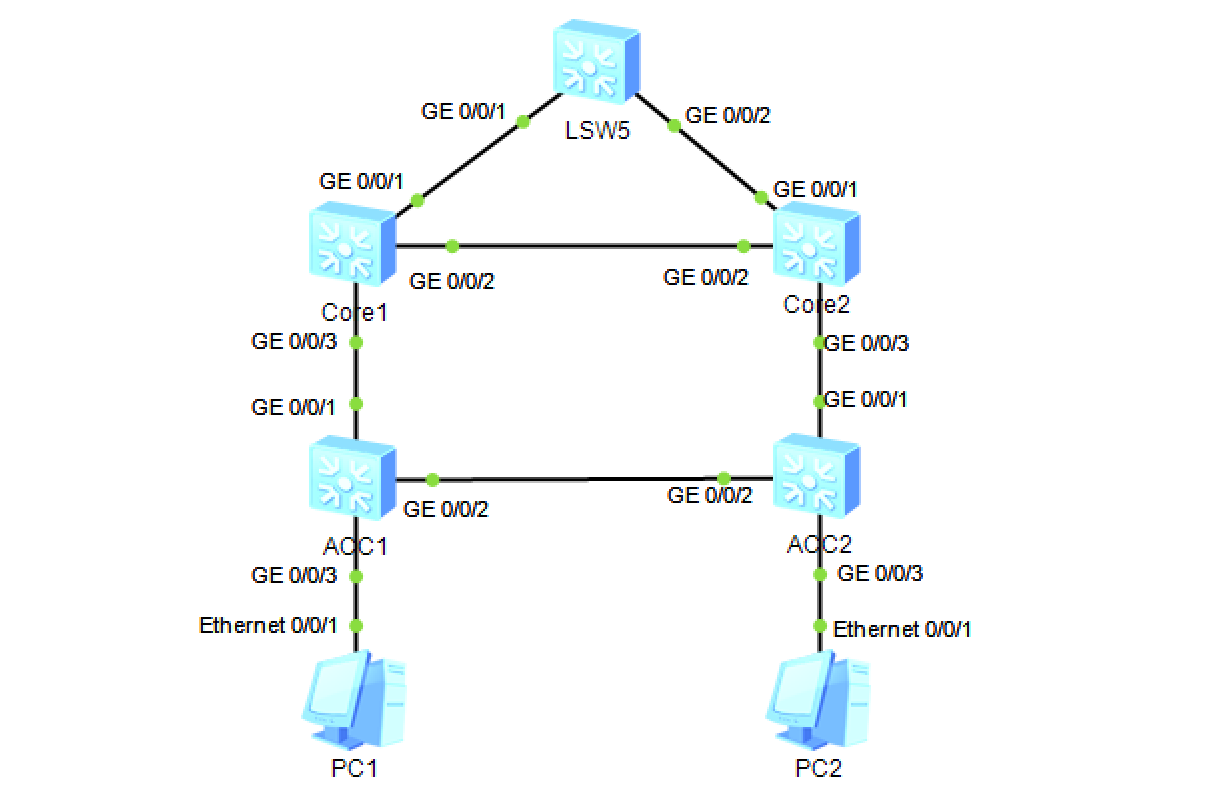
拓扑配置说明:
- PC1 和 PC2 分属 vlan 10/20,
- Core1/2 之间配置了 VRRP,Core1 为vlan10 网关,vrrp vrid 1 优先级120;Core2 为 vlan 20 网关,vrrp vrid 2优先级 120
- Core1/2 上行接口分别和出口交换机Export以vlan 100/200 建立链路
- Core1/2 和 出口交换机之间建立 ospf 邻居,宣告各自的路由
- Core1 配置单臂回声探测到 出口交换机Export vlan100之间的链路,并在 vlan10 下的 vrrp vrid1 联动,如果到出口的 vlan 100 down,则减少优先级40,Core2 立即抢占为 vrrp master、
- 同样,在Core2 的vlan20 vrrp vrid 2 下配置
二、主要配置命令:
Core1:
vlan batch 10 20 100 200
#
stp instance 10 root primary
stp instance 20 root secondary
#
stp region-configuration
 instance 10 vlan 10
 instance 20 vlan 20
 active region-configuration
#
bfd
#
interface Vlanif10
 ip address 10.1.1.252 255.255.255.0
 vrrp vrid 1 virtual-ip 10.1.1.254
 vrrp vrid 1 priority 120
 vrrp vrid 1 track bfd-session 1 reduced 40
#
interface Vlanif20
 ip address 10.1.2.252 255.255.255.0
 vrrp vrid 2 virtual-ip 10.1.2.254
#
interface Vlanif100
 ip address 10.1.100.2 255.255.255.252
#
interface GigabitEthernet0/0/1
 port link-type trunk
 undo port trunk allow-pass vlan 1
 port trunk allow-pass vlan 100 200
#
interface GigabitEthernet0/0/2
 port link-type trunk
 undo port trunk allow-pass vlan 1
 port trunk allow-pass vlan 10 20 100 200
#
interface GigabitEthernet0/0/3
 port link-type trunk
 port trunk allow-pass vlan 10 20
#
bfd 1 bind peer-ip 10.1.100.1 interface Vlanif100 source-ip 10.1.1.254  one-arm-
echo
 discriminator local 1
 commit
#
ospf 1 router-id 2.2.2.2
 area 0.0.0.0
  network 10.1.0.0 0.0.255.255
  network 2.2.2.2 0.0.0.0
#
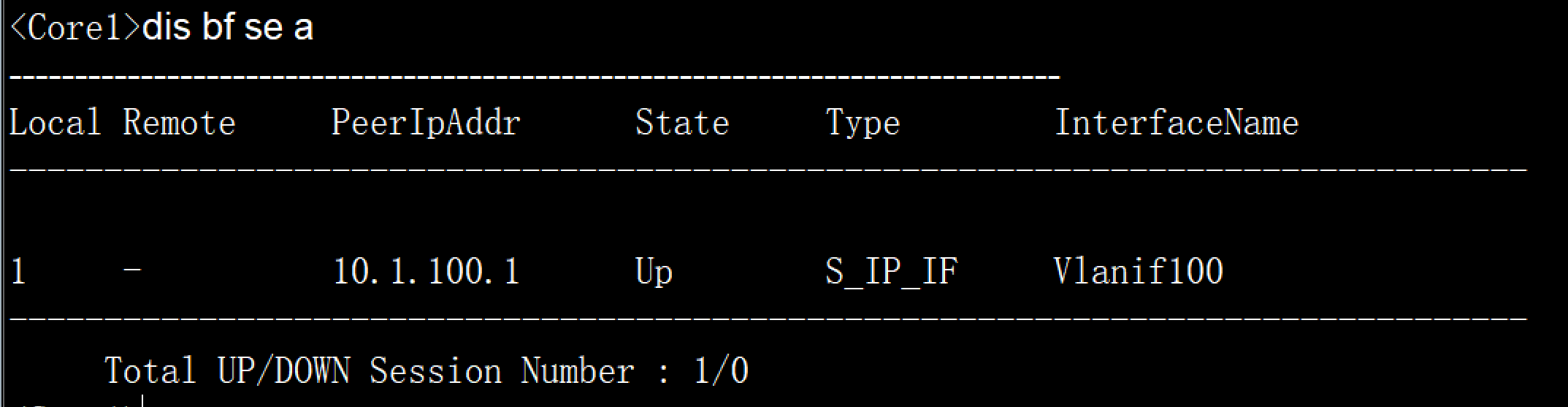
开启 BFD 后,观察下 Core1 上的 bfd session
Core2:
Core2 未配置,按照 Core1 配置即可
vlan batch 10 20 100 200
#
stp instance 10 root secondary
stp instance 20 root primary
#
stp region-configuration
 instance 10 vlan 10
 instance 20 vlan 20
 active region-configuration
#
interface Vlanif10
 ip address 10.1.1.253 255.255.255.0
 vrrp vrid 1 virtual-ip 10.1.1.254
#
interface Vlanif20
 ip address 10.1.2.253 255.255.255.0
 vrrp vrid 2 virtual-ip 10.1.2.254
 vrrp vrid 2 priority 120
#
interface Vlanif200
 ip address 10.1.200.2 255.255.255.252
#
interface GigabitEthernet0/0/1
 port link-type trunk
 undo port trunk allow-pass vlan 1
 port trunk allow-pass vlan 200
#
interface GigabitEthernet0/0/2
 port link-type trunk
 undo port trunk allow-pass vlan 1
 port trunk allow-pass vlan 10 20 100 200
#
interface GigabitEthernet0/0/3
 port link-type trunk
 port trunk allow-pass vlan 10 20
#
ospf 1 router-id 3.3.3.3
 area 0.0.0.0
  network 10.1.0.0 0.0.255.255
  network 3.3.3.3 0.0.0.0
#
Export:
interface Vlanif100
 ip address 10.1.100.1 255.255.255.252
#
interface Vlanif200
 ip address 10.1.200.1 255.255.255.252
#
interface GigabitEthernet0/0/1
 port link-type trunk
 undo port trunk allow-pass vlan 1
 port trunk allow-pass vlan 100 200
#
interface GigabitEthernet0/0/2
 port link-type trunk
 undo port trunk allow-pass vlan 1
 port trunk allow-pass vlan 100 200
#
interface LoopBack1
 ip address 1.1.1.1 255.255.255.255
#
ospf 1 router-id 1.1.1.1
 area 0.0.0.0
  network 10.1.0.0 0.0.255.255
  network 1.1.1.1 0.0.0.0
#
三、检测:
把 Export 上 的 vlan 100 下 shutdown掉,观察 Core1 上的vrrp状态,原来是这样的:
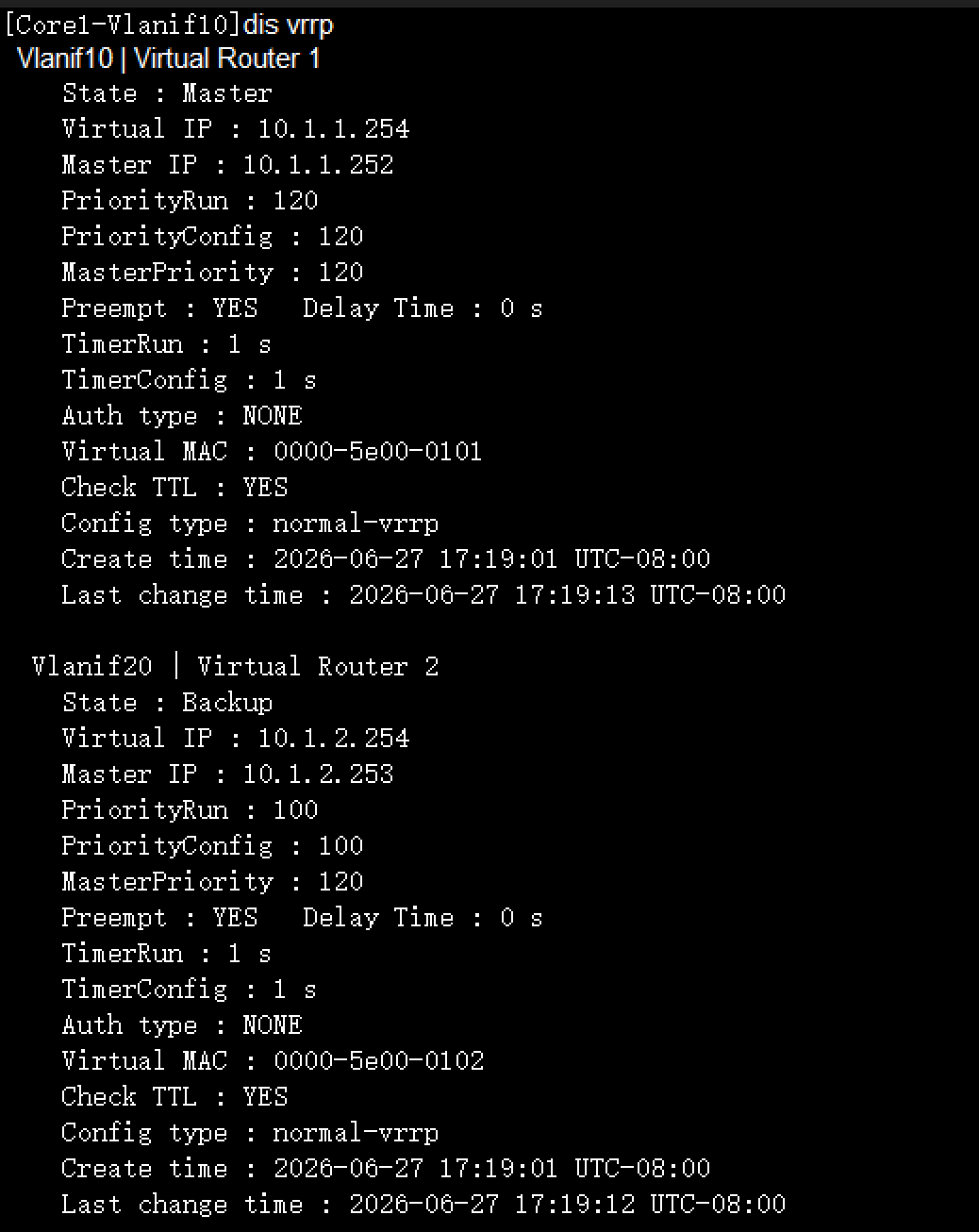
现在是这样的:
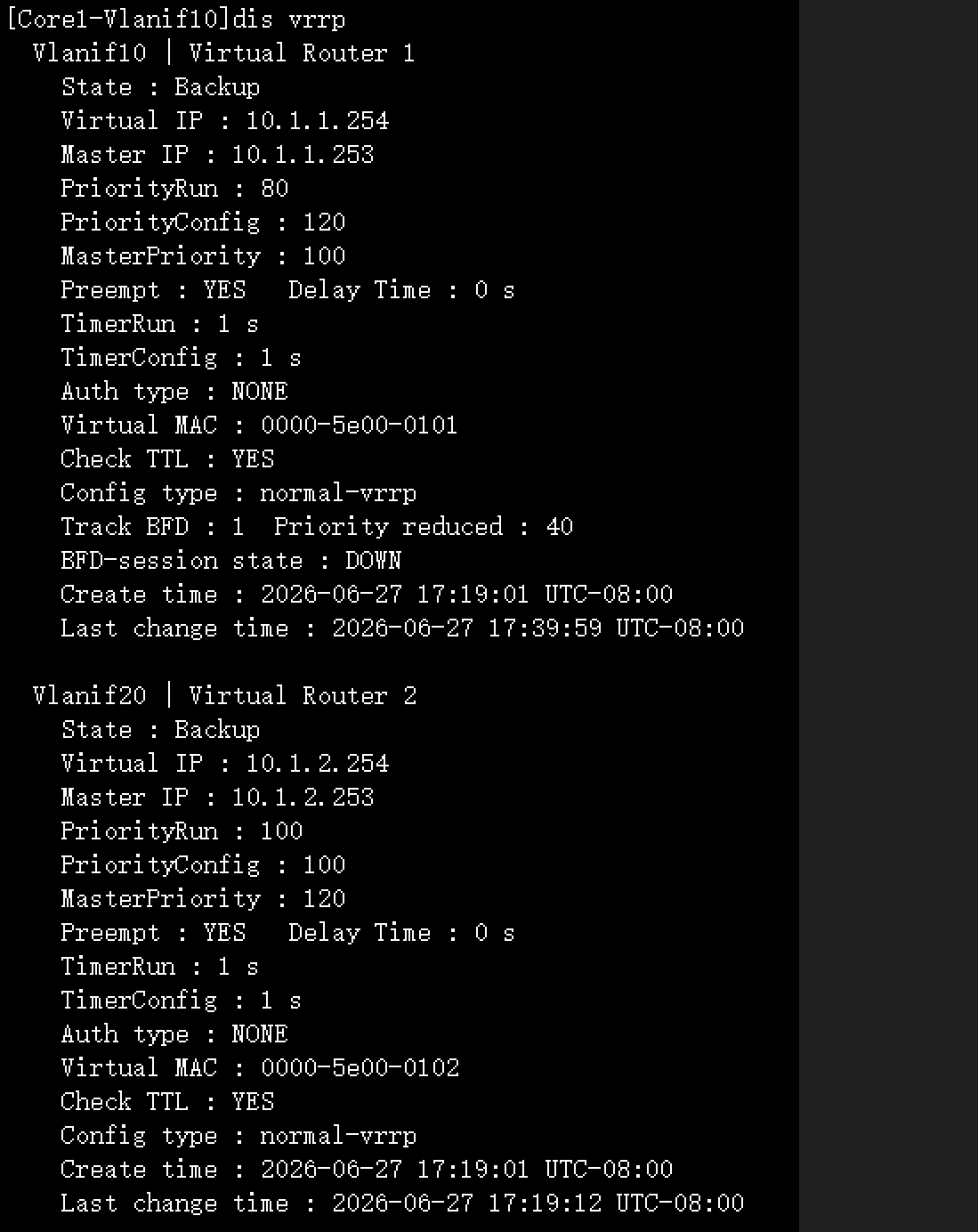
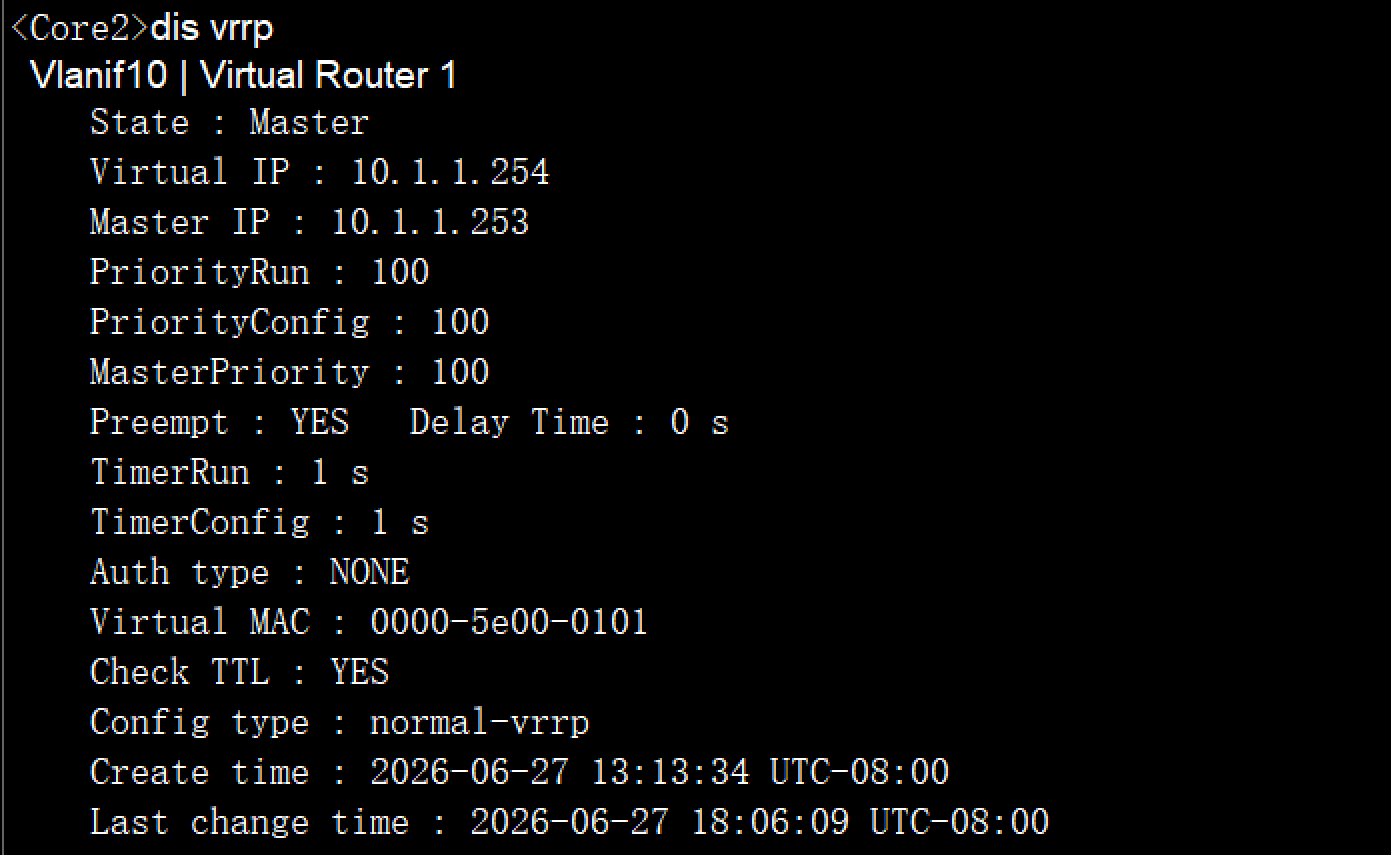
而 Core2 上的 vrrp vrid1 ,则立即抢占为master,因为默认为立即抢占,延时0秒