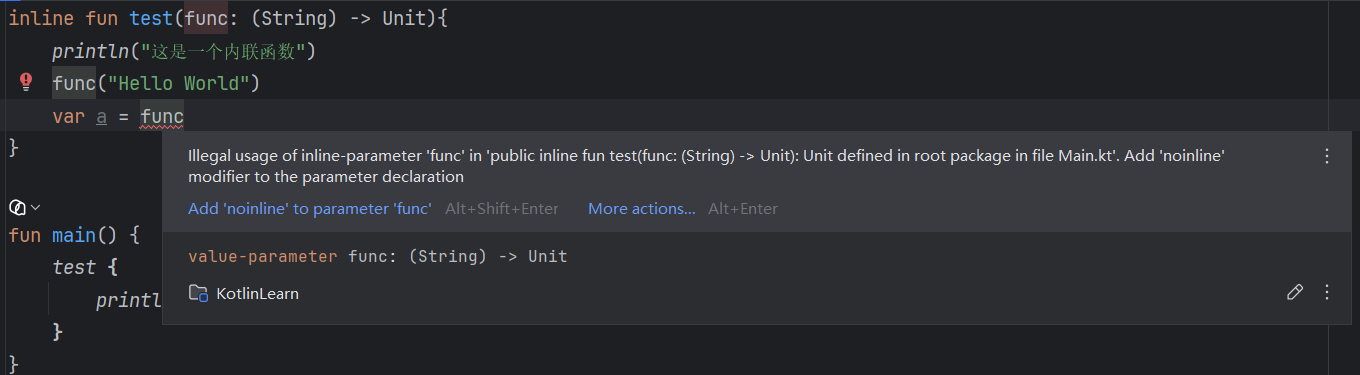
inline fun test(func: (String) -> Unit) {
    println("这是一个内联函数")  // 这是一个内联函数
    func("HelloWorld")
}

fun main() {
    test { println("打印:$it") }  // 打印:HelloWorld
}
可以简单理解为,编译后大致等价于:
kotlin复制代码
fun main() {
    println("这是一个内联函数")  // 这是一个内联函数
    val it = "HelloWorld"
    println("打印:$it")        // 打印:HelloWorld
}
注意:内联函数中的函数参数主要用于直接调用,不适合再保存到变量中使用。
2.类与对象
2.1 类的定义与对象创建
Kotlin 使用 class 定义类。空类可以省略花括号。
kotlin复制代码
class Student
主构造函数 写在类名后面。没有注解或可见性修饰符时,constructor 可以省略。
kotlin复制代码
class Student constructor(name: String, age: Int)
class Student2(name: String, age: Int)
如果希望构造参数同时成为属性,需要加 var 或 val。
kotlin复制代码
class Student(var name: String, val age: Int)

fun main() {
    val stu = Student("小明", 18)
    println(stu.name)  // 小明
    println(stu.age)   // 18
}
也可以在类体中声明属性,但必须初始化,或者使用 lateinit 延迟初始化。
kotlin复制代码
class Student {
    lateinit var name: String
    var age: Int = 0
}

fun main() {
    val stu = Student()
    stu.name = "小明"
    stu.age = 18
    println(stu.name)  // 小明
    println(stu.age)   // 18
}
Kotlin 创建对象不需要 new。
kotlin复制代码
class Student(var name: String, val age: Int)

fun main() {
    val stu = Student("小明", 18)
    println("对象的name = ${stu.name}, age = ${stu.age}")  // 对象的name = 小明, age = 18
}
class Student(var name: String, var age: Int) {
    init {
        println("我是初始化代码块")  // 我是初始化代码块
    }

    constructor(name: String) : this(name, 18) {
        println("我是次要构造函数")  // 我是次要构造函数
    }
}

fun main() {
    Student("小明")
}
2.3 类的成员函数
类中的函数叫成员函数,通过对象调用。
kotlin复制代码
class Student(var name: String, var age: Int) {
    fun hello() {
        println("大家好啊")  // 大家好啊
    }
}

fun main() {
    val stu = Student("小明", 18)
    stu.hello()
}
当成员属性和函数参数同名时,使用 this 表示当前对象。
kotlin复制代码
class Student(var name: String, var age: Int) {
    fun hello(name: String) {
        println("参数name=$name")        // 参数name=小红
        println("成员name=${this.name}") // 成员name=小明
    }
}

fun main() {
    val stu = Student("小明", 18)
    stu.hello("小红")
}
class Student(var name: String, var age: Int) {
    operator fun plus(another: Student): Student {
        return Student(this.name + another.name, this.age + another.age)
    }
}

fun main() {
    val a = Student("小米", 18)
    val b = Student("华为", 19)
    val c = a + b
    println("名称:${c.name},年龄:${c.age}")  // 名称:小米华为,年龄:37
}
常见一元运算符:
符号
对应函数
+a
a.unaryPlus()
-a
a.unaryMinus()
!a
a.not()
a++
a.inc()
a--
a.dec()
常见二元运算符:
符号
对应函数
a + b
a.plus(b)
a - b
a.minus(b)
a * b
a.times(b)
a / b
a.div(b)
a % b
a.rem(b)
a..b
a.rangeTo(b)
a..<b
a.rangeUntil(b)
in 和 !in 对应 contains。
符号
对应函数
a in b
b.contains(a)
a !in b
!b.contains(a)
复合赋值运算符:
符号
对应函数
a += b
a.plusAssign(b)
a -= b
a.minusAssign(b)
a *= b
a.timesAssign(b)
a /= b
a.divAssign(b)
a %= b
a.remAssign(b)
比较运算符对应 compareTo。
运算符
对应函数
a > b
a.compareTo(b) > 0
a < b
a.compareTo(b) < 0
a >= b
a.compareTo(b) >= 0
a <= b
a.compareTo(b) <= 0
示例:
kotlin复制代码
class Student(var name: String, var age: Int) {
    operator fun compareTo(other: Student): Int {
        return this.age - other.age
    }
}

fun main() {
    val a = Student("小明", 18)
    val b = Student("小红", 20)
    println(a > b)   // false
    println(a < b)   // true
}
fun main() {
    val str: String? = "Kotlin"
    println(str!!.length)  // 6
}
2.7 解构声明
解构可以把对象拆成多个变量。自定义类需要提供 componentN 函数。
kotlin复制代码
class Student(var name: String, var age: Int) {
    operator fun component1() = name   //使用component1表示解构出来的第一个参数
    operator fun component2() = age    //使用component2表示解构出来的第二个参数
  	operator fun component3...  //以此类推
}

fun main() {
    val student = Student("小明", 18)
    val (name, age) = student
    println(name)  // 小明
    println(age)   // 18
}
解构也可以用在 lambda 参数中。
kotlin复制代码
class Student(var name: String, var age: Int) {
    operator fun component1() = name
    operator fun component2() = age
}

fun main() {
    val func: (Student) -> Unit = { (name, age) ->
        println("名字: $name, 年龄: $age")  // 名字: 小明, 年龄: 18
    }

    func(Student("小明", 18))
}
不需要的解构变量可以用 _ 忽略。
kotlin复制代码
fun main() {
    val student = Student("小明", 18)
    val (_, age) = student
    println(age)  // 18
}
同一模块可见(当前的项目中可以随意访问,与 public 没大差别,但是如果别人引用我们的项目,那么无法使用)
protected
顶层声明不能使用
类成员:
修饰符
作用范围
public
任何地方可见,默认值
private
只在当前类内部可见
protected
当前类和子类可见
internal
同一模块可见
kotlin复制代码
class Student(
    private var name: String,
    internal var age: Int
) {
    private constructor() : this("", 10)

    fun show() {
        println(name)  // 小明
    }
}

fun main() {
    val stu = Student("小明", 18)
    stu.show()
    println(stu.age)  // 18
    // println(stu.name)  // 编译错误,name是private
}
3.封装、继承和多态
封装、继承、多态是面向对象的基础思想,Kotlin 与 Java 思路一致,但语法更简洁。
封装:隐藏内部属性,通过方法暴露必要操作。
继承:子类复用父类能力,并扩展新能力。
多态:父类引用指向子类对象,运行时调用子类重写后的方法。
3.1 封装
封装通常使用 private 隐藏属性,再提供方法控制访问。
kotlin复制代码
class Student(private var name: String, private var age: Int) {
    fun getName(): String = name
    fun getAge(): Int = age

    fun setName(name: String) {
        this.name = name
    }
}

fun main() {
    val stu = Student("小明", 18)
    println(stu.getName())  // 小明
    stu.setName("小红")
    println(stu.getName())  // 小红
}
Kotlin 中也可以使用属性 getter/setter 实现更自然的封装。
kotlin复制代码
class Student(name: String) {
    var name: String = name
        private set
}

fun main() {
    val stu = Student("小明")
    println(stu.name)  // 小明
    // stu.name = "小红"  // 编译错误,setter是private
}
open class Student {
    val card = "学生证"
    fun hello() = println("我会打招呼")  // 我会打招呼
}

class ArtStudent : Student() {
    fun draw() = println("我会画画")  // 我会画画
}

fun main() {
    val stu = ArtStudent()
    stu.hello()
    stu.draw()
}
父类有主构造函数时,子类必须调用父类构造函数。
kotlin复制代码
open class Student(val name: String, val age: Int)

// 子类必须适配其父类的构造函数,因为需要先对父类进行初始化
// 其实就是去调用一次父类的构造函数,填入需要的参数即可,这里的参数可以是当前子类构造方法的形参,也可以是直接填写的一个参数
class ArtStudent(name: String, age: Int) : Student(name, age) {
    fun show() = println("$name $age")
}

fun main() {
    val stu = ArtStudent("小明", 18)
    stu.show()  // 小明 18
}
如果父类有多个构造函数,子类可以选择其中一个。
kotlin复制代码
open class Student {
    constructor(name: String) {
        println(name)  // 小明
    }

    constructor(name: String, age: Int) {
        println("$name $age")
    }
}

class ArtStudent : Student("小明")

fun main() {
    ArtStudent()
}
子类没有主构造函数时,次要构造函数使用 super 调用父类构造函数。
kotlin复制代码
open class Student {
    constructor(name: String) {
        println("父类构造:$name")  // 父类构造:小明
    }
}

// 子类不写主构造函数时,可以直接在冒号后面添加父类类名
class ArtStudent : Student {
    constructor(name: String) : super(name)
}

fun main() {
    ArtStudent("小明")
}
子类也可以用 this 调用自己的其他构造函数,但最终仍然要调用父类构造函数。
kotlin复制代码
open class Student {
    constructor(name: String, age: Int) {
        println("$name $age")  // 小明 18
    }
}

class ArtStudent : Student {
    constructor(name: String) : this(name, 18)
    constructor(name: String, age: Int) : super(name, age)
}

fun main() {
    ArtStudent("小明")
}
open class Student() {
    constructor(str: String) : this()
    constructor(str: String, age: Int) : this()
    fun hello() = println("我会打招呼")
}

class ArtStudent() : Student() {
    constructor(str: String) : this()  //正确,必须直接或间接调用主构造函数
    constructor(str: String, age: Int) : super(str, age)   //报错,不能绕过主构造函数去匹配父类构造函数
    fun draw() = println("我会画画")
}
3.3 属性覆盖
Kotlin 中方法和属性默认不能被重写。父类成员要加 open,子类重写时加 override。
kotlin复制代码
open class Student {
    open fun hello() = println("我会打招呼")
}

class ArtStudent : Student() {
    override fun hello() = println("哦哈哟")
}

fun main() {
    val stu = ArtStudent()
    stu.hello()  // 哦哈哟
}
属性也可以被覆盖。
kotlin复制代码
open class Student {
    open val type: String = "普通学生"
    fun show() = println(type)
}

class ArtStudent : Student() {
    override val type: String = "美术生"
}

fun main() {
    val stu = ArtStudent()
    stu.show()  // 美术生
}
也可以 在子类主构造函数中直接覆盖父类属性。
kotlin复制代码
open class Student {
    open val name: String = "大明"
}

// 在主构造函数中覆盖,也是可以的,这样会将构造时传入的值进行覆盖
class ArtStudent(override val name: String) : Student()

fun main() {
    val stu = ArtStudent("小明")
    println(stu.name)  // 小明
}
open class Student {
    open val name: String = "小明"
    init { println("我的名字是: ${name.length}") }  //这里拿到的name实际上是还未初始化的子类name
}

class ArtStudent : Student() {
    override val name = "大明"
}

fun main() {
    var student = ArtStudent()
}
多态:父类引用指向子类对象,子类可以重写父类的 open 方法,运行时根据实际对象类型调用对应的方法。
kotlin复制代码
open class Student {
    open fun hello() = println("大家好")
}

class ArtStudent : Student() {
    override fun hello() = println("我是美术生")
}

class ScienceStudent : Student() {
    override fun hello() = println("我是理科生")
}

fun main() {
    val a: Student = ArtStudent()
    val b: Student = ScienceStudent()
    a.hello()  // 我是美术生
    b.hello()  // 我是理科生
}
使用 is 判断对象类型。
kotlin复制代码
open class Student
class ArtStudent : Student()
class SportStudent : Student()

fun main() {
    val student: Student = ArtStudent()
    println(student is ArtStudent)    // true
    println(student is SportStudent)  // false
    println(student is Student)       // true
}
使用 as 强制类型转换。建议先用 is 判断,避免类型转换异常。
kotlin复制代码
open class Student
class ArtStudent : Student() {
    fun draw() = println("我会画画")  // 我会画画
}

fun main() {
    val student: Student = ArtStudent()
    if (student is ArtStudent) {
        val artStudent = student as ArtStudent
        artStudent.draw()
    }
}
Kotlin 有智能类型转换,is 判断之后通常不需要再写 as。
kotlin复制代码
fun main() {
    val student: Student = ArtStudent()
    if (student is ArtStudent) {
        student.draw()  // 我会画画
    }
}
3.5 顶层 Any 类
Kotlin 中所有类默认继承自 Any,类似 Java 中的 Object,但成员更少。
Any 主要包含三个函数:
kotlin复制代码
open class Any {
    open operator fun equals(other: Any?): Boolean
    open fun hashCode(): Int
    open fun toString(): String
}
Kotlin 中有两种相等判断:
写法
含义
==
结构相等,等价于调用 equals()
===
引用相等,判断是否是同一个对象
kotlin复制代码
fun main() {
    val a = String(charArrayOf('H', 'i'))
    val b = String(charArrayOf('H', 'i'))

    println(a == b)   // true
    println(a === b)  // false
}
toString() 默认输出类名和哈希信息,可以重写。
kotlin复制代码
class Student(val name: String) {
    override fun toString(): String {
        return "Student(name=$name)"
    }
}

fun main() {
    println(Student("小明"))  // Student(name=小明)
}
3.6 抽象类
抽象类使用 abstract 声明,不能直接创建对象。抽象成员没有函数体,子类必须实现。
kotlin复制代码
abstract class Student {
    // 注意抽象的属性不能为private,不然子类就没法重写了
    abstract val type: String // 抽象类中可以存在抽象成员属性
    abstract fun hello() // 抽象类中可以存在抽象函数
}

// 子类继承自抽象类时,必须要重写抽象类中定义的抽象属性和抽象函数
class ArtStudent : Student() {
    override val type: String = "美术生"
    override fun hello() = println("大家好,我是$type")
}

fun main() {
    val stu = ArtStudent()
    stu.hello()  // 大家好,我是美术生
}
抽象类也可以有普通属性和普通函数。
kotlin复制代码
abstract class Student {
    abstract fun hello()
    fun test() = println("普通函数")  // 普通函数
}

class ArtStudent : Student() {
    override fun hello() = println("抽象函数的实现")  // 抽象函数的实现
}

fun main() {
    val stu = ArtStudent()
    stu.test()
    stu.hello()
}
3.7 接口
接口使用 interface 声明。类可以继承一个父类,同时实现多个接口。
kotlin复制代码
interface A {
    val x: String // 接口中所有属性默认都是abstract的(可省略关键字)
    fun sleep() // 接口中所有函数默认都是abstract的(可省略关键字)
}

interface B {
    fun game()
}

class Student : A, B {
    override val x: String = "测试"
    override fun sleep() = println("睡觉")
    override fun game() = println("打游戏")
}

fun main() {
    val stu = Student()
    println(stu.x)  // 测试
    stu.sleep()     // 睡觉
    stu.game()      // 打游戏
}
接口中的函数可以有默认实现。
kotlin复制代码
interface A {
    fun sleep() = println("默认睡觉")
}

class Student : A

fun main() {
    val stu = Student()
    stu.sleep()  // 默认睡觉
}
如果多个接口有同名默认方法,子类必须重写并明确选择调用哪个父接口的方法。
kotlin复制代码
interface A {
    fun hello() = println("A")
}

interface B {
    fun hello() = println("B")
}

class Student : A, B {
    override fun hello() {
        super<A>.hello()  // A
        super<B>.hello()  // B
    }
}

fun main() {
    Student().hello()
}
fun String.test(): String = "666"

fun main() {
    val text = "Hello World"
    println(text.test())  // 666
}
扩展函数是静态分发,具体调用哪个扩展函数取决于变量的声明类型,而不是运行时实际类型。
kotlin复制代码
open class Shape
class Rectangle : Shape()

fun Shape.getName() = "Shape"
fun Rectangle.getName() = "Rectangle"

fun printClassName(s: Shape) {
    println(s.getName())  // Shape
}

fun main() {
    printClassName(Rectangle())
}
class Student

val Student.gender: String
    get() = "未知"

fun main() {
    val stu = Student()
    println(stu.gender)  // 未知
}
扩展函数内部的 this 指向被扩展的对象。如果和外部类成员重名,需要使用 this@外部类名 区分。
kotlin复制代码
class A {
    fun hello() = "Hello World"
}

class B(private val a: A) {
    private fun A.test() {
        println(this.hello())   // Hello World 扩展函数中的 this 依然指的是被扩展的类对象
        println(this@B.hello()) // Bye World
    }

    fun hello() = "Bye World"
}
将一个扩展函数作为参数给到一个函数类型变量,扩展函数类型需要写成 类型.() -> 返回值类型。
kotlin复制代码
fun main() {
    val func: String.() -> Int = {
        this.length
    }

    println("Hello".func())  // 5
    println(func("Kotlin"))  // 6
}