大家好我是鸿蒙Jack,本期以我的《时光旅记》APP 为例,聊一个记录类应用里很实用的能力:用户一次选择多张旅行照片后,APP 自动读取照片信息,再按拍摄时间和地点把这些照片拆成多条"瞬间"。
这件事看起来像是"批量导入图片",但真正做起来,重点不在把图片塞进列表,而是让照片带着自己的时间和地点进入 APP。比如一次旅行从上午的机场、下午的景区到晚上的餐厅,用户选择几十张照片后,我希望《时光旅记》自动生成"某天 · 某地 · N 张照片"这样的瞬间,而不是让用户手动一张张整理。
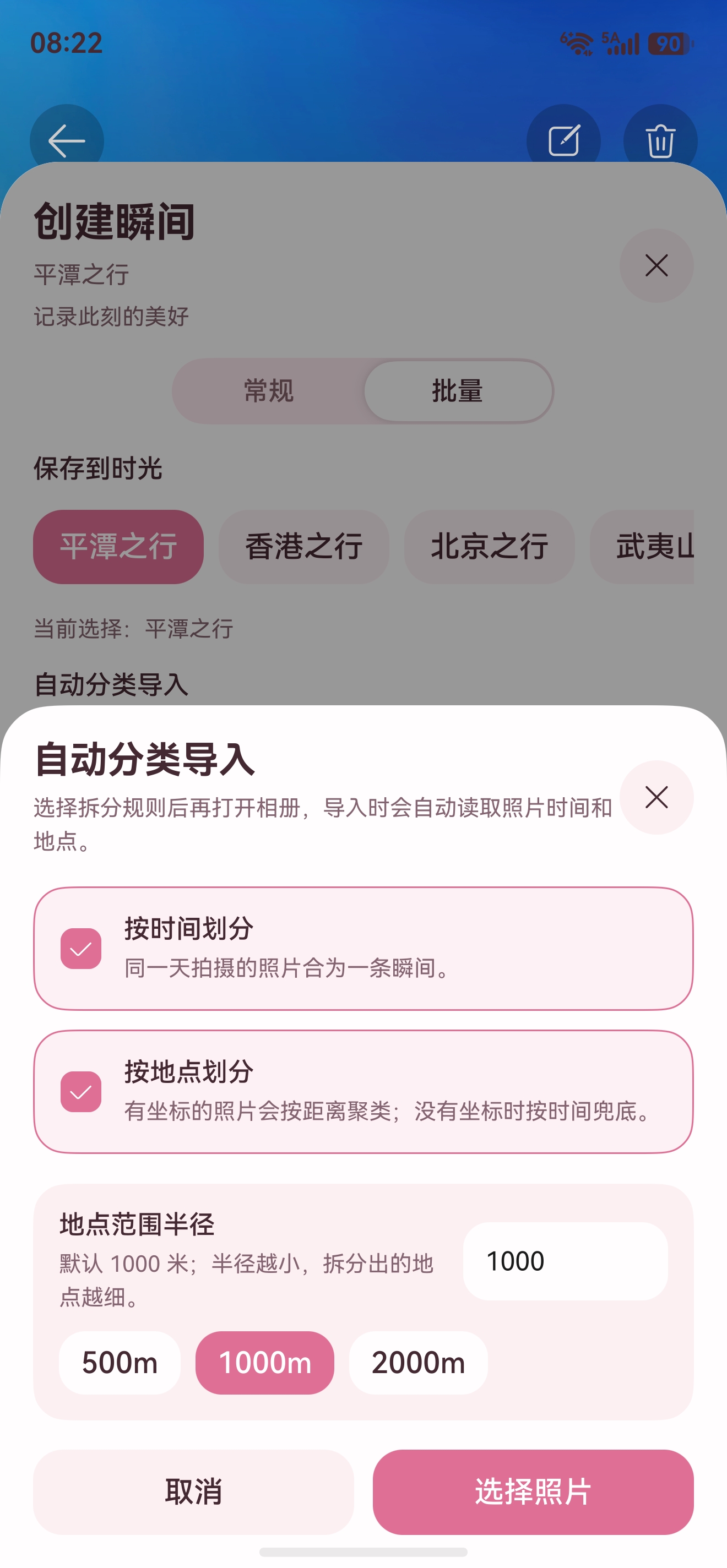
这篇文章会把技术栈、调用链、分组规则和完整代码都放出来。
这个能力解决什么问题
《时光旅记》里的核心对象是"时光本"和"瞬间"。一本时光本可以是一次旅行、一本日记或一个长期主题;瞬间则是一条具体记录,里面包含标题、文字、地点、心情、标签和多张媒体。
普通创建瞬间时,用户先填内容,再选择照片。批量创建瞬间正好反过来:用户先选择一组照片,APP 读取照片里的拍摄时间和 GPS 坐标,再自动创建多条瞬间。时间来自 EXIF 的 DATE_TIME_ORIGINAL 或 DATE_TIME,地点来自 EXIF 的 GPS_LATITUDE、GPS_LONGITUDE,再通过 Location Kit 做逆地理编码。
我在《时光旅记》里给用户留了三个选择:
| 选项 | 作用 |
|---|---|
| 按时间划分 | 同一天拍摄的照片合并成一条瞬间 |
| 按地点划分 | 有坐标的照片按距离半径聚类 |
| 地点范围半径 | 默认 1000 米,越小拆得越细 |
如果用户只开"按时间划分",几十张照片会按日期分组。如果同时开启"按时间"和"按地点",同一天里不同地点会拆成不同瞬间。如果照片没有 GPS,则退回到时间分组,避免导入失败。
用到的技术栈
这条链路用到的能力比较多,我按实际调用顺序讲。
ArkTS + ArkUI 是页面和业务编排层。批量导入入口在 MomentComposerDialog,用户选择拆分规则后,通过 onBatchImport 回调交给主页面处理。
Media Library Kit 负责打开系统相册。这里使用 photoAccessHelper.PhotoViewPicker 和 PhotoSelectOptions 限制只选择图片,并通过 PhotoAccessHelper.requestPhotoUrisReadPermission() 获取可读 URI。Picker 返回的媒体 URI 不等于永久可读文件,所以导入后必须复制到应用沙箱。
Core File Kit 负责文件读写和沙箱落盘。项目里使用 fileIo.openSync()、fileIo.copyFile()、fileUri.getUriFromPath(),把相册 URI 对应的照片复制到 context.filesDir/time-imprint/{notebookId}/ 目录下。
Image Kit 负责读取 EXIF。核心调用是 image.createImageSource(file.fd) 和 imageSource.getImageProperty(),读取拍摄时间、经纬度、海拔等字段。EXIF 可能为空,也可能格式不一致,所以代码里有标准化和兜底解析。
Location Kit 负责把经纬度变成可读地址。EXIF 通常只给 WGS-84 坐标,APP 需要调用 geoLocationManager.getAddressesFromLocation() 得到省、市、地点名和完整地址。
权限系统 里最关键的是 ohos.permission.MEDIA_LOCATION。不申请这个权限,照片里的地理位置可能读不到。ohos.permission.LOCATION 和 ohos.permission.APPROXIMATELY_LOCATION 主要服务于 APP 内手动定位和地图选点,不是读取照片 EXIF GPS 的核心权限。
PersistenceV2 + RDB 持久化 负责最终保存。页面侧先把新生成的 MomentRecord 放进当前 NotebookRecord,再通过 commitNotebookStore() 写回应用数据。项目底层还有 TimeImprintPersistence 把时光本、瞬间、媒体等结构化数据落到本地数据库。
架构图
#mermaid-svg-oUF91XBsw93tWKY1{font-family:"trebuchet ms",verdana,arial,sans-serif;font-size:16px;fill:#333;}@keyframes edge-animation-frame{from{stroke-dashoffset:0;}}@keyframes dash{to{stroke-dashoffset:0;}}#mermaid-svg-oUF91XBsw93tWKY1 .edge-animation-slow{stroke-dasharray:9,5!important;stroke-dashoffset:900;animation:dash 50s linear infinite;stroke-linecap:round;}#mermaid-svg-oUF91XBsw93tWKY1 .edge-animation-fast{stroke-dasharray:9,5!important;stroke-dashoffset:900;animation:dash 20s linear infinite;stroke-linecap:round;}#mermaid-svg-oUF91XBsw93tWKY1 .error-icon{fill:#552222;}#mermaid-svg-oUF91XBsw93tWKY1 .error-text{fill:#552222;stroke:#552222;}#mermaid-svg-oUF91XBsw93tWKY1 .edge-thickness-normal{stroke-width:1px;}#mermaid-svg-oUF91XBsw93tWKY1 .edge-thickness-thick{stroke-width:3.5px;}#mermaid-svg-oUF91XBsw93tWKY1 .edge-pattern-solid{stroke-dasharray:0;}#mermaid-svg-oUF91XBsw93tWKY1 .edge-thickness-invisible{stroke-width:0;fill:none;}#mermaid-svg-oUF91XBsw93tWKY1 .edge-pattern-dashed{stroke-dasharray:3;}#mermaid-svg-oUF91XBsw93tWKY1 .edge-pattern-dotted{stroke-dasharray:2;}#mermaid-svg-oUF91XBsw93tWKY1 .marker{fill:#333333;stroke:#333333;}#mermaid-svg-oUF91XBsw93tWKY1 .marker.cross{stroke:#333333;}#mermaid-svg-oUF91XBsw93tWKY1 svg{font-family:"trebuchet ms",verdana,arial,sans-serif;font-size:16px;}#mermaid-svg-oUF91XBsw93tWKY1 p{margin:0;}#mermaid-svg-oUF91XBsw93tWKY1 .label{font-family:"trebuchet ms",verdana,arial,sans-serif;color:#333;}#mermaid-svg-oUF91XBsw93tWKY1 .cluster-label text{fill:#333;}#mermaid-svg-oUF91XBsw93tWKY1 .cluster-label span{color:#333;}#mermaid-svg-oUF91XBsw93tWKY1 .cluster-label span p{background-color:transparent;}#mermaid-svg-oUF91XBsw93tWKY1 .label text,#mermaid-svg-oUF91XBsw93tWKY1 span{fill:#333;color:#333;}#mermaid-svg-oUF91XBsw93tWKY1 .node rect,#mermaid-svg-oUF91XBsw93tWKY1 .node circle,#mermaid-svg-oUF91XBsw93tWKY1 .node ellipse,#mermaid-svg-oUF91XBsw93tWKY1 .node polygon,#mermaid-svg-oUF91XBsw93tWKY1 .node path{fill:#ECECFF;stroke:#9370DB;stroke-width:1px;}#mermaid-svg-oUF91XBsw93tWKY1 .rough-node .label text,#mermaid-svg-oUF91XBsw93tWKY1 .node .label text,#mermaid-svg-oUF91XBsw93tWKY1 .image-shape .label,#mermaid-svg-oUF91XBsw93tWKY1 .icon-shape .label{text-anchor:middle;}#mermaid-svg-oUF91XBsw93tWKY1 .node .katex path{fill:#000;stroke:#000;stroke-width:1px;}#mermaid-svg-oUF91XBsw93tWKY1 .rough-node .label,#mermaid-svg-oUF91XBsw93tWKY1 .node .label,#mermaid-svg-oUF91XBsw93tWKY1 .image-shape .label,#mermaid-svg-oUF91XBsw93tWKY1 .icon-shape .label{text-align:center;}#mermaid-svg-oUF91XBsw93tWKY1 .node.clickable{cursor:pointer;}#mermaid-svg-oUF91XBsw93tWKY1 .root .anchor path{fill:#333333!important;stroke-width:0;stroke:#333333;}#mermaid-svg-oUF91XBsw93tWKY1 .arrowheadPath{fill:#333333;}#mermaid-svg-oUF91XBsw93tWKY1 .edgePath .path{stroke:#333333;stroke-width:2.0px;}#mermaid-svg-oUF91XBsw93tWKY1 .flowchart-link{stroke:#333333;fill:none;}#mermaid-svg-oUF91XBsw93tWKY1 .edgeLabel{background-color:rgba(232,232,232, 0.8);text-align:center;}#mermaid-svg-oUF91XBsw93tWKY1 .edgeLabel p{background-color:rgba(232,232,232, 0.8);}#mermaid-svg-oUF91XBsw93tWKY1 .edgeLabel rect{opacity:0.5;background-color:rgba(232,232,232, 0.8);fill:rgba(232,232,232, 0.8);}#mermaid-svg-oUF91XBsw93tWKY1 .labelBkg{background-color:rgba(232, 232, 232, 0.5);}#mermaid-svg-oUF91XBsw93tWKY1 .cluster rect{fill:#ffffde;stroke:#aaaa33;stroke-width:1px;}#mermaid-svg-oUF91XBsw93tWKY1 .cluster text{fill:#333;}#mermaid-svg-oUF91XBsw93tWKY1 .cluster span{color:#333;}#mermaid-svg-oUF91XBsw93tWKY1 div.mermaidTooltip{position:absolute;text-align:center;max-width:200px;padding:2px;font-family:"trebuchet ms",verdana,arial,sans-serif;font-size:12px;background:hsl(80, 100%, 96.2745098039%);border:1px solid #aaaa33;border-radius:2px;pointer-events:none;z-index:100;}#mermaid-svg-oUF91XBsw93tWKY1 .flowchartTitleText{text-anchor:middle;font-size:18px;fill:#333;}#mermaid-svg-oUF91XBsw93tWKY1 rect.text{fill:none;stroke-width:0;}#mermaid-svg-oUF91XBsw93tWKY1 .icon-shape,#mermaid-svg-oUF91XBsw93tWKY1 .image-shape{background-color:rgba(232,232,232, 0.8);text-align:center;}#mermaid-svg-oUF91XBsw93tWKY1 .icon-shape p,#mermaid-svg-oUF91XBsw93tWKY1 .image-shape p{background-color:rgba(232,232,232, 0.8);padding:2px;}#mermaid-svg-oUF91XBsw93tWKY1 .icon-shape .label rect,#mermaid-svg-oUF91XBsw93tWKY1 .image-shape .label rect{opacity:0.5;background-color:rgba(232,232,232, 0.8);fill:rgba(232,232,232, 0.8);}#mermaid-svg-oUF91XBsw93tWKY1 .label-icon{display:inline-block;height:1em;overflow:visible;vertical-align:-0.125em;}#mermaid-svg-oUF91XBsw93tWKY1 .node .label-icon path{fill:currentColor;stroke:revert;stroke-width:revert;}#mermaid-svg-oUF91XBsw93tWKY1 :root{--mermaid-font-family:"trebuchet ms",verdana,arial,sans-serif;} 用户在时光本里点击自动分类导入
MomentComposerDialog
BatchMomentImportOptions
MainPage.batchImportMomentsFromPhotos
PhotoViewPicker 选择多张照片
申请 MEDIA_LOCATION
复制照片到应用沙箱
PhotoExifUtil 读取 EXIF
标准化拍摄时间
解析 GPS 经纬度
按日期和地点半径分组
Location Kit 逆地理编码
createMomentRecord 生成多条瞬间
写入 NotebookRecord 并持久化
BackupExtensionAbility 支持后续换机迁移
这里有一个设计点:读取 EXIF 时我优先读相册授权后的原始 URI,失败后再读沙箱 URI。因为有些媒体库 URI 能拿到更完整的元数据,但真正保存时仍然以沙箱文件为准,这样不会受后续系统相册授权变化影响。
时序图
TimeImprintStore Location Kit Image Kit Core File Kit PhotoViewPicker MainPage MomentComposerDialog 用户 TimeImprintStore Location Kit Image Kit Core File Kit PhotoViewPicker MainPage MomentComposerDialog 用户 #mermaid-svg-i8whqxhqa9S2mvK0{font-family:"trebuchet ms",verdana,arial,sans-serif;font-size:16px;fill:#333;}@keyframes edge-animation-frame{from{stroke-dashoffset:0;}}@keyframes dash{to{stroke-dashoffset:0;}}#mermaid-svg-i8whqxhqa9S2mvK0 .edge-animation-slow{stroke-dasharray:9,5!important;stroke-dashoffset:900;animation:dash 50s linear infinite;stroke-linecap:round;}#mermaid-svg-i8whqxhqa9S2mvK0 .edge-animation-fast{stroke-dasharray:9,5!important;stroke-dashoffset:900;animation:dash 20s linear infinite;stroke-linecap:round;}#mermaid-svg-i8whqxhqa9S2mvK0 .error-icon{fill:#552222;}#mermaid-svg-i8whqxhqa9S2mvK0 .error-text{fill:#552222;stroke:#552222;}#mermaid-svg-i8whqxhqa9S2mvK0 .edge-thickness-normal{stroke-width:1px;}#mermaid-svg-i8whqxhqa9S2mvK0 .edge-thickness-thick{stroke-width:3.5px;}#mermaid-svg-i8whqxhqa9S2mvK0 .edge-pattern-solid{stroke-dasharray:0;}#mermaid-svg-i8whqxhqa9S2mvK0 .edge-thickness-invisible{stroke-width:0;fill:none;}#mermaid-svg-i8whqxhqa9S2mvK0 .edge-pattern-dashed{stroke-dasharray:3;}#mermaid-svg-i8whqxhqa9S2mvK0 .edge-pattern-dotted{stroke-dasharray:2;}#mermaid-svg-i8whqxhqa9S2mvK0 .marker{fill:#333333;stroke:#333333;}#mermaid-svg-i8whqxhqa9S2mvK0 .marker.cross{stroke:#333333;}#mermaid-svg-i8whqxhqa9S2mvK0 svg{font-family:"trebuchet ms",verdana,arial,sans-serif;font-size:16px;}#mermaid-svg-i8whqxhqa9S2mvK0 p{margin:0;}#mermaid-svg-i8whqxhqa9S2mvK0 .actor{stroke:hsl(259.6261682243, 59.7765363128%, 87.9019607843%);fill:#ECECFF;}#mermaid-svg-i8whqxhqa9S2mvK0 text.actor>tspan{fill:black;stroke:none;}#mermaid-svg-i8whqxhqa9S2mvK0 .actor-line{stroke:hsl(259.6261682243, 59.7765363128%, 87.9019607843%);}#mermaid-svg-i8whqxhqa9S2mvK0 .innerArc{stroke-width:1.5;stroke-dasharray:none;}#mermaid-svg-i8whqxhqa9S2mvK0 .messageLine0{stroke-width:1.5;stroke-dasharray:none;stroke:#333;}#mermaid-svg-i8whqxhqa9S2mvK0 .messageLine1{stroke-width:1.5;stroke-dasharray:2,2;stroke:#333;}#mermaid-svg-i8whqxhqa9S2mvK0 #arrowhead path{fill:#333;stroke:#333;}#mermaid-svg-i8whqxhqa9S2mvK0 .sequenceNumber{fill:white;}#mermaid-svg-i8whqxhqa9S2mvK0 #sequencenumber{fill:#333;}#mermaid-svg-i8whqxhqa9S2mvK0 #crosshead path{fill:#333;stroke:#333;}#mermaid-svg-i8whqxhqa9S2mvK0 .messageText{fill:#333;stroke:none;}#mermaid-svg-i8whqxhqa9S2mvK0 .labelBox{stroke:hsl(259.6261682243, 59.7765363128%, 87.9019607843%);fill:#ECECFF;}#mermaid-svg-i8whqxhqa9S2mvK0 .labelText,#mermaid-svg-i8whqxhqa9S2mvK0 .labelText>tspan{fill:black;stroke:none;}#mermaid-svg-i8whqxhqa9S2mvK0 .loopText,#mermaid-svg-i8whqxhqa9S2mvK0 .loopText>tspan{fill:black;stroke:none;}#mermaid-svg-i8whqxhqa9S2mvK0 .loopLine{stroke-width:2px;stroke-dasharray:2,2;stroke:hsl(259.6261682243, 59.7765363128%, 87.9019607843%);fill:hsl(259.6261682243, 59.7765363128%, 87.9019607843%);}#mermaid-svg-i8whqxhqa9S2mvK0 .note{stroke:#aaaa33;fill:#fff5ad;}#mermaid-svg-i8whqxhqa9S2mvK0 .noteText,#mermaid-svg-i8whqxhqa9S2mvK0 .noteText>tspan{fill:black;stroke:none;}#mermaid-svg-i8whqxhqa9S2mvK0 .activation0{fill:#f4f4f4;stroke:#666;}#mermaid-svg-i8whqxhqa9S2mvK0 .activation1{fill:#f4f4f4;stroke:#666;}#mermaid-svg-i8whqxhqa9S2mvK0 .activation2{fill:#f4f4f4;stroke:#666;}#mermaid-svg-i8whqxhqa9S2mvK0 .actorPopupMenu{position:absolute;}#mermaid-svg-i8whqxhqa9S2mvK0 .actorPopupMenuPanel{position:absolute;fill:#ECECFF;box-shadow:0px 8px 16px 0px rgba(0,0,0,0.2);filter:drop-shadow(3px 5px 2px rgb(0 0 0 / 0.4));}#mermaid-svg-i8whqxhqa9S2mvK0 .actor-man line{stroke:hsl(259.6261682243, 59.7765363128%, 87.9019607843%);fill:#ECECFF;}#mermaid-svg-i8whqxhqa9S2mvK0 .actor-man circle,#mermaid-svg-i8whqxhqa9S2mvK0 line{stroke:hsl(259.6261682243, 59.7765363128%, 87.9019607843%);fill:#ECECFF;stroke-width:2px;}#mermaid-svg-i8whqxhqa9S2mvK0 :root{--mermaid-font-family:"trebuchet ms",verdana,arial,sans-serif;} alt原始 URI 读取失败 选择批量模式和分组规则onBatchImport(options)select(PhotoSelectOptions)photoUrisrequestPermissionList(MEDIA_LOCATION)requestPhotoUrisReadPermission(photoUris)copyUriToSandbox()readPhotoExifMetadata(sourceUri)readPhotoExifMetadata(sandboxUri)createBatchImportPhotoGroups()getAddressesFromLocation()GeoAddresscreateMomentRecord() 并写入 notebook.momentscommitNotebookStore()
完整代码
下面代码来自《时光旅记》的实际实现,我按文件拆开贴出来。这里放的是批量创建瞬间这条链路的完整核心代码;主题色、Toast 文案资源、页面动效这类和能力本身无关的代码,可以直接对照项目源码补齐。
1. 权限声明:entry/src/main/module.json5
读取照片 GPS 信息需要声明 ohos.permission.MEDIA_LOCATION。如果你的页面还支持手动定位和地图选点,再声明 APPROXIMATELY_LOCATION 和 LOCATION。
json5
{
  "module": {
    "requestPermissions": [
      {
        "name": "ohos.permission.MEDIA_LOCATION",
        "reason": "$string:permission_media_location_reason",
        "usedScene": {
          "abilities": [
            "EntryAbility"
          ],
          "when": "inuse"
        }
      },
      {
        "name": "ohos.permission.APPROXIMATELY_LOCATION",
        "reason": "$string:permission_location_reason",
        "usedScene": {
          "abilities": [
            "EntryAbility"
          ],
          "when": "inuse"
        }
      },
      {
        "name": "ohos.permission.LOCATION",
        "reason": "$string:permission_location_reason",
        "usedScene": {
          "abilities": [
            "EntryAbility"
          ],
          "when": "inuse"
        }
      }
    ]
  }
}
如果要让批量导入后的沙箱照片支持系统数据克隆迁移,还需要按官方文档注册 backup 类型扩展:
json5
{
  "name": "EntryBackupAbility",
  "srcEntry": "./ets/entrybackupability/EntryBackupAbility.ets",
  "type": "backup",
  "exported": false,
  "metadata": [
    {
      "name": "ohos.extension.backup",
      "resource": "$profile:backup_config"
    }
  ]
}
2. EXIF 工具:entry/src/main/ets/utils/PhotoExifUtil.ets
ts
import { BusinessError } from '@kit.BasicServicesKit';
import { fileIo } from '@kit.CoreFileKit';
import { image } from '@kit.ImageKit';

const EXIF_PROPERTY_OPTIONS: image.ImagePropertyOptions = {
  index: 0,
  defaultValue: ''
};

export class PhotoExifMetadata {
  occurredAtDate: string = '';
  occurredAtDateTime: string = '';
  occurredAtFullDateTime: string = '';
  latitude: number = 0;
  longitude: number = 0;
  altitude: number = 0;
  hasAltitude: boolean = false;
}

export async function readPhotoExifMetadata(imageUri: string): Promise<PhotoExifMetadata> {
  let metadata: PhotoExifMetadata = new PhotoExifMetadata();
  console.info(`[MomentPhotoExif] stage=read-start uri=${imageUri}`);
  let file: fileIo.File | undefined = undefined;
  let imageSource: image.ImageSource;
  try {
    file = fileIo.openSync(imageUri, fileIo.OpenMode.READ_ONLY);
    console.info(`[MomentPhotoExif] stage=open-file-success uri=${imageUri} fd=${file.fd.toString()}`);
    imageSource = image.createImageSource(file.fd);
  } catch (error) {
    console.error(
      `[MomentPhotoExif] stage=create-source-failed uri=${imageUri} error=${describeExifError(error)}`
    );
    throw new Error(`failed to create image source for ${imageUri}`);
  }
  try {
    let occurredAtRaw: string = await safeReadImageProperty(imageSource, image.PropertyKey.DATE_TIME_ORIGINAL);
    if (occurredAtRaw.length === 0) {
      occurredAtRaw = await safeReadImageProperty(imageSource, image.PropertyKey.DATE_TIME);
    }
    metadata.occurredAtDate = normalizeExifDate(occurredAtRaw);
    metadata.occurredAtDateTime = normalizeExifDateTime(occurredAtRaw);
    metadata.occurredAtFullDateTime = normalizeExifFullDateTime(occurredAtRaw);

    let latitudeRaw: string = await safeReadImageProperty(imageSource, image.PropertyKey.GPS_LATITUDE);
    let latitudeRef: string = await safeReadImageProperty(imageSource, image.PropertyKey.GPS_LATITUDE_REF);
    let longitudeRaw: string = await safeReadImageProperty(imageSource, image.PropertyKey.GPS_LONGITUDE);
    let longitudeRef: string = await safeReadImageProperty(imageSource, image.PropertyKey.GPS_LONGITUDE_REF);
    metadata.latitude = parseExifGpsCoordinate(latitudeRaw, latitudeRef);
    metadata.longitude = parseExifGpsCoordinate(longitudeRaw, longitudeRef);
    let altitudeRaw: string = await safeReadImageProperty(imageSource, image.PropertyKey.GPS_ALTITUDE);
    let altitudeRef: string = await safeReadImageProperty(imageSource, image.PropertyKey.GPS_ALTITUDE_REF);
    let parsedAltitude: number = parseExifRational(altitudeRaw);
    metadata.altitude = parseExifAltitude(altitudeRaw, altitudeRef);
    metadata.hasAltitude = altitudeRaw.trim().length > 0 && isFinite(parsedAltitude);
    console.info(
      `[MomentPhotoExif] stage=read-done uri=${imageUri} rawDate=${occurredAtRaw.length > 0 ? occurredAtRaw : '-'} ` +
      `normalizedDate=${metadata.occurredAtDate.length > 0 ? metadata.occurredAtDate : '-'} ` +
      `rawLat=${latitudeRaw.length > 0 ? latitudeRaw : '-'} latRef=${latitudeRef.length > 0 ? latitudeRef : '-'} ` +
      `rawLng=${longitudeRaw.length > 0 ? longitudeRaw : '-'} lngRef=${longitudeRef.length > 0 ? longitudeRef : '-'} ` +
      `latitude=${metadata.latitude.toFixed(6)} longitude=${metadata.longitude.toFixed(6)} ` +
      `rawAltitude=${altitudeRaw.length > 0 ? altitudeRaw : '-'} altitudeRef=${altitudeRef.length > 0 ? altitudeRef : '-'} ` +
      `altitude=${metadata.altitude.toFixed(2)}`
    );
  } finally {
    try {
      await imageSource.release();
    } catch (_error) {
    }
    if (file !== undefined) {
      try {
        fileIo.closeSync(file);
      } catch (_error) {
      }
    }
  }
  return metadata;
}

export function normalizeExifDate(rawValue: string): string {
  let trimmed: string = rawValue.trim();
  if (trimmed.length === 0) {
    return '';
  }
  let matched: RegExpMatchArray | null = trimmed.match(
    /^(\d{4})[:\-\/](\d{2})[:\-\/](\d{2})(?:[ T].*)?$/
  );
  if (matched === null) {
    return '';
  }
  return matched[1] + '-' + matched[2] + '-' + matched[3];
}

export function normalizeExifDateTime(rawValue: string): string {
  let trimmed: string = rawValue.trim();
  if (trimmed.length === 0) {
    return '';
  }
  let matched: RegExpMatchArray | null = trimmed.match(
    /^(\d{4})[:\-\/](\d{2})[:\-\/](\d{2})(?:[ T](\d{2}):(\d{2})(?::\d{2})?)?.*$/
  );
  if (matched === null) {
    return '';
  }
  let datePart: string = matched[1] + '-' + matched[2] + '-' + matched[3];
  if (matched[4] !== undefined && matched[5] !== undefined) {
    return datePart + ' ' + matched[4] + ':' + matched[5];
  }
  return datePart;
}

export function normalizeExifFullDateTime(rawValue: string): string {
  let trimmed: string = rawValue.trim();
  if (trimmed.length === 0) {
    return '';
  }
  let matched: RegExpMatchArray | null = trimmed.match(
    /^(\d{4})[:\-\/](\d{2})[:\-\/](\d{2})(?:[ T](\d{2}):(\d{2})(?::(\d{2}))?)?.*$/
  );
  if (matched === null) {
    return '';
  }
  let datePart: string = matched[1] + '-' + matched[2] + '-' + matched[3];
  if (matched[4] !== undefined && matched[5] !== undefined) {
    let second: string = matched[6] !== undefined ? matched[6] : '00';
    return datePart + 'T' + matched[4] + ':' + matched[5] + ':' + second;
  }
  return datePart + 'T12:00:00';
}

export function parseExifGpsCoordinate(rawValue: string, ref: string): number {
  let trimmed: string = rawValue.trim();
  if (trimmed.length === 0) {
    return 0;
  }
  let matchedParts: RegExpMatchArray | null = trimmed.match(/-?\d+(?:\.\d+)?(?:\/-?\d+(?:\.\d+)?)?/g);
  if (matchedParts === null || matchedParts.length === 0) {
    return 0;
  }

  let absoluteValue: number = 0;
  if (matchedParts.length === 1) {
    absoluteValue = parseExifRational(matchedParts[0]);
  } else {
    absoluteValue = parseExifRational(matchedParts[0]);
    absoluteValue = absoluteValue + parseExifRational(matchedParts[1]) / 60;
    if (matchedParts.length > 2) {
      absoluteValue = absoluteValue + parseExifRational(matchedParts[2]) / 3600;
    }
  }
  if (!isFinite(absoluteValue)) {
    return 0;
  }

  let normalizedRef: string = ref.trim().toUpperCase();
  if (normalizedRef === 'S' || normalizedRef === 'W') {
    return -Math.abs(absoluteValue);
  }
  if (normalizedRef === 'N' || normalizedRef === 'E') {
    return Math.abs(absoluteValue);
  }
  return absoluteValue;
}

export function parseExifAltitude(rawValue: string, ref: string): number {
  let altitude: number = parseExifRational(rawValue);
  if (!isFinite(altitude)) {
    return 0;
  }
  let normalizedRef: string = ref.trim();
  if (normalizedRef === '1') {
    return -Math.abs(altitude);
  }
  return altitude;
}

export function hasUsablePhotoExifCoordinates(metadata: PhotoExifMetadata): boolean {
  return Math.abs(metadata.latitude) > 0.000001 && Math.abs(metadata.longitude) > 0.000001;
}

async function safeReadImageProperty(imageSource: image.ImageSource, key: image.PropertyKey): Promise<string> {
  try {
    return await imageSource.getImageProperty(key, EXIF_PROPERTY_OPTIONS);
  } catch (error) {
    console.warn(`[MomentPhotoExif] stage=read-property-failed key=${key} error=${describeExifError(error)}`);
    return '';
  }
}

function parseExifRational(rawValue: string): number {
  let trimmed: string = rawValue.trim();
  if (trimmed.length === 0) {
    return NaN;
  }
  let slashIndex: number = trimmed.indexOf('/');
  if (slashIndex < 0) {
    return Number(trimmed);
  }
  let numerator: number = Number(trimmed.substring(0, slashIndex));
  let denominator: number = Number(trimmed.substring(slashIndex + 1));
  if (denominator === 0) {
    return NaN;
  }
  return numerator / denominator;
}

function describeExifError(error: Object): string {
  let businessError: BusinessError = error as BusinessError;
  let parts: Array<string> = [];
  if (businessError.code !== undefined) {
    parts.push(`code=${businessError.code.toString()}`);
  }
  if (businessError.message !== undefined && businessError.message.length > 0) {
    parts.push(`message=${businessError.message}`);
  }
  let raw: string = JSON.stringify(error);
  if (raw.length > 2) {
    parts.push(`raw=${raw}`);
  }
  if (parts.length === 0) {
    return 'unknown';
  }
  return parts.join(' ');
}
3. 批量导入入口:MomentComposerDialog.ets
这个组件不直接处理图片,它只收集规则并把参数交出去。这样做的好处是编辑器保持轻,文件读写、权限、持久化都放在页面主逻辑里。
ts
export class BatchMomentImportOptions {
  groupByTime: boolean = true;
  groupByLocation: boolean = false;
  locationRadiusMeters: number = 1000;
}

@Component
export struct MomentComposerDialog {
  @State private showBatchImportSheet: boolean = false;
  @State private batchImportGroupByTime: boolean = true;
  @State private batchImportGroupByLocation: boolean = false;
  @State private batchImportRadiusInput: string = '1000';
  @Link isBusy: boolean;

  onBatchImport?: (options: BatchMomentImportOptions) => Promise<void>;

  @Builder
  private buildBatchImportEntry(): void {
    Column({ space: 10 }) {
      Button() {
        Row({ space: 8 }) {
          if (this.isBusy) {
            LoadingProgress()
              .width(18)
              .height(18)
              .color($r('app.color.chip_active_text'))
          }

          Text(this.isBusy ? '正在导入照片...' : '自动分类导入')
            .fontSize(14)
            .fontWeight(FontWeight.Medium)
            .fontColor($r('app.color.chip_active_text'))
        }
        .justifyContent(FlexAlign.Center)
        .width('100%')
      }
      .width('100%')
      .height(46)
      .enabled(!this.isBusy && this.onBatchImport !== undefined)
      .backgroundColor(ThemePalette.accentPrimary())
      .borderRadius(16)
      .onClick(() => {
        this.showBatchImportSheet = true;
      })

      Text('选择多张照片后,可按拍摄日期或地点范围自动拆成多条瞬间。')
        .width('100%')
        .fontSize(12)
        .lineHeight(18)
        .fontColor(ThemePalette.textSecondary())
    }
    .width('100%')
  }

  @Builder
  private buildBatchImportSheet(): void {
    Column({ space: 16 }) {
      Row() {
        Column({ space: 4 }) {
          Text('自动分类导入')
            .fontSize(20)
            .fontWeight(FontWeight.Bold)
            .fontColor(ThemePalette.textPrimary())

          Text('选择拆分规则后再打开相册,导入时会自动读取照片时间和地点。')
            .fontSize(12)
            .lineHeight(18)
            .fontColor(ThemePalette.textSecondary())
        }
        .layoutWeight(1)
        .alignItems(HorizontalAlign.Start)
      }
      .width('100%')

      Column({ space: 10 }) {
        this.buildBatchImportCheckRow('按时间划分', '同一天拍摄的照片合为一条瞬间。', 'time')
        this.buildBatchImportCheckRow('按地点划分', '有坐标的照片会按距离聚类;没有坐标时按时间兜底。', 'location')
      }
      .width('100%')

      if (this.batchImportGroupByLocation) {
        Column({ space: 10 }) {
          Row({ space: 10 }) {
            Column({ space: 3 }) {
              Text('地点范围半径')
                .fontSize(14)
                .fontWeight(FontWeight.Medium)
                .fontColor(ThemePalette.textPrimary())
              Text('默认 1000 米;半径越小,拆分出的地点越细。')
                .fontSize(12)
                .lineHeight(18)
                .fontColor(ThemePalette.textSecondary())
            }
            .layoutWeight(1)
            .alignItems(HorizontalAlign.Start)

            TextInput({ text: this.batchImportRadiusInput, placeholder: '1000' })
              .width(110)
              .height(42)
              .padding({ left: 12, right: 12 })
              .fontSize(14)
              .backgroundColor(ThemePalette.surfacePrimary())
              .borderRadius(14)
              .enabled(!this.isBusy)
              .onChange((value: string) => {
                this.batchImportRadiusInput = value.replace(/[^0-9]/g, '');
              })
          }
          .width('100%')
        }
        .width('100%')
      }

      Row({ space: 10 }) {
        Button('取消')
          .layoutWeight(1)
          .height(46)
          .enabled(!this.isBusy)
          .onClick(() => {
            this.showBatchImportSheet = false;
          })

        Button(this.isBusy ? '导入中...' : '选择照片')
          .layoutWeight(1)
          .height(46)
          .enabled(!this.isBusy && this.canStartBatchImport())
          .onClick(async () => {
            if (!this.onBatchImport || !this.canStartBatchImport()) {
              return;
            }
            await this.onBatchImport(this.buildBatchImportOptions());
            this.showBatchImportSheet = false;
          })
      }
      .width('100%')
    }
    .width('100%')
  }

  private canStartBatchImport(): boolean {
    return this.batchImportGroupByTime || this.batchImportGroupByLocation;
  }

  private buildBatchImportOptions(): BatchMomentImportOptions {
    let options: BatchMomentImportOptions = new BatchMomentImportOptions();
    options.groupByTime = this.batchImportGroupByTime;
    options.groupByLocation = this.batchImportGroupByLocation;
    options.locationRadiusMeters = this.normalizeBatchImportRadius();
    return options;
  }

  private normalizeBatchImportRadius(): number {
    let radius: number = Number(this.batchImportRadiusInput);
    if (Number.isNaN(radius) || radius <= 0) {
      return 1000;
    }
    if (radius < 50) {
      return 50;
    }
    if (radius > 10000) {
      return 10000;
    }
    return Math.round(radius);
  }
}
4. 数据模型:TimeImprintModels.ets
批量创建最终生成的是 MomentRecord,媒体文件记录在 LocalMediaRecord。这里的 createdAt 是瞬间发生时间,我在批量导入时会用照片 EXIF 时间覆盖默认创建时间。
ts
export enum MediaKind {
  PHOTO = 'photo',
  VIDEO = 'video',
  AUDIO = 'audio'
}

export enum MomentContentAlignment {
  INHERIT = -1,
  START = 0,
  CENTER = 1,
  END = 2
}

export class LocalMediaRecord {
  id: string = '';
  kind: MediaKind = MediaKind.PHOTO;
  fileName: string = '';
  localPath: string = '';
  localUri: string = '';
  sourceUri: string = '';
  originalLocalPath: string = '';
  originalLocalUri: string = '';
  thumbnailPath: string = '';
  thumbnailUri: string = '';
  originalCloudUri: string = '';
  previewCloudUri: string = '';
  isPreviewCompressed: boolean = false;
  isMovingPhoto: boolean = false;
  movingPhotoVideoPath: string = '';
  movingPhotoVideoUri: string = '';
  movingPhotoSourceVideoUri: string = '';
  createdAt: string = '';
}

export class MomentRecord {
  id: string = '';
  notebookId: string = '';
  title: string = '';
  note: string = '';
  noteHtml: string = '';
  location: string = '';
  recallReminderEnabled: boolean = false;
  fullAddress: string = '';
  latitude: number = 0;
  longitude: number = 0;
  province: string = '';
  city: string = '';
  moodCode: string = '';
  contentAlignment: number = MomentContentAlignment.INHERIT;
  tags: Array<string> = [];
  coverUri: string = '';
  customBackgroundUri: string = '';
  customBackgroundMaskOpacity: number = 0.66;
  createdAt: string = '';
  updatedAt: string = '';
  mediaItems: Array<LocalMediaRecord> = [];
}

export class NotebookRecord {
  id: string = '';
  name: string = '';
  moments: Array<MomentRecord> = [];
}

export class SandboxFileTarget {
  fileName: string = '';
  filePath: string = '';
  fileUri: string = '';
}
5. 文件落盘和瞬间创建:TimeImprintService.ets
这部分代码解决两个问题:把相册文件复制进沙箱,以及把媒体数组包装成 MomentRecord。
ts
import { Context } from '@kit.AbilityKit';
import { fileIo, fileUri } from '@kit.CoreFileKit';
import { LocalMediaRecord, MediaKind, MomentContentAlignment, MomentRecord, SandboxFileTarget } from '../model/TimeImprintModels';

const ROOT_DIRECTORY: string = 'time-imprint';

export function createMomentRecord(
  notebookId: string,
  title: string,
  note: string,
  location: string,
  latitude: number,
  longitude: number,
  province: string,
  city: string,
  moodCode: string,
  tags: Array<string>,
  mediaItems: Array<LocalMediaRecord>,
  fullAddress?: string,
  contentAlignment?: MomentContentAlignment,
  noteHtml?: string
): MomentRecord {
  let moment: MomentRecord = new MomentRecord();
  let now: string = createTimestampLabel();
  moment.id = createIdentifier('moment');
  moment.notebookId = notebookId;
  moment.title = title;
  moment.note = note;
  moment.noteHtml = noteHtml || '';
  moment.location = location;
  moment.latitude = latitude;
  moment.longitude = longitude;
  moment.fullAddress = fullAddress || '';
  moment.province = province;
  moment.city = city;
  moment.moodCode = moodCode;
  moment.contentAlignment = contentAlignment ?? MomentContentAlignment.INHERIT;
  moment.tags = tags;
  moment.createdAt = now;
  moment.updatedAt = now;
  moment.mediaItems = mediaItems.slice();
  moment.coverUri = chooseCoverUri(moment.mediaItems);
  return moment;
}

export function createMediaRecord(
  kind: MediaKind,
  sourceUri: string,
  target: SandboxFileTarget
): LocalMediaRecord {
  let media: LocalMediaRecord = new LocalMediaRecord();
  media.id = createIdentifier('media');
  media.kind = kind;
  media.fileName = target.fileName;
  media.localPath = target.filePath;
  media.localUri = target.fileUri;
  media.sourceUri = sourceUri;
  media.originalLocalPath = target.filePath;
  media.originalLocalUri = target.fileUri;
  media.createdAt = createTimestampLabel();
  return media;
}

export function chooseCoverUri(mediaItems: Array<LocalMediaRecord>): string {
  let videoThumbnailUri: string = '';
  for (let i: number = 0; i < mediaItems.length; i++) {
    if (mediaItems[i].kind === MediaKind.PHOTO && mediaItems[i].localUri.length > 0) {
      return mediaItems[i].localUri;
    }
    if (videoThumbnailUri.length === 0 && mediaItems[i].kind === MediaKind.VIDEO &&
      mediaItems[i].thumbnailUri.length > 0) {
      videoThumbnailUri = mediaItems[i].thumbnailUri;
    }
  }
  return videoThumbnailUri;
}

export async function copyUriToSandbox(
  context: Context,
  notebookId: string,
  sourceUri: string,
  kind: MediaKind,
  preferredName: string,
  fallbackExtension: string
): Promise<SandboxFileTarget> {
  let target: SandboxFileTarget = await prepareSandboxFile(
    context,
    notebookId,
    kind,
    preferredName,
    fallbackExtension
  );
  let srcFile = fileIo.openSync(sourceUri, fileIo.OpenMode.READ_ONLY);
  let destFile = fileIo.openSync(
    target.filePath,
    fileIo.OpenMode.CREATE | fileIo.OpenMode.WRITE_ONLY | fileIo.OpenMode.TRUNC
  );
  try {
    await fileIo.copyFile(srcFile.fd, destFile.fd);
  } finally {
    fileIo.closeSync(srcFile);
    fileIo.closeSync(destFile);
  }
  if (!hasReadableFile(target.filePath)) {
    throw new Error('sandbox copied file is empty');
  }
  return target;
}

async function prepareSandboxFile(
  context: Context,
  notebookId: string,
  kind: MediaKind,
  preferredName: string,
  fallbackExtension: string
): Promise<SandboxFileTarget> {
  let directory: string = await ensureNotebookDirectory(context, notebookId);
  let fileName: string = buildUniqueFileName(kind, preferredName, fallbackExtension);
  let target: SandboxFileTarget = new SandboxFileTarget();
  target.fileName = fileName;
  target.filePath = directory + '/' + fileName;
  target.fileUri = fileUri.getUriFromPath(target.filePath);
  return target;
}

async function ensureNotebookDirectory(context: Context, notebookId: string): Promise<string> {
  let rootPath: string = context.filesDir + '/' + ROOT_DIRECTORY;
  if (!fileIo.accessSync(rootPath)) {
    await fileIo.mkdir(rootPath, true);
  }
  let notebookPath: string = rootPath + '/' + notebookId;
  if (!fileIo.accessSync(notebookPath)) {
    await fileIo.mkdir(notebookPath, true);
  }
  return notebookPath;
}

function buildUniqueFileName(kind: MediaKind, preferredName: string, fallbackExtension: string): string {
  let safeName: string = sanitizeName(preferredName);
  let dotIndex: number = safeName.lastIndexOf('.');
  let basename: string = safeName;
  let extension: string = normalizeExtension(fallbackExtension);
  if (dotIndex > 0 && dotIndex < safeName.length - 1) {
    basename = safeName.substring(0, dotIndex);
    extension = normalizeExtension(safeName.substring(dotIndex + 1));
  }
  if (basename.length === 0) {
    if (kind === MediaKind.PHOTO) {
      basename = 'photo';
    } else if (kind === MediaKind.VIDEO) {
      basename = 'video';
    } else if (kind === MediaKind.AUDIO) {
      basename = 'audio';
    } else {
      basename = 'media';
    }
  }
  return basename + '_' + createClockSeed() + '.' + extension;
}

function sanitizeName(value: string): string {
  let clean: string = value.trim().replace(/[\\/:*?"<>|]/g, '_');
  if (clean.length === 0) {
    return '';
  }
  return clean;
}

function normalizeExtension(value: string): string {
  let clean: string = value.trim().replace(/^\./, '');
  if (clean.length === 0) {
    return 'jpg';
  }
  return clean.toLowerCase();
}

function hasReadableFile(filePath: string): boolean {
  try {
    return fileIo.accessSync(filePath) && fileIo.statSync(filePath).size > 0;
  } catch (_error) {
    return false;
  }
}

function createIdentifier(prefix: string): string {
  let stamp: number = new Date().getTime();
  let randomValue: number = Math.floor(Math.random() * 1000000);
  return prefix + '_' + stamp.toString() + '_' + randomValue.toString();
}

function createTimestampLabel(): string {
  let dateValue: Date = new Date();
  let year: string = dateValue.getFullYear().toString();
  let month: string = fillWithZero(dateValue.getMonth() + 1);
  let day: string = fillWithZero(dateValue.getDate());
  let hour: string = fillWithZero(dateValue.getHours());
  let minute: string = fillWithZero(dateValue.getMinutes());
  let second: string = fillWithZero(dateValue.getSeconds());
  return year + '-' + month + '-' + day + 'T' + hour + ':' + minute + ':' + second;
}

function createClockSeed(): string {
  let dateValue: Date = new Date();
  let month: string = fillWithZero(dateValue.getMonth() + 1);
  let day: string = fillWithZero(dateValue.getDate());
  let hour: string = fillWithZero(dateValue.getHours());
  let minute: string = fillWithZero(dateValue.getMinutes());
  let second: string = fillWithZero(dateValue.getSeconds());
  let millis: string = dateValue.getMilliseconds().toString();
  return month + day + hour + minute + second + '_' + millis;
}

function fillWithZero(value: number): string {
  return value < 10 ? '0' + value.toString() : value.toString();
}
6. 主流程:MainPage.ets
这段是批量创建瞬间的核心。它做了几件事:打开系统相册、申请媒体位置权限、复制照片、读取 EXIF、按规则分组、逆地理编码、创建 MomentRecord 并写回时光本。
ts
import { Context } from '@kit.AbilityKit';
import { photoAccessHelper } from '@kit.MediaLibraryKit';
import { geoLocationManager } from '@kit.LocationKit';
import { BatchMomentImportOptions } from '../../components/MomentComposerDialog';
import { LocalMediaRecord, MediaKind, MomentContentAlignment, MomentRecord, NotebookRecord, SandboxFileTarget } from '../../model/TimeImprintModels';
import {
  copyUriToSandbox,
  createMediaRecord,
  createMomentRecord,
  createMovingPhotoMediaRecord,
  parseMomentOccurredAt,
  createDefaultMomentOccurredAtValue,
  guessFileName,
  normalizeMomentOccurredAtValue
} from '../../utils/TimeImprintService';
import { hasUsablePhotoExifCoordinates, PhotoExifMetadata, readPhotoExifMetadata } from '../../utils/PhotoExifUtil';

const MOMENT_PHOTO_IMPORT_MAX_COUNT: number = 99;
const DEFAULT_MOOD_CODE: string = '';

class BatchImportPhotoEntry {
  sourceUri: string = '';
  media: LocalMediaRecord = new LocalMediaRecord();
  metadata: PhotoExifMetadata = new PhotoExifMetadata();
  occurredAtDate: string = '';
  occurredAtDateTime: string = '';
  order: number = 0;
}

class BatchImportPhotoGroup {
  entries: Array<BatchImportPhotoEntry> = [];
  dateKey: string = '';
  firstOrder: number = 0;
  latestTime: number = 0;
  representativeLatitude: number = 0;
  representativeLongitude: number = 0;
  hasRepresentativeLocation: boolean = false;
}

class BatchImportMomentLocation {
  location: string = '';
  fullAddress: string = '';
  province: string = '';
  city: string = '';
  latitude: number = 0;
  longitude: number = 0;
}

class PhotoImportPreparedEntry {
  assetUri: string = '';
  sourceUri: string = '';
  media: LocalMediaRecord = new LocalMediaRecord();
  order: number = 0;
}

class PhotoImportPrepareResult {
  entries: Array<PhotoImportPreparedEntry> = [];
  failedCount: number = 0;
}

private async batchImportMomentsFromPhotos(importOptions: BatchMomentImportOptions): Promise<void> {
  if (this.isEditingMoment()) {
    this.showToast('编辑瞬间时不能自动分类导入');
    return;
  }
  let notebook: NotebookRecord | undefined = this.getMomentComposerNotebook();
  let hostContext: Context | undefined = this.getHostContext();
  if (notebook === undefined) {
    this.showToast($r('app.string.toast_need_notebook'));
    return;
  }
  if (hostContext === undefined) {
    return;
  }

  let picker: photoAccessHelper.PhotoViewPicker = new photoAccessHelper.PhotoViewPicker();
  let selectOptions: photoAccessHelper.PhotoSelectOptions = new photoAccessHelper.PhotoSelectOptions();
  selectOptions.maxSelectNumber = MOMENT_PHOTO_IMPORT_MAX_COUNT;
  selectOptions.isSearchSupported = true;
  selectOptions.isPhotoTakingSupported = false;
  selectOptions.MIMEType = photoAccessHelper.PhotoViewMIMETypes.IMAGE_TYPE;
  let windowName: string | undefined = this.getUIContext().getWindowName();
  if (windowName !== undefined) {
    selectOptions.subWindowName = windowName;
  }

  this.isBusy = true;
  try {
    let result: photoAccessHelper.PhotoSelectResult = await picker.select(selectOptions);
    if (result.photoUris.length === 0) {
      this.isBusy = false;
      return;
    }

    let canReadLocation: boolean = await this.requestPermissionList(
      hostContext,
      ['ohos.permission.MEDIA_LOCATION'],
      $r('app.string.toast_media_location_permission_denied')
    );

    let importedEntries: Array<BatchImportPhotoEntry> = [];
    let prepareResult: PhotoImportPrepareResult = await this.preparePhotoImportMediaRecords(
      hostContext,
      notebook.id,
      result.photoUris,
      [],
      'jpg',
      'MomentBatchImport'
    );
    let failedCount: number = prepareResult.failedCount;

    for (let i: number = 0; i < prepareResult.entries.length; i++) {
      let preparedEntry: PhotoImportPreparedEntry = prepareResult.entries[i];
      try {
        let entry: BatchImportPhotoEntry = new BatchImportPhotoEntry();
        entry.sourceUri = preparedEntry.sourceUri;
        entry.media = preparedEntry.media;
        entry.metadata = await this.readBatchImportPhotoMetadata(preparedEntry.sourceUri, preparedEntry.media.localUri);
        entry.occurredAtDateTime = this.normalizeBatchImportOccurredAtDateTime(
          entry.metadata.occurredAtFullDateTime.length > 0 ? entry.metadata.occurredAtFullDateTime :
            (entry.metadata.occurredAtDateTime.length > 0 ? entry.metadata.occurredAtDateTime :
              entry.metadata.occurredAtDate)
        );
        entry.occurredAtDate = this.normalizeBatchImportOccurredAtDate(entry.occurredAtDateTime);
        entry.order = preparedEntry.order;
        importedEntries.push(entry);
        await this.yieldMomentImportWorkIfNeeded(importedEntries.length + failedCount);
      } catch (error) {
        failedCount = failedCount + 1;
        console.error(
          `[MomentBatchImport] stage=metadata-import-failed index=${preparedEntry.order.toString()} ` +
          `error=${JSON.stringify(error)}`
        );
        await this.yieldMomentImportWorkIfNeeded(importedEntries.length + failedCount);
      }
    }

    if (importedEntries.length === 0) {
      this.showToast($r('app.string.toast_media_failed'));
      this.isBusy = false;
      return;
    }

    let createdMoments: Array<MomentRecord> = await this.createBatchImportMoments(
      notebook.id,
      importedEntries,
      canReadLocation,
      importOptions
    );
    if (createdMoments.length === 0) {
      this.showToast($r('app.string.toast_media_failed'));
      this.isBusy = false;
      return;
    }

    notebook.moments = createdMoments.concat(notebook.moments);
    this.syncNotebookAfterMomentChange(notebook);
    this.commitNotebookStore();
    this.store.lastOpenedNotebookId = notebook.id;
    this.markTodayCheckInAfterMomentCreate();
    this.showMomentComposer = false;
    this.resetMomentComposer();
    this.openNotebook(notebook.id);

    let message: string = `已导入 ${importedEntries.length.toString()} 张照片,生成 ${createdMoments.length.toString()} 条瞬间`;
    if (failedCount > 0) {
      message = message + `,${failedCount.toString()} 张失败`;
    }
    this.showToast(message);
  } catch (error) {
    console.error(`[MomentBatchImport] stage=batch-import-failed error=${JSON.stringify(error)}`);
    this.showToast($r('app.string.toast_media_failed'));
  }
  this.isBusy = false;
}

private async readBatchImportPhotoMetadata(sourceUri: string, sandboxUri: string): Promise<PhotoExifMetadata> {
  try {
    return await readPhotoExifMetadata(sourceUri);
  } catch (sourceError) {
    console.warn(`[MomentBatchImport] stage=source-exif-failed uri=${sourceUri} error=${JSON.stringify(sourceError)}`);
  }
  try {
    return await readPhotoExifMetadata(sandboxUri);
  } catch (sandboxError) {
    console.warn(`[MomentBatchImport] stage=sandbox-exif-failed uri=${sandboxUri} error=${JSON.stringify(sandboxError)}`);
  }
  return new PhotoExifMetadata();
}

private async createBatchImportMoments(
  notebookId: string,
  entries: Array<BatchImportPhotoEntry>,
  canReadLocation: boolean,
  options: BatchMomentImportOptions
): Promise<Array<MomentRecord>> {
  let groups: Array<BatchImportPhotoGroup> = this.createBatchImportPhotoGroups(entries, options);
  let moments: Array<MomentRecord> = [];
  for (let i: number = 0; i < groups.length; i++) {
    let group: BatchImportPhotoGroup = groups[i];
    if (group.entries.length === 0) {
      continue;
    }
    group.entries.sort((left: BatchImportPhotoEntry, right: BatchImportPhotoEntry): number => {
      let timeCompare: number = parseMomentOccurredAt(left.occurredAtDateTime).getTime() -
        parseMomentOccurredAt(right.occurredAtDateTime).getTime();
      if (timeCompare !== 0) {
        return timeCompare;
      }
      return left.order - right.order;
    });
    let mediaItems: Array<LocalMediaRecord> = group.entries.map((entry: BatchImportPhotoEntry): LocalMediaRecord => entry.media);
    let location: BatchImportMomentLocation = await this.resolveBatchImportMomentLocation(group.entries, canReadLocation);
    let moment: MomentRecord = createMomentRecord(
      notebookId,
      this.buildBatchImportMomentTitle(group.dateKey, group.entries.length, options, location.location),
      '',
      location.location,
      location.latitude,
      location.longitude,
      location.province,
      location.city,
      DEFAULT_MOOD_CODE,
      [],
      mediaItems,
      location.fullAddress,
      MomentContentAlignment.START
    );
    moment.createdAt = group.entries[0].occurredAtDateTime;
    moments.push(moment);
  }
  return moments;
}

private createBatchImportPhotoGroups(
  entries: Array<BatchImportPhotoEntry>,
  options: BatchMomentImportOptions
): Array<BatchImportPhotoGroup> {
  let normalizedOptions: BatchMomentImportOptions = this.normalizeBatchImportOptions(options);
  if (!normalizedOptions.groupByLocation) {
    return this.createTimeOnlyBatchImportPhotoGroups(entries);
  }

  let sortedEntries: Array<BatchImportPhotoEntry> = entries.slice().sort(
    (left: BatchImportPhotoEntry, right: BatchImportPhotoEntry): number => {
      let timeCompare: number = parseMomentOccurredAt(left.occurredAtDateTime).getTime() -
        parseMomentOccurredAt(right.occurredAtDateTime).getTime();
      if (timeCompare !== 0) {
        return timeCompare;
      }
      return left.order - right.order;
    }
  );
  let groups: Array<BatchImportPhotoGroup> = [];
  for (let i: number = 0; i < sortedEntries.length; i++) {
    let entry: BatchImportPhotoEntry = sortedEntries[i];
    let targetGroup: BatchImportPhotoGroup | undefined = this.findBatchImportLocationGroup(
      groups,
      entry,
      normalizedOptions
    );
    if (targetGroup === undefined) {
      targetGroup = this.createBatchImportPhotoGroup(entry);
      groups.push(targetGroup);
    } else {
      this.addEntryToBatchImportPhotoGroup(targetGroup, entry);
    }
  }
  return this.sortBatchImportPhotoGroups(groups, normalizedOptions);
}

private createTimeOnlyBatchImportPhotoGroups(entries: Array<BatchImportPhotoEntry>): Array<BatchImportPhotoGroup> {
  let groupKeys: Array<string> = [];
  let groupedEntries: Map<string, BatchImportPhotoGroup> = new Map<string, BatchImportPhotoGroup>();
  for (let i: number = 0; i < entries.length; i++) {
    let key: string = entries[i].occurredAtDate;
    let currentGroup: BatchImportPhotoGroup | undefined = groupedEntries.get(key);
    if (currentGroup === undefined) {
      currentGroup = this.createBatchImportPhotoGroup(entries[i]);
      currentGroup.dateKey = key;
      groupedEntries.set(key, currentGroup);
      groupKeys.push(key);
    } else {
      this.addEntryToBatchImportPhotoGroup(currentGroup, entries[i]);
    }
  }
  groupKeys.sort((left: string, right: string): number => right.localeCompare(left));

  let groups: Array<BatchImportPhotoGroup> = [];
  for (let i: number = 0; i < groupKeys.length; i++) {
    let group: BatchImportPhotoGroup | undefined = groupedEntries.get(groupKeys[i]);
    if (group !== undefined) {
      groups.push(group);
    }
  }
  return groups;
}

private findBatchImportLocationGroup(
  groups: Array<BatchImportPhotoGroup>,
  entry: BatchImportPhotoEntry,
  options: BatchMomentImportOptions
): BatchImportPhotoGroup | undefined {
  let entryHasLocation: boolean = hasUsablePhotoExifCoordinates(entry.metadata);
  for (let i: number = 0; i < groups.length; i++) {
    let group: BatchImportPhotoGroup = groups[i];
    if (options.groupByTime && group.dateKey !== entry.occurredAtDate) {
      continue;
    }
    if (!entryHasLocation) {
      if (!group.hasRepresentativeLocation && group.dateKey === entry.occurredAtDate) {
        return group;
      }
      continue;
    }
    if (!group.hasRepresentativeLocation) {
      continue;
    }
    let distance: number = this.getBatchImportDistanceMeters(
      entry.metadata.latitude,
      entry.metadata.longitude,
      group.representativeLatitude,
      group.representativeLongitude
    );
    if (distance <= options.locationRadiusMeters) {
      return group;
    }
  }
  return undefined;
}

private createBatchImportPhotoGroup(entry: BatchImportPhotoEntry): BatchImportPhotoGroup {
  let group: BatchImportPhotoGroup = new BatchImportPhotoGroup();
  group.dateKey = entry.occurredAtDate;
  group.firstOrder = entry.order;
  this.addEntryToBatchImportPhotoGroup(group, entry);
  return group;
}

private addEntryToBatchImportPhotoGroup(group: BatchImportPhotoGroup, entry: BatchImportPhotoEntry): void {
  group.entries.push(entry);
  if (entry.order < group.firstOrder) {
    group.firstOrder = entry.order;
  }
  let entryTime: number = parseMomentOccurredAt(entry.occurredAtDateTime).getTime();
  if (entryTime > group.latestTime) {
    group.latestTime = entryTime;
  }
  if (!group.hasRepresentativeLocation && hasUsablePhotoExifCoordinates(entry.metadata)) {
    group.representativeLatitude = entry.metadata.latitude;
    group.representativeLongitude = entry.metadata.longitude;
    group.hasRepresentativeLocation = true;
  }
}

private sortBatchImportPhotoGroups(
  groups: Array<BatchImportPhotoGroup>,
  options: BatchMomentImportOptions
): Array<BatchImportPhotoGroup> {
  return groups.sort((left: BatchImportPhotoGroup, right: BatchImportPhotoGroup): number => {
    if (options.groupByTime) {
      let dateCompare: number = right.dateKey.localeCompare(left.dateKey);
      if (dateCompare !== 0) {
        return dateCompare;
      }
    }
    if (right.latestTime !== left.latestTime) {
      return right.latestTime - left.latestTime;
    }
    return left.firstOrder - right.firstOrder;
  });
}

private async resolveBatchImportMomentLocation(
  entries: Array<BatchImportPhotoEntry>,
  canReadLocation: boolean
): Promise<BatchImportMomentLocation> {
  let result: BatchImportMomentLocation = new BatchImportMomentLocation();
  if (!canReadLocation) {
    return result;
  }
  for (let i: number = 0; i < entries.length; i++) {
    let metadata: PhotoExifMetadata = entries[i].metadata;
    if (!hasUsablePhotoExifCoordinates(metadata)) {
      continue;
    }
    result.latitude = metadata.latitude;
    result.longitude = metadata.longitude;
    try {
      let addresses: Array<geoLocationManager.GeoAddress> = await geoLocationManager.getAddressesFromLocation({
        latitude: metadata.latitude,
        longitude: metadata.longitude,
        maxItems: 1,
        locale: 'zh-CN'
      });
      if (addresses.length > 0) {
        result.location = this.buildCurrentLocationLabel(addresses[0]);
        result.fullAddress = this.buildMomentFullAddress(addresses[0]);
        if (result.location.length === 0) {
          result.location = result.fullAddress;
        }
        result.province = addresses[0].administrativeArea || '';
        result.city = addresses[0].locality || '';
        return result;
      }
    } catch (error) {
      console.warn(`[MomentBatchImport] stage=reverse-geocode-failed error=${JSON.stringify(error)}`);
    }
    result.location = this.formatCoordinateLabel(metadata.latitude, metadata.longitude);
    return result;
  }
  return result;
}

private normalizeBatchImportOccurredAtDate(value: string): string {
  let normalized: string = normalizeMomentOccurredAtValue(value);
  if (normalized.length > 0) {
    return normalized.substring(0, 10);
  }
  let now: Date = new Date();
  return now.getFullYear().toString() + '-' + this.padNumber(now.getMonth() + 1) + '-' +
    this.padNumber(now.getDate());
}

private normalizeBatchImportOccurredAtDateTime(value: string): string {
  let normalized: string = normalizeMomentOccurredAtValue(value);
  if (normalized.length > 0) {
    return normalized;
  }
  return createDefaultMomentOccurredAtValue(new Date());
}

private buildBatchImportMomentTitle(
  dateValue: string,
  photoCount: number,
  options?: BatchMomentImportOptions,
  locationLabel?: string
): string {
  let label: string = this.getHomeFullDateLabel(dateValue + 'T12:00:00');
  let location: string = locationLabel === undefined ? '' : locationLabel.trim();
  if (options !== undefined && options.groupByLocation && location.length > 0) {
    if (options.groupByTime) {
      return label + ' · ' + location + ' · ' + photoCount.toString() + '张照片';
    }
    return location + ' · ' + photoCount.toString() + '张照片';
  }
  return label + ' · ' + photoCount.toString() + '张照片';
}

private normalizeBatchImportOptions(options: BatchMomentImportOptions): BatchMomentImportOptions {
  let normalized: BatchMomentImportOptions = new BatchMomentImportOptions();
  normalized.groupByTime = options.groupByTime;
  normalized.groupByLocation = options.groupByLocation;
  if (!normalized.groupByTime && !normalized.groupByLocation) {
    normalized.groupByTime = true;
  }
  let radius: number = options.locationRadiusMeters;
  if (Number.isNaN(radius) || radius <= 0) {
    radius = 1000;
  }
  if (radius < 50) {
    radius = 50;
  }
  if (radius > 10000) {
    radius = 10000;
  }
  normalized.locationRadiusMeters = Math.round(radius);
  return normalized;
}

private getBatchImportDistanceMeters(
  firstLatitude: number,
  firstLongitude: number,
  secondLatitude: number,
  secondLongitude: number
): number {
  const earthRadiusMeters: number = 6371000;
  let firstLatRad: number = this.toRadians(firstLatitude);
  let secondLatRad: number = this.toRadians(secondLatitude);
  let deltaLatRad: number = this.toRadians(secondLatitude - firstLatitude);
  let deltaLonRad: number = this.toRadians(secondLongitude - firstLongitude);
  let sinLat: number = Math.sin(deltaLatRad / 2);
  let sinLon: number = Math.sin(deltaLonRad / 2);
  let value: number = sinLat * sinLat + Math.cos(firstLatRad) * Math.cos(secondLatRad) * sinLon * sinLon;
  value = Math.min(1, Math.max(0, value));
  return earthRadiusMeters * 2 * Math.atan2(Math.sqrt(value), Math.sqrt(1 - value));
}

private toRadians(value: number): number {
  return value * Math.PI / 180;
}

private async preparePhotoImportMediaRecords(
  hostContext: Context,
  notebookId: string,
  assetUris: Array<string>,
  readableUris: Array<string>,
  fallbackExtension: string,
  logTag: string
): Promise<PhotoImportPrepareResult> {
  let result: PhotoImportPrepareResult = new PhotoImportPrepareResult();
  let movingEntries: Array<PhotoImportPreparedEntry> = [];
  let normalAssetUris: Array<string> = [];
  let normalOrders: Array<number> = [];
  let helper: photoAccessHelper.PhotoAccessHelper = photoAccessHelper.getPhotoAccessHelper(hostContext);
  let totalCount: number = assetUris.length > 0 ? assetUris.length : readableUris.length;

  for (let i: number = 0; i < totalCount; i++) {
    let assetUri: string = i < assetUris.length ? assetUris[i] : '';
    if (assetUri.length === 0) {
      if (i < readableUris.length && readableUris[i].length > 0) {
        normalAssetUris.push(readableUris[i]);
        normalOrders.push(i);
      }
      continue;
    }
    let preferredName: string = guessFileName(assetUri, MediaKind.PHOTO, fallbackExtension);
    try {
      let media: LocalMediaRecord = await createMovingPhotoMediaRecord(hostContext, notebookId, assetUri, preferredName);
      let entry: PhotoImportPreparedEntry = new PhotoImportPreparedEntry();
      entry.assetUri = assetUri;
      entry.sourceUri = assetUri;
      entry.media = media;
      entry.order = i;
      movingEntries.push(entry);
      console.info(
        `[${logTag}] stage=moving-photo-copied index=${i.toString()} ` +
        `assetUri=${assetUri} targetUri=${media.localUri} videoUri=${media.movingPhotoVideoUri}`
      );
    } catch (_movingPhotoError) {
      normalAssetUris.push(assetUri);
      normalOrders.push(i);
    }
    await this.yieldMomentImportWorkIfNeeded(result.entries.length + movingEntries.length + normalAssetUris.length);
  }

  if (movingEntries.length > 0) {
    let movingAssetUris: Array<string> = movingEntries.map((entry: PhotoImportPreparedEntry): string => entry.assetUri);
    let movingReadableUris: Array<string> = await this.requestReadableUrisForPhotoImport(helper, movingAssetUris);
    for (let i: number = 0; i < movingEntries.length; i++) {
      let entry: PhotoImportPreparedEntry = movingEntries[i];
      if (i < movingReadableUris.length && movingReadableUris[i].length > 0) {
        entry.sourceUri = movingReadableUris[i];
        entry.media.sourceUri = entry.sourceUri;
      }
      result.entries.push(entry);
    }
  }

  if (normalAssetUris.length > 0) {
    let normalReadableUris: Array<string> = await this.requestReadableUrisForPhotoImport(helper, normalAssetUris);
    for (let i: number = 0; i < normalAssetUris.length; i++) {
      let sourceUri: string = i < normalReadableUris.length && normalReadableUris[i].length > 0
        ? normalReadableUris[i] : normalAssetUris[i];
      try {
        let preferredName: string = guessFileName(sourceUri, MediaKind.PHOTO, fallbackExtension);
        let target: SandboxFileTarget = await copyUriToSandbox(
          hostContext,
          notebookId,
          sourceUri,
          MediaKind.PHOTO,
          preferredName,
          fallbackExtension
        );
        let entry: PhotoImportPreparedEntry = new PhotoImportPreparedEntry();
        entry.assetUri = normalAssetUris[i];
        entry.sourceUri = sourceUri;
        entry.media = createMediaRecord(MediaKind.PHOTO, sourceUri, target);
        entry.order = normalOrders[i];
        result.entries.push(entry);
        console.info(
          `[${logTag}] stage=photo-copied index=${entry.order.toString()} ` +
          `sourceUri=${sourceUri} targetUri=${target.fileUri}`
        );
      } catch (error) {
        result.failedCount = result.failedCount + 1;
        console.error(
          `[${logTag}] stage=photo-import-failed index=${normalOrders[i].toString()} error=${JSON.stringify(error)}`
        );
      }
      await this.yieldMomentImportWorkIfNeeded(result.entries.length + result.failedCount);
    }
  }

  result.entries = result.entries.sort((left: PhotoImportPreparedEntry, right: PhotoImportPreparedEntry): number => {
    return left.order - right.order;
  });
  return result;
}

private async requestReadableUrisForPhotoImport(
  helper: photoAccessHelper.PhotoAccessHelper,
  assetUris: Array<string>
): Promise<Array<string>> {
  if (assetUris.length === 0) {
    return [];
  }
  try {
    let readableUris: Array<string> = await helper.requestPhotoUrisReadPermission(assetUris);
    if (readableUris.length > 0) {
      return readableUris;
    }
  } catch (permissionError) {
    console.error(`[MomentPhotoImport] stage=permission-failed error=${JSON.stringify(permissionError)}`);
  }
  return assetUris;
}

private async yieldMomentImportWorkIfNeeded(processedCount: number): Promise<void> {
  if (processedCount <= 0 || processedCount % this.momentImportYieldInterval !== 0) {
    return;
  }
  await new Promise<void>((resolve: () => void) => {
    setTimeout(() => {
      resolve();
    }, this.momentImportYieldDelayMs);
  });
}
这段代码里保留了动态照片兼容分支:先尝试 createMovingPhotoMediaRecord(),成功就把动态照片图片和视频资源一起保存;失败再走普通照片复制。这样批量导入不只适用于普通 JPEG,也能兼容用户从相册里选到的动态照片。
小结
《时光旅记》的批量创建瞬间,本质是把系统相册、文件沙箱、图片 EXIF、定位服务和本地持久化串成一条稳定链路。用户看到的是"选几张照片,自动生成几条瞬间",代码里真正要处理的是权限、URI 可读性、EXIF 格式、GPS 聚类、逆地理编码和数据落盘。
这类能力很适合记录类、旅行类、相册整理类 APP。只要照片本身带有 EXIF,APP 就不应该让用户重复输入拍摄时间和地点;这些信息本来就在照片里,我们要做的是把它们可靠地读出来,并转成符合业务场景的数据结构。