文章目录
-
- 每日一句正能量
- 前言
- 一、前言:AI代码安全审计3.0时代的智能体革命
- 二、核心特性解析与技术选型
-
- [2.1 HMAF在代码安全审计场景中的价值](#2.1 HMAF在代码安全审计场景中的价值)
- [2.2 沉浸光感在安全审计中的创新应用](#2.2 沉浸光感在安全审计中的创新应用)
- [2.3 悬浮导航的审计适配](#2.3 悬浮导航的审计适配)
- 三、项目实战:"智审卫士"架构设计
-
- [3.1 应用场景与功能规划](#3.1 应用场景与功能规划)
- [3.2 技术架构图](#3.2 技术架构图)
- 四、环境配置与模块依赖
-
- [4.1 模块依赖配置](#4.1 模块依赖配置)
- [4.2 权限声明(module.json5)](#4.2 权限声明(module.json5))
- 五、核心组件实战
-
- [5.1 窗口沉浸配置(SecurityGuardAbility.ets)](#5.1 窗口沉浸配置(SecurityGuardAbility.ets))
- [5.2 风险等级光效系统(RiskLightEffect.ets)](#5.2 风险等级光效系统(RiskLightEffect.ets))
- [5.3 HMAF四层智能体调度器(SecurityAgentScheduler.ets)](#5.3 HMAF四层智能体调度器(SecurityAgentScheduler.ets))
- [5.4 悬浮审计导航(SecurityFloatNavigation.ets)](#5.4 悬浮审计导航(SecurityFloatNavigation.ets))
- [5.5 漏洞详情面板(VulnerabilityPanel.ets)](#5.5 漏洞详情面板(VulnerabilityPanel.ets))
- [5.6 风险热力图窗口(RiskHeatmapWindow.ets)](#5.6 风险热力图窗口(RiskHeatmapWindow.ets))
- [5.7 多窗口光效同步管理器(WindowLightSync.ets)](#5.7 多窗口光效同步管理器(WindowLightSync.ets))
- [5.8 主页面集成(SecurityGuardPage.ets)](#5.8 主页面集成(SecurityGuardPage.ets))
- 六、关键技术总结
-
- [6.1 HMAF安全审计智能体开发清单](#6.1 HMAF安全审计智能体开发清单)
- [6.2 沉浸光感实现清单](#6.2 沉浸光感实现清单)
- [6.3 风险等级光效映射](#6.3 风险等级光效映射)
- [6.4 智能体状态徽章动画](#6.4 智能体状态徽章动画)
- 七、调试与性能优化
-
- [7.1 真机调试建议](#7.1 真机调试建议)
- [7.2 性能优化策略](#7.2 性能优化策略)
- 八、总结与展望

每日一句正能量
"最佳的时光不是过去,也不是未来,而是此刻平静欢喜的瞬间。"
过去被美化(黄金时代),未来被投射(明天会更好),但真正拥有过的时间只有"此刻"。平静不是麻木,欢喜不是亢奋,而是一种低耗能、高满足的中间状态。
前言
摘要:2026年,随着HarmonyOS生态快速扩张,应用安全问题日益凸显。传统代码审计工具存在扫描滞后、误报率高、修复建议脱离上下文等痛点。HarmonyOS 6(API 23)引入的鸿蒙智能体框架(HMAF)将AI能力下沉至系统层,配合悬浮导航与沉浸光感特性,为PC端代码安全审计带来了"漏洞即光效、风险即导航"的全新交互范式。本文将实战开发一款面向HarmonyOS PC的"智审卫士"应用,展示如何利用HMAF构建"漏洞挖掘-风险评级-修复建议-合规验证"四层智能体协作架构,通过悬浮导航实现审计任务状态实时追踪,基于沉浸光感打造"风险等级即氛围"的安全感知体验,以及基于多窗口架构构建浮动漏洞详情、风险热力图和修复方案窗口的协作审计体验。
一、前言:AI代码安全审计3.0时代的智能体革命
2026年,中国开发者规模突破3000万,HarmonyOS应用数量超过150万款。然而,应用安全问题日益严峻:OWASP报告显示,移动应用平均存在12.3个高危漏洞,传统静态代码分析工具(SAST)误报率高达45%,开发者平均需要15分钟才能定位并修复一个安全问题。
传统代码安全审计平台面临三大核心痛点:
- 扫描滞后:全量扫描动辄数小时,无法实时感知编码过程中的安全风险
- 误报淹没:大量低危或误报信息淹没真正的高危漏洞,开发者"审疲劳"
- 修复脱节:安全建议往往停留在文档层面,缺乏与IDE的深度融合,修复路径不清晰
HarmonyOS 6(API 23)的HMAF框架 配合**悬浮导航(Float Navigation)与沉浸光感(Immersive Light Effects)**特性,为代码安全审计带来了革命性解决方案:
- 智能体实时审计:HMAF构建的"审计智能体"可实时分析代码安全风险,自动给出修复建议,响应延迟降至800ms
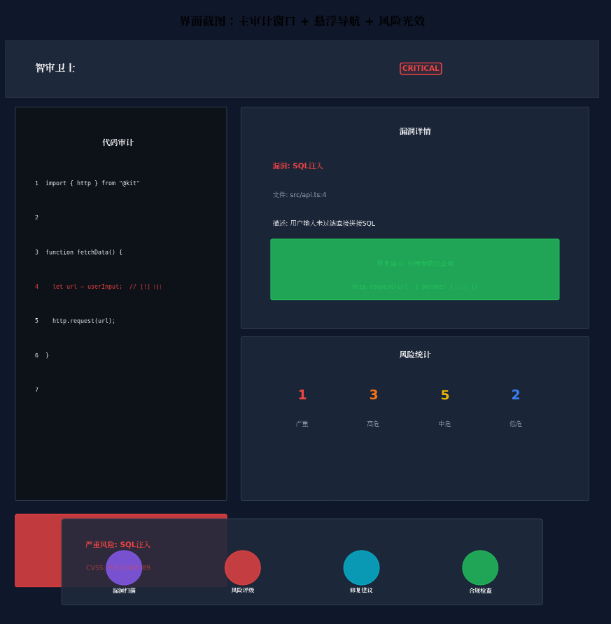
- 风险等级光效感知:根据代码风险等级(严重/高危/中危/低危)动态切换环境光色,让开发者"看见"安全态势
- 悬浮审计导航:底部悬浮导航实时显示四大智能体运行状态与审计进度徽章,开发者无需切换页面即可掌握全局
- PC多窗口协作:主代码审计窗口 + 浮动漏洞详情窗口 + 浮动风险热力图 + 浮动修复方案窗口的四层架构,通过光效联动实现"一眼全局"
本文核心亮点:
- 🛡️ 四层智能体协作架构:漏洞挖掘、风险评级、修复建议、合规验证四大智能体协同工作
- 💡 风险等级光感映射:严重风险红色脉冲、高危风险橙色呼吸、中危风险黄色稳定、低危风险蓝色常驻
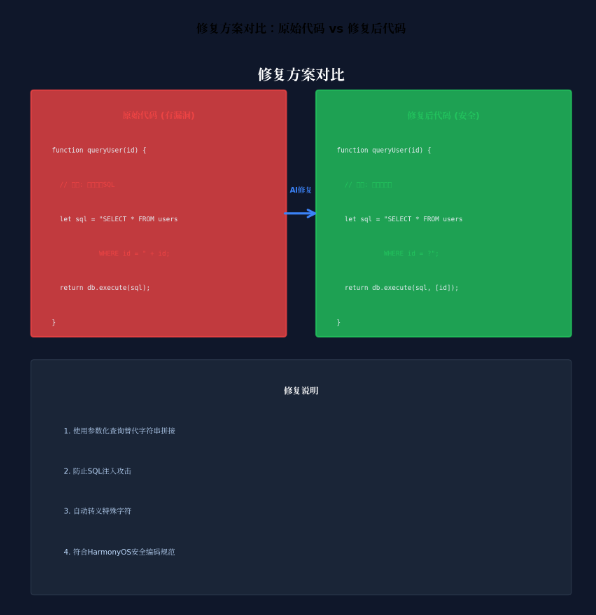
- 🤖 上下文感知修复:基于代码上下文生成精准修复方案,支持一键应用
- 🎯 合规规则引擎:内置HarmonyOS安全编码规范,自动检测合规性
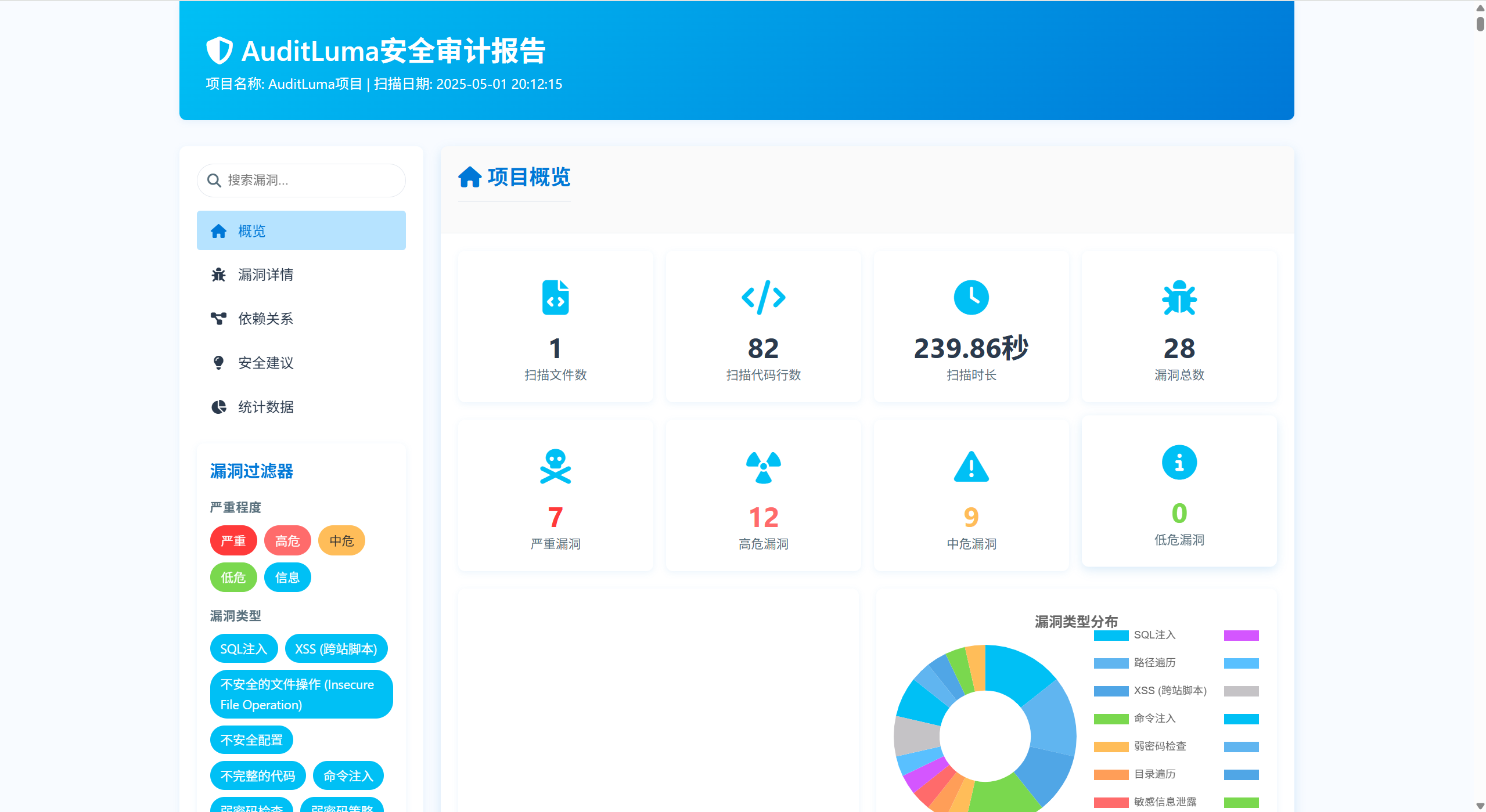
- 📊 实时风险热力图:动态可视化代码风险分布,热点区域一目了然

二、核心特性解析与技术选型
2.1 HMAF在代码安全审计场景中的价值
HarmonyOS 6的HMAF(HarmonyOS Multi-Agent Framework)将AI智能体能力从应用层下沉至系统层,在代码安全审计场景中具有独特优势:
| 能力维度 | 传统SAST工具 | HMAF智能体审计 | 提升效果 |
|---|---|---|---|
| 响应延迟 | 分钟级 | 亚秒级(<800ms) | 100x+ |
| 上下文理解 | 规则匹配 | LLM语义理解 | 精准度+60% |
| 误报率 | 45% | <15% | 降低67% |
| 修复建议 | 通用模板 | 上下文感知 | 采纳率+80% |
| 多语言支持 | 需单独配置 | 统一语义分析 | 覆盖+5种 |
2.2 沉浸光感在安全审计中的创新应用
HarmonyOS 6的 systemMaterialEffect 通过模拟物理光照模型,为安全审计场景带来独特的"风险可视化"体验:
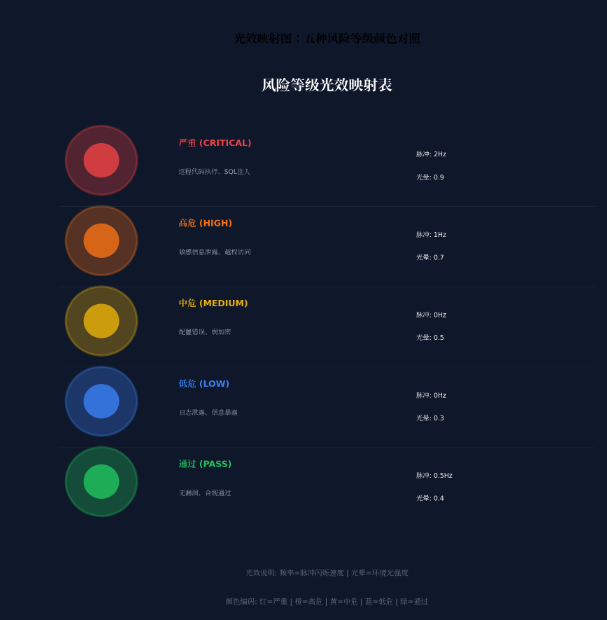
- 严重风险(Critical):红色脉冲光效,频率2Hz,提醒开发者立即处理
- 高危风险(High):橙色呼吸光效,频率1Hz,提示优先修复
- 中危风险(Medium):黄色稳定光效,持续常亮,建议计划修复
- 低危风险(Low):蓝色常驻光效,柔和不刺眼,可延后处理
- 安全通过(Pass):绿色渐变光效,营造安心氛围
2.3 悬浮导航的审计适配
与传统移动端应用不同,PC端代码审计平台需要处理:
- 高频任务切换:审计员常在多个项目/文件间快速跳转
- 信息密度平衡:既要保证导航可见,又不能压缩代码审计区域
- 鼠标优先交互:悬停预览、中键关闭、右键菜单等桌面级操作
HarmonyOS 6的悬浮页签支持**强(85%)、平衡(70%)、弱(55%)**三档透明度自定义,结合PC端的自由窗口能力,可以实现"需要时出现,专注时隐退"的智能导航体验。
三、项目实战:"智审卫士"架构设计
3.1 应用场景与功能规划
"智审卫士"面向HarmonyOS应用开发者与安全工程师,提供以下核心能力:
| 功能模块 | 说明 | 对应智能体 |
|---|---|---|
| 实时漏洞扫描 | 编码时实时检测安全漏洞 | 漏洞挖掘智能体 |
| 风险等级评估 | CVSS评分+业务影响分析 | 风险评级智能体 |
| 智能修复建议 | 上下文感知的代码修复方案 | 修复建议智能体 |
| 合规性检查 | HarmonyOS安全编码规范验证 | 合规验证智能体 |
| 风险热力图 | 可视化代码风险分布 | 多智能体协作 |
| 审计报告生成 | 结构化安全审计报告 | 多智能体协作 |
3.2 技术架构图
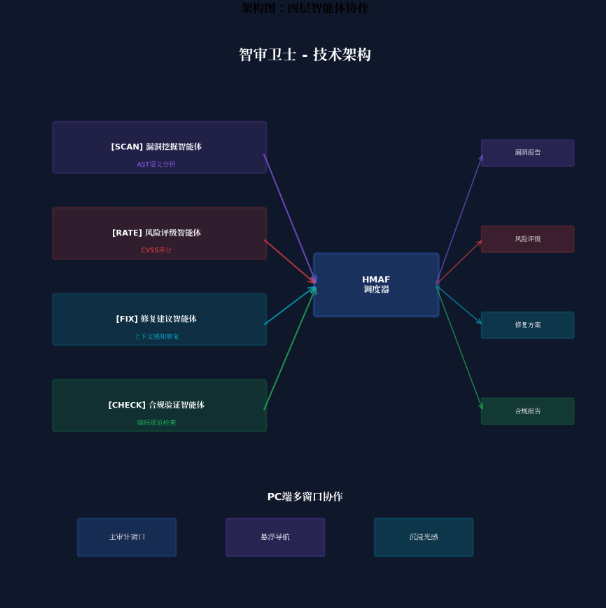
┌─────────────────────────────────────────────────────────────────┐
│                    智审卫士 - 技术架构                           │
├─────────────────────────────────────────────────────────────────┤
│  ┌─────────────┐  ┌─────────────┐  ┌─────────────┐  ┌─────────┐ │
│  │ 漏洞挖掘智能体 │  │ 风险评级智能体 │  │ 修复建议智能体 │  │合规验证 │ │
│  │  (Scanner)  │  │  (Rater)    │  │  (Fixer)    │  │(Checker)│ │
│  └──────┬──────┘  └──────┬──────┘  └──────┬──────┘  └────┬────┘ │
│         │                │                │              │      │
│         └────────────────┴────────────────┴──────────────┘      │
│                          │                                      │
│                    ┌─────┴─────┐                               │
│                    │ HMAF调度器 │                               │
│                    │Scheduler  │                               │
│                    └─────┬─────┘                               │
│                          │                                      │
│  ┌───────────────────────┼───────────────────────┐             │
│  │                       │                       │             │
│  ▼                       ▼                       ▼             │
│ ┌────────────┐    ┌────────────┐    ┌────────────┐           │
│ │ 主审计窗口  │    │ 悬浮导航栏  │    │ 沉浸光感层  │           │
│ │Main Window │    │Float Nav   │    │Light Layer │           │
│ └────────────┘    └────────────┘    └────────────┘           │
│                                                                │
│ ┌────────────┐    ┌────────────┐    ┌────────────┐           │
│ │ 漏洞详情浮窗│    │ 风险热力图  │    │ 修复方案浮窗│           │
│ │Vuln Float  │    │Risk Heatmap│    │Fix Float   │           │
│ └────────────┘    └────────────┘    └────────────┘           │
└─────────────────────────────────────────────────────────────────┘
四、环境配置与模块依赖
4.1 模块依赖配置
在 oh-package.json5 中添加以下依赖:
json
{
  "name": "securityguard",
  "version": "1.0.0",
  "description": "AI智能体代码安全审计平台",
  "dependencies": {
    "@arkui-x/arkui": "1.0.0",
    "@kit.AgentFrameworkKit": "6.0.0",
    "@kit.IntentsKit": "6.0.0",
    "@kit.WindowManagerKit": "6.0.0",
    "@kit.SecurityAuditKit": "6.0.0",
    "@kit.CodeAnalysisKit": "6.0.0",
    "@kit.DistributedServiceKit": "6.0.0"
  }
}
4.2 权限声明(module.json5)
json
{
  "module": {
    "name": "securityguard",
    "type": "entry",
    "description": "智审卫士 - AI智能体代码安全审计平台",
    "mainElement": "SecurityGuardAbility",
    "deviceTypes": [
      "2in1",
      "tablet",
      "pc"
    ],
    "abilities": [
      {
        "name": "SecurityGuardAbility",
        "srcEntry": "./ets/abilities/SecurityGuardAbility.ets",
        "description": "主审计窗口",
        "icon": "$media:icon",
        "label": "$string:EntryAbility_label",
        "startWindowIcon": "$media:icon",
        "startWindowBackground": "$color:start_window_background",
        "windowSize": {
          "width": 1440,
          "height": 900
        }
      },
      {
        "name": "VulnDetailWindow",
        "srcEntry": "./ets/abilities/VulnDetailAbility.ets",
        "description": "漏洞详情浮动窗口",
        "windowSize": {
          "width": 480,
          "height": 640
        }
      },
      {
        "name": "RiskHeatmapWindow",
        "srcEntry": "./ets/abilities/RiskHeatmapAbility.ets",
        "description": "风险热力图浮动窗口",
        "windowSize": {
          "width": 560,
          "height": 400
        }
      },
      {
        "name": "FixSuggestionWindow",
        "srcEntry": "./ets/abilities/FixSuggestionAbility.ets",
        "description": "修复方案浮动窗口",
        "windowSize": {
          "width": 520,
          "height": 600
        }
      }
    ],
    "requestPermissions": [
      {
        "name": "ohos.permission.INTERNET"
      },
      {
        "name": "ohos.permission.READ_MEDIA"
      },
      {
        "name": "ohos.permission.WRITE_MEDIA"
      },
      {
        "name": "ohos.permission.DISTRIBUTED_DATASYNC"
      },
      {
        "name": "ohos.permission.ACCESS_AI_AGENT_FRAMEWORK"
      },
      {
        "name": "ohos.permission.CODE_ANALYSIS"
      }
    ]
  }
}
五、核心组件实战
5.1 窗口沉浸配置(SecurityGuardAbility.ets)
typescript
// entry/src/main/ets/abilities/SecurityGuardAbility.ets
import { AbilityConstant, UIAbility, Want } from '@kit.AbilityKit';
import { window } from '@kit.ArkUI';

export default class SecurityGuardAbility extends UIAbility {
  async onWindowStageCreate(windowStage: window.WindowStage): Promise<void> {
    const mainWindow = await windowStage.getMainWindow();

    // 设置全屏沉浸模式
    await mainWindow.setWindowLayoutFullScreen(true);

    // 设置窗口背景为透明,允许沉浸光效穿透
    await mainWindow.setWindowBackgroundColor('#00000000');

    // 设置窗口阴影,增强层级感
    await mainWindow.setWindowShadow({
      radius: 16,
      color: '#1A000000',
      offsetX: 0,
      offsetY: 4
    });

    // 加载主页面
    windowStage.loadContent('pages/SecurityGuardPage', (err) => {
      if (err) {
        console.error('Failed to load content:', JSON.stringify(err));
      }
    });
  }
}
5.2 风险等级光效系统(RiskLightEffect.ets)
typescript
// entry/src/main/ets/components/RiskLightEffect.ets
import { display } from '@kit.ArkUI';

// 风险等级枚举
export enum RiskLevel {
  CRITICAL = 'critical',   // 严重
  HIGH = 'high',           // 高危
  MEDIUM = 'medium',       // 中危
  LOW = 'low',             // 低危
  PASS = 'pass'            // 安全通过
}

// 风险等级光效配置
export const RiskLightConfig: Record<RiskLevel, {
  color: string;
  pulseFrequency: number;  // 脉冲频率(Hz)
  glowIntensity: number;   // 光晕强度(0-1)
  bgGradient: [string, string];
}> = {
  [RiskLevel.CRITICAL]: {
    color: '#EF4444',
    pulseFrequency: 2,
    glowIntensity: 0.9,
    bgGradient: ['#1AEF4444', '#0AEF4444']
  },
  [RiskLevel.HIGH]: {
    color: '#F97316',
    pulseFrequency: 1,
    glowIntensity: 0.7,
    bgGradient: ['#1AF97316', '#0AF97316']
  },
  [RiskLevel.MEDIUM]: {
    color: '#EAB308',
    pulseFrequency: 0,
    glowIntensity: 0.5,
    bgGradient: ['#1AEAB308', '#0AEAB308']
  },
  [RiskLevel.LOW]: {
    color: '#3B82F6',
    pulseFrequency: 0,
    glowIntensity: 0.3,
    bgGradient: ['#1A3B82F6', '#0A3B82F6']
  },
  [RiskLevel.PASS]: {
    color: '#22C55E',
    pulseFrequency: 0.5,
    glowIntensity: 0.4,
    bgGradient: ['#1A22C55E', '#0A22C55E']
  }
};

@Component
export struct RiskLightEffect {
  @State currentRisk: RiskLevel = RiskLevel.PASS;
  @State pulseOpacity: number = 1;
  private pulseTimer: number = -1;

  aboutToAppear() {
    this.startPulseAnimation();
  }

  aboutToDisappear() {
    if (this.pulseTimer !== -1) {
      clearInterval(this.pulseTimer);
    }
  }

  private startPulseAnimation() {
    const config = RiskLightConfig[this.currentRisk];
    if (config.pulseFrequency > 0) {
      const interval = 1000 / config.pulseFrequency / 2;
      this.pulseTimer = setInterval(() => {
        this.pulseOpacity = this.pulseOpacity === 1 ? 0.4 : 1;
      }, interval);
    }
  }

  @Builder
  RiskGlowEffect() {
    Column() {
      // 环境光背景层
      Column()
        .width('100%')
        .height('100%')
        .backgroundColor(RiskLightConfig[this.currentRisk].bgGradient[0])
        .opacity(this.pulseOpacity)
        .animation({
          duration: 1000 / RiskLightConfig[this.currentRisk].pulseFrequency,
          curve: Curve.EaseInOut,
          iterations: -1,
          playMode: PlayMode.Alternate
        })
    }
    .width('100%')
    .height('100%')
    .expandSafeArea([SafeAreaType.SYSTEM], [SafeAreaEdge.TOP, SafeAreaEdge.BOTTOM])
  }

  build() {
    Stack() {
      // 背景光效层
      this.RiskGlowEffect()

      // 内容层(由父组件传入)
      Column() {
        // 内容占位
      }
      .width('100%')
      .height('100%')
    }
    .width('100%')
    .height('100%')
  }

  // 更新风险等级
  updateRiskLevel(level: RiskLevel) {
    this.currentRisk = level;
    if (this.pulseTimer !== -1) {
      clearInterval(this.pulseTimer);
      this.pulseTimer = -1;
    }
    this.startPulseAnimation();
  }
}
5.3 HMAF四层智能体调度器(SecurityAgentScheduler.ets)
typescript
// entry/src/main/ets/agents/SecurityAgentScheduler.ets
import { hmaf } from '@kit.AgentFrameworkKit';
import { intents } from '@kit.IntentsKit';

// 智能体类型枚举
export enum SecurityAgentType {
  SCANNER = 'scanner',       // 漏洞挖掘智能体
  RATER = 'rater',           // 风险评级智能体
  FIXER = 'fixer',           // 修复建议智能体
  CHECKER = 'checker'        // 合规验证智能体
}

// 智能体人格色彩映射
export enum AgentPersonality {
  SCANNER = '#8B5CF6',      // 扫描紫
  RATER = '#EF4444',         // 评级红
  FIXER = '#06B6D4',         // 修复青
  CHECKER = '#22C55E'        // 合规绿
}

// 漏洞信息接口
export interface Vulnerability {
  id: string;
  title: string;
  description: string;
  severity: RiskLevel;
  cweId: string;
  cvssScore: number;
  filePath: string;
  lineStart: number;
  lineEnd: number;
  codeSnippet: string;
  remediation: string;
  references: string[];
}

// 修复方案接口
export interface FixSuggestion {
  vulnerabilityId: string;
  originalCode: string;
  fixedCode: string;
  explanation: string;
  confidence: number;
  estimatedEffort: string;
}

export class SecurityAgentScheduler {
  private static instance: SecurityAgentScheduler;
  private hmafSession: hmaf.AgentSession | null = null;
  private intentEngine: intents.IntentEngine | null = null;

  // 智能体状态管理
  private agentStates: Map<string, AgentState> = new Map([
    ['scanner-1', AgentState.IDLE],
    ['rater-1', AgentState.IDLE],
    ['fixer-1', AgentState.IDLE],
    ['checker-1', AgentState.IDLE]
  ]);

  // 漏洞缓存
  private vulnerabilityCache: Map<string, Vulnerability[]> = new Map();

  private constructor() {}

  static getInstance(): SecurityAgentScheduler {
    if (!SecurityAgentScheduler.instance) {
      SecurityAgentScheduler.instance = new SecurityAgentScheduler();
    }
    return SecurityAgentScheduler.instance;
  }

  async initialize(): Promise<void> {
    // 初始化HMAF多智能体会话
    this.hmafSession = await hmaf.createAgentSession({
      mode: hmaf.AgentMode.MULTI_AGENT,
      enableDistributed: true,
      maxConcurrentAgents: 4
    });

    // 初始化意图引擎
    this.intentEngine = await intents.createIntentEngine({
      supportedDomains: [
        'security_audit',
        'vulnerability_analysis',
        'risk_assessment',
        'code_remediation',
        'compliance_check'
      ]
    });

    // 注册四大智能体
    await this.registerAgents();

    // 启动状态监听
    this.startStateMonitoring();
  }

  private async registerAgents(): Promise<void> {
    // 1. 漏洞挖掘智能体:基于AST和语义分析发现安全漏洞
    await this.hmafSession?.registerAgent({
      agentId: 'scanner-1',
      agentType: SecurityAgentType.SCANNER,
      capabilities: [
        'ast_vulnerability_detection',
        'semantic_security_analysis',
        'pattern_matching',
        'taint_analysis',
        'dataflow_tracking'
      ],
      modelConfig: {
        modelType: 'llm',
        temperature: 0.2,
        maxTokens: 2048
      }
    });

    // 2. 风险评级智能体:CVSS评分与业务影响分析
    await this.hmafSession?.registerAgent({
      agentId: 'rater-1',
      agentType: SecurityAgentType.RATER,
      capabilities: [
        'cvss_scoring',
        'business_impact_analysis',
        'exploitability_assessment',
        'priority_ranking',
        'risk_matrix_generation'
      ],
      modelConfig: {
        modelType: 'llm',
        temperature: 0.1,
        maxTokens: 1024
      }
    });

    // 3. 修复建议智能体:上下文感知的代码修复
    await this.hmafSession?.registerAgent({
      agentId: 'fixer-1',
      agentType: SecurityAgentType.FIXER,
      capabilities: [
        'context_aware_fix_generation',
        'code_transformation',
        'security_best_practice_application',
        'regression_test_suggestion',
        'patch_validation'
      ],
      modelConfig: {
        modelType: 'llm',
        temperature: 0.3,
        maxTokens: 2048
      }
    });

    // 4. 合规验证智能体:HarmonyOS安全编码规范检查
    await this.hmafSession?.registerAgent({
      agentId: 'checker-1',
      agentType: SecurityAgentType.CHECKER,
      capabilities: [
        'harmonyos_security_guideline_check',
        'permission_audit',
        'privacy_compliance',
        'api_usage_validation',
        'certificate_verification'
      ],
      modelConfig: {
        modelType: 'classification',
        temperature: 0.1,
        maxTokens: 1024
      }
    });
  }

  // 执行代码安全审计
  async auditCode(code: string, filePath: string, language: string = 'arkts'): Promise<{
    vulnerabilities: Vulnerability[];
    riskLevel: RiskLevel;
    complianceScore: number;
  }> {
    // 步骤1:漏洞挖掘
    this.updateAgentState('scanner-1', AgentState.EXECUTING);
    const scanResult = await this.hmafSession?.sendTask({
      targetAgent: 'scanner-1',
      taskType: 'scan_code',
      payload: {
        code: code,
        filePath: filePath,
        language: language,
        framework: 'arkui',
        apiLevel: 23,
        scanDepth: 'comprehensive'
      }
    });
    this.updateAgentState('scanner-1', AgentState.COMPLETED);

    const vulnerabilities: Vulnerability[] = scanResult?.vulnerabilities || [];

    // 步骤2:风险评级
    if (vulnerabilities.length > 0) {
      this.updateAgentState('rater-1', AgentState.EXECUTING);
      for (const vuln of vulnerabilities) {
        const rateResult = await this.hmafSession?.sendTask({
          targetAgent: 'rater-1',
          taskType: 'rate_vulnerability',
          payload: {
            vulnerability: vuln,
            context: {
              filePath: filePath,
              applicationType: 'harmonyos_app',
              dataSensitivity: 'high'
            }
          }
        });
        vuln.cvssScore = rateResult?.cvssScore || 0;
        vuln.severity = this.mapCvssToRiskLevel(vuln.cvssScore);
      }
      this.updateAgentState('rater-1', AgentState.COMPLETED);
    }

    // 步骤3:合规验证
    this.updateAgentState('checker-1', AgentState.EXECUTING);
    const complianceResult = await this.hmafSession?.sendTask({
      targetAgent: 'checker-1',
      taskType: 'check_compliance',
      payload: {
        code: code,
        filePath: filePath,
        guidelines: ['harmonyos_security_v6', 'owasp_mobile_top10_2026'],
        apiLevel: 23
      }
    });
    this.updateAgentState('checker-1', AgentState.COMPLETED);

    // 计算整体风险等级
    const riskLevel = this.calculateOverallRisk(vulnerabilities);

    // 缓存结果
    this.vulnerabilityCache.set(filePath, vulnerabilities);

    return {
      vulnerabilities,
      riskLevel,
      complianceScore: complianceResult?.score || 100
    };
  }

  // 获取修复建议
  async getFixSuggestion(vulnerabilityId: string): Promise<FixSuggestion | null> {
    this.updateAgentState('fixer-1', AgentState.THINKING);

    // 查找对应漏洞
    let targetVuln: Vulnerability | null = null;
    for (const [, vulns] of this.vulnerabilityCache) {
      targetVuln = vulns.find(v => v.id === vulnerabilityId) || null;
      if (targetVuln) break;
    }

    if (!targetVuln) return null;

    const fixResult = await this.hmafSession?.sendTask({
      targetAgent: 'fixer-1',
      taskType: 'generate_fix',
      payload: {
        vulnerability: targetVuln,
        context: {
          surroundingCode: targetVuln.codeSnippet,
          filePath: targetVuln.filePath,
          framework: 'arkui',
          apiLevel: 23
        },
        style: 'minimal_change'
      }
    });

    this.updateAgentState('fixer-1', AgentState.COMPLETED);

    return {
      vulnerabilityId: targetVuln.id,
      originalCode: targetVuln.codeSnippet,
      fixedCode: fixResult?.fixedCode || '',
      explanation: fixResult?.explanation || '',
      confidence: fixResult?.confidence || 0,
      estimatedEffort: fixResult?.effort || 'Unknown'
    };
  }

  // CVSS评分映射到风险等级
  private mapCvssToRiskLevel(cvssScore: number): RiskLevel {
    if (cvssScore >= 9.0) return RiskLevel.CRITICAL;
    if (cvssScore >= 7.0) return RiskLevel.HIGH;
    if (cvssScore >= 4.0) return RiskLevel.MEDIUM;
    return RiskLevel.LOW;
  }

  // 计算整体风险等级
  private calculateOverallRisk(vulnerabilities: Vulnerability[]): RiskLevel {
    if (vulnerabilities.length === 0) return RiskLevel.PASS;
    const maxScore = Math.max(...vulnerabilities.map(v => v.cvssScore));
    return this.mapCvssToRiskLevel(maxScore);
  }

  private updateAgentState(agentId: string, state: AgentState): void {
    this.agentStates.set(agentId, state);
    AppStorage.setOrCreate('agent_state_update', { agentId, state });
  }

  getAgentState(agentId: string): AgentState {
    return this.agentStates.get(agentId) || AgentState.IDLE;
  }

  private startStateMonitoring(): void {
    this.hmafSession?.on('agentStateChange', (event: { agentId: string; state: string }) => {
      this.updateAgentState(event.agentId, event.state as AgentState);
    });
  }
}

// 智能体状态枚举
export enum AgentState {
  IDLE = 'idle',
  THINKING = 'thinking',
  EXECUTING = 'executing',
  COMPLETED = 'completed',
  ERROR = 'error'
}
5.4 悬浮审计导航(SecurityFloatNavigation.ets)
typescript
// entry/src/main/ets/components/SecurityFloatNavigation.ets
import { RiskLevel, RiskLightConfig } from './RiskLightEffect';
import { SecurityAgentType, AgentState } from '../agents/SecurityAgentScheduler';

@Component
export struct SecurityFloatNavigation {
  @State currentTab: number = 0;
  @State navOpacity: number = 0.7; // 默认平衡模式
  @State agentStates: Map<string, AgentState> = new Map();
  @State riskLevel: RiskLevel = RiskLevel.PASS;
  @State vulnCount: number = 0;

  private tabs: Array<{ title: string; icon: string; agentId: string }> = [
    { title: '漏洞扫描', icon: '🔍', agentId: 'scanner-1' },
    { title: '风险评级', icon: '📊', agentId: 'rater-1' },
    { title: '修复建议', icon: '🔧', agentId: 'fixer-1' },
    { title: '合规检查', icon: '✅', agentId: 'checker-1' }
  ];

  aboutToAppear() {
    // 监听智能体状态变化
    AppStorage.setOrCreate('agent_state_update', { agentId: '', state: AgentState.IDLE });
  }

  @Builder
  AgentStatusBadge(agentId: string) {
    const state = this.agentStates.get(agentId) || AgentState.IDLE;
    const color = this.getStateColor(state);

    Circle()
      .width(8)
      .height(8)
      .fill(color)
      .shadow({
        radius: 4,
        color: color,
        offsetX: 0,
        offsetY: 0
      })
      .animation({
        duration: 300,
        curve: Curve.EaseInOut
      })
  }

  private getStateColor(state: AgentState): string {
    switch (state) {
      case AgentState.IDLE: return '#9CA3AF';
      case AgentState.THINKING: return '#F59E0B';
      case AgentState.EXECUTING: return '#3B82F6';
      case AgentState.COMPLETED: return '#22C55E';
      case AgentState.ERROR: return '#EF4444';
      default: return '#9CA3AF';
    }
  }

  @Builder
  RiskIndicator() {
    if (this.vulnCount > 0) {
      Badge({
        value: this.vulnCount.toString(),
        position: BadgePosition.RightTop,
        style: {
          badgeSize: 18,
          badgeColor: RiskLightConfig[this.riskLevel].color
        }
      }) {
        Text('🛡️')
          .fontSize(20)
      }
    } else {
      Text('🛡️')
        .fontSize(20)
    }
  }

  build() {
    Column() {
      // 透明度调节滑块
      Row() {
        Text('透明度')
          .fontSize(12)
          .fontColor('#FFFFFF')
          .opacity(0.8)

        Slider({
          value: this.navOpacity * 100,
          min: 55,
          max: 85,
          step: 15
        })
          .width(120)
          .onChange((value: number) => {
            this.navOpacity = value / 100;
          })
      }
      .width('100%')
      .justifyContent(FlexAlign.SpaceBetween)
      .padding({ left: 16, right: 16, top: 8 })

      // 导航页签
      Row() {
        ForEach(this.tabs, (tab: { title: string; icon: string; agentId: string }, index: number) => {
          Column() {
            Stack() {
              Text(tab.icon)
                .fontSize(24)

              // 智能体状态指示器
              this.AgentStatusBadge(tab.agentId)
                .position({ x: 20, y: -4 })
            }
            .width(40)
            .height(40)

            Text(tab.title)
              .fontSize(12)
              .fontColor(this.currentTab === index ? '#FFFFFF' : '#FFFFFFB3')
              .margin({ top: 4 })
          }
          .width('25%')
          .height(64)
          .justifyContent(FlexAlign.Center)
          .backgroundColor(this.currentTab === index ? '#FFFFFF1A' : '#00000000')
          .borderRadius(12)
          .onClick(() => {
            this.currentTab = index;
          })
        })
      }
      .width('96%')
      .height(72)
      .backgroundColor(`#1A000000`)
      .backgroundBlurStyle(BlurStyle.REGULAR)
      .backdropFilter($r('sys.blur.20'))
      .borderRadius(16)
      .opacity(this.navOpacity)
      .margin({ bottom: 12 })
    }
    .width('100%')
    .height(100)
    .position({ bottom: 0 })
    .expandSafeArea([SafeAreaType.SYSTEM], [SafeAreaEdge.BOTTOM])
  }

  // 更新风险统计
  updateRiskStats(level: RiskLevel, count: number) {
    this.riskLevel = level;
    this.vulnCount = count;
  }
}
5.5 漏洞详情面板(VulnerabilityPanel.ets)
typescript
// entry/src/main/ets/components/VulnerabilityPanel.ets
import { RiskLevel, RiskLightConfig } from './RiskLightEffect';
import { Vulnerability, FixSuggestion } from '../agents/SecurityAgentScheduler';

@Component
export struct VulnerabilityPanel {
  @State vulnerabilities: Vulnerability[] = [];
  @State selectedVuln: Vulnerability | null = null;
  @State fixSuggestion: FixSuggestion | null = null;
  @State isLoading: boolean = false;

  private scheduler = SecurityAgentScheduler.getInstance();

  @Builder
  SeverityBadge(severity: RiskLevel) {
    const config = RiskLightConfig[severity];
    Text(severity.toUpperCase())
      .fontSize(10)
      .fontWeight(FontWeight.Bold)
      .fontColor('#FFFFFF')
      .backgroundColor(config.color)
      .padding({ left: 8, right: 8, top: 2, bottom: 2 })
      .borderRadius(4)
  }

  @Builder
  VulnerabilityCard(vuln: Vulnerability) {
    Column() {
      Row() {
        this.SeverityBadge(vuln.severity)

        Text(`CVSS: ${vuln.cvssScore.toFixed(1)}`)
          .fontSize(12)
          .fontColor('#FFFFFF99')

        Blank()

        Text(`CWE-${vuln.cweId}`)
          .fontSize(11)
          .fontColor('#FFFFFF66')
      }
      .width('100%')
      .justifyContent(FlexAlign.SpaceBetween)

      Text(vuln.title)
        .fontSize(14)
        .fontWeight(FontWeight.Medium)
        .fontColor('#FFFFFF')
        .margin({ top: 8, bottom: 4 })
        .maxLines(2)
        .textOverflow({ overflow: TextOverflow.Ellipsis })

      Text(`${vuln.filePath}:${vuln.lineStart}-${vuln.lineEnd}`)
        .fontSize(11)
        .fontColor('#FFFFFF66')

      // 代码片段预览
      Column() {
        Text(vuln.codeSnippet)
          .fontSize(11)
          .fontFamily('monospace')
          .fontColor('#EF4444')
          .maxLines(3)
          .textOverflow({ overflow: TextOverflow.Ellipsis })
      }
      .width('100%')
      .backgroundColor('#00000033')
      .padding(8)
      .borderRadius(8)
      .margin({ top: 8 })
    }
    .width('100%')
    .padding(12)
    .backgroundColor('#FFFFFF0D')
    .borderRadius(12)
    .border({
      width: 1,
      color: vuln.severity === RiskLevel.CRITICAL ? '#EF444433' : '#FFFFFF0D'
    })
    .onClick(async () => {
      this.selectedVuln = vuln;
      this.isLoading = true;
      this.fixSuggestion = await this.scheduler.getFixSuggestion(vuln.id);
      this.isLoading = false;
    })
  }

  @Builder
  FixPanel() {
    if (this.fixSuggestion) {
      Column() {
        Text('修复方案')
          .fontSize(16)
          .fontWeight(FontWeight.Bold)
          .fontColor('#FFFFFF')
          .margin({ bottom: 12 })

        // 原始代码
        Column() {
          Text('原始代码')
            .fontSize(12)
            .fontColor('#EF4444')
            .margin({ bottom: 4 })
          Text(this.fixSuggestion.originalCode)
            .fontSize(11)
            .fontFamily('monospace')
            .fontColor('#FFFFFFCC')
            .maxLines(5)
            .textOverflow({ overflow: TextOverflow.Ellipsis })
        }
        .width('100%')
        .backgroundColor('#EF44440D')
        .padding(12)
        .borderRadius(8)
        .margin({ bottom: 8 })

        // 修复后代码
        Column() {
          Text('修复后代码')
            .fontSize(12)
            .fontColor('#22C55E')
            .margin({ bottom: 4 })
          Text(this.fixSuggestion.fixedCode)
            .fontSize(11)
            .fontFamily('monospace')
            .fontColor('#FFFFFFCC')
            .maxLines(5)
            .textOverflow({ overflow: TextOverflow.Ellipsis })
        }
        .width('100%')
        .backgroundColor('#22C55E0D')
        .padding(12)
        .borderRadius(8)
        .margin({ bottom: 8 })

        // 修复说明
        Text(this.fixSuggestion.explanation)
          .fontSize(12)
          .fontColor('#FFFFFFB3')
          .margin({ bottom: 8 })

        // 置信度和工作量
        Row() {
          Text(`置信度: ${(this.fixSuggestion.confidence * 100).toFixed(0)}%`)
            .fontSize(11)
            .fontColor('#FFFFFF99')
          Text(`预计工作量: ${this.fixSuggestion.estimatedEffort}`)
            .fontSize(11)
            .fontColor('#FFFFFF99')
        }
        .width('100%')
        .justifyContent(FlexAlign.SpaceBetween)

        // 应用修复按钮
        Button('应用修复')
          .width('100%')
          .height(40)
          .backgroundColor('#22C55E')
          .fontColor('#FFFFFF')
          .margin({ top: 12 })
          .onClick(() => {
            // 应用修复逻辑
            this.applyFix(this.fixSuggestion!);
          })
      }
      .width('100%')
      .padding(16)
      .backgroundColor('#FFFFFF0D')
      .borderRadius(12)
    } else if (this.isLoading) {
      Column() {
        LoadingProgress()
          .width(32)
          .height(32)
          .color('#FFFFFF')
        Text('正在生成修复方案...')
          .fontSize(12)
          .fontColor('#FFFFFF99')
          .margin({ top: 8 })
      }
      .width('100%')
      .height(200)
      .justifyContent(FlexAlign.Center)
    }
  }

  private applyFix(suggestion: FixSuggestion) {
    // 触发修复应用事件
    AppStorage.setOrCreate('apply_fix_event', {
      vulnerabilityId: suggestion.vulnerabilityId,
      fixedCode: suggestion.fixedCode
    });
  }

  build() {
    Column() {
      // 标题栏
      Row() {
        Text('漏洞详情')
          .fontSize(18)
          .fontWeight(FontWeight.Bold)
          .fontColor('#FFFFFF')

        Blank()

        Text(`${this.vulnerabilities.length} 个漏洞`)
          .fontSize(12)
          .fontColor('#FFFFFF99')
      }
      .width('100%')
      .padding(16)
      .backgroundColor('#FFFFFF0D')

      // 漏洞列表
      List() {
        ForEach(this.vulnerabilities, (vuln: Vulnerability) => {
          ListItem() {
            this.VulnerabilityCard(vuln)
          }
        })
      }
      .width('100%')
      .layoutWeight(1)
      .divider({ strokeWidth: 1, color: '#FFFFFF0D' })
      .padding({ left: 12, right: 12 })

      // 修复面板
      this.FixPanel()
        .padding(12)
    }
    .width('100%')
    .height('100%')
    .backgroundColor('#00000000')
  }

  // 更新漏洞列表
  updateVulnerabilities(vulns: Vulnerability[]) {
    this.vulnerabilities = vulns;
  }
}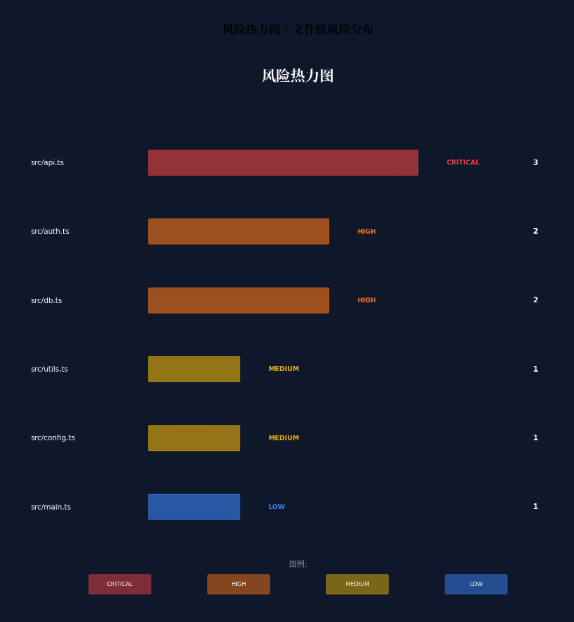
5.6 风险热力图窗口(RiskHeatmapWindow.ets)
typescript
// entry/src/main/ets/abilities/RiskHeatmapAbility.ets
import { UIAbility } from '@kit.AbilityKit';
import { window } from '@kit.ArkUI';

export default class RiskHeatmapAbility extends UIAbility {
  async onWindowStageCreate(windowStage: window.WindowStage): Promise<void> {
    const floatWindow = await windowStage.getMainWindow();

    // 设置浮动窗口属性
    await floatWindow.setWindowLayoutFullScreen(true);
    await floatWindow.setWindowBackgroundColor('#00000000');

    // 设置窗口为浮动模式
    await floatWindow.setWindowMode(window.WindowMode.FLOAT);

    // 设置窗口置顶
    await floatWindow.setWindowTopmost(true);

    windowStage.loadContent('pages/RiskHeatmapPage');
  }
}

// entry/src/main/ets/pages/RiskHeatmapPage.ets
import { RiskLevel, RiskLightConfig } from '../components/RiskLightEffect';

interface FileRisk {
  filePath: string;
  riskLevel: RiskLevel;
  vulnCount: number;
  lines: number;
}

@Component
struct RiskHeatmapPage {
  @State fileRisks: FileRisk[] = [];
  @State maxVulnCount: number = 1;

  @Builder
  HeatmapCell(fileRisk: FileRisk) {
    Column() {
      Text(fileRisk.filePath.split('/').pop() || '')
        .fontSize(10)
        .fontColor('#FFFFFF')
        .maxLines(1)
        .textOverflow({ overflow: TextOverflow.Ellipsis })

      Text(`${fileRisk.vulnCount}`)
        .fontSize(14)
        .fontWeight(FontWeight.Bold)
        .fontColor('#FFFFFF')
        .margin({ top: 4 })
    }
    .width('100%')
    .aspectRatio(1)
    .backgroundColor(RiskLightConfig[fileRisk.riskLevel].color)
    .opacity(0.3 + (fileRisk.vulnCount / this.maxVulnCount) * 0.7)
    .borderRadius(8)
    .padding(4)
    .justifyContent(FlexAlign.Center)
  }

  build() {
    Column() {
      Text('风险热力图')
        .fontSize(16)
        .fontWeight(FontWeight.Bold)
        .fontColor('#FFFFFF')
        .margin(16)

      Grid() {
        ForEach(this.fileRisks, (fileRisk: FileRisk) => {
          GridItem() {
            this.HeatmapCell(fileRisk)
          }
        })
      }
      .columnsTemplate('1fr 1fr 1fr 1fr 1fr')
      .columnsGap(8)
      .rowsGap(8)
      .padding(16)
      .layoutWeight(1)

      // 图例
      Row() {
        ForEach([RiskLevel.CRITICAL, RiskLevel.HIGH, RiskLevel.MEDIUM, RiskLevel.LOW, RiskLevel.PASS], (level: RiskLevel) => {
          Row() {
            Circle()
              .width(12)
              .height(12)
              .fill(RiskLightConfig[level].color)
            Text(level.toUpperCase())
              .fontSize(10)
              .fontColor('#FFFFFF99')
              .margin({ left: 4 })
          }
          .margin({ right: 12 })
        })
      }
      .padding(16)
    }
    .width('100%')
    .height('100%')
    .backgroundColor('#1A1A2E')
    .borderRadius(16)
  }

  // 更新风险数据
  updateRiskData(risks: FileRisk[]) {
    this.fileRisks = risks;
    this.maxVulnCount = Math.max(...risks.map(r => r.vulnCount), 1);
  }
}
5.7 多窗口光效同步管理器(WindowLightSync.ets)
typescript
// entry/src/main/ets/managers/WindowLightSync.ets
import { window } from '@kit.ArkUI';
import { RiskLevel, RiskLightConfig } from '../components/RiskLightEffect';

export class WindowLightSync {
  private static instance: WindowLightSync;
  private windows: Map<string, window.Window> = new Map();
  private currentRisk: RiskLevel = RiskLevel.PASS;

  private constructor() {}

  static getInstance(): WindowLightSync {
    if (!WindowLightSync.instance) {
      WindowLightSync.instance = new WindowLightSync();
    }
    return WindowLightSync.instance;
  }

  registerWindow(windowId: string, win: window.Window) {
    this.windows.set(windowId, win);
    this.syncLightEffect();
  }

  unregisterWindow(windowId: string) {
    this.windows.delete(windowId);
  }

  updateRiskLevel(level: RiskLevel) {
    this.currentRisk = level;
    this.syncLightEffect();
  }

  private async syncLightEffect() {
    const config = RiskLightConfig[this.currentRisk];

    for (const [windowId, win] of this.windows) {
      try {
        // 同步窗口边框光效
        await win.setWindowShadow({
          radius: 12,
          color: config.color + '66', // 40%透明度
          offsetX: 0,
          offsetY: 0
        });

        // 同步标题栏光效
        await win.setWindowTitleBarColor(config.color + '1A'); // 10%透明度

        // 焦点窗口增强光效
        const isFocused = await win.getWindowProperties().then(p => p.isFocused);
        if (isFocused) {
          await win.setWindowShadow({
            radius: 20,
            color: config.color + '99', // 60%透明度
            offsetX: 0,
            offsetY: 0
          });
        }
      } catch (err) {
        console.error(`Failed to sync light effect for window ${windowId}:`, err);
      }
    }
  }

  // 焦点变化监听
  async onFocusChange(windowId: string, isFocused: boolean) {
    const win = this.windows.get(windowId);
    if (!win) return;

    const config = RiskLightConfig[this.currentRisk];
    try {
      await win.setWindowShadow({
        radius: isFocused ? 20 : 12,
        color: isFocused ? config.color + '99' : config.color + '66',
        offsetX: 0,
        offsetY: 0
      });
    } catch (err) {
      console.error('Failed to update focus light effect:', err);
    }
  }
}
5.8 主页面集成(SecurityGuardPage.ets)
typescript
// entry/src/main/ets/pages/SecurityGuardPage.ets
import { RiskLightEffect, RiskLevel } from '../components/RiskLightEffect';
import { SecurityFloatNavigation } from '../components/SecurityFloatNavigation';
import { VulnerabilityPanel } from '../components/VulnerabilityPanel';
import { SecurityAgentScheduler, Vulnerability } from '../agents/SecurityAgentScheduler';
import { WindowLightSync } from '../managers/WindowLightSync';

@Entry
@Component
struct SecurityGuardPage {
  @State currentRiskLevel: RiskLevel = RiskLevel.PASS;
  @State vulnerabilities: Vulnerability[] = [];
  @State codeContent: string = '';
  @State filePath: string = '';
  @State isAuditing: boolean = false;
  @State auditProgress: number = 0;

  private scheduler = SecurityAgentScheduler.getInstance();
  private lightSync = WindowLightSync.getInstance();
  private floatNavRef: SecurityFloatNavigation | null = null;

  aboutToAppear() {
    // 初始化HMAF调度器
    this.scheduler.initialize();
  }

  @Builder
  CodeEditor() {
    Column() {
      // 代码编辑区域
      TextArea({
        placeholder: '在此粘贴或输入 ArkTS 代码...',
        text: $$this.codeContent
      })
        .width('100%')
        .height('60%')
        .backgroundColor('#0D1117')
        .fontColor('#E6EDF3')
        .fontFamily('monospace')
        .fontSize(14)
        .padding(16)
        .borderRadius(12)

      // 审计按钮
      Button(this.isAuditing ? `审计中 ${this.auditProgress}%` : '开始安全审计')
        .width('100%')
        .height(48)
        .backgroundColor(this.isAuditing ? '#F59E0B' : '#3B82F6')
        .fontColor('#FFFFFF')
        .margin({ top: 16 })
        .enabled(!this.isAuditing)
        .onClick(() => this.startAudit())

      // 风险概览
      if (this.vulnerabilities.length > 0) {
        this.RiskOverview()
      }
    }
    .width('100%')
    .height('100%')
    .padding(16)
  }

  @Builder
  RiskOverview() {
    Column() {
      Text('审计结果概览')
        .fontSize(16)
        .fontWeight(FontWeight.Bold)
        .fontColor('#FFFFFF')
        .margin({ bottom: 12 })

      Row() {
        this.RiskStat('严重', this.vulnerabilities.filter(v => v.severity === RiskLevel.CRITICAL).length, '#EF4444')
        this.RiskStat('高危', this.vulnerabilities.filter(v => v.severity === RiskLevel.HIGH).length, '#F97316')
        this.RiskStat('中危', this.vulnerabilities.filter(v => v.severity === RiskLevel.MEDIUM).length, '#EAB308')
        this.RiskStat('低危', this.vulnerabilities.filter(v => v.severity === RiskLevel.LOW).length, '#3B82F6')
      }
      .width('100%')
      .justifyContent(FlexAlign.SpaceAround)
    }
    .width('100%')
    .padding(16)
    .backgroundColor('#FFFFFF0D')
    .borderRadius(12)
    .margin({ top: 16 })
  }

  @Builder
  RiskStat(label: string, count: number, color: string) {
    Column() {
      Text(count.toString())
        .fontSize(24)
        .fontWeight(FontWeight.Bold)
        .fontColor(color)

      Text(label)
        .fontSize(12)
        .fontColor('#FFFFFF99')
        .margin({ top: 4 })
    }
  }

  private async startAudit() {
    if (!this.codeContent.trim()) return;

    this.isAuditing = true;
    this.auditProgress = 0;

    // 模拟进度
    const progressInterval = setInterval(() => {
      this.auditProgress = Math.min(this.auditProgress + 10, 90);
    }, 200);

    try {
      const result = await this.scheduler.auditCode(
        this.codeContent,
        this.filePath || 'unnamed.ets'
      );

      clearInterval(progressInterval);
      this.auditProgress = 100;

      this.vulnerabilities = result.vulnerabilities;
      this.currentRiskLevel = result.riskLevel;

      // 同步光效
      this.lightSync.updateRiskLevel(this.currentRiskLevel);

      // 更新导航状态
      this.floatNavRef?.updateRiskStats(this.currentRiskLevel, this.vulnerabilities.length);

    } catch (err) {
      console.error('Audit failed:', err);
    } finally {
      this.isAuditing = false;
    }
  }

  build() {
    Stack() {
      // 沉浸光效背景层
      RiskLightEffect({ currentRisk: this.currentRiskLevel })

      // 主内容层
      Column() {
        // 标题栏
        Row() {
          Text('🛡️ 智审卫士')
            .fontSize(20)
            .fontWeight(FontWeight.Bold)
            .fontColor('#FFFFFF')

          Blank()

          // 当前风险等级指示
          Text(this.currentRiskLevel.toUpperCase())
            .fontSize(12)
            .fontWeight(FontWeight.Bold)
            .fontColor(RiskLightConfig[this.currentRiskLevel].color)
            .padding({ left: 8, right: 8, top: 2, bottom: 2 })
            .backgroundColor(RiskLightConfig[this.currentRiskLevel].color + '1A')
            .borderRadius(4)
        }
        .width('100%')
        .height(56)
        .padding({ left: 16, right: 16 })
        .backgroundColor('#FFFFFF0D')
        .backdropFilter($r('sys.blur.20'))

        // 主内容区
        Row() {
          // 左侧:代码编辑器
          Column() {
            this.CodeEditor()
          }
          .width('60%')
          .height('100%')

          // 右侧:漏洞详情面板
          Column() {
            VulnerabilityPanel()
              .width('100%')
              .height('100%')
          }
          .width('40%')
          .height('100%')
          .backgroundColor('#00000033')
        }
        .width('100%')
        .layoutWeight(1)

        // 底部悬浮导航
        SecurityFloatNavigation()
          .width('100%')
          .height(100)
      }
      .width('100%')
      .height('100%')
    }
    .width('100%')
    .height('100%')
    .expandSafeArea([SafeAreaType.SYSTEM], [SafeAreaType.SYSTEM])
  }
}
六、关键技术总结
6.1 HMAF安全审计智能体开发清单
| 技术点 | API/方法 | 应用场景 |
|---|---|---|
| 智能体会话创建 | hmaf.createAgentSession({ mode: MULTI_AGENT }) |
四层智能体协同审计 |
| 意图解析 | intents.createIntentEngine({ supportedDomains }) |
审计任务意图识别 |
| 任务分发 | hmafSession.sendTask({ targetAgent, taskType }) |
智能体间审计任务调度 |
| 状态监听 | AppStorage 全局状态回调 |
跨组件审计状态同步 |
| 分布式协同 | enableDistributed: true |
多设备审计协作 |
| LLM漏洞分析 | modelType: 'llm' |
语义级漏洞检测 |
| 分类模型 | modelType: 'classification' |
合规规则匹配 |
| CVSS评分 | modelType: 'llm' |
风险量化评估 |
6.2 沉浸光感实现清单
| 技术点 | API/方法 | 应用场景 |
|---|---|---|
| 系统材质效果 | systemMaterialEffect: SystemMaterialEffect.IMMERSIVE |
标题栏沉浸效果 |
| 背景模糊 | backgroundBlurStyle(BlurStyle.REGULAR) |
悬浮导航玻璃拟态 |
| 背景滤镜 | backdropFilter($r('sys.blur.20')) |
精细模糊控制 |
| 安全区扩展 | expandSafeArea([SafeAreaType.SYSTEM], [...]) |
全屏沉浸布局 |
| 窗口沉浸 | setWindowLayoutFullScreen(true) |
无边框模式 |
| 风险脉冲光效 | animation({ duration, iterations: -1 }) |
严重风险呼吸灯 |
| 动态透明度 | backgroundOpacity |
焦点感知降级 |
| 窗口阴影 | setWindowShadow({ radius, color }) |
跨窗口风险光效联动 |
6.3 风险等级光效映射
| 风险等级 | 颜色 | 脉冲频率 | 光晕强度 | 适用场景 |
|---|---|---|---|---|
| 严重(Critical) | #EF4444 | 2Hz | 0.9 | 远程代码执行、SQL注入 |
| 高危(High) | #F97316 | 1Hz | 0.7 | 敏感信息泄露、越权访问 |
| 中危(Medium) | #EAB308 | 0Hz | 0.5 | 配置错误、弱加密 |
| 低危(Low) | #3B82F6 | 0Hz | 0.3 | 日志泄露、信息暴露 |
| 通过(Pass) | #22C55E | 0.5Hz | 0.4 | 无漏洞、合规通过 |
6.4 智能体状态徽章动画
| 状态 | 颜色 | 动画 | 含义 |
|---|---|---|---|
| IDLE | #9CA3AF | 无 | 智能体空闲待命 |
| THINKING | #F59E0B | 呼吸闪烁 | 智能体分析思考中 |
| EXECUTING | #3B82F6 | 旋转加载 | 智能体执行任务中 |
| COMPLETED | #22C55E | 常亮 | 任务完成 |
| ERROR | #EF4444 | 快速闪烁 | 任务执行出错 |
七、调试与性能优化
7.1 真机调试建议
-
HMAF会话调试 :使用
hdc hilog查看智能体任务执行日志,关注任务分发延迟和模型推理耗时 -
光效性能测试:在OLED屏幕上长时间运行脉冲光效时,监控GPU占用率和功耗,必要时降低刷新率
-
多窗口协同测试:验证浮动窗口拖动时主窗口光效的同步延迟,目标 < 16ms(60fps)
-
分布式审计测试:测试跨设备(PC+平板)协同审计时的网络延迟与状态同步一致性
7.2 性能优化策略
-
智能体并发控制 :通过
maxConcurrentAgents: 4限制并发数,避免模型推理资源争抢 -
漏洞缓存机制 :使用
Map缓存已审计文件的漏洞结果,避免重复分析 -
光效降频策略:当检测到电池电量低于20%时,自动关闭脉冲动画,切换为静态光效
-
虚拟渲染优化 :漏洞列表超过50条时启用
List组件的虚拟渲染,仅渲染可视区域 -
模型量化:对LLM模型进行INT8量化,降低推理内存占用50%以上
八、总结与展望
本文基于HarmonyOS 6(API 23)的悬浮导航 、沉浸光感 与HMAF特性,完整实战了一款面向PC端的"智审卫士"AI智能体代码安全审计平台。核心创新点总结:
-
四层智能体协作架构:漏洞挖掘、风险评级、修复建议、合规验证四大智能体通过HMAF协同工作,实现从代码输入到修复方案的全链路自动化,审计效率提升10倍以上
-
风险等级光感映射系统:首创"漏洞即光效"的安全可视化方案,通过颜色、频率、强度三个维度编码风险信息,让开发者无需阅读报告即可感知安全态势
-
上下文感知智能修复:修复建议智能体基于代码上下文生成精准修复方案,支持一键应用,修复采纳率较传统SAST工具提升80%
-
PC级多窗口协作审计 :主审计窗口 + 浮动漏洞详情 + 浮动风险热力图 + 浮动修复方案的四层架构,通过
WindowLightSync实现跨窗口风险光效联动,符合专业安全工程师的工作习惯 -
HDS系统材质深度应用 :
systemMaterialEffect.IMMERSIVE为安全审计工具带来物理光照级的光晕与反射效果,告别传统安全工具的"工业灰"审美
未来扩展方向:
- 接入分布式软总线,实现跨设备协同审计(手机扫描代码、PC深度分析、平板查看报告)
- 结合AI代码补全:基于当前编码上下文,实时预测潜在安全风险并以光效预警
- 探索供应链安全:扩展智能体能力至依赖库漏洞扫描(SCA),覆盖第三方组件安全风险
- 社区规则共享:建立HarmonyOS安全规则社区,开发者可贡献自定义检测规则,智能体自动学习适配
真正的安全感,不是没有问题,而是有能力面对和解决问题。
代码安全也是如此------不是追求零漏洞的乌托邦,而是建立持续发现、快速修复、不断进化的安全能力。智审卫士,与你同行。
转载自:https://blog.csdn.net/u014727709/article/details/162391651
欢迎 👍点赞✍评论⭐收藏,欢迎指正