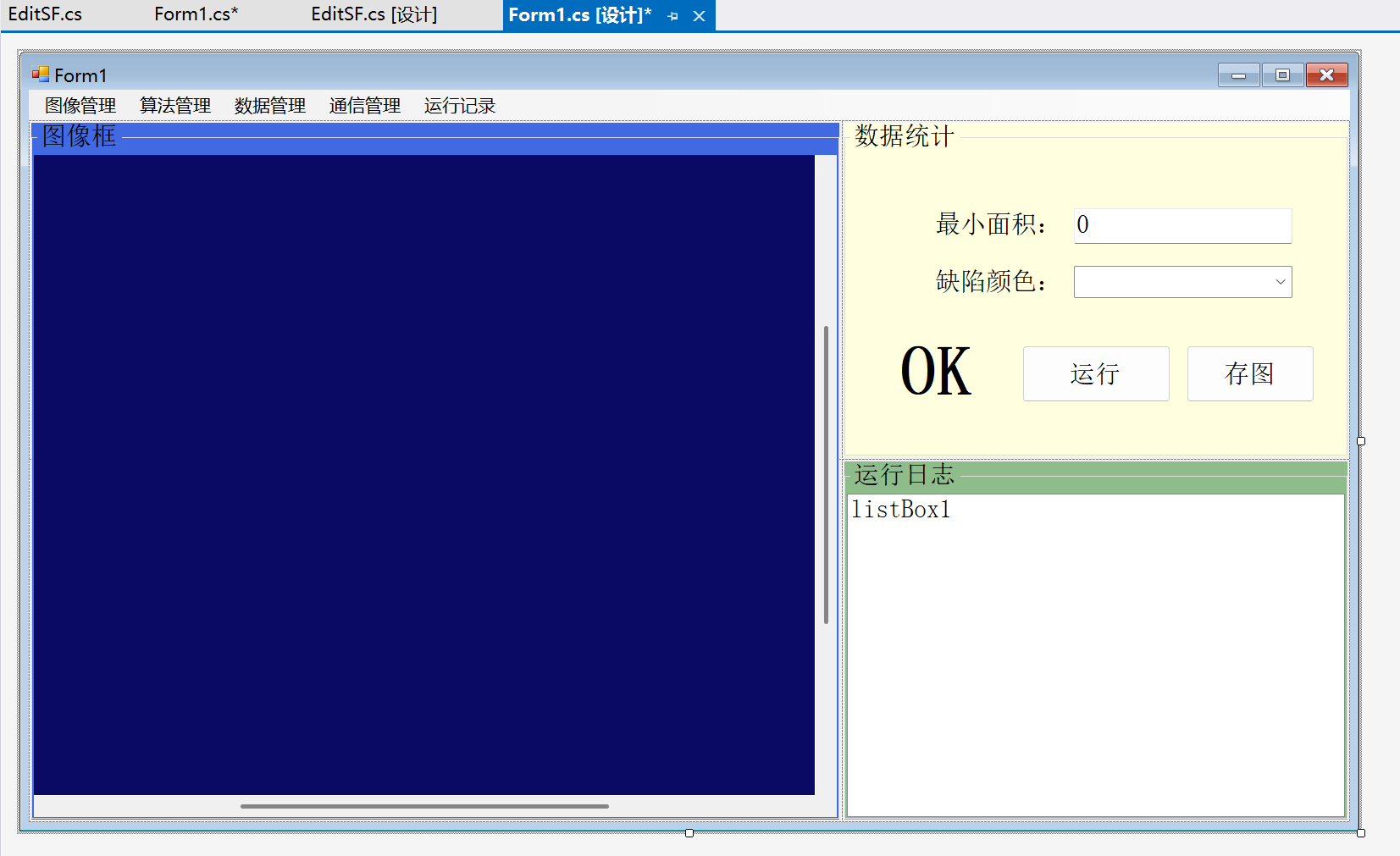
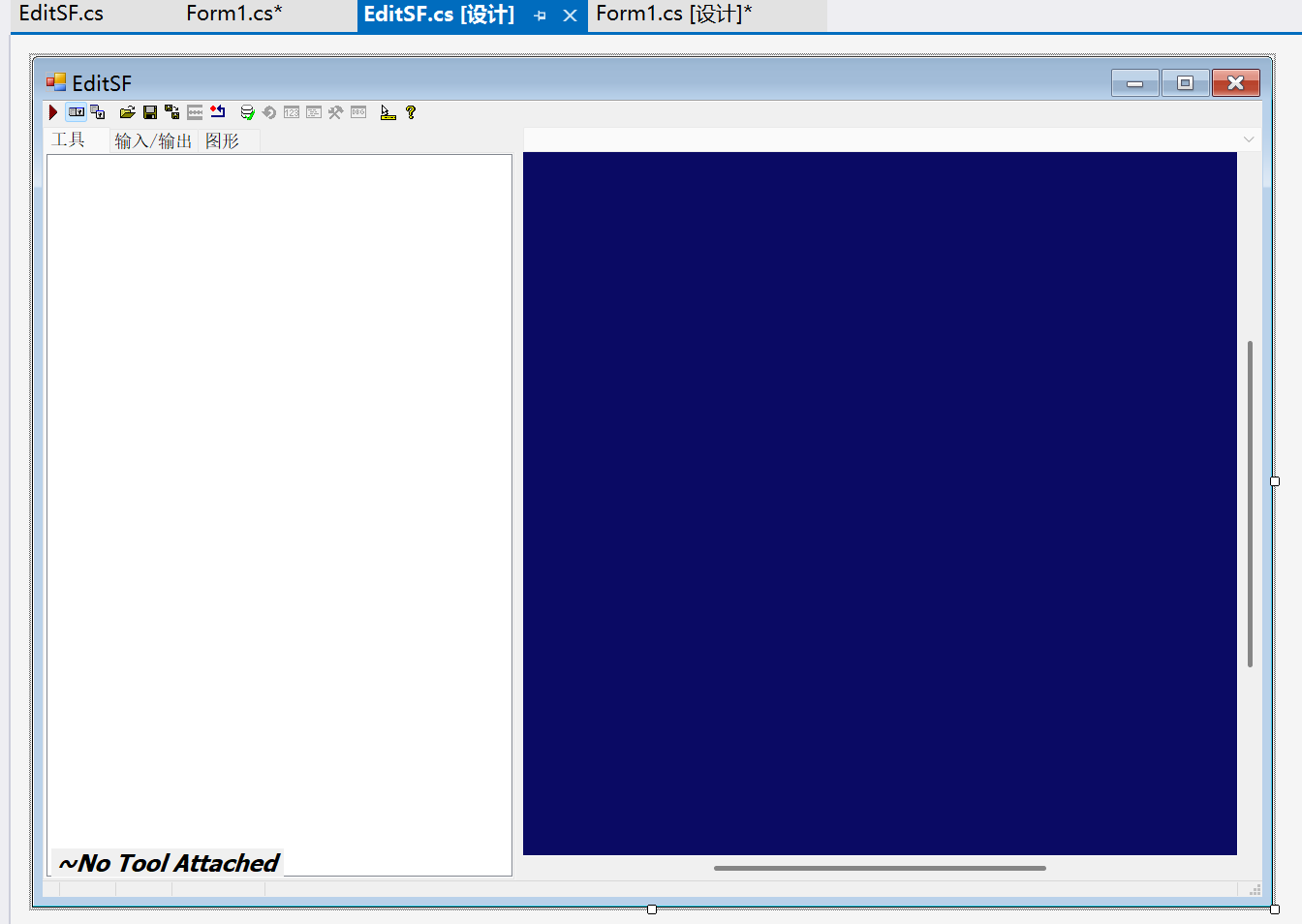
1、界面搭建
搭建主页面和算法编辑页面,并选择控件。
2、代码编辑
主界面代码
cs
using Cognex.VisionPro;
using Cognex.VisionPro.Display;
using Cognex.VisionPro.ImageFile;
using Cognex.VisionPro.Implementation;
using Cognex.VisionPro.ToolBlock;
using Newtonsoft.Json.Linq;
using System;
using System.Collections.Generic;
using System.ComponentModel;
using System.Data;
using System.Drawing;
using System.Drawing.Imaging;
using System.IO;
using System.Linq;
using System.Linq.Expressions;
using System.Text;
using System.Threading.Tasks;
using System.Windows.Forms;

namespace _0623联合一环境搭建
{
    public partial class Form1 : Form
    {
        public Form1()
        {
            InitializeComponent();
        }

        private void Form1_Load(object sender, EventArgs e)
        {
            //设置图像打开的方式
            cogDisplay1.AutoFit = true;
            cogDisplay1.MouseWheelMode = Cognex.VisionPro.Display.CogDisplayMouseWheelModeConstants.Zoom1;

            if (File.Exists("默认.vpp"))//默认算法加载
            {
                try { ctb = CogSerializer.LoadObjectFromFile("默认.vpp") as CogToolBlock; }
                catch { }
            }

            if (File.Exists("默认.png"))
            {
                using (CogImageFileTool cift = new CogImageFileTool())
                {
                    cift.Operator.Open("默认.png", CogImageFileModeConstants.Read);
                    cift.Run();
                    ICogImage ici = cift.OutputImage;

                    //2、将图片显示到DisPlay上
                    cogDisplay1.Image = ici;
                }
            }

            if (File.Exists("Json数据统计.txt"))
            {
                string path = Directory.GetCurrentDirectory() + "\\Json数据统计.txt";//指定路径
                string str;
                using (StreamReader sr = new StreamReader(path))
                {
                    str = sr.ReadToEnd();
                }

                JArray JA = JArray.Parse(str);
                textBox1.Text = Convert.ToString(JA[0]);
                comboBox1.Text = Convert.ToString(JA[1]);
            }


        }

        private void 打开图像ToolStripMenuItem_Click(object sender, EventArgs e)
        {
            try
            {
                //实例化打开文件工具
                using (OpenFileDialog ofd = new OpenFileDialog())//使用using关闭对话框会释放资源
                {
                    //设置默认路径
                    ofd.InitialDirectory = "F:\\VisionPro\\xiangmu";
                    //规定文件后缀格式
                    ofd.Filter = "图片文件|*.jpg;*.png;*.bmp;|所有文件|*.*";
                    //ofd.ShowDialog()是一个有返回值的方法
                    //使用同类型的变量接收返回值
                    DialogResult dr = ofd.ShowDialog();
                    //如果没有正常打开
                    if (dr != DialogResult.OK) return;
                    //定义一个字符串。接收文件路径
                    string filepath = ofd.FileName;

                    File.Copy(filepath,"默认.png",true);

                    //将图像显示道DisPlay
                    //1、根据路径找到图片
                    //方法一:
                    using (CogImageFileTool cift = new CogImageFileTool())
                    {
                        cift.Operator.Open(filepath, CogImageFileModeConstants.Read);
                        cift.Run();
                        ICogImage ici = cift.OutputImage;

                        //2、将图片显示到DisPlay上
                        cogDisplay1.Image = ici;
                    }

                    //方法二:
                    //CogImageFile cif = new CogImageFile();
                    //cif.Open(filepath, CogImageFileModeConstants.Read);
                    //ICogImage ici = cif[0];

                    //2、将图片显示到DisPlay上
                    //cogDisplay1.Image = ici;
                }
            }
            catch
            {
                MessageBox.Show("打开文件格式错误,请联系管理员");
            }

            SuanfaYunXing();


        }

        CogToolBlock ctb = null;
        private void 加载算法ToolStripMenuItem_Click(object sender, EventArgs e)
        {

                //实例化打开文件工具
                using (OpenFileDialog ofd = new OpenFileDialog())//使用using关闭对话框会释放资源
                {
                    //规定文件后缀格式
                    ofd.Filter = "算法文件|*.vpp;";
                    //设置默认路径
                    ofd.InitialDirectory = "F:\\VisionPro\\xiangmu";

                    DialogResult dr = ofd.ShowDialog();
                    //如果没有正常打开
                    if (dr != DialogResult.OK) return;
                    //定义一个字符串。接收文件路径
                    string filepath = ofd.FileName;
                try
                {   //序列化在保存文件时已经完成了
                    //现在只需要反序列化将文件拿来用
                    ctb= CogSerializer.LoadObjectFromFile(filepath) as CogToolBlock;

                }
                catch
                {
                    MessageBox.Show("打开算法文件格式错误,请联系管理员");
                }
            }

        }

         private void SuanfaYunXing()//算法运行的方法
        {
            //运行前需要将输入图像全部传入再去运行
            if (cogDisplay1.Image == null)
            {
                MessageBox.Show("先传图");
                return;
            }
            if (ctb == null)
            {
                MessageBox.Show("先传算法文件");
                return;
            }
            ctb.Inputs["OutputImage"].Value = cogDisplay1.Image;
            ctb.Inputs["Color"].Value = comboBox1.SelectedIndex;
            ctb.Inputs["MinArea"].Value = Convert.ToInt32(textBox1.Text);
            ctb.Run();

            //显示结果
            ICogRecord record = ctb.CreateLastRunRecord();
            cogDisplay1.Record = record;

            int i = ctb.CreateLastRunRecord().SubRecords.IndexOfKey("CogBlobTool1.InputImage");
            record = ctb.CreateLastRunRecord().SubRecords[i];
            cogDisplay1.Record = record;

            label3.Text = Convert.ToString(ctb.Outputs["Result"].Value);//修改OK和NG
            label3.ForeColor = (label3.Text == "OK") ? Color.Green : Color.Red;
        }

        private void button1_Click(object sender, EventArgs e)
        {
            SuanfaYunXing();
            JArray JA = new JArray();
            JA.Add(textBox1.Text);
            JA.Add(comboBox1.Text);
            string str = JA.ToString();
            string path = Directory.GetCurrentDirectory() + "\\Json数据统计.txt";

            using (StreamWriter sw = new StreamWriter(path, false))
            {
                sw.WriteLine(str);
            }

        }

        private void 编辑算法ToolStripMenuItem_Click(object sender, EventArgs e)
        {
            SuanfaYunXing();

            using (EditSF SF = new EditSF(ctb))
            {
                SF.GetNewSF = (Newctb) =>
                {
                    ctb = Newctb;
                };

                SF.ShowDialog();

                SF.GetNewSF = null;//释放委托
            }
        }

        private void comboBox1_SelectedIndexChanged(object sender, EventArgs e)//颜色选择框更改时直接同步更改图像上的颜色
        {
            SuanfaYunXing();
        }

        private void button2_Click(object sender, EventArgs e)
        {
            //1.获取图像
            //ICogImage img=cogDisplay1.Image;
            Image img = cogDisplay1.CreateContentBitmap(CogDisplayContentBitmapConstants.Image);
            //2.保存图像
            string FileName = DateTime.Now.ToString("yyyyMMddHHmmssFFF") + ".png";//使用时间来为文件命名
            string ImagePath = $"{DateTime.Now.Year}/{DateTime.Now.Month}/{DateTime.Now.Day}";
            Directory.CreateDirectory(ImagePath);
            ImagePath = Path.Combine(ImagePath ,FileName);//拼接路径
            img.Save(ImagePath, ImageFormat.Png);
            MessageBox.Show("图像保存成功");
        }
    }
}
算法编辑界面代码
cs
using Cognex.VisionPro;
using Cognex.VisionPro.ToolBlock;
using System;
using System.Collections.Generic;
using System.ComponentModel;
using System.Data;
using System.Drawing;
using System.IO;
using System.Linq;
using System.Text;
using System.Threading.Tasks;
using System.Windows.Forms;

namespace _0623联合一环境搭建
{
    public partial class EditSF : Form
    {
        private EditSF()
        {
            InitializeComponent();
        }

        //定义字段用来保存参数
        CogToolBlock ctb = null;
        //重载接收数据窗体的构造函数
        public EditSF(CogToolBlock ctb):this()
        {
           this.ctb = ctb;
           cogToolBlockEditV21.Subject=this.ctb;
        }


        //声明一个委托
        public Action<CogToolBlock> GetNewSF;
        private void EditSF_FormClosing(object sender, FormClosingEventArgs e)
        {
            CogToolBlock ctb = cogToolBlockEditV21.Subject;
            if (ctb == null) return;

            string debug = Directory.GetCurrentDirectory();
            string ctbPath = Path.Combine(debug, "默认.vpp");
            CogSerializer.SaveObjectToFile(ctb, ctbPath);

            if (GetNewSF!=null)
            {
                GetNewSF?.Invoke(ctb);
            }
        }


    }
}