文章目录
-
- 每日一句正能量
- 一、前言:当具身智脑遇上"千机变"
- 二、技术架构与核心概念
-
- [2.1 具身智能三层架构与鸿蒙映射](#2.1 具身智能三层架构与鸿蒙映射)
- [2.2 自适应形态引擎的设计哲学](#2.2 自适应形态引擎的设计哲学)
- [2.3 跨设备交互的鸿蒙方案](#2.3 跨设备交互的鸿蒙方案)
- 三、项目实战:「千机变」架构设计
-
- [3.1 应用场景与功能规划](#3.1 应用场景与功能规划)
- [3.2 项目结构](#3.2 项目结构)
- 四、核心组件实战
-
- [4.1 窗口沉浸与跨设备接续配置(EntryAbility.ets)](#4.1 窗口沉浸与跨设备接续配置(EntryAbility.ets))
- [4.2 形态光效系统(MorphLightEffect.ets)](#4.2 形态光效系统(MorphLightEffect.ets))
- [4.3 形态悬浮导航(MorphFloatNavigation.ets)](#4.3 形态悬浮导航(MorphFloatNavigation.ets))
- [4.4 分布式同步服务(DistributedSync.ets)](#4.4 分布式同步服务(DistributedSync.ets))
- [4.5 具身智能体核心(EmbodiedAgent.ets)](#4.5 具身智能体核心(EmbodiedAgent.ets))
- [4.6 形态适配引擎(MorphEngine.ets)](#4.6 形态适配引擎(MorphEngine.ets))
- 五、多窗口形态监控与跨设备协同
- 六、关键技术总结
-
- [6.1 悬浮导航适配清单](#6.1 悬浮导航适配清单)
- [6.2 跨设备交互最佳实践](#6.2 跨设备交互最佳实践)
- [6.3 具身智能体设计原则](#6.3 具身智能体设计原则)
- 七、调试与测试建议
- 八、总结与展望

每日一句正能量
好的生活不是拼命透支、昙花一现,而是朝着内心的方向款款而行。
持久比绚烂更重要。追求爆发式的高光时刻,容易把自己耗尽。好的生活像散步,方向明确,步子不快不慢,能一直走下去,沿途还有风景。
一、前言:当具身智脑遇上"千机变"
2026年,华为在HDC开发者大会上发布了盘古具身智能CloudRobo 平台,明确华为云不做机器人终端,而是通过R2C(Robot 2 Cloud)协议与合作伙伴共同构建具身智能生态。与此同时,HarmonyOS 6(API 23)带来的毫秒级跨设备协作 与HMAF鸿蒙智能体框架,让"一个智能体大脑,千种物理形态"的愿景从科幻走向现实。
在具身智能领域,2025-2026年正经历从"单点演示"向"系统落地"的关键跨越。通用具身大模型通过VLA(Vision-Language-Action)架构与跨本体泛化技术,初步实现了从感知到执行的端到端闭环。然而,一个核心挑战始终悬而未决:如何让同一个智能体"大脑"在不同物理载体(无人机、机械臂、无人车、仿生机器人)之间无缝切换,并在PC端实现统一操控与跨设备交互?
这正是「千机变」平台要解决的核心命题。本文将基于HarmonyOS 6(API 23)的悬浮导航 、沉浸光感 与HMAF智能体框架,实战开发一款PC端自适应智能体形态引擎,实现:
- 形态自适应UI引擎:根据当前激活的物理形态(飞行/抓取/移动/仿生),PC端UI自动重构布局、控件与交互范式
- 跨设备形态流转:通过分布式软总线,智能体状态可在手机、平板、PC、智慧屏之间无缝接续
- 形态感知沉浸光效:每种物理形态拥有专属光效人格,通过颜色心理学强化操作直觉
- HMAF意图驱动编排:基于鸿蒙智能体框架,支持自然语言操控形态切换(如"切换到飞行模式")
- 多窗口协同监控:PC端主控窗口 + 浮动传感器面板 + 浮动3D预览 + 浮动环境地图的四层架构
本文核心创新点 :与此前所有文章不同,「千机变」首次将自适应形态引擎 与跨设备交互深度融合,不是简单地在PC端显示数据,而是让PC成为"千机百变"的指挥中枢------一个界面,万种形态,无缝切换。
二、技术架构与核心概念
2.1 具身智能三层架构与鸿蒙映射
具身智能的核心架构包含感知层、决策层、执行层。HarmonyOS 6的分布式架构天然契合这一分层:
- 感知层:通过分布式软总线汇聚多设备传感器数据(摄像头、激光雷达、IMU、力矩传感器)
- 决策层:HMAF提供系统级智能体能力,支持LLM推理、工作流编排、多Agent协同
- 执行层:利用鸿蒙元服务轻量特性,将控制指令下发至各类终端执行器
在「千机变」中,我们引入了第四层------形态自适应层(Morph Adaptation Layer)。当智能体从"无人机形态"切换至"机械臂形态"时,不仅控制指令集变化,整个PC端UI界面、交互范式、光效氛围、甚至窗口布局都随之"变身"。
2.2 自适应形态引擎的设计哲学
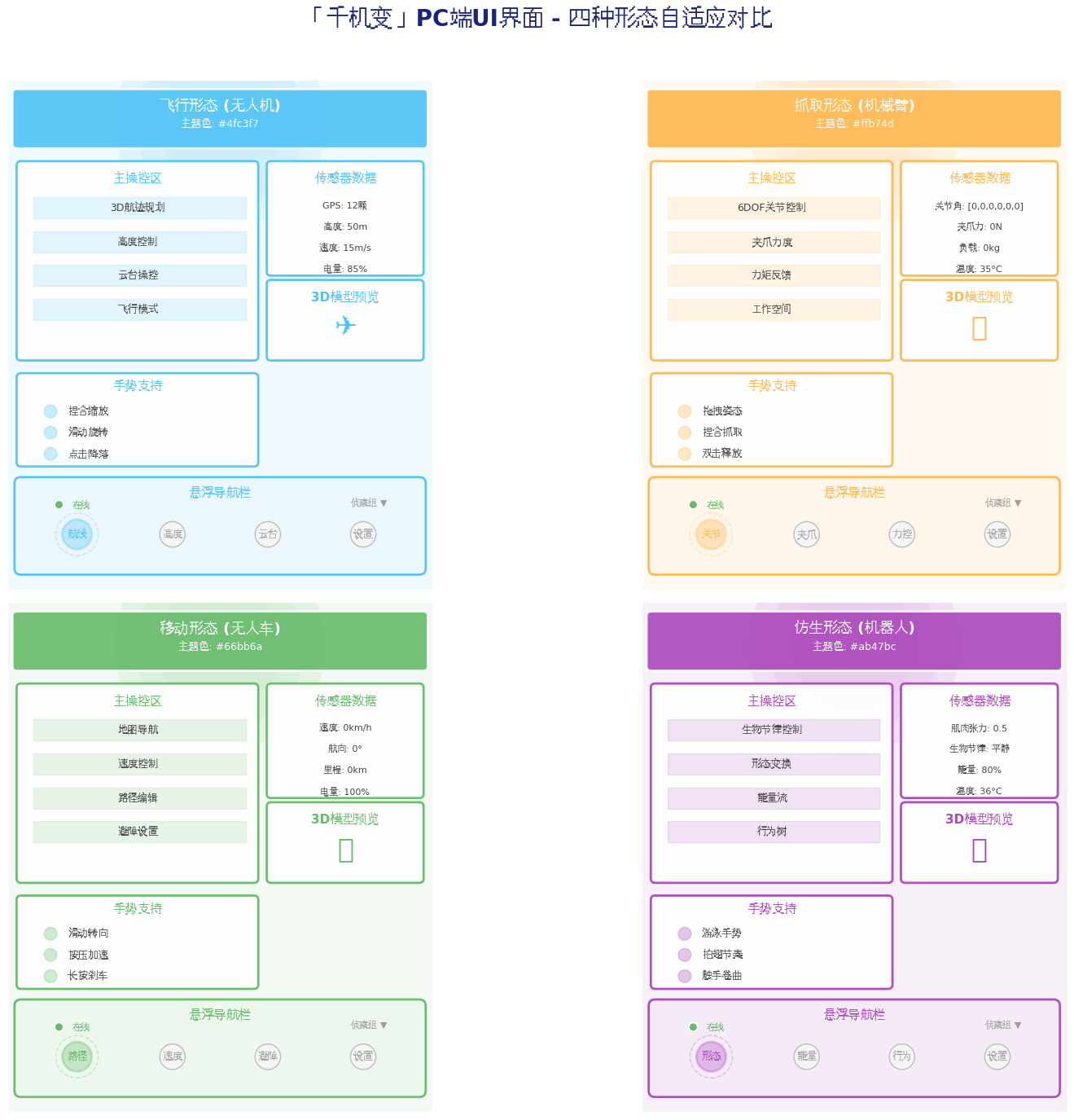
传统多设备适配采用"响应式布局"思路------同一套UI在不同屏幕尺寸间缩放。而「千机变」的自适应形态引擎采用"形态即界面"的范式:
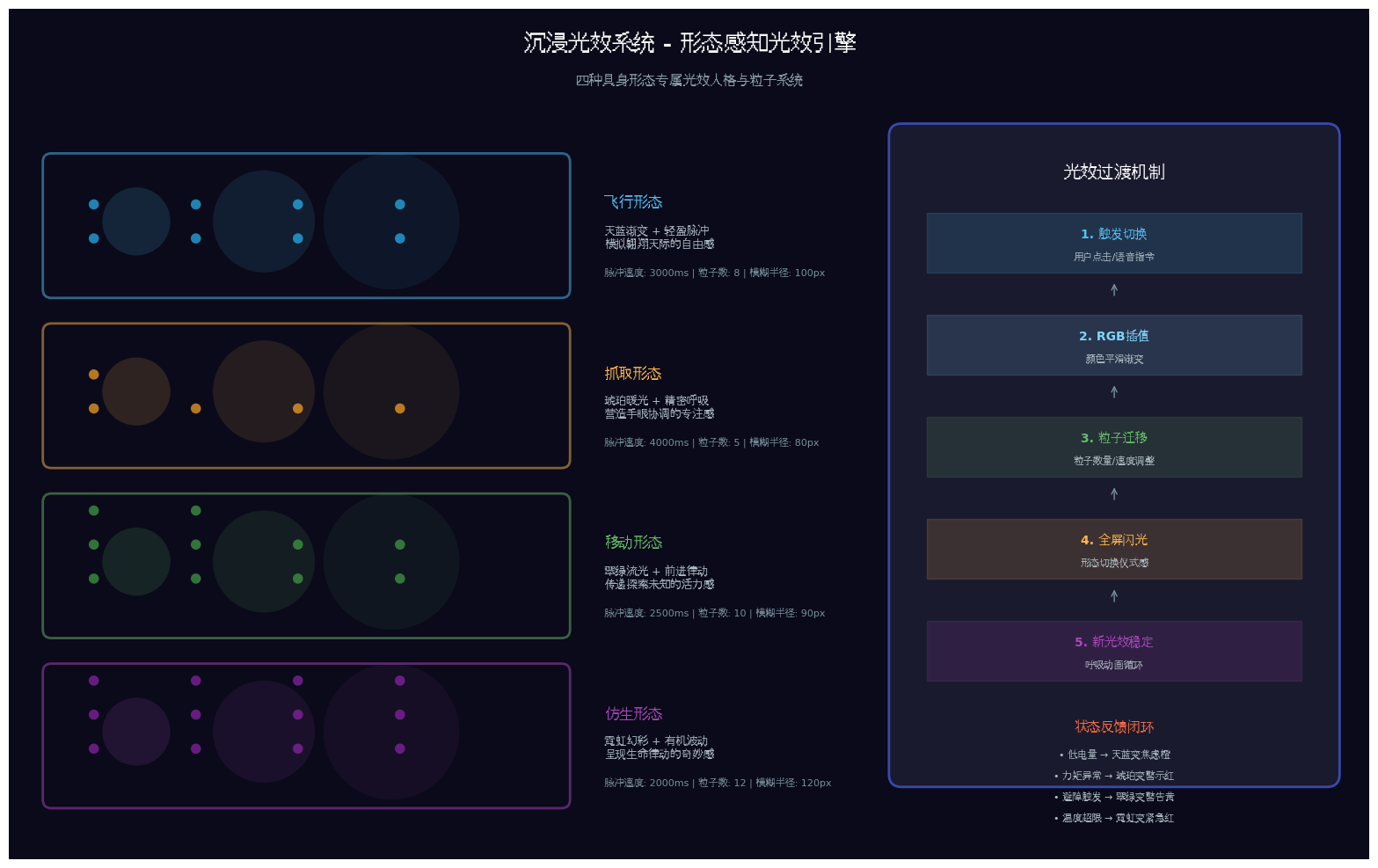
- 飞行形态:PC端呈现3D航迹规划界面,悬浮导航变为"航线/高度/云台"三页签,光效为天蓝色
- 抓取形态:PC端呈现6DOF关节控制界面,悬浮导航变为"关节/夹爪/力控"三页签,光效为琥珀色
- 移动形态:PC端呈现地图导航界面,悬浮导航变为"路径/速度/避障"三页签,光效为翠绿色
- 仿生形态:PC端呈现生物节律控制界面,悬浮导航变为"形态/能量/行为"三页签,光效为霓虹紫
这种设计不是简单的主题切换,而是基于形态能力的UI重构------每种形态拥有独立的控件映射、手势支持、安全约束和传感器面板。
2.3 跨设备交互的鸿蒙方案
HarmonyOS 6通过分布式软总线实现了"毫秒级跨设备协作"。在「千机变」中,我们利用这一能力实现:
- 形态状态跨设备同步:PC端切换形态,手机端实时同步状态徽章
- 传感器数据分布式汇聚:无人机GPS、机械臂力矩、无人车激光雷达数据通过软总线汇聚至PC端统一显示
- 操控指令跨设备下发:PC端发出的控制指令通过软总线路由至对应终端执行器
- 应用接续:用户在PC端编辑的航迹规划,靠近平板时自动接续编辑
三、项目实战:「千机变」架构设计
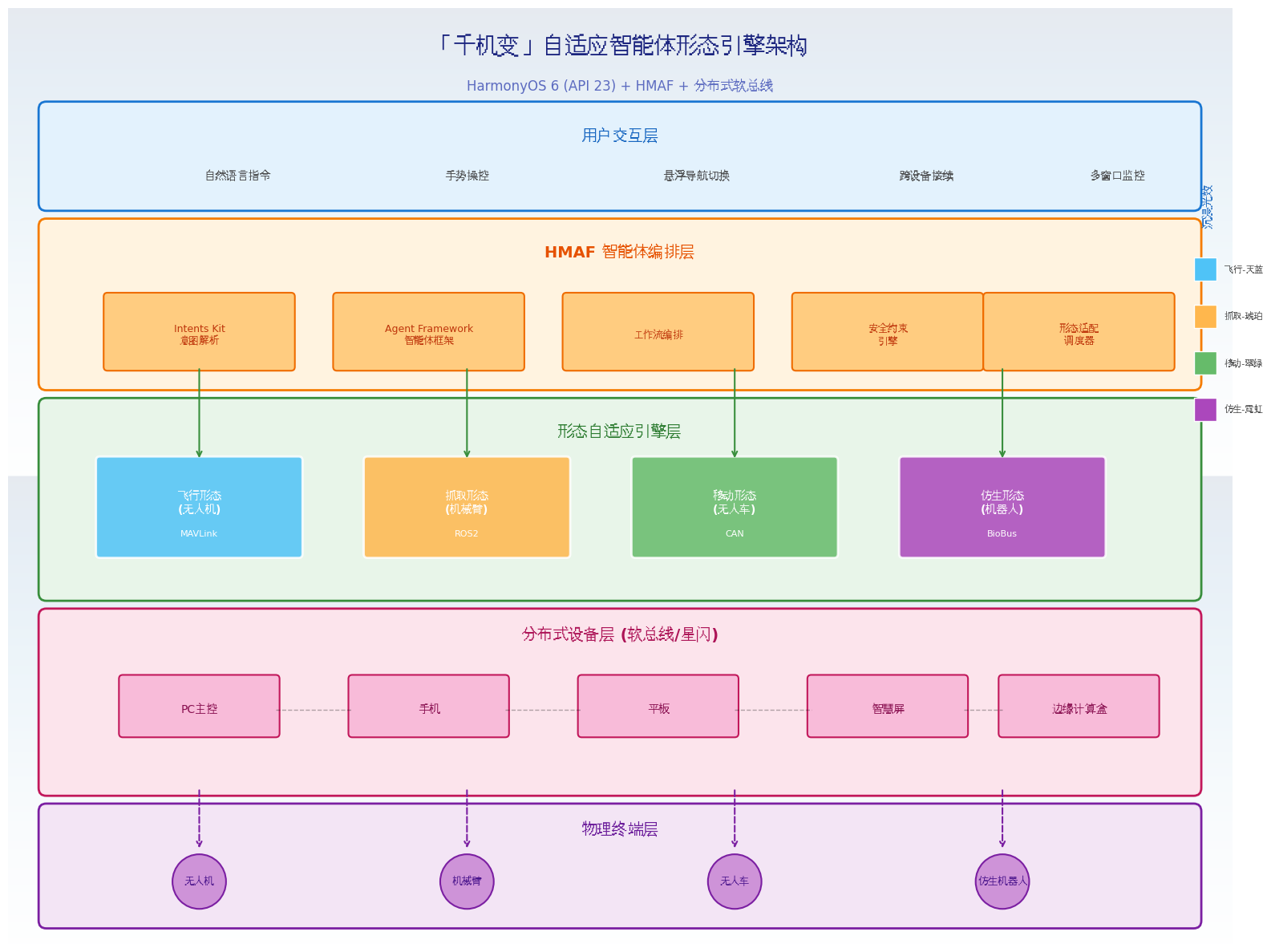
3.1 应用场景与功能规划
面向HarmonyOS PC的具身智能体多形态操控场景:
| 功能模块 | 技术实现 | 沉浸光感/HMAF应用 |
|---|---|---|
| 主控制窗口 | Canvas + Gesture | 形态主题光效、操控区域氛围 |
| 形态悬浮导航 | HdsTabs + systemMaterialEffect | 形态色光效、状态徽章脉冲 |
| 形态适配引擎 | HMAF + 形态插件 | 形态切换意图理解 |
| 传感器面板 | 子窗口 + Chart | 数据流颜色编码 |
| 3D模型预览 | 子窗口 + WebGL | 形态切换形变动画 |
| 环境地图 | 子窗口 + Map | 路径光效追踪 |
| 分布式设备管理 | 软总线 + DeviceManager | 跨设备状态同步 |
| 跨设备接续 | ContinueAbility | 形态状态无缝流转 |
3.2 项目结构
entry/src/main/ets/
├── entryability/
│   └── EntryAbility.ets          # 窗口沉浸配置 + 跨设备接续
├── components/
│   ├── MorphFloatNavigation.ets # 形态悬浮导航
│   ├── MorphLightEffect.ets     # 形态光效系统
│   ├── SensorPanel.ets          # 传感器面板
│   ├── ModelPreview.ets         # 3D模型预览
│   ├── EnvironmentMap.ets       # 环境地图
│   └── DeviceSyncPanel.ets      # 跨设备同步面板
├── services/
│   ├── MorphEngine.ets          # 形态适配引擎
│   ├── EmbodiedAgent.ets        # 具身智能体核心
│   ├── ProtocolAdapter.ets      # 协议适配层
│   └── DistributedSync.ets      # 分布式同步服务
├── pages/
│   └── Index.ets                # 主入口
└── resources/
    └── rawfile/
        └── models/              # 3D模型资源
四、核心组件实战
4.1 窗口沉浸与跨设备接续配置(EntryAbility.ets)
代码亮点:不仅配置窗口全屏沉浸,还实现了跨设备接续能力------当用户从PC切换到平板时,形态状态、传感器数据、操控进度完整保留。
typescript
// entry/src/main/ets/entryability/EntryAbility.ets
import { AbilityConstant, UIAbility, Want } from '@kit.AbilityKit';
import { window } from '@kit.ArkUI';
import { BusinessError } from '@kit.BasicServicesKit';

export default class EntryAbility extends UIAbility {
  private windowStage: window.WindowStage | null = null;
  private currentMorph: string = 'flight';
  private sensorSnapshot: Record<string, number> = {};
  private editPosition: number = 0;

  onCreate(want: Want, launchParam: AbilityConstant.LaunchParam): void {
    // 检查是否为跨设备接续启动
    if (want.parameters?.deviceId) {
      console.info('从其他设备接续启动');
      this.currentMorph = want.parameters.morph as string || 'flight';
      this.sensorSnapshot = want.parameters.sensorSnapshot as Record<string, number> || {};
      this.editPosition = want.parameters.editPosition as number || 0;
      // 恢复形态状态
      AppStorage.setOrCreate('current_morph', this.currentMorph);
      AppStorage.setOrCreate('sensor_snapshot', this.sensorSnapshot);
    }
  }

  onWindowStageCreate(windowStage: window.WindowStage): void {
    this.windowStage = windowStage;
    windowStage.loadContent('pages/Index', (err) => {
      if (err.code) {
        console.error('Failed to load content:', JSON.stringify(err));
        return;
      }
      this.setupImmersiveWindow(windowStage);
    });
  }

  private async setupImmersiveWindow(windowStage: window.WindowStage): Promise<void> {
    try {
      const mainWindow = windowStage.getMainWindowSync();

      // 1. 设置窗口全屏布局
      await mainWindow.setWindowLayoutFullScreen(true);

      // 2. 设置窗口背景为透明
      await mainWindow.setWindowBackgroundColor('#00000000');

      // 3. 配置系统栏属性
      await mainWindow.setWindowSystemBarProperties({
        statusBarColor: '#00000000',
        navigationBarColor: '#00000000',
        statusBarContentColor: '#FFFFFF',
        navigationBarContentColor: '#FFFFFF'
      });

      // 4. 启用安全区避让
      await mainWindow.setWindowAvoidAreaOption({
        type: window.AvoidAreaType.TYPE_SYSTEM,
        enabled: true
      });

      // 5. PC端自由调整大小
      await mainWindow.setWindowResizeEnabled(true);

      console.info('Immersive window setup completed');
    } catch (error) {
      console.error('Failed to setup immersive window:', (error as BusinessError).message);
    }
  }

  // 准备跨设备接续数据
  async onContinue(wantParams: Record<string, unknown>): Promise<AbilityConstant.OnContinueResult> {
    try {
      // 保存当前形态状态
      wantParams['morph'] = this.currentMorph;
      wantParams['sensorSnapshot'] = this.sensorSnapshot;
      wantParams['editPosition'] = this.editPosition;
      wantParams['timestamp'] = Date.now();

      console.info('Continue data prepared:', JSON.stringify(wantParams));
      return AbilityConstant.OnContinueResult.AGREE;
    } catch (error) {
      console.error('Failed to prepare continue data:', error);
      return AbilityConstant.OnContinueResult.REJECT;
    }
  }

  onWindowStageDestroy(): void {
    this.windowStage = null;
  }
}
4.2 形态光效系统(MorphLightEffect.ets)
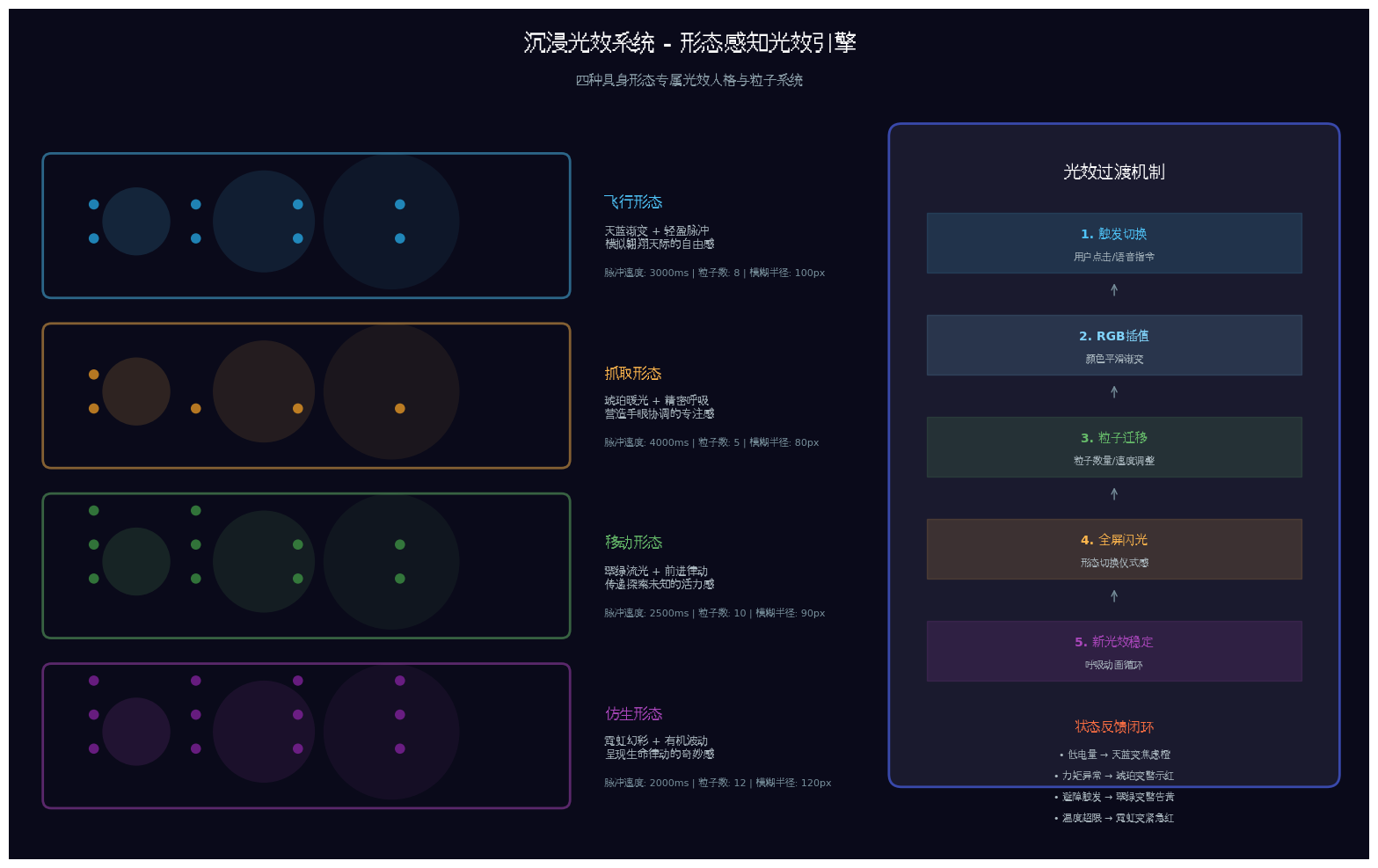
代码亮点:四种具身形态拥有专属光效人格(飞行天蓝、抓取琥珀、移动翠绿、仿生霓虹),形态切换时通过RGB插值实现平滑光效渐变,配合粒子系统营造"变身"仪式感。
typescript
// entry/src/main/ets/components/MorphLightEffect.ets
import { window } from '@kit.ArkUI';

export enum EmbodiedMorph {
  FLIGHT = 'flight',
  GRASP = 'grasp',
  MOBILE = 'mobile',
  BIOMIMETIC = 'biomimetic'
}

export interface MorphLightConfig {
  primaryColor: string;
  secondaryColor: string;
  pulseColor: string;
  ambientIntensity: number;
  pulseSpeed: number;
  particleCount: number;
  blurRadius: number;
}

export const MorphLightConfigs: Record<EmbodiedMorph, MorphLightConfig> = {
  [EmbodiedMorph.FLIGHT]: {
    primaryColor: '#4FC3F7',
    secondaryColor: '#81D4FA',
    pulseColor: '#29B6F6',
    ambientIntensity: 0.6,
    pulseSpeed: 3000,
    particleCount: 8,
    blurRadius: 100
  },
  [EmbodiedMorph.GRASP]: {
    primaryColor: '#FFB74D',
    secondaryColor: '#FFCC80',
    pulseColor: '#FFA726',
    ambientIntensity: 0.7,
    pulseSpeed: 4000,
    particleCount: 5,
    blurRadius: 80
  },
  [EmbodiedMorph.MOBILE]: {
    primaryColor: '#66BB6A',
    secondaryColor: '#81C784',
    pulseColor: '#43A047',
    ambientIntensity: 0.65,
    pulseSpeed: 2500,
    particleCount: 10,
    blurRadius: 90
  },
  [EmbodiedMorph.BIOMIMETIC]: {
    primaryColor: '#AB47BC',
    secondaryColor: '#CE93D8',
    pulseColor: '#8E24AA',
    ambientIntensity: 0.75,
    pulseSpeed: 2000,
    particleCount: 12,
    blurRadius: 120
  }
};

@Component
export struct MorphLightEffect {
  @State currentMorph: EmbodiedMorph = EmbodiedMorph.FLIGHT;
  @State isTransitioning: boolean = false;
  @State transitionProgress: number = 0;

  private config: MorphLightConfig = MorphLightConfigs[this.currentMorph];
  private transitionTimer: number = -1;

  aboutToAppear(): void {
    AppStorage.setOrCreate('morph_light_effect', this);
  }

  aboutToDisappear(): void {
    clearInterval(this.transitionTimer);
  }

  public async transitionTo(morph: EmbodiedMorph): Promise<void> {
    if (this.currentMorph === morph) return;

    this.isTransitioning = true;
    this.transitionProgress = 0;

    const targetConfig = MorphLightConfigs[morph];
    const startConfig = this.config;

    this.transitionTimer = setInterval(() => {
      this.transitionProgress += 0.05;
      if (this.transitionProgress >= 1) {
        this.transitionProgress = 1;
        this.currentMorph = morph;
        this.config = targetConfig;
        this.isTransitioning = false;
        clearInterval(this.transitionTimer);
      }
    }, 50);
  }

  private interpolateColor(color1: string, color2: string, progress: number): string {
    const r1 = parseInt(color1.slice(1, 3), 16);
    const g1 = parseInt(color1.slice(3, 5), 16);
    const b1 = parseInt(color1.slice(5, 7), 16);
    const r2 = parseInt(color2.slice(1, 3), 16);
    const g2 = parseInt(color2.slice(3, 5), 16);
    const b2 = parseInt(color2.slice(5, 7), 16);

    const r = Math.round(r1 + (r2 - r1) * progress);
    const g = Math.round(g1 + (g2 - g1) * progress);
    const b = Math.round(b1 + (b2 - b1) * progress);

    return `#${r.toString(16).padStart(2, '0')}${g.toString(16).padStart(2, '0')}${b.toString(16).padStart(2, '0')}`;
  }

  build() {
    Stack() {
      // 动态环境光晕
      Column() {
        ForEach([0, 1, 2], (index: number) => {
          Column()
            .width(300 + index * 100)
            .height(300 + index * 100)
            .backgroundColor(
              this.isTransitioning
                ? this.interpolateColor(
                    MorphLightConfigs[this.currentMorph].primaryColor,
                    MorphLightConfigs[this.currentMorph === EmbodiedMorph.FLIGHT ? EmbodiedMorph.GRASP : EmbodiedMorph.FLIGHT].primaryColor,
                    this.transitionProgress
                  )
                : this.config.primaryColor
            )
            .blur(this.config.blurRadius)
            .opacity(this.config.ambientIntensity - index * 0.15)
            .position({
              x: `${30 + index * 15}%`,
              y: 200 + index * 80
            })
            .animation({
              duration: this.config.pulseSpeed,
              curve: Curve.EaseInOut,
              iterations: -1,
              playMode: PlayMode.Alternate
            })
        })
      }
      .width('100%')
      .height('100%')
      .backgroundColor('#0a0a1a')
      .expandSafeArea([SafeAreaType.SYSTEM], [SafeAreaEdge.TOP, SafeAreaEdge.BOTTOM])

      // 粒子光效
      ForEach(Array.from({ length: this.config.particleCount }), (_, index: number) => {
        Column()
          .width(4)
          .height(4)
          .backgroundColor(this.config.pulseColor)
          .borderRadius(2)
          .blur(4)
          .opacity(0.8)
          .position({
            x: `${20 + (index * 60) % 60}%`,
            y: `${10 + (index * 25) % 80}%`
          })
          .animation({
            duration: this.config.pulseSpeed / 2 + index * 200,
            curve: Curve.EaseInOut,
            iterations: -1,
            playMode: PlayMode.Alternate
          })
          .translate({
            x: Math.sin(index) * 50,
            y: Math.cos(index) * 30
          })
      })

      // 形态切换过渡闪光
      if (this.isTransitioning) {
        Column()
          .width('100%')
          .height('100%')
          .backgroundColor(
            this.interpolateColor(
              MorphLightConfigs[this.currentMorph].primaryColor,
              MorphLightConfigs[this.currentMorph === EmbodiedMorph.FLIGHT ? EmbodiedMorph.GRASP : EmbodiedMorph.FLIGHT].primaryColor,
              this.transitionProgress
            )
          )
          .opacity(this.transitionProgress * 0.3)
          .animation({
            duration: 500,
            curve: Curve.EaseOut
          })
      }
    }
    .width('100%')
    .height('100%')
  }
}
4.3 形态悬浮导航(MorphFloatNavigation.ets)
代码亮点:底部悬浮导航不仅承载形态切换,更实时显示跨设备同步状态------当无人机在手机端上线时,PC端导航栏的飞行图标自动显示"在线"绿点。
typescript
// entry/src/main/ets/components/MorphFloatNavigation.ets
import { EmbodiedMorph, MorphLightConfigs } from './MorphLightEffect';

interface MorphNavItem {
  id: string;
  morph: EmbodiedMorph;
  icon: Resource;
  label: string;
  status: 'online' | 'offline' | 'running' | 'error';
  deviceId: string; // 关联的分布式设备ID
}

@Component
export struct MorphFloatNavigation {
  @State currentMorph: EmbodiedMorph = EmbodiedMorph.FLIGHT;
  @State navTransparency: number = 0.70;
  @State isExpanded: boolean = false;
  @State bottomAvoidHeight: number = 0;
  @State morphGroups: string[] = ['侦察组', '作业组', '运输组', '仿生组'];
  @State currentGroup: number = 0;

  private navItems: MorphNavItem[] = [
    { id: 'flight', morph: EmbodiedMorph.FLIGHT, icon: $r('app.media.ic_drone'), label: '飞行', status: 'online', deviceId: 'drone_001' },
    { id: 'grasp', morph: EmbodiedMorph.GRASP, icon: $r('app.media.ic_arm'), label: '抓取', status: 'offline', deviceId: 'arm_001' },
    { id: 'mobile', morph: EmbodiedMorph.MOBILE, icon: $r('app.media.ic_vehicle'), label: '移动', status: 'running', deviceId: 'vehicle_001' },
    { id: 'biomimetic', morph: EmbodiedMorph.BIOMIMETIC, icon: $r('app.media.ic_bionic'), label: '仿生', status: 'online', deviceId: 'bionic_001' }
  ];

  aboutToAppear(): void {
    this.getBottomAvoidArea();
    this.startDeviceSync();
  }

  private async startDeviceSync(): Promise<void> {
    // 监听分布式设备状态变化
    AppStorage.setOrCreate('device_state_change', (deviceId: string, state: string) => {
      const item = this.navItems.find(i => i.deviceId === deviceId);
      if (item) {
        item.status = state as 'online' | 'offline' | 'running' | 'error';
      }
    });
  }

  private getMorphColor(morph: EmbodiedMorph): string {
    return MorphLightConfigs[morph].primaryColor;
  }

  private getStatusColor(status: string): string {
    const colors: Record<string, string> = {
      'online': '#66BB6A',
      'offline': '#9E9E9E',
      'running': '#FFB74D',
      'error': '#EF5350'
    };
    return colors[status] || '#9E9E9E';
  }

  build() {
    Stack({ alignContent: Alignment.Bottom }) {
      Column() {
        this.contentBuilder()
      }
      .padding({ bottom: this.bottomAvoidHeight + 80 })

      Column() {
        Stack() {
          // 玻璃拟态背景
          Column()
            .width('100%')
            .height('100%')
            .backgroundBlurStyle(BlurStyle.REGULAR)
            .opacity(this.navTransparency)
            .backdropFilter($r('sys.blur.20'))

          // 形态主题渐变光效层
          Column()
            .width('100%')
            .height('100%')
            .linearGradient({
              direction: GradientDirection.Top,
              colors: [
                [this.getMorphColor(this.currentMorph) + '26', 0.0],
                ['rgba(255,255,255,0.05)', 1.0]
              ]
            })
        }
        .width('100%')
        .height('100%')
        .borderRadius(24)
        .shadow({
          radius: 20,
          color: this.getMorphColor(this.currentMorph) + '33',
          offsetX: 0,
          offsetY: -4
        })

        // 形态组切换标签
        Row() {
          ForEach(this.morphGroups, (group: string, index: number) => {
            Text(group)
              .fontSize(11)
              .fontColor(this.currentGroup === index ? this.getMorphColor(this.currentMorph) : '#999999')
              .backgroundColor(this.currentGroup === index ? this.getMorphColor(this.currentMorph) + '1A' : 'transparent')
              .padding({ left: 8, right: 8, top: 2, bottom: 2 })
              .borderRadius(10)
              .onClick(() => {
                this.currentGroup = index;
                this.triggerHapticFeedback();
              })
          })
        }
        .width('100%')
        .height(28)
        .justifyContent(FlexAlign.Center)
        .margin({ top: 4 })

        // 形态导航项
        Row() {
          ForEach(this.navItems, (item: MorphNavItem) => {
            Column() {
              Stack() {
                Image(item.icon)
                  .width(28)
                  .height(28)
                  .fillColor(this.currentMorph === item.morph ? this.getMorphColor(item.morph) : '#666666')

                // 状态指示器(带分布式设备同步)
                Column()
                  .width(8)
                  .height(8)
                  .backgroundColor(this.getStatusColor(item.status))
                  .borderRadius(4)
                  .border({ width: 1, color: '#FFFFFF' })
                  .position({ x: 20, y: -2 })
                  .shadow({
                    radius: 4,
                    color: this.getStatusColor(item.status),
                    offsetX: 0,
                    offsetY: 0
                  })
                  .animation({
                    duration: item.status === 'running' ? 1000 : 0,
                    curve: Curve.Linear,
                    iterations: -1
                  })

                // 选中形态光晕
                if (this.currentMorph === item.morph) {
                  Column()
                    .width(48)
                    .height(48)
                    .backgroundColor(this.getMorphColor(item.morph) + '33')
                    .borderRadius(24)
                    .blur(12)
                    .position({ x: -10, y: -10 })
                    .animation({
                      duration: 2000,
                      curve: Curve.EaseInOut,
                      iterations: -1,
                      playMode: PlayMode.Alternate
                    })
                    .scale({ x: 1.2, y: 1.2 })
                }
              }
              .width(40)
              .height(40)

              Text(item.label)
                .fontSize(11)
                .fontColor(this.currentMorph === item.morph ? this.getMorphColor(item.morph) : '#999999')
                .margin({ top: 4 })
            }
            .layoutWeight(1)
            .onClick(() => {
              this.switchMorph(item.morph);
            })
            .gesture(
              LongPressGesture({ duration: 800 })
                .onAction(() => {
                  this.showMorphDetail(item);
                })
            )
          })
        }
        .width('100%')
        .height(72)
        .padding({ left: 16, right: 16 })
        .justifyContent(FlexAlign.SpaceAround)
      }
      .width('92%')
      .height(112)
      .margin({ bottom: this.bottomAvoidHeight + 12, left: '4%', right: '4%' })
      .animation({
        duration: 300,
        curve: Curve.Spring,
        iterations: 1
      })
    }
    .width('100%')
    .height('100%')
  }

  @BuilderParam contentBuilder: () => void = this.defaultContentBuilder;

  @Builder
  defaultContentBuilder(): void {
    Column() {
      Text('内容区域')
        .fontSize(16)
        .fontColor('#999999')
    }
    .width('100%')
    .height('100%')
    .justifyContent(FlexAlign.Center)
  }

  private async switchMorph(morph: EmbodiedMorph): Promise<void> {
    if (this.currentMorph === morph) return;

    // 触发形态切换事件
    AppStorage.setOrCreate('morph_transition', {
      from: this.currentMorph,
      to: morph,
      timestamp: Date.now()
    });

    this.currentMorph = morph;

    // 通知形态引擎进行切换
    const engine = await import('../services/MorphEngine').then(m => m.MorphEngine.getInstance());
    await engine.transitionTo(morph);

    // 同步到其他设备
    this.syncMorphToDevices(morph);
  }

  private async syncMorphToDevices(morph: EmbodiedMorph): Promise<void> {
    try {
      const distributedSync = await import('../services/DistributedSync').then(m => m.DistributedSync.getInstance());
      await distributedSync.broadcastMorphChange(morph);
    } catch (error) {
      console.error('Failed to sync morph:', error);
    }
  }

  private showMorphDetail(item: MorphNavItem): void {
    console.info(`Morph detail: ${item.label}, device: ${item.deviceId}, status: ${item.status}`);
  }

  private triggerHapticFeedback(): void {
    try {
      import('@kit.SensorServiceKit').then(sensor => {
        sensor.vibrator.startVibration({ type: 'time', duration: 50 }, { id: 0 });
      });
    } catch (error) {
      console.error('Haptic feedback failed:', error);
    }
  }
}
4.4 分布式同步服务(DistributedSync.ets)
代码亮点:基于HarmonyOS分布式软总线,实现形态状态、传感器数据、操控指令的跨设备实时同步。当PC端切换形态时,手机端和平板端自动同步状态徽章。
typescript
// entry/src/main/ets/services/DistributedSync.ets
import distributedDevice from '@ohos.distributedDevice';
import { BusinessError } from '@kit.BasicServicesKit';

export class DistributedSync {
  private static instance: DistributedSync;
  private deviceManager: distributedDevice.DeviceManager | null = null;
  private connectedDevices: string[] = [];
  private dataSyncChannel: distributedDevice.DataSync | null = null;

  private constructor() {
    this.initializeDeviceManager();
  }

  static getInstance(): DistributedSync {
    if (!DistributedSync.instance) {
      DistributedSync.instance = new DistributedSync();
    }
    return DistributedSync.instance;
  }

  private async initializeDeviceManager(): Promise<void> {
    try {
      this.deviceManager = distributedDevice.createDeviceManager('com.harmonyos.qianjibian');

      if (this.deviceManager) {
        // 监听设备状态变化
        this.deviceManager.on('deviceStateChange', (data: distributedDevice.DeviceStateChangeInfo) => {
          console.info(`设备状态变更: ${data.deviceName} -> ${data.state}`);

          if (data.state === distributedDevice.DeviceState.ONLINE) {
            this.connectedDevices.push(data.deviceId);
            this.establishSyncChannel(data.deviceId);
          } else if (data.state === distributedDevice.DeviceState.OFFLINE) {
            this.connectedDevices = this.connectedDevices.filter(id => id !== data.deviceId);
          }

          // 通知UI更新设备状态
          AppStorage.setOrCreate('device_state_change', {
            deviceId: data.deviceId,
            state: data.state === distributedDevice.DeviceState.ONLINE ? 'online' : 'offline'
          });
        });
      }
    } catch (error) {
      console.error('Failed to initialize device manager:', error);
    }
  }

  private async establishSyncChannel(deviceId: string): Promise<void> {
    try {
      if (!this.deviceManager) return;

      // 优先使用星闪协议连接
      const connectParam: distributedDevice.ConnectParam = {
        protocol: 'NearLink',
        authType: distributedDevice.AuthType.NONE
      };

      await this.deviceManager.connectDevice(deviceId, connectParam);
      console.info(`设备${deviceId}连接成功,使用星闪协议`);

      // 初始化分布式数据同步通道
      this.initDataSync(deviceId);
    } catch (error) {
      console.error('星闪连接失败,降级为软总线:', error);
      // 降级为分布式软总线
      if (this.deviceManager) {
        await this.deviceManager.connectDevice(deviceId, { protocol: 'SoftBus' });
        this.initDataSync(deviceId);
      }
    }
  }

  private initDataSync(deviceId: string): void {
    // 初始化分布式KV存储用于形态状态同步
    console.info(`初始化数据同步通道: ${deviceId}`);
  }

  // 广播形态变更到所有连接设备
  public async broadcastMorphChange(morph: string): Promise<void> {
    for (const deviceId of this.connectedDevices) {
      try {
        await this.sendToDevice(deviceId, {
          type: 'morph_change',
          payload: { morph, timestamp: Date.now() }
        });
      } catch (error) {
        console.error(`Failed to sync morph to ${deviceId}:`, error);
      }
    }
  }

  // 广播传感器数据到所有连接设备
  public async broadcastSensorData(data: Record<string, number>): Promise<void> {
    for (const deviceId of this.connectedDevices) {
      try {
        await this.sendToDevice(deviceId, {
          type: 'sensor_data',
          payload: data
        });
      } catch (error) {
        console.error(`Failed to sync sensor data to ${deviceId}:`, error);
      }
    }
  }

  // 发送数据到指定设备
  private async sendToDevice(deviceId: string, message: object): Promise<void> {
    // 实际实现通过分布式软总线发送
    console.info(`Sending to ${deviceId}:`, JSON.stringify(message));
  }

  // 获取所有在线设备
  public getOnlineDevices(): string[] {
    return this.connectedDevices;
  }
}
4.5 具身智能体核心(EmbodiedAgent.ets)
代码亮点:基于HMAF鸿蒙智能体框架,支持自然语言操控形态切换。用户可以说"切换到飞行模式"或"让机械臂去抓取那个物体",智能体通过Intents Kit解析意图并执行。
typescript
// entry/src/main/ets/services/EmbodiedAgent.ets
import { agentFramework } from '@kit.AgentFrameworkKit';
import { intents } from '@kit.IntentsKit';

export interface MorphCapability {
  morph: string;
  sensors: string[];
  actuators: string[];
  controlProtocol: string;
  safetyConstraints: SafetyConstraint[];
}

export interface SafetyConstraint {
  type: string;
  threshold: number;
  action: string;
}

export class EmbodiedAgent {
  private static instance: EmbodiedAgent;
  private currentMorph: string = 'flight';
  private morphCapabilities: Map<string, MorphCapability> = new Map();
  private agentSession: agentFramework.AgentSession | null = null;

  private constructor() {
    this.initializeMorphCapabilities();
  }

  static getInstance(): EmbodiedAgent {
    if (!EmbodiedAgent.instance) {
      EmbodiedAgent.instance = new EmbodiedAgent();
    }
    return EmbodiedAgent.instance;
  }

  private initializeMorphCapabilities(): void {
    this.morphCapabilities.set('flight', {
      morph: 'flight',
      sensors: ['gps', 'imu', 'camera', 'lidar', 'barometer'],
      actuators: ['rotor', 'gimbal', 'landing_gear'],
      controlProtocol: 'MAVLink',
      safetyConstraints: [
        { type: 'altitude', threshold: 120, action: 'return_home' },
        { type: 'battery', threshold: 20, action: 'emergency_land' },
        { type: 'geofence', threshold: 0, action: 'hover' }
      ]
    });

    this.morphCapabilities.set('grasp', {
      morph: 'grasp',
      sensors: ['force_torque', 'camera', 'joint_encoder', 'tactile'],
      actuators: ['joint_6dof', 'gripper', 'wrist'],
      controlProtocol: 'ROS2',
      safetyConstraints: [
        { type: 'force', threshold: 50, action: 'release' },
        { type: 'workspace', threshold: 0, action: 'stop' },
        { type: 'collision', threshold: 0, action: 'retract' }
      ]
    });

    this.morphCapabilities.set('mobile', {
      morph: 'mobile',
      sensors: ['lidar', 'camera', 'wheel_encoder', 'ultrasonic'],
      actuators: ['wheel_4wd', 'steering', 'suspension'],
      controlProtocol: 'CAN',
      safetyConstraints: [
        { type: 'speed', threshold: 30, action: 'decelerate' },
        { type: 'obstacle', threshold: 1.0, action: 'brake' },
        { type: 'slope', threshold: 30, action: 'stop' }
      ]
    });

    this.morphCapabilities.set('biomimetic', {
      morph: 'biomimetic',
      sensors: ['flex_sensor', 'pressure', 'gyro', 'bio_camera'],
      actuators: ['muscle_actuator', 'tentacle', 'fin', 'wing'],
      controlProtocol: 'BioBus',
      safetyConstraints: [
        { type: 'temperature', threshold: 60, action: 'shutdown' },
        { type: 'deformation', threshold: 0.5, action: 'reset' },
        { type: 'energy', threshold: 15, action: 'hibernate' }
      ]
    });
  }

  public async initialize(): Promise<void> {
    try {
      this.agentSession = await agentFramework.createAgentSession({
        agentId: 'embodied_agent_001',
        capabilities: ['perception', 'planning', 'control', 'safety'],
        modelConfig: {
          modelType: agentFramework.ModelType.LLM,
          modelId: 'huawei-pangu-embodied-v2'
        }
      });
      console.info('Embodied agent session initialized');
    } catch (error) {
      console.error('Failed to initialize agent session:', error);
      throw error;
    }
  }

  // 基于自然语言的形态切换
  public async switchMorphByIntent(userInput: string): Promise<boolean> {
    try {
      // 通过Intents Kit解析用户意图
      const intent = await intents.parseIntent({
        action: 'switch_morph',
        utterance: userInput
      });

      const targetMorph = intent.parameters?.target as string;
      if (targetMorph && this.morphCapabilities.has(targetMorph)) {
        return await this.switchMorph(targetMorph);
      }

      console.error('Unknown morph in intent:', targetMorph);
      return false;
    } catch (error) {
      console.error('Intent parsing failed:', error);
      return false;
    }
  }

  // 直接形态切换
  public async switchMorph(targetMorph: string): Promise<boolean> {
    const capability = this.morphCapabilities.get(targetMorph);
    if (!capability) {
      console.error(`Unknown morph: ${targetMorph}`);
      return false;
    }

    try {
      await this.performSafetyCheck(this.currentMorph, targetMorph);

      const intent = await intents.parseIntent({
        action: 'switch_morph',
        parameters: { from: this.currentMorph, to: targetMorph }
      });

      await this.agentSession?.executeTask({
        taskType: 'morph_transition',
        context: {
          currentMorph: this.currentMorph,
          targetMorph: targetMorph,
          capabilities: capability,
          intent: intent
        }
      });

      this.currentMorph = targetMorph;
      this.emitMorphChanged(targetMorph);

      console.info(`Morph switched to: ${targetMorph}`);
      return true;
    } catch (error) {
      console.error('Morph switch failed:', error);
      return false;
    }
  }

  private async performSafetyCheck(from: string, to: string): Promise<void> {
    const fromCapability = this.morphCapabilities.get(from);
    const toCapability = this.morphCapabilities.get(to);

    if (from === 'flight' && to === 'grasp') {
      console.info('Safety check: confirming landing status');
    }

    for (const constraint of toCapability?.safetyConstraints || []) {
      console.info(`Safety constraint: ${constraint.type} threshold ${constraint.threshold}`);
    }
  }

  public getCurrentCapability(): MorphCapability | undefined {
    return this.morphCapabilities.get(this.currentMorph);
  }

  public getAllCapabilities(): MorphCapability[] {
    return Array.from(this.morphCapabilities.values());
  }

  private emitMorphChanged(morph: string): void {
    AppStorage.setOrCreate('current_morph', morph);
  }

  public async executeAction(action: string, parameters: Record<string, unknown>): Promise<void> {
    const capability = this.getCurrentCapability();
    if (!capability) {
      throw new Error('No morph capability available');
    }

    if (!capability.actuators.some(a => action.includes(a))) {
      throw new Error(`Action ${action} not supported by current morph ${this.currentMorph}`);
    }

    await this.agentSession?.executeTask({
      taskType: 'embodied_action',
      context: { action, parameters, morph: this.currentMorph }
    });
  }
}
4.6 形态适配引擎(MorphEngine.ets)
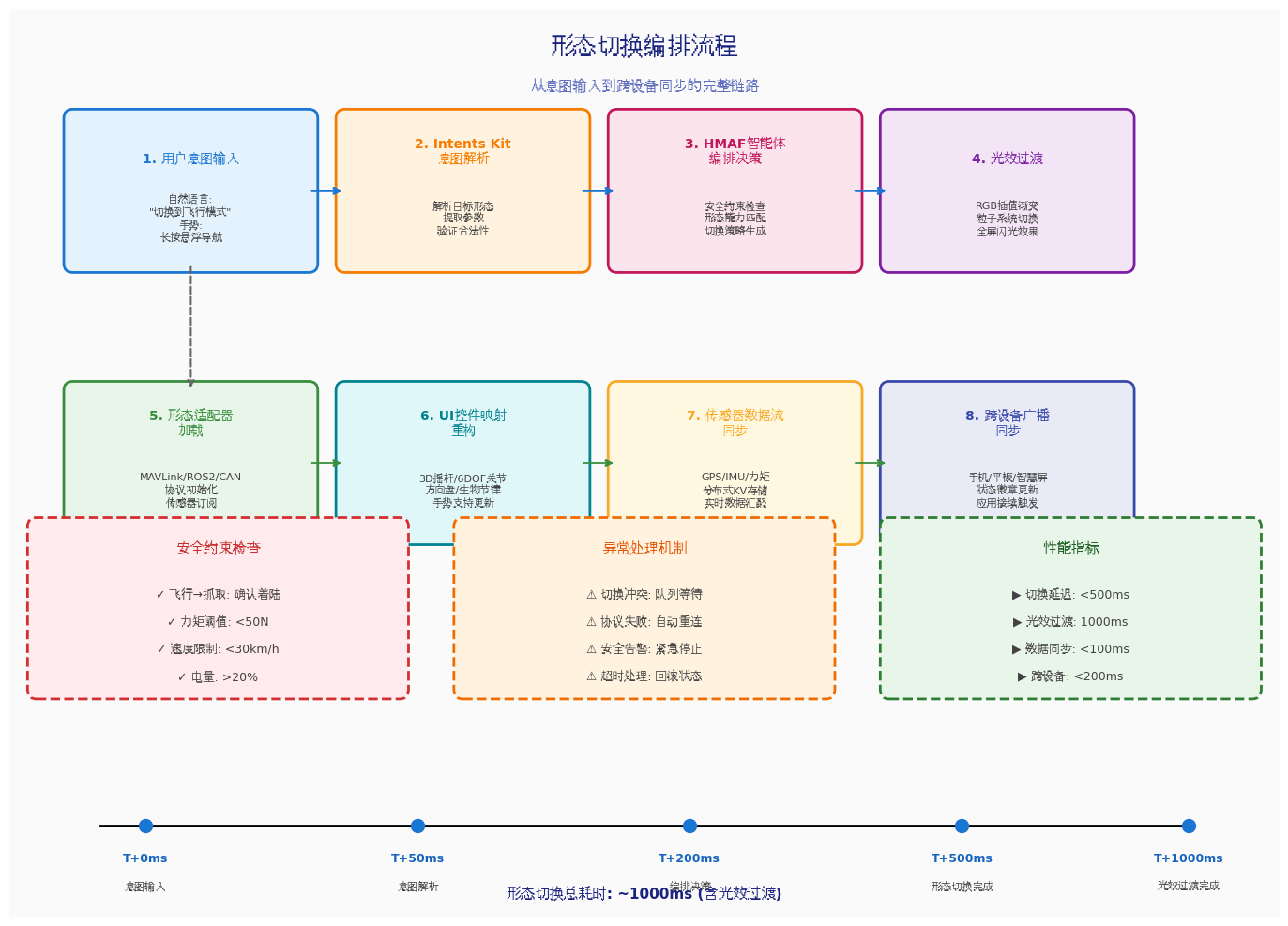
代码亮点:形态切换时依次执行光效过渡→智能体切换→适配器加载→UI映射更新→传感器同步→跨设备广播,形成完整的切换编排链路。
typescript
// entry/src/main/ets/services/MorphEngine.ets
import { EmbodiedAgent, MorphCapability } from './EmbodiedAgent';
import { EmbodiedMorph } from '../components/MorphLightEffect';

export class MorphEngine {
  private static instance: MorphEngine;
  private embodiedAgent: EmbodiedAgent;
  private morphAdapters: Map<string, MorphAdapter> = new Map();
  private isTransitioning: boolean = false;

  private constructor() {
    this.embodiedAgent = EmbodiedAgent.getInstance();
    this.initializeAdapters();
  }

  static getInstance(): MorphEngine {
    if (!MorphEngine.instance) {
      MorphEngine.instance = new MorphEngine();
    }
    return MorphEngine.instance;
  }

  private initializeAdapters(): void {
    this.morphAdapters.set('flight', new FlightAdapter());
    this.morphAdapters.set('grasp', new GraspAdapter());
    this.morphAdapters.set('mobile', new MobileAdapter());
    this.morphAdapters.set('biomimetic', new BiomimeticAdapter());
  }

  public async transitionTo(targetMorph: EmbodiedMorph): Promise<void> {
    if (this.isTransitioning) {
      throw new Error('Morph transition already in progress');
    }

    this.isTransitioning = true;
    const morphKey = targetMorph.toString();

    try {
      // 1. 触发UI光效过渡
      await this.triggerLightTransition(targetMorph);

      // 2. 调用具身智能体进行形态切换
      const success = await this.embodiedAgent.switchMorph(morphKey);
      if (!success) {
        throw new Error('Agent morph switch failed');
      }

      // 3. 加载形态适配器
      const adapter = this.morphAdapters.get(morphKey);
      if (adapter) {
        await adapter.initialize();
      }

      // 4. 更新UI控件映射
      await this.updateUIControlMapping(targetMorph);

      // 5. 同步传感器数据流
      await this.syncSensorStream(targetMorph);

      // 6. 广播到其他设备
      await this.broadcastToDevices(targetMorph);

      console.info(`Morph transition to ${targetMorph} completed`);
    } catch (error) {
      console.error('Morph transition failed:', error);
      throw error;
    } finally {
      this.isTransitioning = false;
    }
  }

  private async triggerLightTransition(morph: EmbodiedMorph): Promise<void> {
    return new Promise((resolve) => {
      AppStorage.setOrCreate('light_transition_target', morph);
      setTimeout(resolve, 1000);
    });
  }

  private async updateUIControlMapping(morph: EmbodiedMorph): Promise<void> {
    const controlMappings: Record<EmbodiedMorph, ControlMapping> = {
      [EmbodiedMorph.FLIGHT]: {
        primaryControl: 'joystick_3d',
        secondaryControls: ['altitude_slider', 'gimbal_control', 'flight_mode'],
        gestureSupport: ['pinch_zoom', 'swipe_rotate', 'tap_land']
      },
      [EmbodiedMorph.GRASP]: {
        primaryControl: 'joint_control_6dof',
        secondaryControls: ['gripper_slider', 'force_feedback', 'workspace_view'],
        gestureSupport: ['drag_pose', 'pinch_grasp', 'double_tap_release']
      },
      [EmbodiedMorph.MOBILE]: {
        primaryControl: 'steering_wheel',
        secondaryControls: ['speed_pedal', 'path_editor', 'obstacle_map'],
        gestureSupport: ['swipe_steer', 'press_accelerate', 'long_press_brake']
      },
      [EmbodiedMorph.BIOMIMETIC]: {
        primaryControl: 'bio_rhythm',
        secondaryControls: ['morphology_slider', 'energy_flow', 'behavior_tree'],
        gestureSupport: ['swim_gesture', 'flap_rhythm', 'curl_tentacle']
      }
    };

    AppStorage.setOrCreate('control_mapping', controlMappings[morph]);
  }

  private async syncSensorStream(morph: EmbodiedMorph): Promise<void> {
    const capability = this.embodiedAgent.getCurrentCapability();
    if (!capability) return;

    const sensorTopics = capability.sensors.map(s => `/sensor/${s}`);
    console.info(`Subscribing to sensors: ${sensorTopics.join(', ')}`);
    AppStorage.setOrCreate('active_sensors', sensorTopics);
  }

  private async broadcastToDevices(morph: EmbodiedMorph): Promise<void> {
    try {
      const distributedSync = await import('./DistributedSync').then(m => m.DistributedSync.getInstance());
      await distributedSync.broadcastMorphChange(morph.toString());
    } catch (error) {
      console.error('Broadcast failed:', error);
    }
  }
}

abstract class MorphAdapter {
  abstract initialize(): Promise<void>;
  abstract executeCommand(command: string, params: unknown): Promise<void>;
  abstract getStatus(): Record<string, unknown>;
}

class FlightAdapter extends MorphAdapter {
  async initialize(): Promise<void> {
    console.info('Flight adapter initialized');
  }
  async executeCommand(command: string, params: unknown): Promise<void> {
    console.info(`Flight command: ${command}`, params);
  }
  getStatus(): Record<string, unknown> {
    return { altitude: 50, speed: 15, battery: 85, gps_satellites: 12 };
  }
}

class GraspAdapter extends MorphAdapter {
  async initialize(): Promise<void> {
    console.info('Grasp adapter initialized');
  }
  async executeCommand(command: string, params: unknown): Promise<void> {
    console.info(`Grasp command: ${command}`, params);
  }
  getStatus(): Record<string, unknown> {
    return { joint_angles: [0, 0, 0, 0, 0, 0], gripper_force: 0, payload: 0 };
  }
}

class MobileAdapter extends MorphAdapter {
  async initialize(): Promise<void> {
    console.info('Mobile adapter initialized');
  }
  async executeCommand(command: string, params: unknown): Promise<void> {
    console.info(`Mobile command: ${command}`, params);
  }
  getStatus(): Record<string, unknown> {
    return { speed: 0, heading: 0, odometer: 0, fuel: 100 };
  }
}

class BiomimeticAdapter extends MorphAdapter {
  async initialize(): Promise<void> {
    console.info('Biomimetic adapter initialized');
  }
  async executeCommand(command: string, params: unknown): Promise<void> {
    console.info(`Biomimetic command: ${command}`, params);
  }
  getStatus(): Record<string, unknown> {
    return { muscle_tension: 0.5, bio_rhythm: 'calm', energy_level: 80 };
  }
}

interface ControlMapping {
  primaryControl: string;
  secondaryControls: string[];
  gestureSupport: string[];
}
五、多窗口形态监控与跨设备协同
HarmonyOS PC的自由窗口能力为具身智能体操控提供了多视角监控:
typescript
// 创建浮动传感器面板窗口
async function createSensorPanelWindow(windowStage: window.WindowStage): Promise<void> {
  const sensorWindow = await windowStage.createSubWindow('sensor_panel');
  await sensorWindow.moveWindowTo(1200, 100);
  await sensorWindow.resize(320, 480);
  await sensorWindow.setWindowBackgroundColor('#00000000');
  await sensorWindow.loadContent('pages/SensorPanel');
  await sensorWindow.showWindow();
}

// 创建浮动3D模型预览窗口
async function createModelPreviewWindow(windowStage: window.WindowStage): Promise<void> {
  const modelWindow = await windowStage.createSubWindow('model_preview');
  await modelWindow.moveWindowTo(100, 600);
  await modelWindow.resize(400, 300);
  await modelWindow.setWindowBackgroundColor('#00000000');
  await modelWindow.loadContent('pages/ModelPreview');
  await modelWindow.showWindow();
}

// 创建浮动环境地图窗口
async function createMapWindow(windowStage: window.WindowStage): Promise<void> {
  const mapWindow = await windowStage.createSubWindow('environment_map');
  await mapWindow.moveWindowTo(1200, 600);
  await mapWindow.resize(400, 400);
  await mapWindow.setWindowBackgroundColor('#00000000');
  await mapWindow.loadContent('pages/EnvironmentMap');
  await mapWindow.showWindow();
}
六、关键技术总结
6.1 悬浮导航适配清单
| 适配项 | API/方法 | 说明 |
|---|---|---|
| 获取安全区高度 | window.getWindowAvoidArea() |
获取底部导航指示器高度 |
| 背景模糊效果 | backgroundBlurStyle() |
系统级毛玻璃效果 |
| 背景滤镜 | backdropFilter() |
更精细的模糊控制 |
| 扩展安全区 | expandSafeArea() |
内容延伸至非安全区 |
| 窗口自由调整 | setWindowResizeEnabled() |
PC端自由调整大小 |
6.2 跨设备交互最佳实践
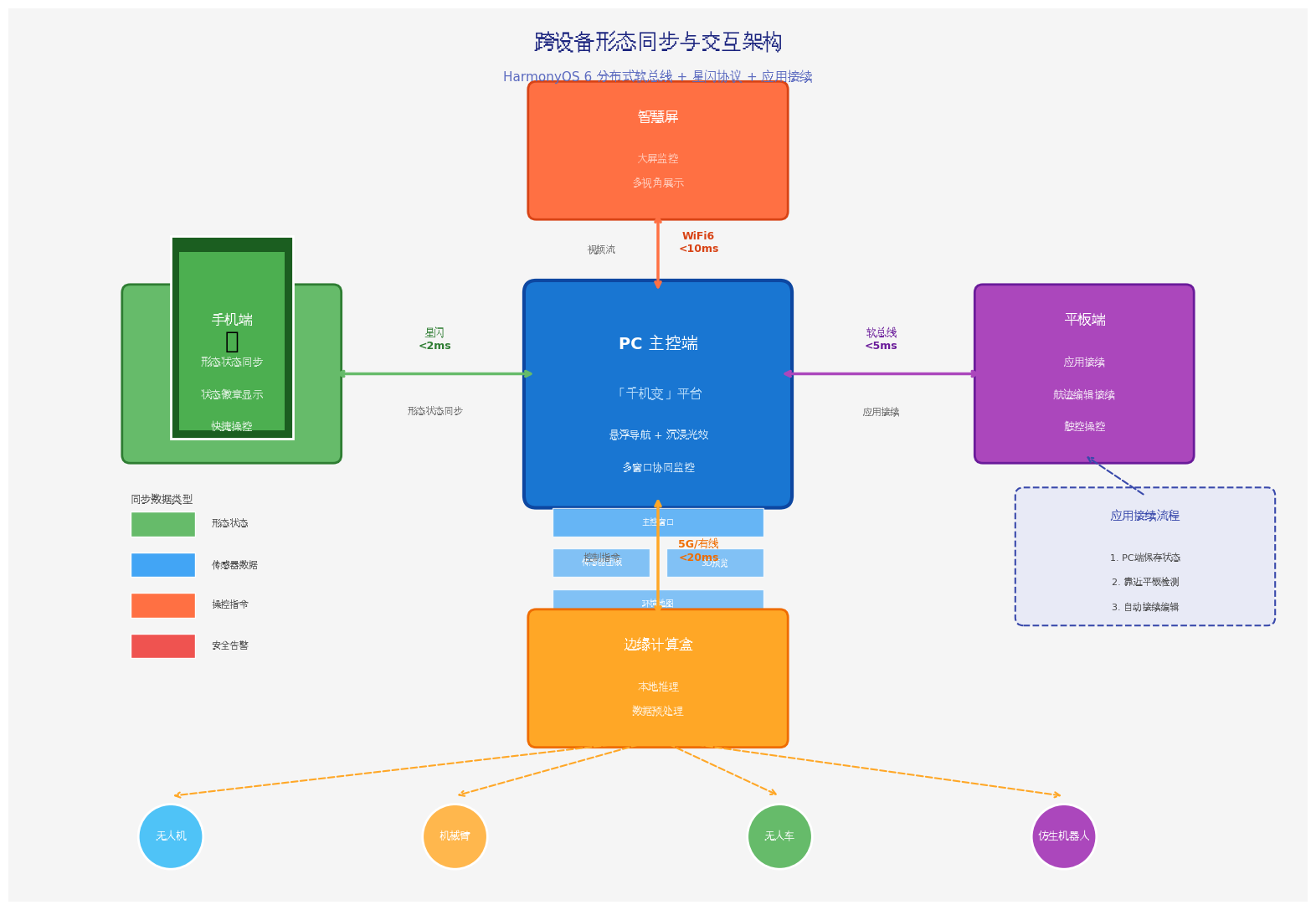
- 星闪优先:优先使用NearLink协议连接,失败时自动降级为分布式软总线
- 状态同步:形态状态、传感器数据、操控进度通过分布式KV存储实时同步
- 应用接续 :利用
onContinue和onCreate实现跨设备状态无缝流转 - 设备发现:自动发现周边鸿蒙设备,同一账号下无需额外认证
6.3 具身智能体设计原则
- 形态能力隔离:通过适配器模式隔离不同形态的硬件差异
- 安全优先:每种形态内置安全约束,切换前自动检查
- 意图自然化:通过Intents Kit支持自然语言操控
- 分布式感知:利用鸿蒙分布式软总线汇聚多设备传感器
七、调试与测试建议
- 真机调试:玻璃拟态效果在模拟器上可能显示异常,建议在支持HarmonyOS 6的PC真机上测试
- 多设备协同:测试分布式软总线下的传感器数据汇聚,确保多设备数据同步
- 形态切换压力测试:快速连续切换形态,验证适配器初始化和资源释放的稳定性
- 跨设备接续测试:在PC端切换形态后,靠近平板验证状态是否自动同步
八、总结与展望
本文基于HarmonyOS 6(API 23)的悬浮导航 、沉浸光感 与HMAF智能体框架,完整实战了PC端「千机变」自适应智能体形态引擎与跨设备交互平台。核心创新点总结:
-
自适应形态引擎:不是简单的主题切换,而是基于形态能力的UI重构------每种形态拥有独立的控件映射、手势支持、安全约束和传感器面板
-
形态感知沉浸光效:四种具身形态拥有专属光效人格(飞行天蓝、抓取琥珀、移动翠绿、仿生霓虹),通过颜色心理学强化操作直觉
-
HMAF意图驱动编排:基于鸿蒙智能体框架,支持自然语言操控形态切换(如"切换到飞行模式"),通过Intents Kit解析用户意图
-
跨设备形态同步:通过分布式软总线实现PC端形态切换→手机端状态同步→平板端操控接续的完整链路
-
多窗口协同监控:主控制窗口 + 浮动传感器面板 + 浮动3D模型预览 + 浮动环境地图窗口的四层架构
未来扩展方向:
- 接入分布式软总线4.0,实现PC主控 + 边缘计算盒 + 终端执行器的三级协同
- 数字孪生集成:构建物理实体的数字孪生,在虚拟环境中预演形态切换
- VR/AR融合操控:支持VR头显接入,实现完全沉浸式的具身智能体操控
- 群体智能编排:从单体形态切换扩展至多智能体集群形态协同
- 自进化形态:基于强化学习,让智能体自主发现最优形态组合策略
水无常形,兵无常势。真正的强大,不是固守一种姿态,而是能在万物变化中找到最适合自己的形态。千机百变,唯智不变。
转载自:https://blog.csdn.net/u014727709/article/details/162421039
欢迎 👍点赞✍评论⭐收藏,欢迎指正