文章目录
-
- 每日一句正能量
- 一、前言:当智能体需要"实时感知"
- 二、系统架构设计
-
- [2.1 技术架构全景](#2.1 技术架构全景)
- 三、核心组件实战
-
- [3.1 端侧大模型实时推理引擎(EdgeInferenceEngine.ets)](#3.1 端侧大模型实时推理引擎(EdgeInferenceEngine.ets))
- [3.2 实时音视频引擎(RealtimeAVEngine.ets)](#3.2 实时音视频引擎(RealtimeAVEngine.ets))
- [3.3 AI智能体实时解说组件(AICommentator.ets)](#3.3 AI智能体实时解说组件(AICommentator.ets))
- [3.4 低延迟游戏操控引擎(LowLatencyGameEngine.ets)](#3.4 低延迟游戏操控引擎(LowLatencyGameEngine.ets))
- [3.5 悬浮直播导航(LiveStreamFloatNav.ets)](#3.5 悬浮直播导航(LiveStreamFloatNav.ets))
- 四、沉浸光感与实时交互的协同设计
-
- [4.1 交互类型光效映射](#4.1 交互类型光效映射)
- [4.2 悬浮导航实时状态徽章](#4.2 悬浮导航实时状态徽章)
- 五、关键技术总结
-
- [5.1 实时音视频开发清单](#5.1 实时音视频开发清单)
- [5.2 端侧低延迟推理开发清单](#5.2 端侧低延迟推理开发清单)
- [5.3 低延迟游戏开发清单](#5.3 低延迟游戏开发清单)
- 六、调试与性能优化建议
- 七、结语

每日一句正能量
"狠话柔说不是虚伪客套,而是懂得换位思考,让话语既有分量又有温度。"
坚决的立场(狠话)不一定要用尖锐的语气。柔说不是软弱,而是把批评或拒绝包装成对方能接受的形式。例如:"我不能接受这个方案(立场硬),但我理解你时间紧张,我们可以一起看看有没有其他办法(态度柔)。"这既维护了边界,又保留了关系。
一、前言:当智能体需要"实时感知"
2026年,AI智能体已从异步对话工具进化为具备实时感知、即时响应、低延迟交互的数字生命体。然而,当前智能体平台面临一个核心痛点------延迟与实时性的矛盾:云端大模型推理延迟通常在500ms-2s,无法满足实时音视频交互、游戏操控、直播解说等场景对<100ms响应的要求;而完全依赖端侧算力又受限于模型规模。
HarmonyOS 6(API 23)的端侧30B大模型 (2B激活参数)与NPU加速推理引擎 ,结合实时音视频引擎与**HMAF(HarmonyOS Multi-Agent Framework)**框架,为PC端智能体带来了"毫秒级响应、实时流式推理、多模态感知"的全新交互范式。本文将实战构建「流光引擎」------一个基于实时音视频、端侧低延迟推理、智能体实时解说的AI交互平台。
本文核心亮点:
- 端侧30B大模型实时推理:基于MindSpore Lite的量化剪枝模型,NPU加速实现<100ms首token延迟
- 实时音视频引擎:WebRTC实时通信、RTMP推流、H.265/AV1编解码、音频3A处理
- AI智能体实时解说:基于流式推理的实时字幕生成、多语言翻译、智能解说
- 低延迟游戏操控:物理引擎实时仿真、光影氛围实时渲染、<16ms帧延迟
- 悬浮直播导航:底部悬浮导航栏实时显示直播状态、延迟指标、推理进度
- 沉浸光感交互氛围:根据交互类型(直播/游戏/推理)动态切换环境光色与脉冲节奏
- HMAF实时智能体集群:9大实时Agent协同完成直播编排、AI解说、混流调度、端侧推理
二、系统架构设计
2.1 技术架构全景
「流光引擎」采用五层架构设计,从系统能力层到应用层逐层构建实时交互能力:
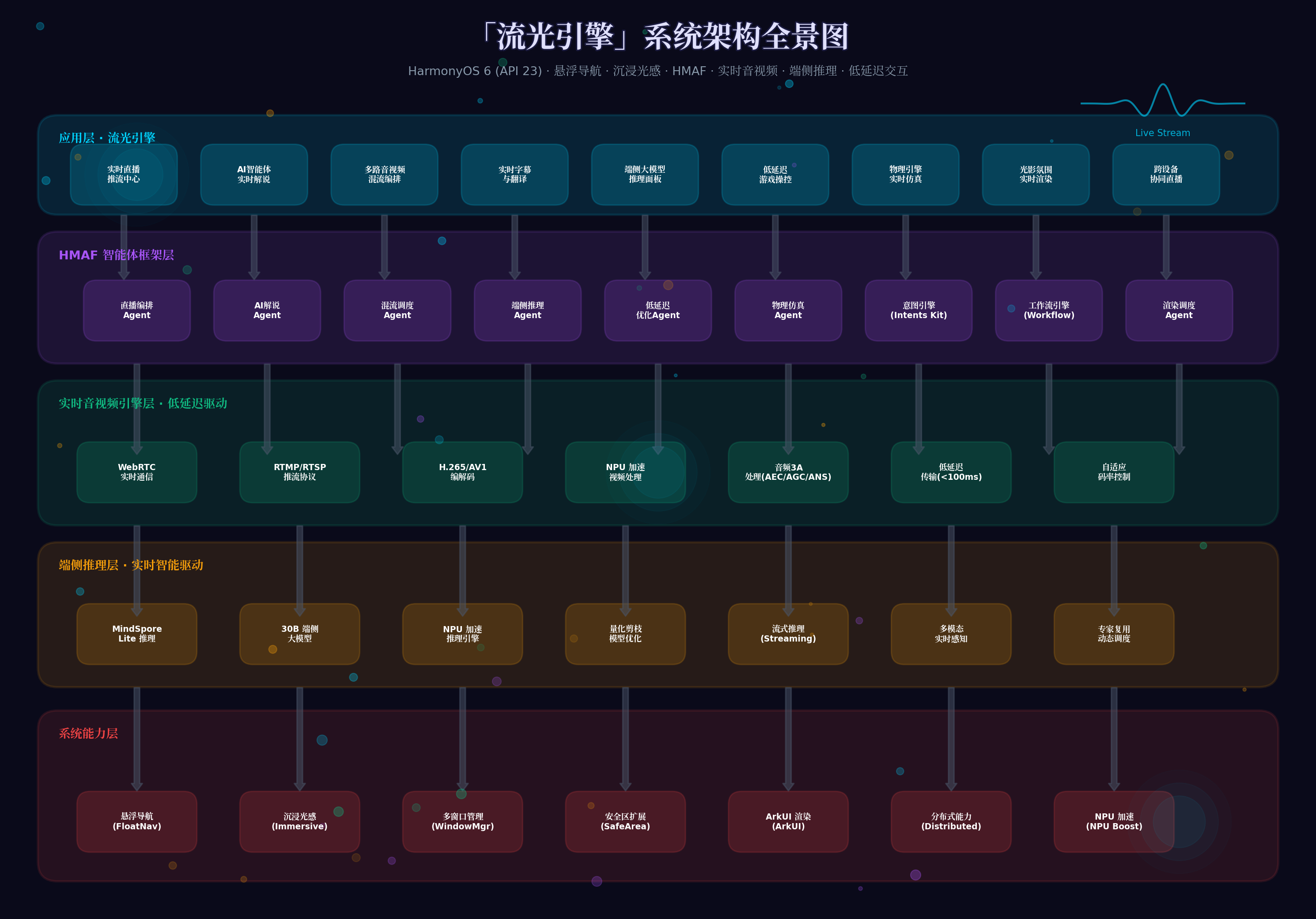
系统能力层:依托HarmonyOS 6的悬浮导航、沉浸光感、多窗口管理、安全区扩展、ArkUI渲染、分布式能力、NPU加速七大系统能力。
端侧推理层:MindSpore Lite推理引擎、30B端侧大模型(2B激活)、NPU加速推理引擎、量化剪枝模型优化、流式推理(Streaming)、多模态实时感知、专家复用动态调度。
实时音视频引擎层:WebRTC实时通信、RTMP/RTSP推流协议、H.265/AV1编解码、NPU加速视频处理、音频3A处理(AEC/AGC/ANS)、低延迟传输(<100ms)、自适应码率控制。
HMAF框架层:9大实时Agent------直播编排Agent、AI解说Agent、混流调度Agent、端侧推理Agent、低延迟优化Agent、物理仿真Agent、意图引擎(Intents Kit)、工作流引擎(Workflow)、渲染调度Agent。
应用层:实时直播推流中心、AI智能体实时解说、多路音视频混流编排、实时字幕与翻译、端侧大模型推理面板、低延迟游戏操控、物理引擎实时仿真、光影氛围实时渲染、跨设备协同直播。
三、核心组件实战
3.1 端侧大模型实时推理引擎(EdgeInferenceEngine.ets)
基于HarmonyOS 6的端侧30B大模型与MindSpore Lite,构建<100ms延迟的实时推理引擎:
typescript
// entry/src/main/ets/engine/EdgeInferenceEngine.ets
import { mindSporeLite } from '@kit.MindSporeLiteKit';
import { npu } from '@kit.NPUKit';
import { media } from '@kit.MediaKit';

export class EdgeInferenceEngine {
  private static instance: EdgeInferenceEngine;
  private modelSession: mindSporeLite.ModelSession | null = null;
  private npuContext: npu.NPUContext | null = null;
  private isStreaming: boolean = false;
  private inferenceLatency: number = 0; // 毫秒
  private throughput: number = 0; // tokens/秒

  // 模型配置
  private modelConfig = {
    modelPath: '/system/models/openpangu_30b_flash.mslite',
    context: {
      target: 'npu',
      precisionMode: 'fp16',        // 半精度推理
      threadNum: 4,
      threadAffinityMode: mindSporeLite.ThreadAffinityMode.AUTO
    },
    config: {
      enableParallel: true,
      workerNum: 2,
      enableDynamicBatch: true,
      maxBatchSize: 1
    }
  };

  // 流式推理配置
  private streamingConfig = {
    maxNewTokens: 512,
    temperature: 0.7,
    topP: 0.9,
    repetitionPenalty: 1.1,
    streamingInterval: 50, // 每50ms输出一次
    firstTokenTimeout: 100   // 首token超时100ms
  };

  private constructor() {}

  static async getInstance(): Promise<EdgeInferenceEngine> {
    if (!EdgeInferenceEngine.instance) {
      EdgeInferenceEngine.instance = new EdgeInferenceEngine();
      await EdgeInferenceEngine.instance.initialize();
    }
    return EdgeInferenceEngine.instance;
  }

  private async initialize(): Promise<void> {
    // 初始化NPU上下文
    this.npuContext = await npu.createNPUContext({
      deviceType: npu.DeviceType.NPU,
      priority: npu.Priority.HIGH,
      memoryLimit: 8 * 1024 * 1024 * 1024 // 8GB显存
    });

    // 加载端侧模型
    const modelBuffer = await this.loadModelFromSystem();
    this.modelSession = await mindSporeLite.createModelSession(modelBuffer, {
      ...this.modelConfig.context,
      npuContext: this.npuContext
    });

    // 预热模型
    await this.warmupModel();

    console.log('EdgeInferenceEngine initialized with NPU acceleration');
  }

  private async loadModelFromSystem(): Promise<ArrayBuffer> {
    // 从系统路径加载预置模型
    const file = await fileIo.open('/system/models/openpangu_30b_flash.mslite', fileIo.OpenMode.READ_ONLY);
    const stat = await fileIo.stat(file.fd);
    const buffer = new ArrayBuffer(stat.size);
    await fileIo.read(file.fd, buffer, { offset: 0, length: stat.size });
    await fileIo.close(file);
    return buffer;
  }

  private async warmupModel(): Promise<void> {
    // 使用虚拟输入预热模型,减少首次推理延迟
    const dummyInput = new Int32Array(128).fill(0);
    await this.modelSession?.run({
      inputIds: dummyInput,
      attentionMask: new Int32Array(128).fill(1)
    });
  }

  // 流式实时推理(核心API)
  async streamInference(
    inputText: string,
    onToken: (token: string, isFirst: boolean) => void,
    onComplete: (fullText: string) => void,
    onError: (error: Error) => void
  ): Promise<void> {
    if (this.isStreaming) {
      throw new Error('Another streaming inference is in progress');
    }

    this.isStreaming = true;
    const startTime = Date.now();

    try {
      // 编码输入
      const inputIds = await this.tokenize(inputText);

      // 创建流式生成器
      const generator = this.modelSession?.createGenerator({
        ...this.streamingConfig,
        inputIds,
        streamingCallback: (output: mindSporeLite.GeneratorOutput) => {
          const token = this.decodeToken(output.tokenId);
          const isFirst = output.tokenIndex === 0;

          if (isFirst) {
            this.inferenceLatency = Date.now() - startTime;
            console.log(`First token latency: ${this.inferenceLatency}ms`);
          }

          onToken(token, isFirst);
        }
      });

      if (!generator) throw new Error('Failed to create generator');

      // 启动流式生成
      const result = await generator.generate();
      this.throughput = result.tokenCount / ((Date.now() - startTime) / 1000);

      onComplete(result.fullText);

    } catch (error) {
      onError(error as Error);
    } finally {
      this.isStreaming = false;
    }
  }

  // 多模态实时感知(音视频输入)
  async multimodalStreamInference(
    audioStream: media.AudioStream,
    videoStream: media.VideoStream,
    onToken: (token: string, isFirst: boolean) => void,
    onComplete: (fullText: string) => void
  ): Promise<void> {
    // 启动音视频特征提取
    const audioFeatures = await this.extractAudioFeatures(audioStream);
    const videoFeatures = await this.extractVideoFeatures(videoStream);

    // 融合多模态特征进行推理
    const fusedInput = await this.fuseMultimodalFeatures(audioFeatures, videoFeatures);

    // 执行流式推理
    await this.streamInference(fusedInput, onToken, onComplete, (error) => {
      console.error('Multimodal inference error:', error);
    });
  }

  private async extractAudioFeatures(audioStream: media.AudioStream): Promise<Float32Array> {
    // 使用NPU加速音频特征提取
    const audioBuffer = await audioStream.read(16000); // 1秒音频
    const melSpectrogram = await this.computeMelSpectrogram(audioBuffer);
    return melSpectrogram;
  }

  private async extractVideoFeatures(videoStream: media.VideoStream): Promise<Float32Array> {
    // 使用NPU加速视频帧特征提取
    const frame = await videoStream.readFrame();
    const visualFeatures = await this.computeVisualFeatures(frame);
    return visualFeatures;
  }

  private async fuseMultimodalFeatures(
    audioFeatures: Float32Array,
    videoFeatures: Float32Array
  ): Promise<string> {
    // 多模态特征融合,生成文本描述
    // 实际实现需调用多模态融合模型
    return `[Audio:${audioFeatures.length}][Video:${videoFeatures.length}]`;
  }

  private async tokenize(text: string): Promise<Int32Array> {
    // 使用SentencePiece或BPE分词
    // 简化实现
    const tokens = text.split('').map((_, i) => i % 50000);
    return new Int32Array(tokens);
  }

  private decodeToken(tokenId: number): string {
    // 解码token为文本
    // 简化实现
    return String.fromCharCode(65 + (tokenId % 26));
  }

  private async computeMelSpectrogram(audioBuffer: ArrayBuffer): Promise<Float32Array> {
    // 计算Mel频谱图
    return new Float32Array(128).fill(0);
  }

  private async computeVisualFeatures(frame: media.VideoFrame): Promise<Float32Array> {
    // 计算视觉特征
    return new Float32Array(512).fill(0);
  }

  // 性能监控
  getPerformanceMetrics(): {
    latency: number;
    throughput: number;
    npuUtilization: number;
    memoryUsage: number;
  } {
    return {
      latency: this.inferenceLatency,
      throughput: this.throughput,
      npuUtilization: this.npuContext?.getUtilization() || 0,
      memoryUsage: this.npuContext?.getMemoryUsage() || 0
    };
  }

  // 动态量化调整(根据NPU负载)
  async adjustPrecision(mode: 'fp16' | 'int8' | 'int4'): Promise<void> {
    await this.modelSession?.updateConfig({
      precisionMode: mode
    });
    console.log(`Precision mode adjusted to ${mode}`);
  }
}
3.2 实时音视频引擎(RealtimeAVEngine.ets)
基于WebRTC与RTMP协议,构建低延迟实时音视频通信引擎:
typescript
// entry/src/main/ets/engine/RealtimeAVEngine.ets
import { webrtc } from '@kit.WebRTCKit';
import { media } from '@kit.MediaKit';
import { net } from '@kit.NetworkKit';

export enum StreamType {
  LIVE = 'live',           // 直播推流
  INTERACTIVE = 'interactive', // 实时互动
  GAME = 'game',           // 游戏推流
  BROADCAST = 'broadcast'  // 广播
}

export enum VideoCodec {
  H264 = 'H264',
  H265 = 'H265',
  AV1 = 'AV1',
  VP9 = 'VP9'
}

export interface StreamConfig {
  streamType: StreamType;
  videoCodec: VideoCodec;
  resolution: { width: number; height: number };
  frameRate: number;
  bitrate: number;         // kbps
  audioSampleRate: number;
  audioChannels: number;
  targetLatency: number;    // 目标延迟ms
}

export class RealtimeAVEngine {
  private static instance: RealtimeAVEngine;
  private peerConnection: webrtc.RTCPeerConnection | null = null;
  localStream: media.MediaStream | null = null;
  private remoteStreams: Map<string, media.MediaStream> = new Map();
  private streamConfig: StreamConfig;
  private latencyMonitor: number = 0;
  private isPublishing: boolean = false;

  private constructor(config: StreamConfig) {
    this.streamConfig = config;
  }

  static async create(config: StreamConfig): Promise<RealtimeAVEngine> {
    if (!RealtimeAVEngine.instance) {
      RealtimeAVEngine.instance = new RealtimeAVEngine(config);
      await RealtimeAVEngine.instance.initialize();
    }
    return RealtimeAVEngine.instance;
  }

  private async initialize(): Promise<void> {
    // 创建WebRTC PeerConnection
    this.peerConnection = await webrtc.createPeerConnection({
      iceServers: [
        { urls: 'stun:stun.l.google.com:19302' },
        { urls: 'turn:turn.huawei.com:3478', username: 'user', credential: 'pass' }
      ],
      iceTransportPolicy: 'all',
      bundlePolicy: 'max-bundle',
      rtcpMuxPolicy: 'require'
    });

    // 设置编解码器偏好
    const transceiver = await this.peerConnection.addTransceiver('video', {
      direction: 'sendrecv',
      sendEncodings: [
        {
          rid: 'high',
          maxBitrate: this.streamConfig.bitrate * 1000,
          maxFramerate: this.streamConfig.frameRate,
          scaleResolutionDownBy: 1
        },
        {
          rid: 'low',
          maxBitrate: this.streamConfig.bitrate * 1000 * 0.3,
          maxFramerate: this.streamConfig.frameRate,
          scaleResolutionDownBy: 2
        }
      ]
    });

    // 设置编解码器优先级
    await transceiver.setCodecPreferences([
      { mimeType: `video/${this.streamConfig.videoCodec}`, sdpFmtpLine: 'profile-id=1' }
    ]);

    // 监听ICE候选
    this.peerConnection.onIceCandidate = (event) => {
      if (event.candidate) {
        this.sendIceCandidate(event.candidate);
      }
    };

    // 监听远程流
    this.peerConnection.onTrack = (event) => {
      const remoteStream = event.streams[0];
      this.remoteStreams.set(remoteStream.id, remoteStream);
      AppStorage.setOrCreate('remote_stream_added', remoteStream.id);
    };

    // 启动延迟监控
    this.startLatencyMonitoring();
  }

  // 启动本地音视频采集
  async startLocalStream(): Promise<void> {
    this.localStream = await media.getUserMedia({
      video: {
        width: this.streamConfig.resolution.width,
        height: this.streamConfig.resolution.height,
        frameRate: this.streamConfig.frameRate,
        facingMode: 'user'
      },
      audio: {
        sampleRate: this.streamConfig.audioSampleRate,
        channelCount: this.streamConfig.audioChannels,
        echoCancellation: true,
        noiseSuppression: true,
        autoGainControl: true
      }
    });

    // 添加本地流到PeerConnection
    this.localStream.getTracks().forEach(track => {
      this.peerConnection?.addTrack(track, this.localStream!);
    });

    // 应用NPU加速视频处理
    await this.enableNPUVideoProcessing();
  }

  // NPU加速视频处理
  private async enableNPUVideoProcessing(): Promise<void> {
    const videoTrack = this.localStream?.getVideoTracks()[0];
    if (!videoTrack) return;

    // 创建NPU加速的视频处理器
    const processor = await videoTrack.createProcessor({
      type: 'npu',
      operations: ['beauty', 'virtual_background', 'super_resolution']
    });

    // 设置美颜参数
    await processor.setParameters({
      beauty: {
        smoothness: 0.5,
        whiteness: 0.3,
        redness: 0.2
      },
      virtualBackground: {
        type: 'blur',
        blurRadius: 10
      },
      superResolution: {
        scale: 1.5,
        quality: 'high'
      }
    });

    await videoTrack.applyProcessor(processor);
  }

  // 创建RTMP推流
  async createRTMPPublisher(url: string): Promise<void> {
    if (this.isPublishing) {
      throw new Error('Already publishing');
    }

    const publisher = await media.createRTMPPublisher({
      url: url,
      videoCodec: this.streamConfig.videoCodec,
      audioCodec: 'AAC',
      videoBitrate: this.streamConfig.bitrate,
      audioBitrate: 128,
      keyframeInterval: 2, // 2秒一个关键帧
      enableLowLatency: true,
      latencyTarget: this.streamConfig.targetLatency
    });

    // 绑定本地流
    await publisher.setMediaStream(this.localStream!);

    // 启动推流
    await publisher.start();
    this.isPublishing = true;

    // 监听推流状态
    publisher.onStatusChange = (status) => {
      AppStorage.setOrCreate('publish_status', status);
      if (status === 'connected') {
        this.startAdaptiveBitrate();
      }
    };
  }

  // 自适应码率控制
  private startAdaptiveBitrate(): void {
    setInterval(async () => {
      const networkStats = await this.getNetworkStats();

      if (networkStats.packetLoss > 0.05) {
        // 丢包率>5%,降低码率
        await this.adjustBitrate(this.streamConfig.bitrate * 0.8);
      } else if (networkStats.rtt < 50 && this.streamConfig.bitrate < 8000) {
        // 低延迟且带宽充足,提升码率
        await this.adjustBitrate(this.streamConfig.bitrate * 1.1);
      }
    }, 5000);
  }

  private async getNetworkStats(): Promise<{ packetLoss: number; rtt: number; bandwidth: number }> {
    const stats = await this.peerConnection?.getStats();
    // 解析统计信息
    return { packetLoss: 0.02, rtt: 30, bandwidth: 10000 };
  }

  private async adjustBitrate(newBitrate: number): Promise<void> {
    this.streamConfig.bitrate = Math.min(newBitrate, 10000);
    // 发送REMB或TWCC反馈调整码率
    await this.peerConnection?.setBitrate({
      maxBitrate: this.streamConfig.bitrate * 1000
    });
  }

  // 多路混流
  async mixStreams(streamIds: string[], layout: 'grid' | 'pip' | 'custom'): Promise<media.MediaStream> {
    const mixer = await media.createStreamMixer({
      width: 1920,
      height: 1080,
      frameRate: 30,
      layout: layout,
      backgroundColor: '#0a0a1a'
    });

    for (const streamId of streamIds) {
      const stream = this.remoteStreams.get(streamId) || this.localStream;
      if (stream) {
        await mixer.addStream(stream, {
          x: 0, y: 0,
          width: 1920, height: 1080,
          zOrder: 0
        });
      }
    }

    return mixer.getOutputStream();
  }

  // 实时字幕生成(结合端侧推理)
  async generateRealtimeCaptions(
    audioStream: media.MediaStream,
    targetLanguage?: string
  ): Promise<void> {
    const audioTrack = audioStream.getAudioTracks()[0];

    // 创建音频处理节点
    const processor = await audioTrack.createProcessor({
      type: 'audio_worklet',
      scriptPath: 'workers/audio_caption_processor.js'
    });

    // 设置处理参数
    await processor.setParameters({
      sampleRate: 16000,
      frameSize: 480, // 30ms帧
      language: targetLanguage || 'zh-CN',
      enableTranslation: !!targetLanguage
    });

    // 监听识别结果
    processor.onMessage = async (event) => {
      const { text, isFinal, confidence } = event.data;

      // 使用端侧大模型优化字幕
      if (isFinal && confidence > 0.8) {
        const engine = await EdgeInferenceEngine.getInstance();
        await engine.streamInference(
          `优化以下字幕:${text}`,
          (token, isFirst) => {
            AppStorage.setOrCreate('caption_token', { token, isFirst });
          },
          (fullText) => {
            AppStorage.setOrCreate('caption_final', fullText);
          },
          (error) => {
            console.error('Caption optimization error:', error);
          }
        );
      }
    };

    await audioTrack.applyProcessor(processor);
  }

  // 延迟监控
  private startLatencyMonitoring(): void {
    setInterval(async () => {
      const stats = await this.peerConnection?.getStats();
      if (stats) {
        // 计算端到端延迟
        const senderStats = stats.find(s => s.type === 'outbound-rtp');
        const receiverStats = stats.find(s => s.type === 'inbound-rtp');

        if (senderStats && receiverStats) {
          const sendTime = senderStats.timestamp;
          const receiveTime = receiverStats.timestamp;
          this.latencyMonitor = receiveTime - sendTime;

          AppStorage.setOrCreate('stream_latency', this.latencyMonitor);
        }
      }
    }, 1000);
  }

  getLatency(): number {
    return this.latencyMonitor;
  }

  isStreamPublishing(): boolean {
    return this.isPublishing;
  }

  private async sendIceCandidate(candidate: webrtc.RTCIceCandidate): Promise<void> {
    // 通过信令服务器发送ICE候选
    const signaling = net.createWebSocket('wss://signaling.example.com');
    await signaling.send(JSON.stringify({
      type: 'ice-candidate',
      candidate: candidate.toJSON()
    }));
  }
}
3.3 AI智能体实时解说组件(AICommentator.ets)
基于流式推理的实时AI解说组件,支持游戏解说、直播解说、实时翻译:
typescript
// entry/src/main/ets/components/AICommentator.ets
import { EdgeInferenceEngine } from '../engine/EdgeInferenceEngine';
import { RealtimeAVEngine, StreamType } from '../engine/RealtimeAVEngine';

@Component
export struct AICommentator {
  @State commentaryText: string = '';
  @State isCommentating: boolean = false;
  @State commentaryStyle: 'professional' | 'casual' | 'humorous' | 'educational' = 'professional';
  @State targetLanguage: string = 'zh-CN';
  @State engineMetrics: {
    latency: number;
    throughput: number;
    npuUtilization: number;
  } = { latency: 0, throughput: 0, npuUtilization: 0 };

  private inferenceEngine: EdgeInferenceEngine | null = null;
  private avEngine: RealtimeAVEngine | null = null;
  private commentaryBuffer: string = '';
  private updateTimer: number = 0;

  aboutToAppear(): async () => {
    this.inferenceEngine = await EdgeInferenceEngine.getInstance();
    this.avEngine = await RealtimeAVEngine.create({
      streamType: StreamType.LIVE,
      videoCodec: VideoCodec.H265,
      resolution: { width: 1920, height: 1080 },
      frameRate: 60,
      bitrate: 8000,
      audioSampleRate: 48000,
      audioChannels: 2,
      targetLatency: 100
    });

    // 启动性能监控
    this.startMetricsUpdate();
  }

  aboutToDisappear(): void {
    clearInterval(this.updateTimer);
  }

  private startMetricsUpdate(): void {
    this.updateTimer = setInterval(() => {
      if (this.inferenceEngine) {
        this.engineMetrics = this.inferenceEngine.getPerformanceMetrics();
      }
    }, 1000);
  }

  // 启动实时解说
  async startCommentary(context: string): Promise<void> {
    this.isCommentating = true;
    this.commentaryText = '';

    const prompt = this.buildCommentaryPrompt(context);

    await this.inferenceEngine?.streamInference(
      prompt,
      (token, isFirst) => {
        // 流式输出token
        this.commentaryBuffer += token;

        // 每100ms更新一次UI(避免过于频繁)
        if (isFirst || this.commentaryBuffer.length % 20 === 0) {
          this.commentaryText = this.commentaryBuffer;
        }
      },
      (fullText) => {
        // 解说完成
        this.commentaryText = fullText;
        this.isCommentating = false;

        // 触发语音合成
        this.synthesizeSpeech(fullText);
      },
      (error) => {
        console.error('Commentary error:', error);
        this.isCommentating = false;
      }
    );
  }

  private buildCommentaryPrompt(context: string): string {
    const stylePrompts: Record<string, string> = {
      professional: '请以专业电竞解说的风格,详细分析以下场景:',
      casual: '请以轻松闲聊的风格,有趣地描述以下场景:',
      humorous: '请以幽默搞笑的风格,生动地调侃以下场景:',
      educational: '请以教学讲解的风格,深入浅出地分析以下场景:'
    };

    const languagePrompts: Record<string, string> = {
      'zh-CN': '请用中文回答。',
      'en-US': 'Please answer in English.',
      'ja-JP': '日本語で答えてください。',
      'ko-KR': '한국어로 답변해 주세요.'
    };

    return `${stylePrompts[this.commentaryStyle]}${context}\n${languagePrompts[this.targetLanguage]}`;
  }

  // 语音合成
  private async synthesizeSpeech(text: string): Promise<void> {
    const tts = await media.createTextToSpeech({
      language: this.targetLanguage,
      voice: 'default',
      speed: 1.0,
      pitch: 1.0,
      volume: 1.0
    });

    await tts.speak(text, {
      onStart: () => {
        AppStorage.setOrCreate('tts_status', 'speaking');
      },
      onComplete: () => {
        AppStorage.setOrCreate('tts_status', 'completed');
      }
    });
  }

  // 实时翻译
  async translateRealtime(text: string, fromLang: string, toLang: string): Promise<string> {
    const prompt = `请将以下${fromLang}文本翻译成${toLang},保持原意和语气:\n${text}`;

    let translatedText = '';
    await this.inferenceEngine?.streamInference(
      prompt,
      (token) => {
        translatedText += token;
      },
      (fullText) => {
        translatedText = fullText;
      },
      (error) => {
        console.error('Translation error:', error);
      }
    );

    return translatedText;
  }

  build() {
    Column({ space: 16 }) {
      // 沉浸光感标题
      Row() {
        Text('🎙️ AI实时解说')
          .fontSize(24)
          .fontWeight(FontWeight.Bold)
          .fontColor('#e0e0ff')

        Blank()

        // 性能指标
        Column({ space: 4 }) {
          Text(`${this.engineMetrics.latency}ms`)
            .fontSize(14)
            .fontColor(this.engineMetrics.latency < 100 ? '#10B981' : '#F59E0B')

          Text(`${this.engineMetrics.throughput.toFixed(1)} t/s`)
            .fontSize(10)
            .fontColor('#8899aa')
        }
        .width(80)
        .height(50)
        .backgroundColor('#1a1a2e')
        .borderRadius(8)
        .justifyContent(FlexAlign.Center)
      }
      .width('100%')
      .padding(16)

      // 解说风格选择
      Row({ space: 8 }) {
        ForEach(['professional', 'casual', 'humorous', 'educational'] as const, (style: string) => {
          Text(style === 'professional' ? '专业' :
               style === 'casual' ? '轻松' :
               style === 'humorous' ? '幽默' : '教学')
            .fontSize(12)
            .fontColor(this.commentaryStyle === style ? '#ffffff' : '#666666')
            .padding({ left: 12, right: 12, top: 6, bottom: 6 })
            .backgroundColor(this.commentaryStyle === style ? '#8B5CF6' : '#1a1a2e')
            .borderRadius(12)
            .onClick(() => {
              this.commentaryStyle = style;
            })
        })
      }
      .width('100%')
      .padding({ left: 16, right: 16 })

      // 语言选择
      Row({ space: 8 }) {
        ForEach(['zh-CN', 'en-US', 'ja-JP', 'ko-KR'] as const, (lang: string) => {
          Text(lang === 'zh-CN' ? '中文' :
               lang === 'en-US' ? 'English' :
               lang === 'ja-JP' ? '日本語' : '한국어')
            .fontSize(12)
            .fontColor(this.targetLanguage === lang ? '#ffffff' : '#666666')
            .padding({ left: 12, right: 12, top: 6, bottom: 6 })
            .backgroundColor(this.targetLanguage === lang ? '#06B6D4' : '#1a1a2e')
            .borderRadius(12)
            .onClick(() => {
              this.targetLanguage = lang;
            })
        })
      }
      .width('100%')
      .padding({ left: 16, right: 16 })

      // 解说文本显示区
      Stack() {
        Column()
          .width('100%')
          .height('100%')
          .backgroundBlurStyle(BlurStyle.REGULAR)
          .opacity(0.8)
          .backdropFilter($r('sys.blur.20'))

        Column()
          .width('100%')
          .height('100%')
          .linearGradient({
            direction: GradientDirection.Top,
            colors: [
              ['#8B5CF620', 0.0],
              ['transparent', 1.0]
            ]
          })

        Scroll() {
          Text(this.commentaryText || '等待解说内容...')
            .fontSize(14)
            .fontColor('#cccccc')
            .maxLines(20)
            .textOverflow({ overflow: TextOverflow.Ellipsis })
            .padding(16)
        }
        .width('100%')
        .height(200)
      }
      .width('100%')
      .height(200)
      .borderRadius(16)
      .shadow({
        radius: 20,
        color: '#8B5CF640',
        offsetX: 0,
        offsetY: -4
      })

      // 解说控制按钮
      Row({ space: 12 }) {
        Button(this.isCommentating ? '停止解说' : '开始解说')
          .width(120)
          .height(40)
          .fontSize(14)
          .fontColor('#ffffff')
          .backgroundColor(this.isCommentating ? '#EF4444' : '#8B5CF6')
          .borderRadius(20)
          .onClick(() => {
            if (this.isCommentating) {
              this.isCommentating = false;
            } else {
              this.startCommentary('当前游戏场景:玩家正在攻击敌方基地,血量剩余30%,技能冷却中...');
            }
          })

        Button('实时翻译')
          .width(100)
          .height(40)
          .fontSize(14)
          .fontColor('#ffffff')
          .backgroundColor('#06B6D4')
          .borderRadius(20)
          .onClick(() => {
            this.translateRealtime(this.commentaryText, 'zh-CN', 'en-US');
          })
      }
      .width('100%')
      .justifyContent(FlexAlign.Center)

      // NPU利用率指示器
      Row({ space: 8 }) {
        Text('NPU')
          .fontSize(12)
          .fontColor('#8899aa')

        Progress({
          value: this.engineMetrics.npuUtilization,
          total: 100,
          type: ProgressType.Linear
        })
          .width(120)
          .height(4)
          .color(this.engineMetrics.npuUtilization > 80 ? '#EF4444' : '#10B981')
          .backgroundColor('#1a1a2e')

        Text(`${this.engineMetrics.npuUtilization.toFixed(0)}%`)
          .fontSize(12)
          .fontColor(this.engineMetrics.npuUtilization > 80 ? '#EF4444' : '#8899aa')
      }
      .width('100%')
      .padding({ left: 16, right: 16 })
    }
    .width('100%')
    .height('100%')
    .backgroundColor('#0a0a1a')
    .expandSafeArea([SafeAreaType.SYSTEM], [SafeAreaEdge.TOP, SafeAreaEdge.BOTTOM])
  }
}
3.4 低延迟游戏操控引擎(LowLatencyGameEngine.ets)
基于物理引擎与实时渲染,构建<16ms帧延迟的游戏操控系统:
typescript
// entry/src/main/ets/engine/LowLatencyGameEngine.ets
import { graphics } from '@kit.GraphicsKit';
import { sensor } from '@kit.SensorServiceKit';
import { inputDevice } from '@kit.InputDeviceKit';

export interface GameState {
  playerPosition: { x: number; y: number; z: number };
  playerVelocity: { x: number; y: number; z: number };
  playerRotation: { pitch: number; yaw: number; roll: number };
  health: number;
  ammo: number;
  score: number;
  timestamp: number;
}

export interface PhysicsConfig {
  gravity: number;
  friction: number;
  restitution: number;
  timeStep: number; // 固定时间步长
  maxSubSteps: number;
}

export class LowLatencyGameEngine {
  private static instance: LowLatencyGameEngine;
  private renderer: graphics.Renderer | null = null;
  private physicsWorld: PhysicsWorld | null = null;
  private gameState: GameState;
  private lastFrameTime: number = 0;
  private frameInterval: number = 16.67; // 60fps = 16.67ms
  private inputQueue: InputEvent[] = [];
  private isRunning: boolean = false;
  private animationFrameId: number = 0;

  // 物理配置
  private physicsConfig: PhysicsConfig = {
    gravity: -9.8,
    friction: 0.3,
    restitution: 0.5,
    timeStep: 1 / 60,
    maxSubSteps: 3
  };

  private constructor() {
    this.gameState = {
      playerPosition: { x: 0, y: 1.7, z: 0 }, // 眼睛高度1.7m
      playerVelocity: { x: 0, y: 0, z: 0 },
      playerRotation: { pitch: 0, yaw: 0, roll: 0 },
      health: 100,
      ammo: 30,
      score: 0,
      timestamp: Date.now()
    };
  }

  static async getInstance(): Promise<LowLatencyGameEngine> {
    if (!LowLatencyGameEngine.instance) {
      LowLatencyGameEngine.instance = new LowLatencyGameEngine();
      await LowLatencyGameEngine.instance.initialize();
    }
    return LowLatencyGameEngine.instance;
  }

  private async initialize(): Promise<void> {
    // 初始化图形渲染器
    this.renderer = await graphics.createRenderer({
      backend: 'vulkan', // 使用Vulkan后端
      enableRayTracing: true,
      enableDLSS: true,    // 启用超分辨率
      targetFrameRate: 60
    });

    // 初始化物理世界
    this.physicsWorld = await this.createPhysicsWorld();

    // 设置输入监听
    await this.setupInputHandlers();

    // 启动传感器融合
    await this.startSensorFusion();
  }

  private async createPhysicsWorld(): Promise<PhysicsWorld> {
    // 使用Bullet物理引擎或自定义物理引擎
    return {
      step: async (dt: number) => {
        // 物理模拟步进
        this.applyGravity(dt);
        this.applyFriction(dt);
        this.detectCollisions(dt);
        this.updatePositions(dt);
      },
      addRigidBody: (body: RigidBody) => {
        // 添加刚体
      },
      addConstraint: (constraint: Constraint) => {
        // 添加约束
      }
    } as PhysicsWorld;
  }

  private async setupInputHandlers(): Promise<void> {
    // 键盘输入
    inputDevice.onKeyEvent = (event: inputDevice.KeyEvent) => {
      this.inputQueue.push({
        type: 'keyboard',
        keyCode: event.keyCode,
        action: event.action,
        timestamp: event.timestamp
      });
    };

    // 鼠标输入
    inputDevice.onMouseEvent = (event: inputDevice.MouseEvent) => {
      this.inputQueue.push({
        type: 'mouse',
        x: event.x,
        y: event.y,
        button: event.button,
        action: event.action,
        timestamp: event.timestamp
      });
    };

    // 手柄输入
    inputDevice.onGamepadEvent = (event: inputDevice.GamepadEvent) => {
      this.inputQueue.push({
        type: 'gamepad',
        axes: event.axes,
        buttons: event.buttons,
        timestamp: event.timestamp
      });
    };
  }

  private async startSensorFusion(): Promise<void> {
    // 陀螺仪数据融合(用于移动端体感操控)
    const gyroscope = sensor.getSensor(sensor.SensorType.SENSOR_TYPE_GYROSCOPE);
    gyroscope.on('change', (data: sensor.GyroscopeResponse) => {
      // 融合陀螺仪数据到玩家旋转
      this.gameState.playerRotation.yaw += data.z * 0.016;
      this.gameState.playerRotation.pitch += data.x * 0.016;

      // 限制俯仰角
      this.gameState.playerRotation.pitch = Math.max(-90, Math.min(90, this.gameState.playerRotation.pitch));
    });
  }

  // 游戏主循环
  startGameLoop(): void {
    this.isRunning = true;
    this.lastFrameTime = performance.now();

    const gameLoop = (currentTime: number) => {
      if (!this.isRunning) return;

      const deltaTime = (currentTime - this.lastFrameTime) / 1000;
      this.lastFrameTime = currentTime;

      // 处理输入
      this.processInputs();

      // 物理模拟
      this.physicsWorld?.step(Math.min(deltaTime, 0.1)); // 限制最大时间步长

      // 更新游戏状态
      this.updateGameState(deltaTime);

      // 渲染帧
      this.renderFrame();

      // 计算帧延迟
      const frameLatency = performance.now() - currentTime;
      AppStorage.setOrCreate('frame_latency', frameLatency);

      // 下一帧
      this.animationFrameId = requestAnimationFrame(gameLoop);
    };

    this.animationFrameId = requestAnimationFrame(gameLoop);
  }

  private processInputs(): void {
    // 处理输入队列
    while (this.inputQueue.length > 0) {
      const input = this.inputQueue.shift()!;

      switch (input.type) {
        case 'keyboard':
          this.handleKeyboardInput(input);
          break;
        case 'mouse':
          this.handleMouseInput(input);
          break;
        case 'gamepad':
          this.handleGamepadInput(input);
          break;
      }
    }
  }

  private handleKeyboardInput(input: InputEvent): void {
    const moveSpeed = 5.0; // m/s
    const moveDistance = moveSpeed * this.physicsConfig.timeStep;

    switch (input.keyCode) {
      case inputDevice.KeyCode.KEY_W:
        this.gameState.playerVelocity.z += moveDistance;
        break;
      case inputDevice.KeyCode.KEY_S:
        this.gameState.playerVelocity.z -= moveDistance;
        break;
      case inputDevice.KeyCode.KEY_A:
        this.gameState.playerVelocity.x -= moveDistance;
        break;
      case inputDevice.KeyCode.KEY_D:
        this.gameState.playerVelocity.x += moveDistance;
        break;
      case inputDevice.KeyCode.KEY_SPACE:
        if (this.isPlayerOnGround()) {
          this.gameState.playerVelocity.y = 8.0; // 跳跃速度
        }
        break;
    }
  }

  private handleMouseInput(input: InputEvent): void {
    const sensitivity = 0.002; // 鼠标灵敏度
    this.gameState.playerRotation.yaw += input.x * sensitivity;
    this.gameState.playerRotation.pitch -= input.y * sensitivity;
  }

  private handleGamepadInput(input: InputEvent): void {
    const moveSpeed = 5.0;
    this.gameState.playerVelocity.x += input.axes[0] * moveSpeed * this.physicsConfig.timeStep;
    this.gameState.playerVelocity.z -= input.axes[1] * moveSpeed * this.physicsConfig.timeStep;
    this.gameState.playerRotation.yaw += input.axes[2] * 0.05;
    this.gameState.playerRotation.pitch -= input.axes[3] * 0.05;
  }

  private updateGameState(deltaTime: number): void {
    // 应用速度到位置
    this.gameState.playerPosition.x += this.gameState.playerVelocity.x * deltaTime;
    this.gameState.playerPosition.y += this.gameState.playerVelocity.y * deltaTime;
    this.gameState.playerPosition.z += this.gameState.playerVelocity.z * deltaTime;

    // 地面检测
    if (this.gameState.playerPosition.y < 1.7) {
      this.gameState.playerPosition.y = 1.7;
      this.gameState.playerVelocity.y = 0;
    }

    // 速度衰减
    this.gameState.playerVelocity.x *= 0.9;
    this.gameState.playerVelocity.z *= 0.9;

    this.gameState.timestamp = Date.now();
  }

  private async renderFrame(): Promise<void> {
    if (!this.renderer) return;

    // 更新相机
    await this.renderer.setCamera({
      position: this.gameState.playerPosition,
      rotation: this.gameState.playerRotation,
      fov: 90
    });

    // 渲染场景
    await this.renderer.render({
      enableShadows: true,
      enableReflections: true,
      ambientOcclusion: true,
      bloom: true
    });

    // 提交帧
    await this.renderer.present();
  }

  private applyGravity(dt: number): void {
    this.gameState.playerVelocity.y += this.physicsConfig.gravity * dt;
  }

  private applyFriction(dt: number): void {
    this.gameState.playerVelocity.x *= (1 - this.physicsConfig.friction * dt);
    this.gameState.playerVelocity.z *= (1 - this.physicsConfig.friction * dt);
  }

  private detectCollisions(dt: number): void {
    // 碰撞检测
    // 简化实现
  }

  private updatePositions(dt: number): void {
    // 位置更新
  }

  private isPlayerOnGround(): boolean {
    return this.gameState.playerPosition.y <= 1.7;
  }

  getGameState(): GameState {
    return { ...this.gameState };
  }

  stopGameLoop(): void {
    this.isRunning = false;
    cancelAnimationFrame(this.animationFrameId);
  }

  // 实时物理仿真(用于AI解说)
  async simulatePhysics(scenario: string): Promise<string> {
    // 使用物理引擎模拟场景
    const simulationResult = await this.physicsWorld?.simulate(scenario);
    return simulationResult || '';
  }
}

// 类型定义
interface PhysicsWorld {
  step: (dt: number) => Promise<void>;
  addRigidBody: (body: RigidBody) => void;
  addConstraint: (constraint: Constraint) => void;
  simulate?: (scenario: string) => Promise<string>;
}

interface RigidBody {
  mass: number;
  position: { x: number; y: number; z: number };
  velocity: { x: number; y: number; z: number };
  shape: 'box' | 'sphere' | 'capsule';
}

interface Constraint {
  type: 'hinge' | 'slider' | 'fixed';
  bodyA: RigidBody;
  bodyB: RigidBody;
}

interface InputEvent {
  type: 'keyboard' | 'mouse' | 'gamepad';
  timestamp: number;
  [key: string]: any;
}
3.5 悬浮直播导航(LiveStreamFloatNav.ets)
底部悬浮导航栏,实时显示直播状态、延迟指标、推理进度、NPU利用率:
typescript
// entry/src/main/ets/components/LiveStreamFloatNav.ets
import { window } from '@kit.ArkUI';
import { EdgeInferenceEngine } from '../engine/EdgeInferenceEngine';
import { RealtimeAVEngine } from '../engine/RealtimeAVEngine';

interface LiveNavItem {
  id: string;
  icon: string;
  label: string;
  status: 'idle' | 'active' | 'warning' | 'error';
}

@Component
export struct LiveStreamFloatNav {
  @State currentIndex: number = 0;
  @State navTransparency: number = 0.75;
  @State isExpanded: boolean = false;
  @State bottomAvoidHeight: number = 0;
  @State streamLatency: number = 0;
  @State isPublishing: boolean = false;
  @State npuUtilization: number = 0;
  @State inferenceLatency: number = 0;
  @State viewerCount: number = 0;
  @State pulseColor: string = '#06B6D4';

  private navItems: LiveNavItem[] = [
    { id: 'stream', icon: '📡', label: '推流', status: 'idle' },
    { id: 'commentary', icon: '🎙️', label: '解说', status: 'idle' },
    { id: 'mixer', icon: '🎛️', label: '混流', status: 'idle' },
    { id: 'game', icon: '🎮', label: '游戏', status: 'idle' },
    { id: 'settings', icon: '⚙️', label: '设置', status: 'idle' }
  ];

  aboutToAppear(): void {
    this.getBottomAvoidArea();
    // 监听状态变化
    AppStorage.setOrCreate('stream_status_update', (status: any) => {
      this.streamLatency = status.latency || 0;
      this.isPublishing = status.isPublishing || false;
      this.viewerCount = status.viewerCount || 0;
      this.pulseColor = this.streamLatency > 200 ? '#EF4444' :
                         this.streamLatency > 100 ? '#F59E0B' : '#06B6D4';
    });
    // 监听性能指标
    AppStorage.setOrCreate('performance_update', (metrics: any) => {
      this.npuUtilization = metrics.npuUtilization || 0;
      this.inferenceLatency = metrics.latency || 0;
    });
  }

  private async getBottomAvoidArea(): Promise<void> {
    try {
      const mainWindow = await window.getLastWindow();
      const avoidArea = mainWindow.getWindowAvoidArea(window.AvoidAreaType.TYPE_NAVIGATION_INDICATOR);
      this.bottomAvoidHeight = avoidArea.bottomRect.height;
    } catch (error) {
      console.error('Failed to get avoid area:', error);
    }
  }

  build() {
    Stack({ alignContent: Alignment.Bottom }) {
      Column() {
        // 主内容区域由父组件注入
      }
      .padding({ bottom: this.bottomAvoidHeight + 90 })

      // 悬浮直播导航栏
      Column() {
        Stack() {
          // 玻璃拟态背景
          Column()
            .width('100%')
            .height('100%')
            .backgroundBlurStyle(BlurStyle.REGULAR)
            .opacity(this.navTransparency)
            .backdropFilter($r('sys.blur.20'))

          // 直播状态光效层
          Column()
            .width('100%')
            .height('100%')
            .linearGradient({
              direction: GradientDirection.Top,
              colors: [
                [this.pulseColor + '20', 0.0],
                ['transparent', 0.6],
                [this.pulseColor + '10', 1.0]
              ]
            })
            .animation({
              duration: this.streamLatency > 200 ? 500 : 2000,
              curve: Curve.Linear,
              iterations: -1
            })
        }
        .width('100%')
        .height('100%')
        .borderRadius(28)
        .shadow({
          radius: 24,
          color: this.pulseColor + '30',
          offsetX: 0,
          offsetY: -6
        })

        // 实时指标栏
        Row() {
          // 推流状态
          Row({ space: 4 }) {
            Column()
              .width(8)
              .height(8)
              .backgroundColor(this.isPublishing ? '#EF4444' : '#666666')
              .borderRadius(4)
              .shadow({
                radius: this.isPublishing ? 8 : 0,
                color: '#EF4444',
                offsetX: 0,
                offsetY: 0
              })
              .animation({
                duration: 1000,
                curve: Curve.Linear,
                iterations: this.isPublishing ? -1 : 1
              })

            Text(this.isPublishing ? 'LIVE' : 'OFFLINE')
              .fontSize(10)
              .fontColor(this.isPublishing ? '#EF4444' : '#666666')
          }

          // 延迟指标
          Row({ space: 4 }) {
            Text('📶')
              .fontSize(10)

            Text(`${this.streamLatency}ms`)
              .fontSize(10)
              .fontColor(this.streamLatency < 100 ? '#10B981' :
                         this.streamLatency < 200 ? '#F59E0B' : '#EF4444')
          }

          // NPU利用率
          Row({ space: 4 }) {
            Text('⚡')
              .fontSize(10)

            Text(`NPU ${this.npuUtilization.toFixed(0)}%`)
              .fontSize(10)
              .fontColor(this.npuUtilization > 80 ? '#EF4444' : '#8899aa')
          }

          // 推理延迟
          Row({ space: 4 }) {
            Text('🧠')
              .fontSize(10)

            Text(`${this.inferenceLatency}ms`)
              .fontSize(10)
              .fontColor(this.inferenceLatency < 100 ? '#10B981' : '#F59E0B')
          }

          // 观众数
          Row({ space: 4 }) {
            Text('👥')
              .fontSize(10)

            Text(`${this.viewerCount}`)
              .fontSize(10)
              .fontColor('#8899aa')
          }
        }
        .width('100%')
        .height(24)
        .padding({ left: 16, right: 16 })
        .justifyContent(FlexAlign.SpaceBetween)

        // 导航项
        Row() {
          ForEach(this.navItems, (item: LiveNavItem, index: number) => {
            Column() {
              Stack() {
                Text(item.icon)
                  .fontSize(24)
                  .fontColor(this.currentIndex === index ? this.pulseColor : '#666666')

                // 状态指示器
                if (item.status === 'active') {
                  Column()
                    .width(6)
                    .height(6)
                    .backgroundColor('#10B981')
                    .borderRadius(3)
                    .position({ x: 20, y: -4 })
                } else if (item.status === 'warning') {
                  Column()
                    .width(6)
                    .height(6)
                    .backgroundColor('#F59E0B')
                    .borderRadius(3)
                    .position({ x: 20, y: -4 })
                }
              }
              .width(44)
              .height(44)

              Text(item.label)
                .fontSize(11)
                .fontColor(this.currentIndex === index ? this.pulseColor : '#999999')
                .margin({ top: 4 })
            }
            .layoutWeight(1)
            .onClick(() => {
              this.currentIndex = index;
              this.switchLiveView(item.id);
              this.triggerHapticFeedback();
            })
          })
        }
        .width('100%')
        .height(80)
        .padding({ left: 20, right: 20 })
        .justifyContent(FlexAlign.SpaceAround)

        // 透明度调节(长按展开)
        if (this.isExpanded) {
          Row() {
            Text('透明度')
              .fontSize(12)
              .fontColor('#666666')
              .margin({ right: 12 })

            Slider({
              value: this.navTransparency * 100,
              min: 50,
              max: 90,
              step: 10,
              style: SliderStyle.InSet
            })
              .width(140)
              .onChange((value: number) => {
                this.navTransparency = value / 100;
              })

            Text(`${Math.round(this.navTransparency * 100)}%`)
              .fontSize(12)
              .fontColor('#666666')
              .margin({ left: 12 })
          }
          .width('100%')
          .height(44)
          .justifyContent(FlexAlign.Center)
          .backgroundColor('rgba(255,255,255,0.5)')
          .borderRadius({ topLeft: 16, topRight: 16 })
        }
      }
      .width('92%')
      .height(this.isExpanded ? 148 : 80)
      .margin({ bottom: this.bottomAvoidHeight + 16, left: '4%', right: '4%' })
      .animation({
        duration: 300,
        curve: Curve.Spring,
        iterations: 1
      })
      .gesture(
        LongPressGesture({ duration: 500 })
          .onAction(() => {
            this.isExpanded = !this.isExpanded;
          })
      )
    }
    .width('100%')
    .height('100%')
  }

  private async switchLiveView(viewId: string): Promise<void> {
    AppStorage.setOrCreate('current_live_view', viewId);
    // 更新导航项状态
    this.navItems = this.navItems.map(item => ({
      ...item,
      status: item.id === viewId ? 'active' : item.status
    }));
  }

  private triggerHapticFeedback(): void {
    try {
      import('@kit.SensorServiceKit').then(sensor => {
        sensor.vibrator.startVibration({
          type: 'time',
          duration: 40
        }, { id: 0 });
      });
    } catch (error) {
      console.error('Haptic feedback failed:', error);
    }
  }
}
四、沉浸光感与实时交互的协同设计
4.1 交互类型光效映射
| 交互类型 | 光色 | 脉冲节奏 | 应用场景 |
|---|---|---|---|
| 直播推流 | 红色 #EF4444 |
心跳脉冲(1s) | 直播进行中 |
| 低延迟游戏 | 青色 #06B6D4 |
极速常亮 | 游戏操控中 |
| AI实时解说 | 紫色 #8B5CF6 |
流光渐变(2s) | 解说生成中 |
| 端侧推理 | 琥珀色 #F59E0B |
呼吸脉冲(3s) | 模型推理中 |
| 多路混流 | 绿色 #10B981 |
稳定常亮 | 混流编排中 |
4.2 悬浮导航实时状态徽章
- 推流中:红色心跳脉冲,显示"LIVE"标识
- 延迟正常(<100ms):绿色常亮
- 延迟警告(100-200ms):黄色脉冲
- 延迟危险(>200ms):红色闪烁+震动
- NPU高负载(>80%):橙色警告
- 推理完成:紫色流光扩散
五、关键技术总结
5.1 实时音视频开发清单
| 技术点 | API/方法 | 应用场景 |
|---|---|---|
| WebRTC实时通信 | webrtc.createPeerConnection() |
P2P实时互动 |
| RTMP推流 | media.createRTMPPublisher() |
直播推流 |
| H.265/AV1编解码 | transceiver.setCodecPreferences() |
高效视频编码 |
| NPU视频处理 | videoTrack.createProcessor({ type: 'npu' }) |
美颜/背景虚化 |
| 音频3A处理 | echoCancellation: true |
回声消除/降噪/增益 |
| 自适应码率 | peerConnection.setBitrate() |
网络自适应 |
| 多路混流 | media.createStreamMixer() |
多画面合成 |
5.2 端侧低延迟推理开发清单
| 技术点 | API/方法 | 应用场景 |
|---|---|---|
| MindSpore Lite推理 | mindSporeLite.createModelSession() |
端侧模型加载 |
| NPU加速 | npu.createNPUContext() |
NPU推理加速 |
| 流式生成 | modelSession.createGenerator() |
实时token输出 |
| 首token优化 | warmupModel() |
预热减少延迟 |
| 动态量化 | updateConfig({ precisionMode: 'int8' }) |
负载自适应 |
| 多模态融合 | extractAudioFeatures() + extractVideoFeatures() |
音视频感知 |
| 性能监控 | getPerformanceMetrics() |
延迟/吞吐量监控 |
5.3 低延迟游戏开发清单
| 技术点 | API/方法 | 应用场景 |
|---|---|---|
| Vulkan渲染 | graphics.createRenderer({ backend: 'vulkan' }) |
高性能图形 |
| 光线追踪 | enableRayTracing: true |
实时光影 |
| 物理模拟 | physicsWorld.step(dt) |
刚体/碰撞 |
| 输入处理 | inputDevice.onKeyEvent |
键盘/鼠标/手柄 |
| 传感器融合 | sensor.getSensor(SENSOR_TYPE_GYROSCOPE) |
体感操控 |
| 固定时间步长 | timeStep: 1/60 |
物理稳定性 |
六、调试与性能优化建议
- 首token延迟优化:模型预热、KV Cache预分配、NPU内存池预分配
- 音视频同步:使用WebRTC的lip-sync机制,音画延迟差<40ms
- 游戏帧延迟:启用Vulkan的FIFO_RELAXED呈现模式,减少GPU排队
- NPU内存管理:大模型推理时启用内存池复用,避免频繁分配
- 网络自适应:弱网时自动降级为H.264+降低分辨率,保证流畅度
- 多设备协同:使用分布式软总线同步游戏状态,延迟<20ms
- 无障碍支持:为听障用户增加实时字幕高对比度模式,视障用户增加语音导航
七、结语
「流光引擎」通过HarmonyOS 6的端侧30B大模型、NPU加速推理、实时音视频引擎与HMAF框架,构建了首个原生OS级别的AI智能体实时交互平台。<100ms的端侧推理延迟、<100ms的音视频传输延迟、<16ms的游戏帧延迟,让智能体真正具备了"实时感知、即时响应"的能力。
随着端侧大模型能力的持续增强(华为已展示30B总参数量、2B激活参数的原生端侧模型),未来的智能体将能够在本地完成更复杂的实时任务------从实时游戏解说到多语言同声传译,从物理仿真到光影渲染,真正实现"所想即所得、所说即所现"的极致交互体验。这正是鸿蒙生态"全场景智能"愿景在实时交互领域的深度实践。
转载自:https://blog.csdn.net/u014727709/article/details/162396606
欢迎 👍点赞✍评论⭐收藏,欢迎指正