在之前的章节,一直都是改源码的去添加后期Pass,每次改源码,编译源码,时间很长,且还要同步给公司同事拉引擎库,十分麻烦,有没有简单一点的?
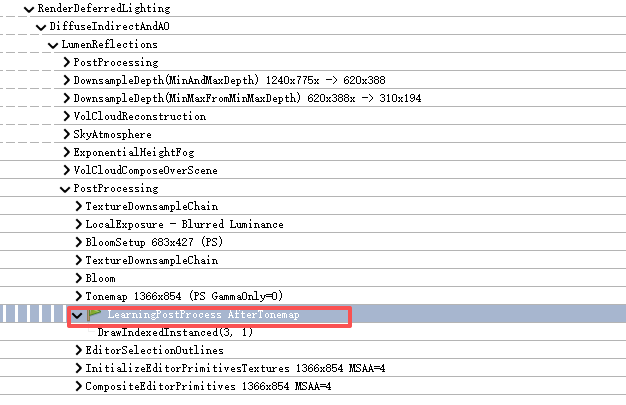
当然有,PostProcessing.cpp给我们暴露了拓展接口,利用插件对其进行注册,即可在PostProcessing.cpp的下列阶段触发执行
让我们开始吧!
for (const TSharedRef<ISceneViewExtension>& ViewExtension : View.Family->ViewExtensions)
{
	for (int32 SceneViewPassId = 0; SceneViewPassId < FirstAfterPass; SceneViewPassId++)
	{
		const ISceneViewExtension::EPostProcessingPass SceneViewPass = static_cast<ISceneViewExtension::EPostProcessingPass>(SceneViewPassId);
		const bool bIsEnabled = (SceneViewPass == ISceneViewExtension::EPostProcessingPass::ReplacingTonemapper) ? PassSequence.IsEnabled(EPass::Tonemap) : true;

		ViewExtension->SubscribeToPostProcessingPass(SceneViewPass, View, SceneViewExtensionDelegates[SceneViewPassId], bIsEnabled);
	}

	for (int32 SceneViewPassId = FirstAfterPass; SceneViewPassId < static_cast<int32>(ISceneViewExtension::EPostProcessingPass::MAX); SceneViewPassId++)
	{
		const ISceneViewExtension::EPostProcessingPass SceneViewPass = static_cast<ISceneViewExtension::EPostProcessingPass>(SceneViewPassId);
		const EPass PostProcessingPass = TranslatePass(SceneViewPass);

		ViewExtension->SubscribeToPostProcessingPass(
			SceneViewPass,
			View,
			PassSequence.GetAfterPassCallbacks(PostProcessingPass),
			PassSequence.IsEnabled(PostProcessingPass));
	}
}

FSceneViewExtensions::NewExtension()
    ↓
创建 FAutoRegister
    ↓
构造 FLearningPostProcessViewExtension
    ↓
调用 FSceneViewExtensionBase(AutoRegister)
    ↓
把该实例的弱引用加入全局注册表
    ↓
返回 TSharedRef

全局 ViewExtension 注册表
→ 调用 IsActiveThisFrame()
→ 把激活的 Extension 放入 View.Family->ViewExtensions
→ 渲染阶段调用 SubscribeToPostProcessingPass()这里SubscribeToPostProcessingPass的SceneViewExtensionDelegatesSceneViewPassId已经分类把对应类型的delegates给绑定好了,然后分不同passid在不同阶段执行!
这段代码的作用是:
遍历当前 View 的所有 SceneViewExtension,询问每个插件想订阅哪些 PostProcess 节点,并把插件 Delegate 保存到对应的回调数组中。
注意:这里只是"注册回调",还没有真正执行插件 Pass。
简化成伪代码:
for (每个插件)
{
	for (每个PostProcess插入点)
	{
		询问插件:
		"你要不要在这个位置添加回调?"
	}
}
for (const TSharedRef<ISceneViewExtension>& ViewExtension
: View.Family->ViewExtensions)
遍历所有注册了ViewExtension的接口
分界点:
constexpr int32 FirstAfterPass =
	static_cast<int32>(
		ISceneViewExtension::EPostProcessingPass::MotionBlur);
EPostProcessingPass 顺序是:
BeforeDOF                // 0
AfterDOF                 // 1
TranslucencyAfterDOF     // 2
SSRInput                 // 3
ReplacingTonemapper      // 4

MotionBlur               // FirstAfterPass
Tonemap
FXAA
SMAA
VisualizeDepthOfField
前五个位置由 PostProcessing.cpp 在特定位置手动执行。
从 MotionBlur 开始的节点,可以统一放进 PassSequence。
EPostProcessingPass枚举中,
MotionBlur编号之前的特殊插件挂载点
并且循环当前做的只是询问插件是否订阅:
ViewExtension->SubscribeToPostProcessingPass(...)同一个 ViewExtension 可以把:
- 同一个回调函数绑定到多个阶段;
- 不同回调函数绑定到不同阶段。
那么一帧内大致是:
BeforeDOF
    → OutlineCallback 执行一次

景深处理

AfterDOF
    → OutlineCallback 再执行一次
遍历每一个viewextension,然后一个一个问,这个阶段要不要绑定,要绑定我就subscribe
具体是否绑定是上面代码遍历前期的各个postprocess阶段,传到ViewExtension里面,看是否绑定,ViewExtension会实现对应的SubscribeToPostProcessingPass函数,里面会判断if(id 是否等于对应阶段)是对应阶段才进行注册绑定
例如:
void FLearningPostProcessViewExtension::
SubscribeToPostProcessingPass(
	EPostProcessingPass PassId,
	const FSceneView& View,
	FPostProcessingPassDelegateArray& InOutPassCallbacks,
	bool bIsPassEnabled)
{
	if (PassId != EPostProcessingPass::Tonemap)
	{
		return;
	}

	if (!bIsPassEnabled)
	{
		return;
	}

	if (CVarLearningPostProcessEnable.GetValueOnRenderThread() == 0)
	{
		return;
	}

	// 当前 Shader 只编译 SM5 及以上平台。
	if (!IsFeatureLevelSupported(
		View.GetShaderPlatform(),
		ERHIFeatureLevel::SM5))
	{
		return;
	}

	InOutPassCallbacks.Add(
		FPostProcessingPassDelegate::CreateRaw(
			this,
			&FLearningPostProcessViewExtension::
			PostProcessPassAfterTonemap_RenderThread));
}
问:所以这里为什么就replacingtonemapper要判断isenable其他直接返回true呢?
答:因为前面几个并不是"替换某个功能",而是固定的插入位置;只有 ReplacingTonemapper 依赖 Tonemap 本身存在。
对应第一类的执行在:
	FScreenPassTexture AddSceneViewExtensionPassChain(
		FRDGBuilder& GraphBuilder,
		const FViewInfo& View,
		const FPostProcessMaterialInputs& InputsTemplate,
		const FPostProcessingPassDelegateArray& Delegates,
		EPostProcessMaterialInput MaterialInput = EPostProcessMaterialInput::SceneColor)
	{
		FScreenPassTextureSlice CurrentInput = InputsTemplate.GetInput(MaterialInput);
		FScreenPassTexture Outputs;

		for (int32 DelegateIndex = 0; DelegateIndex < Delegates.Num(); ++DelegateIndex)
		{
			FPostProcessMaterialInputs Inputs = InputsTemplate;
			Inputs.SetInput(MaterialInput, CurrentInput);

			Outputs = Delegates[DelegateIndex].Execute(GraphBuilder, View, Inputs);

			CurrentInput = FScreenPassTextureSlice::CreateFromScreenPassTexture(GraphBuilder, Outputs);
		}

		if (!Outputs.IsValid())
		{
			Outputs = FScreenPassTexture::CopyFromSlice(GraphBuilder, CurrentInput);
		}

		return Outputs;
	};
}
第二类的执行之一在:
const auto AddAfterPass = [&](EPass InPass, FScreenPassTexture InSceneColor) -> FScreenPassTexture
{
	// In some cases (e.g. OCIO color conversion) we want View Extensions to be able to add extra custom post processing after the pass.

	FPostProcessingPassDelegateArray& PassCallbacks = PassSequence.GetAfterPassCallbacks(InPass);

	if (PassCallbacks.Num())
	{
		FPostProcessMaterialInputs InOutPostProcessAfterPassInputs = GetPostProcessMaterialInputs(InSceneColor);

		for (int32 AfterPassCallbackIndex = 0; AfterPassCallbackIndex < PassCallbacks.Num(); AfterPassCallbackIndex++)
		{
			InOutPostProcessAfterPassInputs.SetInput(GraphBuilder, EPostProcessMaterialInput::SceneColor, InSceneColor);

			FAfterPassCallbackDelegate& AfterPassCallback = PassCallbacks[AfterPassCallbackIndex];
			PassSequence.AcceptOverrideIfLastPass(InPass, InOutPostProcessAfterPassInputs.OverrideOutput, AfterPassCallbackIndex);
			InSceneColor = AfterPassCallback.Execute(GraphBuilder, View, InOutPostProcessAfterPassInputs);
		}
	}

	return MoveTemp(InSceneColor);
};
都是在不同地方然后取出不同的epass类型注册的delegates数组然后执行
第一类:
SceneViewExtensionDelegates[PassId]是 PostProcessing.cpp 中的局部数组,在 BeforeDOF、SSRInput 等特殊位置手动调用。不同位置还可能使用不同输入:
SceneColor
SeparateTranslucency
SSRInput
CombinedBloom
第二类:
PassSequence.GetAfterPassCallbacks(EPass)数组由 PassSequence 管理,统一通过 AddAfterPass() 执行。它额外参与:
- 最后一个有效 Pass 的判断。
OverrideOutput管理。- 直接写 ViewFamily 最终输出。
- 原生 Pass 启用状态。
- 多个回调串联后的最终输出选择。
onst EPass PostProcessingPass =
	TranslatePass(SceneViewPass);
例如:
EPostProcessingPass::MotionBlur
→ EPass::MotionBlur

EPostProcessingPass::Tonemap
→ EPass::Tonemap

EPostProcessingPass::FXAA
→ EPass::FXAA
PassSequence.GetAfterPassCallbacks(PostProcessingPass)意思是在这个Pass执行完之后执行
第一个 for:
回调放进独立数组,之后在 PostProcessing.cpp 的指定代码位置手动执行

第二个 for:
回调放进 PassSequence,某个 Pass 执行完成后自动接着执行
实际代码:
.uplugin:
{
  "FileVersion": 3,
  "Version": 1,
  "VersionName": "1.0",
  "FriendlyName": "Learning Post Process",
  "Description": "A minimal Scene View Extension post-processing pass example.",
  "Category": "Rendering",
  "CreatedBy": "Learning",
  "CanContainContent": false,
  "EnabledByDefault": true,
  "Modules": [
    {
      "Name": "LearningPostProcess",
      "Type": "Runtime",
      "LoadingPhase": "PostConfigInit"
    }
  ]
}
.Build.cs:
// Some copyright should be here...

using UnrealBuildTool;

public class LearningPostProcess : ModuleRules
{
	public LearningPostProcess(ReadOnlyTargetRules Target) : base(Target)
	{
		PCHUsage = ModuleRules.PCHUsageMode.UseExplicitOrSharedPCHs;

		PublicIncludePaths.AddRange(
			new string[] {
				// ... add public include paths required here ...
			}
			);


		PrivateIncludePaths.AddRange(
			new string[] {
				// ... add other private include paths required here ...
			}
			);


		PublicDependencyModuleNames.AddRange(
			new string[]
			{
				"Core",
                "CoreUObject",
                "Engine",
                "RenderCore"
				// ... add other public dependencies that you statically link with here ...
			}
			);


		PrivateDependencyModuleNames.AddRange(
			new string[]
			{
                "Projects",
                "RHI",
                "Renderer"
				// ... add private dependencies that you statically link with here ...
			}
			);


		DynamicallyLoadedModuleNames.AddRange(
			new string[]
			{
				// ... add any modules that your module loads dynamically here ...
			}
			);
	}
}
.LearningPostProcess.cpp:
// Copyright Epic Games, Inc. All Rights Reserved.

#include "LearningPostProcess.h"

#include "LearningPostProcessViewExtension.h"

#include "Engine/Engine.h"
#include "Interfaces/IPluginManager.h"
#include "Misc/CoreDelegates.h"
#include "Misc/Paths.h"
#include "SceneViewExtension.h"
#include "ShaderCore.h"

void FLearningPostProcessModule::StartupModule()
{
	const TSharedPtr<IPlugin> Plugin =
		IPluginManager::Get().FindPlugin(TEXT("LearningPostProcess"));

	checkf(
		Plugin.IsValid(),
		TEXT("LearningPostProcess plugin was not found."));

	const FString ShaderDirectory =
		FPaths::Combine(
			Plugin->GetBaseDir(),
			TEXT("Shaders"));

	AddShaderSourceDirectoryMapping(
		TEXT("/Plugin/LearningPostProcess"),
		ShaderDirectory);

	// PostConfigInit 时 GEngine 可能尚未完成初始化。
	if (GEngine != nullptr)
	{
		RegisterViewExtension();
	}
	else
	{
		PostEngineInitHandle =
			FCoreDelegates::OnPostEngineInit.AddRaw(
				this,
				&FLearningPostProcessModule::RegisterViewExtension);
	}
}

void FLearningPostProcessModule::ShutdownModule()
{
	if (PostEngineInitHandle.IsValid())
	{
		FCoreDelegates::OnPostEngineInit.Remove(
			PostEngineInitHandle);

		PostEngineInitHandle.Reset();
	}

	// SceneViewExtension 系统保存的是弱引用。
	// 释放这个强引用即可注销 Extension。
	ViewExtension.Reset();
}

void FLearningPostProcessModule::RegisterViewExtension()
{
	if (!ViewExtension.IsValid())
	{
		ViewExtension =
			FSceneViewExtensions::NewExtension<
			FLearningPostProcessViewExtension>();
	}
}

IMPLEMENT_MODULE(
	FLearningPostProcessModule,
	LearningPostProcess)

const TSharedPtr<IPlugin> Plugin =
IPluginManager::Get().FindPlugin(TEXT("LearningPostProcess"));-
通过全局插件管理器,按名称查找
"LearningPostProcess"这个插件,得到它的接口指针。const FString ShaderDirectory =
FPaths::Combine(Plugin->GetBaseDir(), TEXT("Shaders")); -
Plugin->GetBaseDir()返回该插件在磁盘上的根目录(例如D:/Project/Plugins/LearningPostProcess/)。 -
FPaths::Combine将其与Shaders子目录拼接,得到物理路径,比如D:/Project/Plugins/LearningPostProcess/Shaders。AddShaderSourceDirectoryMapping(
TEXT("/Plugin/LearningPostProcess"),
ShaderDirectory); -
核心操作:建立一个虚拟路径到物理路径的映射。
-
第一个参数是虚拟路径
"/Plugin/LearningPostProcess",在着色器代码中用它来引用文件。 -
第二个参数是上面拼接出的实际文件夹路径。
-
调用后,引擎的着色器预处理器在处理
#include时,就会把"/Plugin/LearningPostProcess/xxx.usf"自动转换为ShaderDirectory/xxx.usf。if (GEngine)
{
RegisterViewExtension();
} -
GEngine全局引擎指针,指向
UEngine实例。它是在引擎初始化过程中由UEngine::Init()创建的。在模块的StartupModule()阶段,它可能还是nullptr,具体取决于模块加载顺序(例如在编辑器启动、项目启动等场景)。
RegisterViewExtension()
就是之前在PostProcessing.cpp里面给出的拓展Extension,我们需要把插件的给注册进里面
-
else分支如果
GEngine还是空,则绑定到FCoreDelegates::OnPostEngineInit这个全局委托。该委托会在引擎完全初始化后触发(UEngine::Init()结束时广播)。-
AddRaw将一个原始 C++ 成员函数指针绑定到委托上。 -
返回值
PostEngineInitHandle是一个句柄,通常用于后续在ShutdownModule()时通过FCoreDelegates::OnPostEngineInit.Remove(Handle)解绑,避免悬空指针。virtual void ShutdownModule() override
{
if (PostEngineInitHandle.IsValid())
{
FCoreDelegates::OnPostEngineInit.Remove(PostEngineInitHandle);
PostEngineInitHandle.Reset();
}
}
-
-
作用 :如果在模块启动时,
GEngine还未初始化,我们就绑定了一个委托到OnPostEngineInit。现在模块关闭了,必须把这个绑定解除,防止委托还在持有指向已释放模块成员的原始指针,导致未来触发时崩溃。 -
Remove()从委托列表里移除该句柄对应的绑定。 -
Reset()将句柄本身清空(标记为无效)。void RegisterViewExtension()
{
if (!ViewExtension.IsValid())
{
ViewExtension =
FSceneViewExtensions::NewExtension<
FLearningPostProcessViewExtension>();
}
}
这就是实际创建并注册自定义扩展的地方。
IMPLEMENT_MODULE(FLearningPostProcessModule, LearningPostProcess)FLearningPostProcessModule 就是我们一直在讨论的那个类,其中包含了 StartupModule() 和 ShutdownModule()。这个宏告诉引擎:"这是我的模块类,请用StartupModule\ShutdownModule来初始化/关闭这个模块。
LearningPostProcess.h:
// Copyright Epic Games, Inc. All Rights Reserved.

#pragma once

#include "CoreMinimal.h"
#include "Modules/ModuleManager.h"

class FLearningPostProcessViewExtension;

class FLearningPostProcessModule final : public IModuleInterface
{
public:
	virtual void StartupModule() override;
	virtual void ShutdownModule() override;

private:
	void RegisterViewExtension();

	FDelegateHandle PostEngineInitHandle;

	TSharedPtr<
		FLearningPostProcessViewExtension,
		ESPMode::ThreadSafe> ViewExtension;
};
这里就没啥好讲的,就是声明变量
LearningPostProcessViewExtension.h:
// Copyright Epic Games, Inc. All Rights Reserved.

#pragma once

#include "SceneViewExtension.h"

class FLearningPostProcessViewExtension final
	: public FSceneViewExtensionBase
{
public:
	explicit FLearningPostProcessViewExtension(
		const FAutoRegister& AutoRegister);

	virtual bool IsActiveThisFrame_Internal(
		const FSceneViewExtensionContext& Context) const override;

	virtual void SubscribeToPostProcessingPass(
		EPostProcessingPass PassId,
		const FSceneView& View,
		FPostProcessingPassDelegateArray& InOutPassCallbacks,
		bool bIsPassEnabled) override;

private:
	FScreenPassTexture PostProcessPassAfterTonemap_RenderThread(
		FRDGBuilder& GraphBuilder,
		const FSceneView& View,
		const FPostProcessMaterialInputs& Inputs);
};
在.cpp详细描述具体函数含义
LearningPostProcessViewExtension.cpp
// Copyright Epic Games, Inc. All Rights Reserved.

#include "LearningPostProcessViewExtension.h"

#include "DataDrivenShaderPlatformInfo.h"
#include "GlobalShader.h"
#include "HAL/IConsoleManager.h"
#include "PixelShaderUtils.h"
#include "PostProcess/PostProcessMaterialInputs.h"
#include "RenderGraphBuilder.h"
#include "RHIStaticStates.h"
#include "SceneView.h"
#include "ScreenPass.h"
#include "ShaderParameterStruct.h"

static TAutoConsoleVariable<int32>
CVarLearningPostProcessEnable(
	TEXT("r.LearningPostProcess.Enable"),
	1,
	TEXT("Enable the LearningPostProcess pass.\n")
	TEXT("0: Disabled\n")
	TEXT("1: Enabled"),
	ECVF_RenderThreadSafe);

static TAutoConsoleVariable<float>
CVarLearningPostProcessIntensity(
	TEXT("r.LearningPostProcess.Intensity"),
	0.5f,
	TEXT("Tint intensity in the range 0 to 1."),
	ECVF_RenderThreadSafe);

static TAutoConsoleVariable<float>
CVarLearningPostProcessTintR(
	TEXT("r.LearningPostProcess.TintR"),
	1.0f,
	TEXT("Red component of the tint color."),
	ECVF_RenderThreadSafe);

static TAutoConsoleVariable<float>
CVarLearningPostProcessTintG(
	TEXT("r.LearningPostProcess.TintG"),
	0.5f,
	TEXT("Green component of the tint color."),
	ECVF_RenderThreadSafe);

static TAutoConsoleVariable<float>
CVarLearningPostProcessTintB(
	TEXT("r.LearningPostProcess.TintB"),
	0.5f,
	TEXT("Blue component of the tint color."),
	ECVF_RenderThreadSafe);

class FLearningPostProcessPS final : public FGlobalShader
{
public:
	DECLARE_GLOBAL_SHADER(FLearningPostProcessPS);

	SHADER_USE_PARAMETER_STRUCT(
		FLearningPostProcessPS,
		FGlobalShader);

	BEGIN_SHADER_PARAMETER_STRUCT(FParameters, )
		SHADER_PARAMETER_RDG_TEXTURE(
			Texture2D,
			InputTexture)

		SHADER_PARAMETER_SAMPLER(
			SamplerState,
			InputSampler)

		SHADER_PARAMETER(
			FScreenTransform,
			SvPositionToInputTextureUV)

		SHADER_PARAMETER(
			FLinearColor,
			TintColor)

		SHADER_PARAMETER(
			float,
			Intensity)

		RENDER_TARGET_BINDING_SLOTS()
	END_SHADER_PARAMETER_STRUCT()

	static bool ShouldCompilePermutation(
		const FGlobalShaderPermutationParameters& Parameters)
	{
		return IsFeatureLevelSupported(
			Parameters.Platform,
			ERHIFeatureLevel::SM5);
	}
};

IMPLEMENT_GLOBAL_SHADER(
	FLearningPostProcessPS,
	"/Plugin/LearningPostProcess/Private/LearningPostProcess.usf",
	"LearningPostProcessPS",
	SF_Pixel);

FLearningPostProcessViewExtension::
FLearningPostProcessViewExtension(
	const FAutoRegister& AutoRegister)
	: FSceneViewExtensionBase(AutoRegister)
{
}

bool FLearningPostProcessViewExtension::
IsActiveThisFrame_Internal(
	const FSceneViewExtensionContext& Context) const
{
	return
		CVarLearningPostProcessEnable.GetValueOnAnyThread() != 0;
}

void FLearningPostProcessViewExtension::
SubscribeToPostProcessingPass(
	EPostProcessingPass PassId,
	const FSceneView& View,
	FPostProcessingPassDelegateArray& InOutPassCallbacks,
	bool bIsPassEnabled)
{
	if (PassId != EPostProcessingPass::Tonemap)
	{
		return;
	}

	if (!bIsPassEnabled)
	{
		return;
	}

	if (CVarLearningPostProcessEnable.GetValueOnRenderThread() == 0)
	{
		return;
	}

	// 当前 Shader 只编译 SM5 及以上平台。
	if (!IsFeatureLevelSupported(
		View.GetShaderPlatform(),
		ERHIFeatureLevel::SM5))
	{
		return;
	}

	InOutPassCallbacks.Add(
		FPostProcessingPassDelegate::CreateRaw(
			this,
			&FLearningPostProcessViewExtension::
			PostProcessPassAfterTonemap_RenderThread));
}

FScreenPassTexture
FLearningPostProcessViewExtension::
PostProcessPassAfterTonemap_RenderThread(
	FRDGBuilder& GraphBuilder,
	const FSceneView& View,
	const FPostProcessMaterialInputs& Inputs)
{
	const FScreenPassTexture SceneColor =
		FScreenPassTexture::CopyFromSlice(
			GraphBuilder,
			Inputs.GetInput(
				EPostProcessMaterialInput::SceneColor));

	check(SceneColor.IsValid());

	// 当这个回调是后处理链最后一个 pass 时,
	// 引擎会传入 OverrideOutput。
	FScreenPassRenderTarget Output =
		Inputs.OverrideOutput;

	if (!Output.IsValid())
	{
		Output =
			FScreenPassRenderTarget::CreateFromInput(
				GraphBuilder,
				SceneColor,
				View.GetOverwriteLoadAction(),
				TEXT("LearningPostProcess.Output"));
	}

	const FScreenPassTextureViewport InputViewport(SceneColor);
	const FScreenPassTextureViewport OutputViewport(Output);

	FLearningPostProcessPS::FParameters* PassParameters =
		GraphBuilder.AllocParameters<
		FLearningPostProcessPS::FParameters>();

	PassParameters->InputTexture =
		SceneColor.Texture;

	PassParameters->InputSampler =
		TStaticSamplerState<
		SF_Bilinear,
		AM_Clamp,
		AM_Clamp,
		AM_Clamp>::GetRHI();

	// SV_POSITION -> Output Viewport UV -> Input Texture UV。
	PassParameters->SvPositionToInputTextureUV =
		FScreenTransform::ChangeTextureBasisFromTo(
			OutputViewport,
			FScreenTransform::ETextureBasis::TexelPosition,
			FScreenTransform::ETextureBasis::ViewportUV)
		*
		FScreenTransform::ChangeTextureBasisFromTo(
			InputViewport,
			FScreenTransform::ETextureBasis::ViewportUV,
			FScreenTransform::ETextureBasis::TextureUV);

	PassParameters->TintColor =
		FLinearColor(
			CVarLearningPostProcessTintR
			.GetValueOnRenderThread(),
			CVarLearningPostProcessTintG
			.GetValueOnRenderThread(),
			CVarLearningPostProcessTintB
			.GetValueOnRenderThread(),
			1.0f);

	PassParameters->Intensity =
		FMath::Clamp(
			CVarLearningPostProcessIntensity
			.GetValueOnRenderThread(),
			0.0f,
			1.0f);

	PassParameters->RenderTargets[0] =
		Output.GetRenderTargetBinding();

	const FGlobalShaderMap* ShaderMap =
		GetGlobalShaderMap(
			View.GetFeatureLevel());

	const TShaderMapRef<FLearningPostProcessPS>
		PixelShader(ShaderMap);

	FPixelShaderUtils::AddFullscreenPass(
		GraphBuilder,
		ShaderMap,
		RDG_EVENT_NAME(
			"LearningPostProcess AfterTonemap"),
		PixelShader,
		PassParameters,
		Output.ViewRect);

	return MoveTemp(Output);
}

FLearningPostProcessViewExtension::
FLearningPostProcessViewExtension(
	const FAutoRegister& AutoRegister)
	: FSceneViewExtensionBase(AutoRegister)
{
}
相当于之前在引擎的PS,这里面就要对Extension多做一下构造函数,函数里面不需要任何逻辑
bool FLearningPostProcessViewExtension::
IsActiveThisFrame_Internal(
	const FSceneViewExtensionContext& Context) const
{
	return
		CVarLearningPostProcessEnable.GetValueOnAnyThread() != 0;
}
这是FLearningPostProcessViewExtension继承的FSceneViewExtensionBase里面的ISceneViewExtension的一个受保护的虚函数,如果返回false就不会调用资源来执行接下来的逻辑,true才会
void FLearningPostProcessViewExtension::
SubscribeToPostProcessingPass(
	EPostProcessingPass PassId,
	const FSceneView& View,
	FPostProcessingPassDelegateArray& InOutPassCallbacks,
	bool bIsPassEnabled)
{
	if (PassId != EPostProcessingPass::Tonemap)
	{
		return;
	}

	if (!bIsPassEnabled)
	{
		return;
	}

	if (CVarLearningPostProcessEnable.GetValueOnRenderThread() == 0)
	{
		return;
	}

	// 当前 Shader 只编译 SM5 及以上平台。
	if (!IsFeatureLevelSupported(
		View.GetShaderPlatform(),
		ERHIFeatureLevel::SM5))
	{
		return;
	}

	InOutPassCallbacks.Add(
		FPostProcessingPassDelegate::CreateRaw(
			this,
			&FLearningPostProcessViewExtension::
			PostProcessPassAfterTonemap_RenderThread));
}
这里就是看是否是对应Pass阶段,Pass是否启用,命令行,命令行是否启用,是否支持对应平台,如果都OK,那么就绑定到对应的delegate上,方便之后对应的epass阶段在postprocessing.cpp里面进行execute执行对应的回调函数:FScreenPassTexture
FLearningPostProcessViewExtension::
PostProcessPassAfterTonemap_RenderThread。
剩下这个回调函数就是给PS赋值,然后
AddFullscreenPass到任务队列
LearningPostProcess.usf:
// Copyright Epic Games, Inc. All Rights Reserved.
#include "/Engine/Private/Common.ush"
#include "/Engine/Private/ScreenPass.ush"
Texture2D InputTexture;
SamplerState InputSampler;
FScreenTransform SvPositionToInputTextureUV;
float4 TintColor;
float Intensity;
void LearningPostProcessPS(
    float4 SvPosition : SV_POSITION,
    out float4 OutColor : SV_Target0)
{
    const float2 UV = ApplyScreenTransform(
        SvPosition.xy,
        SvPositionToInputTextureUV);
    const float4 SceneColor = Texture2DSample(
        InputTexture,
        InputSampler,
        UV);
    const float3 TintedColor = SceneColor.rgb * TintColor.rgb;
    OutColor = float4(
        lerp(SceneColor.rgb, TintedColor, saturate(Intensity)),
        SceneColor.a);
}
这里的.usf就很简单,就是原场景颜色 * 一个我们自定义的颜色即可
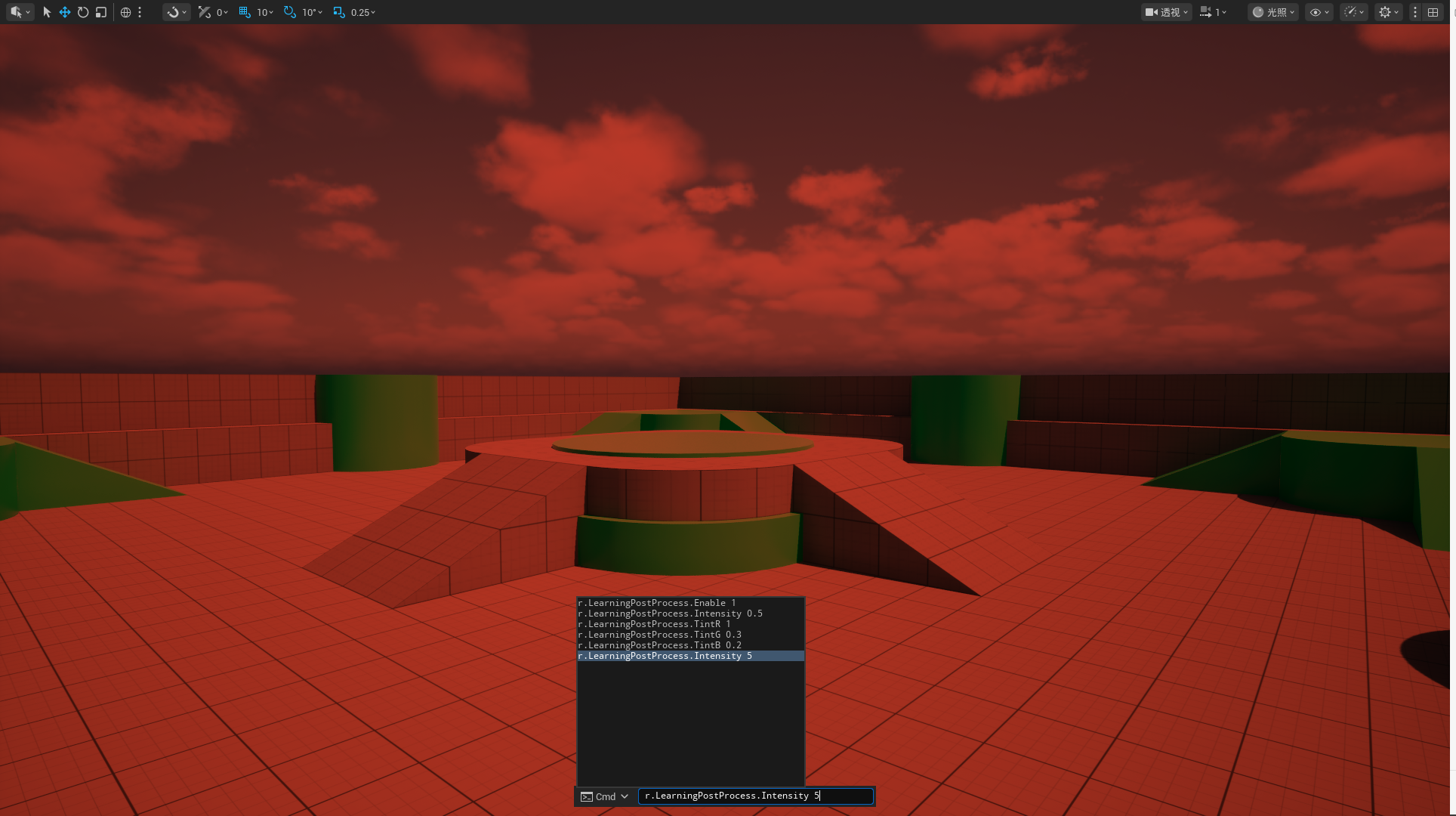
总体来说,就是相对于直接改引擎,我们先要在module注册一个ViewExtension,第二个就是ViewExtension回调函数的参数FViewInfo变成了FSceneView,其他基本保持一致