系列06-Playwright UI 自动化 AI 自愈实战:定位器失败如何自动修复?
做过 UI 自动化的同学,几乎都踩过这个坑:
产品把按钮文案从「提交订单」改成「立即下单」,30 条用例 overnight 全红 。
测试开发花半天改 XPath,PR 还没 merge, nightly 又跑了一轮。
业界把这类能力叫 Self-healing(自愈) :步骤因 locator 失效 失败时,不立刻判死刑,而是让 AI 结合 步骤语义 + 当前页面 DOM 试一组候选定位器,短超时重试 ,成功则本次执行继续;确认无误后再 写回用例资产。
本文基于开源平台 BrickCore 的实现,讲清 什么时候有效、怎么开、源码怎么走 。即使不用该平台,Runner 采集 DOM → Backend LLM → 候选重试 → 人工确认写回 的设计也可复用到自建框架。
先看效果:在线演示与体验入口
不用 clone 代码,可以直接打开官方 功能演示页 看「UI 定位器自愈」录屏(约 1~2 分钟能看懂全流程):
| 项 | 地址 |
|---|---|
| 演示首页(含自愈章节) | http://43.142.83.156/showcase/ |
| 直达自愈录屏 | http://43.142.83.156/showcase/#ui-heal |
| 平台在线体验 | http://43.142.83.156/ (admin / BrickCore123456) |
| UI 录制/自愈试跑页 | http://43.142.83.156/showcase/demo-ui.html (demo / demo123) |
演示页说明与线上能力一致:用例执行定位失败 → 平台结合页面快照由 AI 推荐新定位器并自动重试 → 报告内可写回用例 (见 BrickCore 功能演示 中「UI 定位器自愈」一节)。
建议阅读顺序 :先看 #ui-heal 录屏 → 再按下文第五节自己跑一条「故意写错 locator」的用例 → 对照第六节源码。
一、为什么 locator 是 UI 自动化第一大维护成本
| 写法 | 典型失败原因 |
|---|---|
绝对 XPath /html/body/div[3]/... |
DOM 层级一改就断 |
绑死文案 text=提交订单 |
文案/国际化/改版 |
仅 class .btn-primary |
样式重构、多个按钮撞车 |
动态 id #el-id-8848 |
每次构建 id 变 |
Playwright 官方推荐 getByRole、data-testid,但 历史资产 里往往堆满 XPath。全量重写不现实,自愈针对的是「小改还能救」的那一批。
二、AI 自愈解决什么、不解决什么
| ✅ 适合自愈 | ❌ 不要指望自愈 |
|---|---|
| 按钮 class/文案微调 | 整页重构、流程删除 |
| 同级 DOM 顺序小变 | 新增弹窗、缺步骤 |
| 单个元素属性变化 | 业务逻辑变更 |
| 老用例续命,争取改 selector 的缓冲期 | 替代 push 前端加 test-id |
结论 :自愈是 降本 ,不是 免维护;大改版仍要人工或重新录制。
三、一次自愈的完整链路
UI 步骤执行(click_ele / fill_value ...)
    ↓ 原 locator 超时 / 找不到
Runner:是否在 HEALABLE_METHODS 且 ai_heal_enabled=true?
    ↓ 是
capture_page_context → aria_snapshot + 可见元素列表(≤80)
    ↓
POST /ai/generate/locator-heal/internal(X-Internal-Token)
    ↓
Backend heal_locator:PromptManager「ui_locator_heal」→ LLM → 新 locator
    ↓ 后端校验:非空、≠旧值、文案不能「缩小匹配范围」
Runner:apply_healed_locator 替换本步 locator,**立即重试一次**
    ↓ 成功 → 本步继续;报告步骤详情带 locator_healed(原 → 新)
↓ 用户在报告点「写回用例」/「写回全部自愈」→ apply-to-case 持久化三个入口(同一套 Backend 逻辑):
| 入口 | 谁触发 | 场景 |
|---|---|---|
| Runner 自动 | 步骤异常且 ai_heal_enabled=true |
套件/计划 nightly 续命 |
| 步骤编辑页 | 人工点「AI 自愈」 | 调试单步 locator(调 /ai/generate/locator-heal) |
| 报告写回 | 「写回自愈定位器」/「写回全部自愈」 | 确认后 apply-to-case 持久化 |
四、实战案例:改 class 名后如何「救」回来
背景:某步 desc 为「点击提交按钮」,原 locator:
text
css=.btn-submit前端把 class 改成 .btn-primary,用例执行报错 Timeout 20000ms exceeded。
自愈后(示例,非固定输出):
text
get_by_role=button,name=提交
或 button:has-text("提交")
报告侧 :Runner 重试成功后,步骤结果里会带 locator_healed: { original, new }(见 runner/WebEngine/runner.py 写入 step_info)。用例 JSON 里仍是旧 locator ,直到你在 用例报告时间线 点击「写回自愈定位器」或「写回全部自愈 (N)」------前端 CaseReportTimeline.vue 调 apply-to-case 才落库。
错误示范 (Backend 会拒绝):原意图「基础设置」,AI 若返回只匹配「设置」的宽泛 locator,_reject_shortened_text_match 会拒掉,避免点到别的「设置」链接------这是 质量上比裸调 LLM 多的一层安全网 。
五、如何开启与自测(6 步)
Step 0:看演示(可选)
打开 http://43.142.83.156/showcase/#ui-heal 对照录屏;要在平台里亲手试,继续下面步骤。
Step 1:LLM 与场景绑定
平台配置 → AI 模型配置:
- LLM 模型配置 Tab:新增并启用一条模型(如 DeepSeek),API Key 测通
- 场景绑定 Tab:为
locator_heal(UI 定位器自愈) 绑定上述模型
Runner 自动自愈、步骤编辑页手动自愈,都走 _get_ai_config(..., scene="locator_heal")。
Step 2:项目自愈策略
同一页面 「执行与自愈」 Tab(策略存 Project.global_vars.ai_settings,Backend 计算后写入 MQ 的 ai_heal_enabled):
| 配置项 | 含义 | 默认 |
|---|---|---|
| 启用定位器自愈 | 项目总开关 | 开 |
| 执行时默认开启 | 跑用例/套件/计划时的默认值 | 开 |
| 允许运行弹窗覆盖 | 运行弹窗里能否临时关自愈 | 开 |
页面提示:Runner .env 的 AI_HEAL_ENABLED 仅运维熔断;日常以项目配置为准。
运行 UI 用例/套件/计划时,若允许覆盖,弹窗里可看到 「AI 自愈」 开关(Case.vue / Task.vue / Suite.vue)。
Step 3:Runner
安装 BrickCoreRunner Release,连接 http://43.142.83.156/ 并 上线设备。
Step 4:准备页面与用例
- 试跑页:
http://43.142.83.156/showcase/demo-ui.html(demo / demo123) - 或业务测试环境;复制一条 UI 用例,故意改错 某步
params.locator
Step 5:执行并观察
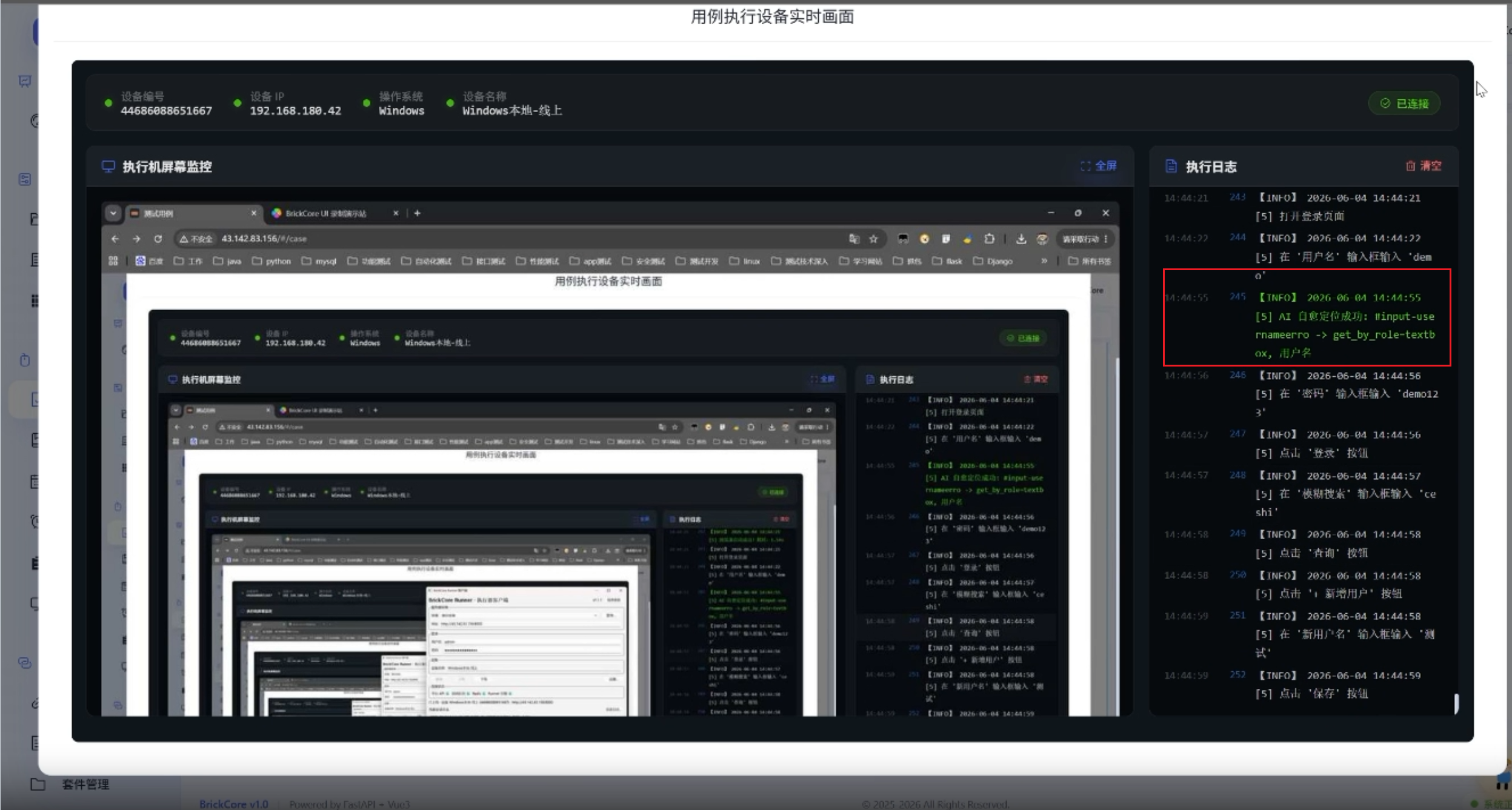
跑单用例或套件。Runner 日志示例:
text
[case_id] AI 自愈定位成功: css=.btn-submit -> get_by_role=button,name=提交报告步骤详情会出现 自愈信息(原 locator → 新 locator)。
Step 6:写回用例(可选)
在报告时间线对该步 「写回自愈定位器」 ,或点多处自愈时的 「写回全部自愈 (N)」 → 确认后调用 POST /ai/generate/locator-heal/apply-to-case,更新 case.steps[step_index].params.locator。
六、源码视角:Runner → Backend → 安全校验
6.1 Runner 采集与调用
runner/tools/locator_heal.py:
python
HEALABLE_METHODS = frozenset({
    "click_ele", "fill_value", "hover", "wait_for_element",
    "kw_assert_visible", "kw_assert_element_text", "extract_text", ...
})

def try_heal_step(page, step, error_msg):
    snapshot, elements = capture_page_context(page)  # aria + JS 抓可见元素
    payload = {
        "method": method,
        "failed_locator": failed_locator,
        "step_desc": step.get("desc") or "",
        "error_message": (error_msg or "")[:1000],
        "page_url": page.url,
        "accessibility_snapshot": snapshot[:50000],
        "page_elements": elements,
    }
    resp = requests.post(
        f"{BASE_URL}/ai/generate/locator-heal/internal",
        json=payload, headers=runner_auth_headers(), timeout=90,
    )
仅 点击/输入/断言/提取 等与元素相关的关键字会走自愈;纯等待、自定义脚本 不在集合内,避免误伤。
6.2 Runner 引擎:失败 → 自愈 → 重试
runner/WebEngine/basecase.py(步骤执行核心):
python
except Exception as e:
    if page and self.config.get("ai_heal_enabled"):
        from tools.locator_heal import try_heal_step, apply_healed_locator
        new_locator = try_heal_step(page, step, str(e))
        if new_locator:
            retry_step = apply_healed_locator(step, new_locator)
            retry_step["_healed"] = {"original": orig, "new": new_locator}
            success, result = self._step_executor.execute(retry_step)
            self._last_step_heal = retry_step.get("_healed")
            return result
    raise
要点 :Backend 一次返回一个通过校验的 locator;Runner 只重试当前这一步 ,不会 silent 改库里的 steps。报告里的 locator_healed 供人工确认后再写回。
6.3 Backend:heal_locator
backend/app/core/ui_locator_heal.py:
python
async def heal_locator(..., call_llm, ...):
    if method not in HEALABLE_METHODS:
        return {"success": False, "reason": f"方法 {method} 不支持 AI 自愈"}

    # snapshot 优先级:Runner 上传 aria → page_elements → 按 page_url 拉 DOM
    system_prompt, user_prompt = await PromptManager.render("ui_locator_heal", {...})
    parsed = _extract_json_object(await call_llm(...))
    new_locator = normalize_locator(parsed.get("locator") or ...)

    if new_locator == failed_locator:
        return {"success": False, "reason": "建议定位器与原定位器相同"}

    shorten_reason = _reject_shortened_text_match(
        failed_locator=failed_locator, new_locator=new_locator, step_desc=step_desc)
    if shorten_reason:
        return {"success": False, "reason": shorten_reason}

return {"success": True, "locator": new_locator, "confidence": ...}要点:
- Prompt 模板在
core/ai_prompts.py的ui_locator_heal - snapshot 优先级:Runner 上传 aria →
page_elementsDOM 列表 → 仅传page_url时 Backend 拉取(编辑页手动自愈常用)
6.4 写回用例(需权限)
generate.py → apply_healed_locator_to_case:更新 steps[step_index].params.locator,并清理冗余 selector 字段。必须人工确认 ,默认自愈 仅本次执行生效,防止 AI 污染资产。
七、与录制、步骤片段、失败分析的分工
| 手段 | 作用 | 时机 |
|---|---|---|
| 录制 / Agent | 新用例、更稳 locator | 新功能 |
| 步骤片段 | 登录等公共流程改一处 | 日常维护 |
| AI 自愈 | 老用例小改版续命 | 发版后 nightly 红了一大片 |
| AI 失败分析(平台另能力) | 解释日志、归类原因 | 自愈仍失败时 |
不要混 :业务流程多了「同意协议」弹窗 → DOM 里根本没有目标元素 → 应加步骤或重录,不是自愈能解决的。
八、常见失败排错
| 现象 | 原因 | 处理 |
|---|---|---|
| 从不触发自愈 | 项目 locator_heal_enabled=false |
项目 AI 设置打开 |
| 从不触发自愈 | 运行弹窗关了 AI 自愈 | 运行 UI 任务时选「开启」 |
| 401/403 internal | Runner Token / INTERNAL_API_KEY | 对照 Runner 连接配置 |
| 自愈失败:无法 snapshot | 无头页未加载完 / 页面空白 | 加 wait;查截图 |
| 自愈失败:文案缩小被拒 | 安全校验生效 | 人工改 locator 或改 desc 更明确 |
| 本次绿、下次又红 | 未在报告写回 | 点「写回自愈定位器」或「写回全部自愈」 |
| LLM 乱给 id | Prompt/模型弱 | 换更强模型;推动 test-id |
九、和纯 Playwright 脚本方案对比
| 本地 Playwright + 自写 heal | 平台 AI 自愈 | |
|---|---|---|
| DOM 采集 | 自己写 | Runner 内置 aria + 元素列表 |
| LLM | 自己接 API | 场景化 Prompt + 校验 |
| 写回 | 改 Git 代码 | Web 采纳写回 steps JSON |
| 权限/审计 | 无 | RBAC + 可选记录 |
| 适用 | 单仓库脚本 | 多人在 Web 维护步骤 |
十、小结
- AI 自愈 = 步骤失败 → DOM/aria + desc → LLM 新 locator → Runner 重试本步。
- 适合 小改 ,不适合 新流程/大重构。
- 报告展示原→新 ;持久化须 报告写回 / apply-to-case。
- Backend
_reject_shortened_text_match防文案缩小误点。 - 先看 http://43.142.83.156/showcase/#ui-heal 再动手配置。
- 与 test-id、片段、录制 组合,维护成本最低。
附录 A:源码文件索引(进阶读码)
| 顺序 | 文件 | 关注点 |
|---|---|---|
| 1 | runner/tools/locator_heal.py |
触发、采集、internal API |
| 2 | core/ui_locator_heal.py |
heal_locator、安全校验 |
| 3 | routers/ai/generate.py |
locator_heal / internal / apply-to-case |
| 4 | core/ai_project_settings.py |
三档项目开关 |
| 5 | routers/ui/exec.py |
resolve_locator_heal_for_execute → MQ ai_heal_enabled |
| 6 | runner/WebEngine/basecase.py |
异常捕获、重试、_last_step_heal |
| 7 | frontend/.../CaseReportTimeline.vue |
报告写回 / 批量写回 |
关于 BrickCore
| 项 | 链接 |
|---|---|
| 自愈章节直达 | http://43.142.83.156/showcase/#ui-heal |
| 在线体验 | http://43.142.83.156/ (admin / BrickCore123456) |
| 源码 | https://gitee.com/BanZhuanKeOrz/BrickCore |
支持与交流
- 觉得有用欢迎 Star ⭐
- 问题反馈:Gitee Issues 或评论区留言