一、insert
通过#{}进行预编译,当在mapper接口中传递的参数是(User user),可以直接获取字段值;如果传递的是两个参数@Param("username") String username, @Param("password") String password可以使用注解@param进行命名,就可以在xml文件中进行取值了
xml
<insert id="对应mapper接口的方法名" keyColumn="数据库表id" keyProperty="实体类属性名" useGeneratedKeys="是否为自增主键">
    insert into user(username, password) VALUES(#{username},#{password})
</insert>
二、udpate
当修改不是全字段修改时,可以使用if test进行判空,将有值传递的字段进行修改,其他字段不变,根据实际开发需求编写。
如果where语句中的id传递的是null 时,未匹配到具体的那条数据,数据将不会进行修改
xml
<update id="mapper中对应的方法名">
    update user
    	<set>
	        <if test="username != null and username != ''">
	            username = #{username},
	        </if>
	        <if test="password != null and password != ''">
	           password = #{password}
	        </if>
	    </set>
    where id = #{id}
</update>
三、delete
通过id进行数据删除
xml
<delete id="mapper中对应的方法名">
    delete from user where id = #{id}
</delete>
删除多条数据
xml
<delete id="mapper接口中对应的方法名">
    delete from user
    where id  in
    <foreach collection="传递的参数数组名" item="循环的临时变量名" open="以这个符号开始" separator="分隔符" close="以这个符号结束">
        #{循环的临时变量名}
    </foreach>
</delete>
四、select
单表数据查询(模糊查询+分页)
可以通过传递的参数实体类(包含分页字段和查询字段),进行字段的判空,不为空的字段进行模糊查询
注意:连接查询条件间的and关键字,不可以省略,否则会报错
xml
<select id="mapper中对应的方法名" resultType="查询返回的实体类-全限定名">
        select * from user
        <where>
            <if test="username != null and username != ''">
                username = #{username}
            </if>
            <if test="keyword!= null and keyword!= ''">
              and   keyword concat('%', #{keyword},'%')
            </if>
        </where>
        limit #{start},#{pageSize}
    </select>
一对一关系查询
例:一个员工只存在于一个部门
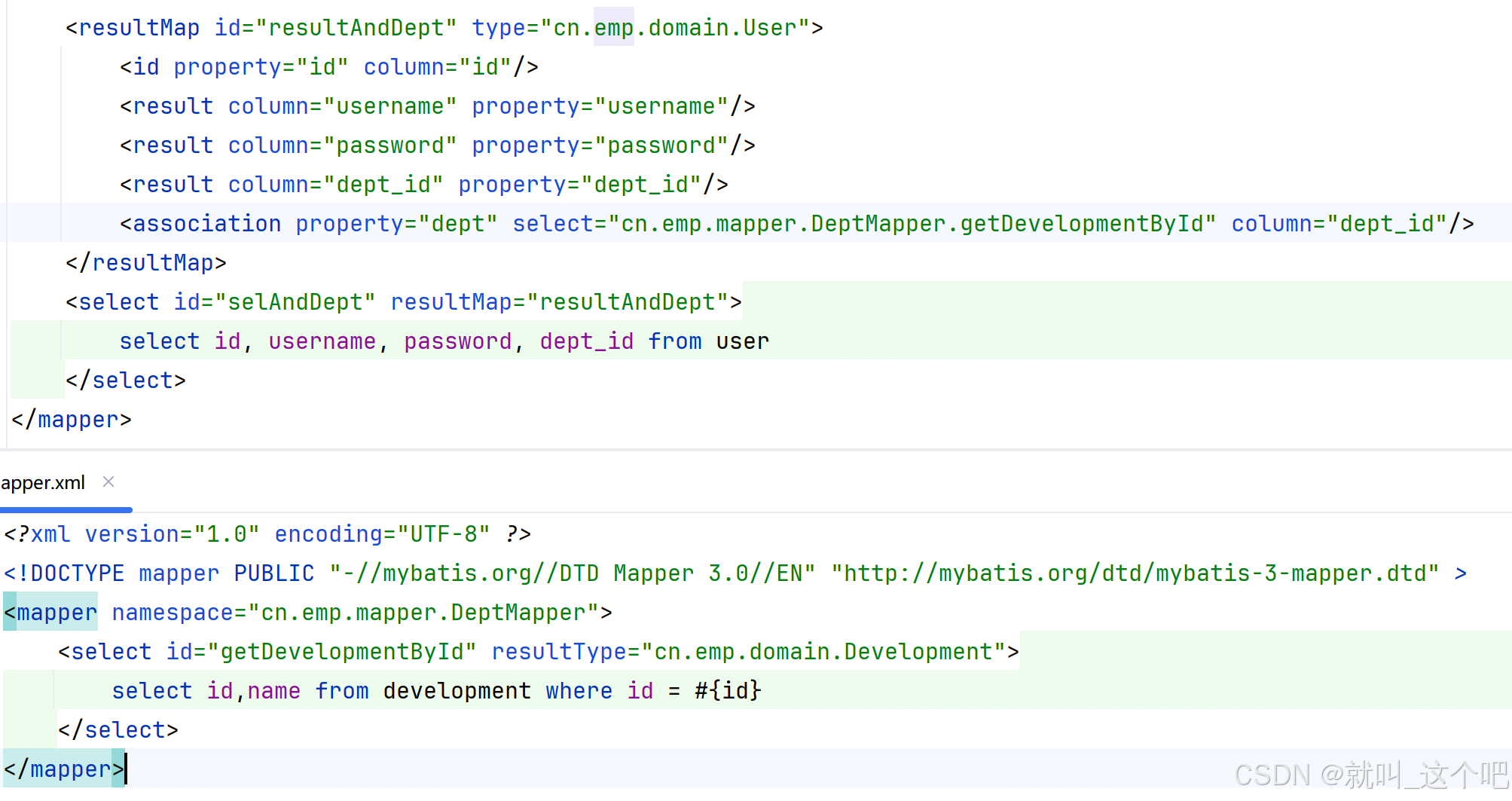
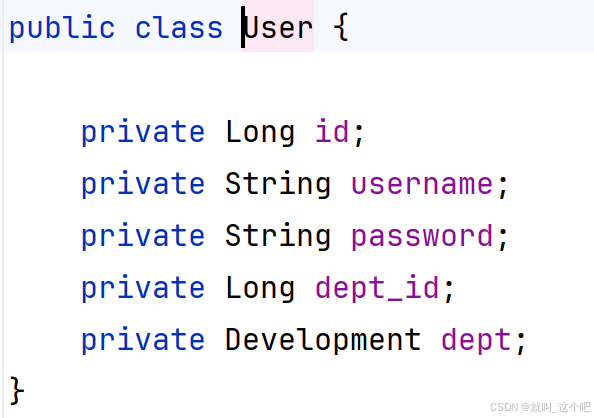
如图实现了,通过查询用户信息,同时查出了用户所在部门的信息,用户实体类中存放了这几个字段,查询出的部门信息存放到dept当中去,查询结果中不仅包含了用户信息,还包含了部门的实体类信息,需要通过resultMap进行返回值的填入,association property="查出的实体写入的字段名" select="查询语句的全限定名" column="传入的参数名"
一对多关系
例:一个部门包含多个员工
xml
<!-- UserMapper接口 -->
List<User> selByDeptId(Long dept_id);

<!-- UserMapper.xml -->
<select id="selByDeptId" resultType="cn.emp.domain.User">
    select * from user where dept_id = #{dept_id}
</select>

<!-- Dept实体类 -->
public class Development {
    private Long id;
    private String name;
    private List<User> users;
}

<!-- DeptMapper接口 -->
List<Development> getDevelopments();

<!-- DeptMapper.xml -->
<resultMap id="deptResult" type="cn.wolfcode.domain.Development">
    <id property="id" column="id"/>
    <result column="name" property="name"/>
    <collection property="users" column="id" select="cn.wolfcode.mapper.UserMapper.selByDeptId"/>
</resultMap>
<select id="getDevelopments" resultMap="deptResult">
    select id,name from development
</select>
多对多关系
当一个用户可以加入不同部门时,就形成了多对多关系,这是就需要一张连接关系表user_dept,存放用户和部门id
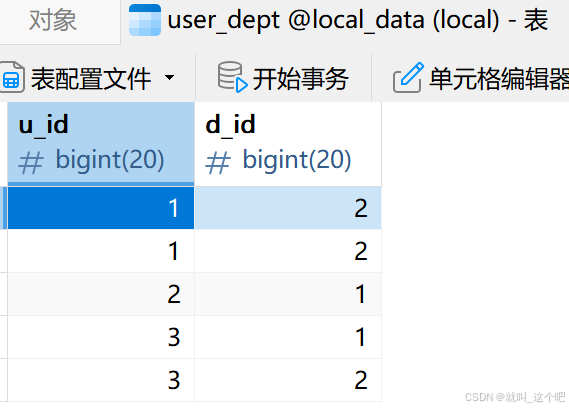
实现查询用户信息及所在的全部部门信息
xml
<!-- UserMapper.xml -->
<resultMap id="resultById" type="cn.wolfcode.domain.User">
    <id property="id" column="id"/>
    <result column="username" property="username"/>
    <result column="password" property="password"/>
    <collection property="depts" select="cn.wolfcode.mapper.DeptMapper.getDeptsByUid" column="id"/>
</resultMap>
<select id="selByUserId" resultMap="resultById">
    select id, username, password, dept_id from user
</select>
<!-- DeptMapper.xml -->
<select id="getDeptsByUid" resultType="cn.wolfcode.domain.Development">
    select id,name from development join user_dept on id = d_id
    where u_id = #{uid}
</select>注意:当删除多对多关系中的主表数据时,尽量同步删除关系表数据,避免数据冗余