文章目录
- [1. 案例目标与效果](#1. 案例目标与效果)
- [2. 整体架构](#2. 整体架构)
- [3. 多 Agent 装配:GatewayConfig](#3. 多 Agent 装配:GatewayConfig)
- [4. 路由 + SSE 接口:CustomerServiceController](#4. 路由 + SSE 接口:CustomerServiceController)
- [5. 前端工作台:cs.html](#5. 前端工作台:cs.html)
- [6. 对话测试](#6. 对话测试)
-
- [6.1 多 Agent 路由](#6.1 多 Agent 路由)
- [6.2 会话记忆延续](#6.2 会话记忆延续)
- [6.3 会话隔离](#6.3 会话隔离)
- 在这里插入图片描述
1. 案例目标与效果
我们要做一个最常见的生产形态:**一个入口,背后多个专职 ** Agent。
- 前台客服
concierge(main agent):负责接待、理解诉求、分流。 - 技术支持
tech:负责技术 / 故障 / 代码类问题。
效果:
- 网页左侧选「座席」,右侧聊天,消息按所选
agentId路由 到对应Agent;不选则走缺省main agent。 - 每个
userId拥有独立会话(记忆隔离);同一用户多轮对话记忆自动延续。 - 回复流式 (
SSE)输出,气泡标注来源座席。
它正好覆盖 Gateway 的三大职责------会话管理、per-session 并发、多 Agent 路由 ------并且纯本地、零外部依赖 (两个 Agent 都是纯对话型,关掉了文件/shell/子 agent 等)。
2. 整体架构
 浏览器 cs.html
   │  POST /api/cs/run_sse  { userId, message, agentId? }
   ▼
 CustomerServiceController  ──→  ChatUiChannel.sendStream(SendOptions, text)
   │                                   │  SendOptions.userId(userId)[.withAgentId(agentId)]
   │  Flux<AgentEvent> → SSE           ▼
   │                              ┌──────────────┐  PER_PEER:每个 userId 一个 session
   └───────────────────────────  │   Gateway     │  按 agentId 路由(缺省 concierge)
                                  └──────────────┘
                                     │          │
                              ┌──────────┐  ┌──────────┐
                              │concierge │  │   tech   │   (两个 HarnessAgent)
└──────────┘ └──────────┘三个角色对应三段代码:GatewayConfig(装配)→ CustomerServiceController(路由 + SSE)→ cs.html(前端)。
3. 多 Agent 装配:GatewayConfig
用 GatewayBootstrap 注册两个 Agent,并暴露一个 ChatUiChannel Bean。
java
@Configuration
public class GatewayConfig {

    /** 复用 AgentConfig 里的 DashScope Model,构建两个客服 Agent 并注册到 Gateway。 */
    @Bean
    public GatewayBootstrap csGateway(Model dashScopeModel) {
        HarnessAgent concierge = conversationalAgent(
                "concierge",
                "你是「前台客服」。职责:友好接待、快速理解诉求并分流。"
                        + "遇到明显的技术/故障/代码类问题时,建议用户转「技术支持」座席(tech)。用中文。",
                dashScopeModel);

        HarnessAgent tech = conversationalAgent(
                "tech",
                "你是「技术支持专家」。解答技术、故障排查、代码与配置类问题,给出可操作步骤。用中文。",
                dashScopeModel);

        return GatewayBootstrap.builder()
                .agent("concierge", concierge)
                .agent("tech", tech)
                .mainAgent("concierge")   // 未显式指定 agentId 时的缺省路由目标
                .build();
    }

    /** ChatUI Channel:PER_PEER(每个 userId 独立 session),缺省路由到 concierge。 */
    @Bean
    public ChatUiChannel csChannel(GatewayBootstrap csGateway) {
        ChannelConfig config = ChannelConfig.builder("chatui")
                .dmScope(DmScope.PER_PEER)        // ← 关键:多用户必须 PER_PEER,否则共用一个 session
                .defaultAgentId("concierge")
                .build();
        return csGateway.chatUiChannel(config);
    }

    /** 构建一个「纯对话」HarnessAgent:关掉文件/shell/子 agent/记忆/技能/工作区上下文,轻量、无外部依赖。 */
    private static HarnessAgent conversationalAgent(String name, String sysPrompt, Model model) {
        return HarnessAgent.builder()
                .name(name)
                .sysPrompt(sysPrompt)
                .model(model)
                .disableFilesystemTools()
                .disableShellTool()
                .disableSubagents()
                .disableDynamicSubagents()
                .disableMemoryTools()
                .disableMemoryHooks()
                .disableDynamicSkills()
                .disableDefaultWorkspaceSkills()
                .disableWorkspaceContext()
                .build();
    }
}
三个要点:
DmScope.PER_PEER是多用户的关键 。GatewayBootstrap.chatUiChannel()的默认是DmScope.MAIN------所有人共用一个 session (适合单用户/开发)。多用户客服必须显式改成PER_PEER,每个userId(peer)一段独立会话,记忆才不会串。mainAgent("concierge")决定"没指定agentId时发给谁"。- 纯对话 Agent :一连串
disableXxx()把文件、shell、子agent、记忆、技能、工作区上下文全关掉------客服Agent不需要这些,关掉后更轻、更快,也避免任何外部依赖(嵌入模型、技能目录等),保证demo拿来即跑。
4. 路由 + SSE 接口:CustomerServiceController
所有消息经 ChatUiChannel 发送,事件流转成 SSE:
java
@RestController
@RequestMapping("/api/cs")
public class CustomerServiceController {

    private final ChatUiChannel chat;
    private final ObjectMapper objectMapper;

    public CustomerServiceController(ChatUiChannel csChannel, ObjectMapper objectMapper) {
        this.chat = csChannel;
        this.objectMapper = objectMapper;
    }


    public record CsRequest(String userId, String message, String agentId) {}

    @PostMapping(value = "/run_sse", produces = MediaType.TEXT_EVENT_STREAM_VALUE)
    public SseEmitter run(@RequestBody CsRequest req) {
        String userId = (req.userId() == null || req.userId().isBlank()) ? "guest" : req.userId();
        String text = req.message() == null ? "" : req.message();

        // userId → PER_PEER 独立 session;可选 agentId → 显式路由到该座席
        SendOptions options = SendOptions.userId(userId);
        if (req.agentId() != null && !req.agentId().isBlank()) {
            options = options.withAgentId(req.agentId());
        }

        Flux<AgentEvent> events = chat.sendStream(options, text);
        return stream(events, userId);
    }

    /** 把 Flux<AgentEvent> 桥接到 SseEmitter:逐事件序列化为 JSON 推送。 */
    private SseEmitter stream(Flux<AgentEvent> events, String userId) {
        SseEmitter emitter = new SseEmitter(0L); // 0 = 不超时
        events.subscribe(
                event -> {
                    try {
                        emitter.send(SseEmitter.event()
                                .name(event.getType().name())                       // SSE 事件名 = 事件类型
                                .data(objectMapper.writeValueAsString(event),        // data = 事件 JSON
                                        MediaType.APPLICATION_JSON));
                    } catch (IOException e) {
                        emitter.completeWithError(e);
                    }
                },
                emitter::completeWithError,
                emitter::complete);
        return emitter;
    }
}
核心就一行 chat.sendStream(SendOptions.userId(userId).withAgentId(agentId), text):
SendOptions.userId(userId)→ 经Gateway的PER_PEER映射成该用户的独立session;.withAgentId(agentId)→ 路由到指定座席;不带就走mainAgent。
事件 JSON 里带了 type、source(子 agent 时形如 main/xxx、父事件为 null)、以及 delta/toolCallName 等,前端按需渲染。
5. 前端工作台:cs.html
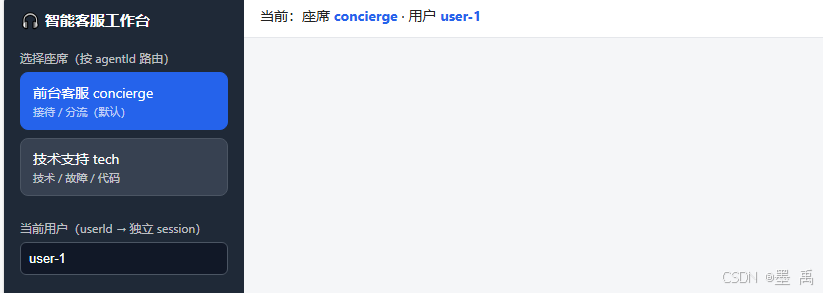
页面分两栏:左侧选座席 + 填 userId,右侧聊天。
关键 JS:
javascript
// 座席切换:仅改变后续请求带的 agentId
document.querySelectorAll(".agent").forEach(el => {
  el.onclick = () => { agentId = el.dataset.agent; /* ...高亮... */ };
});

// 发送:带上 userId + agentId
function send() {
  const userId = userIdEl.value.trim() || "guest";
  streamSse({ userId, message: text, agentId });
}

// 因为 SSE 端点是 POST,用 fetch + ReadableStream 手动按空行解析 SSE 帧
async function streamSse(body) {
  const resp = await fetch("/api/cs/run_sse", {
    method: "POST", headers: { "Content-Type": "application/json" },
    body: JSON.stringify(body),
  });
  const reader = resp.body.getReader();
  const decoder = new TextDecoder();
  let buffer = "";
  while (true) {
    const { value, done } = await reader.read();
    if (done) break;
    buffer += decoder.decode(value, { stream: true });
    let idx;
    while ((idx = buffer.indexOf("\n\n")) >= 0) {       // SSE 以空行分隔事件
      parseSseBlock(buffer.slice(0, idx));
      buffer = buffer.slice(idx + 2);
    }
  }
}

// 渲染:TEXT_BLOCK_DELTA 累积进同一气泡,并标注来源座席
function handleEvent(type, payload) {
  const ev = JSON.parse(payload);
  const who = ev.source ? ev.source : agentId;          // source 优先,否则当前座席
  if (type === "TEXT_BLOCK_DELTA") appendAssistant(ev.delta || "", who);
  else if (type === "TOOL_CALL_END") add("msg tool", "🔧 " + (ev.toolCallName || "tool"));
}
SSE 端点是 POST,浏览器原生
EventSource只支持 GET,所以用fetch+ReadableStream手动解析------和【34】的plan.html同款套路。
6. 对话测试
6.1 多 Agent 路由
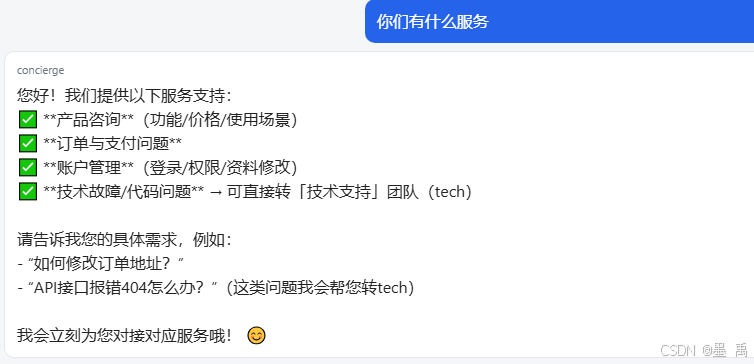
选「前台客服」问你们有什么服务 ,concierge 回答:
切「技术支持」问接口 500 怎么排查 ,tech 用专业口吻给排查步骤:
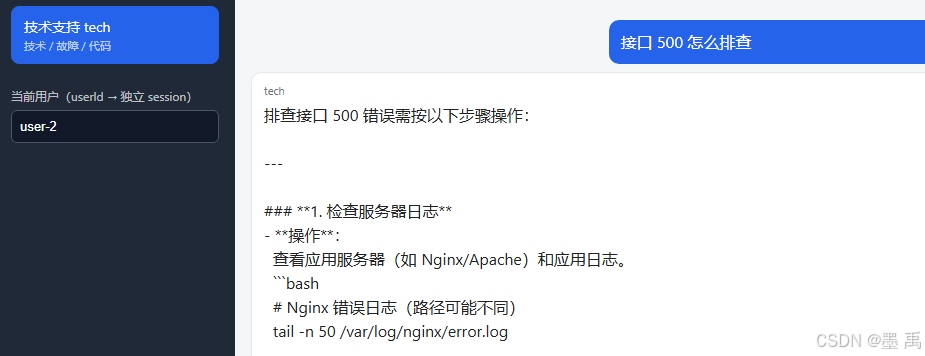
同一句话发给不同座席,回答风格明显不同,证明
withAgentId路由生效。
6.2 会话记忆延续
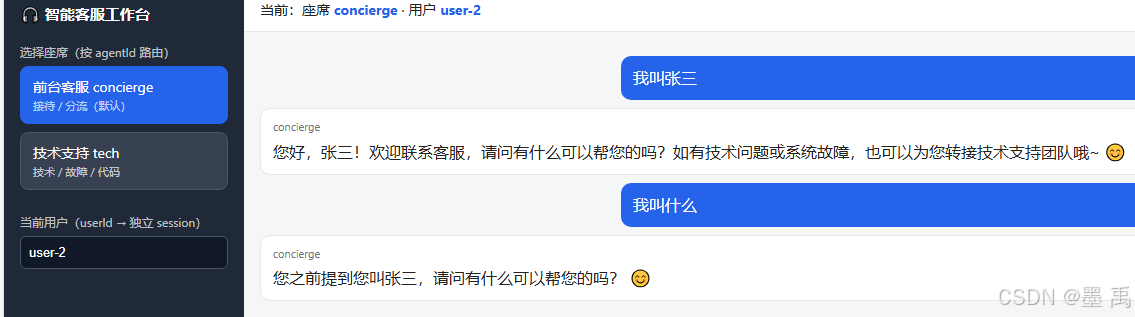
用 user-2 连问两轮,Agent 记得上文证明同 userId 是同一段 session :
6.3 会话隔离
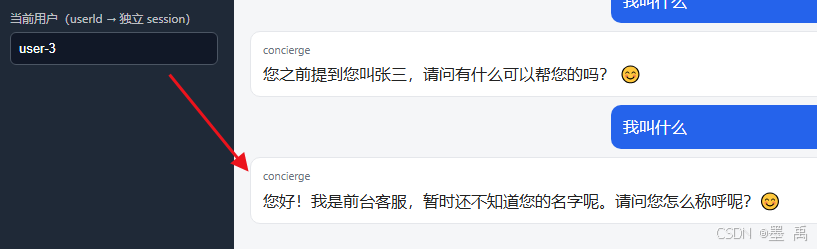
把 userId 改成 user-3 再问,Agent 不知道 user-2 聊过什么,明 PER_PEER 按用户隔离: