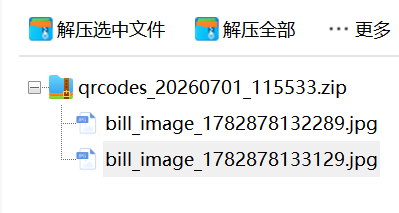
一:需求:查看发票详情需要跳转第三方页面,然后右键复制图片保存到本地。一个个下载太麻烦
最后是从html中获取图片元素转为字节流,下载压缩到同一个文件夹:
二:pom依赖
<dependency>
    <groupId>org.jsoup</groupId>
    <artifactId>jsoup</artifactId>
    <version>1.17.2</version>
</dependency>
三:压缩成zip文件
@PostMapping("/qrcodes")
@ApiOperation("测试导票据图片")
public ResponseEntity<byte[]> exportQrCodes(@RequestBody(required = false) InvoiceSummary invoiceSummary) {
    try {
          // 数据
        byte[] zipData = exportQrCodesToZip(invoiceSummary);
        // 生成文件名(带时间戳)
        String timestamp = new SimpleDateFormat("yyyyMMdd_HHmmss").format(new Date());
        String fileName = "qrcodes_" + timestamp + ".zip";
        String encodedFileName = URLEncoder.encode(fileName, StandardCharsets.UTF_8.name())
                .replaceAll("\\+", "%20");

        // 返回文件流,浏览器会自动下载到默认下载文件夹
        return ResponseEntity.ok()
                .header(HttpHeaders.CONTENT_DISPOSITION, "attachment; filename*=UTF-8''" + encodedFileName)
                .contentType(MediaType.APPLICATION_OCTET_STREAM)
                .body(zipData);

    } catch (Exception e) {
        return ResponseEntity.internalServerError().build();
    }
}
四:获取需要处理的列表
public byte[] exportQrCodesToZip(InvoiceSummary invoiceSummary) {
    // 查询所有有二维码的数据
    //示例数据
    Map<String,Object> map1 = invoiceSummaryService.selectInvoiceSummaryByIdByAPP(520541L);
    Map<String,Object> map2 = invoiceSummaryService.selectInvoiceSummaryByIdByAPP(568177L);
    List<Map<String,Object>> list=new ArrayList<>();
    list.add(map1);
    list.add(map2);
    if (CollectionUtils.isEmpty(list)) {
        throw new RuntimeException("没有找到数据");
    }

    System.err.println("开始导出,共{}张二维码"+ list.size());

    ByteArrayOutputStream baos = new ByteArrayOutputStream();

    try (ZipOutputStream zos = new ZipOutputStream(baos)) {
        int successCount = 0;
        int failCount = 0;
        for (Map<String, Object> entity : list) {
            String pictureUrl = entity.get("pictureUrl").toString();
            if (pictureUrl == null || pictureUrl.isEmpty()) {
                continue;
            }
            String fileName;
            try {
                // 1. 获取页面HTML
                String html = TestBillDownload.fetchPageHtml(pictureUrl);
                System.out.println("页面加载成功,HTML长度: " + html.length());
                // 2. 从页面中提取正确的参数
                String imageUrl = TestBillDownload.buildImageUrlFromPage(html);
                if (imageUrl != null && !imageUrl.isEmpty()) {
                    System.out.println("构建图片URL成功: " + imageUrl);
                    fileName = "bill_image_" + System.currentTimeMillis() + ".jpg";
                } else {
                    System.out.println("构建图片URL失败");
                    throw new ServiceException("");
                }
                // 2. 获取图片byte[]
                byte[] imageBytes = TestBillDownload.fetchImageBytes(imageUrl);

                if (imageBytes != null && imageBytes.length > 0) {
                    System.out.println("获取图片成功,大小: " + imageBytes.length + " 字节 (" + (imageBytes.length / 1024) + " KB)");
                }

                // 添加到ZIP文件
                ZipEntry entry = new ZipEntry(fileName);
                zos.putNextEntry(entry);
                zos.write(imageBytes);
                zos.closeEntry();
                successCount++;

                if (successCount % 100 == 0) {
                    System.err.println("已打包 {} 张" + successCount);
                }
                // 添加小延迟,避免请求过快
                Thread.sleep(100);

            } catch (Exception e) {
                System.err.println("处理图片失败: " + pictureUrl + ", 错误: " + e.getMessage());
                failCount++;
                // 继续处理下一张,不要中断整个流程
            }
        }
        System.err.println("打包完成,成功 " + successCount + " 张,失败 " + failCount + " 张");
        // 注意:return 要放在循环外面!
        return baos.toByteArray();

    } catch (IOException e) {
        throw new RuntimeException(e);
    }
}
五:工具类
public static String fetchPageHtml(String url) throws Exception {
    Request request = new Request.Builder()
            .url(url)
            .header("User-Agent", "Mozilla/5.0 (Windows NT 10.0; Win64; x64) AppleWebKit/537.36 (KHTML, like Gecko) Chrome/120.0.0.0 Safari/537.36")
            .header("Accept", "text/html,application/xhtml+xml,application/xml;q=0.9,image/webp,*/*;q=0.8")
            .header("Accept-Language", "zh-CN,zh;q=0.9,en;q=0.8")
            .header("Cache-Control", "no-cache")
            .build();

    try (Response response = client.newCall(request).execute()) {
        if (!response.isSuccessful()) {
            throw new RuntimeException("页面加载失败: " + response.code());
        }
        return response.body().string();
    }
}public static String buildImageUrlFromPage(String html) {
String ciphertext = null;
String appId = null;
String method = null;
// 1. 提取 ciphertext
Pattern cipherPattern = Pattern.compile(
"var\\s+ciphertext\\s*=\\s*[\"']([^\"']+)[\"']",
Pattern.CASE_INSENSITIVE
);
Matcher cipherMatcher = cipherPattern.matcher(html);
if (cipherMatcher.find()) {
ciphertext = cipherMatcher.group(1);
System.out.println("提取到 ciphertext: " + ciphertext);
} else {
System.out.println("未找到 ciphertext");
return null;
}
// 2. 提取 appId
Pattern appIdPattern = Pattern.compile(
"var\\s+appId\\s*=\\s*[\"']([^\"']+)[\"']",
Pattern.CASE_INSENSITIVE
);
Matcher appIdMatcher = appIdPattern.matcher(html);
if (appIdMatcher.find()) {
appId = appIdMatcher.group(1);
System.out.println("提取到 appId: " + appId);
} else {
System.out.println("未找到 appId");
return null;
}
// 3. 提取 method
Pattern methodPattern = Pattern.compile(
"var\\s+method\\s*=\\s*[\"']([^\"']+)[\"']",
Pattern.CASE_INSENSITIVE
);
Matcher methodMatcher = methodPattern.matcher(html);
if (methodMatcher.find()) {
method = methodMatcher.group(1);
System.out.println("提取到 method: " + method);
} else {
// method 可能没有定义,使用默认值
method = "DISPLAYH5";
System.out.println("未找到 method,使用默认值: " + method);
}
// 4. 构建图片URL
String imageUrl = "http://211.159.155.25:8001/colleges-proxy/peripheral/queryBill/queryEbillImg.do" +
"?ciphertext=" + ciphertext +
"&appId=" + appId +
"&method=" + method;
return imageUrl;
}public static byte[] fetchImageBytes(String imageUrl) throws Exception {
// 构建请求
Request request = new Request.Builder()
.url(imageUrl)
.header("User-Agent", "Mozilla/5.0 (Windows NT 10.0; Win64; x64) AppleWebKit/537.36 (KHTML, like Gecko) Chrome/120.0.0.0 Safari/537.36")
.header("Referer", "http://211.159.155.25:8001/")
.header("Accept", "image/webp,image/apng,image/*,*/*;q=0.8")
.header("Accept-Language", "zh-CN,zh;q=0.9,en;q=0.8")
.header("Connection", "keep-alive")
.build();
try (Response response = client.newCall(request).execute()) {
// 检查响应状态
if (!response.isSuccessful()) {
throw new RuntimeException("下载失败,HTTP状态码: " + response.code() + ", 消息: " + response.message());
}
// 获取Content-Type(可选,用于验证)
String contentType = response.header("Content-Type");
System.out.println("Content-Type: " + contentType);
// 直接返回byte[]
byte[] imageBytes = response.body().bytes();
System.out.println("实际获取大小: " + imageBytes.length + " 字节 (" + (imageBytes.length / 1024) + " KB)");
return imageBytes;
}
}六:结果