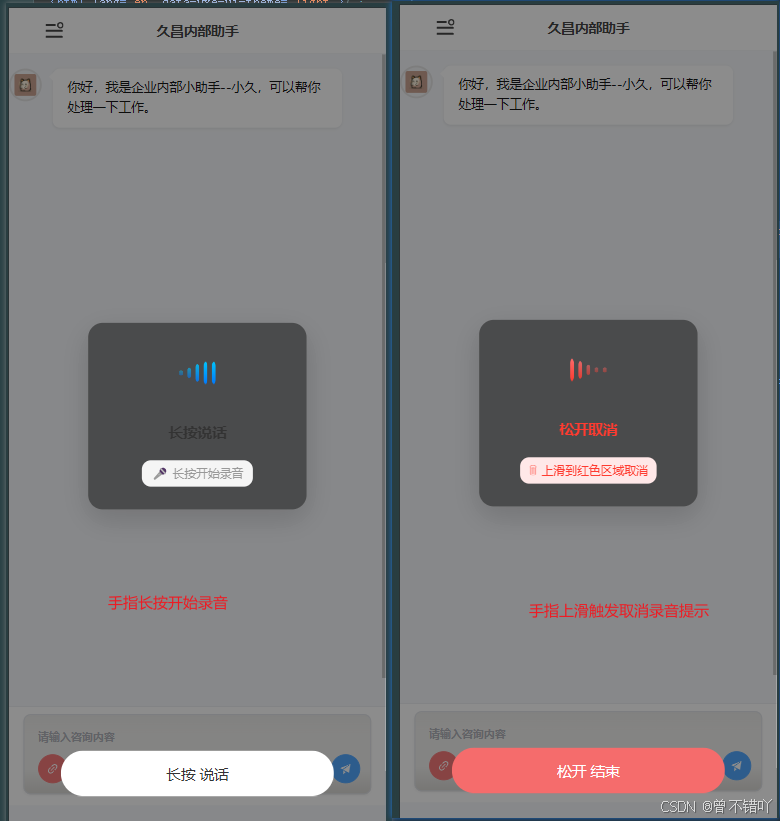
<template>
    <!-- 语音录制组件 - 全屏遮罩层 -->
    <div
        class="voice-wrapper"
        v-if="show"
        @click.stop="handleClose"
    >
        <!-- 内容区域(阻止右键菜单) -->
        <div
            @contextmenu.prevent
            @touchstart.prevent
            @mousedown.prevent
        >
            <!-- 录音卡片 -->
            <div class="recorder-card" @click.stop>
                <!-- 音波动画区域 -->
                <div class="voice-wave" :class="{ 'cancel-mode': isCancelMode }">
                    <div
                        v-for="i in 5"
                        :key="i"
                        class="wave-bar"
                        :style="{ animationDelay: i * 0.1 + 's' }"
                    ></div>
                </div>
                <!-- 状态提示文字 / 倒计时 -->
                <div class="countdown-text" :class="{ 'cancel-mode': isCancelMode }">
                    {{ isCancelMode ? '松开取消' : (isRecording ? (countdown + 's') : '长按说话') }}
                </div>
                <!-- 操作提示 -->
                <div class="cancel-hint" :class="{ 'cancel-mode': isCancelMode }">
                    <span class="hint-icon">{{ isCancelMode ? '🗑' : '🎤' }}</span>
                    {{ isCancelMode ? '上滑到红色区域取消' : '长按开始录音' }}
                </div>
            </div>

            <!-- 底部录音按钮 -->
            <div
                class="voice-btn"
                :class="{ recording: isRecording, cancel: isCancelMode }"
                @pointerdown.prevent="onPointerDown"
                @pointermove.prevent="onPointerMove"
                @pointerup.prevent="onPointerUp"
                @pointercancel.prevent="onPointerUp"
                @contextmenu.prevent
            >
                {{ isRecording ? '松开 结束' : '长按 说话' }}
            </div>
        </div><!-- /内容区域 -->

        <!-- 播放录音按钮(录音完成后显示,放在内容区域外避免 mousedown.prevent 干扰) -->
        <div v-if="audioUrl && !isRecording" class="play-btn" @click.stop="playRecording">
            {{ isPlaying ? '⏹ 播放中...' : '▶ 播放录音' }}
        </div>
    </div>
</template>

<script setup>
import { ref, watch, onUnmounted } from 'vue'
import { ElMessage } from 'element-plus';

// ==================== 响应式状态 ====================
const isRecording = ref(false)      // 是否正在录音
const isCancelMode = ref(false)     // 是否处于取消模式(上滑取消)
const audioUrl = ref('')            // 录音文件的播放 URL
const isPlaying = ref(false)        // 是否正在播放录音
const countdown = ref(0)            // 倒计时秒数,0 表示不显示倒计时

// ==================== 非响应式变量 ====================
let pressTimer = null               // 长按计时器
let pressStartY = 0                 // 按下时的 Y 坐标(用于判断上滑取消)
let audioPlayer = null              // 音频播放器实例
let countdownTimer = null           // 倒计时定时器
const CANCEL_THRESHOLD = 80         // 上滑多少像素进入取消模式
const MAX_RECORD_SECONDS = 10       // 最长录音秒数(倒计时从该值开始递减)

// ==================== 组件属性 ====================
const props = defineProps({
    show: { type: Boolean, default: false }  // 控制组件显示/隐藏
})

// ==================== 组件事件 ====================
const emit = defineEmits(['close', 'recordFile'])

// ==================== 录音核心逻辑 ====================
let micStream = null                // 麦克风流
let mediaRecorder = null            // 媒体录制器实例
let audioChunks = []                // 录音数据块数组

/**
 * 获取麦克风流
 * @returns {MediaStream|null} 麦克风流,获取失败返回 null
 */
const getMicStream = async () => {
    if (micStream) return micStream
    // 检查浏览器是否支持 getUserMedia
    if (!navigator.mediaDevices || !navigator.mediaDevices.getUserMedia) {
        const isHttps = location.protocol === 'https:'
        const isLocalhost = location.hostname === 'localhost' || location.hostname === '127.0.0.1'
        if (!isHttps && !isLocalhost) {
            ElMessage.error('麦克风功能需要 HTTPS 访问')
        } else {
            ElMessage.error('当前浏览器不支持麦克风功能')
        }
        return null
    }
    try {
        micStream = await navigator.mediaDevices.getUserMedia({ audio: true })
        return micStream
    } catch (err) {
        console.error('麦克风获取失败', err)
        if (err.name === 'NotAllowedError') {
            ElMessage.error('麦克风权限被拒绝,请在浏览器设置中允许麦克风权限')
        } else if (err.name === 'NotFoundError') {
            ElMessage.error('未检测到麦克风设备')
        } else {
            ElMessage.error('麦克风启动失败:' + err.message)
        }
        return null
    }
}

/**
 * 开始录音
 */
const startRecording = async () => {
    const stream = await getMicStream()
    if (!stream) return

    isRecording.value = true
    isCancelMode.value = false
    audioChunks = []
    countdown.value = MAX_RECORD_SECONDS

    // 选择浏览器支持的音频编码格式(优先移动端兼容格式)
    const mimeType = MediaRecorder.isTypeSupported('audio/mp4;codecs=mp4a.40.2')
        ? 'audio/mp4;codecs=mp4a.40.2'
        : MediaRecorder.isTypeSupported('audio/webm;codecs=opus')
            ? 'audio/webm;codecs=opus'
            : MediaRecorder.isTypeSupported('audio/webm')
                ? 'audio/webm'
                : ''
    // 如果没有任何支持的格式,不传 mimeType 让浏览器使用默认格式
    const recorderOptions = mimeType ? { mimeType } : {}
    mediaRecorder = new MediaRecorder(stream, recorderOptions)

    // 收集录音数据块
    mediaRecorder.ondataavailable = (e) => {
        if (e.data.size > 0) audioChunks.push(e.data)
    }

    // 每 100ms 触发一次 dataavailable 事件
    mediaRecorder.start(100)

    // 启动倒计时,每秒递减,归零时自动停止录音
    countdownTimer = setInterval(() => {
        countdown.value--
        if (countdown.value <= 0) {
            stopRecording(false)
        }
    }, 1000)
}

/**
 * 停止录音
 * @param {boolean} canceled - 是否为取消操作(取消则不生成文件)
 */
const stopRecording = (canceled = false) => {
    if (!isRecording.value) return
    isRecording.value = false
    isCancelMode.value = false
    countdown.value = 0

    // 清除倒计时定时器
    if (countdownTimer) {
        clearInterval(countdownTimer)
        countdownTimer = null
    }

    // 停止媒体录制器
    if (mediaRecorder && mediaRecorder.state !== 'inactive') {
        mediaRecorder.stop()
    }

    // 非取消模式且有录音数据时,生成音频文件
    if (!canceled && audioChunks.length > 0) {
        // 与 startRecording 保持一致的格式选择
        const mimeType = MediaRecorder.isTypeSupported('audio/mp4;codecs=mp4a.40.2')
            ? 'audio/mp4;codecs=mp4a.40.2'
            : MediaRecorder.isTypeSupported('audio/webm;codecs=opus')
                ? 'audio/webm;codecs=opus'
                : MediaRecorder.isTypeSupported('audio/webm')
                    ? 'audio/webm'
                    : ''
        // 没有任何支持的格式时,使用默认类型
        const finalMimeType = mimeType || ''
        const ext = finalMimeType.startsWith('audio/mp4') ? 'm4a' : 'webm'
        const blob = new Blob(audioChunks, { type: finalMimeType })
        const file = new File([blob], `recording_${Date.now()}.${ext}`, { type: finalMimeType })
        // emit('recordFile', file)
        console.log('发送到父组件的录音文件:',file);


        // 生成播放 URL
        if (audioUrl.value) URL.revokeObjectURL(audioUrl.value)
        audioUrl.value = URL.createObjectURL(blob)
    }
    audioChunks = []
}

/**
 * 播放录音
 */
const playRecording = () => {
    console.log('播放录音');
    if (!audioUrl.value || isPlaying.value) return
    isPlaying.value = true
    audioPlayer = new Audio(audioUrl.value)
    // 播放结束回调
    audioPlayer.onended = () => {
        isPlaying.value = false
        audioPlayer = null
    }
    // 播放失败回调
    audioPlayer.onerror = (e) => {
        console.error('播放失败', e)
        isPlaying.value = false
        audioPlayer = null
        // 移动端常见:格式不支持,尝试用 blob 转 mp3 或提示用户
        ElMessage.error('播放失败,请重试')
    }
    // 移动端浏览器要求用户手势触发播放,play() 返回 Promise
    const playPromise = audioPlayer.play()
    if (playPromise) {
        playPromise.catch((err) => {
            console.error('播放被阻止', err)
            isPlaying.value = false
            audioPlayer = null
            ElMessage.error('播放失败,请点击重试')
        })
    }
}

/**
 * 取消录音(不保存录音文件)
 */
const cancelRecording = () => {
    stopRecording(true)
}

// ==================== 指针事件处理 ====================

/**
 * 指针按下 - 开始长按计时
 * @param {PointerEvent} e - 指针事件对象
 */
const onPointerDown = (e) => {
    pressStartY = e.clientY
    isCancelMode.value = false
    // 长按 300ms 后开始录音
    pressTimer = setTimeout(() => {
        startRecording()
    }, 300)
}

/**
 * 指针移动 - 检测上滑取消操作
 * @param {PointerEvent} e - 指针事件对象
 */
const onPointerMove = (e) => {
    if (!isRecording.value) return
    const deltaY = pressStartY - e.clientY
    isCancelMode.value = deltaY > CANCEL_THRESHOLD
}

/**
 * 指针抬起 - 结束录音或取消录音
 */
const onPointerUp = () => {
    clearTimeout(pressTimer)
    if (isRecording.value) {
        stopRecording(isCancelMode.value)
    }
}

// ==================== 关闭与清理 ====================

/**
 * 关闭组件 - 停止录音/播放并关闭遮罩
 */
const handleClose = () => {
    console.log('这个触发了-------关闭')
    if (isRecording.value) cancelRecording()
    stopPlayback()
    emit('close')
}

/**
 * 停止播放并释放音频资源
 */
const stopPlayback = () => {
    if (audioPlayer) {
        audioPlayer.pause()
        audioPlayer = null
    }
    isPlaying.value = false
    if (audioUrl.value) {
        URL.revokeObjectURL(audioUrl.value)
        audioUrl.value = ''
    }
}

// ==================== 生命周期 ====================

// 监听 show 属性变化,关闭时重置所有状态
watch(() => props.show, (newVal) => {
    if (!newVal) {
        isRecording.value = false
        isCancelMode.value = false
        countdown.value = 0
        clearTimeout(pressTimer)
        if (countdownTimer) {
            clearInterval(countdownTimer)
            countdownTimer = null
        }
        stopPlayback()
    }
}, { immediate: true })

// 组件卸载时清理资源
onUnmounted(() => {
    clearTimeout(pressTimer)
    if (countdownTimer) {
        clearInterval(countdownTimer)
        countdownTimer = null
    }
    stopPlayback()
})

</script>

<style lang="less" scoped>
/* 全屏遮罩层 */
.voice-wrapper {
    position: fixed;
    top: 0;
    left: 0;
    width: 100vw;
    height: 100vh;
    z-index: 2000;
    background: rgba(26, 26, 26, 0.5);
    display: flex;
    flex-direction: column;
    justify-content: center;
    align-items: center;
    touch-action: manipulation;
    -webkit-touch-callout: none;
}

/* 录音卡片容器 */
.recorder-card {
    display: flex;
    flex-direction: column;
    align-items: center;
    justify-content: space-between;
    width: 200px;
    height: 150px;
    background: #00000073;
    border-radius: 16px;
    padding: 30px 20px 25px;
    box-shadow: 0 10px 30px rgba(0, 0, 0, 0.15);
    transition: all 0.3s ease;

    /* 取消模式下的卡片样式 */
    &.cancel-mode {
        background: #fff5f5;
        box-shadow: 0 10px 30px rgba(255, 59, 48, 0.15);
    }
}

/* 状态提示文字 */
.countdown-text {
    font-size: 16px;
    font-weight: 600;
    color: #333;
    text-align: center;
    transition: color 0.3s ease;

    /* 取消模式下的文字颜色 */
    &.cancel-mode {
        color: #ff3b30;
    }
}

/* 操作提示标签 */
.cancel-hint {
    display: flex;
    align-items: center;
    gap: 4px;
    font-size: 13px;
    color: #999;
    text-align: center;
    padding: 5px 10px;
    background: #f5f5f5;
    border-radius: 10px;
    transition: all 0.3s ease;

    .hint-icon {
        font-size: 14px;
    }

    /* 取消模式下的提示样式 */
    &.cancel-mode {
        color: #ff3b30;
        background: #ffe8e8;
    }
}

/* 音阶动画容器 */
.voice-wave {
    display: flex;
    align-items: center;
    justify-content: center;
    gap: 5px;
    height: 50px;
    margin-bottom: 10px;
    transition: all 0.3s ease;

    /* 取消模式下音条变为红色 */
    &.cancel-mode {
        .wave-bar {
            background: linear-gradient(to top, #ff3b30, #ff6b6b);
        }
    }
}

/* 单个音条 */
.wave-bar {
    width: 4px;
    min-height: 10px;
    background: linear-gradient(to top, #007AFF, #00C6FF);
    border-radius: 2px;
    animation: waveAnim 0.8s ease-in-out infinite;
}

/* 音条动画 - 模拟音量波动 */
@keyframes waveAnim {
    0%,
    100% {
        transform: scaleY(0.5);
        opacity: 0.4;
    }
    50% {
        transform: scaleY(2.5);
        opacity: 1;
    }
}

/* 播放录音按钮 */
.play-btn {
    position: absolute;
    top: 50%;
    left: 50%;
    transform: translate(-50%, -50%);
    margin-top: 90px;
    font-size: 13px;
    color: #409eff;
    cursor: pointer;
    padding: 4px 12px;
    border-radius: 12px;
    background: rgba(64, 158, 255, 0.1);
    transition: all 0.2s;
    user-select: none;
    z-index: 1;

    &:hover {
        background: rgba(64, 158, 255, 0.2);
    }
}

/* 底部录音按钮 */
.voice-btn {
    position: absolute;
    left: 50%;
    bottom: 30px;
    transform: translateX(-50%);
    width: 80%;
    max-width: 300px;
    height: 50px;
    background-color: #fff;
    border-radius: 25px;
    display: flex;
    align-items: center;
    justify-content: center;
    font-size: 16px;
    color: #333;
    cursor: pointer;
    user-select: none;
    -webkit-user-select: none;
    -webkit-touch-callout: none;
    -webkit-tap-highlight-color: transparent;
    touch-action: manipulation;
    transition: all 0.2s;

    /* 录音中样式 */
    &.recording {
        background-color: #409eff;
        color: #fff;
    }

    /* 取消模式样式 */
    &.cancel {
        background-color: #f56c6c;
        color: #fff;
    }
}
</style>