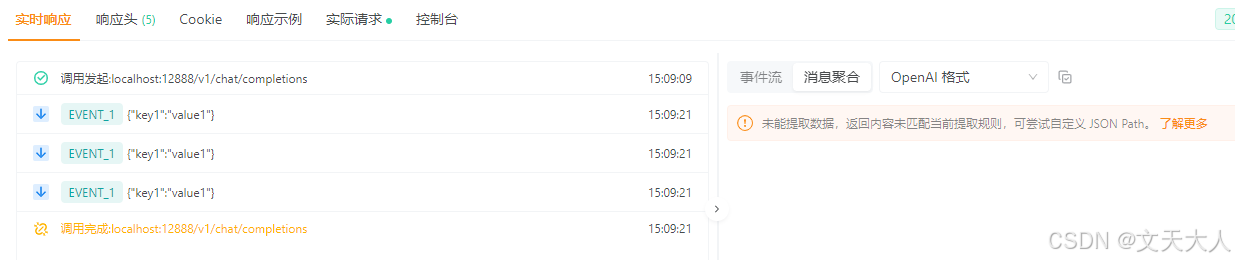
写个Servlet 阻塞式 IO流式推送的小例子,方便以后复制粘贴用,你可能会问:那非阻塞是什么,非阻塞是Spring web flux模块的东西,本文记录只是记录servlet下面的流式实现,新项目建议使用flux
SseEmitter由于是阻塞式IO,所以如果不额外配置线程池,spring会提示:Performing asynchronous handling through the default Spring MVC SimpleAsyncTaskExecutor. This executor is not suitable for production use under load. Please, configure an AsyncTaskExecutor through the WebMvc config.意思就是没有配置任何线程池,将使用默认线程池,该线程池不建议在生产环境下使用,所以新项目我这里强烈建议使用SSE的另一个实现,也就是Spring-webflux
cpp
package 你的包名;

import com.fasterxml.jackson.databind.ObjectMapper;
import org.springframework.http.MediaType;
import org.springframework.web.bind.annotation.*;
import org.springframework.web.servlet.mvc.method.annotation.SseEmitter;

import java.util.HashMap;
import java.util.Map;

@RestController
@RequestMapping("/v1/chat")
public class ShiWenTianTestController {

    public SseEmitter createEmitter() {
        return new SseEmitter(720_000L);
    }

    @PostMapping(path = "/completions", produces = MediaType.TEXT_EVENT_STREAM_VALUE)
    public SseEmitter completions(@RequestBody String param) throws Exception {
        SseEmitter emitter = createEmitter();
        Map<String, String> streamData = new HashMap<>();
        streamData.put("key1", "value1");
        try {
            ObjectMapper objectMapper = new ObjectMapper();
            String jsonString = objectMapper.writeValueAsString(streamData);
            for (int i = 0; i < 3; i++) {
                Thread.sleep(1000);
                // 实际开发中这个send方法应该放到异步方法中,然后在另外一个线程一直
                // send,这就比较麻烦,所以建议使用spring-webflux框架,而不是SseEmitter
                emitter.send(SseEmitter.event().name("EVENT_1").data(jsonString));
            }
            emitter.complete();
        } catch (Exception error) {
            //log.error("流式生成事项发送给前端时产生了错误", error);
            emitter.completeWithError(error);
        }
        return emitter;
    }

}
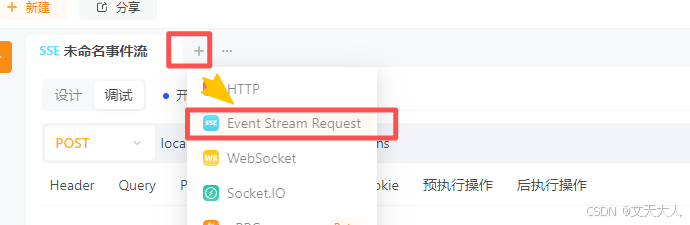
使用Postman发送流式请求:
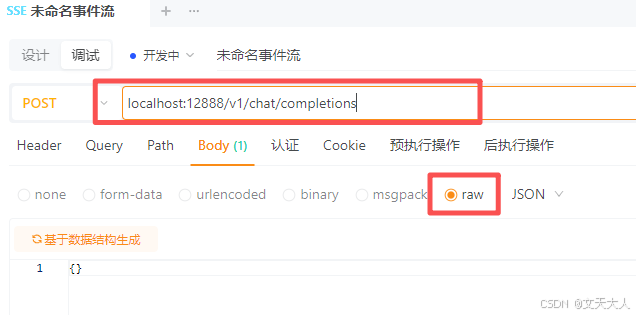
我这里是端口号是12888,每个项目可能不一样
最终返回结果如下