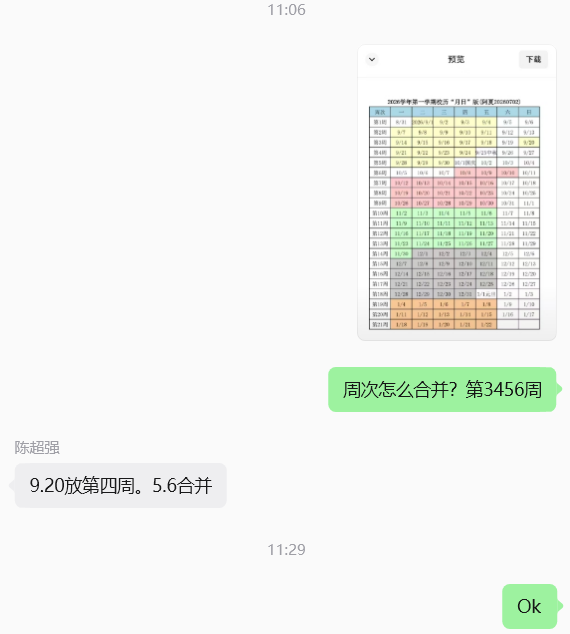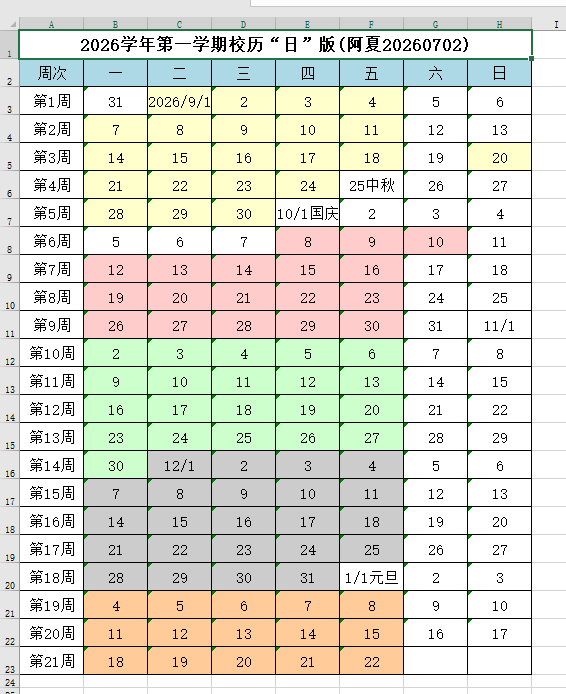
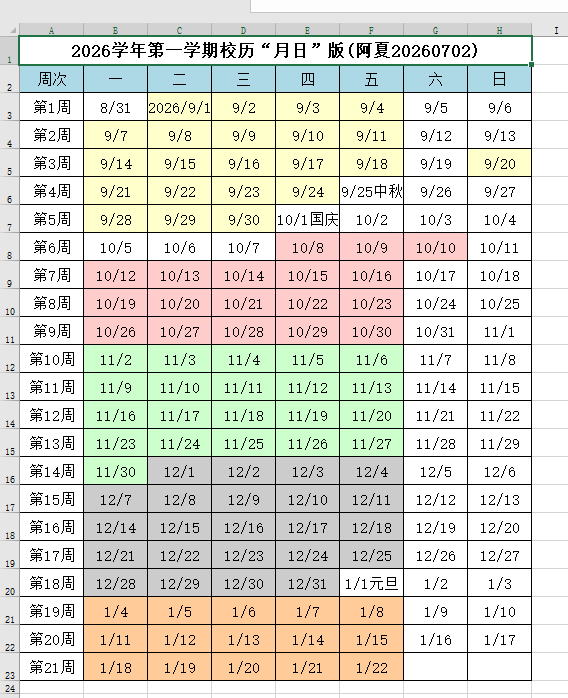
背景需求:
放假第一天,把下学期校历做一下,这是后续一系列工作安排的基础
网上看看第一学期的起至日期(2026-9-1到2027-01-22)
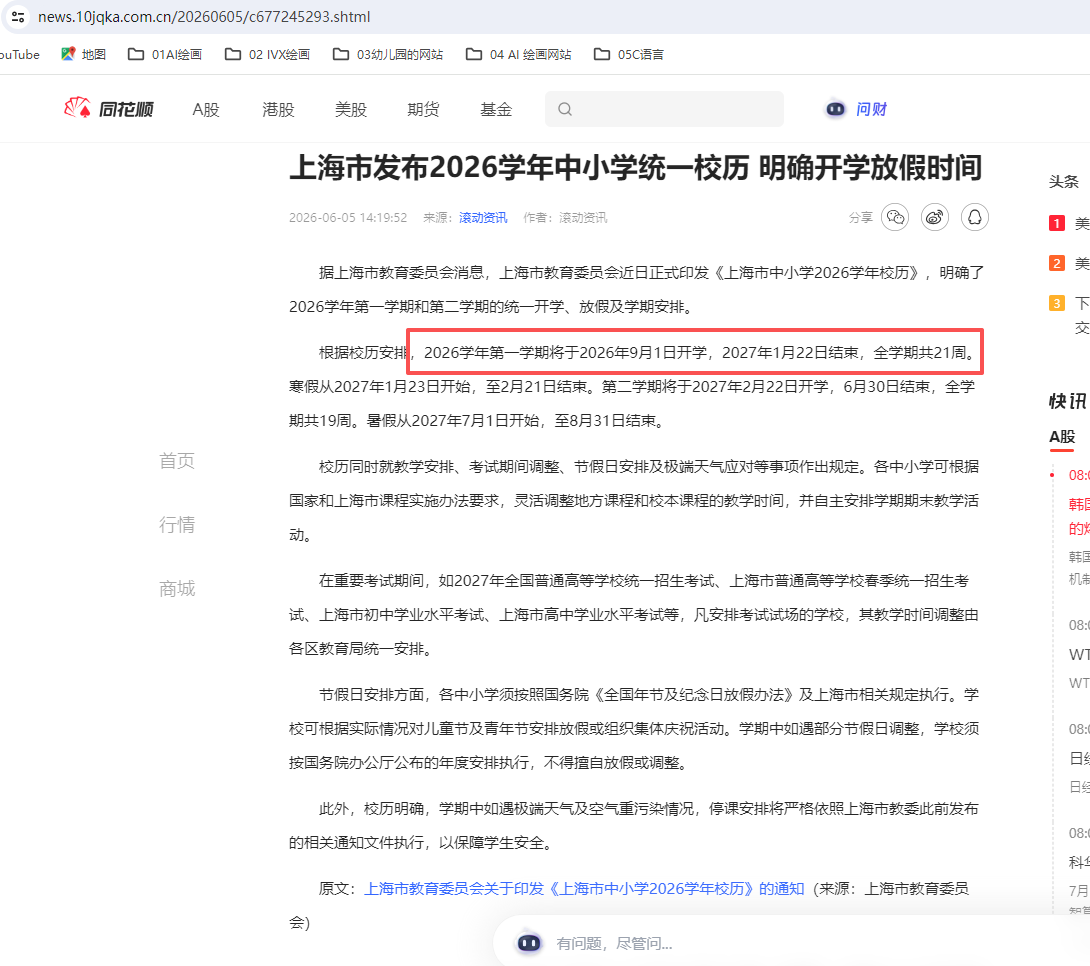
这个学校已经把休息日标注出来了
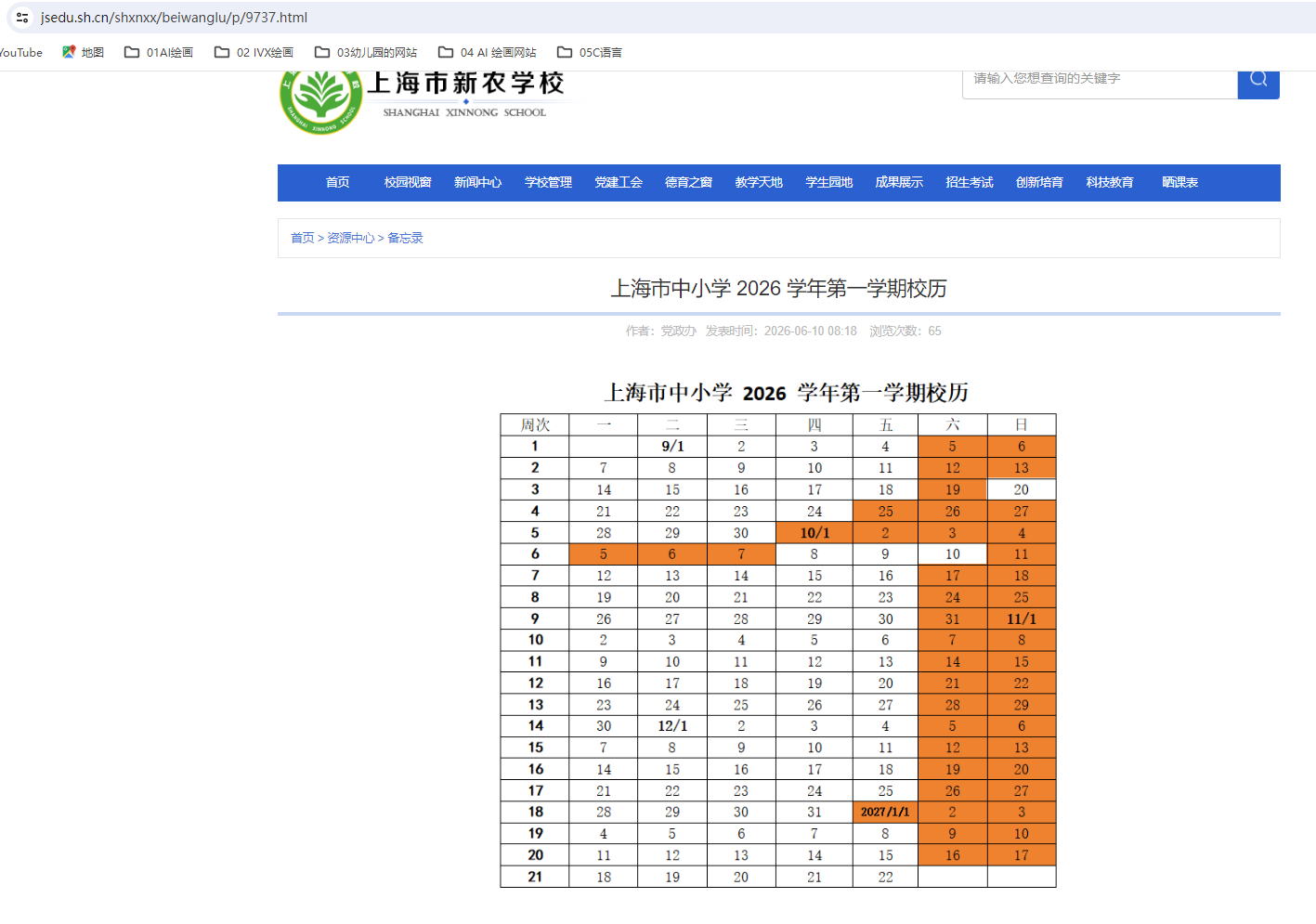
只有9月-10月有休息
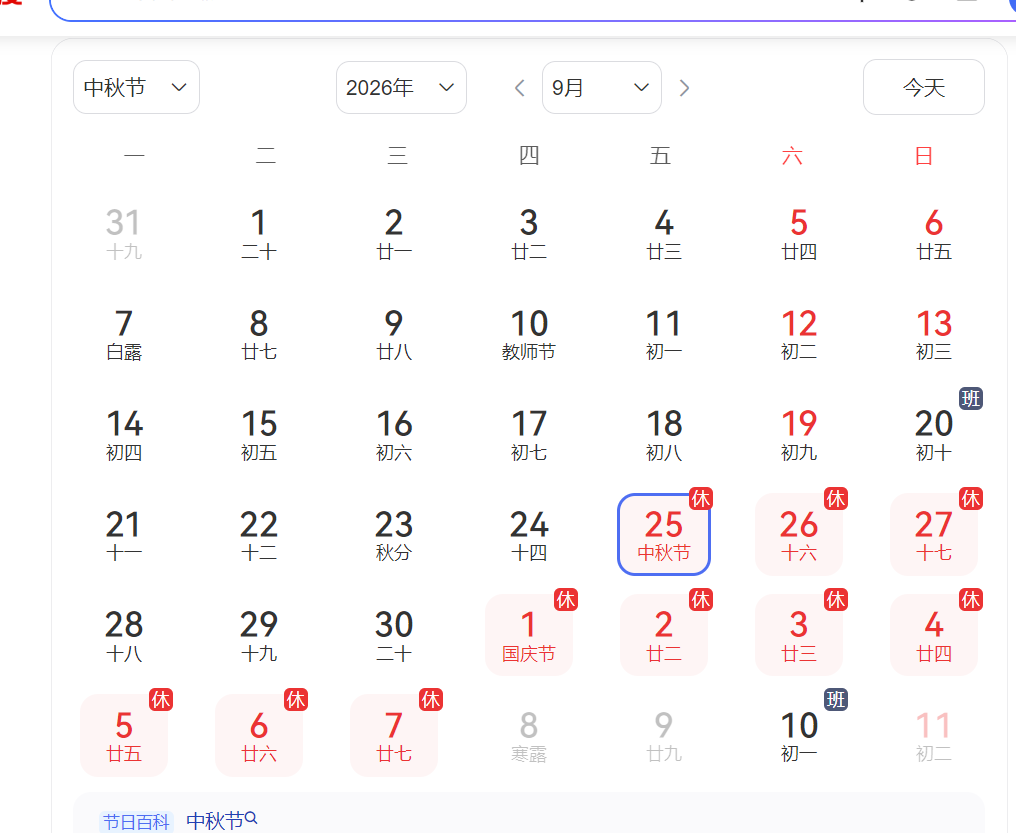
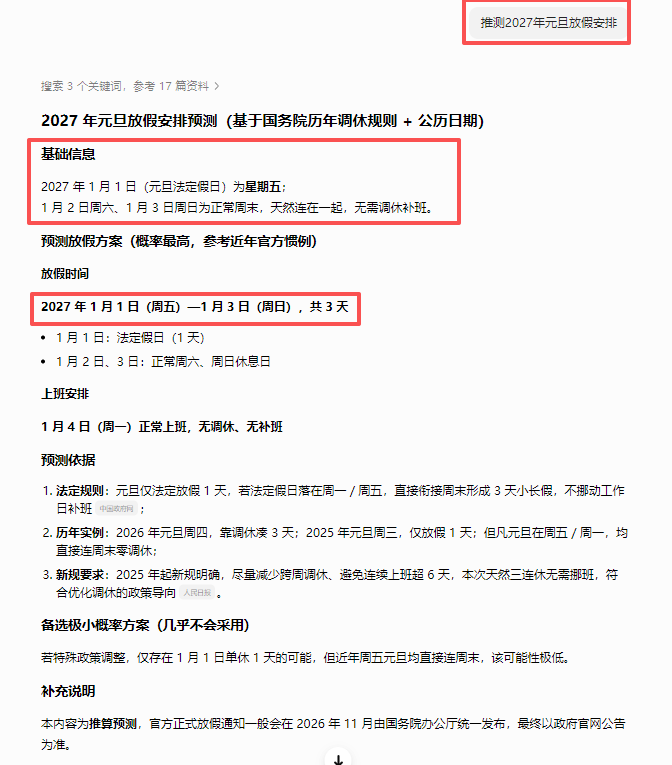
所以这张表的假日标注(橙色)、工作日/补班日(白色)是正确的,就根据这张表制作带颜色的校历。
零,复制一份2026年2月的校历制作py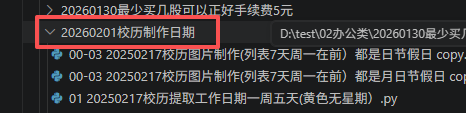
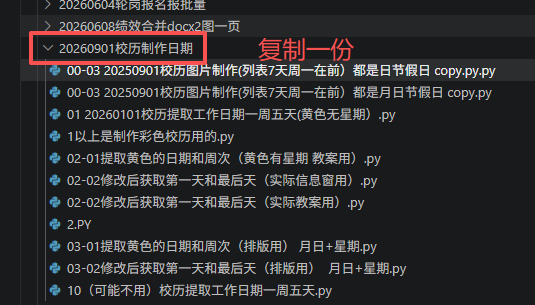
有点忘记怎么做了,一步步修改
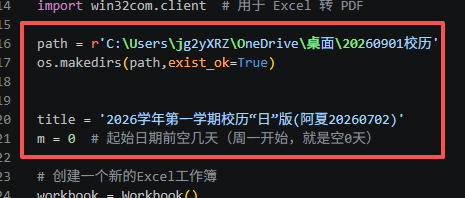
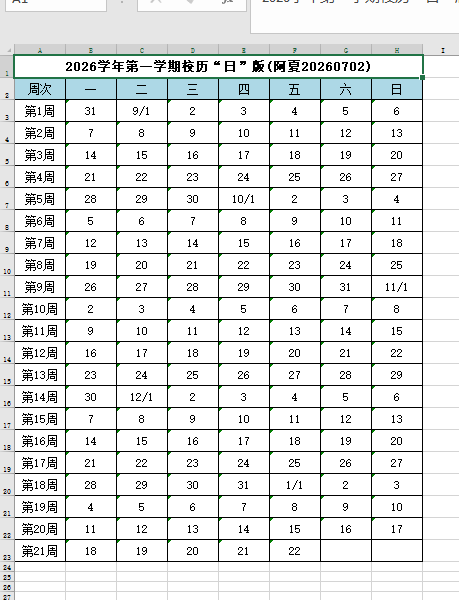
一、修改基础信息,制作日期白表
记不清怎么修改了,一步步修改
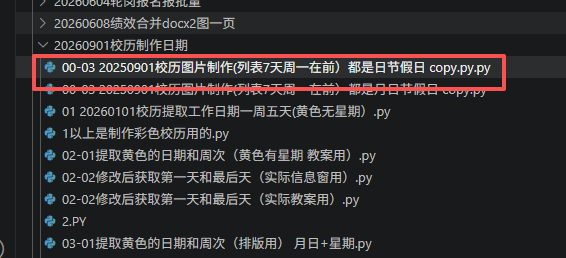
修改名称
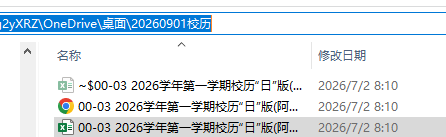
白表
二、填充颜色
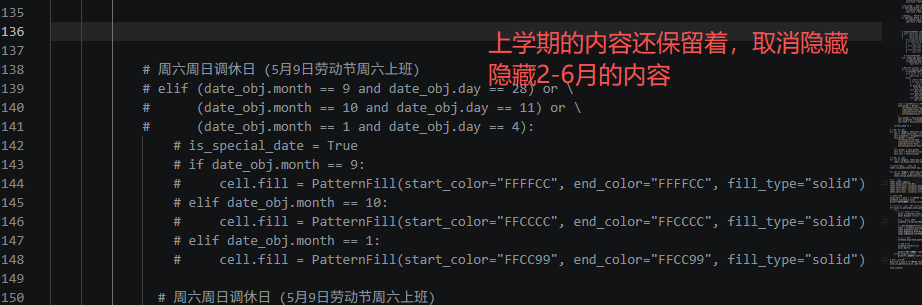
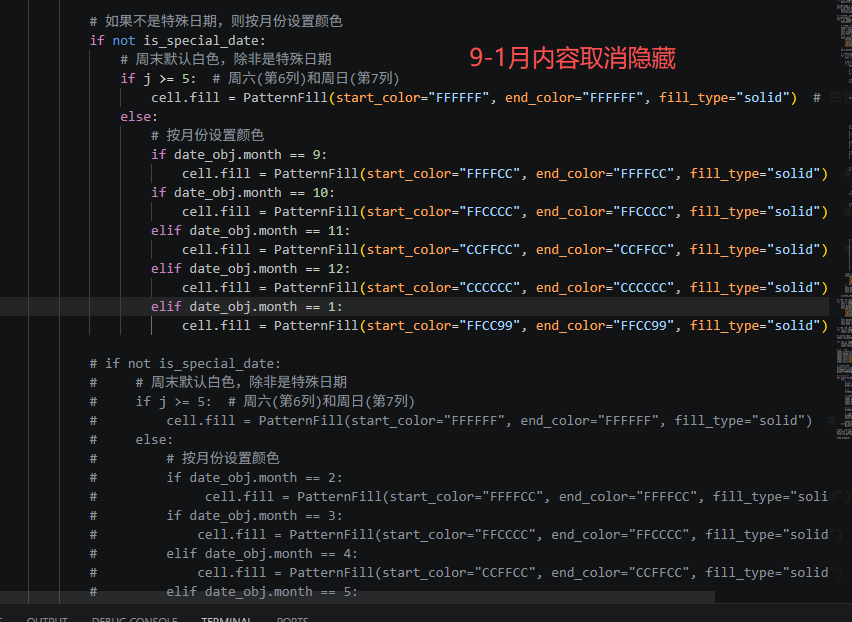
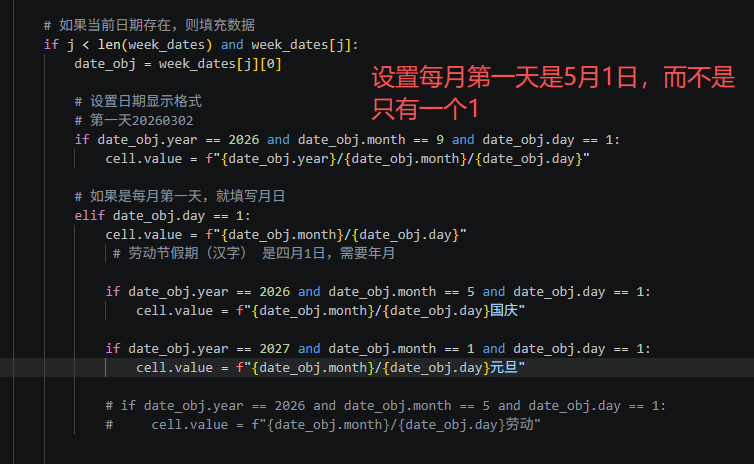
出现彩色的底纹,并且每月第一天都是1/1表示
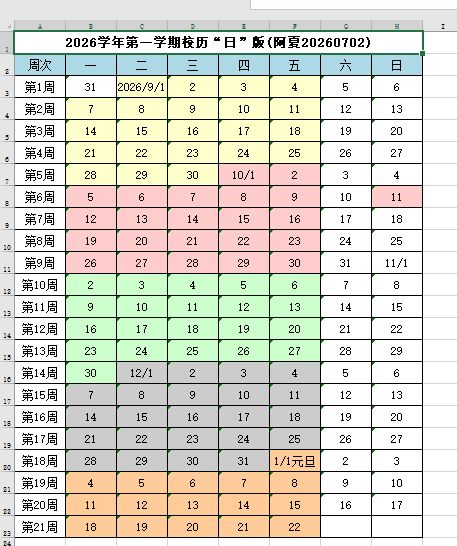
三、调整国定假日和补班日
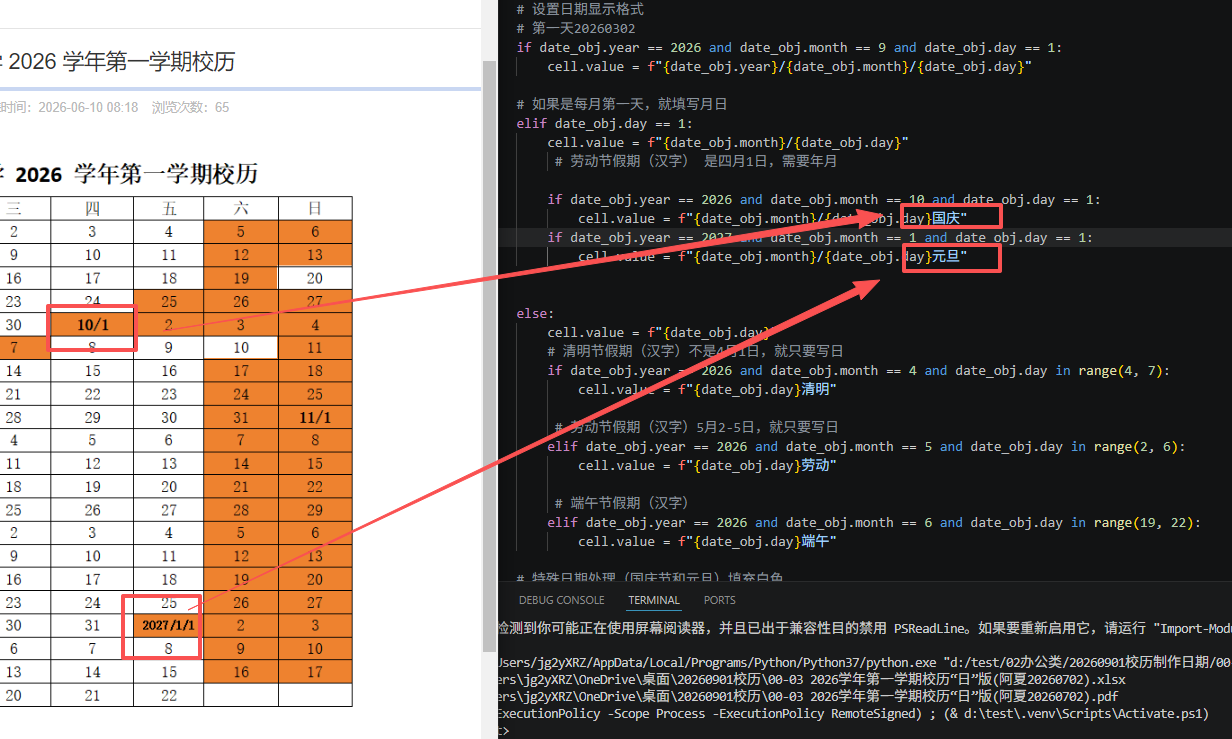
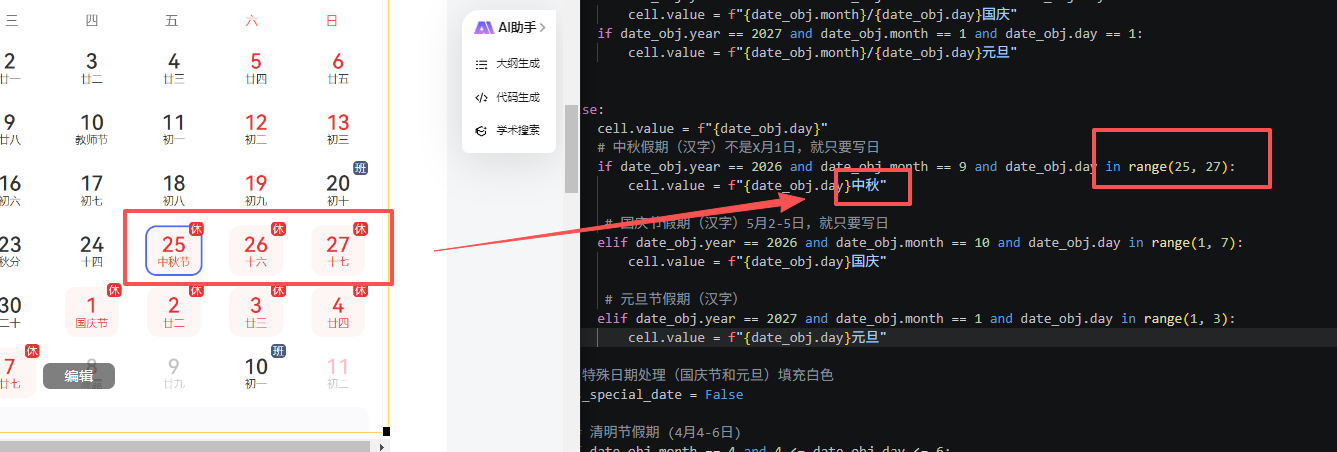
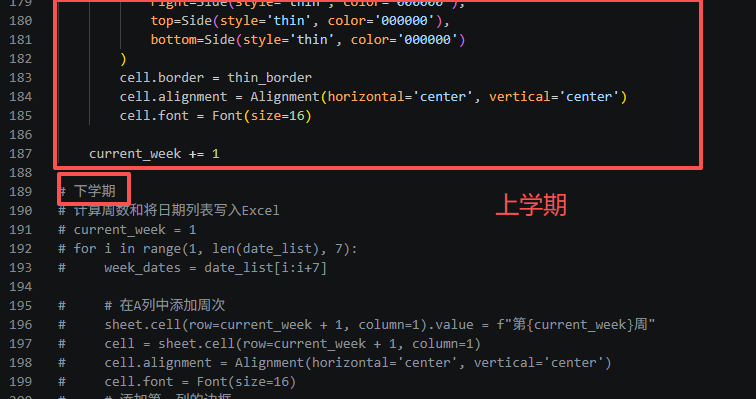
改成上学期和下学期
python
'''
"日"版
模仿制作2026年2月第二学期的校历(标注节假日)3月第一天是年月日,每月第1天是月日,其他都是日
上学期和下学期
星火讯飞、deepseek修订、阿夏
20260702
'''

from openpyxl import Workbook
from openpyxl.styles import PatternFill, Border, Side, Alignment, Font
import datetime
import time, os
from openpyxl.utils import get_column_letter
from openpyxl.worksheet.page import PageMargins
import win32com.client  # 用于 Excel 转 PDF

path = r'C:\Users\jg2yXRZ\OneDrive\桌面\20260901校历'


title = '2026学年第一学期校历"日"版(阿夏20260702)'
m = 0  # 起始日期前空几天(周一开始,就是空0天)

# 创建一个新的Excel工作簿
workbook = Workbook()
sheet = workbook.active

# 设置页边距(单位为厘米)
left_margin_cm = 1.3
right_margin_cm = 1.3
top_margin_cm = 2
bottom_margin_cm = 2

# 将厘米转换为英寸
left_margin_inch = left_margin_cm * 0.393701
right_margin_inch = right_margin_cm * 0.393701
top_margin_inch = top_margin_cm * 0.393701
bottom_margin_inch = bottom_margin_cm * 0.393701

# 设置页边距
margins = PageMargins(left=left_margin_inch, right=right_margin_inch,
                      top=top_margin_inch, bottom=bottom_margin_inch)
sheet.page_margins = margins

# 设置标题行
title_row = ["周次", "一", "二", "三", "四", "五", "六", "日"]
sheet.append(title_row)

# 设置日期范围
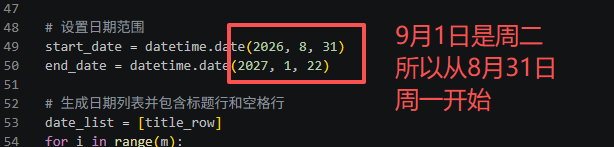
start_date = datetime.date(2026, 8, 31)# 9月1日是周二,需要补一个周一的日期
end_date = datetime.date(2027, 1, 22)

# 生成日期列表并包含标题行和空格行
date_list = [title_row]
for i in range(m):
    date_list.append([''])  # 添加一个空格行

current_day = start_date
while current_day <= end_date:
    date_list.append([current_day])
    current_day += datetime.timedelta(days=1)

# 上学期(9-1月)
# 计算周数和将日期列表写入Excel
current_week = 1
for i in range(1, len(date_list), 7):
    week_dates = date_list[i:i+7]

    # 在A列中添加周次
    sheet.cell(row=current_week + 1, column=1).value = f"第{current_week}周"
    cell = sheet.cell(row=current_week + 1, column=1)
    cell.alignment = Alignment(horizontal='center', vertical='center')
    cell.font = Font(size=16)
    # 添加第一列的边框
    thin_border = Border(
        left=Side(style='thin', color='000000'),
        right=Side(style='thin', color='000000'),
        top=Side(style='thin', color='000000'),
        bottom=Side(style='thin', color='000000')
    )
    cell.border = thin_border

    # 在正确的单元格中添加日期
    for j in range(7):  # 确保遍历7天(即使数据不足7天)
        cell = sheet.cell(row=current_week + 1, column=j + 2)

        # 如果当前日期存在,则填充数据
        if j < len(week_dates) and week_dates[j]:
            date_obj = week_dates[j][0]

            # 设置日期显示格式
            # 第一天20260302
            if date_obj.year == 2026 and date_obj.month == 9 and date_obj.day == 1:
                cell.value = f"{date_obj.year}/{date_obj.month}/{date_obj.day}"

            # 如果是每月第一天,就填写月日
            elif date_obj.day == 1:
                cell.value = f"{date_obj.month}/{date_obj.day}"
                 # 劳动节假期(汉字) 是四月1日,需要年月

                if date_obj.year == 2026 and date_obj.month == 10 and date_obj.day == 1:
                    cell.value = f"{date_obj.month}/{date_obj.day}国庆"
                if date_obj.year == 2027 and date_obj.month == 1 and date_obj.day == 1:
                    cell.value = f"{date_obj.month}/{date_obj.day}元旦"


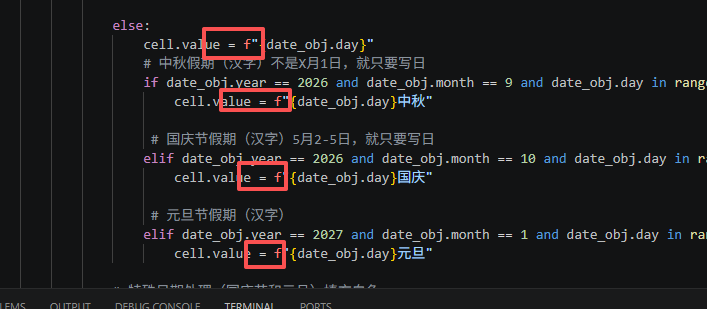
            else:
                cell.value = f"{date_obj.day}"
                # 中秋假期(汉字)不是X月1日,就只要写日
                if date_obj.year == 2026 and date_obj.month == 9 and date_obj.day in range(25, 26):
                    cell.value = f"{date_obj.day}中秋"

                 # 国庆节假期(汉字)5月2-5日,就只要写日
                elif date_obj.year == 2026 and date_obj.month == 10 and date_obj.day in range(1, 2):
                    cell.value = f"{date_obj.day}国庆"

                 # 元旦节假期(汉字)
                elif date_obj.year == 2027 and date_obj.month == 1 and date_obj.day in range(1, 2):
                    cell.value = f"{date_obj.day}元旦"

            # 特殊日期处理(国庆节和元旦)填充白色
            is_special_date = False

             # 中秋假期 (9月25-27日)
            if date_obj.month == 9 and 25 <= date_obj.day <= 27:
                is_special_date = True
                cell.fill = PatternFill(start_color="FFFFFF", end_color="FFFFFF", fill_type="solid")  # 白色

            # 国庆节假期 (10月1-7日)
            if date_obj.month == 10 and 1 <= date_obj.day <= 7:
                is_special_date = True
                cell.fill = PatternFill(start_color="FFFFFF", end_color="FFFFFF", fill_type="solid")  # 白色

            # 元旦假期 (1月1-3日)
            if date_obj.month == 1 and 1 <= date_obj.day <= 3:
                is_special_date = True
                cell.fill = PatternFill(start_color="FFFFFF", end_color="FFFFFF", fill_type="solid")  # 白色


            # 国定假日 补上班日 (中秋节补上班9月20日、国庆节补上班10月11日)
            elif (date_obj.month == 9 and date_obj.day == 20) or \
                 (date_obj.month == 10 and date_obj.day == 10) :
                #  (date_obj.month == 1 and date_obj.day == 4):
                is_special_date = True
                if date_obj.month == 9:
                    cell.fill = PatternFill(start_color="FFFFCC", end_color="FFFFCC", fill_type="solid")  # 浅黄
                elif date_obj.month == 10:
                    cell.fill = PatternFill(start_color="FFCCCC", end_color="FFCCCC", fill_type="solid")  # 浅红
                # elif date_obj.month == 1:
                #     cell.fill = PatternFill(start_color="FFCC99", end_color="FFCC99", fill_type="solid")  # 浅橘

            #   # 周六周日调休日 (5月9日劳动节周六上班)
            # elif (date_obj.month == 5 and date_obj.day == 9):
            #     is_special_date = True
            #     if date_obj.month == 5:
            #         cell.fill = PatternFill(start_color="CCCCCC", end_color="CCCCCC", fill_type="solid")  # 浅灰色

            # 如果不是特殊日期,则按月份设置颜色
            if not is_special_date:
                # 周末默认白色,除非是特殊日期
                if j >= 5:  # 周六(第6列)和周日(第7列)
                    cell.fill = PatternFill(start_color="FFFFFF", end_color="FFFFFF", fill_type="solid")  # 白色
                else:
                    # 按月份设置颜色
                    if date_obj.month == 9:
                        cell.fill = PatternFill(start_color="FFFFCC", end_color="FFFFCC", fill_type="solid")  # 浅黄色
                    if date_obj.month == 10:
                        cell.fill = PatternFill(start_color="FFCCCC", end_color="FFCCCC", fill_type="solid")  # 浅红色
                    elif date_obj.month == 11:
                        cell.fill = PatternFill(start_color="CCFFCC", end_color="CCFFCC", fill_type="solid")  # 浅绿色
                    elif date_obj.month == 12:
                        cell.fill = PatternFill(start_color="CCCCCC", end_color="CCCCCC", fill_type="solid")  # 浅灰色
                    elif date_obj.month == 1:
                        cell.fill = PatternFill(start_color="FFCC99", end_color="FFCC99", fill_type="solid")  # 浅橘色

        # 无论是否有数据,都设置边框
        thin_border = Border(
            left=Side(style='thin', color='000000'),
            right=Side(style='thin', color='000000'),
            top=Side(style='thin', color='000000'),
            bottom=Side(style='thin', color='000000')
        )
        cell.border = thin_border
        cell.alignment = Alignment(horizontal='center', vertical='center')
        cell.font = Font(size=16)

    current_week += 1

# 下学期
# 计算周数和将日期列表写入Excel
# current_week = 1
# for i in range(1, len(date_list), 7):
#     week_dates = date_list[i:i+7]

#     # 在A列中添加周次
#     sheet.cell(row=current_week + 1, column=1).value = f"第{current_week}周"
#     cell = sheet.cell(row=current_week + 1, column=1)
#     cell.alignment = Alignment(horizontal='center', vertical='center')
#     cell.font = Font(size=16)
#     # 添加第一列的边框
#     thin_border = Border(
#         left=Side(style='thin', color='000000'),
#         right=Side(style='thin', color='000000'),
#         top=Side(style='thin', color='000000'),
#         bottom=Side(style='thin', color='000000')
#     )
#     cell.border = thin_border

#     # 在正确的单元格中添加日期
#     for j in range(7):  # 确保遍历7天(即使数据不足7天)
#         cell = sheet.cell(row=current_week + 1, column=j + 2)

#         # 如果当前日期存在,则填充数据
#         if j < len(week_dates) and week_dates[j]:
#             date_obj = week_dates[j][0]

#             # 设置日期显示格式
#             # 第一天20260302
#             if date_obj.year == 2026 and date_obj.month == 3 and date_obj.day == 2:
#                 cell.value = f"{date_obj.year}/{date_obj.month}/{date_obj.day}"

#             # 如果是每月第一天,就填写月日
#             elif date_obj.day == 1:
#                 cell.value = f"{date_obj.month}/{date_obj.day}"
#                  # 劳动节假期(汉字) 是四月1日,需要年月

#                 if date_obj.year == 2026 and date_obj.month == 5 and date_obj.day == 1:
#                     cell.value = f"{date_obj.month}/{date_obj.day}劳动"


#             else:
#                 cell.value = f"{date_obj.day}"
#                 # 清明节假期(汉字)不是4月1日,就只要写日
#                 if date_obj.year == 2026 and date_obj.month == 4 and date_obj.day in range(4, 7):
#                     cell.value = f"{date_obj.day}清明"

#                  # 劳动节假期(汉字)5月2-5日,就只要写日
#                 elif date_obj.year == 2026 and date_obj.month == 5 and date_obj.day in range(2, 6):
#                     cell.value = f"{date_obj.day}劳动"

#                  # 端午节假期(汉字)
#                 elif date_obj.year == 2026 and date_obj.month == 6 and date_obj.day in range(19, 22):
#                     cell.value = f"{date_obj.day}端午"

#             # 特殊日期处理(国庆节和元旦)填充白色
#             is_special_date = False

#              # 清明节假期 (4月4-6日)
#             if date_obj.month == 4 and 4 <= date_obj.day <= 6:
#                 is_special_date = True
#                 cell.fill = PatternFill(start_color="FFFFFF", end_color="FFFFFF", fill_type="solid")  # 浅橘色

#             # 劳动节假期 (5月1-5日)
#             if date_obj.month == 5 and 1 <= date_obj.day <= 5:
#                 is_special_date = True
#                 cell.fill = PatternFill(start_color="FFFFFF", end_color="FFFFFF", fill_type="solid")  # 浅红色

#             # 端午假期 (6月19-21日)
#             if date_obj.month == 6 and 19 <= date_obj.day <= 21:
#                 is_special_date = True
#                 cell.fill = PatternFill(start_color="FFFFFF", end_color="FFFFFF", fill_type="solid")  # 浅红色


#               #  # 国定假日 补上班日 (中秋节补上班9月20日、国庆节补上班10月11日)
#             elif (date_obj.month == 5 and date_obj.day == 9):
#                 is_special_date = True
#                 if date_obj.month == 5:
#                     cell.fill = PatternFill(start_color="CCCCCC", end_color="CCCCCC", fill_type="solid")  # 浅灰色

#             # 如果不是特殊日期,则按月份设置颜色
#             if not is_special_date:
#                 # 周末默认白色,除非是特殊日期
#                 if j >= 5:  # 周六(第6列)和周日(第7列)
#                     cell.fill = PatternFill(start_color="FFFFFF", end_color="FFFFFF", fill_type="solid")  # 白色
#                 else:
#                     # 按月份设置颜色
#                     # if date_obj.month == 2:
#                     #     cell.fill = PatternFill(start_color="FFFFCC", end_color="FFFFCC", fill_type="solid")  # 浅黄色
#                     if date_obj.month == 3:
#                         cell.fill = PatternFill(start_color="FFCCCC", end_color="FFCCCC", fill_type="solid")  # 浅红色
#                     elif date_obj.month == 4:
#                         cell.fill = PatternFill(start_color="CCFFCC", end_color="CCFFCC", fill_type="solid")  # 浅绿色
#                     elif date_obj.month == 5:
#                         cell.fill = PatternFill(start_color="CCCCCC", end_color="CCCCCC", fill_type="solid")  # 浅灰色
#                     elif date_obj.month == 6:
#                         cell.fill = PatternFill(start_color="FFCC99", end_color="FFCC99", fill_type="solid")  # 浅橘色

#         # 无论是否有数据,都设置边框
#         thin_border = Border(
#             left=Side(style='thin', color='000000'),
#             right=Side(style='thin', color='000000'),
#             top=Side(style='thin', color='000000'),
#             bottom=Side(style='thin', color='000000')
#         )
#         cell.border = thin_border
#         cell.alignment = Alignment(horizontal='center', vertical='center')
#         cell.font = Font(size=16)

#     current_week += 1

# 设置标题行样式
for col in range(1, len(title_row) + 1):
    cell = sheet.cell(row=1, column=col)
    cell.alignment = Alignment(horizontal='center', vertical='center')
    thin_border = Border(
        left=Side(style='thin', color='000000'),
        right=Side(style='thin', color='000000'),
        top=Side(style='thin', color='000000'),
        bottom=Side(style='thin', color='000000')
    )
    cell.border = thin_border
    cell.fill = PatternFill(start_color="ADD8E6", end_color="ADD8E6", fill_type="solid")  # 浅蓝色
    cell.font = Font(size=16)

# 设置行高和列宽
for row in range(1, sheet.max_row + 2):
    sheet.row_dimensions[row].height = 30

# 特别确保最后一行高度为30
sheet.row_dimensions[sheet.max_row].height = 30

for col in range(1, sheet.max_column + 1):
    column_letter = get_column_letter(col)
    sheet.column_dimensions[column_letter].width = 11.5

# 添加标题行
sheet.insert_rows(1)
sheet.merge_cells('A1:H1')
sheet.cell(row=1, column=1).value = title
sheet.cell(row=1, column=1).alignment = Alignment(horizontal='center', vertical='center')
sheet.cell(row=1, column=1).font = Font(size=18, bold=True)
sheet.cell(row=1, column=1).fill = PatternFill(start_color="FFFFFF", end_color="FFFFFF", fill_type="solid")

# 保存工作簿
excel_file = path + fr"\00-03 {title}.xlsx"
workbook.save(excel_file)
print(f"校历已生成: {excel_file}")

# ========== 转换为 PDF ==========
def excel_to_pdf(input_excel_path, output_pdf_path):
    try:
        # 启动 Excel 应用程序
        excel = win32com.client.Dispatch("Excel.Application")
        excel.Visible = False  # 不显示 Excel 界面

        # 打开 Excel 文件
        workbook = excel.Workbooks.Open(input_excel_path)

        # 设置打印区域(整个工作表)
        sheet = workbook.ActiveSheet
        sheet.PageSetup.Zoom = False
        sheet.PageSetup.FitToPagesWide = 1  # 适应宽度到 1 页
        sheet.PageSetup.FitToPagesTall = False  # 高度不限制

        # 导出为 PDF
        workbook.ExportAsFixedFormat(0, output_pdf_path)  # 0 表示 PDF 格式

        # 关闭 Excel
        workbook.Close(False)
        excel.Quit()

        print(f"PDF 已生成: {output_pdf_path}")
    except Exception as e:
        print(f"转换失败: {e}")

# 调用转换函数
pdf_file = path + fr"\00-03 {title}.pdf"
excel_to_pdf(excel_file, pdf_file)

time.sleep(2)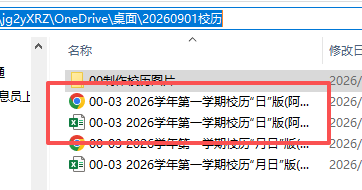
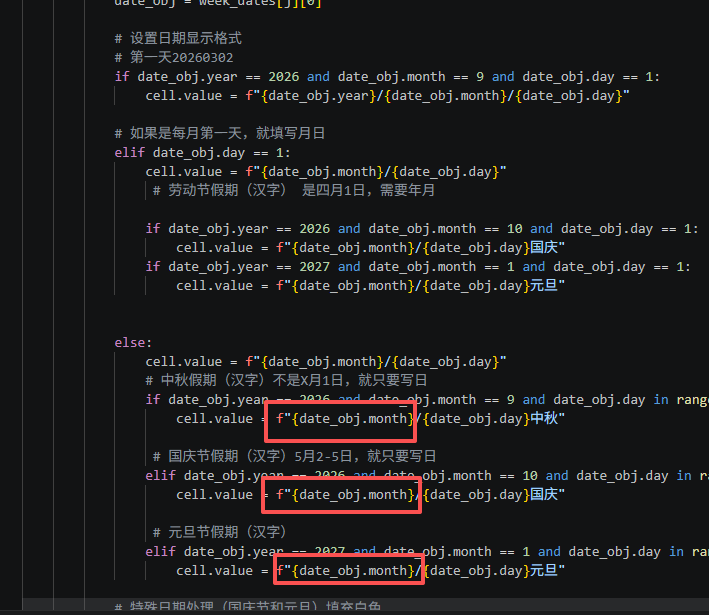
同样方式制作"月日"版,在"日"前面加"月/"
python
'''
"月日"版
模仿制作2026年2月第二学期的校历(标注节假日)3月第一天是年月日,每月第1天是月日,其他都是日
星火讯飞、deepseek修订、阿夏
20260702
'''

from openpyxl import Workbook
from openpyxl.styles import PatternFill, Border, Side, Alignment, Font
import datetime
import time, os
from openpyxl.utils import get_column_letter
from openpyxl.worksheet.page import PageMargins
import win32com.client  # 用于 Excel 转 PDF

path = r'C:\Users\jg2yXRZ\OneDrive\桌面\20260901校历'


title = '2026学年第一学期校历"月日"版(阿夏20260702)'
m = 0  # 起始日期前空几天(周一开始,就是空0天)

# 创建一个新的Excel工作簿
workbook = Workbook()
sheet = workbook.active

# 设置页边距(单位为厘米)
left_margin_cm = 1.3
right_margin_cm = 1.3
top_margin_cm = 2
bottom_margin_cm = 2

# 将厘米转换为英寸
left_margin_inch = left_margin_cm * 0.393701
right_margin_inch = right_margin_cm * 0.393701
top_margin_inch = top_margin_cm * 0.393701
bottom_margin_inch = bottom_margin_cm * 0.393701

# 设置页边距
margins = PageMargins(left=left_margin_inch, right=right_margin_inch,
                      top=top_margin_inch, bottom=bottom_margin_inch)
sheet.page_margins = margins

# 设置标题行
title_row = ["周次", "一", "二", "三", "四", "五", "六", "日"]
sheet.append(title_row)

# 设置日期范围
start_date = datetime.date(2026, 8, 31)# 9月1日是周二,需要补一个周一的日期
end_date = datetime.date(2027, 1, 22)

# 生成日期列表并包含标题行和空格行
date_list = [title_row]
for i in range(m):
    date_list.append([''])  # 添加一个空格行

current_day = start_date
while current_day <= end_date:
    date_list.append([current_day])
    current_day += datetime.timedelta(days=1)

# 上学期(9-1月)
# 计算周数和将日期列表写入Excel
current_week = 1
for i in range(1, len(date_list), 7):
    week_dates = date_list[i:i+7]

    # 在A列中添加周次
    sheet.cell(row=current_week + 1, column=1).value = f"第{current_week}周"
    cell = sheet.cell(row=current_week + 1, column=1)
    cell.alignment = Alignment(horizontal='center', vertical='center')
    cell.font = Font(size=16)
    # 添加第一列的边框
    thin_border = Border(
        left=Side(style='thin', color='000000'),
        right=Side(style='thin', color='000000'),
        top=Side(style='thin', color='000000'),
        bottom=Side(style='thin', color='000000')
    )
    cell.border = thin_border

    # 在正确的单元格中添加日期
    for j in range(7):  # 确保遍历7天(即使数据不足7天)
        cell = sheet.cell(row=current_week + 1, column=j + 2)

        # 如果当前日期存在,则填充数据
        if j < len(week_dates) and week_dates[j]:
            date_obj = week_dates[j][0]

            # 设置日期显示格式
            # 第一天20260302
            if date_obj.year == 2026 and date_obj.month == 9 and date_obj.day == 1:
                cell.value = f"{date_obj.year}/{date_obj.month}/{date_obj.day}"

            # 如果是每月第一天,就填写月日
            elif date_obj.day == 1:
                cell.value = f"{date_obj.month}/{date_obj.day}"
                 # 劳动节假期(汉字) 是四月1日,需要年月

                if date_obj.year == 2026 and date_obj.month == 10 and date_obj.day == 1:
                    cell.value = f"{date_obj.month}/{date_obj.day}国庆"
                if date_obj.year == 2027 and date_obj.month == 1 and date_obj.day == 1:
                    cell.value = f"{date_obj.month}/{date_obj.day}元旦"


            else:
                cell.value = f"{date_obj.month}/{date_obj.day}"
                # 中秋假期(汉字)不是X月1日,就只要写日
                if date_obj.year == 2026 and date_obj.month == 9 and date_obj.day in range(25, 26):
                    cell.value = f"{date_obj.month}/{date_obj.day}中秋"

                 # 国庆节假期(汉字)5月2-5日,就只要写日
                elif date_obj.year == 2026 and date_obj.month == 10 and date_obj.day in range(1, 2):
                    cell.value = f"{date_obj.month}/{date_obj.day}国庆"

                 # 元旦节假期(汉字)
                elif date_obj.year == 2027 and date_obj.month == 1 and date_obj.day in range(1, 2):
                    cell.value = f"{date_obj.month}/{date_obj.day}元旦"

            # 特殊日期处理(国庆节和元旦)填充白色
            is_special_date = False

             # 中秋假期 (9月25-27日)
            if date_obj.month == 9 and 25 <= date_obj.day <= 27:
                is_special_date = True
                cell.fill = PatternFill(start_color="FFFFFF", end_color="FFFFFF", fill_type="solid")  # 白色

            # 国庆节假期 (10月1-7日)
            if date_obj.month == 10 and 1 <= date_obj.day <= 7:
                is_special_date = True
                cell.fill = PatternFill(start_color="FFFFFF", end_color="FFFFFF", fill_type="solid")  # 白色

            # 元旦假期 (1月1-3日)
            if date_obj.month == 1 and 1 <= date_obj.day <= 3:
                is_special_date = True
                cell.fill = PatternFill(start_color="FFFFFF", end_color="FFFFFF", fill_type="solid")  # 白色


            # 国定假日 补上班日 (中秋节补上班9月20日、国庆节补上班10月11日)
            elif (date_obj.month == 9 and date_obj.day == 20) or \
                 (date_obj.month == 10 and date_obj.day == 10) :
                #  (date_obj.month == 1 and date_obj.day == 4):
                is_special_date = True
                if date_obj.month == 9:
                    cell.fill = PatternFill(start_color="FFFFCC", end_color="FFFFCC", fill_type="solid")  # 浅黄
                elif date_obj.month == 10:
                    cell.fill = PatternFill(start_color="FFCCCC", end_color="FFCCCC", fill_type="solid")  # 浅红
                # elif date_obj.month == 1:
                #     cell.fill = PatternFill(start_color="FFCC99", end_color="FFCC99", fill_type="solid")  # 浅橘

            #   # 周六周日调休日 (5月9日劳动节周六上班)
            # elif (date_obj.month == 5 and date_obj.day == 9):
            #     is_special_date = True
            #     if date_obj.month == 5:
            #         cell.fill = PatternFill(start_color="CCCCCC", end_color="CCCCCC", fill_type="solid")  # 浅灰色

            # 如果不是特殊日期,则按月份设置颜色
            if not is_special_date:
                # 周末默认白色,除非是特殊日期
                if j >= 5:  # 周六(第6列)和周日(第7列)
                    cell.fill = PatternFill(start_color="FFFFFF", end_color="FFFFFF", fill_type="solid")  # 白色
                else:
                    # 按月份设置颜色
                    if date_obj.month == 9:
                        cell.fill = PatternFill(start_color="FFFFCC", end_color="FFFFCC", fill_type="solid")  # 浅黄色
                    if date_obj.month == 10:
                        cell.fill = PatternFill(start_color="FFCCCC", end_color="FFCCCC", fill_type="solid")  # 浅红色
                    elif date_obj.month == 11:
                        cell.fill = PatternFill(start_color="CCFFCC", end_color="CCFFCC", fill_type="solid")  # 浅绿色
                    elif date_obj.month == 12:
                        cell.fill = PatternFill(start_color="CCCCCC", end_color="CCCCCC", fill_type="solid")  # 浅灰色
                    elif date_obj.month == 1:
                        cell.fill = PatternFill(start_color="FFCC99", end_color="FFCC99", fill_type="solid")  # 浅橘色

        # 无论是否有数据,都设置边框
        thin_border = Border(
            left=Side(style='thin', color='000000'),
            right=Side(style='thin', color='000000'),
            top=Side(style='thin', color='000000'),
            bottom=Side(style='thin', color='000000')
        )
        cell.border = thin_border
        cell.alignment = Alignment(horizontal='center', vertical='center')
        cell.font = Font(size=16)

    current_week += 1

# 下学期
# 计算周数和将日期列表写入Excel
# current_week = 1
# for i in range(1, len(date_list), 7):
#     week_dates = date_list[i:i+7]

#     # 在A列中添加周次
#     sheet.cell(row=current_week + 1, column=1).value = f"第{current_week}周"
#     cell = sheet.cell(row=current_week + 1, column=1)
#     cell.alignment = Alignment(horizontal='center', vertical='center')
#     cell.font = Font(size=16)
#     # 添加第一列的边框
#     thin_border = Border(
#         left=Side(style='thin', color='000000'),
#         right=Side(style='thin', color='000000'),
#         top=Side(style='thin', color='000000'),
#         bottom=Side(style='thin', color='000000')
#     )
#     cell.border = thin_border

#     # 在正确的单元格中添加日期
#     for j in range(7):  # 确保遍历7天(即使数据不足7天)
#         cell = sheet.cell(row=current_week + 1, column=j + 2)

#         # 如果当前日期存在,则填充数据
#         if j < len(week_dates) and week_dates[j]:
#             date_obj = week_dates[j][0]

#             # 设置日期显示格式
#             # 第一天20260302
#             if date_obj.year == 2026 and date_obj.month == 3 and date_obj.day == 2:
#                 cell.value = f"{date_obj.year}/{date_obj.month}/{date_obj.day}"

#             # 如果是每月第一天,就填写月日
#             elif date_obj.day == 1:
#                 cell.value = f"{date_obj.month}/{date_obj.day}"
#                  # 劳动节假期(汉字) 是四月1日,需要年月

#                 if date_obj.year == 2026 and date_obj.month == 5 and date_obj.day == 1:
#                     cell.value = f"{date_obj.month}/{date_obj.day}劳动"


#             else:
#                 cell.value = f"{date_obj.month}/{date_obj.day}"
#                 # 清明节假期(汉字)不是4月1日,就只要写日
#                 if date_obj.year == 2026 and date_obj.month == 4 and date_obj.day in range(4, 7):
#                     cell.value = f"{date_obj.month}/{date_obj.day}清明"

#                  # 劳动节假期(汉字)5月2-5日,就只要写日
#                 elif date_obj.year == 2026 and date_obj.month == 5 and date_obj.day in range(2, 6):
#                     cell.value = f"{date_obj.month}/{date_obj.day}劳动"

#                  # 端午节假期(汉字)
#                 elif date_obj.year == 2026 and date_obj.month == 6 and date_obj.day in range(19, 22):
#                     cell.value = f"{date_obj.month}/{date_obj.day}端午"

#             # 特殊日期处理(国庆节和元旦)填充白色
#             is_special_date = False

#              # 清明节假期 (4月4-6日)
#             if date_obj.month == 4 and 4 <= date_obj.day <= 6:
#                 is_special_date = True
#                 cell.fill = PatternFill(start_color="FFFFFF", end_color="FFFFFF", fill_type="solid")  # 浅橘色

#             # 劳动节假期 (5月1-5日)
#             if date_obj.month == 5 and 1 <= date_obj.day <= 5:
#                 is_special_date = True
#                 cell.fill = PatternFill(start_color="FFFFFF", end_color="FFFFFF", fill_type="solid")  # 浅红色

#             # 端午假期 (6月19-21日)
#             if date_obj.month == 6 and 19 <= date_obj.day <= 21:
#                 is_special_date = True
#                 cell.fill = PatternFill(start_color="FFFFFF", end_color="FFFFFF", fill_type="solid")  # 浅红色


#               #  # 国定假日 补上班日 (中秋节补上班9月20日、国庆节补上班10月11日)
#             elif (date_obj.month == 5 and date_obj.day == 9):
#                 is_special_date = True
#                 if date_obj.month == 5:
#                     cell.fill = PatternFill(start_color="CCCCCC", end_color="CCCCCC", fill_type="solid")  # 浅灰色

#             # 如果不是特殊日期,则按月份设置颜色
#             if not is_special_date:
#                 # 周末默认白色,除非是特殊日期
#                 if j >= 5:  # 周六(第6列)和周日(第7列)
#                     cell.fill = PatternFill(start_color="FFFFFF", end_color="FFFFFF", fill_type="solid")  # 白色
#                 else:
#                     # 按月份设置颜色
#                     # if date_obj.month == 2:
#                     #     cell.fill = PatternFill(start_color="FFFFCC", end_color="FFFFCC", fill_type="solid")  # 浅黄色
#                     if date_obj.month == 3:
#                         cell.fill = PatternFill(start_color="FFCCCC", end_color="FFCCCC", fill_type="solid")  # 浅红色
#                     elif date_obj.month == 4:
#                         cell.fill = PatternFill(start_color="CCFFCC", end_color="CCFFCC", fill_type="solid")  # 浅绿色
#                     elif date_obj.month == 5:
#                         cell.fill = PatternFill(start_color="CCCCCC", end_color="CCCCCC", fill_type="solid")  # 浅灰色
#                     elif date_obj.month == 6:
#                         cell.fill = PatternFill(start_color="FFCC99", end_color="FFCC99", fill_type="solid")  # 浅橘色

#         # 无论是否有数据,都设置边框
#         thin_border = Border(
#             left=Side(style='thin', color='000000'),
#             right=Side(style='thin', color='000000'),
#             top=Side(style='thin', color='000000'),
#             bottom=Side(style='thin', color='000000')
#         )
#         cell.border = thin_border
#         cell.alignment = Alignment(horizontal='center', vertical='center')
#         cell.font = Font(size=16)

#     current_week += 1

# 设置标题行样式
for col in range(1, len(title_row) + 1):
    cell = sheet.cell(row=1, column=col)
    cell.alignment = Alignment(horizontal='center', vertical='center')
    thin_border = Border(
        left=Side(style='thin', color='000000'),
        right=Side(style='thin', color='000000'),
        top=Side(style='thin', color='000000'),
        bottom=Side(style='thin', color='000000')
    )
    cell.border = thin_border
    cell.fill = PatternFill(start_color="ADD8E6", end_color="ADD8E6", fill_type="solid")  # 浅蓝色
    cell.font = Font(size=16)

# 设置行高和列宽
for row in range(1, sheet.max_row + 2):
    sheet.row_dimensions[row].height = 30

# 特别确保最后一行高度为30
sheet.row_dimensions[sheet.max_row].height = 30

for col in range(1, sheet.max_column + 1):
    column_letter = get_column_letter(col)
    sheet.column_dimensions[column_letter].width = 11.5

# 添加标题行
sheet.insert_rows(1)
sheet.merge_cells('A1:H1')
sheet.cell(row=1, column=1).value = title
sheet.cell(row=1, column=1).alignment = Alignment(horizontal='center', vertical='center')
sheet.cell(row=1, column=1).font = Font(size=18, bold=True)
sheet.cell(row=1, column=1).fill = PatternFill(start_color="FFFFFF", end_color="FFFFFF", fill_type="solid")

# 保存工作簿
excel_file = path + fr"\00-03 {title}.xlsx"
workbook.save(excel_file)
print(f"校历已生成: {excel_file}")

# ========== 转换为 PDF ==========
def excel_to_pdf(input_excel_path, output_pdf_path):
    try:
        # 启动 Excel 应用程序
        excel = win32com.client.Dispatch("Excel.Application")
        excel.Visible = False  # 不显示 Excel 界面

        # 打开 Excel 文件
        workbook = excel.Workbooks.Open(input_excel_path)

        # 设置打印区域(整个工作表)
        sheet = workbook.ActiveSheet
        sheet.PageSetup.Zoom = False
        sheet.PageSetup.FitToPagesWide = 1  # 适应宽度到 1 页
        sheet.PageSetup.FitToPagesTall = False  # 高度不限制

        # 导出为 PDF
        workbook.ExportAsFixedFormat(0, output_pdf_path)  # 0 表示 PDF 格式

        # 关闭 Excel
        workbook.Close(False)
        excel.Quit()

        print(f"PDF 已生成: {output_pdf_path}")
    except Exception as e:
        print(f"转换失败: {e}")

# 调用转换函数
pdf_file = path + fr"\00-03 {title}.pdf"
excel_to_pdf(excel_file, pdf_file)

time.sleep(2)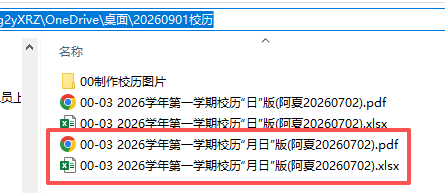
最后还有一个做周计划的"年月日"表格版本

也做上学期和下学期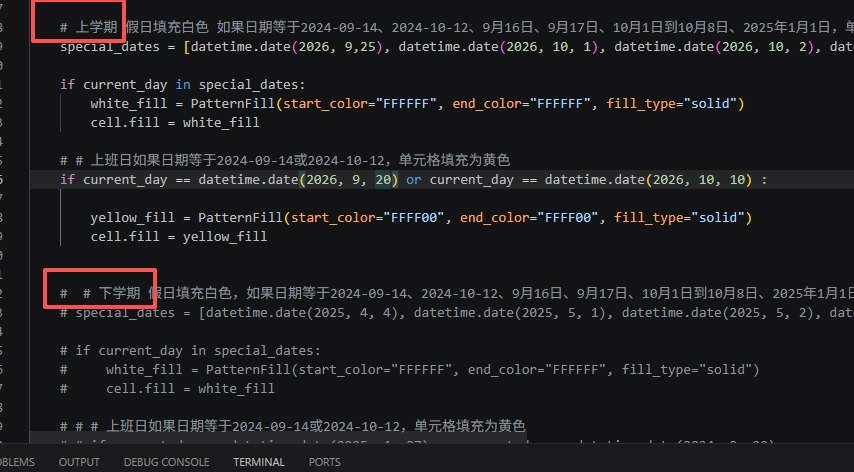
python
'''
制作周计划用的白黄表格,年月日-年月日
2024学年第二学期校历
星火讯飞 阿夏
20260702
'''


# -*- coding: utf-8 -*-

import datetime
import openpyxl
from openpyxl.styles import Alignment, PatternFill
import time,os
path = r'C:\Users\jg2yXRZ\OneDrive\桌面\20260901校历'

new=path+r'\00制作校历图片'
os.makedirs(new,exist_ok=True)


title='2026学年第一学期校历'

tt=new+fr"\01 {title}.xlsx"

# 创建一个新的Excel工作簿
workbook = openpyxl.Workbook()
sheet = workbook.active

# 设置标题行
title_row = ["周次", "星期一", "星期二", "星期三", "星期四", "星期五", "星期六", "星期日"]
sheet.append(title_row)

# 设置日期范围
start_date = datetime.date(2026, 8, 31)
end_date = datetime.date(2027, 1, 22)

# 计算周数和日期
current_week = 1
current_day = start_date
while current_day <= end_date:
    # 获取当前周的第一天(星期一)
    week_start = current_day - datetime.timedelta(days=current_day.weekday())

    # 如果当前日期是新的一周,添加新行并更新周数
    if current_day == week_start:
        sheet.append([f"第{current_week:02d}周"])
        current_week += 1

    # 在正确的单元格中添加日期
    column_index = current_day.weekday() + 2  # 从B列开始,所以加2
    cell = sheet.cell(row=current_week, column=column_index)

    cell.value = current_day.strftime("%Y-%m-%d")

    # cell.value = current_day.strftime("%m/%d")
    # cell.value = current_day.strftime('%Y{y}%m{m}%d{d}').format(y='年', m='月', d='日')


    cell.alignment = Alignment(horizontal='center', vertical='center')

     # 如果日期不等于周六和周日,就把这个单元格填充为浅黄色
    if current_day.weekday() not in (5, 6):
        light_yellow_fill = PatternFill(start_color="FFFF00", end_color="FFFF00", fill_type="solid")
        cell.fill = light_yellow_fill


    # 上学期 假日填充白色 如果日期等于2024-09-14、2024-10-12、9月16日、9月17日、10月1日到10月8日、2025年1月1日,单元格填充为白色
    special_dates = [datetime.date(2026, 9,25), datetime.date(2026, 10, 1), datetime.date(2026, 10, 2), datetime.date(2026, 10, 5),datetime.date(2026, 10, 6),datetime.date(2026, 10, 7),datetime.date(2027, 1, 1)]

    if current_day in special_dates:
        white_fill = PatternFill(start_color="FFFFFF", end_color="FFFFFF", fill_type="solid")
        cell.fill = white_fill

    # # 上班日如果日期等于2024-09-14或2024-10-12,单元格填充为黄色
    if current_day == datetime.date(2026, 9, 20) or current_day == datetime.date(2026, 10, 10) :

        yellow_fill = PatternFill(start_color="FFFF00", end_color="FFFF00", fill_type="solid")
        cell.fill = yellow_fill


    #  # 下学期 假日填充白色,如果日期等于2024-09-14、2024-10-12、9月16日、9月17日、10月1日到10月8日、2025年1月1日,单元格填充为白色
    # special_dates = [datetime.date(2025, 4, 4), datetime.date(2025, 5, 1), datetime.date(2025, 5, 2), datetime.date(2025, 5, 5),datetime.date(2025, 6, 2)]

    # if current_day in special_dates:
    #     white_fill = PatternFill(start_color="FFFFFF", end_color="FFFFFF", fill_type="solid")
    #     cell.fill = white_fill

    # # # 上班日如果日期等于2024-09-14或2024-10-12,单元格填充为黄色
    # # if current_day == datetime.date(2025, 4, 27) or current_day == datetime.date(2024, 9, 29) or current_day == datetime.date(2024, 10, 12):
    # if current_day == datetime.date(2025, 4, 27):
    #     yellow_fill = PatternFill(start_color="FFFF00", end_color="FFFF00", fill_type="solid")
    #     cell.fill = yellow_fill


    # 移动到下一天
    current_day += datetime.timedelta(days=1)


# 保存工作簿
workbook.save(tt)
time.sleep(2)


import openpyxl
from openpyxl.styles import PatternFill

# 打开已存在的Excel文件
workbook = openpyxl.load_workbook(tt)
sheet = workbook.active

# 设置黄色填充样式
yellow_fill = PatternFill(start_color="FFFF00", end_color="FFFF00", fill_type="solid")

# 提取单独的第一个黄、最后一个黄
# 遍历每一行
for row in range(2, sheet.max_row + 1):
    # 读取每一行第一个黄色填充单元格的数字,写入I列
    for col in range(2, sheet.max_column + 1):
        cell = sheet.cell(row=row, column=col)
        if cell.fill == yellow_fill:
            sheet.cell(row=row, column=9).value = cell.value
            break
    # 读取每一行最后一个黄色填充单元格的数字,写入J列
    for col in range(sheet.max_column, 1, -1):
        cell = sheet.cell(row=row, column=col)
        if cell.fill == yellow_fill:
            sheet.cell(row=row, column=10).value = cell.value
            break

# 合并在一起的第一个日期和最后一个日期
for row in range(2, sheet.max_row + 1):
    # 读取每一行第一个黄色填充单元格的数字
    first_cell_value = None
    for col in range(2, sheet.max_column + 1):
        cell = sheet.cell(row=row, column=col)
        if cell.fill == yellow_fill:
            first_cell_value = cell.value
            break

    # 读取每一行最后一个黄色填充单元格的数字
    last_cell_value = None
    for col in range(sheet.max_column, 1, -1):
        cell = sheet.cell(row=row, column=col)
        if cell.fill == yellow_fill:
            last_cell_value = cell.value
            break

    # 组合数字并写入K列
    if first_cell_value is not None and last_cell_value is not None:
        combined_value = f"{first_cell_value}------{last_cell_value}"
        sheet.cell(row=row, column=9).value = combined_value

# 设置列宽
for col in range(1, 9):
    sheet.column_dimensions[openpyxl.utils.get_column_letter(col)].width = 15
for col in range(9, 12):
    sheet.column_dimensions[openpyxl.utils.get_column_letter(col)].width = 35
# 设置单元格文字居中
for row in sheet.iter_rows():
    for cell in row:
        cell.alignment = openpyxl.styles.Alignment(horizontal='center', vertical='center')

workbook.save(tt)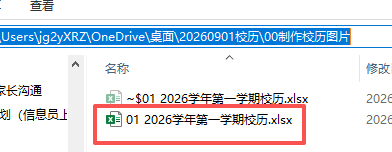
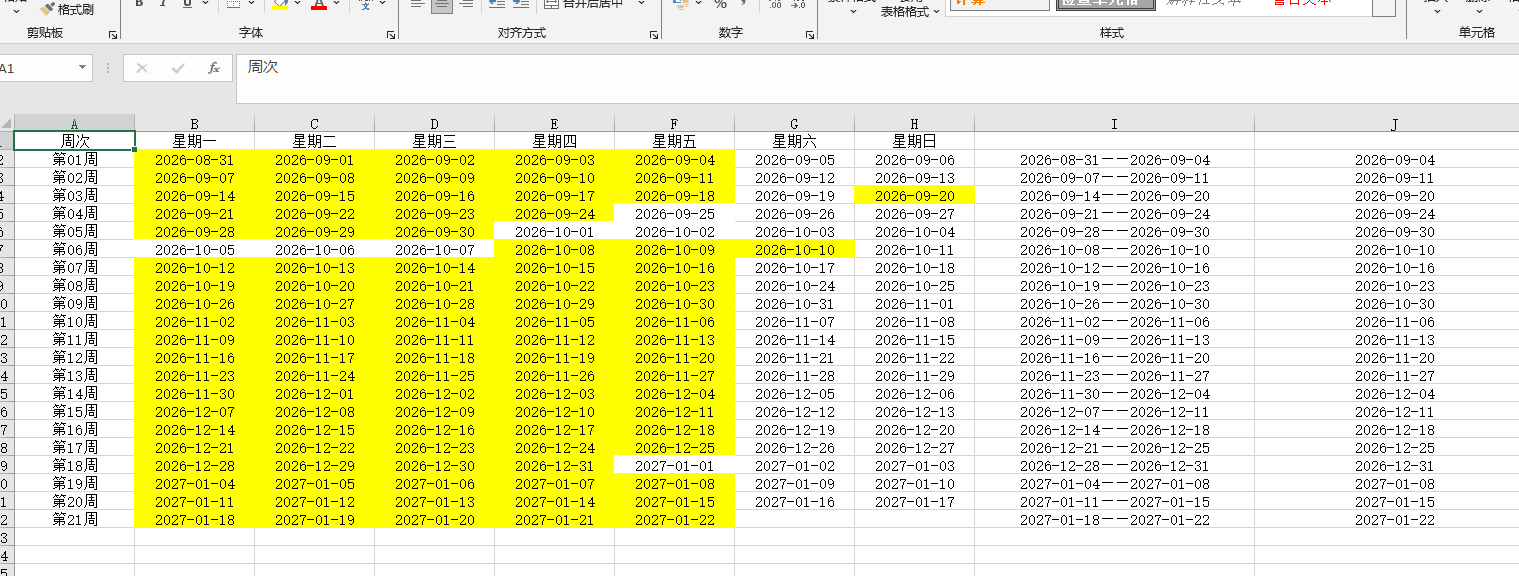
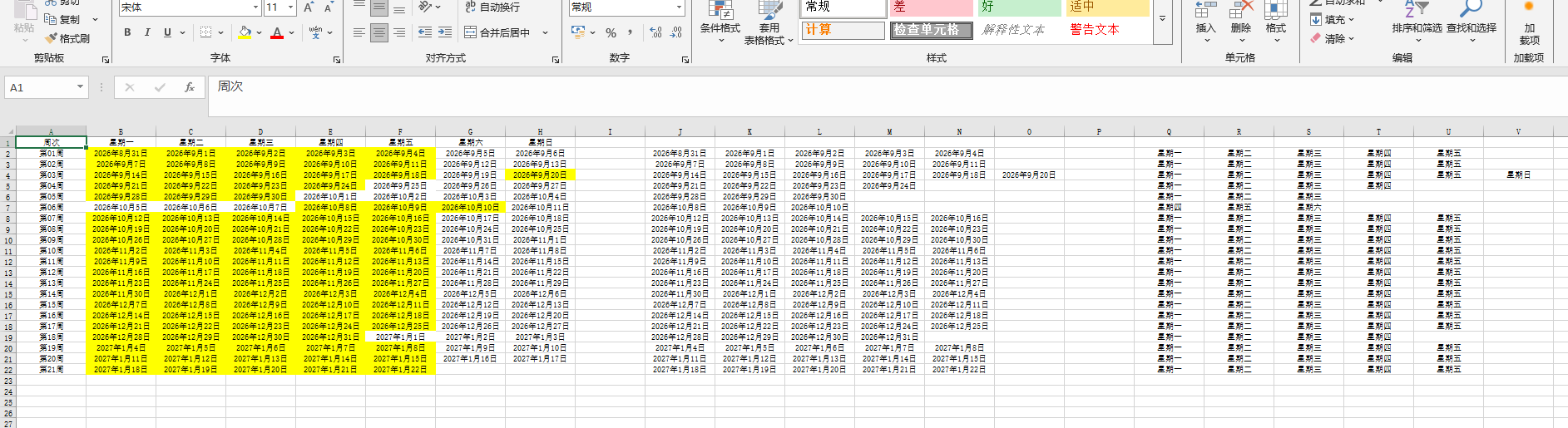
这个没有星期
python
'''
2024学年第二学期校历,制作教案用日期
星火讯飞 阿夏
2024年2月19日
'''


# -*- coding: utf-8 -*-

import datetime
import openpyxl
from openpyxl.styles import Alignment, PatternFill
import time

# for

path=r'C:\Users\jg2yXRZ\OneDrive\桌面\20260901校历'

title='2026学年第一学期校历'

tt=path+fr"\02-01 {title}.xlsx"

# 创建一个新的Excel工作簿
workbook = openpyxl.Workbook()
sheet = workbook.active

# 设置标题行
title_row = ["周次", "星期一", "星期二", "星期三", "星期四", "星期五", "星期六", "星期日"]
sheet.append(title_row)

# 设置日期范围
start_date = datetime.date(2026, 8, 31)
end_date = datetime.date(2027, 1, 22)

# 计算周数和日期
current_week = 1
current_day = start_date
while current_day <= end_date:
    # 获取当前周的第一天(星期一)
    week_start = current_day - datetime.timedelta(days=current_day.weekday())

    # 如果当前日期是新的一周,添加新行并更新周数
    if current_day == week_start:
        sheet.append([f"第{current_week:02d}周"])
        current_week += 1

    # 在正确的单元格中添加日期
    column_index = current_day.weekday() + 2  # 从B列开始,所以加2
    cell = sheet.cell(row=current_week, column=column_index)

    # 不同的表示方法
    # cell.value = current_day.strftime("%Y-%m-%d")    # 2024-09-01
    # cell.value = current_day.strftime("%Y-%#m-%#d")    # 2024-9-1
    # cell.value = current_day.strftime("%m/%d")      # 09-01
    # cell.value = current_day.strftime("%#m/%#d")    # 9-1
    # cell.value = current_day.strftime('%Y{y}%m{m}%d{d}').format(y='年', m='月', d='日')   # 2024年09月01日
    cell.value = current_day.strftime('%Y{y}%#m{m}%#d{d}').format(y='年', m='月', d='日')  # 2024年9月1日


    cell.alignment = Alignment(horizontal='center', vertical='center')

     # 如果日期不等于周六和周日,就把这个单元格填充为浅黄色
    if current_day.weekday() not in (5, 6):
        light_yellow_fill = PatternFill(start_color="FFFF00", end_color="FFFF00", fill_type="solid")
        cell.fill = light_yellow_fill


      # 上学期 假日填充白色 如果日期等于2024-09-14、2024-10-12、9月16日、9月17日、10月1日到10月8日、2025年1月1日,单元格填充为白色
    special_dates = [datetime.date(2026, 9,25), datetime.date(2026, 10, 1), datetime.date(2026, 10, 2), datetime.date(2026, 10, 5),datetime.date(2026, 10, 6),datetime.date(2026, 10, 7),datetime.date(2027, 1, 1)]

    if current_day in special_dates:
        white_fill = PatternFill(start_color="FFFFFF", end_color="FFFFFF", fill_type="solid")
        cell.fill = white_fill

    # # 上班日如果日期等于2024-09-14或2024-10-12,单元格填充为黄色
    if current_day == datetime.date(2026, 9, 20) or current_day == datetime.date(2026, 10, 10) :

        yellow_fill = PatternFill(start_color="FFFF00", end_color="FFFF00", fill_type="solid")
        cell.fill = yellow_fill

    # 移动到下一天
    current_day += datetime.timedelta(days=1)


# 保存工作簿
workbook.save(tt)
time.sleep(2)


import openpyxl
from openpyxl.styles import PatternFill

# 打开已存在的Excel文件
workbook = openpyxl.load_workbook(tt)
sheet = workbook.active

# 设置黄色填充样式
yellow_fill = PatternFill(start_color="FFFF00", end_color="FFFF00", fill_type="solid")

# 提取单独的第一个黄、最后一个黄
# 遍历每一行
for row in range(2, sheet.max_row + 1):
   # 读取每行里面的所有黄色单元格,复制到I列开始的单元格
    yellow_cells = []
    for col in range(2, sheet.max_column + 1):
        cell = sheet.cell(row=row, column=col)
        if cell.fill == yellow_fill:
            yellow_cells.append(cell.value)
    for index, value in enumerate(yellow_cells):
        sheet.cell(row=row, column=10+index).value = value

# 定义黄色填充样式
yellow_fill = PatternFill(start_color="FFFF00", end_color="FFFF00", fill_type="solid")

for row in range(2, sheet.max_row + 1):
    # 读取每行里面的所有黄色单元格,复制到I列开始的单元格
    yellow_cells = []
    for col in range(2, sheet.max_column + 1):
        cell = sheet.cell(row=row, column=col)
        if cell.fill == yellow_fill:
            yellow_cells.append(cell.value)
            # 获取黄色单元格所在列的第一行的文字
            first_row_value = sheet.cell(row=1, column=col).value
            # 将文字写入R列对应的单元格
            sheet.cell(row=row, column=16+len(yellow_cells)).value = first_row_value
    # 将黄色单元格的值复制到I列开始的单元格
    # for index, value in enumerate(yellow_cells):
    #     sheet.cell(row=row, column=9+index).value = value


# 设置列宽
for col in range(1, 30):
    sheet.column_dimensions[openpyxl.utils.get_column_letter(col)].width = 15
# for col in range(9, 12):
#     sheet.column_dimensions[openpyxl.utils.get_column_letter(col)].width = 35
# 设置单元格文字居中
for row in sheet.iter_rows():
    for cell in row:
        cell.alignment = openpyxl.styles.Alignment(horizontal='center', vertical='center')

workbook.save(tt)
# 再以下这份里面手动复制黏贴起止日期
workbook.save(tt[:-5]+'人工修改用.xlsx')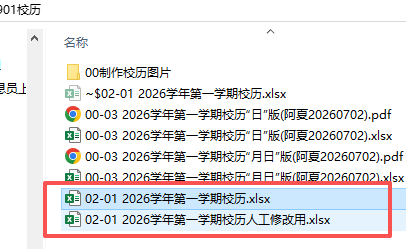
询问组长们周次合并