文章目录
-
- 需求
- [第一种解决方案:使用 wx.createOffscreenCanvas制作并长按保存](#第一种解决方案:使用 wx.createOffscreenCanvas制作并长按保存)
-
- 关键实现
-
- [1. 防重复与稳定性](#1. 防重复与稳定性)
- [2. 权限处理](#2. 权限处理)
- [3. 数据来源](#3. 数据来源)
- 问题:长按在第二次保存时出现保存失败的问题
- 解决
- 源码
- 第二种解决方案:snapshot截图
-
- 一、整体架构
- 二、流程时序
- [三、Snapshot 的核心用法](#三、Snapshot 的核心用法)
-
- [3.1 WXML 声明](#3.1 WXML 声明)
- [3.2 JS 调用截图](#3.2 JS 调用截图)
- 关键设计点
- [3.3 snapshot 参数说明](#3.3 snapshot 参数说明)
- 四、截图后的两种流向
-
- [4.1 保存到相册 --- `onSaveSnapshot`](#4.1 保存到相册 —
onSaveSnapshot) - [4.2 分享给好友 --- `onShareSnapshot`](#4.2 分享给好友 —
onShareSnapshot)
- [4.1 保存到相册 --- `onSaveSnapshot`](#4.1 保存到相册 —
- [五、权限处理策略 --- requestAlbumAuth](#五、权限处理策略 — requestAlbumAuth)
- 六、海报内容结构
- 七、图片资源签名
- 八、常见问题与注意事项
-
- [8.1 截图节点获取时机](#8.1 截图节点获取时机)
- [8.2 截图内容完整性](#8.2 截图内容完整性)
- [8.3 type 选择建议](#8.3 type 选择建议)
- [8.4 重复点击保护](#8.4 重复点击保护)
- [8.5 尺寸限制](#8.5 尺寸限制)
- 九、总结
- 源码
需求
左侧为长按保存到相册中的,右侧为页面展示的,现在需要将右侧的内容保存在相册本地
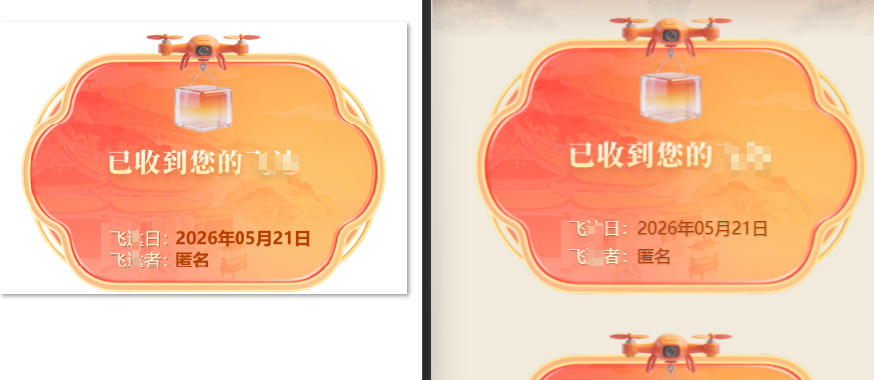
第一种解决方案:使用 wx.createOffscreenCanvas制作并长按保存
证书卡片长按保存到相册功能。
用户长按证书卡片
  → saveCertificateCard(e)        弹窗确认
    → generateAndSaveCertificateImage(item)  合成并保存
关键实现
画布尺寸
js
const scale = sysInfo.windowWidth / 750;  // rpx 转 px 系数
const width = 690 * scale;   // 卡片宽度
const height = 460 * scale;  // 卡片高度
const dpr = sysInfo.pixelRatio;
const canvas = wx.createOffscreenCanvas({ type: '2d', width: width * dpr, height: height * dpr });
物理像素 = 逻辑像素 × devicePixelRatio,保证清晰度。
背景图 aspectFit
js
const fitScale = Math.min(width / img.width, height / img.height);
ctx.drawImage(img, (width - drawW) / 2, (height - drawH) / 2, drawW, drawH);
保持图片原始比例,居中绘制,与 WXML mode="aspectFit" 一致。
文字 text-shadow 模拟
js
ctx.fillStyle = 'rgba(0,0,0,0.3)';
ctx.fillText(text, x + 1, y + 1);  // 阴影偏移 1px
ctx.fillStyle = color;
ctx.fillText(text, x, y);           // 主文字
Canvas 2D 不支持 CSS text-shadow,通过绘制两层文字实现。
日期/姓名加粗
js
ctx.font = 'bold 15px sans-serif';1. 防重复与稳定性
| 机制 | 说明 |
|---|---|
_isGenerating 锁 |
防止用户多次长按触发多个生成任务 |
| 单例 canvas | wx.createOffscreenCanvas 只创建一次,规避微信多次创建的资源限制 |
| 10s 超时保护 | 任何异常导致 onload 未触发时自动关闭 loading 并提示 |
wx.getImageInfo 预下载 |
背景图先下载到本地临时路径,再用本地路径加载,避免网络缓存导致 onload 不触发 |
ctx.clearRect + setTransform |
每次绘制前重置 canvas 状态,避免残留内容 |
2. 权限处理
保存到相册失败时根据 errMsg 判断:
auth deny→ 弹窗引导用户去设置页开启权限- 其他错误 → 提示保存失败
3. 数据来源
item.createDate---createTime时间戳经formatTime转为YYYY年MM月DD日格式item.name--- API 返回的用户名- 背景图 URL --- 固定线上地址
bg-certificate.png
问题:长按在第二次保存时出现保存失败的问题
解决
- 单例 canvas --- wx.createOffscreenCanvas 只在第一次调用时创建,之后复用同一个 canvas 和 context。之前每次调用都新建,微信对 offscreen
canvas 的创建次数有限制,第二次可能因资源问题返回无效对象,导致 onload 不触发。 - wx.getImageInfo 预下载 --- 先用 getImageInfo 将背景图下载到本地临时路径,再从本地路径加载到 canvas。之前直接用网络 URL 作为
img.src,第二次调用时图片在 HTTP 缓存中,微信底层 onload 可能出现竞态条件不触发。本地路径加载稳定得多。
源码
- wxml
javascript
<!--pages/certificates/list.wxml-->
<navigation-bar title="飞达证书" back="{{true}}" color="#FFF5D0" background="transparent" opacity="0" transparent="true"></navigation-bar>

<scroll-view
  class="page-scroll"
  scroll-y="true"
  enhanced="true"
  show-scrollbar="false"
  bindscrolltolower="onLoadMore"
  refresher-enabled
  refresher-triggered="{{refresherTriggered}}"
  bindrefresherrefresh="onRefresh"
>
  <view class="page-container">
    <!-- 顶部信息 -->
    <view class="header-info">
      <text class="header-title">您当前拥有 {{total}} 张证书</text>
      <text class="header-id">(长按下载)</text>
    </view>
    <!-- 证书列表 -->
    <block wx:for="{{certificates}}" wx:key="index">
      <view class="certificate-wrapper">
        <view class="certificate-card" wx:if="{{1==0}}">
          <image
            src="{{item.recordUrlPresigned}}"
            mode="widthFix"
            bindlongpress="saveImage"
            data-index="{{index}}"
            binderror="onImageError"
            class="save-img"
          ></image>
        </view>
        <view class="certificate-card" wx:else bindlongpress="saveCertificateCard" data-index="{{index}}">
          <view class="certificate-content">
            <image class="bg-home-2" src="https://www.dkifly.com/ifly-api/admin-api/infra/file/29/get/wxMiniProDefault/feiyuan/bg-certificate.png" mode="aspectFit"></image>
          </view>
          <view class="certificate-info">
            <text class="certificate-date">飞日:<text style="color: #B23E00;">{{item.createDate}}</text></text>
            <text class="certificate-name">飞者:<text style="color: #B23E00;">{{item.name}}</text></text>
          </view>
        </view>
      </view>
    </block>

    <!-- 加载状态提示 -->
    <view class="loading-status" wx:if="{{loading}}">
      <text>加载中...</text>
    </view>
    <view class="loading-status" wx:elif="{{!hasMore && certificates.length > 0}}">
      <text>没有更多数据了</text>
    </view>

    <!-- 无证书 - 缺省状态 -->
    <block wx:if="{{certificates.length === 0 && !loading}}">
      <view class="no-data-container">
        <image
          class="no-data-image"
          src="/assets/feiyuan/live-videono.png"
          mode="aspectFit"
        />
        <text class="no-data-text">暂无证书</text>
      </view>
    </block>
  </view>
</scroll-view>- wxss
javascript
/* pages/certificates/list.wxss */

/* ===== 页面基础 ===== */
page {
  height: 100%;
  display: flex;
  flex-direction: column;
  background-color: #F1EBDE;
  background-image: url('https://www.dkifly.com/ifly-api/admin-api/infra/file/29/get/wxMiniProDefault/feiyuan/bg-profile.jpg');
  background-repeat: no-repeat;
  background-size: cover;
}

.page-scroll {
  flex: 1;
  overflow-y: auto;
}

.page-container {
  flex: 1;
  padding: 24rpx;
  box-sizing: border-box;
  display: flex;
  flex-direction: column;
  align-items: center;
  min-height: 100%;
}

/* ===== 顶部信息 ===== */
.header-info {
  font-weight: 600;
  font-size: 28rpx;
  color: #FFFFFF;
  line-height: 34rpx;
  margin-top: 24rpx;
  margin-bottom: 24rpx;
  text-align: center;
  text-shadow: 0 2rpx 4rpx rgba(0, 0, 0, 0.5);
}

.header-title {
  display: block;
  margin-bottom: 8rpx;
}

.header-id {
  opacity: 0.9;
  font-size: 24rpx;
}

/* ===== 证书样式 ===== */
.bg-home-2 {
  position: absolute;
  top: 0;
  left: 0;
  width: 100%;
  height: 100%;
  z-index: 0;
  border-radius: 20rpx;
}

.certificate-wrapper {
  width: 100%;
  margin-bottom: 40rpx;
  display: flex;
  justify-content: center;
}

.certificate-card {
  /* width: 690rpx; */
  width: 690rpx;
  height: 460rpx;
  box-sizing: border-box;
  position: relative;
}

.certificate-content {
  display: flex;
  flex-direction: column;
  align-items: center;
  justify-content: center;
  height: 100%;
  text-align: center;
  letter-spacing: 4rpx;
}

.certificate-title {
  font-size: 36rpx;
  font-weight: bold;
  color: #ffefb8;
  margin-top: 40rpx;
  text-shadow: 0 2rpx 4rpx rgba(0, 0, 0, 0.3);
  opacity: 0.9;
  position: absolute;
  top: 90rpx;
}

.certificate-info {
  left: 185rpx;
  right: 40rpx;
  position: absolute;
  bottom: 40rpx;
  display: block;
  text-align: left;
}

.certificate-date,
.certificate-name {
  display: block;
  font-size: 28rpx;
  color: #FFF5D0;
  margin-bottom: 8rpx;
  text-shadow: 0 1rpx 2rpx rgba(0, 0, 0, 0.3);
}

.save-img {
  width: 100%;
  display: block;
}

/* ===== 加载状态 ===== */
.loading-status {
  padding: 20rpx 0;
  color: #999;
  font-size: 28rpx;
  text-align: center;
}

/* ===== 无数据缺省状态 ===== */
.no-data-container {
  display: flex;
  flex-direction: column;
  align-items: center;
  justify-content: center;
  padding: 100rpx 0;
}

.no-data-image {
  width: 300rpx;
  height: 300rpx;
  margin-bottom: 32rpx;
}

.no-data-text {
  font-size: 28rpx;
  color: #999;
}

/* ===== 响应式调整 ===== */
@media (max-width: 375px) {
  .certificate-card {
    width: 90%;
    padding: 30rpx;
  }

  .certificate-title {
    font-size: 32rpx;
  }

  .certificate-date,
  .certificate-name {
    font-size: 24rpx;
  }
}- js
javascript
// pages/certificates/list.js
import { fetchCertificateListApi, fetchPresignedUrlOssPost } from '../../api/prayApi'
import { formatTime } from '../../utils/util'

Page({
  data: {
    certificates: [],
    // 分页与刷新
    pageNo: 1,
    pageSize: 10,
    hasMore: true,
    loading: false,
    refresherTriggered: false,
    total: 0, // 证书总数
  },
  onShareAppMessage() {},
  onShareTimeline() {},

  onLoad(options) {
    // 可从参数获取订单ID或其他信息
    if (options.orderId) {
      console.log('查看证书,订单ID:', options.orderId);
    }
    // 获取证书列表
    this.getCertificateList({ append: false });
  },

  // ===== 获取证书列表 =====
  async getCertificateList({ append }) {
    if (this.data.loading || (!this.data.hasMore && append)) return
    this.setData({ loading: true })
    const { pageNo, pageSize } = this.data

    try {
      const res = await fetchCertificateListApi({
        pageNo,
        pageSize,
        showHasRecordUrl: true, // 是否展示recordUrl字段
      });

      if (res.code === 0) {
        // 判断是否还有更多数据
        const hasMore = res.data.list.length >= pageSize

        // 处理图片URL,将 recordUrl 转换为预签名URL,添加到原数据项
        const certificatesWithUrls = await Promise.all(
          res.data.list.map(async (item) => {
            // 时间戳转年月日
            const dateStr = item.createTime ? formatTime(item.createTime).split(' ')[0] : ''
            const createDate = dateStr ? `${dateStr.split('-')[0]}年${dateStr.split('-')[1]}月${dateStr.split('-')[2]}日` : ''
            if (!item.recordUrl) return { ...item, recordUrlPresigned: '', createDate }
            try {
              const presignedUrlRes = await fetchPresignedUrlOssPost({ url: item.recordUrl })
              if (presignedUrlRes?.code === 0 && presignedUrlRes?.data) {
                return { ...item, recordUrlPresigned: presignedUrlRes.data, createDate }
              }
              return { ...item, recordUrlPresigned: item.recordUrl, createDate }
            } catch (err) {
              console.error('获取预签名URL失败:', err)
              return { ...item, recordUrlPresigned: item.recordUrl, createDate }
            }
          })
        )

        this.setData({
          certificates: append ? [...this.data.certificates, ...certificatesWithUrls] : certificatesWithUrls,
          hasMore: append ? this.data.hasMore && hasMore : hasMore,
          loading: false,
          refresherTriggered: false,
          total: res.data.total, // 更新证书总数
        });

        console.log('证书列表URL数据:', this.data.certificates);

      } else {
        this.setData({
          hasMore: false,
          loading: false,
          refresherTriggered: false
        });
      }
    } catch (err) {
      console.error('获取证书列表失败:', err);
      this.setData({ loading: false, refresherTriggered: false })
      wx.showToast({
        title: '获取失败',
        icon: 'none'
      });
    }
  },

  // ===== 下拉刷新 =====
  onRefresh() {
    if (this.data.loading) return
    this.setData({ pageNo: 1, hasMore: true, refresherTriggered: true })
    this.getCertificateList({ append: false })
  },

  // 触底加载更多
  onLoadMore() {
    if (this.data.loading || !this.data.hasMore) return
    this.setData({
      pageNo: this.data.pageNo + 1,
      loading: true
    });

    this.getCertificateList({ append: true })
  },

  // ===== 图片加载失败处理 =====
  onImageError(e) {
    console.error('图片加载失败:', e.detail);
    console.error('当前图片src:', e.currentTarget.dataset.url);
  },

  // ===== 长按保存证书卡片(背景+文字合成) =====
  saveCertificateCard(e) {
    if (this._isGenerating) return;
    const index = e.currentTarget.dataset.index;
    const item = this.data.certificates[index];
    console.log(item);
    if (!item) return;

    wx.showModal({
      title: '保存图片',
      content: '是否保存到相册?',
      success: (modalRes) => {
        if (!modalRes.confirm) return;
        this.generateAndSaveCertificateImage(item);
      }
    });
  },

  generateAndSaveCertificateImage(item) {
    if (this._isGenerating) return;
    this._isGenerating = true;
    wx.showLoading({ title: '保存中...' });

    const safeTimer = setTimeout(() => {
      this._isGenerating = false;
      wx.hideLoading();
      wx.showToast({ title: '生成超时', icon: 'none' });
    }, 10000);

    const finish = (ok, msg) => {
      clearTimeout(safeTimer);
      this._isGenerating = false;
      wx.hideLoading();
      wx.showToast({ title: msg || (ok ? '保存成功' : '操作失败'), icon: ok ? 'success' : 'none' });
    };

    try {
      const sysInfo = wx.getSystemInfoSync();
      const scale = sysInfo.windowWidth / 750;
      const width = Math.ceil(690 * scale);
      const height = Math.ceil(460 * scale);
      const dpr = sysInfo.pixelRatio;

      // 单例 canvas,避免重复创建导致资源问题
      if (!this._certCanvas) {
        this._certCanvas = wx.createOffscreenCanvas({ type: '2d', width: width * dpr, height: height * dpr });
        this._certCtx = this._certCanvas.getContext('2d');
        this._certScale = scale;
        this._certDpr = dpr;
        this._certWidth = width;
        this._certHeight = height;
      }
      const canvas = this._certCanvas;
      const ctx = this._certCtx;
      // 清空上次绘制
      ctx.setTransform(1, 0, 0, 1, 0, 0);
      ctx.clearRect(0, 0, width * dpr, height * dpr);
      ctx.scale(dpr, dpr);

      // 用 getImageInfo 预下载背景图,确保本地缓存
      wx.getImageInfo({
        src: 'https://www.dkifly.com/ifly-api/admin-api/infra/file/29/get/wxMiniProDefault/feiyuan/bg-certificate.png',
        success: (info) => {
          const img = canvas.createImage();
          img.src = info.path;
          img.onload = () => {
            try {
              // aspectFit
              const fitScale = Math.min(width / img.width, height / img.height);
              const drawW = img.width * fitScale;
              const drawH = img.height * fitScale;
              ctx.drawImage(img, (width - drawW) / 2, (height - drawH) / 2, drawW, drawH);

              const x = Math.ceil(185 * scale);
              const nameY = height - Math.ceil(54 * scale);
              const dateY = nameY - Math.ceil(36 * scale);

              ctx.textBaseline = 'middle';
              ctx.font = '15px sans-serif';

              const drawText = (text, y, color) => {
                ctx.fillStyle = 'rgba(0,0,0,0.3)';
                ctx.fillText(text, x + 1, y + 1);
                ctx.fillStyle = color;
                ctx.fillText(text, x, y);
              };

              drawText('飞日:', dateY, '#FFF5D0');
              ctx.font = 'bold 15px sans-serif';
              ctx.fillStyle = '#B23E00';
              ctx.fillText(item.createDate || '', x + Math.ceil(110 * scale), dateY);

              ctx.font = '15px sans-serif';
              drawText('飞者:', nameY, '#FFF5D0');
              ctx.font = 'bold 15px sans-serif';
              ctx.fillStyle = '#B23E00';
              ctx.fillText(item.name || '', x + Math.ceil(110 * scale), nameY);

              wx.canvasToTempFilePath({
                canvas,
                x: 0, y: 0,
                width: width * dpr,
                height: height * dpr,
                destWidth: width * dpr,
                destHeight: height * dpr,
                fileType: 'png',
                success: (res) => {
                  clearTimeout(safeTimer);
                  this._isGenerating = false;
                  wx.hideLoading();
                  wx.saveImageToPhotosAlbum({
                    filePath: res.tempFilePath,
                    success: () => { wx.showToast({ title: '保存成功' }) },
                    fail: (err) => {
                      if (err.errMsg && err.errMsg.indexOf('auth deny') > -1) {
                        wx.showModal({
                          title: '提示',
                          content: '请在设置中打开相册权限',
                          success: (r) => { if (r.confirm) wx.openSetting() }
                        });
                      } else {
                        wx.showToast({ title: '保存失败', icon: 'none' });
                      }
                    }
                  });
                },
                fail: (err) => {
                  finish(false, '生成失败');
                  console.error('生成图片失败:', err);
                }
              });
            } catch (e) {
              finish(false, '生成失败');
              console.error('生成图片异常:', e);
            }
          };
          img.onerror = () => finish(false, '加载背景图失败');
        },
        fail: () => finish(false, '下载背景图失败')
      });
    } catch (err) {
      clearTimeout(safeTimer);
      this._isGenerating = false;
      wx.hideLoading();
      console.error('生成证书图片异常:', err);
      wx.showToast({ title: '生成失败', icon: 'none' });
    }
  },

  // ===== 下载证书图片URL =====
  saveImage(e) {
    const index = e.currentTarget.dataset.index;
    const item = this.data.certificates[index];
    const url = item?.recordUrlPresigned;

    if (!url) {
      wx.showToast({ title: '图片地址无效', icon: 'none' });
      return;
    }

    wx.showModal({
      title: "保存图片",
      content: "是否保存到相册?",
      success: (res) => {
        if (!res.confirm) return;

        // 下载图片
        wx.downloadFile({
          url,
          success: (res) => {
            let path = res.tempFilePath;

            // 保存到相册
            wx.saveImageToPhotosAlbum({
              filePath: path,
              success: () => {
                wx.showToast({ title: "保存成功" });
              },
              fail: (err) => {
                // 失败 → 引导去开启权限
                if (err.errMsg.indexOf("auth deny") > -1) {
                  wx.showModal({
                    title: "提示",
                    content: "请在设置中打开相册权限",
                    success: (res) => {
                      if (res.confirm) {
                        wx.openSetting(); // 打开权限设置页
                      }
                    }
                  });
                } else {
                  wx.showToast({ title: "保存失败" });
                }
              }
            });
          }
        });
      }
    });
  },
});
第二种解决方案:snapshot截图
官方地址:https://developers.weixin.qq.com/miniprogram/dev/component/snapshot.html
generateImage模块利用微信小程序<snapshot>组件实现海报截图 功能,将动态渲染的视觉内容(背景图、照片、二维码、文字等)生成为 PNG 图片文件,支持保存到相册 和分享给好友两种操作。
一、整体架构
┌─────────────────────────────────────────────────┐
│                  generateImage 页面               │
├─────────────────────────────────────────────────┤
│  1. onLoad → 解析参数(src/time/pickUpStoreName)   │
│  2. resolvePosterAssets → 获取签名后的图片URL      │
│  3. 用户交互 → onSaveSnapshot / onShareSnapshot   │
│       ├─ requestAlbumAuth (仅保存)                │
│       └─ takeSnapshot → snapshot 截图             │
│            ├─ wx.saveImageToPhotosAlbum (保存)     │
│            └─ wx.showShareImageMenu (分享)         │
└─────────────────────────────────────────────────┘
二、流程时序
文件系统 <snapshot> 组件 OSS API 页面 用户 文件系统 <snapshot> 组件 OSS API 页面 用户 #mermaid-svg-oRvxuhL9YueBQpyU{font-family:"trebuchet ms",verdana,arial,sans-serif;font-size:16px;fill:#333;}@keyframes edge-animation-frame{from{stroke-dashoffset:0;}}@keyframes dash{to{stroke-dashoffset:0;}}#mermaid-svg-oRvxuhL9YueBQpyU .edge-animation-slow{stroke-dasharray:9,5!important;stroke-dashoffset:900;animation:dash 50s linear infinite;stroke-linecap:round;}#mermaid-svg-oRvxuhL9YueBQpyU .edge-animation-fast{stroke-dasharray:9,5!important;stroke-dashoffset:900;animation:dash 20s linear infinite;stroke-linecap:round;}#mermaid-svg-oRvxuhL9YueBQpyU .error-icon{fill:#552222;}#mermaid-svg-oRvxuhL9YueBQpyU .error-text{fill:#552222;stroke:#552222;}#mermaid-svg-oRvxuhL9YueBQpyU .edge-thickness-normal{stroke-width:1px;}#mermaid-svg-oRvxuhL9YueBQpyU .edge-thickness-thick{stroke-width:3.5px;}#mermaid-svg-oRvxuhL9YueBQpyU .edge-pattern-solid{stroke-dasharray:0;}#mermaid-svg-oRvxuhL9YueBQpyU .edge-thickness-invisible{stroke-width:0;fill:none;}#mermaid-svg-oRvxuhL9YueBQpyU .edge-pattern-dashed{stroke-dasharray:3;}#mermaid-svg-oRvxuhL9YueBQpyU .edge-pattern-dotted{stroke-dasharray:2;}#mermaid-svg-oRvxuhL9YueBQpyU .marker{fill:#333333;stroke:#333333;}#mermaid-svg-oRvxuhL9YueBQpyU .marker.cross{stroke:#333333;}#mermaid-svg-oRvxuhL9YueBQpyU svg{font-family:"trebuchet ms",verdana,arial,sans-serif;font-size:16px;}#mermaid-svg-oRvxuhL9YueBQpyU p{margin:0;}#mermaid-svg-oRvxuhL9YueBQpyU .actor{stroke:hsl(259.6261682243, 59.7765363128%, 87.9019607843%);fill:#ECECFF;}#mermaid-svg-oRvxuhL9YueBQpyU text.actor>tspan{fill:black;stroke:none;}#mermaid-svg-oRvxuhL9YueBQpyU .actor-line{stroke:hsl(259.6261682243, 59.7765363128%, 87.9019607843%);}#mermaid-svg-oRvxuhL9YueBQpyU .innerArc{stroke-width:1.5;stroke-dasharray:none;}#mermaid-svg-oRvxuhL9YueBQpyU .messageLine0{stroke-width:1.5;stroke-dasharray:none;stroke:#333;}#mermaid-svg-oRvxuhL9YueBQpyU .messageLine1{stroke-width:1.5;stroke-dasharray:2,2;stroke:#333;}#mermaid-svg-oRvxuhL9YueBQpyU #arrowhead path{fill:#333;stroke:#333;}#mermaid-svg-oRvxuhL9YueBQpyU .sequenceNumber{fill:white;}#mermaid-svg-oRvxuhL9YueBQpyU #sequencenumber{fill:#333;}#mermaid-svg-oRvxuhL9YueBQpyU #crosshead path{fill:#333;stroke:#333;}#mermaid-svg-oRvxuhL9YueBQpyU .messageText{fill:#333;stroke:none;}#mermaid-svg-oRvxuhL9YueBQpyU .labelBox{stroke:hsl(259.6261682243, 59.7765363128%, 87.9019607843%);fill:#ECECFF;}#mermaid-svg-oRvxuhL9YueBQpyU .labelText,#mermaid-svg-oRvxuhL9YueBQpyU .labelText>tspan{fill:black;stroke:none;}#mermaid-svg-oRvxuhL9YueBQpyU .loopText,#mermaid-svg-oRvxuhL9YueBQpyU .loopText>tspan{fill:black;stroke:none;}#mermaid-svg-oRvxuhL9YueBQpyU .loopLine{stroke-width:2px;stroke-dasharray:2,2;stroke:hsl(259.6261682243, 59.7765363128%, 87.9019607843%);fill:hsl(259.6261682243, 59.7765363128%, 87.9019607843%);}#mermaid-svg-oRvxuhL9YueBQpyU .note{stroke:#aaaa33;fill:#fff5ad;}#mermaid-svg-oRvxuhL9YueBQpyU .noteText,#mermaid-svg-oRvxuhL9YueBQpyU .noteText>tspan{fill:black;stroke:none;}#mermaid-svg-oRvxuhL9YueBQpyU .activation0{fill:#f4f4f4;stroke:#666;}#mermaid-svg-oRvxuhL9YueBQpyU .activation1{fill:#f4f4f4;stroke:#666;}#mermaid-svg-oRvxuhL9YueBQpyU .activation2{fill:#f4f4f4;stroke:#666;}#mermaid-svg-oRvxuhL9YueBQpyU .actorPopupMenu{position:absolute;}#mermaid-svg-oRvxuhL9YueBQpyU .actorPopupMenuPanel{position:absolute;fill:#ECECFF;box-shadow:0px 8px 16px 0px rgba(0,0,0,0.2);filter:drop-shadow(3px 5px 2px rgb(0 0 0 / 0.4));}#mermaid-svg-oRvxuhL9YueBQpyU .actor-man line{stroke:hsl(259.6261682243, 59.7765363128%, 87.9019607843%);fill:#ECECFF;}#mermaid-svg-oRvxuhL9YueBQpyU .actor-man circle,#mermaid-svg-oRvxuhL9YueBQpyU line{stroke:hsl(259.6261682243, 59.7765363128%, 87.9019607843%);fill:#ECECFF;stroke-width:2px;}#mermaid-svg-oRvxuhL9YueBQpyU :root{--mermaid-font-family:"trebuchet ms",verdana,arial,sans-serif;} onLoad 解析参数 resolvePosterAssets() 签名URL(防OSS防盗链) 点击「保存」或「分享」 requestAlbumAuth() 仅保存 takeSnapshot({type:'file', format:'png'}) tempFilePath saveImageToPhotosAlbum / showShareImageMenu
三、Snapshot 的核心用法
3.1 WXML 声明
xml
<snapshot id="posterSnapshot" class="snapshot-box">
  <view class="poster-card">
    <!-- 截图范围内的所有内容 -->
  </view>
</snapshot>- 使用
<snapshot>组件包裹需要截图的内容区域 - 通过
id="posterSnapshot"供 JS 通过SelectorQuery获取节点 - 截图范围即
snapshot标签内部渲染的所有内容
3.2 JS 调用截图
javascript
takeSnapshot() {
  return new Promise((resolve, reject) => {
    const query = this.createSelectorQuery()
    query.select('#posterSnapshot').node(res => {
      const node = res && res.node
      // 容错:节点不存在或不支持 takeSnapshot
      if (!node || typeof node.takeSnapshot !== 'function') {
        reject(new Error('snapshot node unavailable'))
        return
      }

      try {
        const maybePromise = node.takeSnapshot({
          type: 'file',      // 输出类型:file | base64 | jpg
          format: 'png',     // 图片格式:png | jpg | heic
          success: result => {
            if (result?.tempFilePath) {
              resolve(result.tempFilePath)
              return
            }
            reject(new Error('snapshot failed'))
          },
          fail: reject,
        })

        // 兼容新旧两版 API:
        // 新版返回 Promise,旧版走 success/fail 回调
        if (maybePromise && typeof maybePromise.then === 'function') {
          maybePromise
            .then(result => {
              if (result?.tempFilePath) {
                resolve(result.tempFilePath)
              } else {
                reject(new Error('snapshot failed'))
              }
            })
            .catch(reject)
        }
      } catch (err) {
        reject(err)
      }
    })
    query.exec()
  })
}
关键设计点
| 设计 | 说明 |
|---|---|
createSelectorQuery + .node() |
获取 <snapshot> 的底层节点对象,而非普通 DOM 节点 |
| 双重容错 | 检测 node 是否存在、takeSnapshot 是否为函数 |
| Promise 封装 | 将原生回调 API 包装为 Promise,便于 async/await |
| 兼容新旧 API | 新版 takeSnapshot 返回 Promise,旧版依靠 success/fail,两种都处理 |
| 参数选择 | type:'file' 输出临时文件路径,format:'png' 保证无损透明通道 |
3.3 snapshot 参数说明
javascript
node.takeSnapshot({
  type: 'file',      // 文件类型,可选 'file' | 'base64' | 'jpg'
  format: 'png',     // 图片格式,可选 'png' | 'jpg' | 'heic'
  success: callback,
  fail: callback,
})| 参数 | 值 | 说明 |
|---|---|---|
type |
file |
生成临时文件,返回 tempFilePath |
type |
base64 |
返回 base64 字符串,适合小图 |
type |
jpg |
仅 Android,输出 JPEG 格式文件 |
format |
png |
支持透明背景,无损 |
format |
jpg |
有损压缩,文件小 |
format |
heic |
仅 iOS,高效压缩 |
四、截图后的两种流向
4.1 保存到相册 --- onSaveSnapshot
javascript
async onSaveSnapshot() {
  // 防重复点击
  if (this.data.saving || this.data.sharing || !this.data.src) return
  this.setData({ saving: true })
  try {
    // Step 1: 请求相册授权(含权限弹窗引导)
    await this.requestAlbumAuth()
    // Step 2: 截图
    const filePath = await this.takeSnapshot()
    // Step 3: 保存到系统相册
    await new Promise((resolve, reject) => {
      wx.saveImageToPhotosAlbum({ filePath, success: resolve, fail: reject })
    })
    wx.showToast({ title: '图片已保存到相册', icon: 'success' })
  } catch (err) {
    wx.showToast({ title: '保存失败,请重试', icon: 'none' })
  } finally {
    this.setData({ saving: false })
  }
}
4.2 分享给好友 --- onShareSnapshot
javascript
async onShareSnapshot() {
  if (this.data.saving || this.data.sharing || !this.data.src) return
  this.setData({ sharing: true })
  try {
    const filePath = await this.takeSnapshot()
    // 使用微信分享图片菜单(可同时分享给好友和朋友圈)
    await new Promise((resolve, reject) => {
      wx.showShareImageMenu({ path: filePath, success: resolve, fail: reject })
    })
  } catch (err) {
    wx.showToast({ title: '分享失败,请重试', icon: 'none' })
  } finally {
    this.setData({ sharing: false })
  }
}
区别对比:
| 维度 | onSaveSnapshot | onShareSnapshot |
|---|---|---|
| 前置权限 | scope.writePhotosAlbum 授权 |
无需授权 |
| 后续操作 | wx.saveImageToPhotosAlbum |
wx.showShareImageMenu |
| 交互体验 | 保存到本地相册 | 弹出分享菜单(好友/朋友圈) |
| 按钮文案 | 「保存」 | 「分享」 |
五、权限处理策略 --- requestAlbumAuth
保存到相册涉及微信授权流程,代码实现了三层递进策略:
第1层: wx.getSetting → 检查 scope.writePhotosAlbum
  ├─ true: 已授权 → 直接保存
  ├─ undefined: 从未询问 → wx.authorize 发起首次授权
  │    ├─ 同意 → 保存
  │    └─ 拒绝 → 弹窗引导「去设置」→ wx.openSetting
  └─ false: 之前拒绝过 → 直接弹窗引导「去设置」→ wx.openSetting
引导弹窗使用 wx.showModal(自定义标题/内容),避免直接调 wx.openSetting 造成不好的用户体验。
六、海报内容结构
<snapshot id="posterSnapshot">
  ┌──────────────────────────────┐
  │        poster-card            │
  │  ┌────────────────────────┐   │
  │  │      poster-bg         │   │  ← 背景装饰图 (frameUrl)
  │  │  (absolute 铺满全层)     │   │
  │  └────────────────────────┘   │
  │  ┌────────────────────────┐   │
  │  │     poster-content      │   │  ← 内容层 (absolute)
  │  │  ┌──────────────────┐   │   │
  │  │  │   poster-header   │   │   │  ← 门店名 + 日期
  │  │  └──────────────────┘   │   │
  │  │  ┌──────────────────┐   │   │
  │  │  │ poster-photo-wrap │   │   │  ← 用户照片
  │  │  │   poster-photo   │   │   │
  │  │  └──────────────────┘   │   │
  │  │  ┌──────────────────┐   │   │
  │  │  │  poster-qrcode   │   │   │  ← 二维码
  │  │  └──────────────────┘   │   │
  │  └────────────────────────┘   │
  └──────────────────────────────┘
</snapshot>poster-bg使用position: absolute; inset: 0铺满作为底层背景poster-content同样position: absolute; inset: 0叠在背景之上z-index: 1(背景) /z-index: 2(内容) 控制层叠顺序
七、图片资源签名
resolvePosterAssets() 负责获取可用的图片 URL:
javascript
async resolvePosterAssets() {
  const frameRawUrl = `${OSS_FILE_BASE_URL}/generateImage_frame@2x.png`
  const qrcodeRawUrl = `${OSS_FILE_BASE_URL}/qrcode.png`

  try {
    const [frameRes, qrcodeRes] = await Promise.all([
      fetchPresignedUrlOssPost({ url: frameRawUrl }),
      fetchPresignedUrlOssPost({ url: qrcodeRawUrl }),
    ])
    this.setData({
      frameUrl: frameRes?.code === 0 && frameRes?.data ? frameRes.data : frameRawUrl,
      qrcodeUrl: qrcodeRes?.code === 0 && qrcodeRes?.data ? qrcodeRes.data : qrcodeRawUrl,
    })
  } catch (e) {
    // 接口失败时回退使用原始 OSS URL
    this.setData({ frameUrl: frameRawUrl, qrcodeUrl: qrcodeRawUrl })
  }
}- 请求 OSS 签名接口获取临时的预签名 URL(防止 OSS 防盗链)
- 接口失败时降级使用原始 URL 直连
- 两个请求使用
Promise.all并发发起,减少等待时间
八、常见问题与注意事项
8.1 截图节点获取时机
<snapshot> 节点必须在页面渲染完成后才能通过 SelectorQuery 获取,所以在 onLoad 中不能立即截图,必须等待用户交互触发。
8.2 截图内容完整性
- 截图区域内的图片必须完全加载完成,否则可能截到空白
- 背景图和二维码在
onLoad阶段通过resolvePosterAssets提前加载 - 用户照片 (
src) 由父页面传入,通常已完成加载
8.3 type 选择建议
- 推荐使用
type: 'file',获得临时文件路径后可以复用(保存 + 分享) type: 'base64'适合小图、不需要持久化的场景- 本场景需要两次使用截图结果(保存或分享),用
file最合适
8.4 重复点击保护
保存和分享按钮均使用 saving / sharing 状态标志位,在操作期间禁用按钮并显示「保存中...」/「分享中...」,防止重复触发截图。
8.5 尺寸限制
<snapshot>截图有最大尺寸限制(通常不超过画布 4096×4096)- 本模块海报尺寸为
750rpx × 1200rpx,在安全范围内
九、总结
generateImage 模块的截图方案可以概括为:
声明包裹 → 获取节点 → 调用截图 → 结果消费
<snapshot>           →  WXML 声明截图容器
this.selectQuery()   →  JS 获取组件节点
node.takeSnapshot()  →  执行截图,输出 tempFilePath
save / share         →  保存到相册或分享给好友
这一方案充分利用了微信小程序 <snapshot> 组件的客户端原生渲染→图片 能力,相较于服务端合成海报的方案,具有实时渲染、无需额外带宽、用户无感知的优势。
源码
- wxml
javascript
<t-navbar
  t-class-placeholder="t-navbar-placeholder"
  t-class-content="t-navbar-content"
  title="海报预览"
  t-class-title="nav-title"
  left-arrow
/>

<view class="page">
  <view class="preview-wrap">
    <snapshot id="posterSnapshot" class="snapshot-box">
      <view class="poster-card">
        <image class="poster-bg" src="{{frameUrl}}" mode="aspectFill" />

        <view class="poster-content">
          <view class="poster-header" wx:if="{{pickUpStoreName || time}}">
            <view class="poster-store" wx:if="{{pickUpStoreName}}"
              >{{pickUpStoreName}}</view
            >
            <view class="poster-time" wx:if="{{time}}">{{time}}</view>
          </view>

          <view class="poster-photo-wrap">
            <image class="poster-photo" src="{{src}}" mode="aspectFill" />
          </view>

          <image class="poster-qrcode" src="{{qrcodeUrl}}" mode="aspectFit" />
        </view>
      </view>
    </snapshot>
  </view>

  <view class="bottom-bar">
    <t-button
      class="action-btn save-btn"
      disabled="{{saving || sharing}}"
      bindtap="onSaveSnapshot"
      >{{saving ? '保存中...' : '保存'}}</t-button
    >
    <t-button
      class="action-btn share-btn"
      variant="outline"
      disabled="{{saving || sharing}}"
      bindtap="onShareSnapshot"
      >{{sharing ? '分享中...' : '分享'}}</t-button
    >
  </view>
</view>- wxss
javascript
.page {
  height: 100vh;
  background: #fff;
  display: flex;
  flex-direction: column;
}

.preview-wrap {
  min-height: 0;
  display: flex;
  align-items: center;
  justify-content: center;
  box-sizing: border-box;
  overflow: auto;
}

.snapshot-box {
  width: 100%;
  display: flex;
  align-items: center;
  justify-content: center;
}

.poster-card {
  width: 750rpx;
  height: 1200rpx;
  position: relative;
  overflow: hidden;
}

.poster-bg {
  position: absolute;
  inset: 0;
  width: 100%;
  height: 100%;
  z-index: 1;
  display: block;
}

.poster-content {
  position: absolute;
  inset: 0;
  z-index: 2;
  display: flex;
  flex-direction: column;
  width: 100%;
}

.poster-header {
  text-align: right;
  margin-right: 90rpx;
  margin-top: 174rpx;
}

.poster-store {
  height: 50rpx;
  font-weight: 800;
  font-size: 42rpx;
  color: #529ffe;
  line-height: 50rpx;
  margin-bottom: 10rpx;
}

.poster-time {
  font-weight: 400;
  font-size: 30rpx;
  color: #000;
  line-height: 36rpx;
}

.poster-photo-wrap {
  margin-top: 47rpx;
  padding: 0 90rpx;
}

.poster-photo {
  width: 100%;
  display: block;
}

.poster-qrcode {
  width: 146rpx;
  height: 146rpx;
  align-self: flex-end;
  position: relative;
  top: 160rpx;
  right: 90rpx;
}

.bottom-bar {
  width: 100%;
  background: #fff;
  display: flex;
  justify-content: space-around;
  align-items: center;
  position: fixed;
  bottom: calc(32rpx + env(safe-area-inset-bottom));
}

.action-btn {
  width: 327rpx !important;
  height: 80rpx !important;
  line-height: 80rpx !important;
  background: #f2f3ff !important;
  border-radius: 6rpx !important;
  font-weight: 700 !important;
  font-size: 30rpx !important;
  color: #2b72ff !important;
}

.save-btn {
  background: #f2f3ff !important;
}

.share-btn {
  background: #f2f3ff !important;
}- js
javascript
const { FILE_BASE_URL, OSS_FILE_BASE_URL } = require('../../utils/request')
const { fetchPresignedUrlOssPost } = require('../../api/albumApi')

Page({
  data: {
    src: '',
    time: '',
    pickUpStoreName: '',
    saving: false,
    sharing: false,
    FILE_BASE_URL,
    OSS_FILE_BASE_URL,
    frameUrl: `${OSS_FILE_BASE_URL}/generateImage_frame@2x.png`,
    qrcodeUrl: `${OSS_FILE_BASE_URL}/qrcode.png`,
  },

  onLoad(options = {}) {
    const src = options.src ? decodeURIComponent(options.src) : ''
    const rawTime = options.time ? decodeURIComponent(options.time) : ''
    const time = this.formatDate(rawTime)
    const pickUpStoreName = options.pickUpStoreName
      ? decodeURIComponent(options.pickUpStoreName)
      : ''
    this.setData({ src, time, pickUpStoreName })
    this.resolvePosterAssets()
  },

  async resolvePosterAssets() {
    const frameRawUrl = `${OSS_FILE_BASE_URL}/generateImage_frame@2x.png`
    const qrcodeRawUrl = `${OSS_FILE_BASE_URL}/qrcode.png`

    try {
      const [frameRes, qrcodeRes] = await Promise.all([
        fetchPresignedUrlOssPost({ url: frameRawUrl }),
        fetchPresignedUrlOssPost({ url: qrcodeRawUrl }),
      ])

      this.setData({
        frameUrl:
          frameRes?.code === 0 && frameRes?.data ? frameRes.data : frameRawUrl,
        qrcodeUrl:
          qrcodeRes?.code === 0 && qrcodeRes?.data
            ? qrcodeRes.data
            : qrcodeRawUrl,
      })
    } catch (e) {
      this.setData({
        frameUrl: frameRawUrl,
        qrcodeUrl: qrcodeRawUrl,
      })
    }
  },

  formatDate(dateTimeStr = '') {
    const datePart = String(dateTimeStr).trim().split(' ')[0]
    const match = datePart.match(/^(\d{4})-(\d{1,2})-(\d{1,2})$/)
    if (!match) return dateTimeStr

    const year = Number(match[1])
    const month = Number(match[2])
    const day = Number(match[3])
    return `${year}年${month}月${day}日`
  },

  requestAlbumAuth() {
    const scope = 'scope.writePhotosAlbum'

    const openSettingForAlbum = () =>
      new Promise((resolve, reject) => {
        wx.showModal({
          title: '需要相册权限',
          content: '请在设置中开启"保存到相册"权限后重试',
          confirmText: '去设置',
          success: modalRes => {
            if (!modalRes.confirm) {
              reject(new Error('album auth denied'))
              return
            }
            wx.openSetting({
              success: settingRes => {
                if (settingRes?.authSetting?.[scope]) {
                  resolve()
                } else {
                  reject(new Error('album auth denied'))
                }
              },
              fail: reject,
            })
          },
          fail: reject,
        })
      })

    return new Promise((resolve, reject) => {
      wx.getSetting({
        success: res => {
          const authSetting = res?.authSetting || {}

          if (authSetting[scope] === true) {
            resolve()
            return
          }

          if (authSetting[scope] === undefined) {
            wx.authorize({
              scope,
              success: resolve,
              fail: () => {
                openSettingForAlbum().then(resolve).catch(reject)
              },
            })
            return
          }

          openSettingForAlbum().then(resolve).catch(reject)
        },
        fail: reject,
      })
    })
  },

  takeSnapshot() {
    return new Promise((resolve, reject) => {
      const query = this.createSelectorQuery()
      query.select('#posterSnapshot').node(res => {
        const node = res && res.node
        if (!node || typeof node.takeSnapshot !== 'function') {
          reject(new Error('snapshot node unavailable'))
          return
        }

        try {
          const maybePromise = node.takeSnapshot({
            type: 'file',
            format: 'png',
            success: result => {
              if (result?.tempFilePath) {
                resolve(result.tempFilePath)
                return
              }
              reject(new Error('snapshot failed'))
            },
            fail: reject,
          })

          if (maybePromise && typeof maybePromise.then === 'function') {
            maybePromise
              .then(result => {
                if (result?.tempFilePath) {
                  resolve(result.tempFilePath)
                } else {
                  reject(new Error('snapshot failed'))
                }
              })
              .catch(reject)
          }
        } catch (err) {
          reject(err)
        }
      })
      query.exec()
    })
  },

  async onSaveSnapshot() {
    if (this.data.saving || this.data.sharing || !this.data.src) return

    this.setData({ saving: true })
    try {
      await this.requestAlbumAuth()
      const filePath = await this.takeSnapshot()
      await new Promise((resolve, reject) => {
        wx.saveImageToPhotosAlbum({
          filePath,
          success: resolve,
          fail: reject,
        })
      })
      wx.showToast({ title: '图片已保存到相册', icon: 'success' })
    } catch (err) {
      wx.showToast({ title: '保存失败,请重试', icon: 'none' })
    } finally {
      this.setData({ saving: false })
    }
  },

  async onShareSnapshot() {
    if (this.data.saving || this.data.sharing || !this.data.src) return

    this.setData({ sharing: true })
    try {
      const filePath = await this.takeSnapshot()
      await new Promise((resolve, reject) => {
        wx.showShareImageMenu({
          path: filePath,
          success: resolve,
          fail: reject,
        })
      })
    } catch (err) {
      wx.showToast({ title: '分享失败,请重试', icon: 'none' })
    } finally {
      this.setData({ sharing: false })
    }
  },
})