官网: https://linuxecke.volkoh.de/vokoscreen/vokoscreen.html
Ubuntu 22.04 录屏怎么保存 MP4?推荐一个简单好用的 VokoscreenNG
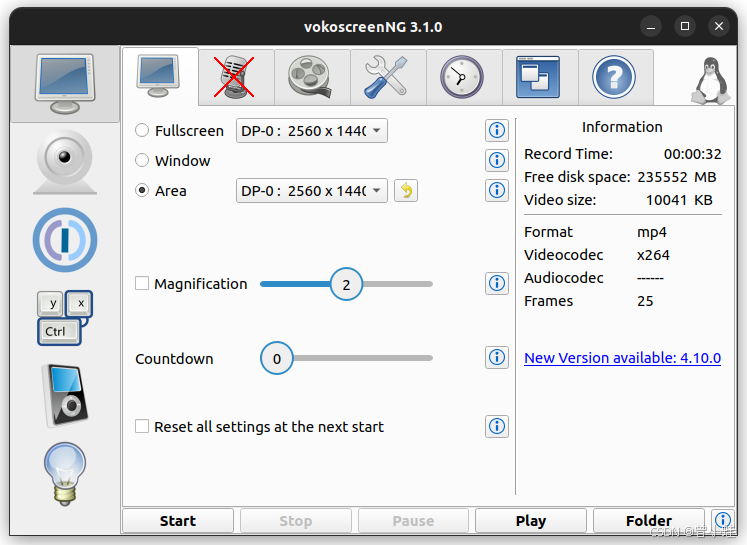
1. 系统环境
这次是在 Ubuntu 22.04 上找一个简单好用、能录 MP4 的屏幕录制工具,最后使用的是 VokoscreenNG。
当前环境:
- 系统:Ubuntu 22.04.5 LTS
- 内核:Linux 6.8.0-57-generic
- 图形会话:X11
2. 遇到的痛点
Ubuntu 自带录屏功能确实简单,但是输出格式不太方便,不适合直接拿来上传或分享。
我的需求很简单:
- 操作要简单
- 能直接录制 MP4
- 适配 Ubuntu 22.04
- 不想折腾太复杂的配置
3. 安装 VokoscreenNG
Ubuntu 22.04 软件源里可以直接安装 vokoscreen-ng。
安装命令:
bash
sudo apt-get install -y vokoscreen-ngA clean 16:9 CSDN technical blog cover for a Chinese article about Ubuntu 22.04 MP4 screen recording with VokoscreenNG. Dark navy to Ubuntu orange gradient background, modern flat vector style. Large readable Chinese title: "Ubuntu 22.04 录屏保存 MP4". Subtitle: "VokoscreenNG 简单上手". Show a monitor with recording icon and an MP4 badge. Include a small terminal snippet with the only correct command: " vokoscreenNG". Bottom keywords: "Linux 录屏 · X11 · NVIDIA · MP4". No fake command line options, no --start, no --hwaccel. High contrast, clean layout, suitable as CSDN article cover.A clean 16:9 CSDN technical blog cover for a Chinese article about Ubuntu 22.04 MP4 screen recording with VokoscreenNG. Dark navy to Ubuntu orange gradient background, modern flat vector style. Large readable Chinese title: "Ubuntu 22.04 录屏保存 MP4". Subtitle: "VokoscreenNG 简单上手". Show a monitor with recording icon and an MP4 badge. Include a small terminal snippet with the only correct command: " vokoscreenNG". Bottom keywords: "Linux 录屏 · X11 · NVIDIA · MP4". No fake command line options, no --start, no --hwaccel. High contrast, clean layout, suitable as CSDN article cover.
安装完成后可以检查一下命令是否存在:
bash
command -v vokoscreenNG如果输出类似下面这样,说明安装成功:
bash
/usr/bin/vokoscreenNG4. 启动方式
bash
vokoscreenNG启动后选择录制区域,然后设置输出格式即可。
5. 推荐设置
我主要关心直接保存成 MP4,可以这样设置:
- 录制模式:Fullscreen 或 Area
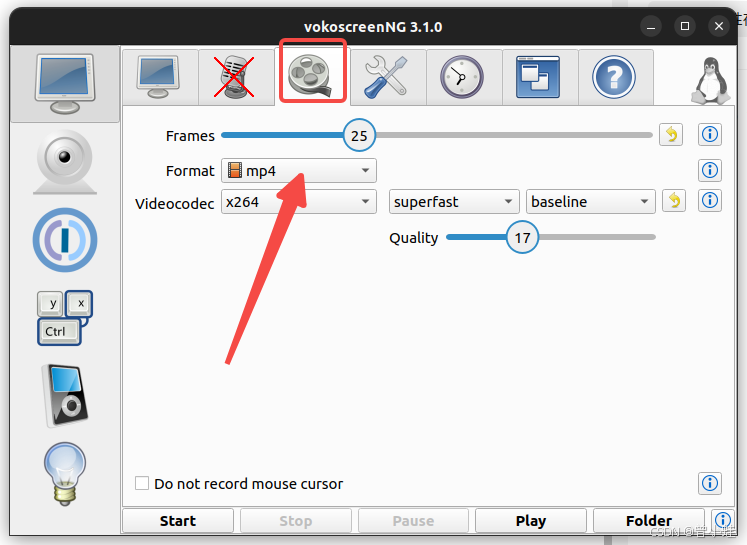
- 输出格式:MP4
- 视频编码:H.264 / x264
如果只是录桌面操作,默认参数基本就够用。
6. 可能遇到的小问题
安装过程中系统可能会提示类似下面的错误:
text
v4l2loopback-dkms 编译失败这个错误来自系统里的 DKMS 内核模块,不是 VokoscreenNG 本身的问题。
只要下面命令能找到程序,一般就可以正常使用:
bash
command -v vokoscreenNG7. 总结命令
安装:
bash
sudo apt-get install -y vokoscreen-ng启动:
bash
vokoscreenNG设置输出格式为mp4
二、Windows 安装方法
Windows 用户可以直接下载官方安装包,不需要命令行安装。
官方下载页:
text
https://linuxecke.volkoh.de/vokoscreen/vokoscreen-download.html选择类似下面的 Windows 版本:
text
vokoscreenNG-4.9.0-win64.exe下载后双击 .exe 安装即可。
Windows 下可以这样记录:
- 软件名:
VokoscreenNG - Windows 安装包:
vokoscreenNG-版本号-win64.exe - Ubuntu 启动命令:
vokoscreenNG
注意不要写成 vikoscreen,正确名称是 VokoscreenNG。
附录
封面生成题词
参考知识
582/1000
AI翻译
AI大模型翻译
一款简洁的16:9 CSDN技术博客封面,用于一篇关于Ubuntu 22.04使用VokoscreenNG录制MP4屏幕视频的中文文章。采用深海军蓝至Ubuntu橙色渐变背景,现代扁平矢量风格。大号易读中文字体标题:"Ubuntu 22.04 录屏保存MP4",副标题:"VokoscreenNG快速上手"。展示带有录制图标和MP4标识的显示器,附带终端片段,仅显示正确命令:"$ vokoscreenNG"。底部关键词:"Linux录屏 · X11 · NVIDIA · MP4"。无虚假命令行选项,不包含--start或--hwaccel参数。高对比度、布局简洁,适合作为CSDN文章封面。
bash
A clean 16:9 CSDN technical blog cover for a Chinese article about Ubuntu 22.04 MP4 screen recording with VokoscreenNG. Dark navy to Ubuntu orange gradient background, modern flat vector style. Large readable Chinese title: "Ubuntu 22.04 录屏保存 MP4". Subtitle: "VokoscreenNG 简单上手". Show a monitor with recording icon and an MP4 badge. Include a small terminal snippet with the only correct command: "$ vokoscreenNG". Bottom keywords: "Linux 录屏 · X11 · NVIDIA · MP4". No fake command line options, no --start, no --hwaccel. High contrast, clean layout, suitable as CSDN article cover.