S22U升级oneui8.0后卡的很,google play服务禁用后重启手机仍然自动启用,所以用adb的形式禁用掉。
1.电脑上下载 adb调试工具,并解压到任意文件夹中。
度:https://pan.baidu.com/s/1anVS4-N37cMobDBiZMf1kQ 提取码:r5iw
奏:https://liu834189447.lanzn.com/ixUyC1md63pg
2.开启USB调试。开启步骤:设置-关于手机-软件信息-编译编号。不停的连按编译编号直到提示开发者模式打开,返回上一页,设置页面最下面进入开发者选项-启用USB调试。
3.用数据线连接电脑,允许文件传输,允许usb调试;
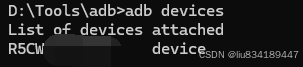
4.打开adb文件夹的cmd.exe,输入 adb devices 查看是否连接手机成功,若连接成功,会看到一串序列和devices字符;
bash
# 谷歌服务框架(核心,不冻必自启)
adb shell pm disable-user com.google.android.gsf
adb shell pm disable-user com.google.android.gsf.login
# Google Play服务(你要禁用的主体)
adb shell pm disable-user com.google.android.gms
adb shell pm disable-user com.google.android.gms.ui
# 谷歌应用商店
adb shell pm disable-user com.android.vending
# 谷歌配置更新、初始化组件(重启恢复元凶)
adb shell pm disable-user com.google.android.configupdater
adb shell pm disable-user com.google.android.onetimeinitializer
adb shell pm disable-user com.google.android.partnersetup
# 谷歌扩展服务、AR核心、打印服务等附属
adb shell pm disable-user com.google.android.ext.services
adb shell pm disable-user com.google.android.ext.shared
adb shell pm disable-user com.google.ar.core
adb shell pm disable-user com.google.android.printservice.recommendation
# 谷歌账户同步、备份
adb shell pm disable-user com.google.android.syncadapters.contacts
adb shell pm disable-user com.google.android.syncadapters.calendar
想让设置里彻底消失谷歌服务(终极方案)
执行卸载当前用户 0 下的 GMS,卸载后应用列表不再出现 Google Play 服务:
adb shell pm uninstall --user 0 com.google.android.gms
adb shell pm uninstall --user 0 com.google.android.gsf
adb shell pm uninstall --user 0 com.android.vending
执行完成后再校验:
adb shell dumpsys package com.google.android.gms | findstr installedUser 0 会显示 installed=false,设置里完全看不到谷歌相关程序。
后续恢复谷歌服务命令(需要时)
adb shell cmd package install-existing --user 0 com.google.android.gms
adb shell cmd package install-existing --user 0 com.google.android.gsf
adb shell cmd package install-existing --user 0 com.android.vending
禁用系统自带的应用商店
三星自带应用商店(Galaxy Store)完整禁用 / 卸载命令
主包名:com.sec.android.app.samsungapps
方式 1:永久禁用(推荐,可随时恢复)
直接在 CMD 执行:
adb shell pm disable-user --user 0 com.sec.android.app.samsungapps输出 new state: disabled-user 即成功,重启不会自动启用。
方式 2:用户级卸载(应用列表彻底消失,视觉干净)
adb shell pm uninstall -k --user 0 com.sec.android.app.samsungapps-k保留缓存数据,以后想恢复不用重新下载;- 设置应用列表完全看不到三星应用商店。
恢复商店(两种对应命令)
-
仅禁用的恢复:
adb shell pm enable --user 0 com.sec.android.app.samsungapps
-
卸载后恢复:
adb shell cmd package install-existing --user 0 com.sec.android.app.samsungapps
这些命令是从豆包上查的