idf编译代码的时候,使用Windows PowerShell实时监控 ninja 和 cc1plus,脚本如下
bash
# 保存为 monitor_compile.ps1
while ($true) {
    Clear-Host
    $time = Get-Date -Format "HH:mm:ss"
    Write-Host "=== 编译核心进程监控 $time ===" -ForegroundColor Yellow

    # 1. 获取关键进程
    $procs = Get-Process -Name ninja, cc1plus, cc1, ccache, python -ErrorAction SilentlyContinue

    if ($procs) {
        $procs | Sort-Object CPU -Descending | Format-Table -AutoSize ProcessName,
            @{N='CPU(s)';E={[math]::Round($_.CPU, 1)}},
            @{N='Mem(MB)';E={[math]::Round($_.WorkingSet/1MB, 1)}},
            @{N='线程数';E={$_.Threads.Count}},
            @{N='句柄数';E={$_.HandleCount}}
    } else {
        Write-Host "❌ 编译进程未运行" -ForegroundColor Red
    }

    # 2. 检查是否有 cc1plus 进程(真正的编译器)
    $cc = Get-Process -Name cc1plus -ErrorAction SilentlyContinue
    if ($cc) {
        Write-Host "`n✅ cc1plus 正在运行!" -ForegroundColor Green
        Write-Host "   CPU 占用: $([math]::Round($cc.CPU, 1)) 秒" -ForegroundColor Cyan
        Write-Host "   内存占用: $([math]::Round($cc.WorkingSet/1MB, 1)) MB" -ForegroundColor Cyan
        Write-Host "   进程数量: $($cc.Count)" -ForegroundColor Cyan
    } else {
        Write-Host "`n❌ cc1plus 未运行(编译器未启动)" -ForegroundColor Red
    }

    # 3. 检查 ninja 状态
    $ninja = Get-Process -Name ninja -ErrorAction SilentlyContinue
    if ($ninja) {
        Write-Host "`n📦 ninja 状态:" -ForegroundColor Cyan
        Write-Host "   CPU 占用: $([math]::Round($ninja.CPU, 1)) 秒" -ForegroundColor $(if($ninja.CPU -gt 5){"Green"}else{"Yellow"})
        Write-Host "   线程数: $($ninja.Threads.Count)" -ForegroundColor Gray
    }

    # 4. 显示编译进度(如果有 build 目录)
    $buildDir = ".\build"
    if (Test-Path $buildDir) {
        $objFiles = (Get-ChildItem -Path $buildDir -Recurse -Filter "*.o" -ErrorAction SilentlyContinue).Count
        $elfFiles = (Get-ChildItem -Path $buildDir -Recurse -Filter "*.elf" -ErrorAction SilentlyContinue).Count
        Write-Host "`n📊 编译进度:" -ForegroundColor Cyan
        Write-Host "   已编译 .o 文件: $objFiles" -ForegroundColor Gray
        Write-Host "   已生成 .elf 文件: $elfFiles" -ForegroundColor Gray
    }

    Start-Sleep -Seconds 2
}
我的测试结果如下,CPU的使用很低,说明CPU在空转,根本没有进行编译,但是什么原因没找到
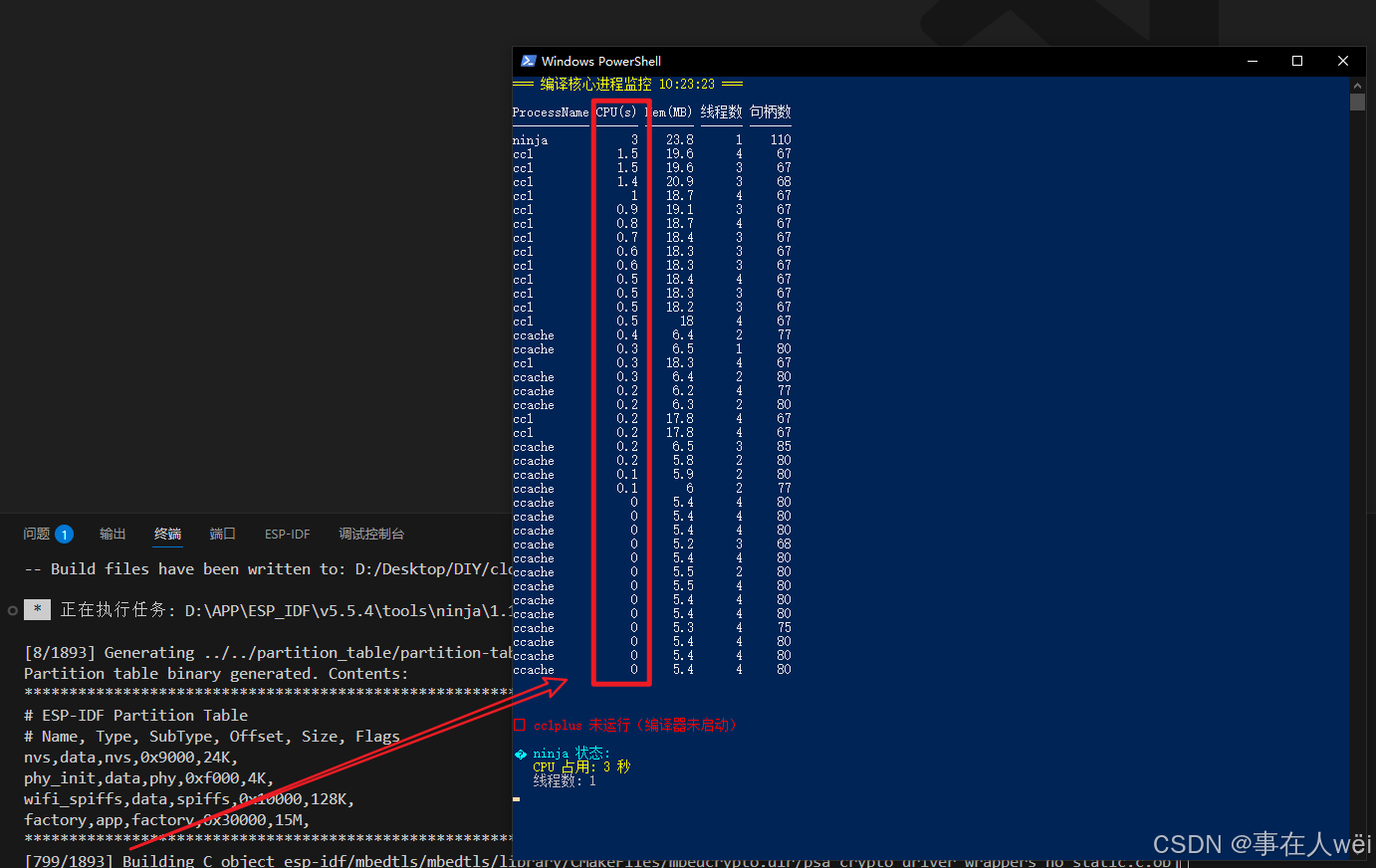
电脑以前编译是很快的,一两分钟就能全量编译,隔了很长一段时间没用,就变成这个鬼样子了
重新安装了IDFv5.5.4和IDFv6.0.1,情况都一样
排查方向:
1.电脑没有安装微软电脑管家 (Microsoft PC Manager)
2.直接调用 ninja(绕过 idf.py),也一样很慢
# 先让 idf.py 生成 build 目录
idf.py reconfigure

# 然后直接调用 ninja,指定 -j8
ninja -C build -j8
用没用懂的朋友???