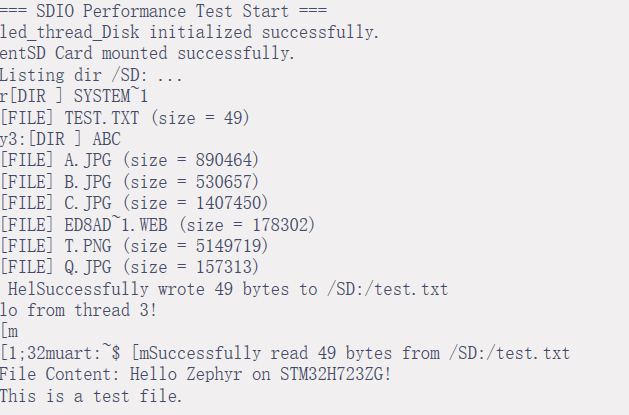
1、配置sdmmc,使得系统能检测到sd卡并测试sd的性能
c
(1)配置prj.conf
#开启 Zephyr SD 卡子系统与 SDHC 驱动
CONFIG_SDHC=y
CONFIG_DISK_ACCESS=y

 开启文件系统支持(以 FatFs 为例)
CONFIG_FILE_SYSTEM=y
CONFIG_FAT_FILESYSTEM_ELM=y
CONFIG_LOG_MODE_IMMEDIATE=y

配置app.overlay文件。
&dmamux1 {
    status = "okay";
};
&dma1 {
    status = "okay";
};
&sdmmc1 {
    status = "okay";
    compatible = "st,stm32-sdmmc";
    pinctrl-0 = <&sdmmc1_ck_pc12 &sdmmc1_cmd_pd2
                 &sdmmc1_d0_pc8 &sdmmc1_d1_pc9
                 &sdmmc1_d2_pc10 &sdmmc1_d3_pc11>;
    pinctrl-names = "default";
    bus-width = <4>;
    disk-name = "SD";
};
配置 sd卡的时钟过高可能导致sd检测不到,设置到合理的范围。如 div-q = <10>; 配置一下符合48mhz倍数。当前是配置完为48mhz,
主要线程调用。
c
#include <zephyr/storage/disk_access.h>
#include <zephyr/linker/linker-defs.h>
#include <inttypes.h>
#include <zephyr/linker/linker-defs.h>
#include <zephyr/fs/fs.h>
#include <zephyr/arch/cpu.h>
#define TEST_BLOCK_SIZE 512 /* 标准扇区大小 */
#define TEST_BLOCK_COUNT 100 /* 每次连续读写的扇区数 (100 * 512 = 50KB) */
#define TEST_ITERATIONS 20 /* 循环测试次数 */
#define TOTAL_DATA_SIZE (TEST_BLOCK_SIZE * TEST_BLOCK_COUNT)
/* 定义 512 字节的扇区缓冲区,并确保 32 字节对齐 */
static uint8_t __aligned(32) test_write_buf[TOTAL_DATA_SIZE] __attribute__((section(".nocache.sd_nocache_mem")));
static uint8_t __aligned(32) test_read_buf[TOTAL_DATA_SIZE] __attribute__((section(".nocache.sd_nocache_mem")));
#define MAX_RETRIES 3
int sd_write_with_retry(const char *pdrv, const uint8_t *buf, uint32_t sector, uint32_t count) {
int ret;
for (int i = 0; i < MAX_RETRIES; i++) {
ret = disk_access_write(pdrv, buf, sector, count);
if (ret == 0) return 0; // 成功则直接返回
LOG_WRN("Write failed (attempt %d), retrying...", i + 1);
k_msleep(10); // 等待 10ms 后重试
}
return ret; // 重试耗尽,返回错误
}
int sd_read_with_retry(const char *pdrv, uint8_t *buf, uint32_t sector, uint32_t count) {
int ret;
for (int i = 0; i < MAX_RETRIES; i++) {
ret = disk_access_read(pdrv, buf, sector, count);
if (ret == 0) return 0;
LOG_WRN("Read failed (attempt %d), retrying...", i + 1);
k_msleep(10);
}
return ret;
}
void thread_entry4(void *p1, void *p2, void *p3)
{
int ret;
uint32_t start_sector = 1000; /* 避开 0 扇区(MBR/引导区),从安全区域开始 */
uint32_t start_time, end_time;
uint64_t total_write_ms = 0, total_read_ms = 0;
uint32_t sector_count;
uint32_t sector_size;
ret = disk_access_init("SD");
if (ret != 0) {
printk("SD card init failed: %d \n", ret);
}
printk("SD card initialized successfully!\n");
/* 2. 获取 SD 卡容量信息 */
ret = disk_access_ioctl("SD", DISK_IOCTL_GET_SECTOR_COUNT, §or_count);
if (ret != 0) {
printk("Failed to get sector count");
}
ret = disk_access_ioctl("SD", DISK_IOCTL_GET_SECTOR_SIZE, §or_size);
if (ret != 0) {
printk("Failed to get sector size");
}
printk("SD Card Info: %u sectors, %u bytes/sector\n", sector_count, sector_size);
printk("Total Capacity: %u MB\n", (sector_count * sector_size) / (1024 * 1024));
/* 填充测试数据 */
memset(test_write_buf, 0xA5, sizeof(test_write_buf));
for (int i = 0; i < TEST_ITERATIONS; i++) {
/* 1. 写入性能测试 */
/* 【关键】写入前:将 D-Cache 中的数据刷入 AXI SRAM,确保 DMA 读到最新数据 */
SCB_CleanDCache_by_Addr((uint32_t *)test_write_buf, TOTAL_DATA_SIZE);
start_time = k_uptime_get();
ret = sd_write_with_retry("SD", test_write_buf, start_sector, TEST_BLOCK_COUNT);
end_time = k_uptime_get();
if (ret != 0) {
printk("Write failed at iteration %d, err: %d", i, ret);
//return;
}
total_write_ms += (end_time - start_time);
SCB_InvalidateDCache_by_Addr((uint32_t *)test_read_buf, TOTAL_DATA_SIZE);
/* 2. 读取性能测试 */
start_time = k_uptime_get();
ret = sd_read_with_retry("SD", test_read_buf, start_sector, TEST_BLOCK_COUNT);
end_time = k_uptime_get();
if (ret != 0) {
printk("Read failed at iteration %d, err: %d", i, ret);
// return;
}
SCB_InvalidateDCache_by_Addr((uint32_t *)test_read_buf, TOTAL_DATA_SIZE);
total_read_ms += (end_time - start_time);
}
/* 3. 数据完整性校验 */
if (memcmp(test_write_buf, test_read_buf, TOTAL_DATA_SIZE) != 0) {
printk("Data mismatch! Read/Write data is inconsistent.");
//return;
}
/* 4. 计算并打印吞吐量 (MB/s) */
float write_speed = ((float)(TOTAL_DATA_SIZE * TEST_ITERATIONS) / (1024.0f * 1024.0f)) /
((float)total_write_ms / 1000.0f);
float read_speed = ((float)(TOTAL_DATA_SIZE * TEST_ITERATIONS) / (1024.0f * 1024.0f)) /
((float)total_read_ms / 1000.0f);
uint32_t write_speed_int = (uint32_t)(write_speed * 100);
uint32_t read_speed_int = (uint32_t)(read_speed * 100);
printk("=== Test Completed Successfully ===");
printk("Avg Write Speed: %u.%02u MB/s (Total: %" PRIu64 " ms)",
write_speed_int / 100, write_speed_int % 100, total_write_ms);
printk("Avg Read Speed: %u.%02u MB/s (Total: %" PRIu64 " ms)",
read_speed_int / 100, read_speed_int % 100, total_read_ms);
while(1)
{
k_sleep(K_FOREVER);
}
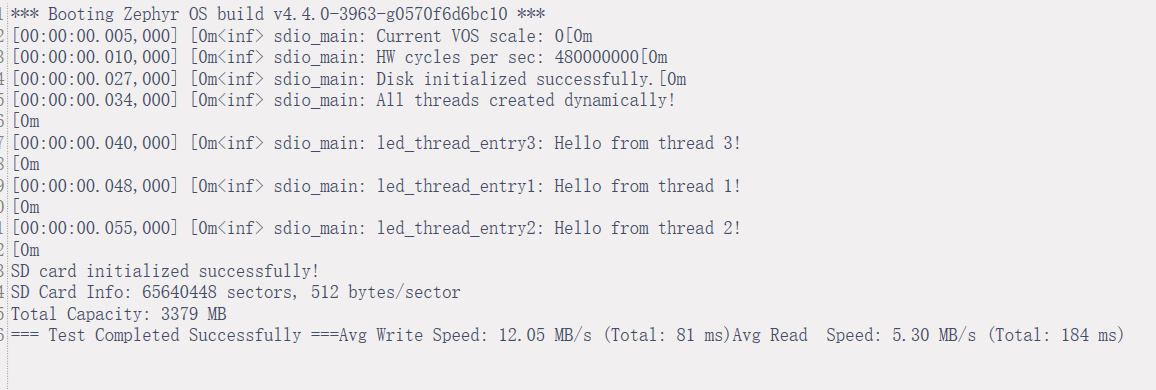
}演示结果:
2、在sdmmc基础上加上配置 fatfs系统
c
# 开启 Zephyr SD 卡子系统与 SDHC 驱动
CONFIG_SDHC=y
CONFIG_DISK_ACCESS=y
CONFIG_DISK_DRIVER_SDMMC=y
CONFIG_SDMMC_STM32=y

# 开启文件系统支持(以 FatFs 为例)
CONFIG_FILE_SYSTEM=y
CONFIG_FAT_FILESYSTEM_ELM=y
CONFIG_LOG_MODE_IMMEDIATE=y

CONFIG_HEAP_MEM_POOL_SIZE=8192
CONFIG_MAIN_STACK_SIZE=16384

CONFIG_DMA=y                  # 显式启用 DMA 支持
CONFIG_DMA_STM32=y
CONFIG_NOCACHE_MEMORY=y       # 保持 DMA 缓冲区一致性
代码:
c
#include <stm32h7xx_hal.h>
#include <string.h>
#include <stdbool.h>
#include <zephyr/drivers/dma.h>
#include <zephyr/cache.h>
#include <zephyr/devicetree.h>
#include <zephyr/storage/disk_access.h>
#include <zephyr/linker/linker-defs.h>
#include <inttypes.h>
#include <zephyr/arch/cpu.h>
#include <zephyr/fs/fs.h>
#include <ff.h>

#define TEST_FILE_PATH "/SD:/test.txt"
static FATFS fatfs_fs;
static struct fs_mount_t fat_fs_mnt = {
    .type = FS_FATFS,
    .fs_data = &fatfs_fs,
    .mnt_point = "/SD:",
};

static int lsdir(const char *path)
{
    int res;
    struct fs_dir_t dirp;
    struct fs_dirent entry;

    fs_dir_t_init(&dirp);
    res = fs_opendir(&dirp, path);
    if (res) {
        LOG_ERR("Error opening dir %s [%d]", path, res);
        return res;
    }

    LOG_INF("Listing dir %s ...", path);
    for (;;) {
        res = fs_readdir(&dirp, &entry);
        if (res || entry.name[0] == 0) {
            break;
        }
        if (entry.type == FS_DIR_ENTRY_DIR) {
            LOG_INF("[DIR ] %s", entry.name);
        } else {
            LOG_INF("[FILE] %s (size = %zu)", entry.name, entry.size);
        }
    }
    fs_closedir(&dirp);
    return res;
}
/**
 * @brief 创建文件并写入内容
 */
static int create_and_write_file(const char *path, const char *data, size_t len)
{
    struct fs_file_t file;
    int res;

    fs_file_t_init(&file);

    /* 以 "写" 模式打开文件,如果文件不存在则创建,存在则清空 */
    res = fs_open(&file, path, FS_O_CREATE | FS_O_WRITE);
    if (res) {
        LOG_ERR("Failed to open file for writing [%d]", res);
        return res;
    }

    /* 将数据写入文件 */
    res = fs_write(&file, data, len);
    if (res < 0) {
        LOG_ERR("Failed to write to file [%d]", res);
        goto cleanup;
    }

    LOG_INF("Successfully wrote %d bytes to %s", res, path);

cleanup:
    /* 关闭文件 */
    fs_close(&file);
    return res;
}
/**
 * @brief 读取文件内容
 */
static int read_file_content(const char *path, char *buf, size_t buf_size)
{
    struct fs_file_t file;
    int res;
    ssize_t bytes_read;

    fs_file_t_init(&file);

    /* 以 "读" 模式打开文件 */
    res = fs_open(&file, path, FS_O_READ);
    if (res) {
        LOG_ERR("Failed to open file for reading [%d]", res);
        return res;
    }

    /* 读取文件内容到缓冲区 */
    bytes_read = fs_read(&file, buf, buf_size);
    if (bytes_read < 0) {
        LOG_ERR("Failed to read from file [%d]", bytes_read);
        res = bytes_read;
        goto cleanup;
    }

    /* 确保字符串以 \0 结尾,方便打印 */
    buf[bytes_read] = '\0';
    LOG_INF("Successfully read %d bytes from %s", bytes_read, path);
    LOG_INF("File Content: %s", buf);

cleanup:
    /* 关闭文件 */
    fs_close(&file);
    return res;
}

void led_thread_entry4(void *p1, void *p2, void *p3)
{
    int ret;
    printk("=== SDIO Performance Test Start ===\n");
     ret = disk_access_init("SD");
   if (ret != 0) {
      printk("Disk init failed: %d\n", ret);

  }
  else
  {
     printk("Disk initialized successfully.\n");
  }
  int res = fs_mount(&fat_fs_mnt);
    if (res == FR_OK)
    {
        LOG_INF("SD Card mounted successfully.");
         lsdir(fat_fs_mnt.mnt_point);
    }
    else
    {
        LOG_ERR("Error mounting disk: %d", res);
    }

    const char *test_data = "Hello Zephyr on STM32H723ZG!\nThis is a test file.";
    char read_buffer[128];

    create_and_write_file(TEST_FILE_PATH, test_data, strlen(test_data)) ;
    k_sleep(K_MSEC(5));
    read_file_content(TEST_FILE_PATH, read_buffer, sizeof(read_buffer));
    while(1)
    {
     k_sleep(K_FOREVER);
    }
}
结果演示依据: