概念
Stack 是一个层叠布局组件,子组件按照先后顺序堆叠在一起,后面的覆盖前面的,类似 Photoshop 的图层概念,当没有写明定位的时候就是默认从左上角开始。
基本使用
Dart
Stack(
  children: [
    Container(color: Colors.red, width: 200, height: 200), //底层
    Container(color: Colors.blue, width: 150, height: 150), //中层
    Container(color: Colors.green, width: 100, height: 100), //上层
  ],
)
// 结果:绿色在最上面,覆盖蓝色,蓝色覆盖红色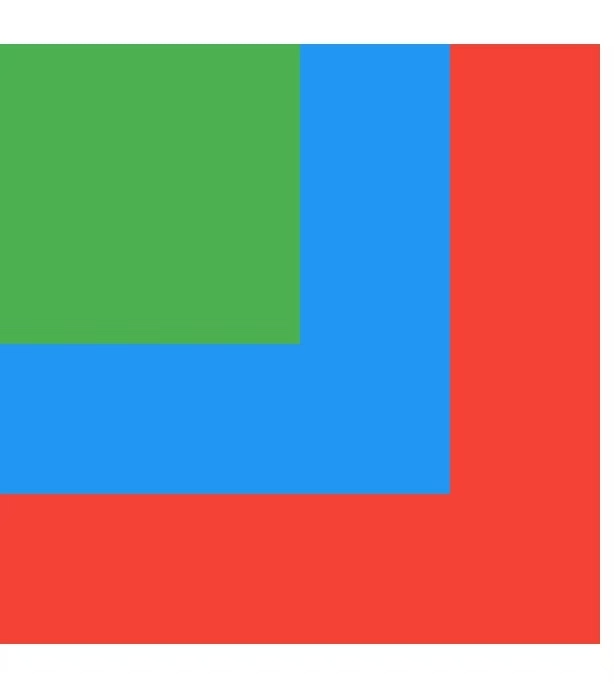
Stack的源码本质
Dart
class Stack extends MultiChildRenderObjectWidget {
  const Stack({
    super.key,
    this.alignment = AlignmentDirectional.topStart,  // 默认左上角对齐
    this.textDirection,
    this.fit = StackFit.loose,  // 子组件如何适应
    this.clipBehavior = Clip.hardEdge,
    super.children,
  });
}
布局约束传递机制
Dart
// Column/Row 的约束传递
父组件 → 给约束 → 子组件返尺寸 → 父组件计算位置
// 特点:线性排列,一个接一个

// Stack 的约束传递
父组件 → 给约束 → 所有子组件各自返尺寸 → 父组件根据 alignment 堆叠
// 特点:所有子组件都叠在同一个位置
对齐方式
Dart
// Alignment 的坐标系统:(-1, -1) 到 (1, 1)
// 左上角 (-1, -1)  右上角 (1, -1)
// 正中间 (0, 0)
// 左下角 (-1, 1)   右下角 (1, 1)

Alignment.topLeft - 左上角

Alignment.topCenter - 顶部居中

Alignment.topRight - 右上角

Alignment.centerLeft - 左侧居中

Alignment.center - 中心

Alignment.centerRight - 右侧居中

Alignment.bottomLeft - 左下角

Alignment.bottomCenter - 底部居中

Alignment.bottomRight - 右下角
Dart
Stack(
  alignment: Alignment.center, // 所有子组件居中对齐
  children: [
    Container(width: 200, height: 200, color: Colors.red),
    Container(width: 100, height: 100, color: Colors.blue),
  ],
)


自定义对齐位置

// Alignment(x, y)
// x: -1 到 1(左到右)
// y: -1 到 1(上到下)

Stack(
  alignment: Alignment(0.5, -0.5),  // 偏右上方
  children: [
    Container(width: 100, height: 100, color: Colors.blue),
  ],
)

// Alignment 是 FractionalOffset 的别名
// FractionalOffset(0.3, 0.7) = 30% 宽度, 70% 高度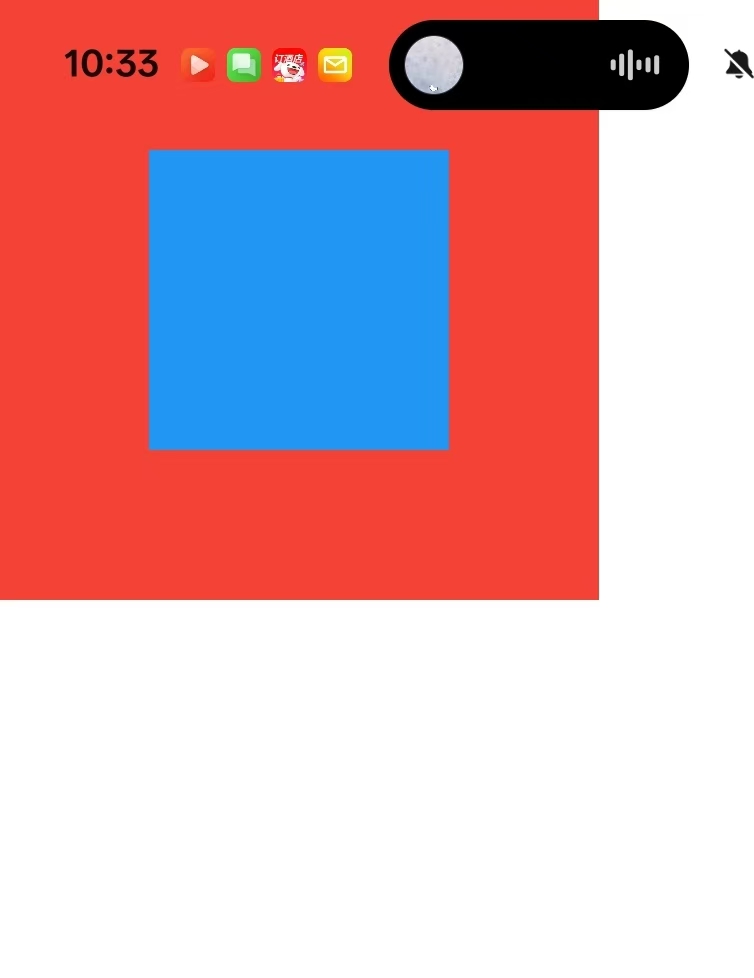
Positioned精准定位
Dart
left - 距离左边的距离

top - 距离顶部的距离

right - 距离右边的距离

bottom - 距离底部的距离

width - 宽度(不能与left/right同时使用)

height - 高度(不能与top/bottom同时使用)
Dart
Stack(
  children: [
    // 背景
    Container(
      width: 300,
      height: 300,
      color: Colors.grey[200],
    ),

    // 使用Positioned定位
    Positioned(
      left: 20,
      top: 20,
      child: Container(
        width: 100,
        height: 100,
        color: Colors.red,
      ),
    ),

    Positioned(
      right: 20,
      bottom: 20,
      child: Container(
        width: 100,
        height: 100,
        color: Colors.blue,
      ),
    ),

    // 四角定位
    Positioned.fill(
      top: 50,
      bottom: 50,
      left: 50,
      right: 50,
      child: Container(
        color: Colors.green,
      ),
    ),
  ],
)
关键
Dart
1.Stack 是层叠布局组件,Positioned 是它的定位数据包装器

2.Stack 的布局分三步:

遍历子组件,区分是否被 Positioned 包裹

被 Positioned 包裹的用精确坐标定位,其他的用 alignment 对齐

所有子组件在同一个坐标系中堆叠,后绘制的覆盖前面的

3.没有使用Positioned包裹的子组件:按照alignment属性对齐

4.使用Positioned包裹的子组件:按照Positioned的定位属性定位

5.定位冲突:不能同时指定相对的边,比如不能同时指定left和right

6.同时设置 left 和 right 会拉伸宽度
常见问题
Dart
1.无界约束问题

// ❌ 错误:Stack 里的 Container 无法撑满
Stack(
  children: [
    Container(
      color: Colors.blue,
      // 没有指定 width/height,无法确定大小
    ),
  ],
)
// 结果:Container 变成 0x0,看不见!

// ✅ 正确:给明确大小
Stack(
  children: [
    Container(
      width: 200,
      height: 200,
      color: Colors.blue,
    ),
  ],
)

// ✅ 或者用 Positioned.fill 撑满
Stack(
  children: [
    Positioned.fill(
      child: Container(color: Colors.blue),
    ),
  ],
)
获取验证码的实现
叠加(container+stack)
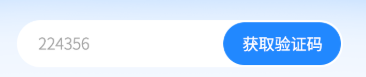
实现以上效果,container为底,里面放Stack,Stack里面再放Container和Align
Dart
  Container(
          height: 57,
          width: double.infinity,
          margin: EdgeInsets.only(left:30,right: 30), // 添加右边距
          decoration: BoxDecoration(
              color: Colors.white,
              borderRadius: BorderRadius.circular(44)
          ),
          child: Stack(
            children: [
              Container(
                height: 57,
                width: double.infinity,
                child: TextField(
                  controller: numberController,
                  decoration: InputDecoration(
                    //filled: true,
                      fillColor: Colors.white,
                      contentPadding: EdgeInsets.symmetric(horizontal: 16, vertical: 16),
                      hintStyle: TextStyle(color: Colors.grey),
                      border: OutlineInputBorder(
                        borderRadius: BorderRadius.circular(12),
                        borderSide: BorderSide.none,
                      ),
                      counterText:""
                  ),

                  maxLength: 11,
                  keyboardType: TextInputType.phone,
                  style: TextStyle(fontSize: 16, color: Colors.black),
                  cursorColor: Colors.blue,
                ),
              ),

              // 上面的容器 - 使用 Align,或者Position,把right设置为0
              Align(
                alignment: Alignment.bottomRight,
                child: Container(
                  height: 57,
                  width: 140,
                    decoration: BoxDecoration(
                        color: Color(0xFF2188FF),
                        borderRadius: BorderRadius.circular(44)
                    ),

                  child: Center(
                    child: Text("获取验证码"),
                  )
                ),
              ),
            ],
          )
        ),