HarmonyOS ArkTS 实战:实现一个校园快递代取与跑腿应用
项目效果
本文使用 HarmonyOS 和 ArkTS 实现一个校园快递代取与跑腿应用。
应用可以发布快递代取和跑腿需求,设置取件地点和送达地点,设置跑腿费用,接单跑腿,查看订单状态,并提供订单筛选、进度更新和收入统计等功能。
项目使用 DevEco Studio 开发,适配 API 23 及以上版本。
运行效果
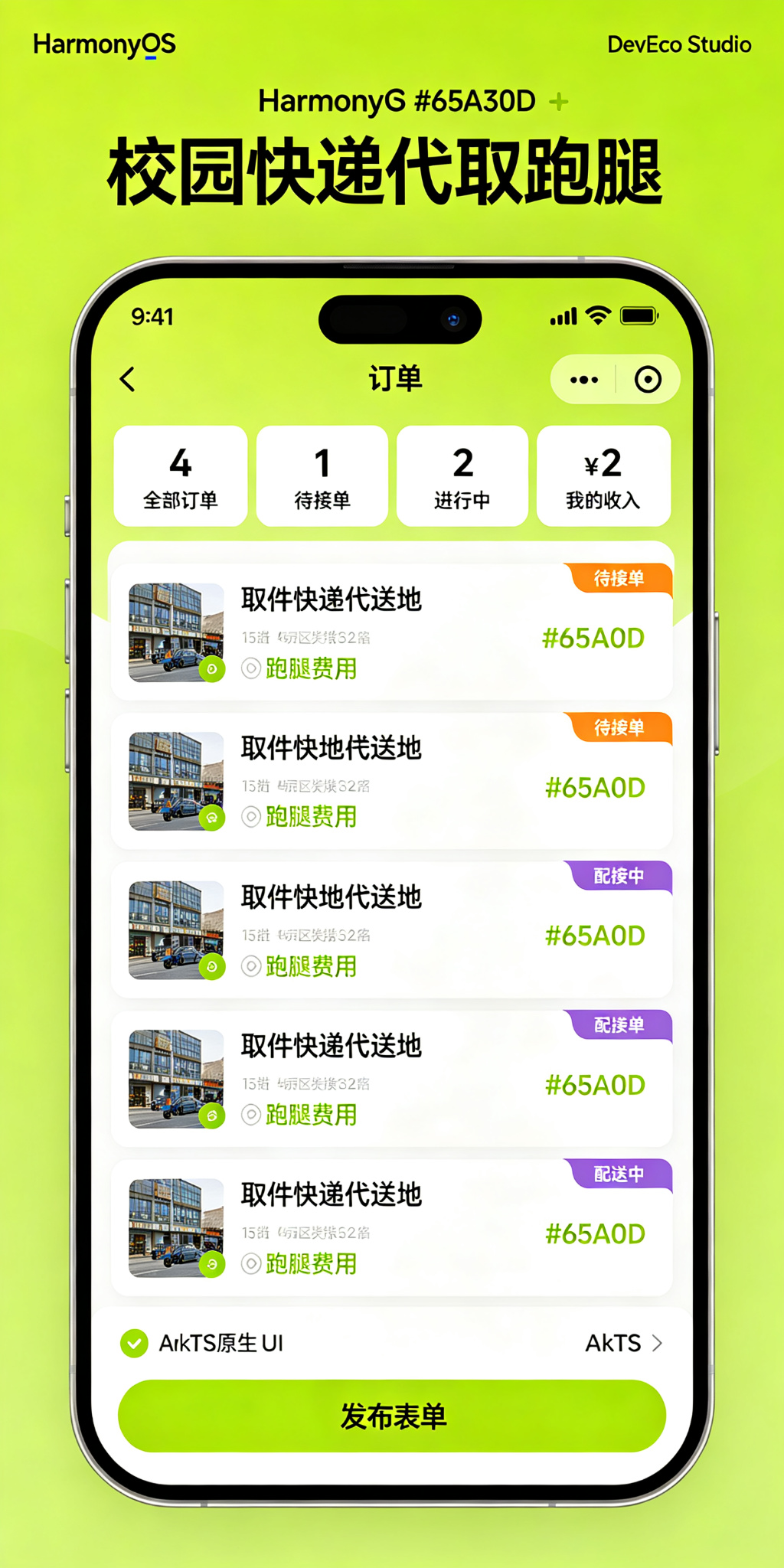
功能介绍
本项目实现了以下功能:
- 发布代取或跑腿需求
- 填写快递信息或跑腿内容
- 设置取件地点和送达地点
- 设置期望送达时间
- 设置跑腿费用
- 留下联系方式
- 跑腿员接单
- 更新订单进度
- 确认送达完成
- 按订单状态筛选
- 统计发布订单、已接单、已完成数量
- 统计跑腿收入
- 取消未接单订单
定义数据结构
首先定义跑腿订单的数据结构:
typescript
interface ErrandsOrder {
  id: number;
  title: string;
  description: string;
  pickupLocation: string;
  deliveryLocation: string;
  deliveryTime: string;
  fee: number;
  orderType: string;
  publisher: string;
  contact: string;
  runner: string;
  status: string;
  publishTime: string;
}
字段说明如下:
id:订单的唯一编号title:订单标题description:详细描述pickupLocation:取件地点deliveryLocation:送达地点deliveryTime:期望送达时间fee:跑腿费用orderType:订单类型(快递代取/食堂带饭/其他跑腿)publisher:发布人contact:联系方式runner:接单跑腿员status:订单状态(待接单/已接单/配送中/已完成/已取消)publishTime:发布时间
初始化页面状态
使用 @State 保存输入内容、订单类型、筛选条件和当前用户:
typescript
@State private titleText: string = '';
@State private descriptionText: string = '';
@State private pickupText: string = '';
@State private deliveryText: string = '';
@State private timeText: string = '';
@State private feeText: string = '';
@State private contactText: string = '';
@State private publisherText: string = '';
@State private currentUser: string = '跑腿小哥';
@State private orderType: string = '快递代取';
@State private filterType: string = '全部';
@State private nextId: number = 6;
准备一些初始数据,让应用运行后可以直接展示完整效果:
typescript
@State private orders: ErrandsOrder[] = [
  {
    id: 1,
    title: '代取顺丰快递',
    description: '快递码:SF123456,一个小盒子,很轻',
    pickupLocation: '菜鸟驿站(南门)',
    deliveryLocation: '12号楼302宿舍',
    deliveryTime: '今天18:00前',
    fee: 3,
    orderType: '快递代取',
    publisher: '张同学',
    contact: '微信:zhang2026',
    runner: '',
    status: '待接单',
    publishTime: '2026-07-17 14:30'
  },
  {
    id: 2,
    title: '食堂带一份黄焖鸡',
    description: '微辣,不要香菜,多放米饭',
    pickupLocation: '二食堂三楼',
    deliveryLocation: '图书馆四楼A区',
    deliveryTime: '现在就去',
    fee: 5,
    orderType: '食堂带饭',
    publisher: '李同学',
    contact: '电话:138****1234',
    runner: '王同学',
    status: '配送中',
    publishTime: '2026-07-17 11:50'
  },
  {
    id: 3,
    title: '代取京东快递',
    description: '快递码:JD654321,有点重,一箱水',
    pickupLocation: '京东快递点',
    deliveryLocation: '8号楼501宿舍',
    deliveryTime: '今天晚上',
    fee: 4,
    orderType: '快递代取',
    publisher: '赵同学',
    contact: 'QQ:987654321',
    runner: '跑腿小哥',
    status: '已接单',
    publishTime: '2026-07-17 15:20'
  },
  {
    id: 4,
    title: '超市帮买一瓶可乐',
    description: '冰的可口可乐,大瓶',
    pickupLocation: '教育超市',
    deliveryLocation: '操场看台',
    deliveryTime: '10分钟内',
    fee: 2,
    orderType: '其他跑腿',
    publisher: '孙同学',
    contact: '微信:sun123',
    runner: '周同学',
    status: '已完成',
    publishTime: '2026-07-17 10:15'
  }
];
发布跑腿订单
用户填写订单信息后,可以发布新的跑腿需求:
typescript
private addOrder(): void {
  const title: string = this.titleText.trim();
  const pickup: string = this.pickupText.trim();
  const delivery: string = this.deliveryText.trim();
  const fee: number = parseInt(this.feeText);
  const publisher: string = this.publisherText.trim();
  const contact: string = this.contactText.trim();

  if (title.length === 0 || pickup.length === 0 || delivery.length === 0 ||
      isNaN(fee) || publisher.length === 0 || contact.length === 0) {
    return;
  }

  const now = new Date();
  const timeStr = `${now.getFullYear()}-${String(now.getMonth() + 1).padStart(2, '0')}-${String(now.getDate()).padStart(2, '0')} ${String(now.getHours()).padStart(2, '0')}:${String(now.getMinutes()).padStart(2, '0')}`;

  const order: ErrandsOrder = {
    id: this.nextId,
    title,
    description: this.descriptionText.trim(),
    pickupLocation: pickup,
    deliveryLocation: delivery,
    deliveryTime: this.timeText.trim() || '尽快送达',
    fee,
    orderType: this.orderType,
    publisher,
    contact,
    runner: '',
    status: '待接单',
    publishTime: timeStr
  };

  this.orders = [order, ...this.orders];
  this.nextId += 1;
  this.titleText = '';
  this.descriptionText = '';
  this.pickupText = '';
  this.deliveryText = '';
  this.timeText = '';
  this.feeText = '';
  this.publisherText = '';
  this.contactText = '';
}
新发布的订单默认处于"待接单"状态。
订单状态流转
跑腿订单按照以下流程处理:
待接单 -> 已接单 -> 配送中 -> 已完成
   |
   -> 已取消
使用以下方法更新订单状态:
typescript
private takeOrder(id: number): void {
  this.orders = this.orders.map((order: ErrandsOrder) => {
    if (order.id === id && order.status === '待接单') {
      return {
        id: order.id,
        title: order.title,
        description: order.description,
        pickupLocation: order.pickupLocation,
        deliveryLocation: order.deliveryLocation,
        deliveryTime: order.deliveryTime,
        fee: order.fee,
        orderType: order.orderType,
        publisher: order.publisher,
        contact: order.contact,
        runner: this.currentUser,
        status: '已接单',
        publishTime: order.publishTime
      };
    }
    return order;
  });
}

private startDelivery(id: number): void {
  this.orders = this.orders.map((order: ErrandsOrder) => {
    if (order.id === id && order.status === '已接单' && order.runner === this.currentUser) {
      return {
        id: order.id,
        title: order.title,
        description: order.description,
        pickupLocation: order.pickupLocation,
        deliveryLocation: order.deliveryLocation,
        deliveryTime: order.deliveryTime,
        fee: order.fee,
        orderType: order.orderType,
        publisher: order.publisher,
        contact: order.contact,
        runner: order.runner,
        status: '配送中',
        publishTime: order.publishTime
      };
    }
    return order;
  });
}

private completeOrder(id: number): void {
  this.orders = this.orders.map((order: ErrandsOrder) => {
    if (order.id === id && order.status === '配送中') {
      return {
        id: order.id,
        title: order.title,
        description: order.description,
        pickupLocation: order.pickupLocation,
        deliveryLocation: order.deliveryLocation,
        deliveryTime: order.deliveryTime,
        fee: order.fee,
        orderType: order.orderType,
        publisher: order.publisher,
        contact: order.contact,
        runner: order.runner,
        status: '已完成',
        publishTime: order.publishTime
      };
    }
    return order;
  });
}
待接单状态点击"接单"后变为已接单;已接单状态点击"开始配送"后变为配送中;配送中状态点击"确认送达"后变为已完成。
取消订单
未接单的订单可以取消:
typescript
private cancelOrder(id: number): void {
  this.orders = this.orders.map((order: ErrandsOrder) => {
    if (order.id === id && order.status === '待接单') {
      return {
        id: order.id,
        title: order.title,
        description: order.description,
        pickupLocation: order.pickupLocation,
        deliveryLocation: order.deliveryLocation,
        deliveryTime: order.deliveryTime,
        fee: order.fee,
        orderType: order.orderType,
        publisher: order.publisher,
        contact: order.contact,
        runner: order.runner,
        status: '已取消',
        publishTime: order.publishTime
      };
    }
    return order;
  });
}
只有待接单状态的订单可以取消。
筛选订单
页面支持按照订单状态筛选:
typescript
private getFilteredOrders(): ErrandsOrder[] {
  if (this.filterType === '待接单') {
    return this.orders.filter(
      (order: ErrandsOrder) => order.status === '待接单'
    );
  }
  if (this.filterType === '进行中') {
    return this.orders.filter(
      (order: ErrandsOrder) => order.status === '已接单' || order.status === '配送中'
    );
  }
  if (this.filterType === '已完成') {
    return this.orders.filter(
      (order: ErrandsOrder) => order.status === '已完成'
    );
  }
  if (this.filterType === '我接的单') {
    return this.orders.filter(
      (order: ErrandsOrder) => order.runner === this.currentUser
    );
  }
  return this.orders;
}
筛选按钮封装如下:
typescript
@Builder
FilterButton(text: string) {
  Button(text)
    .height(34)
    .layoutWeight(1)
    .fontSize(12)
    .fontColor(this.filterType === text ? Color.White : '#344054')
    .backgroundColor(
      this.filterType === text ? '#65A30D' : '#ECFCCB'
    )
    .borderRadius(8)
    .onClick(() => {
      this.filterType = text;
    });
}
选择订单类型
页面支持多种跑腿类型选择:
typescript
@Builder
TypeButton(text: string) {
  Button(text)
    .height(34)
    .layoutWeight(1)
    .fontSize(12)
    .fontColor(this.orderType === text ? Color.White : '#344054')
    .backgroundColor(
      this.orderType === text ? '#65A30D' : '#F3F4F6'
    )
    .borderRadius(8)
    .onClick(() => {
      this.orderType = text;
    });
}
不同订单类型使用黄绿色主题色高亮显示。
统计订单和收入
统计各类订单数量和跑腿收入:
typescript
private getOrderCount(status: string): number {
  if (status === '待接单') {
    return this.orders.filter((o: ErrandsOrder) => o.status === '待接单').length;
  }
  if (status === '进行中') {
    return this.orders.filter((o: ErrandsOrder) =>
      o.status === '已接单' || o.status === '配送中'
    ).length;
  }
  if (status === '已完成') {
    return this.orders.filter((o: ErrandsOrder) => o.status === '已完成').length;
  }
  return this.orders.length;
}

private getMyIncome(): number {
  return this.orders
    .filter((o: ErrandsOrder) => o.runner === this.currentUser && o.status === '已完成')
    .reduce((sum: number, o: ErrandsOrder) => sum + o.fee, 0);
}
顶部统计区域展示全部订单、待接单、进行中和我的收入:
typescript
this.StatCard(
  '全部订单',
  `${this.orders.length}`,
  '#65A30D',
  '#F7FEE7'
);
this.StatCard(
  '待接单',
  `${this.getOrderCount('待接单')}`,
  '#D97706',
  '#FFF7E8'
);
this.StatCard(
  '进行中',
  `${this.getOrderCount('进行中')}`,
  '#2563EB',
  '#EFF6FF'
);
this.StatCard(
  '我的收入',
  `¥${this.getMyIncome()}`,
  '#059669',
  '#ECFDF5'
);
设置状态颜色
不同订单状态使用不同颜色:
typescript
private getStatusColor(status: string): ResourceColor {
  if (status === '待接单') {
    return '#D97706';
  }
  if (status === '已接单') {
    return '#2563EB';
  }
  if (status === '配送中') {
    return '#7C3AED';
  }
  if (status === '已完成') {
    return '#059669';
  }
  return '#6B7280';
}

private getStatusBgColor(status: string): ResourceColor {
  if (status === '待接单') {
    return '#FEF3C7';
  }
  if (status === '已接单') {
    return '#DBEAFE';
  }
  if (status === '配送中') {
    return '#F3E8FF';
  }
  if (status === '已完成') {
    return '#DCFCE7';
  }
  return '#F3F4F6';
}
颜色含义如下:
- 橙色:待接单
- 蓝色:已接单
- 紫色:配送中
- 绿色:已完成
- 灰色:已取消
- 黄绿色:页面主题色
使用列表展示订单
使用 List 和 ForEach 渲染筛选后的订单:
typescript
List({ space: 12 }) {
  ForEach(
    this.getFilteredOrders(),
    (order: ErrandsOrder) => {
      ListItem() {
        this.OrderCard(order)
      }
    },
    (order: ErrandsOrder) => order.id.toString()
  );
}
.width('100%')
.layoutWeight(1)
.scrollBar(BarState.Off);
每个订单使用独立卡片展示,卡片中包含订单标题、描述、取件地点、送达地点、时间、费用、类型、发布人、状态和操作按钮。
页面设计说明
应用使用黄绿色作为主题色,适合跑腿服务充满活力的感觉。
页面主要分为以下区域:
- 顶部标题和今日订单数
- 订单数据和收入统计区域
- 发布跑腿订单表单
- 订单状态筛选区域
- 订单列表
页面采用浅灰色背景和白色卡片。待接单使用橙色,已接单使用蓝色,配送中使用紫色,已完成使用绿色,费用使用大号绿色字体突出显示,便于快速浏览。
SDK 配置
本项目使用 HarmonyOS API 24,满足 API 23 及以上要求:
json5
{
  "name": "default",
  "compatibleSdkVersion": "6.1.1(24)",
  "runtimeOS": "HarmonyOS",
  "targetSdkVersion": "6.1.1(24)",
  "compileSdkVersion": "6.1.1(24)"
}
entry 模块中的运行系统也要保持一致:
json5
{
  "apiType": "stageMode",
  "targets": [
    {
      "name": "default",
      "runtimeOS": "HarmonyOS"
    }
  ]
}
运行项目
使用 DevEco Studio 打开项目,然后找到:
entry/src/main/ets/pages/Index.ets等待项目同步完成,点击右侧的 Preview 按钮即可查看应用效果。
项目总结
本文使用 HarmonyOS 和 ArkTS 实现了一个校园快递代取与跑腿应用。
项目实现了订单发布、类型选择、地点设置、费用设置、接单功能、配送状态更新、确认送达、订单取消、状态筛选、收入统计等功能。
通过这个项目可以掌握:
- ArkTS 接口定义
@State状态管理- 多状态订单流转
List和ForEach列表渲染map和filter数组操作- 收入统计计算
- 自定义
@Builder组件 - HarmonyOS 订单卡片布局
后续还可以加入订单图片上传、实时位置共享、聊天功能、评价系统、跑腿员认证、悬赏功能和信用分机制等功能。