Agent 是当前应用开发的最终形态;与前面模型调用不同,Agent 可以自主规划调用工具,然后再返回内容
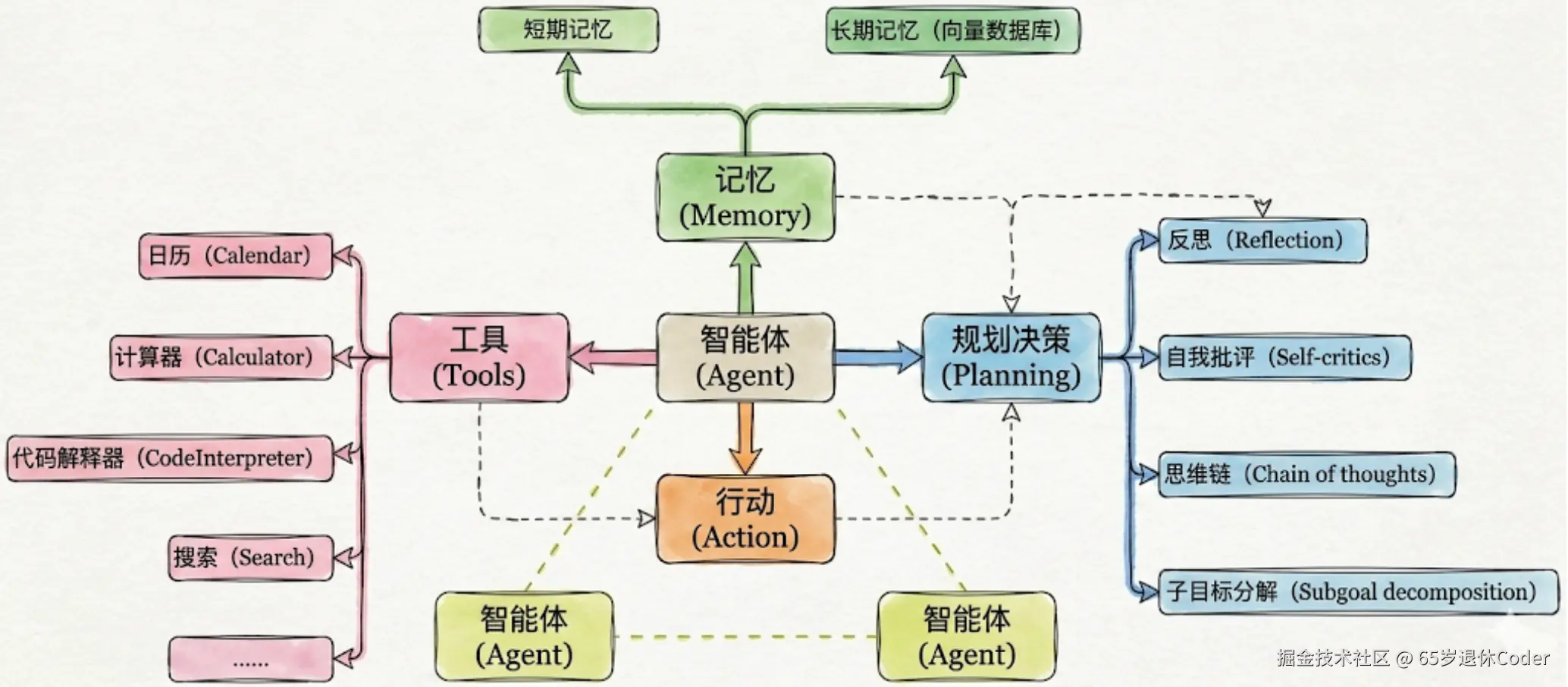
通过 create_agent 创建智能体
py
from dotenv import load_dotenv
from langchain.chat_models import init_chat_model
from langchain.agents import create_agent

load_dotenv()

model = init_chat_model("deepseek:deepseek-v4-flash")
# 创建 agent 第一个参数模式 model
# 也可以是字符串 deepseek:deepseek-v4-flash 底层还是会调用 ChatDeepSeek
agent = create_agent(model)

# 传递的数据,需要时一个 messages 的对象,各种类型的消息通过数组传递
# 单个字符串则标识 HumanMessage
# 支持字典、元组、消息对象类型的传递
# {"messages": [{"role": "user", "content": "你好"}]}
# {"messages": [("user",  "你好")]}
# {"messages": [HumanMessage("你好")]}
result = agent.invoke({"messages": ["你好"]})

# 返回的数据是一个对象,同样被 messages 包裹
# 数组的最后一个就是对话的最后一条消息
print(result["messages"][-1].content)
# {
#     'messages': [
#         HumanMessage(content='你好', additional_kwargs={}, response_metadata={}, id='ff259f86-ec59-4148-a3ba-920389298e66'),
#         AIMessage(
#             content='你好!很高兴见到你!我是DeepSeek,随时准备为你提供帮助。无论是解答问题、讨论想法,还是协助完成任务,我都在这里。有什么可以为你做的吗?😊',
#             additional_kwargs={
#                 'refusal': None,
#                 'reasoning_content':
# '嗯,用户发来了一句简单的问候"你好"。这是一个非常基础的社交开场,没有附带任何具体问题或指令。用户可能是在测试我是否在线,或者准备发起后续对话。\n\n我需要给出一
# 个友好、开放、热情的回应,以建立良好的互动氛围。可以用一个温暖的问候回复,并主动提供帮助,引导用户说出具体需求。想到了用"你好!很高兴见到你"开头,然后说明我的
# 身份和功能,最后用开放式提问结束,邀请用户进一步交流。\n\n这样既回应了问候,又为对话的继续创造了空间。'
#             },
#             response_metadata={
#                 'token_usage': {
#                     'completion_tokens': 156,
#                     'prompt_tokens': 5,
#                     'total_tokens': 161,
#                     'completion_tokens_details': {
#                         'accepted_prediction_tokens': None,
#                         'audio_tokens': None,
#                         'reasoning_tokens': 115,
#                         'rejected_prediction_tokens': None
#                     },
#                     'prompt_tokens_details': {'audio_tokens': None, 'cache_write_tokens': None, 'cached_tokens': 0},
#                     'prompt_cache_hit_tokens': 0,
#                     'prompt_cache_miss_tokens': 5
#                 },
#                 'model_provider': 'deepseek',
#                 'model_name': 'deepseek-v4-flash',
#                 'system_fingerprint': 'fp_8b330d02d0_prod0820_fp8_kvcache_20260402',
#                 'id': 'a48b3239-9255-4184-a541-ae495c168805',
#                 'finish_reason': 'stop',
#                 'logprobs': None
#             },
#             id='lc_run--019f6eeb-af71-7ea3-945e-e470ebecdeab-0',
#             tool_calls=[],
#             invalid_tool_calls=[],
#             usage_metadata={
#                 'input_tokens': 5,
#                 'output_tokens': 156,
#                 'total_tokens': 161,
#                 'input_token_details': {'cache_read': 0},
#                 'output_token_details': {'reasoning': 115}
#             }
#         )
#     ]
# }
create_agent 常用参数
model字符串或者init_chat_model的返回值tools工具列表,from langchain.tools import toolsystem_prompt系统提示词,不会在返回的result["message"]中显示middleware中间件列表interrupt_before: list[str]在某些工具前暂停(人机协作)interrupt_after: list[str]在某些工具后暂停debug: bool调试开关name: str | None模型名称response_format结构化输出
system_propmt & tools & name 参数
py
@tool
def get_weather(city: str) -> str:
    """获取天气状况"""
    return f"{city} 有雨,可以缓解最近三伏天的闷热天气"

agent = create_agent(
    model,
    tools=[get_weather],
    system_prompt="你是一个堪比国家级的天气播报专家", # 可以是消息对象或者字符串
    name="天气助手 Agent 1号"
)
result = agent.invoke({"messages": [HumanMessage("今天上海的天气怎么样?")]})

for message in result["messages"]:
    print(message.pretty_print())

# ================================ Human Message =================================

# 今天上海的天气怎么样?
# None
# ================================== Ai Message ==================================
# Name: 天气助手 Agent 1号

# 好的,让我查询一下上海今天的天气情况!
# Tool Calls:
#   get_weather (call_00_rgtIdRjaISgSO9smOtit2315)
#  Call ID: call_00_rgtIdRjaISgSO9smOtit2315
#   Args:
#     city: 上海
# None
# ================================= Tool Message =================================
# Name: get_weather

# 上海 有雨,可以缓解最近三伏天的闷热天气
# None
# ================================== Ai Message ==================================
# Name: 天气助手 Agent 1号

# 好的,现在的天气播报来啦!🌤️
# ... 认为省略
# 以上就是今天上海的天气情况,希望这场雨能给你带来一份清凉舒爽的好心情!😊 如需查询其他城市天气,随时告诉我哦~
# None
从原始对象的打印看,每个 AI 消息都会拥有一个 name 字段;并且在第一个 AI 消息中包含 tool_calls 字段说明要调用的工具,紧接着就开始调用工具,然后再由 AI 整合信息后返回最终数据
py
HumanMessage(content='今天上海的天气怎么样?', additional_kwargs={}, response_metadata={}, id='1f4532fb-c3d0-4b62-92a7-3479a4469851')
# 省略了部分属性的展示
AIMessage(
    content='好的,我来为您查询上海今天的天气情况。',
    additional_kwargs={'refusal': None, 'reasoning_content': '用户想知道今天上海的天气情况。我需要使用get_weather工具来获取上海的天气信息。'},
    name='天气助手 Agent 1号',
    id='lc_run--019f6f00-9dac-74e0-955e-ed4d5c9d5b26-0',
    tool_calls=[{'name': 'get_weather', 'args': {'city': '上海'}, 'id': 'call_00_NLazeqSdWnnP3bUEvMyt8672', 'type': 'tool_call'}],
)
ToolMessage(
    content='上海 有雨,可以缓解最近三伏天的闷热天气',
    name='get_weather',
    id='6545f442-37ff-445e-9763-de2d71712cad',
    tool_call_id='call_00_NLazeqSdWnnP3bUEvMyt8672'
)
AIMessage(
    content='好的,为您带来上海今日天气播报:\n\n---\n\n🌤 **上海今日天气速报**\n\n**天气状况:** 🌧 ....',
    additional_kwargs={'refusal': None, 'reasoning_content': '好的,我已经获取到了上海的天气信息。现在让我以国家级的天气播报专家的身份来为用户播报。'},
    name='天气助手 Agent 1号',
    id='lc_run--019f6f00-a313-7371-ad63-7620830b38a4-0',
)
Agent 结构化输出 response_format 参数
与模型的结构化输出基本一致;但场景不同,Agent 的结构化输出是智能体的最终的返回结果做结构化(也就是最终的结果);
结构化输出包含四种策略
ProviderStrategy使用模型自带的 format 方案,deepseek、kimi 就不支持ToolStrategy使用function_calling方案,与之前提到的模型结构化输出需要传入method=function_calling一样的原理AutoStrategylangchain 自定判定使用上面哪一种None默认方案,正常对话输出
数据类型的定义与模型结构化一样 pydantic | TypeDict | json_schema | @dataclass
py
from langchain.agents.structured_output import ProviderStrategy, ToolStrategy, AutoStrategy

class Info(BaseModel):
    unit: Literal['Celsius', 'Fahrenheit'] = Field('Celsius', description="温度单位")
    temperature: int = Field(description="温度")
    text: str = Field(description="天气状况")
    wind: str = Field(description="风力等级及方向")

class Weather(BaseModel):
    city: str = Field(description="城市")
    precautions: str = Field(description="注意事项")
    info: Info = Field(description="详细信息")


agent = create_agent(
    model,  # 记得关闭模型的思考能力
    tools=[get_weather],
    # 规范 agent 的输出
    response_format=ToolStrategy(Weather)
)
result = agent.invoke({"messages": [HumanMessage("今天上海的天气怎么样?")]})
# 不在通过 result["messages"] 获取而是通过 structured_response 获取输出
rprint(result["structured_response"])
py
# ============  @dataclass  ============
@dataclass
class Info():
    unit: Literal['Celsius', 'Fahrenheit'] = Field('Celsius', description="温度单位")
    temperature: int = Field(description="温度")
    text: str = Field(description="天气状况")
    wind: str = Field(description="风力等级及方向")

@dataclass
class Weather():
    city: str = Field(description="城市")
    precautions: str = Field(description="注意事项")
    info: Info = Field(description="详细信息")

#  ============  TypeDict  ============
class Info(TypedDict):
    unit: Annotated[Literal['Celsius', 'Fahrenheit'], "温度单位"]
    temperature: Annotated[int, "温度"]
    text: Annotated[str, "天气状况"]
    wind: Annotated[str, "风力等级及方向"]

class Weather(TypedDict):
    city: str = Annotated[str, "城市"]
    precautions: str = Annotated[str, "注意事项"]
    info: Info = Annotated[str, "详细信息"]

#  ============  json_schema  ============
# 同样需要原生支持这个能力,deepseek 不支持
Weather = {
  "type": "json_schema",
  "json_schema": {
    "name": "weather_output",
    "description": "天气预报输出结构,包含城市、注意事项和当前天气详情",
    "schema": {
      "type": "object",
      "properties": {
        "city": {
          "type": "string",
          "description": "城市名称"
        },
      },
      "required": ["city"],
    }
  }
}
response_format 允许通过 Union 类型声明多个不同的类型输出,但是不会全部生效,是模型内部判定使用哪个类型
py
create_agent(
  model,
  response_format=ToolStrategy(Union[Weather, News])
)
ToolStrategy 的参数
包含三个参数 schema 是类型约束,上面一直在用
tool_message_content
可选,如果打印 result["messages"] 会发现一条消息为 ToolMessage, 其中的 content 字段则由此属性进行修改
py
    ToolMessage(
        # tool_message_content 传递什么,这里就显示什么,不会影响最终的 structured_response 内容
        content="Returning structured response: city='上海'
precautions='今天上海有雨,出门请记得携带雨具,注意防滑。降雨会缓解闷热,但雨天气温可能较低,适时增减衣物。' info=Info(unit='Celsius', temperature=28,
text='有雨', wind='东南风3-4级')",
        name='Weather',
        id='759cb13d-0fb8-4563-b593-01992db8e4ab',
        tool_call_id='call_00_qV21jnnqB9G4cxwmX26H4763'
    )
handle_errors
可选,指定数据校验失败时的重试策略,默认为 True,捕获所有异常,反之则任何错误都会导致程序终止
还支持异常类型、自定义函数
py
#  ============  handle_errors=ExceptionType  ============
from langchain.agents import create_agent
from langchain.agents.structured_output import ToolStrategy, StructuredOutputValidationError, MultipleStructuredOutputsError

create_agent(
  model,
  response_format=ToolStrategy(
    Union[Weather, News],
    # 只有命中当前错误时,才会被捕获
    handle_erros=(MultipleStructuredOutputsError, StructuredOutputValidationError)
  )
)

#  ============  handle_errors=function  ============
def custom_error_handler(error: Exception):
    print(error)

create_agent(
  model,
  response_format=ToolStrategy(
    Union[Weather, News],
    # 只有命中当前错误时,才会被捕获
    handle_erros=custom_error_handler
  )
)
Agent 流式输出 stream 方法
包含 "values", "updates", "checkpoints", "tasks", "debug", "messages", "custom"
messages 常用
py
#  ============  messages  ============
result = agent.stream({"messages": ["你好,章鱼哥,要来一份蟹黄堡吗~"]}, stream_mode="messages")

for chunk in result:
    if chunk[0].additional_kwargs.keys():
        # 输出模型的思考信息
        print(chunk[0].additional_kwargs["reasoning_content"], end="", flush=True)
    if chunk[0].content:
        print(chunk[0].content, end="", flush=True)
# 每个 chunk 都是一个元组,对象的 content 则是真正输出的内容
# (
#     AIMessageChunk(
#         content='母',
#         additional_kwargs={},
#         response_metadata={'model_provider': 'deepseek'},
#         id='lc_run--019f6f91-6b7c-7a50-bdb1-ae2b7cedd790',
#         tool_calls=[],
#         invalid_tool_calls=[],
#         tool_call_chunks=[]
#     ),
#     {
#         'ls_integration': 'langchain_chat_model',
#         'langgraph_step': 1,
#         'langgraph_node': 'model',
#         'langgraph_triggers': ('branch:to:model',),
#         'langgraph_path': ('__pregel_pull', 'model'),
#         'langgraph_checkpoint_ns': 'model:50ef54bc-0f2b-bc7b-a347-5bfde7843e08',
#         'checkpoint_ns': 'model:50ef54bc-0f2b-bc7b-a347-5bfde7843e08',
#         'ls_provider': 'deepseek',
#         'ls_model_name': 'deepseek-v4-flash',
#         'ls_model_type': 'chat',
#         'ls_temperature': None,
#         'lc_versions': {'langchain-core': '1.4.9', 'langchain': '1.3.12', 'langchain-openai': '1.3.4'}
#     }
# )
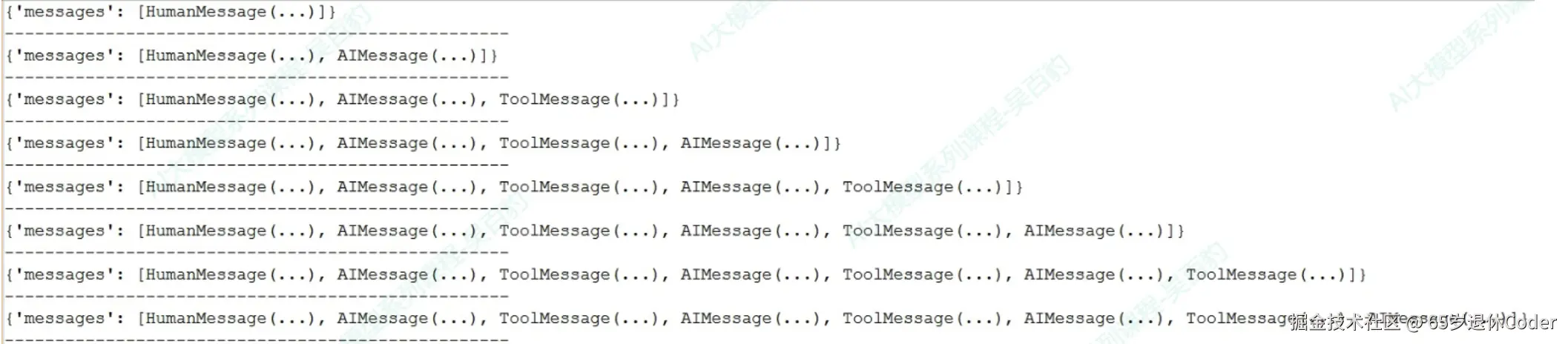
values 输出是循序渐进的,每一步都会带上之前所有的内容
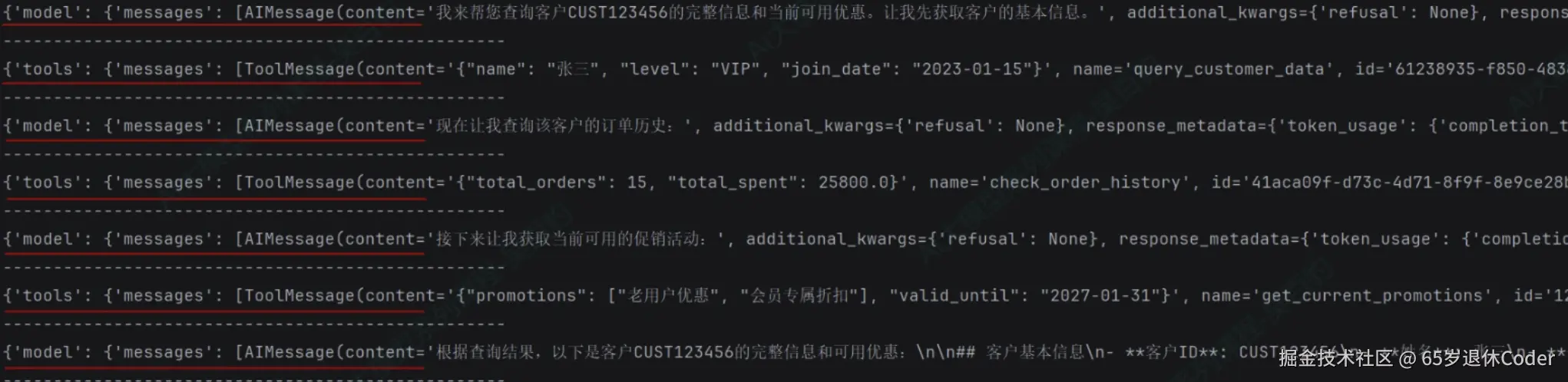
updates 默认值 ,每次输出只显示增量的变化,并且会在外层套一个对象告知是 model | tool
tasks 会带上的输入和对应错误消息
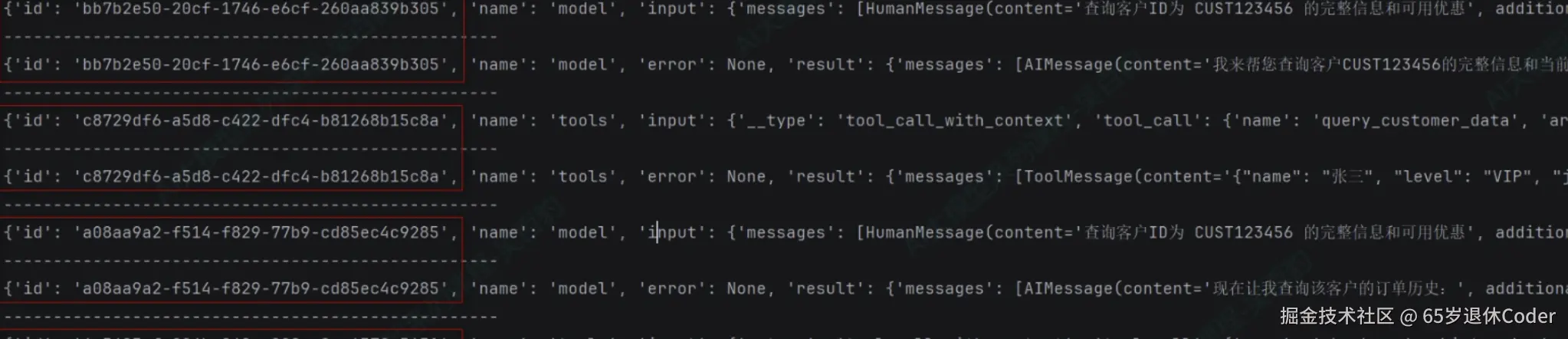
debug 会带上每次输出的步骤、时间、类型

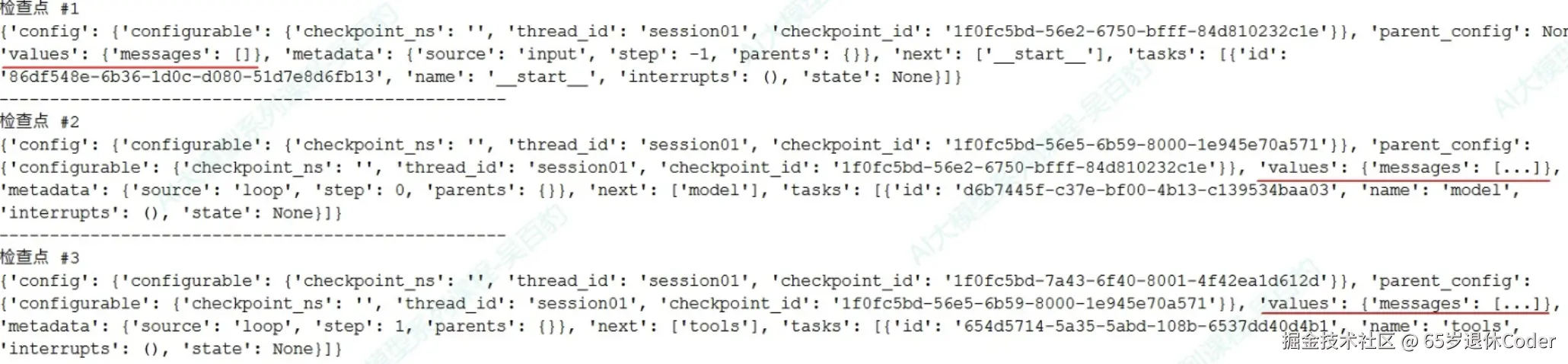
checkpoints 每次的输出都会把 messages 添加到相关的 value.messages 中。
py
from langgraph.checkpoint.memory import InMemorySaver

agent = creat_agent(
    model,
    checkpointer=InMemorySaver()
)

# 保证在同一个线程内,id 一致
config = {"configurable": {"thread_id": "1"}}

result = agent.stream(
    {"messages": [HumanMessage("你好,章鱼哥,要来一份蟹黄堡吗~")]},
    stream_mode="checkpoints",
    config=config
)