Cloudflare Workers 代理部署全流程
一、背景与动机
LLM-Switch 是一个 AI 模型供应商管理 App,核心诉求是:无论在什么平台/工具中使用 API Key,都能统一监控用量。
问题在于:
- Trae IDE、Claude Code、Cursor 等工具内置的 API 调用无法被本地应用直接监控
- 本地代理服务器(
proxy_server.dart)需要保持电脑开机运行,不够可靠 - 需要一个永不宕机的代理层来拦截和记录所有 API 请求
解决方案:将代理逻辑部署到 Cloudflare 的全球边缘节点(Workers),利用其免费额度实现零成本运维。
二、架构设计
#mermaid-svg-KmleJymDZp7s7xIR{font-family:"trebuchet ms",verdana,arial,sans-serif;font-size:16px;fill:#333;}@keyframes edge-animation-frame{from{stroke-dashoffset:0;}}@keyframes dash{to{stroke-dashoffset:0;}}#mermaid-svg-KmleJymDZp7s7xIR .edge-animation-slow{stroke-dasharray:9,5!important;stroke-dashoffset:900;animation:dash 50s linear infinite;stroke-linecap:round;}#mermaid-svg-KmleJymDZp7s7xIR .edge-animation-fast{stroke-dasharray:9,5!important;stroke-dashoffset:900;animation:dash 20s linear infinite;stroke-linecap:round;}#mermaid-svg-KmleJymDZp7s7xIR .error-icon{fill:#552222;}#mermaid-svg-KmleJymDZp7s7xIR .error-text{fill:#552222;stroke:#552222;}#mermaid-svg-KmleJymDZp7s7xIR .edge-thickness-normal{stroke-width:1px;}#mermaid-svg-KmleJymDZp7s7xIR .edge-thickness-thick{stroke-width:3.5px;}#mermaid-svg-KmleJymDZp7s7xIR .edge-pattern-solid{stroke-dasharray:0;}#mermaid-svg-KmleJymDZp7s7xIR .edge-thickness-invisible{stroke-width:0;fill:none;}#mermaid-svg-KmleJymDZp7s7xIR .edge-pattern-dashed{stroke-dasharray:3;}#mermaid-svg-KmleJymDZp7s7xIR .edge-pattern-dotted{stroke-dasharray:2;}#mermaid-svg-KmleJymDZp7s7xIR .marker{fill:#333333;stroke:#333333;}#mermaid-svg-KmleJymDZp7s7xIR .marker.cross{stroke:#333333;}#mermaid-svg-KmleJymDZp7s7xIR svg{font-family:"trebuchet ms",verdana,arial,sans-serif;font-size:16px;}#mermaid-svg-KmleJymDZp7s7xIR p{margin:0;}#mermaid-svg-KmleJymDZp7s7xIR .label{font-family:"trebuchet ms",verdana,arial,sans-serif;color:#333;}#mermaid-svg-KmleJymDZp7s7xIR .cluster-label text{fill:#333;}#mermaid-svg-KmleJymDZp7s7xIR .cluster-label span{color:#333;}#mermaid-svg-KmleJymDZp7s7xIR .cluster-label span p{background-color:transparent;}#mermaid-svg-KmleJymDZp7s7xIR .label text,#mermaid-svg-KmleJymDZp7s7xIR span{fill:#333;color:#333;}#mermaid-svg-KmleJymDZp7s7xIR .node rect,#mermaid-svg-KmleJymDZp7s7xIR .node circle,#mermaid-svg-KmleJymDZp7s7xIR .node ellipse,#mermaid-svg-KmleJymDZp7s7xIR .node polygon,#mermaid-svg-KmleJymDZp7s7xIR .node path{fill:#ECECFF;stroke:#9370DB;stroke-width:1px;}#mermaid-svg-KmleJymDZp7s7xIR .rough-node .label text,#mermaid-svg-KmleJymDZp7s7xIR .node .label text,#mermaid-svg-KmleJymDZp7s7xIR .image-shape .label,#mermaid-svg-KmleJymDZp7s7xIR .icon-shape .label{text-anchor:middle;}#mermaid-svg-KmleJymDZp7s7xIR .node .katex path{fill:#000;stroke:#000;stroke-width:1px;}#mermaid-svg-KmleJymDZp7s7xIR .rough-node .label,#mermaid-svg-KmleJymDZp7s7xIR .node .label,#mermaid-svg-KmleJymDZp7s7xIR .image-shape .label,#mermaid-svg-KmleJymDZp7s7xIR .icon-shape .label{text-align:center;}#mermaid-svg-KmleJymDZp7s7xIR .node.clickable{cursor:pointer;}#mermaid-svg-KmleJymDZp7s7xIR .root .anchor path{fill:#333333!important;stroke-width:0;stroke:#333333;}#mermaid-svg-KmleJymDZp7s7xIR .arrowheadPath{fill:#333333;}#mermaid-svg-KmleJymDZp7s7xIR .edgePath .path{stroke:#333333;stroke-width:2.0px;}#mermaid-svg-KmleJymDZp7s7xIR .flowchart-link{stroke:#333333;fill:none;}#mermaid-svg-KmleJymDZp7s7xIR .edgeLabel{background-color:rgba(232,232,232, 0.8);text-align:center;}#mermaid-svg-KmleJymDZp7s7xIR .edgeLabel p{background-color:rgba(232,232,232, 0.8);}#mermaid-svg-KmleJymDZp7s7xIR .edgeLabel rect{opacity:0.5;background-color:rgba(232,232,232, 0.8);fill:rgba(232,232,232, 0.8);}#mermaid-svg-KmleJymDZp7s7xIR .labelBkg{background-color:rgba(232, 232, 232, 0.5);}#mermaid-svg-KmleJymDZp7s7xIR .cluster rect{fill:#ffffde;stroke:#aaaa33;stroke-width:1px;}#mermaid-svg-KmleJymDZp7s7xIR .cluster text{fill:#333;}#mermaid-svg-KmleJymDZp7s7xIR .cluster span{color:#333;}#mermaid-svg-KmleJymDZp7s7xIR div.mermaidTooltip{position:absolute;text-align:center;max-width:200px;padding:2px;font-family:"trebuchet ms",verdana,arial,sans-serif;font-size:12px;background:hsl(80, 100%, 96.2745098039%);border:1px solid #aaaa33;border-radius:2px;pointer-events:none;z-index:100;}#mermaid-svg-KmleJymDZp7s7xIR .flowchartTitleText{text-anchor:middle;font-size:18px;fill:#333;}#mermaid-svg-KmleJymDZp7s7xIR rect.text{fill:none;stroke-width:0;}#mermaid-svg-KmleJymDZp7s7xIR .icon-shape,#mermaid-svg-KmleJymDZp7s7xIR .image-shape{background-color:rgba(232,232,232, 0.8);text-align:center;}#mermaid-svg-KmleJymDZp7s7xIR .icon-shape p,#mermaid-svg-KmleJymDZp7s7xIR .image-shape p{background-color:rgba(232,232,232, 0.8);padding:2px;}#mermaid-svg-KmleJymDZp7s7xIR .icon-shape .label rect,#mermaid-svg-KmleJymDZp7s7xIR .image-shape .label rect{opacity:0.5;background-color:rgba(232,232,232, 0.8);fill:rgba(232,232,232, 0.8);}#mermaid-svg-KmleJymDZp7s7xIR .label-icon{display:inline-block;height:1em;overflow:visible;vertical-align:-0.125em;}#mermaid-svg-KmleJymDZp7s7xIR .node .label-icon path{fill:currentColor;stroke:revert;stroke-width:revert;}#mermaid-svg-KmleJymDZp7s7xIR :root{--mermaid-font-family:"trebuchet ms",verdana,arial,sans-serif;} Base URL
转发请求
转发请求
SSE / JSON 响应
ctx.waitUntil()
异步写入用量
GET /proxy/usage
查询用量
返回用量数据
更新仪表盘
外部工具
Trae / Claude Code / Cursor
Cloudflare Worker
llm-switch-proxy.xxx.workers.dev
真实 API
DeepSeek / GPT-4 / Claude-3
D1 数据库
SQLite (proxy_request_logs)
Flutter App
定时轮询 /proxy/usage
LLM-Switch App
仪表盘 + 用量记录
核心接口:
| 端点 | 方法 | 功能 |
|---|---|---|
/proxy/health |
GET | 健康检查 + D1 连接状态 |
/proxy/usage?since=&limit= |
GET | 拉取用量记录(增量) |
/proxy/usage |
DELETE | 清空所有记录 |
| 其他所有路径 | ANY | 转发到目标 API |
三、项目文件结构
text
llm_switch/cf-proxy/
├── wrangler.toml        # Wrangler 配置(Worker 名/D1 绑定/环境变量)
├── package.json          # Node.js 依赖(wrangler)
├── schema.sql            # D1 数据库建表语句
└── src/
    └── index.js          # Worker 核心逻辑(~380 行)
wrangler.toml
toml
name = "llm-switch-proxy"
main = "src/index.js"
compatibility_date = "2024-12-01"

[[d1_databases]]
binding = "DB"
database_name = "llm-switch-usage"
database_id = "e030a225-3868-4084-8cb4-2120da9e501a"

[vars]
TARGET_BASE_URL = "https://api.deepseek.com"
schema.sql
sql
CREATE TABLE IF NOT EXISTS proxy_request_logs (
    id              TEXT PRIMARY KEY,
    provider_name   TEXT NOT NULL DEFAULT 'Cloudflare代理',
    model_name      TEXT NOT NULL DEFAULT 'unknown',
    app_type        TEXT NOT NULL DEFAULT 'llm',
    input_tokens    INTEGER NOT NULL DEFAULT 0,
    output_tokens   INTEGER NOT NULL DEFAULT 0,
    cost            REAL NOT NULL DEFAULT 0,
    latency_ms      INTEGER NOT NULL DEFAULT 0,
    status_code     INTEGER NOT NULL,
    error_message   TEXT,
    created_at      INTEGER NOT NULL
);
index.js 核心逻辑(~380 行)
主要模块:
- CORS 处理 ---
Access-Control-Allow-Origin: *,所有接口支持跨域 - 费用估算 --- 根据模型名称(deepseek/gpt-4/claude-3 等)自动计算
$input/1M * 输入 + $output/1M * 输出 - 请求转发 --- 剥离 Cloudflare 特定头(
cf-connecting-ip等),转发到TARGET_BASE_URL - 流式响应处理 --- 对 SSE 流式请求,tee 流读取
[DONE]前的最后一条 data 帧解析usage - 非流式响应处理 --- 解析
response.json().usage获取 prompt_tokens/completion_tokens - D1 写入 ---
ctx.waitUntil()异步写入,不阻塞响应 - 用量查询 --- 支持
?since=ISO时间&limit=N增量查询
四、部署步骤
4.1 前置准备
- Cloudflare 账号
- Node.js 22.x + npm 10.x
- API Token(权限:Workers Scripts 编辑、D1 编辑、Account Settings 读取)
Cloudflare 登录地址:https://dash.cloudflare.com/login
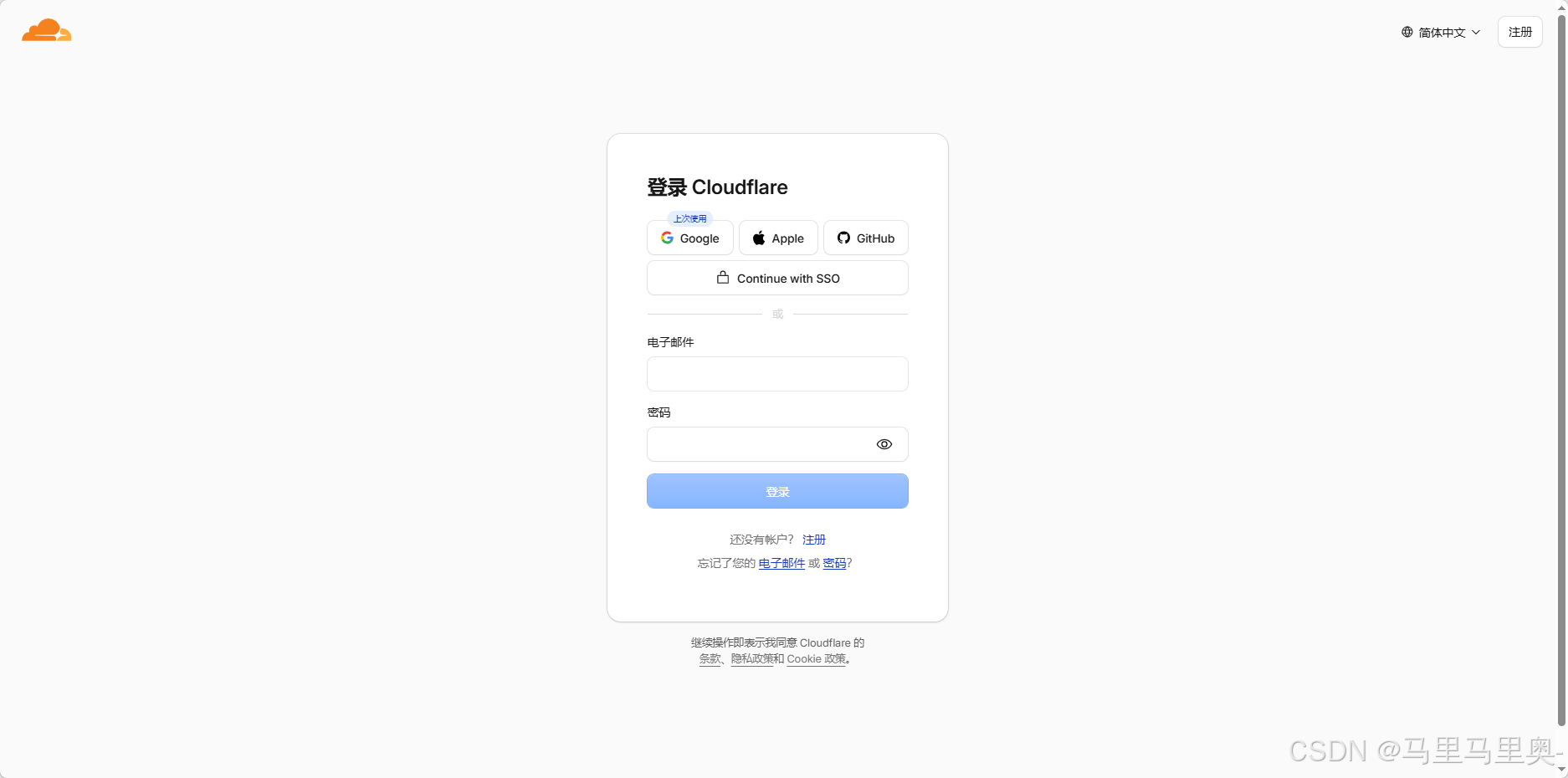
三种登录方式,一般选取谷歌进行登录。
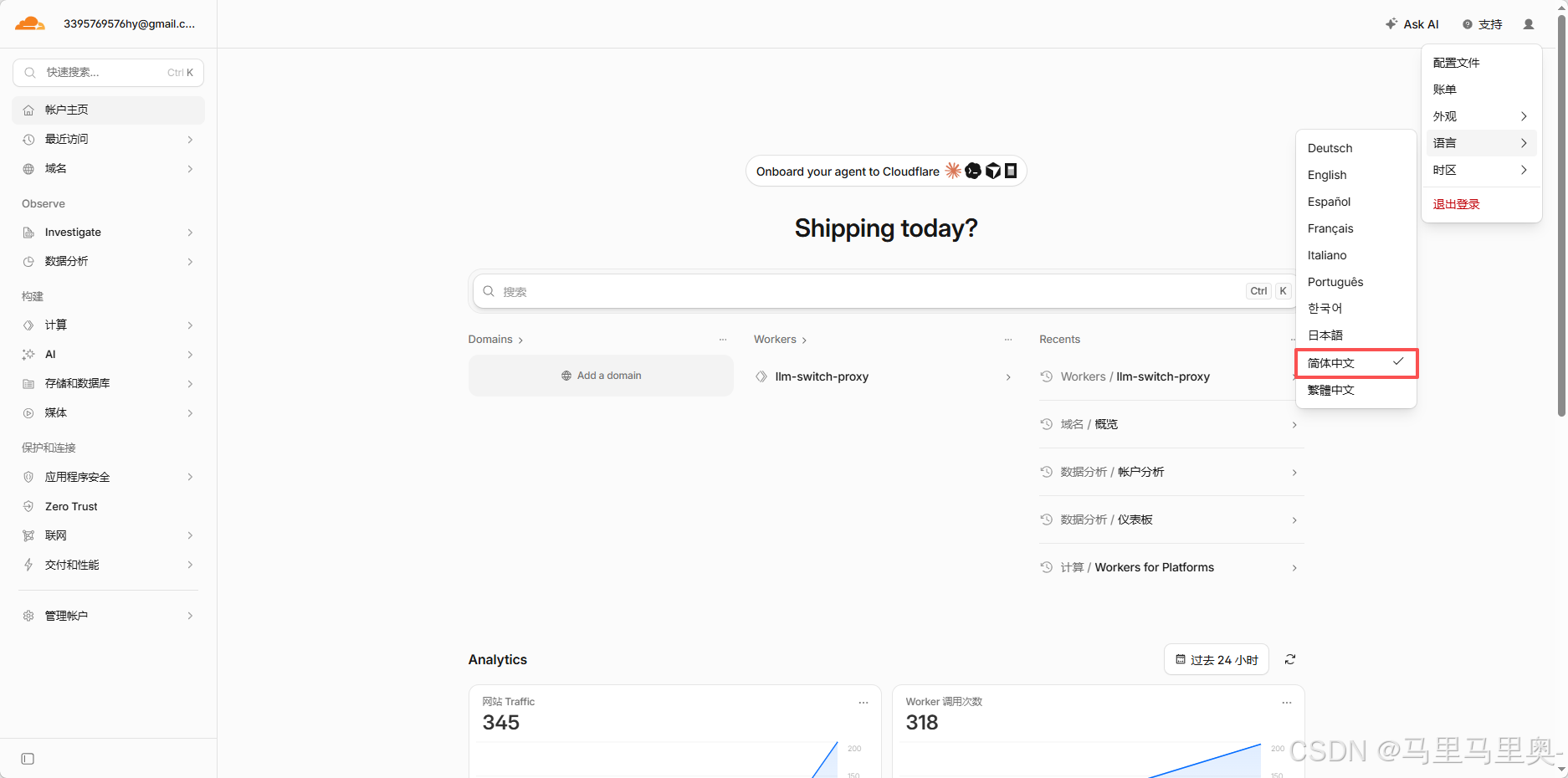
这里可以进行语言的切换。
4.2 API Token 权限配置
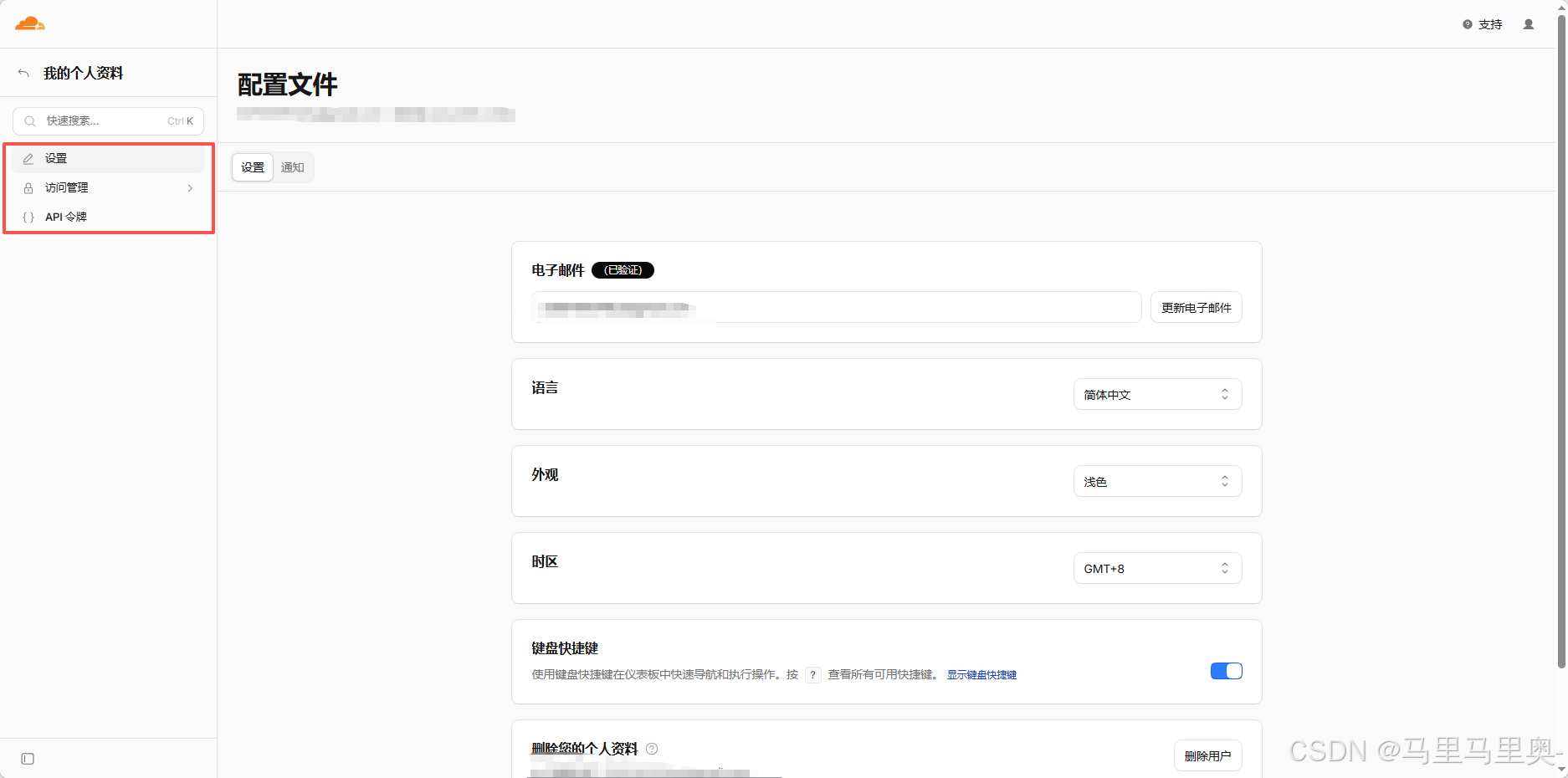
在 Cloudflare 控制台 → 个人资料 → API 令牌 → 创建令牌 → 自定义,
点击右上角的图像可以看到,配置文件的这个选项。然后进行以下的操作:
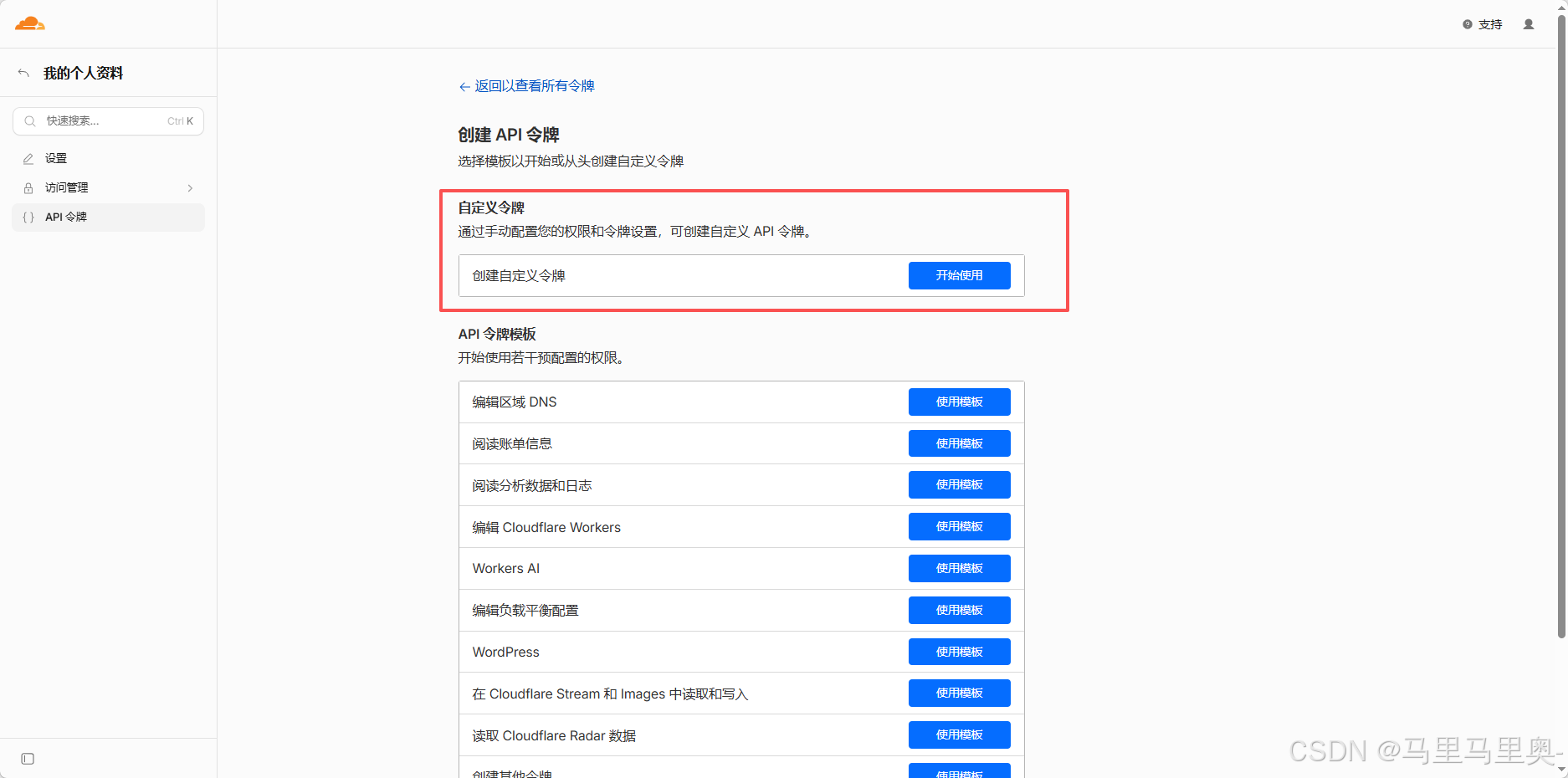
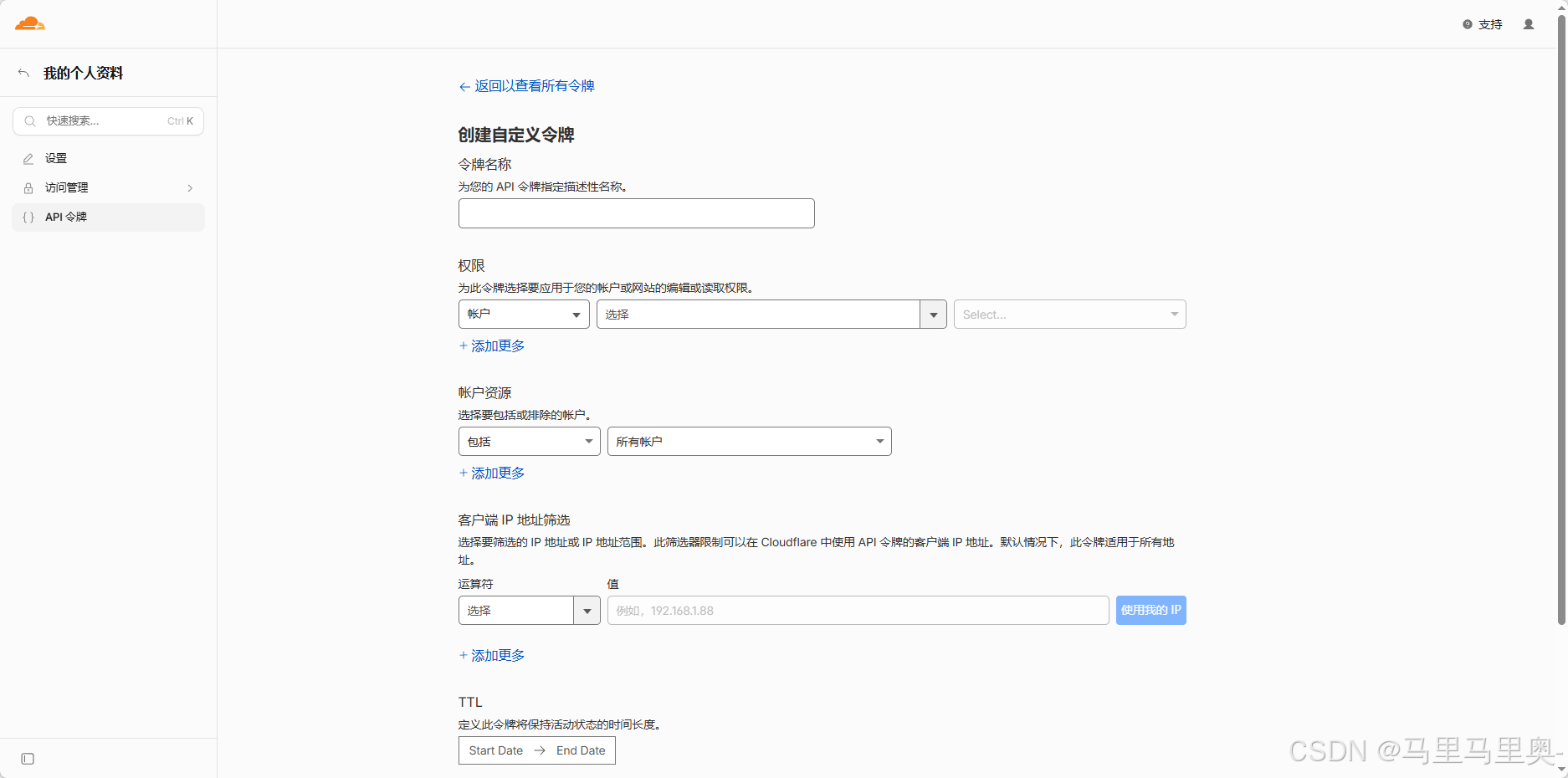
添加三个权限:
| 权限类型 | 级别 | 资源 |
|---|---|---|
| Workers Scripts | 编辑 | 包括 - 所有区域 |
| D1 | 编辑 | 包括 - 所有区域 |
| Account Settings | 读取 | 包括 - 所有区域 |
Token 格式:cfut_xxx...(只显示一次,立即保存)
4.3 安装 Wrangler
bash
cd llm_switch/cf-proxy
npm install
4.4 注册 workers.dev 子域名
每个 Cloudflare 账户需要注册一次。可通过 Cloudflare Dashboard 或 API:
powershell
# 查询当前子域名
Invoke-RestMethod -Uri "https://api.cloudflare.com/client/v4/accounts/{account_id}/workers/subdomain" `
  -Method GET -Headers @{"Authorization"="Bearer $TOKEN"}
# 返回: { "subdomain": "3395769576hy" }
4.5 创建 D1 数据库
bash
npx wrangler d1 create llm-switch-usage
# 输出: database_id = "e030a225xxxxxxx501a"
将返回的 database_id 填入 wrangler.toml。
4.6 建表(必须先远程执行)
bash
npx wrangler d1 execute llm-switch-usage --remote --file=schema.sql注意:必须加
--remote,否则只在本地执行。
4.7 部署 Worker
由于 Wrangler CLI 在某些 Windows 环境下存在交互式认证问题(卡在 "Getting User settings..."),改用 Cloudflare REST API 直接上传。
创建 deploy.js(部署后已删除):
javascript
const fs = require('fs');
const https = require('https');

const ACCOUNT_ID = '30ad86xxxxxxxx';
const API_TOKEN = 'cfuxxxxx';
const SCRIPT_NAME = 'llm-switch-proxy';
const D1_ID = 'exxxxxxxxxxxxx';

const metadata = JSON.stringify({
  main_module: 'index.js',
  bindings: [
    { type: 'd1', name: 'DB', database_id: D1_ID }  // 关键:type 必须是 "d1"
  ],
  vars: { TARGET_BASE_URL: 'https://api.deepseek.com' },
  compatibility_date: '2024-12-01',
});

// 构建 multipart/form-data 上传
// PUT /client/v4/accounts/{id}/workers/scripts/{name}
4.8 验证部署
bash
# 健康检查
curl https://llm-switch-proxy.3395769576hy.workers.dev/proxy/health
# {"status":"ok","target":"https://api.deepseek.com","platform":"cloudflare","records":1}

# 用量查询
curl https://llm-switch-proxy.3395769576hy.workers.dev/proxy/usage
# [{"id":"...","providerName":"Cloudflare代理","modelName":"deepseek-chat",...}]
五、Flutter App 端适配
5.1 问题:Web 平台跨域超时
Flutter Web 的 package:http 底层使用 XMLHttpRequest,对 Cloudflare Worker 的 HTTPS 跨域请求出现 TimeoutException(即使 Worker 已设置 CORS)。
5.2 解决方案:条件导出 + dart:html
text
lib/services/
├── proxy_service.dart       # 条件导出入口
├── proxy_service_io.dart    # 移动端:http 包
└── proxy_service_web.dart   # Web 端:dart:html HttpRequest
proxy_service.dart 核心一行:
dart
export 'proxy_service_io.dart' if (dart.library.html) 'proxy_service_web.dart';Web 版使用 dart:html 的 HttpRequest.request(),绕过 http 包的跨域问题。
六、关键踩坑记录
| 坑 | 现象 | 原因 | 解决 |
|---|---|---|---|
| D1 绑定类型错误 | binding DB has an unknown type d1_database | API metadata 中 type 字段值不对 | 改为 "type": "d1",字段用 database_id 而非 id |
| D1 绑定不生效 | /proxy/usage 返回 env.DB is undefined |
d1_databases 顶层字段 API 不支持 |
将 D1 绑定放入 bindings 数组,type 为 "d1" |
| Wrangler 卡认证 | 停在 "Getting User settings..." | Windows xdg.config 日志目录权限 + 交互式 OAuth | 改用 REST API 直接上传 Worker |
| Schema 仅本地执行 | 部署后 Worker 查询失败 | wrangler d1 execute 默认 --local |
加 --remote 标志 |
| 端口占用 | SocketException: 端口只允许使用一次 |
多个 flutter run 残留进程 |
Get-NetTCPConnection 查进程 → Stop-Process |
_languageCode 私有访问 |
Flutter 编译错误 | 私有字段跨类访问 | 改用公开 getter languageCode |
| 子域名未注册 | You need to register a workers.dev subdomain | 账户首次使用 Workers | API 调用或 Dashboard 注册一次 |
七、使用方式
- 在 LLM-Switch App → 设置 → 代理监控 → 输入
https://llm-switch-proxy.3xxxxxxxxxhy.workers.dev→ 连接 - 将外部工具(Claude Code / Cursor / 自定义应用)的 Base URL 改为上述地址
- App 每 30 秒自动拉取最新用量,仪表盘实时更新
八、扩展性
- 多模型支持 :修改
TARGET_BASE_URL或根据请求路由动态判断目标 API - 密钥禁用 :Worker 端暂未实现
/proxy/keys/disable,可后续添加 - 用量保护 :可添加
USAGE_TOKEN环境变量保护查询接口 - 成本优化:Worker 免费额度 10 万次/天,D1 免费 5GB 存储,日常使用足够