摘要:介绍 Grid、GridLayout 和 Flow 三种布局的用法,帮助你根据是否需要跨行跨列、自适应大小和自动换行选择合适的方案。
当线性布局满足不了二维排列需求时,就需要用到网格和流式布局。Grid 适合固定大小的均匀网格,GridLayout 支持跨行跨列和自适应,Flow 则能根据容器宽度自动换行。这三个组件看着相似,实际应用场景差别很大。
三种二维布局总览
| 组件 | 特点 | 适用场景 |
|---|---|---|
| Grid | 固定行列、固定子项大小 | 数字键盘、图标矩阵 |
| GridLayout | 支持跨行跨列、自适应 | 复杂表单、Dashboard |
| Flow | 自动换行、方向流式 | 标签云、按钮组、关键词 |
Grid 与 GridLayout
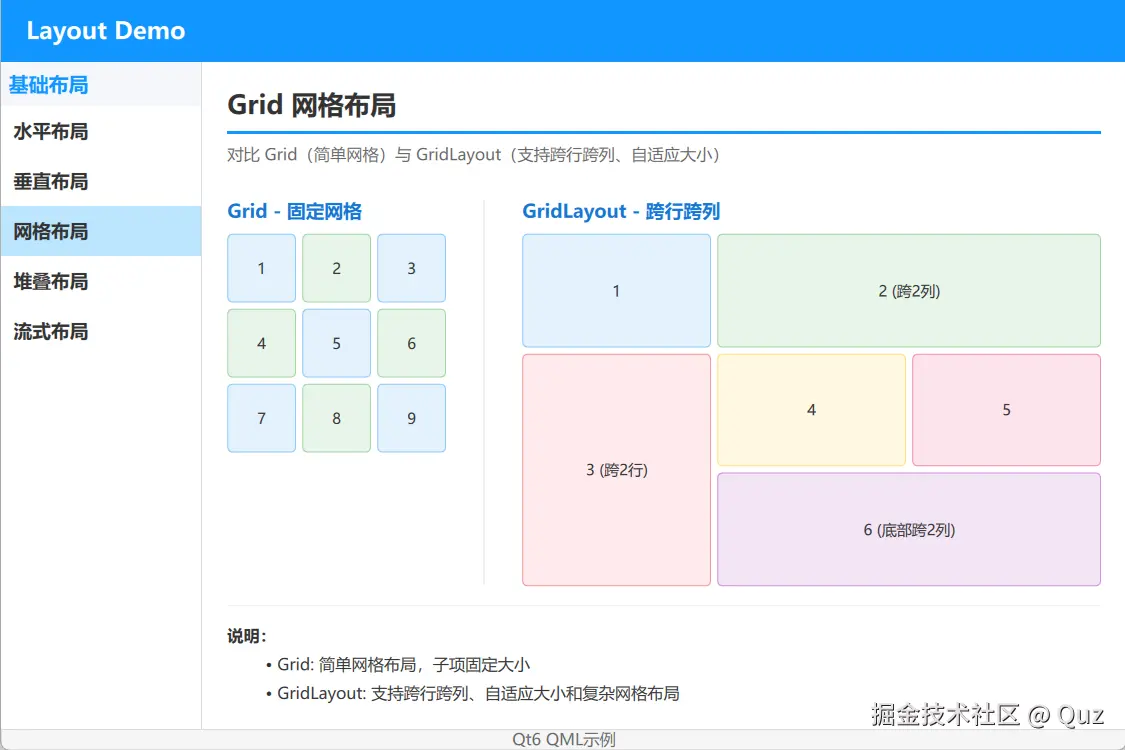
这个 demo 左侧用 Grid 做固定 3x3 网格,右侧用 GridLayout 演示跨列、跨行和自适应填充。
演示代码
qml
import QtQuick
import QtQuick.Layouts

FadeInAnimation {
    ColumnLayout {
        anchors.fill: parent
        anchors.margins: 20
        spacing: 15

        // ... 省略标题组件 TitleSeparator ...

        RowLayout {
            Layout.fillWidth: true
            Layout.fillHeight: true
            spacing: 30

            // Grid 示例 - 固定网格
            ColumnLayout {
                spacing: 8
                Layout.alignment: Qt.AlignTop

                Text {
                    text: "Grid - 固定网格"
                    font.pointSize: 11
                    font.bold: true
                    color: "#1976D2"
                }

                Grid {
                    columns: 3
                    spacing: 5

                    Repeater {
                        model: 9
                        Rectangle {
                            width: 55; height: 55
                            color: (index % 2 === 0) ? "#e3f2fd" : "#e8f5e9"
                            border.color: (index % 2 === 0) ? "#90CAF9" : "#A5D6A7"
                            radius: 4
                            Text { anchors.centerIn: parent; text: (index + 1); color: "#333" }
                        }
                    }
                }
            }

            // 分隔线
            Rectangle {
                Layout.fillHeight: true
                width: 1
                color: "#eee"
            }

            // GridLayout 示例 - 自适应网格
            ColumnLayout {
                spacing: 8
                Layout.fillWidth: true
                Layout.fillHeight: true

                Text {
                    text: "GridLayout - 跨行跨列"
                    font.pointSize: 11
                    font.bold: true
                    color: "#1976D2"
                }

                GridLayout {
                    Layout.fillWidth: true
                    Layout.fillHeight: true
                    columns: 3
                    rowSpacing: 5
                    columnSpacing: 5

                    Rectangle {
                        Layout.column: 0; Layout.row: 0
                        Layout.fillWidth: true; Layout.fillHeight: true
                        color: "#e3f2fd"; border.color: "#90CAF9"; radius: 4
                        Text { anchors.centerIn: parent; text: "1"; color: "#333" }
                    }
                    Rectangle {
                        Layout.column: 1; Layout.row: 0; Layout.columnSpan: 2
                        Layout.fillWidth: true; Layout.fillHeight: true
                        color: "#e8f5e9"; border.color: "#A5D6A7"; radius: 4
                        Text { anchors.centerIn: parent; text: "2 (跨2列)"; color: "#333" }
                    }
                    Rectangle {
                        Layout.column: 0; Layout.row: 1; Layout.rowSpan: 2
                        Layout.fillWidth: true; Layout.fillHeight: true
                        color: "#ffebee"; border.color: "#EF9A9A"; radius: 4
                        Text { anchors.centerIn: parent; text: "3 (跨2行)"; color: "#333" }
                    }
                    Rectangle {
                        Layout.column: 1; Layout.row: 1
                        Layout.fillWidth: true; Layout.fillHeight: true
                        color: "#fff8e1"; border.color: "#FFE082"; radius: 4
                        Text { anchors.centerIn: parent; text: "4"; color: "#333" }
                    }
                    Rectangle {
                        Layout.column: 2; Layout.row: 1
                        Layout.fillWidth: true; Layout.fillHeight: true
                        color: "#fce4ec"; border.color: "#F48FB1"; radius: 4
                        Text { anchors.centerIn: parent; text: "5"; color: "#333" }
                    }
                    Rectangle {
                        Layout.column: 1; Layout.row: 2; Layout.columnSpan: 2
                        Layout.fillWidth: true; Layout.fillHeight: true
                        color: "#f3e5f5"; border.color: "#CE93D8"; radius: 4
                        Text { anchors.centerIn: parent; text: "6 (底部跨2列)"; color: "#333" }
                    }
                }
            }
        }

        // 说明
        Note {
            text: "**说明:**\n- Grid: 简单网格布局,子项固定大小\n- GridLayout: 支持跨行跨列、自适应大小和复杂网格布局"
        }
    }
}
关键逻辑解析
Grid:通过columns或rows控制行列,子项用固定width/heightGridLayout:子项用Layout.row/Layout.column定位,用Layout.rowSpan/Layout.columnSpan跨行跨列GridLayout配合Layout.fillWidth/Layout.fillHeight可实现单元格自适应
适用场景
Grid 适合计算器键盘、九宫格图标、固定尺寸的缩略图矩阵。GridLayout 适合复杂表单、Dashboard 卡片、需要某个单元格跨列的详情页。
注意点
GridLayout 的行列索引从 0 开始。如果子项的行列设置冲突或缺失,布局可能不符合预期。建议每个子项都显式设置 Layout.row 和 Layout.column,避免依赖自动排列。
Flow 流式布局
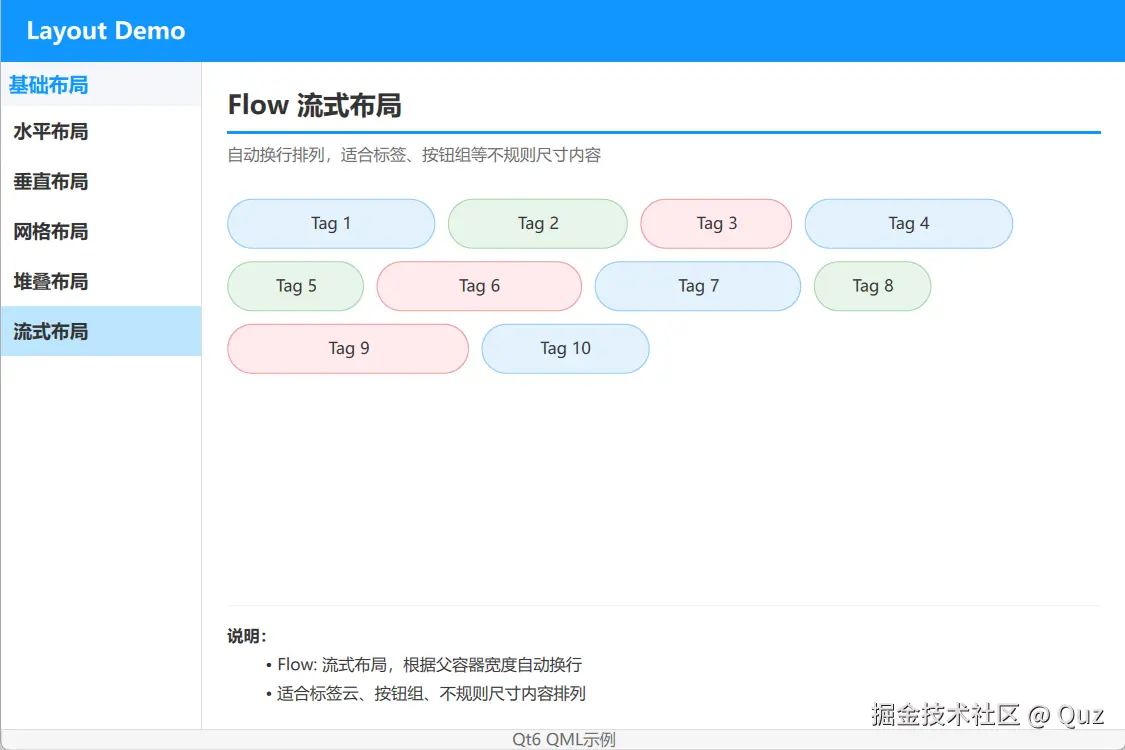
这个 demo 用 Flow 展示一组宽度随机的标签,容器宽度变化时自动换行。
演示代码
qml
import QtQuick
import QtQuick.Layouts

FadeInAnimation {
    ColumnLayout {
        anchors.fill: parent
        anchors.margins: 20
        spacing: 15

        // ... 省略标题组件 TitleSeparator ...

        // Flow 布局示例
        Flow {
            spacing: 10
            Layout.fillWidth: true
            Layout.fillHeight: true

            Repeater {
                model: 10
                Rectangle {
                    width: Math.random() * 120 + 80
                    height: 40
                    color: ["#e3f2fd", "#e8f5e9", "#ffebee"][index % 3]
                    border.color: ["#90CAF9", "#A5D6A7", "#EF9A9A"][index % 3]
                    radius: 20

                    Text {
                        anchors.centerIn: parent
                        text: "Tag " + (index + 1)
                        font.pointSize: 10
                        color: "#333"
                    }
                }
            }
        }

        // 说明
        Note {
            text: "**说明:**\n- Flow: 流式布局,根据父容器宽度自动换行\n- 适合标签云、按钮组、不规则尺寸内容排列"
        }
    }
}
关键逻辑解析
Flow默认按从左到右、从上到下的顺序排列子项- 子项总宽度超过容器宽度时自动换行
spacing控制子项间距,但实际排列可能因子项宽度不同而不均匀
适用场景
Flow 适合标签云、筛选条件、历史搜索词、动态按钮组。只要内容尺寸不规则且需要自动换行,就应该考虑 Flow。
注意点
Flow 里的子项如果高度不一致,会导致行高不统一。建议让同类子项保持相同高度,或者用 Layout 辅助对齐。另外,Flow 不会自动滚动,内容过多时需要配合 Flickable 或 ScrollView 使用。
选型建议
| 需求 | 推荐组件 | 理由 |
|---|---|---|
| 固定大小网格 | Grid | 简单直接,无布局约束 |
| 跨行跨列或自适应 | GridLayout | 支持复杂二维布局 |
| 内容不规则且自动换行 | Flow | 按宽度自动换行 |
| 二维排列+可滚动 | Grid/Flow + ScrollView | 原生不支持滚动,需要外套 |
运行验证
- Qt Creator 打开
qml_layout/CMakeLists.txt - 按
Ctrl+R运行 - 在左侧导航切换网格布局和流式布局
- 拖动窗口宽度,观察 Flow 的自动换行效果
扩展复用方向
- 用
GridLayout做复杂表单:左侧标签、右侧输入框、底部跨列按钮 - 用
Flow做标签云,点击标签可删除或筛选 - 用
Grid+Repeater做图片缩略图矩阵 - 给
Flow外套Flickable实现标签云滚动
小结
Grid、GridLayout、Flow 分别对应三种二维排列需求。Grid 做固定网格,GridLayout 做复杂自适应网格,Flow 做自动换行的流式内容。选择时先看子项尺寸是否固定,再看是否需要跨行跨列,最后看是否需要自动换行。掌握这三个组件,就能处理大部分二维布局场景。
已验证环境:
- Qt 版本:Qt 6.8.2、Qt 6.11.1
- 操作系统:Windows 11
- GitHub:QML-Minimal-Demos/qml_layout