效果图
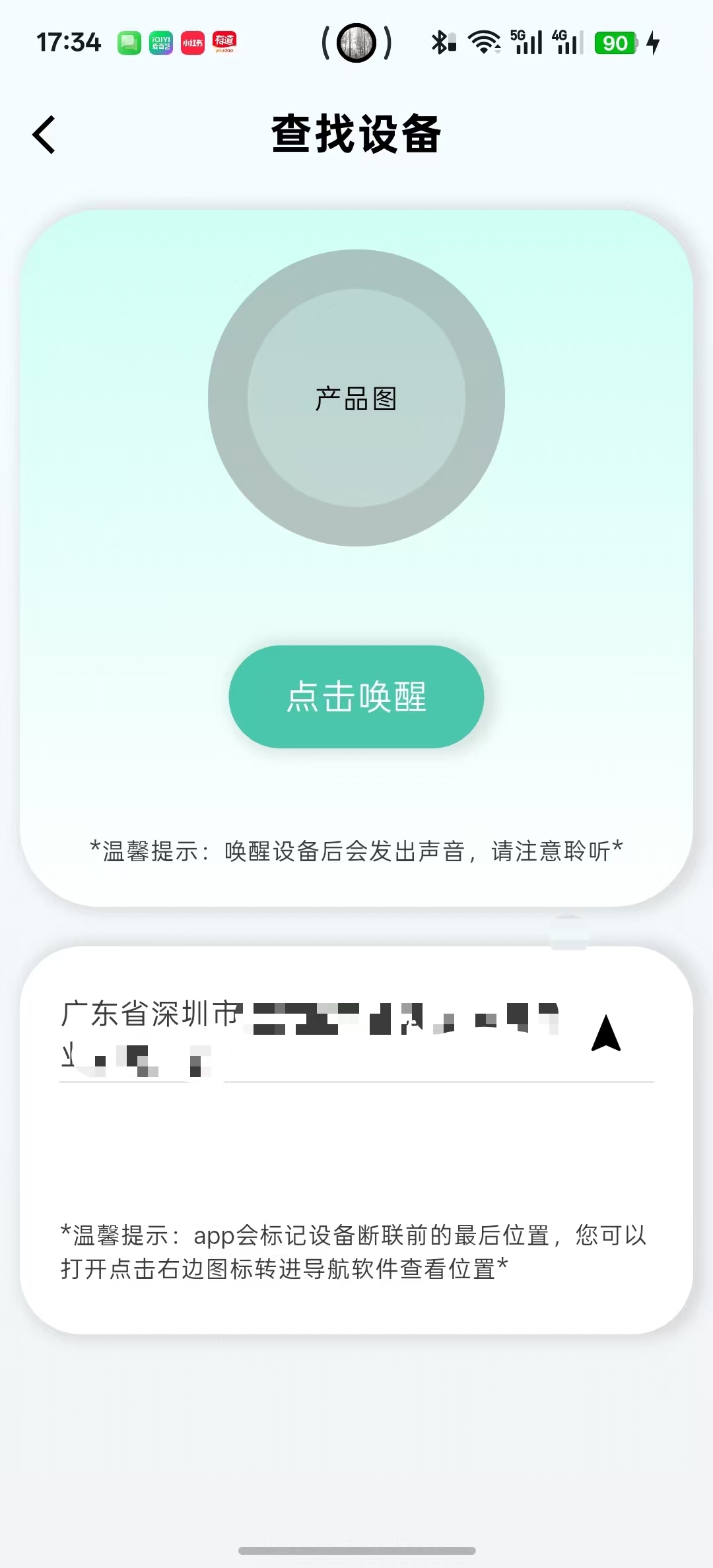
功能:主要通过使用外部库实现GPS定位
实现步骤
1.引入外部库
Dart
  geolocator: ^14.0.2  # GPS 定位
  geocoding: ^2.1.1 #经纬度转详细地址
2.添加权限
Dart
    <uses-permission android:name="android.permission.ACCESS_FINE_LOCATION" />
    <uses-permission android:name="android.permission.ACCESS_COARSE_LOCATION" />
3.定义定位服务类LocationService
Dart
import 'dart:async';
import 'package:geolocator/geolocator.dart';


class LocationService {

  //单例模式
  static final LocationService _instance = LocationService._internal();
  factory LocationService() => _instance;
  LocationService._internal();

  StreamSubscription<Position>? _positionStream; //位置变化流订阅

  bool _isBusy = false; //防止并发

  Position? _currentPosition; //缓存最新位置

  // 位置更新回调
  Function(Position position)? onLocationUpdated;
  Function(String error)? onError;

  //===========================检查并请求定位权限============================
  Future<bool> checkAndRequestPermission() async {
    try {

      // 1. 检查 GPS 是否开启
      bool serviceEnabled = await Geolocator.isLocationServiceEnabled();
      if (!serviceEnabled) {
        // Log.d("⚠️ GPS 未开启");
        onError?.call("请开启 GPS 定位");
        return false;
      }

      // 2. 检查权限状态
      LocationPermission permission = await Geolocator.checkPermission();
      if (permission == LocationPermission.denied) { //如果被拒绝,请求权限
        permission = await Geolocator.requestPermission();
        if (permission == LocationPermission.denied) {
          // Log.d("⚠️ 定位权限被拒绝");
          onError?.call("定位权限被拒绝");
          return false;
        }
      }

      //检查是否永久被拒绝
      if (permission == LocationPermission.deniedForever) {
        // Log.d("⚠️ 定位权限被永久拒绝");
        onError?.call("请在设置中开启定位权限");
        return false;
      }

      return true;
    } catch (e) {
      // Log.d("❌ 权限检查失败: $e");
      onError?.call("权限检查失败");
      return false;
    }
  }

  //======================获取当前位置(单次)===============================
  Future<Position?> getCurrentLocation() async {
    if (_isBusy) return null;

    _isBusy = true;
    try {
      //检查权限
      bool hasPermission = await checkAndRequestPermission();
      if (!hasPermission) {
        _isBusy = false;
        return null;
      }

      //获取位置
      Position position = await Geolocator.getCurrentPosition(
        desiredAccuracy: LocationAccuracy.high,
      );

      _currentPosition = position;
      // Log.d("📍 获取位置成功: ${position.latitude}, ${position.longitude}");
      return position;

    } catch (e) {
      // Log.d("❌ 获取位置失败: $e");
      onError?.call("获取位置失败");
      return null;
    } finally {
      _isBusy = false;
    }
  }

  //========================持续监听位置变化================================
  void startListening({
    Duration interval = const Duration(seconds: 5), //更新间隔
    int distanceFilter = 10, // 移动10米才更新
  }) {

    //如果有旧监听,先取消
    if (_positionStream != null) {
      // Log.d("⚠️ 已有位置监听,先取消");
      stopListening();
    }

    // 先检查权限
    checkAndRequestPermission().then((hasPermission) {
      if (!hasPermission) return;

      //配置定位参数
      final locationSettings = LocationSettings(
        accuracy: LocationAccuracy.high,
        distanceFilter: distanceFilter,  // 移动10米才更新
      );

      //创建监听
      _positionStream = Geolocator.getPositionStream(
        locationSettings: locationSettings,
      ).listen(

        //位置更新回调
            (Position position) {
          _currentPosition = position;
          // Log.d("📍 位置更新: ${position.latitude}, ${position.longitude}");
          onLocationUpdated?.call(position); //通知外部
        },

        //错误回调
        onError: (error) {
          // Log.d("❌ 位置监听错误: $error");
          onError?.call("位置监听出错");
        },
      );
    });
  }

  /// 停止监听
  void stopListening() {
    _positionStream?.cancel();
    _positionStream = null;
    // Log.d("🛑 位置监听已停止");
  }

  /// 获取缓存的位置
  Position? get currentPosition => _currentPosition;

  /// 释放资源
  void dispose() {
    stopListening();
  }
}
4.定义UI类,使用定位服务类
Dart
import 'package:flutter/cupertino.dart';
import 'package:flutter/material.dart';
import 'package:geocoding/geocoding.dart';
import 'package:geolocator/geolocator.dart';

import 'location_service.dart';


/// 设备查找页面
class DeviceFindPage extends StatefulWidget {
  const DeviceFindPage({super.key});

  @override
  State<StatefulWidget> createState() => _DeviceFindPageState();
}

class _DeviceFindPageState extends State<DeviceFindPage> {

  // ============ 定位相关 ============
  final LocationService _locationService = LocationService(); //定位服务实例
  Position? _currentPosition; //当前位置
  String _currentAddress = ""; //当前地址
  bool _isLoadingLocation = false; //加载状态
  bool _hasLocationPermission = false; //权限状态


  // 文本资源
  String findDevice = "查找设备";
  String tapRing = "点击唤醒";
  String tapRingTips = "温馨提示:唤醒设备后会发出声音,请注意聆听";
  String addressTips = "温馨提示:app会标记设备断联前的最后位置,您可以打开点击右边图标转进导航软件查看位置";

  @override
  void initState() {
    super.initState();

    // 设置定位回调
    _setupLocationCallbacks();

    // 页面加载时自动获取位置
    WidgetsBinding.instance.addPostFrameCallback((_) {
      _getLocationAndAddress();
    });
  }

  @override
  void dispose() {
    // 释放定位资源
    _locationService.dispose();
    super.dispose();
  }

  //===========================设置定位回调================================
  void _setupLocationCallbacks() {
    _locationService.onLocationUpdated = (Position position) {
      if (mounted) {
        setState(() {
          _currentPosition = position;
          _hasLocationPermission = true;
        });
        // 位置更新时重新获取地址
        _getAddressFromLatLng(position.latitude, position.longitude);
      }
    };

    _locationService.onError = (String error) {
      // Log.d("定位错误: $error");
      if (mounted) {
        setState(() {
          _currentAddress = "定位失败: $error";
          _isLoadingLocation = false;
        });
        // 显示提示
        ScaffoldMessenger.of(context).showSnackBar(
          SnackBar(
            content: Text("定位错误: $error"),
            backgroundColor: Colors.red,
          ),
        );
      }
    };
  }

  //========================获取位置和地址================================
  Future<void> _getLocationAndAddress() async {
    if (_isLoadingLocation) return;

    setState(() {
      _isLoadingLocation = true;
      _currentAddress = "正在获取位置...";
    });

    try {
      // 获取单次定位
      Position? position = await _locationService.getCurrentLocation();

      if (position != null && mounted) {
        setState(() {
          _currentPosition = position;
          _hasLocationPermission = true;
        });
        // 获取地址
        await _getAddressFromLatLng(position.latitude, position.longitude);
      }
    } catch (e) {
      // Log.d("❌ 获取定位失败: $e");
      if (mounted) {
        setState(() {
          _currentAddress = "获取位置失败,请检查GPS设置";
        });
      }
    } finally {
      if (mounted) {
        setState(() {
          _isLoadingLocation = false;
        });
      }
    }
  }

  //============================经纬度转地址================================
  Future<void> _getAddressFromLatLng(double latitude, double longitude) async {
    try {

      //地址解析
      List<Placemark> placemarks = await placemarkFromCoordinates(
        latitude,
        longitude,
        localeIdentifier: 'zh_CN', // 中文显示
      );

      if (placemarks.isNotEmpty && mounted) {
        Placemark place = placemarks[0];

        // 构建详细地址
        List<String> addressParts = [];

        // //国家
        // if (place.country != null && place.country!.isNotEmpty) {
        //   addressParts.add(place.country!);
        // }
        //省份
        // if (place.administrativeArea != null && place.administrativeArea!.isNotEmpty) {
        //   Log.d("⭐administrativeArea当前得到的值为${place.administrativeArea!}");
        //   addressParts.add(place.administrativeArea!);
        // }
        // //城市
        // if (place.locality != null && place.locality!.isNotEmpty) {
        //   Log.d("⭐locality当前得到的值为${place.locality!}");
        //   addressParts.add(place.locality!);
        // }
        // //区县
        // if (place.subLocality != null && place.subLocality!.isNotEmpty) {
        //   Log.d("⭐subLocality当前得到的值为${place.subLocality!}");
        //   addressParts.add(place.subLocality!);
        // }
        //街道
        if (place.street != null && place.street!.isNotEmpty) {
          // Log.d("⭐street当前得到的值为${place.street!}");
          addressParts.add(place.street!);
        }

        String fullAddress = addressParts.join(' ');

        // 如果地址为空,使用经纬度
        if (fullAddress.isEmpty) {
          fullAddress = "纬度: $latitude, 经度: $longitude";
        }

        setState(() {
          _currentAddress = fullAddress;
          _isLoadingLocation = false;
        });

        // Log.d("📍 当前地址: $fullAddress");

        // 如果需要上传到服务器,在这里调用
        // await YourHttpService.uploadLocation(latitude, longitude, fullAddress);
      }
    } catch (e) {
      // Log.d("❌ 获取地址失败: $e");
      if (mounted) {
        setState(() {
          _currentAddress = "获取地址失败 (经纬度: $latitude, $longitude)";
          _isLoadingLocation = false;
        });
      }
    }
  }


  @override
  Widget build(BuildContext context) {
    return Scaffold(
      backgroundColor: Color(0xFFF5FCFF),
      appBar: AppBar(
        backgroundColor: Color(0xFFF5FCFF),
        leading: IconButton(
          onPressed: () {
            Navigator.pop(context);
          },
          icon: Icon(Icons.arrow_back_ios),
        ),
        title: Text(
          findDevice,
          style: TextStyle(fontSize: 22, fontWeight: FontWeight.bold),
        ),
        centerTitle: true,
      ),
      body: Container(
        width: double.infinity,
        height: double.infinity,
        decoration: BoxDecoration(
          gradient: LinearGradient(
            begin: Alignment.topCenter,
            end: Alignment.bottomCenter,
            colors: [
              Color(0xFFF5FCFF),
              Color(0xFFF2F4F5),
            ],
          ),
        ),
        child: Column(
          children: [
            SizedBox(height: 10),

            // 查找容器
            _buildFindContainer(),

            SizedBox(height: 20),

            // 详细地址(显示定位信息)
            _buildAddress(),

          ],
        ),
      ),
    );
  }

  // ============ 查找容器 ============
  Widget _buildFindContainer() {
    return Container(
      width: double.infinity,
      height: 352,
      margin: EdgeInsets.symmetric(horizontal: 10),
      decoration: BoxDecoration(
        borderRadius: BorderRadius.circular(40),
        gradient: LinearGradient(
          begin: Alignment.topCenter,
          end: Alignment.bottomCenter,
          colors: [
            Color(0xFFCFFFF5),
            Color(0xFFFFFFFF),

          ],
        ),
        boxShadow: [
          BoxShadow(
            color: Color(0xFF000000).withOpacity(0.1),
            offset: Offset(3, 0),
            spreadRadius: 3,
            blurRadius: 5,
          ),
        ],
      ),
      child: Column(
        children: [
          SizedBox(height: 20),

          // 产品图
          Container(
            width: 150,
            height: 150,
            decoration: BoxDecoration(
              shape: BoxShape.circle,
              color: Color(0xFF777777).withOpacity(0.3),
              border: Border.all(
                color: Color(0xFF777777).withOpacity(0.2),
                width: 20,
              ),
            ),
            child: Center(
              child: Text("产品图"),
            ),
          ),

          SizedBox(height: 50),

          // 响铃按钮
          GestureDetector(
            onTap: () {
              // 点击时触发响铃
              // Log.d("点击唤醒设备");

            },
            child: Container(
              height: 52,
              width: 129,
              decoration: BoxDecoration(
                borderRadius: BorderRadius.circular(26),
                color: Color(0xFF4AC6AD),
                boxShadow: [
                  BoxShadow(
                    color: Color(0xFF000000).withOpacity(0.1),
                    offset: Offset(3, 0),
                    spreadRadius: 3,
                    blurRadius: 5,
                  ),
                ],
              ),
              child: Center(
                child: Text(
                  tapRing,
                  style: TextStyle(color: Colors.white, fontSize: 18),
                ),
              ),
            ),
          ),

          Spacer(),

          // 温馨提示
          Text(
            "*$tapRingTips*",
            style: TextStyle(color: Color(0xFF3D3D3D), fontSize: 12),
          ),
          SizedBox(height: 20),
        ],
      ),
    );
  }

  // ============ 详细地址 ============
  Widget _buildAddress() {
    return Container(
      width: double.infinity,
      height: 196,
      margin: EdgeInsets.symmetric(horizontal: 10),
      decoration: BoxDecoration(
        borderRadius: BorderRadius.circular(31),
        color: Colors.white,
        boxShadow: [
          BoxShadow(
            color: Color(0xFF000000).withOpacity(0.1),
            offset: Offset(3, 0),
            spreadRadius: 3,
            blurRadius: 5,
          ),
        ],
      ),
      child: Padding(
        padding: EdgeInsets.all(20),
        child: Column(
          crossAxisAlignment: CrossAxisAlignment.start,
          children: [
            //地址行
            Row(
              children: [
                //地址
                Expanded(child: Text(_currentAddress,style: TextStyle(fontSize: 15,color: Color(0xFF3D3D3D)),)),
                //定位按钮
                IconButton(
                    onPressed: (){

                    },
                    icon: Icon(Icons.navigation),
                )

              ],
            ),

            //分割线
            Container(
              height: 1,
              width: double.infinity,
              color: Colors.black.withOpacity(0.1),
            ),

            Spacer(),

            //温馨提示
            Text(
              "*$addressTips*",
              style: TextStyle(color: Color(0xFF3D3D3D), fontSize: 12),
            ),

            SizedBox(height: 5,),

          ],
        ),
      ),
    );
  }
}