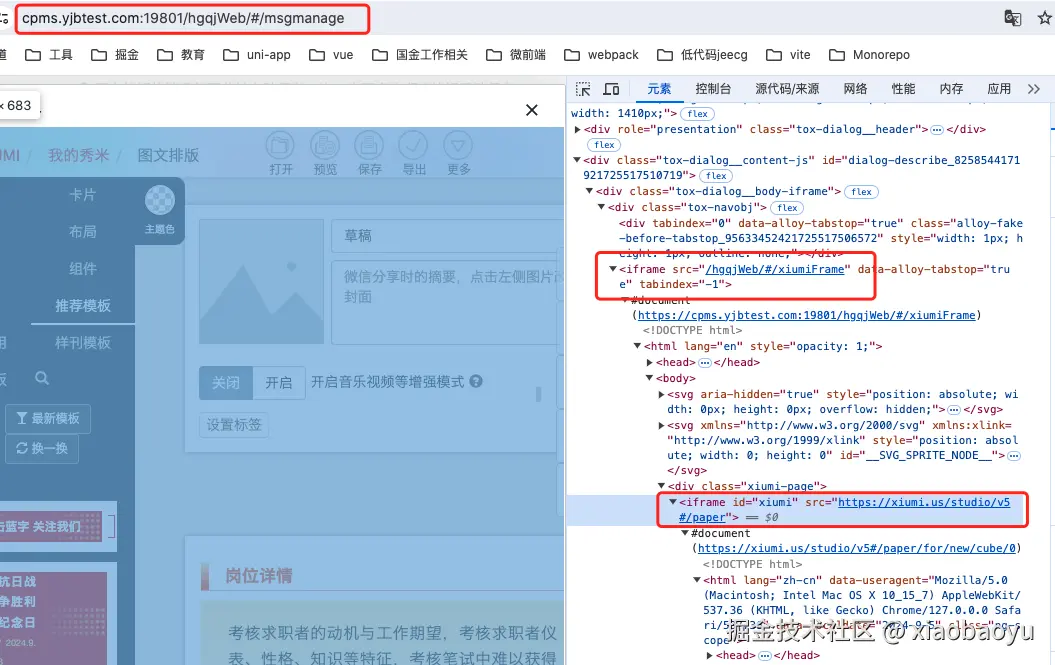
#### 1.iframe是有自己独立的window对象,(document对象,history对象等),通常用于一个系统中需要嵌入另一个系统的页面
2.父窗口中如何获取子窗口iframe的window对象
3.父窗口和子窗口如何互相通信,可以使用postMessage安全的进行跨文档通讯
示例:父向子发送消息
bash
父页面 运行在域名http://127.0.0.1:5501下

<body>
    <div>我是主应用,下面是一些通过iframe嵌套的子应用</div>
    <div>vue3Iframe 我有跨域限制</div>
    <iframe src="http://localhost:8081" frameborder="0" id="vue3Iframe">vue3子应用</iframe>

    <div>vue2Iframe</div>
    <iframe src="http://localhost:8080" frameborder="0" id="vue2Iframe">vue2子应用</iframe>

<script>
    // 1.父窗口中如何获取子窗口iframe的window对象
    const vue3Iframe = document.getElementById('vue3Iframe')
    const vue3IframeWindow = vue3Iframe.contentWindow

    console.log('vue3Iframe',vue3Iframe)
    console.log('vue3IframeWindow',vue3IframeWindow)

    // 2.父窗口和子窗口如何互相通信
    `消息的接收方调用postMessage发送消息,参数1:发送的数据,参数2:接收方的地址(协议,域名,端口号)`

   //3.父向子发送消息
    //父页面代码
      const onLoad = ()=>{
        const iframe  = document.getElementById("receiver");
             iframe.contentWindow.postMessage(decodeURIComponent(window.location.origin),'http://localhost:8081')

    }
    window.addEventListener('load',onLoad,false)

    //子页面代码
    function getMessage(event) {
  console.log("event.origin---", event.origin); //发送消息的源 //http://127.0.0.1:5501
  if (event.origin !== "http://127.0.0.1:5501") return; //判断如果不是受信任的源则return
  console.log("收到消息---", event.data);
  mainAppHost.value = event.data;
}
onMounted(() => {
  window.addEventListener("message", getMessage, false);
});
</script>

</body>
示例:子向父发送消
bash
      //子应用
      const handlClick =  (event, path) => {
      //注意:需要使用window.parent才会生效,如果用window不生效
      // wrong
      // window.postMessage({ message: "hello from iframe" }, "*");

      //right
      // parent属性返回当前窗口的父窗口。
      window.parent.postMessage(
        { key: "vue3-demo", query: decodeURIComponent(path) },
        "http://127.0.0.1:8081/"
      );

      // 父应用监听
       const onLoad = ()=>{
        const handleEvent =  (event)=> {
            console.log('Received message in parent:', event.data,location.href);
            const newHref = `${location.href}?${event.data.key}=${event.data.query}`
            window.history.pushState(null,null,newHref)
        }
        window.addEventListener('message',  handleEvent);

    }
    window.addEventListener('load',onLoad,false)

};
4. postMessage 发送数据
- 语法:
消息的接收方调用postMessage方法
ini
otherWindow.postMessage(message, targetOrigin, [transfer]);otherWindow :消息接收方的窗口
 补充 window.parent 可以用于子文档向父级文档发送消息
message :json字符串数据

targetOrigin : 消息接收方的地址,表示你要向哪个窗口发送消息,是接收消息窗口的域名
通过窗口的 origin 属性来指定哪些窗口能接收到消息事件,其值可以是字符串"*"(表示无限制)或者一个 URI
5.message事件监听数据
示例:
js
window.addEventListener("message", receiveMessage, false);

function receiveMessage(event) {
  // For Chrome, the origin property is in the event.originalEvent
  // object.
  // 这里不准确,chrome 没有这个属性
  // var origin = event.origin || event.originalEvent.origin;
  var origin = event.origin;
  if (origin !== "http://example.org:8080") return;

  // ...
}
message的事件对象包含的属性有:
source: 对发送消息的窗口对象的引用; 你可以使用此来在具有不同 origin 的两个窗口之间建立双向通信。???
origin:事件源,接收的数据的来源 ,是消息发送方的域名,与postMessage中设置的targetOrigin无关
data :接收的数据,是json字符串,如果接收的是对象或数组等,需要JSON.parse()反序列化
6.安全问题
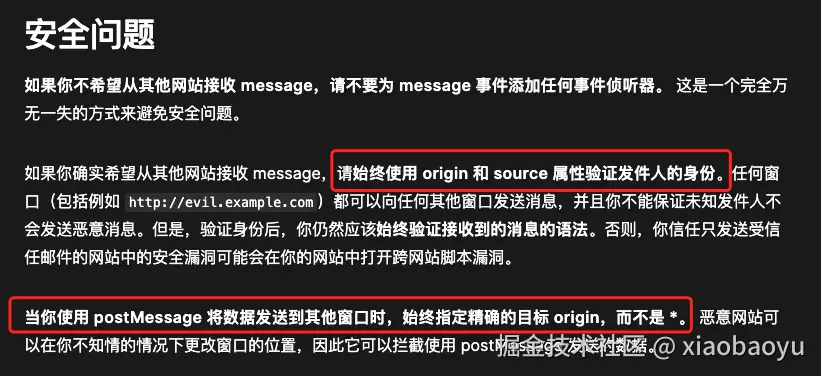
下面看看控制台的log,来更深入理解一下origin和source吧!
子窗口运行在http://localhost:5173, 示例代码
js
const handlClick = async (e, path) => {
 console.log("son--location.origin", window.location.origin); //5173
 window.parent.postMessage(
   { key: "vue3-demo", query: decodeURIComponent(path) },
   "http://127.0.0.1:5500/"
 );
};
父窗口 运行在http://127.0.0.1:5500/test/1.parent.html
示例代码
js
<body>
   <div>我是parent Document</div>
   <iframe src="http://localhost:5173/" frameborder="0" id="sonIframe"></iframe>

   <script>
       window.addEventListener('load',(event)=>{
           window.addEventListener('message',function(event){
               console.log('far---location.origin:',window.location.origin) // http://127.0.0.1:5500
               console.log('event.source:',event.source)  //消息发送窗口 ,是一个子窗口
               console.log('window:',window) //当前文档的window对象,是一个父窗口
               console.log('event.source === window:',event.source === window)
               console.log('event.origin:',event.origin)  // 指的是实际发送消息的窗口域名 与targetOrigin无关
               console.log('event.data:',event.data)
           })
       })
   </script>
</body>
看控制台
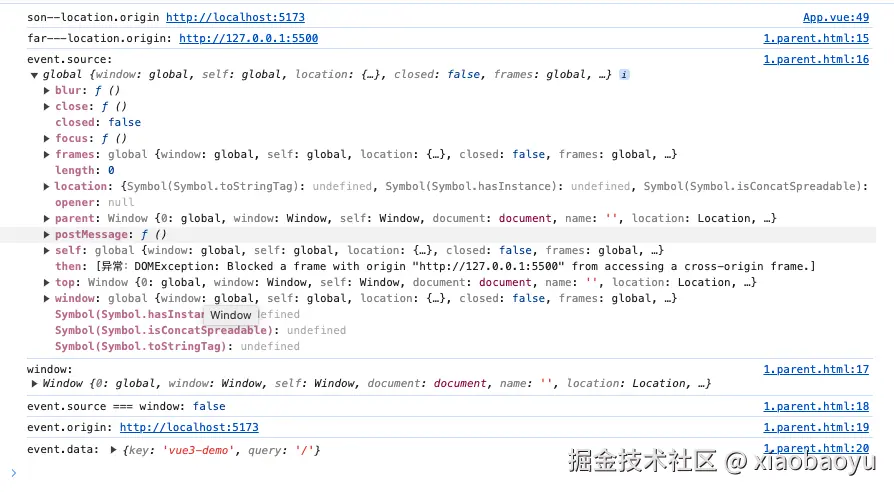
思考 :其中event.source和window有什么不一样呢?
看看vue2项目接入秀米插件的案例吧 运行在http://127.0.0.1:8080/#/xiumiFrame
js
<template>
 <div class="xiumi-page">
   <iframe id="xiumi" src="https://xiumi.us/studio/v5#/paper"> </iframe>
 </div>
</template>

mounted() {
   const xiumi = document.getElementById("xiumi");
   const xiumi_url = "https://xiumi.us";
   console.log("xiumi_url is %o", xiumi_url);
   xiumi.onload = function() {
     console.log("postMessage to %o", xiumi_url);
     // "XIUMI:3rdEditor:Connect" 是特定标识符,不能修改,大小写敏感
     //父向子发送消息
     xiumi.contentWindow.postMessage("XIUMI:3rdEditor:Connect", xiumi_url);
   };

   window.addEventListener(
     "message",
      event => {
       console.log(
         "Received message from xiumi, origin: %o %o",
         event.origin,
         xiumi_url
       );
       // 监听从秀米文档发送过来的消息,origin指定为
       if (event.origin === xiumi_url) {
         if (window.parent && window.parent.tinyMCEEditorInstance) {
           const dialogInstance = window.parent.dialogInstance;
           const targetOrigin = window.location.origin; //这里因为接收方和发送方在同一个域名下,所以可以这样;如果不同源,则需要设置为具体的域名
           // 把数据传递给接收方-消息发送页面
           window.parent.postMessage(event.data,targetOrigin)
           dialogInstance.close()
         }
       }
     },
     false
   );
},运行在http://127.0.0.1:8080/#/msgmanage下
js
methods:{
  handleMsgFromXiumiDialog(event){
     if (window == event.source) {
         //(vue项目)页面初始化的时候会被浏览器触发一次message,在这里根据发送方地址进行过滤
         return
     }
     if (event.origin != window.location.origin) {
       // 过滤指定地址的信息
       return;
     }
     this.handleOriginData(event.data).then(res=>{
       // 使用 TinyMCE API 插入修改后的内容
       this.insertEditorContent(res)
       }).catch(error=>{
       console.error('error---',error)
     })
   },
}
mounted () {
   window.addEventListener('message', this.handleMsgFromXiumiDialog)
 },
 destroyed () {
   window.removeEventListener('message', this.handleMsgFromXiumiDialog)
 },