让 Windows 文件夹拥有自己的视觉语言:Folder Theme Studio Beta 6
首个一键修改Windows指定目录文件夹图标,并且支持自行设计样式和苹果风格图标的软件
https://github.com/OnstarKevin/Folder-Theme-Studio-For-Windows 下载(记得点个Star哦)
成品展示:
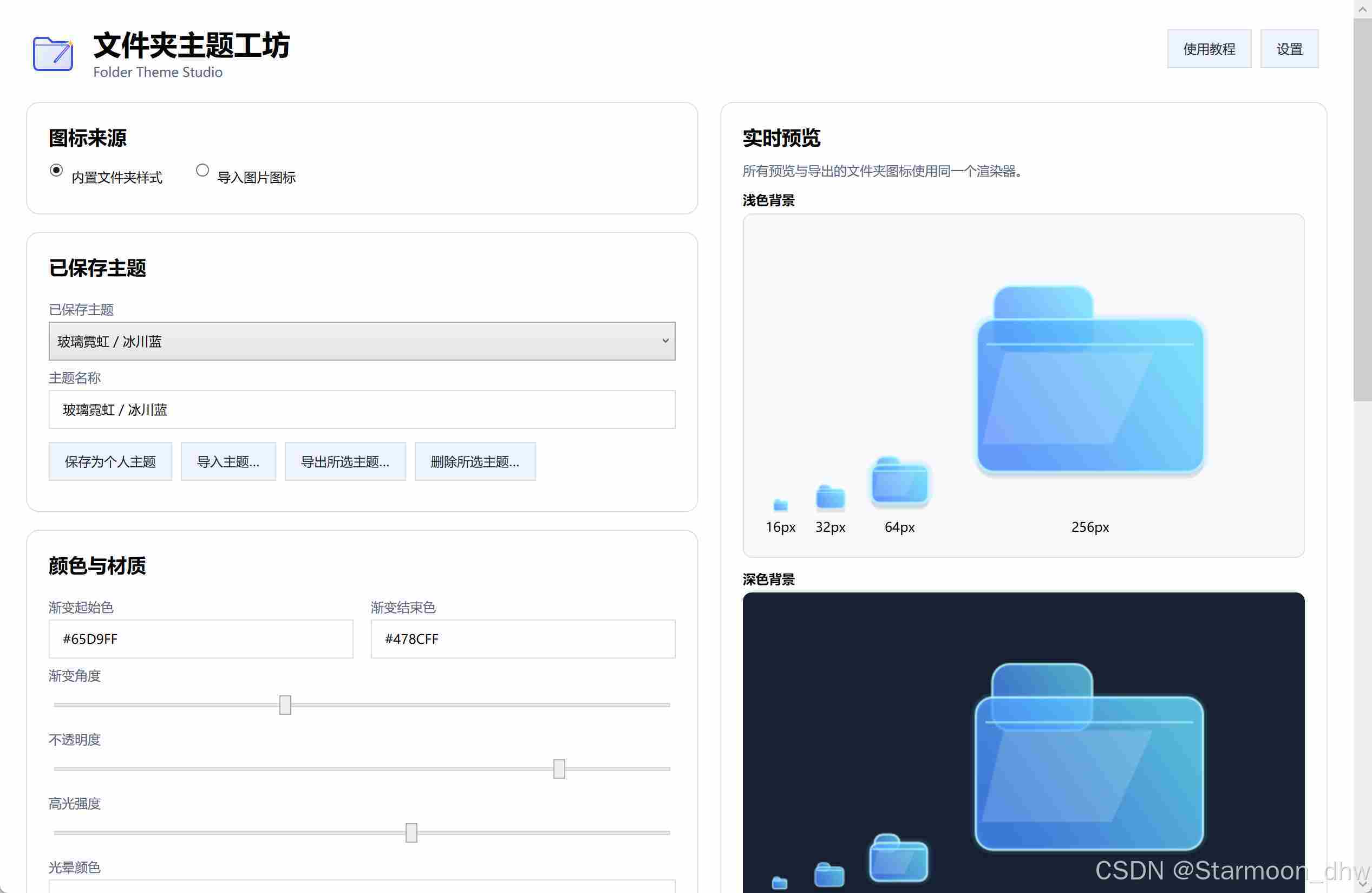
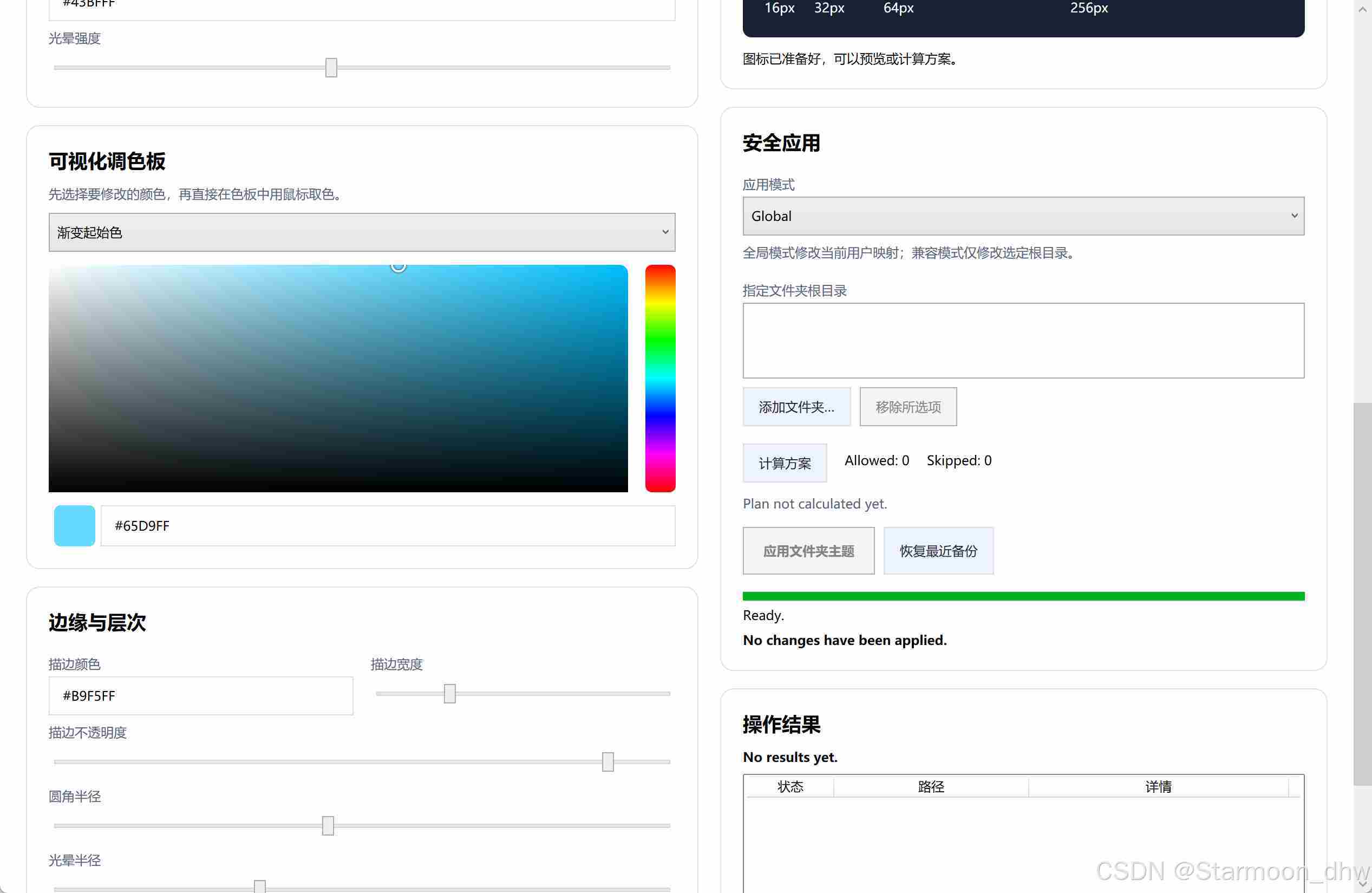
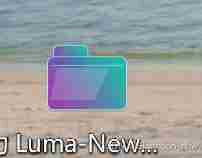
中文版
桌面、项目目录、素材库和归档文件夹越积越多之后,Windows 默认文件夹图标很快就会变得难以区分。手动逐个制作图标、编辑配置并刷新显示不仅费时,也很难保证所有目录长期保持同一种风格。
Folder Theme Studio 正是为这个问题而做的一款开源 Windows 工具。它让用户通过可视化方式设计或导入文件夹图标,在应用之前检查变更方案,并在需要时恢复原有配置。v0.1.0-beta.6 进一步加入递归持久监控、系统托盘和登录 Windows 后后台启动,让文件夹样式不只能够"一次性替换",还可以持续维护。
它会修改什么?
Folder Theme Studio 面向 Windows 10/11 x64,只定制普通文件夹图标。它不会替换文件资源管理器本身,不会修改文件类型图标,也不会把系统特殊文件夹、受保护路径或不可写位置当作普通目录强行处理。
这种边界让它更适合以下场景:
- 为不同项目、客户或工作区建立清晰的视觉分类;
- 统一摄影、设计、视频或开发素材库的文件夹风格;
- 为归档目录、课程资料或个人知识库制作长期一致的图标;
- 在不替换文件资源管理器的情况下改善 Windows 桌面观感。
用眼睛选颜色,而不是猜参数
内置样式编辑器提供真正的二维可视化调色板。用户可以直接选择色相、饱和度和亮度,并分别控制渐变起始色、渐变结束色、描边与发光颜色。16、32、64、256 px 多尺寸预览会同步更新,方便在应用前检查小图标和大图标下的实际效果。
如果不想使用内置文件夹造型,也可以切换到独立的图片图标模式,导入 PNG、JPG、JPEG 或 BMP。软件会保持图片比例、自动居中,并使用透明边距补成适合生成 Windows 图标的画布。图片导入与内置样式编辑相互独立,不会混淆当前选择的图标来源。
先计算,再应用;需要时可以恢复
Folder Theme Studio 不要求用户直接执行不可见的批量修改。完整流程是:
- 选择或设计图标;
- 选择全局模式,或添加明确的兼容模式根目录;
- 计算方案,查看允许、跳过与失败项目;
- 确认后应用;
- 需要撤销时恢复最近备份。
全局模式用于修改当前用户普通文件夹的默认图标映射,不会扫描整个磁盘。兼容模式则限制在用户明确添加的目录中,并跳过已知特殊目录、网络路径、重解析点和不可写位置。
Beta 6 取消了对"已有自定义文件夹"的一刀切跳过。现在再次修改这类文件夹时,软件只合并 Desktop.ini 中与图标有关的字段,保留其他设置、注释、编码和换行格式。应用前还会记录原配置;满足恢复条件时,可以精确还原原始内容和文件属性。
新文件夹也能持续保持同一风格
一次应用并不能解决之后不断新增目录的问题。Beta 6 可以为兼容模式中的指定根目录启用递归持久监控:当其中出现新文件夹时,软件会自动应用已经保存的图标。
关闭主窗口后,程序默认收起到系统托盘继续工作。托盘菜单可以重新打开窗口、暂停或恢复监控,也可以彻底退出。登录 Windows 后自动在后台启动和关闭到托盘都是可选设置,用户可以按自己的工作方式关闭它们。
Beta 6 的重点
- 已有自定义文件夹可以安全地再次修改;
Desktop.ini图标字段采用保留式合并;- 原有配置支持更精确的备份与恢复;
- 指定目录支持递归持久监控;
- 新建文件夹自动继承当前样式;
- 新增系统托盘和监控暂停/恢复入口;
- 支持登录 Windows 后后台启动并恢复监控;
- 保留中英双语界面、可视化调色板和图片图标导入。
安装与项目状态
从项目 Release 获取 FolderThemeStudio-v0.1.0-beta.6-setup.exe 和对应的 .sha256 文件,核对校验值后运行安装器。如果电脑尚未安装 x64 .NET 8 Desktop Runtime,安装器会保持联网并自动下载、安装所需运行时。
当前版本仍是未签名 Beta 构建,Windows 可能显示 SmartScreen 提示。建议首次体验时先创建一次性测试目录,使用兼容模式确认效果,再决定是否扩大应用范围。
Folder Theme Studio 使用 Apache-2.0 许可证开放源代码。欢迎提交能够复现的问题,也欢迎参与界面、文档、兼容性和测试改进。
English version
As desktops, project trees, asset libraries, and archives grow, the default Windows folder icon quickly stops being useful as a visual cue. Creating icons one by one, editing configuration files manually, and refreshing Explorer is time-consuming---and it still does not keep future folders visually consistent.
Folder Theme Studio is an open-source Windows application built around that problem. It provides a visual workflow for designing or importing folder icons, reviewing a change plan before applying it, and restoring previous configuration when necessary. Release v0.1.0-beta.6 adds persistent recursive monitoring, system-tray operation, and background startup after Windows sign-in, turning one-time icon replacement into a style that can be maintained over time.
A deliberately narrow scope
Folder Theme Studio targets Windows 10/11 x64 and customizes ordinary folder icons only. It does not replace File Explorer, alter file-type icons, or force protected system folders and unwritable locations through the ordinary-folder workflow.
That scope makes it useful for people who want to:
- give projects, clients, or workspaces distinct visual identities;
- organize photography, design, video, or development asset libraries;
- maintain consistent icons across archives, course materials, or personal knowledge bases;
- improve the Windows desktop without replacing the file manager itself.
Choose colors visually
The built-in style editor includes a two-dimensional visual color palette. Hue, saturation, and brightness can be selected directly, while gradient start, gradient end, stroke, and glow remain independently adjustable. Live previews at 16, 32, 64, and 256 px make it easier to judge the result at both small and large icon sizes before applying anything.
For a completely different look, the separate image-icon mode imports PNG, JPG, JPEG, or BMP files. The image keeps its aspect ratio, is centered automatically, and receives transparent padding before the Windows icon is generated. Imported images and built-in styles remain distinct sources, so the active choice is always explicit.
Plan first, apply second, restore when needed
The application does not hide a bulk modification behind a single unexplained action. Its workflow is intentionally reviewable:
- Choose or design an icon.
- Select Global mode or add explicit Compatible-mode roots.
- Calculate a plan and review allowed, skipped, and failed items.
- Confirm and apply.
- Restore the latest backup when an undo is needed.
Global mode updates the current user's ordinary-folder icon mapping without scanning the whole drive. Compatible mode stays inside directories the user explicitly selected and skips known special folders, network paths, reparse points, and unwritable locations.
Beta 6 removes the blanket rejection of already-customized folders. When one is restyled, the app merges only the icon-related fields in Desktop.ini, retaining unrelated settings, comments, encoding, and line endings. It also captures the previous configuration before applying and can restore the original bytes and file attributes when the recovery conditions are met.
Keep future folders consistent
A one-time application does not cover folders created next week. Beta 6 can persist a rule for selected Compatible-mode roots and watch them recursively. When a new folder appears below one of those roots, the saved icon is applied automatically.
Closing the main window minimizes the application to the system tray by default so monitoring can continue. The tray menu can reopen the window, pause or resume monitoring, or exit completely. Both background startup after Windows sign-in and close-to-tray behavior are optional Settings choices.
Beta 6 highlights
- Safely restyle folders that already have custom configuration.
- Merge only icon fields while preserving unrelated
Desktop.inicontent. - Capture and restore pre-existing configuration more precisely.
- Persist recursive monitoring for selected directory roots.
- Apply the chosen style automatically to newly created folders.
- Control monitoring from the Windows system tray.
- Start in the background and resume monitoring after Windows sign-in.
- Retain the bilingual interface, visual palette, and image-icon import workflow.
Installation and project status
Download FolderThemeStudio-v0.1.0-beta.6-setup.exe and its matching .sha256 file from the project Release, verify the checksum, and run the installer. If the x64 .NET 8 Desktop Runtime is missing, the installer stays online to download and install that prerequisite automatically.
This release is still an unsigned Beta build, so Windows may display a SmartScreen warning. For a first evaluation, create a disposable test directory, use Compatible mode, and verify the result before applying the style more broadly.
Folder Theme Studio is open source under the Apache-2.0 license. Reproducible bug reports are welcome, as are contributions to the interface, documentation, compatibility work, and test coverage.